


 TL;DR:
Wondershare Filmora is the optimal cross-platform app for adding custom watermarks to photos and videos utilizing an AI background remover, though exporting on the free version automatically applies an unremovable Filmora watermark.
● For batch processing, eZy Watermark handles up to 5 images simultaneously on iOS 13.0+ and Android 7.0+, while PhotoMarks provides pixel-perfect positioning for iOS 12.0+ but restricts software updates to 12 months post-purchase.
● iOS users requiring AI object removal and advanced typography should select Watermark Maker: Add Signature, whereas My Watermarks is strictly for converting scanned handwriting into transparent PNG logos for free on iOS 8.0+.
● Budget buyers should note operational risks on the $1.99 apps A+ Signature and iWatermark; A+ Signature risks compatibility issues having lacked updates since 2018, and iWatermark presents an outdated UI with user-reported lag on version 6.8.6.
Ask AI for a summary
 ChatGPT
 Perplexity
 Gemini
 Claude
 Grok
Grok
Sharing photos on social media networks comes with a certain amount of risk because there is almost nothing that stops other people from taking your photos and using them as their own. This can be a little disappointing, especially when the huge amount of hard work that went into the production of the professional-looking photos is taken into account.

Until social media networks come up with a better solution for protecting their users from copyright infringements, adding watermarks to your photos remains the most reliable way of making sure that nobody is going to steal your property. In this article, we are going to take you through some of the best watermark apps for iPhone and Android.
How We Test
- We focused on tools that don't require complicated login/setup processes.
- Each tool was tested for the time it takes to add watermarks or logos to photos and videos.
- We also examined the other capabilities of the watermarking app, including editing suites.
- Finally, their pricing was also considered – many of the options here are either free or offer free trials.
Our Top 3 Picks for Watermark Apps
Quick Comparison for Best Watermark Apps
| Name | Supported OS | Price | Ratings |
| Wondershare Filmora | Android and iOS | Free version/US$9.99 for Pro with 3-day free trial | 4.7/5 (App Store) / 4.3/5 (Play Store) |
| Watermark Photos & Videos | Android | US$7.99 per month (with 3-day free trial) US$39.99 annual payment (with 3-day free trial) |
5.0/5 (App Store) / 4.3/5 (Play Store) |
| Watermark: Watermark Maker X | iOS | US$0.99 monthly subscription US$59.99 unlock all features |
4.4/5 (App Store) |
| Watermark Maker: Add Signature | iOS | US$5.99 per week (3-day free trial) US$9.99 per month (3-day free trial) US$39.99 per year (3-day free trial) |
4.6/5 (App Store) |
| PhotoMarks | iOS | Free (with ads) | 4.7/5 (App Store) |
| Watermark | iOS | Free | 4.7/5 (App Store) |
| eZy Watermark | iOS and Android | Free (with Ads) | 4.8/5 (App Store) / 4.6/5 (Play Store) |
| iWatermark | iOS and Android | US$1.99 | 4.3/5 (App Store) / 4.5/5 (Play Store) |
| A+ Signature | iOS | US$1.99 | 4.9/5 (App Store) |
| My Watermarks | iOS | Free | 4.5/5 (App Store) |
|
Show more
Show less
|
|||
 Secure Download
Top 10 Best Watermark Apps for iPhone/Android
Without further ado, let's take a look at the various photo watermarking apps. In comparison to the table above, this section offers a more detailed examination of each of the tools. Meaning, we'll be seeing their overviews, key features, the pros, the cons, pricing, and other relevant information.
Some will be watermarking apps for iPhone, and some will be for Android. Please refer to the table in the previous section to jump directly to apps relevant to your device.
1. Wondershare Filmora
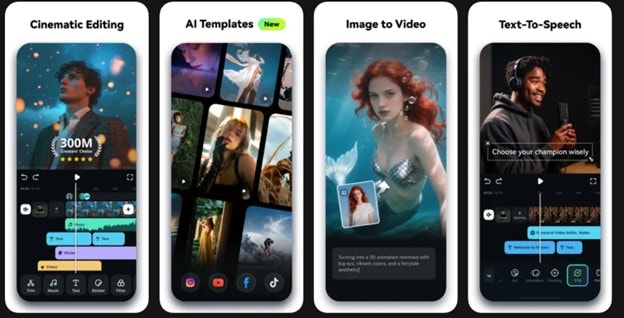
First on the list is Wondershare Filmora's mobile app. It's more than a simple watermarking app. Unlike the others on this list, it combines video editing with advanced watermarking features. Use preset designs or upload your own. You can edit videos or photos and apply a watermark while taking advantage of Filmora's full suite of editing tools.
- AI background remover that you can use on watermark/logo source images
- 6 fully customizable and creative watermark templates
- Picture-in-Picture mode to add video watermarks
- Upload-your-own watermark or logo source image
- Not limited to watermark editing, allows you to edit photos/videos further to improve appearance of watermark atop a video/image
- Cross-platform access for Premium subscription
- Allows you to change the size, orientation, and opacity of watermark
- Free version leaves a "Filmora" watermark on exported photos and videos
- Free version (with watermarks on Export)
- 3-day free trial on the Pro and Premium versions
- Pro (platform-only): US$9.99 per month
- Premium (cross-platform): US$34.99 per year
iOS 13.0 or later/Android 7.0 and up
4.7/5 (App Store) / 4.3/5 (Play Store)
Secure Download2. Watermark Photos & Videos
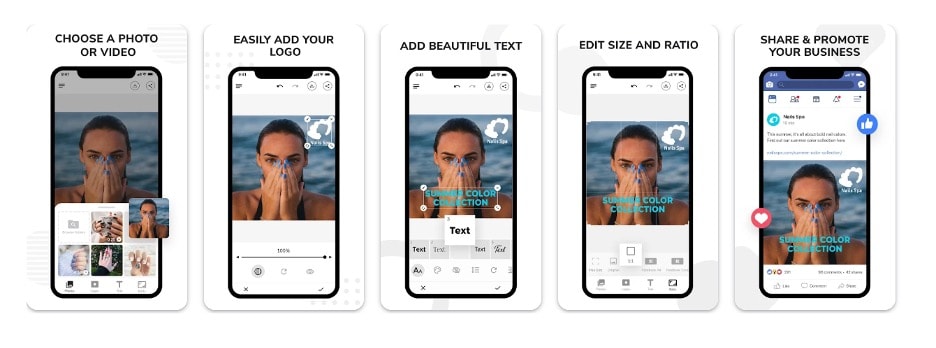
Second on our list is a watermark app for Android. A standout feature on this app is the availability of template sizes for your watermarks, including 1:1, 3:4, 4:3, 9:16, and more. It even has a direct option to resize photos and videos to social media standards, such as Facebook.
- Free fonts in different styles such as handwriting, fancy, stylish, and more
- Resize and crop photos in standard formats (1:1; 16:9, etc.)
- Direct share to Facebook, Instagram, etc.
- Straight-to-the-point watermarking app, no fuss
- Beautiful selection of fonts for watermark creation
- Credits are still required even after the subscription for exports, according to reviews
- US$7.99 per month (with 3-day free trial)
- US$39.99 annual payment (with 3-day free trial)
iOS 16.0 or later / Android 7.0 and up
5.0/5 (App Store) / 4.3/5 (Play Store)
3. Watermark: Watermark Maker X
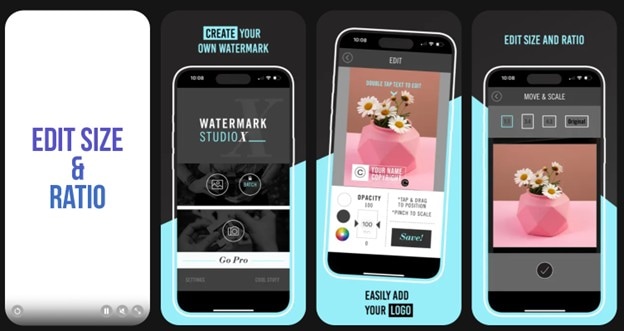
Using this app is straightforward, as it offers a fast and simple way to add watermarks to your photos. Watermark X provides a vast collection of professionally designed template watermarks that can be customized to meet your specific needs.
Each user can insert their own information and adjust the position, size, opacity, and color of the watermark on the photo. The database of watermark templates is constantly updated, so the app also enables iPhone photographers to change the watermark they are using as often as they want.
- 18 pre-designed watermark templates
- Customization tools (text, color, opacity, size, etc.)
- Active development team that provides you with new templates
- Supports batch watermarking and logo creation
- Provides ways to add discreet watermarks
- Some reviewers report crashing
- 1-week free trial only
- 1-week free trial
- US$0.99 monthly subscription
- US$59.99 unlock all features
iOS 15.0 or later
4.4/5 (App Store)
4. Watermark Maker: Add Signature
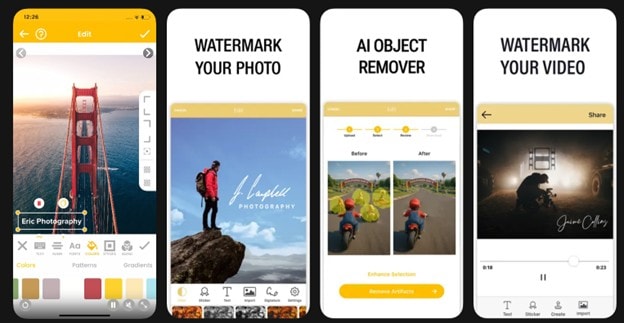
This iPhone photo watermark app is the second one on our list with AI support (aside from Filmora). Watermark Maker: Add Signature features an AI Object Remover and text cleaner, helping you create beautiful logos or watermarks. The AI integration in this app makes it a top pick if you're looking for a reliable watermark app for iPhone.
- AI tools, such as the AI object and text removal tool
- Focus on typography and text tools with 5,000 fonts
- Elements library with different clip arts, colors, fonts, images, and more
- Direct online album integration (iOS Photos, etc.) for exports
- Weekly subscription format, making it more flexible
- 3-day free trial only
- Users report that buying a subscription does not reflect in real-time, and features are still locked
- US$5.99 per week (3-day free trial)
- US$9.99 per month (3-day free trial)
- US$39.99 per year (3-day free trial)
iOS 15.0 or later
4.6/5 (App Store)
5. PhotoMarks
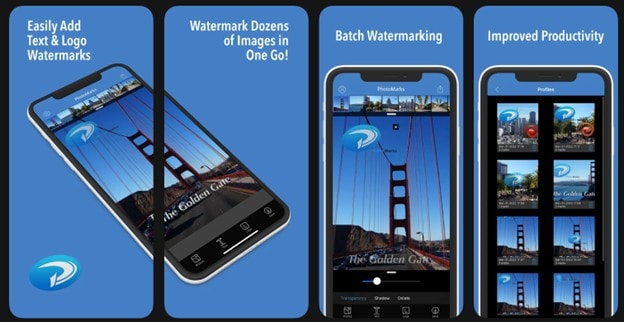
This is one of the best watermark apps for iPhones, simply because it enables users to easily annotate each photo and export the image without compromising picture quality. Its branding is to provide a watermarking app for iPhone that is not complicated to use.
The most fun part is that you can use multiple logos and layers of text, which means that you can have complete creative control over each element you add to your photo.
- Batch processing/adding of watermarks to multiple images with "zone" features
- Text watermarks with pixel-perfect positioning and rotation options
- Supports 50 image formats
- Integrates directly with email sending
- Faster workflow with smart resizing filters
- Settings profile for easier access to different kinds of work
- A purchase only provides 12 months of updates
- Advertisements in-app
- Free for the mobile app (with ads)
- US$29.95 (one-time purchase) for macOS/PC for 12 months of updates
iOS 12.0 or later/Windows/macOS
4.7/5 (App Store)
6. Watermark
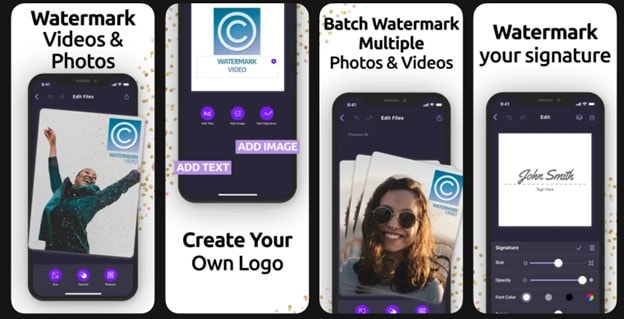
The process of adding a watermark to a photo with this app is so simple that you don't really have to know how to add watermarks to photos. The app lets you select the font you want to use, and you can drag the text box to the desired location in the image.
It's a simple tool with the simple goal of letting you add watermarks and create them. Pretty straightforward!
- Watermarking support for both videos & photos
- Built-in logo maker with typography tools
- Supports creation of your own watermark and templates catalog/library
- High rating in App Store; trusted tool
- The developer made the Pro features free
- Uses an outdated UI design language
Free
iOS 16.0 or later
4.7/5 (App Store)
7. eZy Watermark Photos Lite
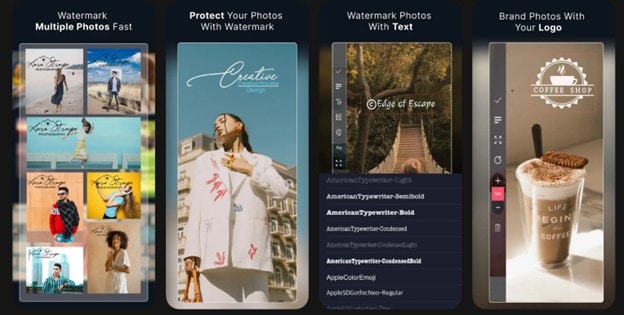
This app has over 500 thousand downloads as a watermark app for Android, according to the Play Store, with similar statistics in the App Store. This is because eZy watermark is a highly reliable watermarking tool that you will love.
The app offers a collection of 150 fonts, while it also enables its users to adjust pen thickness on autographs they add to their photos. The eZy Watermark app lets you import pictures from the camera roll, Facebook, or Instagram, while its exporting options are no less impressive.
- Supports up to 5 images in batch processing of watermarks
- Control opacity, rotation, size, position, and alignment
- Social media export to Instagram, Pinterest, Facebook, Twitter, LinkedIn, and WhatsApp
- Supports multiple languages (English, Chinese, Dutch, French, German, Italian, Japanese, Korean, Portuguese, Spanish)
- Beautiful UI design language
- Supports up to 1920px
- In-app advertisements for the free version
- Free (with advertisements)
- US$5 (remove advertisements)
iOS 13 or later/Android 7.0 and up
4.8/5 (App Store) / 4.6/5 (Play Store)
8. iWatermark – Watermark Photos
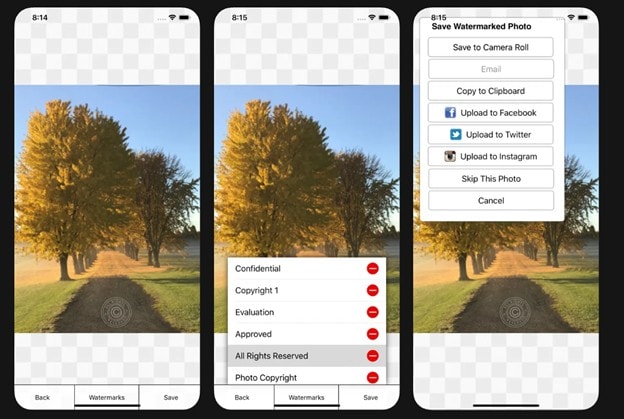
Businesses and professionals in need of an app that lets them protect their photos in a variety of ways are going to enjoy using this app. iWatermark lets its users add graphics, signatures, text, and even QR watermarks to their photos, which makes it one of the most versatile watermark apps for iPhones and Androids.
- Over 160 fonts available for watermark creation
- Provides you with commonly-used phrases or disclaimers for watermark creation
- Direct upload to social media apps like Facebook and Instagram
- Cheap pricing, accessible to everyone
- Supports taking a photo in-app and editing directly
- Outdated UI and app design
- Users report lagging on a certain version (6.8.6)
US$1.99
iOS 12.0 or later / Android 4.0 and up
4.3/5 (App Store) / 4.5/5 (Play Store)
9. A+ Signature

The A+ Signature app is a tool that has stood the test of time, despite being last updated in 2018. It's still a reliable choice for people who are just looking for a way to add watermarks and signatures to a photo without all the complicated processes present in most modern apps.
Adjusting size or adding shadows to drawings and texts is easy, and the app also lets you rotate the watermarks you add to your pictures. Pasting drawings and text to other iOS apps is also possible.
- Built-in meme library that you can directly add to photos in addition to watermarks
- Supports the creation of photocards
- 115 fonts and 280+ font variations for text editing
- Can create a catalog of watermarks/signatures
- Supports opacity, color, shadow, font, and other editing of images
- Last updated in 2018
- Due to a long time not being updated, there might be compatibility issues with new devices
US$1.99
iOS 9.3 or later
4.9/5 (App Store)
10. My Watermarks
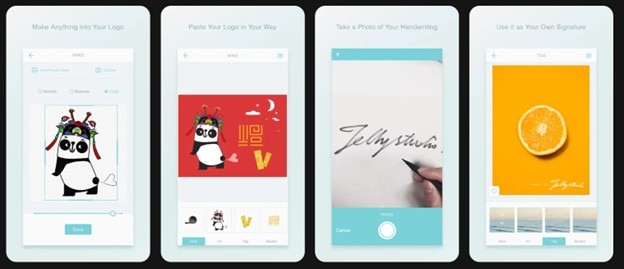
Lastly, this option is straightforward. Although it only works as an iPhone watermark tool, it can easily create watermarks. This tool allows you to create your own watermark or signature using your own photos or the stock elements it provides. Then, you can immediately add to your photo without hassle.
- Turn any picture into a logo (so long as it has a transparent background)
- Transforms scanned handwriting or signature into a watermark
- Adjust, scale, add filters, and add images/photos to existing photos
- Totally free
- Logo and watermark library
- Limits support for photos to PNG/transparent backgrounds
- No built-in background remover
Free
iOS 8.0 or later
4.5/5 (App Store)
How To Add a Watermark/Logo to Photos/Videos Easily With Filmora
Main benefits of adding a watermark to a video in Filmora:
- You can use the built-in plain text templates to create a watermark easily;
- You can choose from various blending modes to composite the watermark and video more effectively.
- You can place watermarks anywhere in the video
For more details about editing iPhone videos on Filmora, please read How to Edit iPhone Videos
To give you a brief idea of how this tool works as a free watermark app for iPhones and Android, follow the steps below:
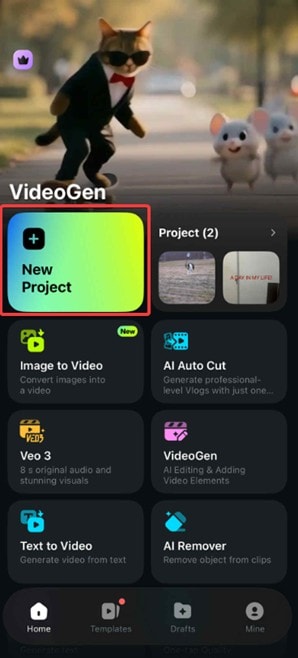
Step 1: Create a New Project and Import the video/photo that you want to watermark.
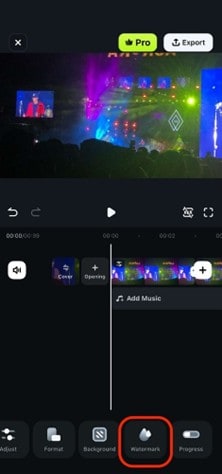
Step 2: Access the Watermark menu from the bottom toolbar.
Step 3: Select a preset watermark template or upload your own using the 'Customize' option.
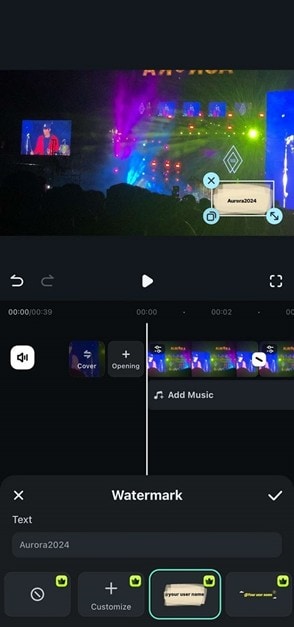
With those three easy steps, you should have successfully added a watermark to your photo or video. Check out Filmora today to enjoy more powerful editing tools beyond watermarking.
Secure DownloadConclusion
With the list provided above, it's time to make your choice for the watermark app you'll use to protect your media and art online. These days, it's crucial to have a reliable watermarking app because online, it's easy to download and infringe on the original work of others.
If you're looking for a tool you want to use for both video and photo editing, as well as a watermarking app, then Filmora might be your best bet. It's a complete suite built to serve professionals like you.
