
- Various AI editing tools to increase your video creation efficiency.
- Offer popular templates and royalty-free creative resources.
- Cross-platform functionality for editing everywhere.

 100% Security Verified | No Subscription Required | No Malware
Top 9 Best Terraria Map Viewers for PC & Mobile (Find All Treasures & World Secrets)

Jul 28, 2026• Proven solutions
 TL;DR:
Terraria map viewers instantly reveal hidden resources, traps, and biomes, drastically reducing exploration time by allowing players to filter and pinpoint exact block locations across desktop and mobile platforms.
● PC players needing full world modifications should choose TEdit, while those wanting to track current progress without full map spoilers can utilize TerraMap's Fog-of-War mode, keeping in mind it requires significant PC memory to operate.
● For mobile and console users, TManager provides complete world analysis and save backups for iOS and Android, whereas the Terraria World Map Android app functions specifically as a live, second-screen navigation companion for Xbox One and PS4.
● The desktop tool MoreTerra should be avoided as it is no longer updated for recent Terraria versions; instead, players can use Terrafirma for offline analysis with full textures or TerraMap Online for a no-download, browser-based alternative.
Ask AI for a summary
 ChatGPT
 Perplexity
 Gemini
 Claude
 Grok
Grok
Terraria is an adventure game where players must survive in a perilous world. The vast Terraria landscape is yours to explore, allowing you to uncover treasures, gather resources, collect weapons, and build your own kingdom. These unique features make Terraria a globally popular game.
However, navigating Terraria's expansive world can be challenging and time-consuming. Terraria Map Viewers, available online, offer features to help you easily locate and acquire valuable resources, streamlining your gameplay experience.
In this article, we are going to list the Best Terraria Map Viewers for Desktop and Mobile that will help you find what you're looking for in Terraria. Additionally, we will teach you how to edit your Terraria gameplay videos with the video editor, Filmora.
- Part 1. Top 5 Best Terraria Map Viewers for PC
- Part 2. Top 4 Best Terraria Map Viewers for Mobile
- Part 3. How to Use Terraria Map Viewer
- Part 4. How to Edit Your Terraria Gameplay Videos with Filmora Desktop
- Part 5. Filmora Mobile: Edit & Share Your Terraria Map Viewer
- Conclusion and FAQs

Best YouTube Video Editor for PC - Filmora
- Cut, Trim, Split and Deatch audio from YouTube videos
- Edit Videos with AI tools,key frame, motion track, green screen ect.
- Built-in plentiful YouTube templates and effects
- Export to MP4, MOV, MKV, GIF and multiple formats
 Secure Download

Part 1: Top 5 Best Terraria Map Viewers for PC
1. TEdit
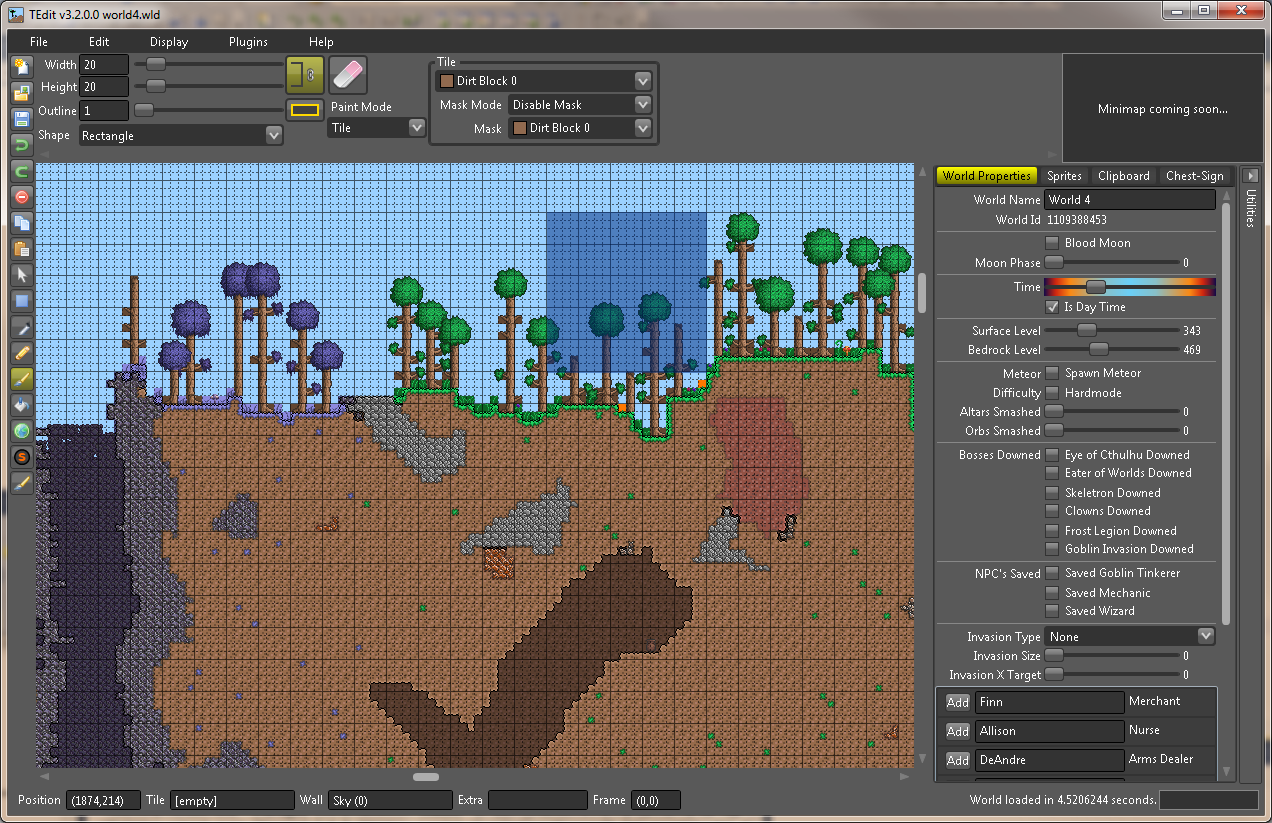
TEdit is the most powerful tool that comes with several amazing features and options to help you achieve everything in the game. It enables users to view the entire world of Terraria without any fog or hindrance which will help you look at each and everything including, resources, traps, and treasures. It allows you to see everything and edit and change everything in the game from world type to the bosses you have defeated.
Features
- View everything such as traps, resources, and treasures.
- Edit or change the world the way you want.
2. MoreTerra (No longer updated, may not support the latest version of Terraria. )
MoreTerra provides its users with the ability to load the world and generate pictures of the clear map with secret locations marked to help you get an overview of the map for analysis. It is a simple Terraria Map Viewer which provides a detailed output image of the world with everything clearly visible. It helps the user find the chest, their location, and the content they contain. Its feature of marking the important points containing resources, treasures, or other valuable material needs to survive and build your own world.

Features
- Simple and Easy to Use Terraria Map Viewer
- Provides an overview of the entire world
- Generate images with important location
- Mark important points
3. Terrafirma
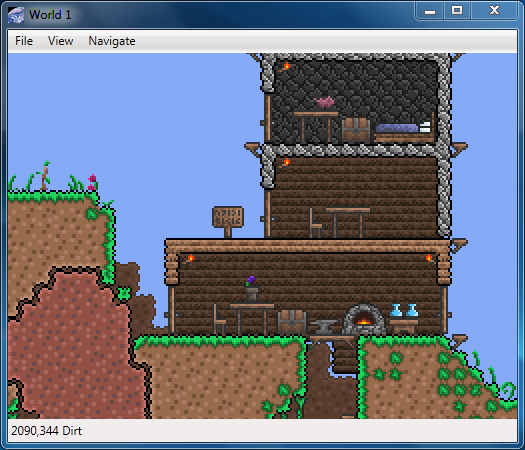
Analyze the world by zooming in and finding useful materials with full graphics and clearance. Terrafirma enables you to import an entire world into it and analyze each and everything with full texture and Light to find resources, objects, traps, and much more. It has a feature to filter the resources according to your need. You can filter anything you want to find on the map and get the exact location of that. It not only allows you to find the location of elements but you can inspect the item by right-clicking on them. Apart from that, it also allows you to directly jump to spawn, chests, NPC houses, and more locations that contain valuable and important items. This Terraria Map Viewer has a really simple user interface and is easy to use.
Features
- Import the world find everything in it.
- Explore and analyze the world clearly with high-quality graphics
- Simple User Interface
- Very easy to use
- Jump directly to NPC houses, chests, and spawn.
4. TerraMap
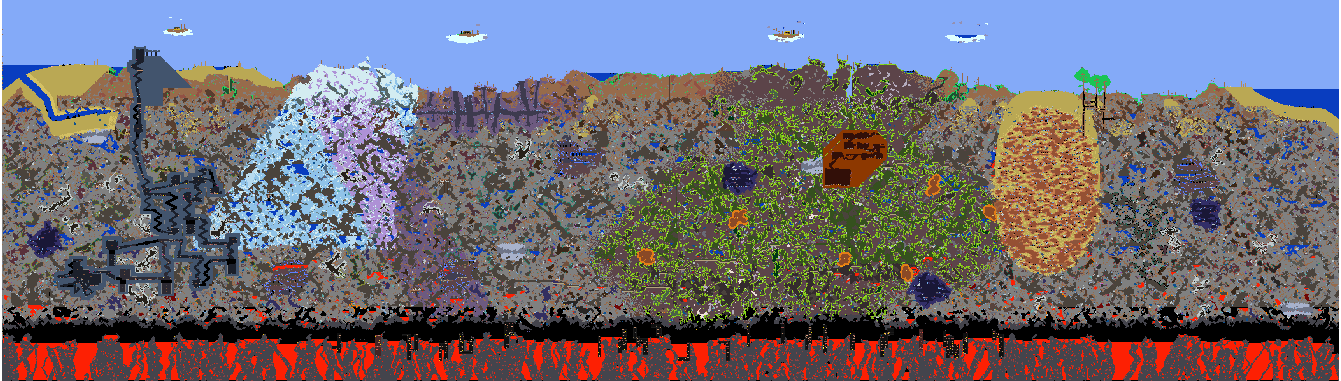
This Terraria Map Viewer is unique and different from all the above viewers. It allows its user to import and view the map in two different modes: With Fog-of-War, which allows users to analyze their progress in the game so far, or with All-Spoilers, which enables the users to view the entire map and everything it contains. Find all kinds of resources such as chests, NPC houses, and other raw materials by select any filtering any specific item, and users can also view all other settings and information that are not allowed to be seen by everyone such as the bosses that they have defeated and more. Importing and Operating such a huge map and exploring items in it can consume a lot of memory of your PC, keep it in mind while exploring the map to avoid any uncertainty.
Features
- Powerful Terraria Map Viewer
- Two Modes to Choose: Fog-of-War & All Spoilers
- Analyze your progress
- Filter and find all the valuable items
5. TerraMap Online
Unlike all other Terraria Map Viewers, TerraMap Online is an online web-based platform that allows its users to import and view the map in their browsers directly. It provides users with an interactive map to find everything they are looking for. With its feature of filter, users can filter everything they are looking for and find the location of their required items highlighted. Find everything including Chests, NPC houses, and dungeons using a simple interface. TerraMap Online also Supports a headless and unattended world map image that highlights everything more clearly.
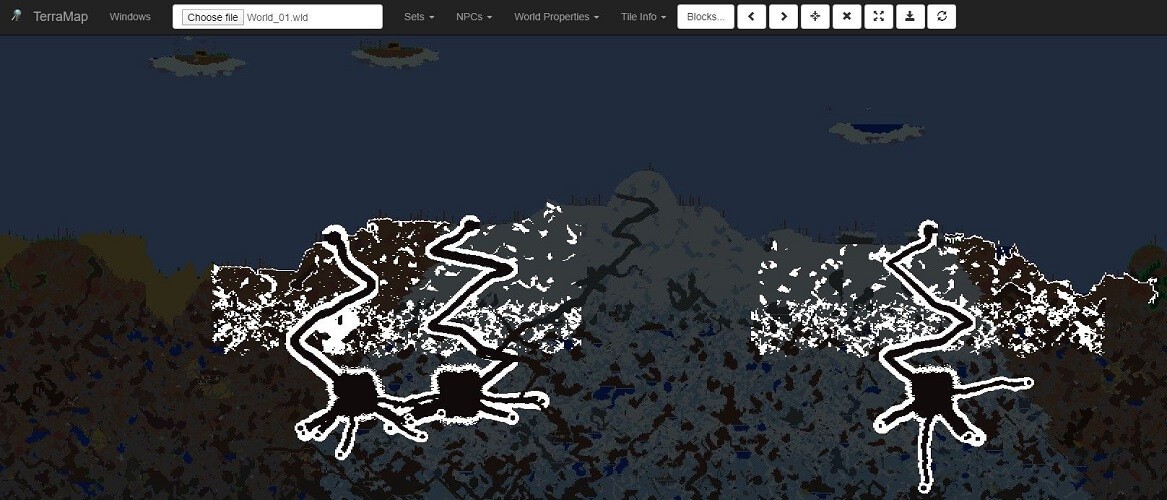
Features
- Web-Based Online Platform
- Interactive Maps
- Filter Chests, NPC houses, and treasures
- Import and explore maps directly into your browser
To help you quickly compare and choose the best tool for your adventure, here's a concise overview of the top Terraria Map Viewers for PC:
| Map Viewer | Platform/Type | Key Features/Highlights | Notes/Best For |
|---|---|---|---|
| TEdit | Desktop | View & Edit Entire World; Uncover Resources, Traps, Treasures | Most powerful for detailed viewing and world modifications. |
| MoreTerra | Desktop | Generates Clear Map Images; Marks Secret Locations & Chests | Simple overview for analysis; *No longer updated.* |
| Terrafirma | Desktop | Detailed World Analysis with Graphics; Filter & Inspect Items | Great for finding specific items and quick navigation to key points. |
| TerraMap | Desktop | Two Viewing Modes (Fog-of-War & All Spoilers); Filter Valuable Items | Powerful for analyzing progress or full world view. |
| TerraMap Online | Online (Web-based) | Interactive Map Directly in Browser; Filter Chests, NPCs, Dungeons | Convenient Terraria online map viewer; no download required. |
Part 2. Top 4 Best Terraria Map Viewers for Mobile
1. TManager
Unlike most other Terraria Map Viewers, TManager is a mobile-based platform designed specifically for iOS and Android devices. It allows users to explore, analyze, and manage their Terraria worlds conveniently on their mobile devices. With TManager, users can easily locate resources, treasures, and specific biomes using its user-friendly interface. Additionally, it provides powerful tools for organizing and backing up saved worlds, making it an all-in-one utility for Terraria enthusiasts.

Features
- Designed for both iOS and Android platforms, making it highly accessible.
- Explore and analyze maps with detailed insights into terrain, treasures, and biomes.
- Quickly find specific items, chests, NPC locations, and more.
- Backup and restore saved worlds easily to avoid losing progress.
- Intuitive design for players of all experience levels.
2. Map Mods for Terraria
This app under discussion helps players discover and install custom worlds and character add-ons with ease. It removes the need for complicated file handling by offering ready-to-use content directly within the app. This allows users to expand gameplay, explore creative maps, and enjoy fresh character variations effortlessly.
Key Features
- Offers character modifications with unique outfits and equipment sets.
- Simple browsing system for quickly finding preferred content.
- Enables fast installation without manual file transfers.
- Provides maps in different sizes and difficulty levels.
- Refreshes content regularly with newly added creations.
3. Mods for Terraria
This app gathers community-created maps, character skins, and add-ons in one convenient place. It lets players download and apply creative content to refresh gameplay. You can also explore custom worlds and personalize their experience with new designs and challenges.
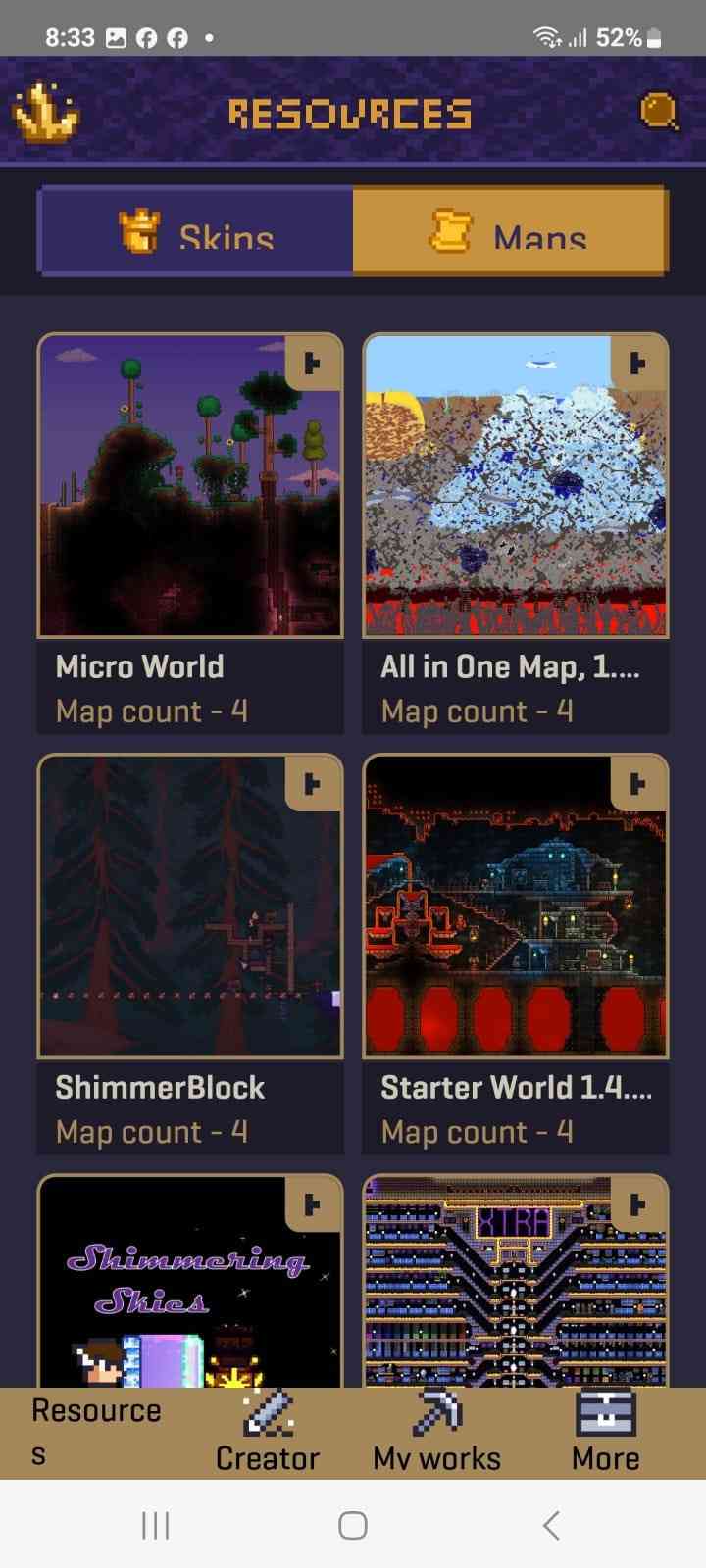
Key Features
- Provides access to a large library of custom maps and add-on content.
- Offers a variety of world styles, including adventure and themed environments.
- Includes a wide selection of character skins for visual customization.
- Categories make browsing maps and mods simple and organized.
- Supports various difficulty options for different play styles.
4. Terraria World Map
Terraria World Map is an application that mirrors your console onto a mobile screen. It helps players navigate environments and monitor positioning. They can also plan safer routes for Xbox One and PS4 users. It also enhances exploration by providing guidance and map control features.
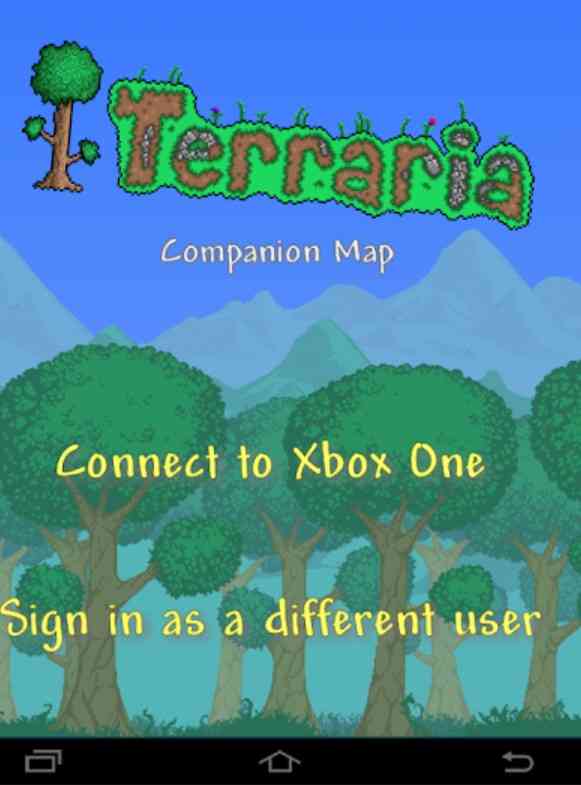
Key Features
- Allows smooth zooming and scrolling for detailed navigation.
- Highlights terrain layouts to support better exploration planning.
- Helps spot risky zones and notable landmarks easily.
- Uses minimal storage and system resources.
- Lets players explore the map without pausing the main game.
Here is a comparison of the best Terraria mobile map viewers and tools:
| App Name | Platform | Key Functions | Best For |
|---|---|---|---|
| TManager | iOS / Android | World analysis, Backup/Restore saves, Item finder | Complete world management and analysis on mobile. |
| Map Mods for Terraria | Android | Character mods, Unique outfits, Custom world installer | Players looking to modify characters and install custom maps easily. |
| Mods for Terraria | Android | Community library of maps & skins, Categorized browsing | Discovering and downloading new community content. |
| Terraria World Map | Android (Companion) | Console mirroring, Live map navigation, Safe route planning | Xbox One and PS4 users needing a second-screen map. |
You may also like:
Top Best Terraria Texture Packs to Enhance Your Game
How to Build a House in Terraria - Complete Guide
How to Get Dryad in Terraria - Unlock Requirements & Guide
Part 3. How to Use Terraria Map Viewer
After exploring the top mobile map viewers, it is important to know how to use them. The following guide shares how the Terraria World Map Viewer can be used:
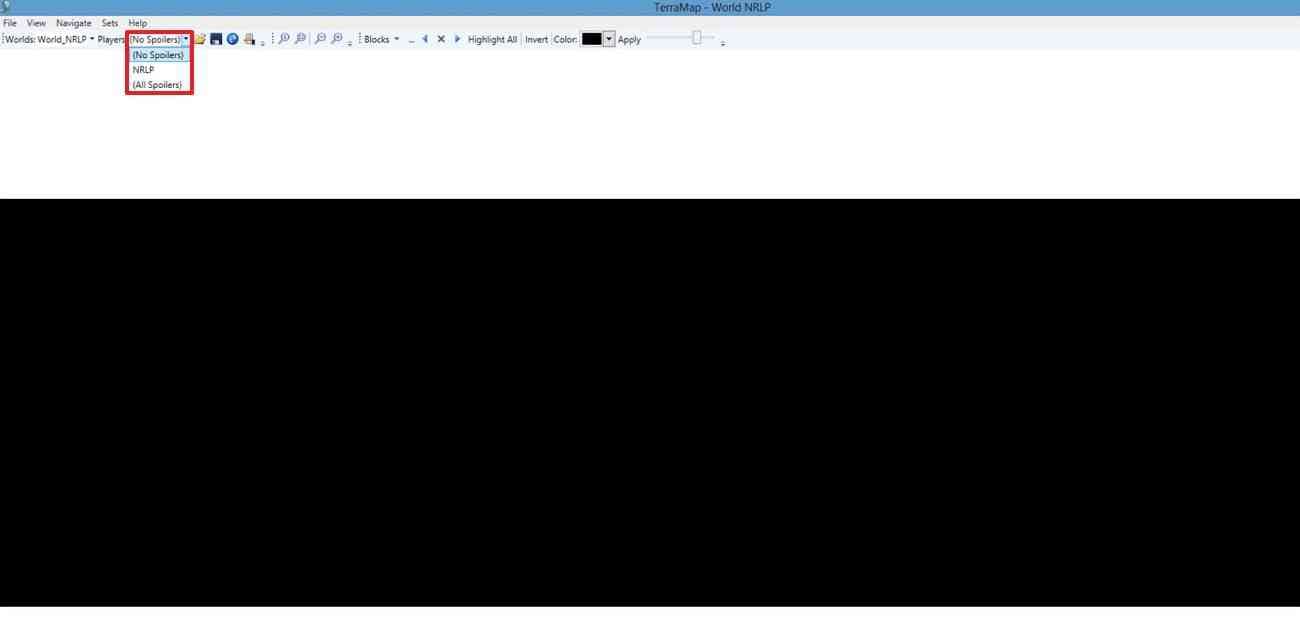
Step 1. Using the TerraMap on the website, select the desired option from the “Players” menu.
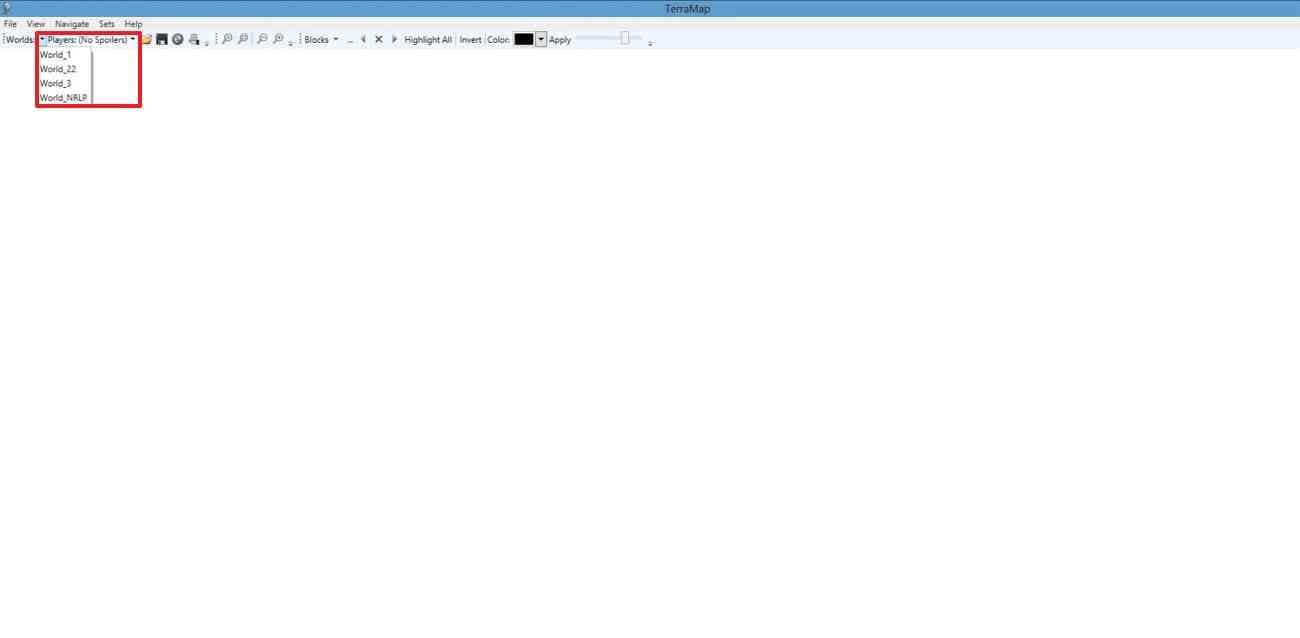
Step 2. Select the mode of map viewing as “No Spoilers” from the relevant menu.
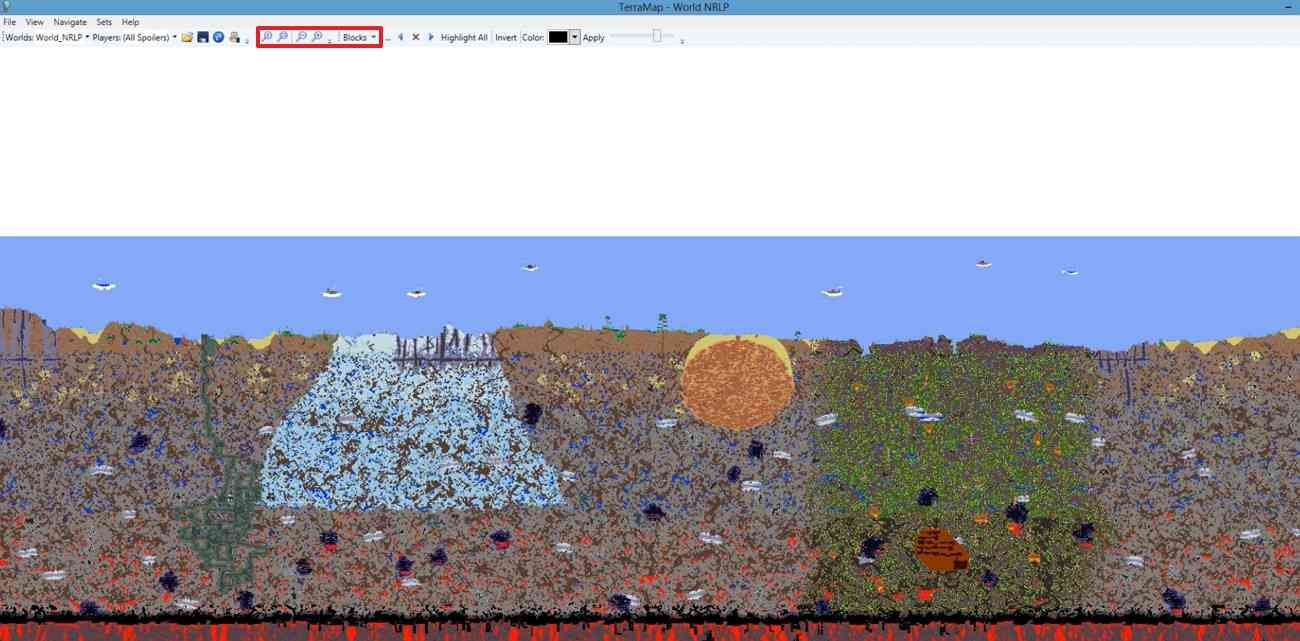
Step 3. Now, zoom out on the map and select “Blocks” from the menu at the top if you need to find specific elements in the game.
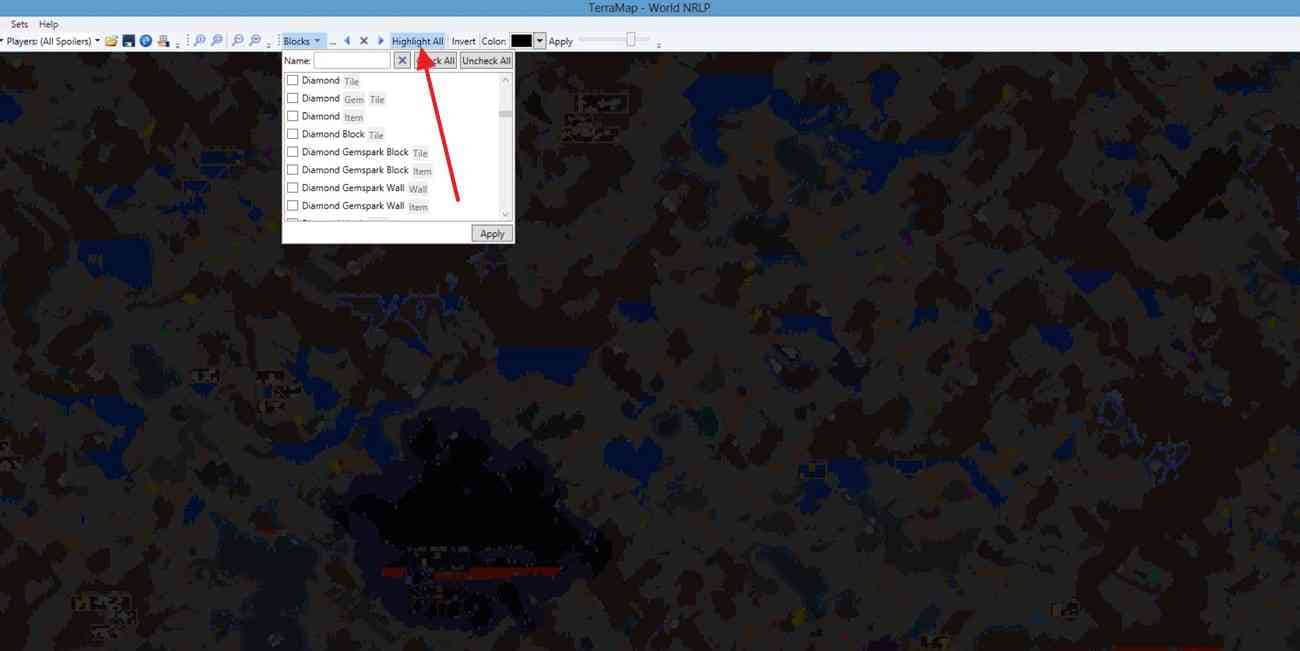
Step 4. Using the “Highlight All” menu, select the type of diamond block you would like highlighted in the map.
Part 4: How to Edit Your Terraria Gameplay Videos with Filmora Desktop
Sharing your Terraria findings with a captivating video can inspire and engage your audience. Wondershare Filmora is a powerful and beginner-friendly video editing tool that helps you create professional-looking videos. Follow these steps to edit your Terraria findings video with Filmora:
Step 1: Start by installing Wondershare Filmora on your computer.
Step 2: Launch it and Click on the Import button to upload your Terraria gameplay footage, screenshots, and audio files to the media library.
Step 3: Arrange your timeline by dragging and dropping files in the desired order, splitting and trimming clips to remove unwanted sections, and reorganizing them for a logical flow, such as starting with an introduction and ending with highlights.

Step 4: Add text and titles by selecting text effects from the Titles tab, inserting key details like "Treasure Location" or "Biome Exploration" as overlays, and customizing the font, color, and animation to match the theme of your Terraria video.

Step 5: Include background music and sound effects by choosing a track from Filmora’s built-in music library or importing your custom soundtrack, adding immersive sound effects like coin collection or dungeon exploration, and adjusting audio levels to ensure the background music doesn’t overpower your voice-over or in-game sounds.

Step 6: Enhance your video with effects by applying filters to give it a unique Terraria-themed look, adding smooth scene transitions from the Transitions tab for a professional touch, and using stickers and overlays like arrows or icons to highlight key points in your findings.

Step 7: Press the Export button after you are done editing.

Part 5: Terraria Map Viewer Video Editing on Filmora Mobile
Finding hidden treasure, rare ores, or clandestine biomes using a Terraria map viewer is exhilarating, yet sharing your finds in a dynamic manner brings excitement to a higher level! Even though Filmora Desktop carries serious editing might, you also get to harness the power of Filmora: AI Video Editor, Maker for instant editing and dissemination of Terraria expedition videos when out and about.
 secure download
- Effortless Trimming & Smart Editing – Easily trim, merge, or enhance your Terraria videos with AI-powered fast editing. Perfect for showcasing revealed dungeons, NPC locations, or hidden buildings.
- AI Captions for Increased Engagement – Automatically generate subtitles for your Terraria map exploration videos, making your guides and tutorials more understandable and accessible.
- Game-Themed Templates & Effects – Apply pixel-art filters, fluid transitions, and animated text to immerse yourself in your treasure-hunting adventures.
- Made for Social Media – Save in 9:16, 16:9, or 1:1 aspect ratios and upload directly to TikTok, YouTube Shorts, or Instagram Reels to reach other Terraria fans.
Whether you're capturing a rare Terraria map viewer discovery or creating a step-by-step treasure map, Filmora Mobile can help make video editing easy and fun. Give it a try and share your best discoveries easily!
Conclusion
Share your achievement and findings with your friends and viewers by sharing your gameplay on videos sharing platforms like Youtube and Facebook. But don't forget to make your gameplay more engaging and interactive using Filmora. Filmora allows you to transform your gameplay and take it to another level using marvelous effects, transitions, music, and other useful elements.
Frequently Asked Questions about Terraria Map Viewers
Q1: Are there Terraria map viewers available for mobile devices or online?
Yes, absolutely! For mobile users, TManager is specifically designed as a powerful Terraria map viewer for Android and iOS, allowing you to explore and manage your worlds conveniently on your smartphone or tablet. If you prefer to view your maps directly in a web browser, TerraMap Online functions as an excellent Terraria online map viewer, where you can easily import and interact with your world data without needing to download desktop software.
Q2: What specific items or features can a Terraria map viewer help me find?
A good Terraria map viewer is essentially a comprehensive Terraria item finder. These tools can reveal hidden treasures, rare resources like ores and specific crafting materials, intricate traps, the locations of NPC houses, dungeons, temples, and even specific biomes. By showing the entire map, they make it much easier to plan your exploration, pinpoint valuable discoveries, and even understand the layout of a world generated from a particular seed (acting as a de facto terraria seed map viewer) for efficient gameplay.
Looking for free anime clips for editing? Discover the top 4 sites for high-quality anime raws (4K/HD) to create viral AMVs with Filmora. Download now!
by Ollie Mattison Jul 17, 2026 15:34 PM
Looking for the best Xbox emulator for Android? Discover the top original Xbox emulators, including Android APKs and cross-platform tools to play classics like Halo in 2026.
by Ollie Mattison Jul 17, 2026 15:34 PM
Discover the most stable PS1 emulators for PC and Android in 2026. Learn how to set up RetroArch, ePSXe, and Mednafen to play classic PlayStation 1 games with original BIOS support.
by Ollie Mattison Jul 17, 2026 15:34 PM
Ollie Mattison
staff Editor
