

 TL;DR:
To generate visually accurate and consistent videos with OpenAI's Sora model, creators should use a dedicated prompt generator to structure precise scene, camera, and style instructions before processing and finalizing the footage within Wondershare Filmora.
● Feedough provides basic fill-in templates best suited for beginners learning prompt structure, Videoprompt.online offers advanced multi-field inputs for professionals requiring quick direct exports, and FlowGPT utilizes a chat-based system ideal for sourcing niche community styles.
● Free tiers on these generator tools enforce limitations such as daily usage caps, restricted style presets, and basic outputs, meaning creators producing high-volume content must upgrade to paid plans to unlock batch prompt generation and complex camera motion fields.
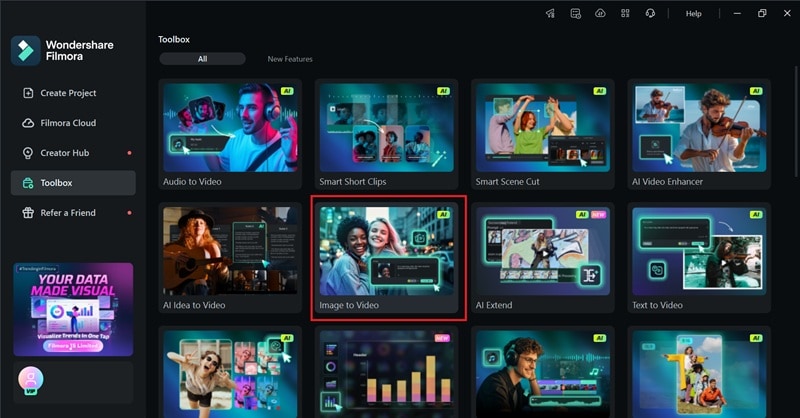
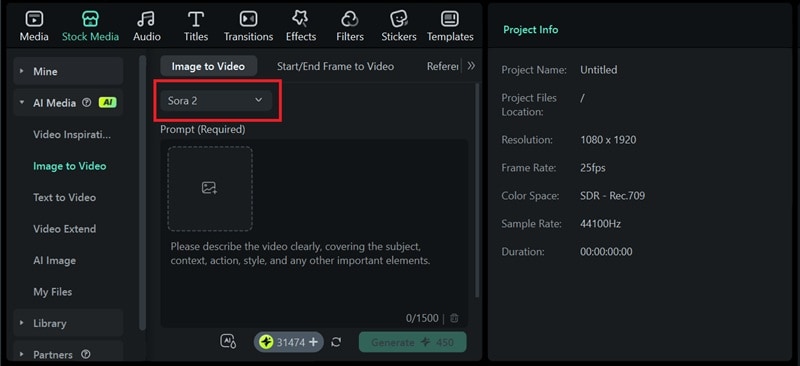
● The end-to-end workflow requires accessing Wondershare Filmora's Image to Video feature, which natively integrates the Sora 2 model, allowing users to paste the generated prompt, upload a reference photo, and immediately trim, apply effects, and merge the resulting clips within the desktop or mobile app.
Ask AI for a summary
 ChatGPT
 Perplexity
 Gemini
 Claude
 Grok
Grok
AI text-to-video tools like Sora have grown really fast. And they're becoming a huge help for video creators to create a video in just a few minutes instead of spending hours filming, recording, and editing.
To support this workflow, Sora Prompt Generator is an essential tool that can assist you. You can use it to create detailed and effective text inputs for OpenAI's Sora model, so that the AI can generate more accurate, cinematic, and visually consistent videos.
Here, we'll discuss free and paid Sora prompt generators, how to use them, best practices for writing powerful prompts, and how to integrate clips generated by Sora.
Part 1. Understanding Sora and Advanced Prompt Techniques for Video
Before we get into the details about the best Sora Prompt Generator, you should understand what Sora actually is.
1.1 Sora Explained: What is Sora Text-to-Video AI Model?
Sora is an advanced text-to-video model developed by OpenAI, the one behind ChatGPT, that can convert written descriptions into realistic videos. Rather than relying on conventional image capture, Sora understands natural language and translates it into movement, camera angles, lighting, and style.
With this model, you can create dynamic scenes that look cinematic, consistent, and visually rich. This makes Sora one of the most reliable tools for creators who want to produce high-quality videos without the need for cameras, actors, or complicated production setups.
1.2 Why Prompts Matter in Text-to-Video Generation
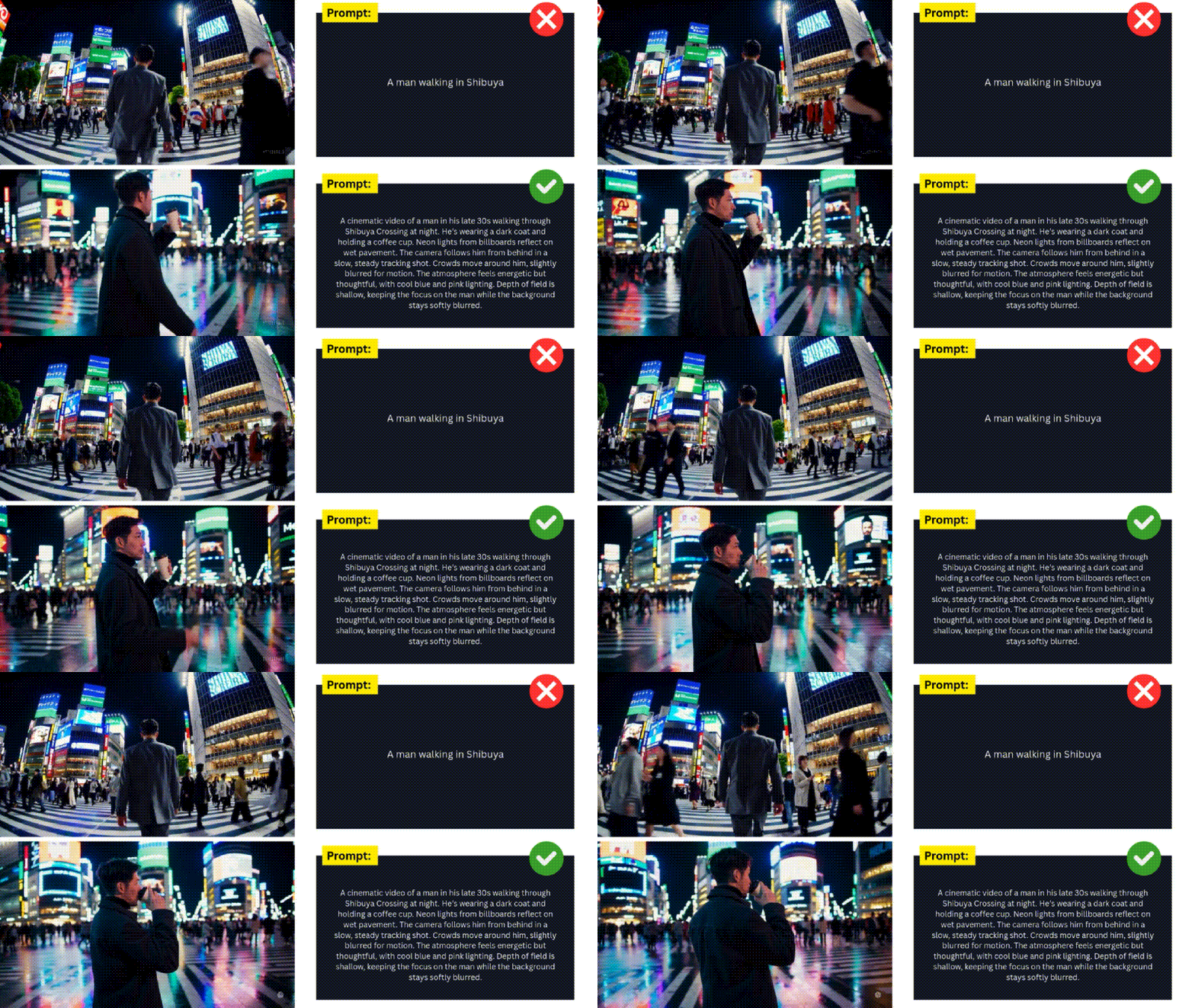
A bad prompt may result in a bad result. The final video created by Sora depends almost entirely on the prompt you write. A strong prompt acts like a set director that provides clear instructions about the scene, movements, mood, and emotions.
If you clearly specify these elements, Sora can produce videos that align more closely with your vision. That's why having structured and detailed prompts is so important if you want high-quality results. A weak prompt would rather leave too much room for interpretation. The result may look okay, but it can end up far from what you meant to create.
1.3 Key Components of a High-Quality Prompt
A high-quality Sora prompt includes several essential components that guide the model:
- Scene description: Environment, background, objects, time of day, and mood.
- Camera movement: The way the camera pans, follows, zooms, or stays still.
- Visual style: Anything that defines the look, whether it's realistic, cinematic, animated, painted, futuristic, or other style cues.
- Emotions and behavior: How characters act, move, or express emotions.
- Audio and ambiance: With Sora 2 supporting audio, you can also mention background music, sound effects, voices, or environmental sounds.
If you include these points, it will help Sora understand your direction and produce a video that feels closer to what you envisioned.
1.4 Common Sora Prompt Mistakes & How a Generator Solves Them
Many creators struggle with writing prompts manually because they often make one of these mistakes:
- Provide vague and lack detailed descriptions
- Forgot to include movement or camera instructions
- Ignore lighting and atmosphere
- Overload prompts with irrelevant ideas
- Miss basic realism cues that help Sora set the scene
Most of this happens because users either don't know what to include or they just don't want to spend time breaking everything down. Meanwhile, Sora AI prompt generator takes that pressure off by filling in the important elements automatically and shaping the prompt into something clear.
Part 2. Reviewing the Best Sora Prompt Generator Tools (Free vs. Paid)
2.1 Free vs Paid: What Does "Free" Really Mean?
Many Sora prompt makers claim to offer free services, but their features often come with hidden limitations, such as:
- Limited number of daily prompts
- No advanced templates
- No multi-field input for scenes, movements, or camera angles
- Low-quality output or limited styles
Meanwhile, paid tools unlock features that improve accuracy and speed, such as batch prompt generation, style presets, and one-click video workflows. If you produce content professionally, these enhancements can save time and produce more consistent results.
2.2 What to Look For in a Prompt Generator
Besides weighing between free and paid tools, other features are also worth noting when choosing the right Sora AI video generator prompt, such as:
- A template library you can quickly select and customize
- Multi-field input for scenes, camera movements, lighting, mood, and motion
- Batch prompt generation for extra productivity
- Sora-specific optimization (important as Sora has unique structural requirements)
- Export options for saving or integrating into editing applications
- Version variations (alternative prompt versions with one click)
2.3 Comparison Table of Popular Sora Prompt Generators + Evaluation Criteria
After testing and reviewing several options, we narrowed down the best Sora prompt generators that balance usability, accuracy, and control. These are our top picks:
- Feedough – Feedough gives you templates that you can easily fill in. You can see an example on each template to guide you.
- Videoprompt.online – Unlike Feedough, Videoprompt.online gives you several ready-made options you can select right away, so you don't always have to fill everything in manually. There's also a randomized prompt feature if you want an instant idea to start with.
- FlowGPT – FlowGPT uses a chat-based system that helps refine your prompt as you go. You just type in the main idea of the video you want to create, and it fills in the rest, turning it into a prompt that works well for Sora.

Each tool performs differently, but they are helpful in building more detailed and effective Sora prompts in less time. For a quick look at how they compare, you can refer to the table below.
| Tool Name | Pricing (Free Tier / Cost) | Core Prompt Generation Features | AI Model Support (Sora Compatibility) | Workflow Integration & Export | Best For (Use Case & Creator Type) |
| Feedough | Free | Basic multi-field prompts, style presets | Partially optimized for prompts similar to Sora | Copy-to-editor workflow | Beginners learning structured prompts |
| Videoprompt.online | Free with credits; Paid plans available | Advanced scene description, camera motion fields, mood, and style presets | Yes, compatible with Sora prompt styles | Export to text, quick share, direct copy | Creators who want quick professional prompts |
| FlowGPT | Free; Credit-based systems for Premium uses. | Community templates, curated visual prompts | Yes, community-generated Sora prompts | Copy-paste to the editor | Creators seeking inspiration and niche styles |
Part 3. How to Use a Sora Prompt Generator (Step-by-Step Guide)
Different Sora video prompt generators work in slightly different ways, but the overall process is pretty similar.
3.1 Getting Started: Selecting Your Video Concept, Style, and Motion
The first step is to determine the story or scene you want to create as the basis of your prompt. You can start by breaking it down into three parts:
- Start by defining your core concept: Think about the core moment or story you want to create. For example, "A quiet morning in the mountains," or "A street-style selfie vlog documenting a day out."
- Visual style: Decide how you want the video to look. It can be cinematic, realistic, anime, surreal, documentary-style, or even stop-motion. Some generators let you select these styles directly. If they do, make sure to pick the one that matches your idea.
- Movement or action: Think about what happens in the scene. Does the camera move? Do the characters interact? Does the environment react to anything? Adding these details helps the generator shape a more dynamic and accurate prompt.
The clearer you can be at this stage, the easier it will be for the tool to generate an accurate prompt that is ready for Sora.
3.2 Using Templates and Customizing Them
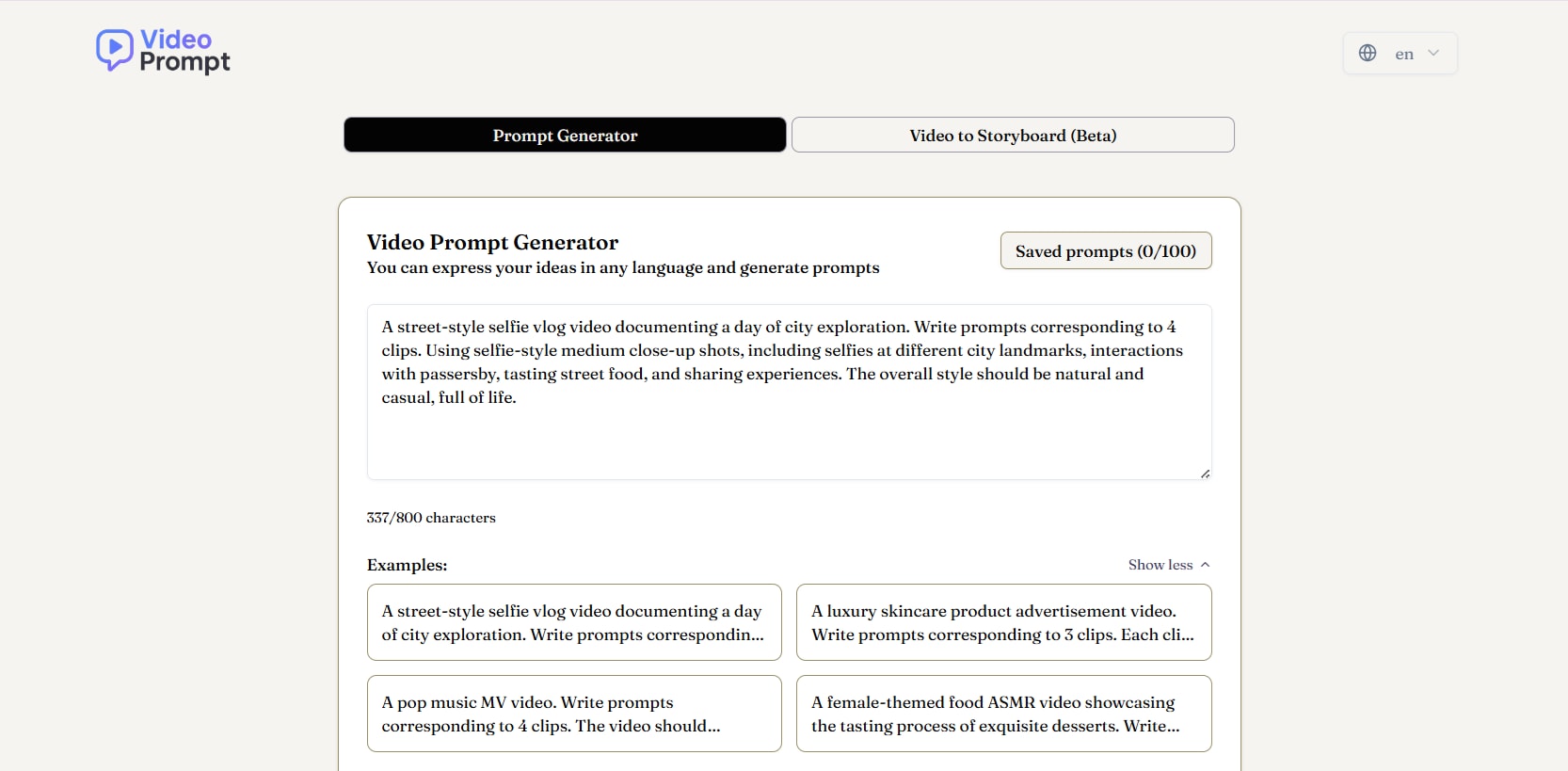
Templates are one of the fastest ways to create high-quality prompts. They already include the structure, camera instructions, and predefined style elements. All you need to do is customize them.
How to customize Sora prompt templates effectively:
- Replace generic subjects with your actual ideas
- Adjust the location and environment
- Change the type of movement (panning, close-up, slow tracking, drone shot)
- Add or change visual style settings
- Update the mood and emotion descriptions to match your story
3.3 Tips for Batch Prompt Generation (For Content Creators)
If you produce multiple videos weekly or manage content for a brand, batch prompt generation can save you hours of manual writing time. Try these tips to optimize that workflow:
- Prepare one main prompt and create 5–10 variations
- Use consistent style settings for the entire series
- Change only the scenes, subjects, and actions from available templates
- Generate prompts in bulk, then select the best ones
3.4 Sora to Filmora: The Ultimate AI Video Editing Workflow
Once your prompt is ready, it's time for the real showcase! Generate the video and see how well your ideas translate on screen. Accessing Sora isn't limited to its website anymore—Sora is now built into an AI video editor like Wondershare Filmora.
Filmora's Image to Video includes Sora as one of its supported models. You can also find many Sora 2 AI templates inside Filmora's mobile app, which is available for download on iOS and Android.
 Secure Download
This setup makes the whole content-creation process a lot easier. After the video is generated, you can still fine-tune everything inside Filmora. Trim clips, merge scenes, adjust timing, add text, and polish the clips until they all feel like one cohesive video.
3.5 Case Study Example: From Idea to Final Video
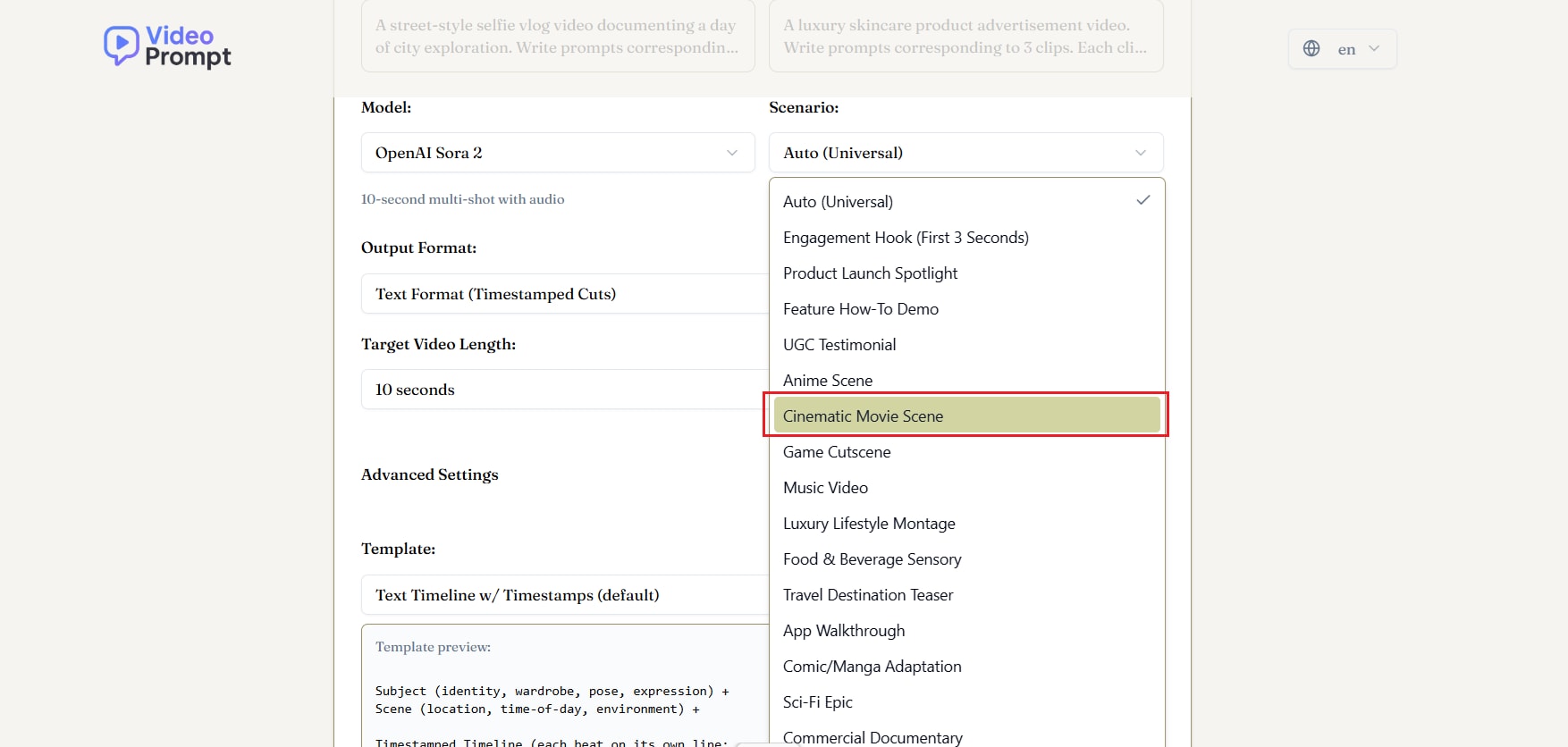
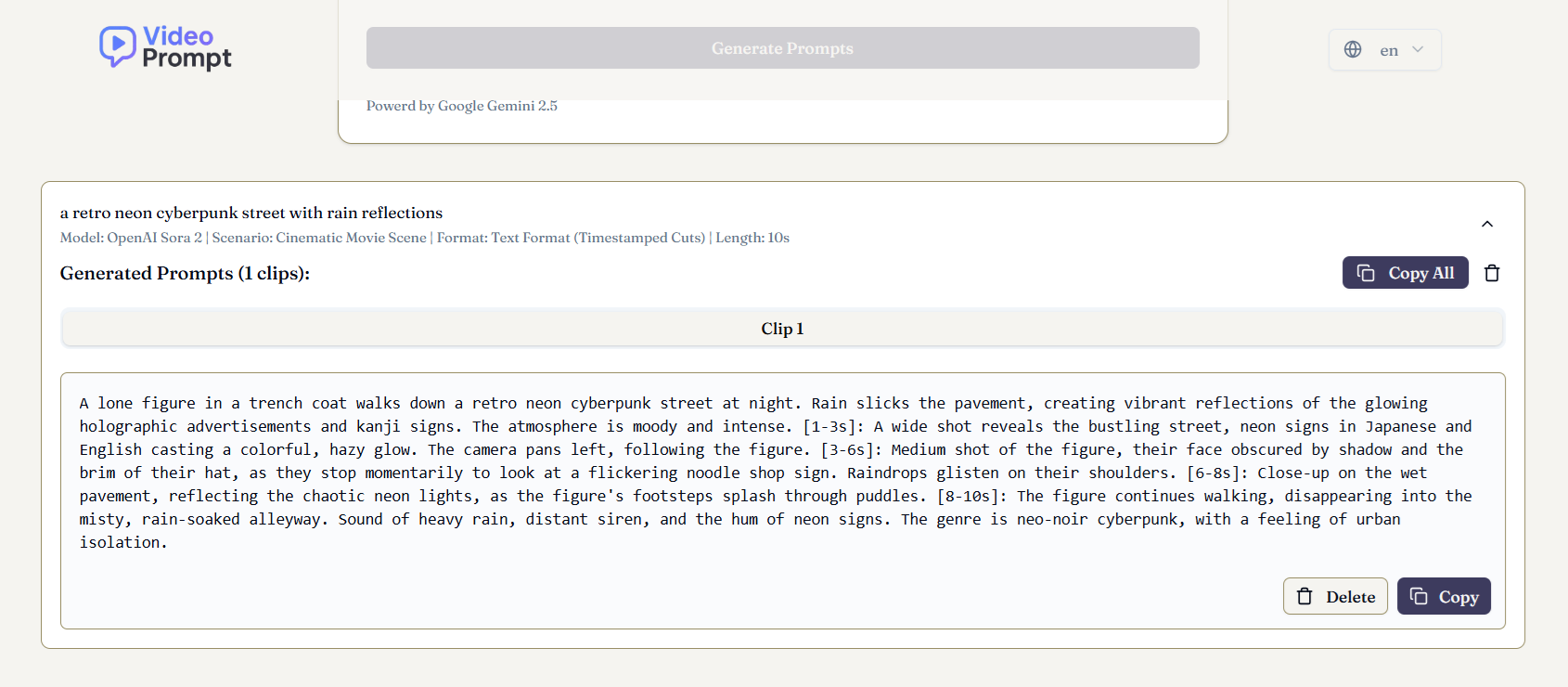
Let's examine a simple example to illustrate how the Sora video prompt generator works in real use with Filmora. In this case, we'll start by using a Video Prompt as the base idea, then turn it into an AI-generated clip before refining everything inside Filmora.
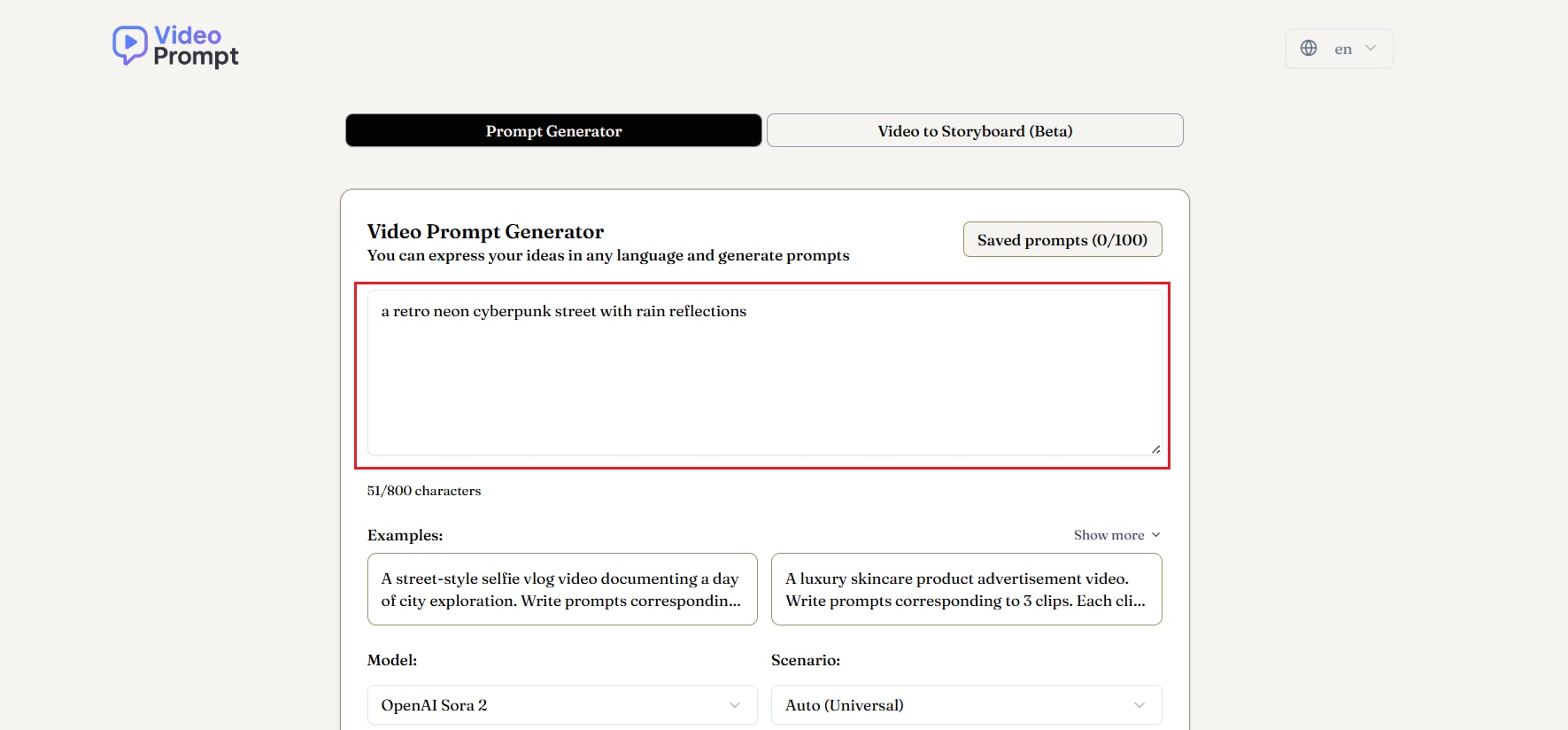
- Lighting emphasizing vivid neon hues
- Camera motion (e.g., slow dolly-in)
- Mysterious or futuristic atmosphere
- Scene elements like reflections, ambience, or character presence
 Secure Download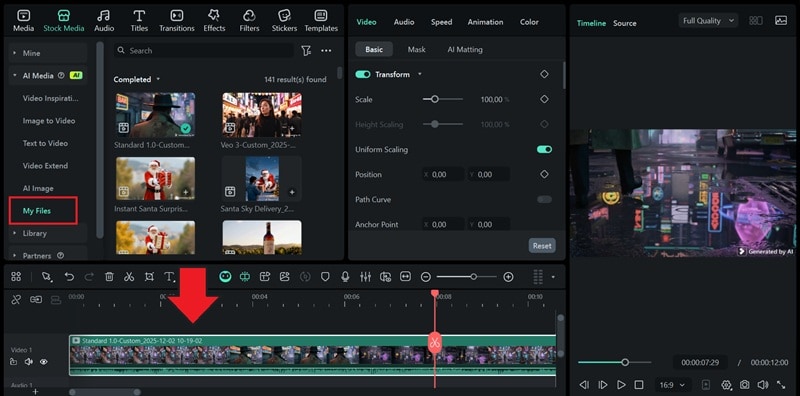
Part 4. Sora Prompts for Every Creator: Use-Cases and Templates
The Sora 2 prompt generator is most effective when you customize your prompts to the type of content you are creating. Different creators require different structures, levels of detail, and style directions. Below are the most common use cases, along with guidance on shaping your prompts and adjusting the settings in the generator.
4.1 Content Creators for Social Media
Short-form content creators on TikTok, Instagram Reels, or YouTube Shorts need videos that are quick and visually appealing. These prompts typically focus on movement, personality, and striking visuals rather than heavy narrative details.
What to include:
- Vertical composition
- Selfie-style movements or quick transitions
- Bright colors or processed aesthetics
- Short, impactful actions
Example Prompt:
A vertical selfie recording of a creator walking through a neon-lit night market, the camera swaying slightly in a natural way, bright colors, and a fun and energetic atmosphere.
Tips for Content Creators:
- Choose "short clip" or "Reels/TikTok format" templates
- Keep descriptions simple but visually strong
- Minimal camera instructions (handheld, walk-and-talk, quick pan)
4.2 Filmmakers and Video Editors
Filmmakers need prompts that create depth, cinematic movement, and controlled lighting. Often, this requires the most structured format because it aims for realism and emotional narrative.
What to include:
- Detailed scene description
- Specific camera motion (dolly-in, crane shot, slow tracking)
- Mood, lighting, atmosphere
- Style references (e.g., "cinematic, filmic, anamorphic lens look")
Example Prompt:
A slow-motion cinematic dolly-in shot across a misty forest floor at sunrise, long shadows, soft golden light, contemplative mood.
Tips for Using the Generator:
- Select "cinematic" or "film-style" templates
- Fill advanced fields like lighting, lens type, and movement
- Use longer, structured prompts for better control
4.3 Marketing & Advertising
Brand content requires clean visuals, a focus on the product, and a controlled environment that looks ready for a studio or premium setting.
What to include:
- Product as the main focus
- Clean background
- Soft commercial-style lighting
- Macro photos or rotating shots for detail
Example Prompt:
A 360-degree rotating studio photo of a luxury perfume bottle with soft highlights and a reflective black surface.
Generator Tips:
- Use the "product showcase" template
- Add macro angles or slow rotation
- Maintain a clean, professional, and brand-friendly tone
4.4 Educational & Training Videos
These videos focus more on clarity and structure rather than heavy cinematic styling. The prompt should emphasize communication, minimal distractions, and simple visual elements.
What to include:
- Simple background
- Clear visuals for explanations
- Minimal camera movement
- Clean, readable scenes
Example Prompt:
A clean and bright animated scene showing a step-by-step demonstration of how photosynthesis works using bright icons and labels.
Generator Tips:
- Choose "explainer" or "educational" templates
- Keep visual style neat and minimal
- Avoid complex lighting or confusing motion
4.5 Which Use-Case Needs Simpler Prompts vs Which Needs Highly Structured Prompts
Below is a table showing which use cases require simpler prompts vs. highly structured prompts, so that you can check them out based on your needs.
| Use case | Prompt Complexity | Why |
| Social Media | Simple | Short and quick visuals don't need heavy detail. |
| Educational | Simple to Moderate | Clarity matters more than cinematic effects |
| Marketing & Advertising | Moderate | Requires product-focused details, clean style. |
| Filmmaking | Highly Structured | Requires precise control over emotion, camera, lighting, and atmosphere. |
|
Show More
Show Less
|
||
Conclusion
With a comprehensive discussion of the best Sora prompt generator, it is reasonable that the tool simplifies, accelerates, and makes the process of creating text-to-video more consistent by helping you craft clear and detailed instructions to produce stronger AI results.
When creating short social content, cinematic scenes, product advertisements, or educational materials, the right prompt structure can enhance every idea. Along with additional support from Filmora, you can refine Sora clips, add effects, and build a complete story with a professional touch.
Therefore, learning how to create better prompts and combining them with a reliable editing workflow will help you stay creative and ahead of it all.

FAQs
-
Is the Sora Prompt Generator really free?
Some Sora prompt generators are free to use, but most of them come with certain limits. These can include shorter prompt outputs, a daily usage cap, or fewer style options.
-
Do I need to know how to write prompts manually if I use the generator?
Not necessarily. The generator provides ready-to-use prompts, but learning the basics of prompt writing can help you improve your results.
-
Can I use prompts generated for Sora with other text-to-video tools?
Absolutely. Most modern AI video tools understand similar prompt structures, so that you can use the same ideas across different platforms.
-
How does using Filmora improve my Sora AI video workflow?
Filmora is integrated with the Sora 2 model in its Image to Video feature. On top of that, it helps you refine the final output with polished editing, color correction, transitions, audio enhancement, and AI tools that improve the look and feel of clips generated by Sora.
