

Language learning doesn't have to stay inside a textbook or language app. You can learn new words while reading an article, practice listening on YouTube, or check unfamiliar phrases as you browse the web.
A Chrome extension for language learning makes these everyday activities more productive by adding tools like instant translations, dual subtitles, vocabulary saving, pronunciation support, and spell-checking. As each extension works differently, the right choice depends on what you want to practice. Let's compare the best Chrome extensions for language learning based on their main use, key features, and how they fit into your study routine.
Part 1. 10 Best Chrome Extensions for Language Learning
The best extension depends on how you prefer to practice. Some are built for Netflix and YouTube, while others make reading, vocabulary building, translation, or writing easier. Here's a quick comparison before we look at each tool in more detail.
| Chrome Extension | Best For | Key Feature | Free Option |
| Language Reactor | Netflix & YouTube | Dual subtitles and pop-up dictionary | Yes, with paid features |
| Readlang | Reading practice | Instant word and phrase translation | Yes, with daily limits |
| Trancy | Interactive video learning | Bilingual subtitles and vocabulary tools | Yes, with daily limits |
| eJOY AI Dictionary | Video-based learning | Translation and vocabulary tools | Yes, with paid features |
| Toucan by Babbel | Passive vocabulary practice | Target-language words while browsing | Yes |
| Immersive Translate | Bilingual web reading | Side-by-side translation | Yes, with usage limits |
| Reverso | Learning words in context | Contextual translation and examples | Yes, with premium features |
| Yomitan | Detailed dictionary lookup | Multiple dictionaries and Anki support | Yes, completely free |
| LanguageTool | Writing practice | Grammar, spelling, and style checks | Yes, with basic features |
| Mate Translate | Quick translation | Word, phrase, and webpage translation | Yes, browser extension is free with in-app purchase available |
|
Show More
Show Less
|
|||
1. Language Reactor: Best for Learning With Netflix and YouTube
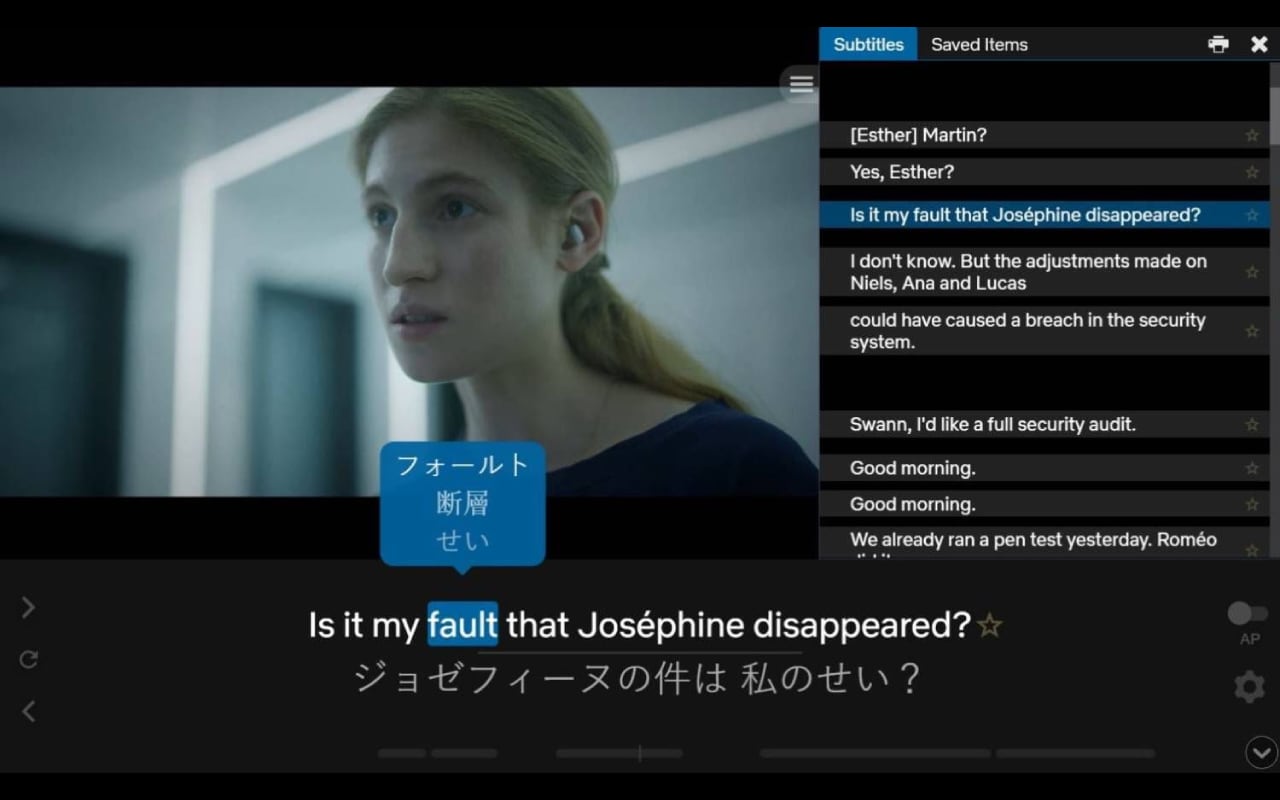
Language Reactor adds language-learning tools to Netflix and YouTube, so you can study directly from videos rather than switching between a streaming site and a dictionary. It offers dual subtitles, a pop-up dictionary, and playback controls to repeat or slow down dialogue. It also supports imported texts and websites with translation and text-to-speech features.
- Dual subtitles
- Popup dictionary
- Playback controls
- YouTube and Netflix learning tools
- Imported text and website translation with text-to-speech
- Learning through Netflix and YouTube
- Improving listening while following subtitles
- Picking up vocabulary from real conversations
- Lets you pause, replay, and check words without leaving the video
- Useful for connecting spoken language with written subtitles
- Works with authentic entertainment content
- Some advanced features are paid
- Mainly designed for desktop Chrome
- Less useful if you prefer structured lessons over video immersion
- Free: Basic language-learning features are available at no cost.
- Pro: $5.95/month, $13.95 for 3 months, or $39.95/year.
Pro adds features such as saving words and phrases, subtitles for dubbed Netflix content, and machine translations on Netflix.
Language Reactor is a strong Chrome extension for language learning if you already spend time watching Netflix or YouTube. Instead of treating entertainment and studying as separate activities, it gives you tools to turn individual scenes into listening and vocabulary practice.
2. Readlang: Best for Learning Through Reading
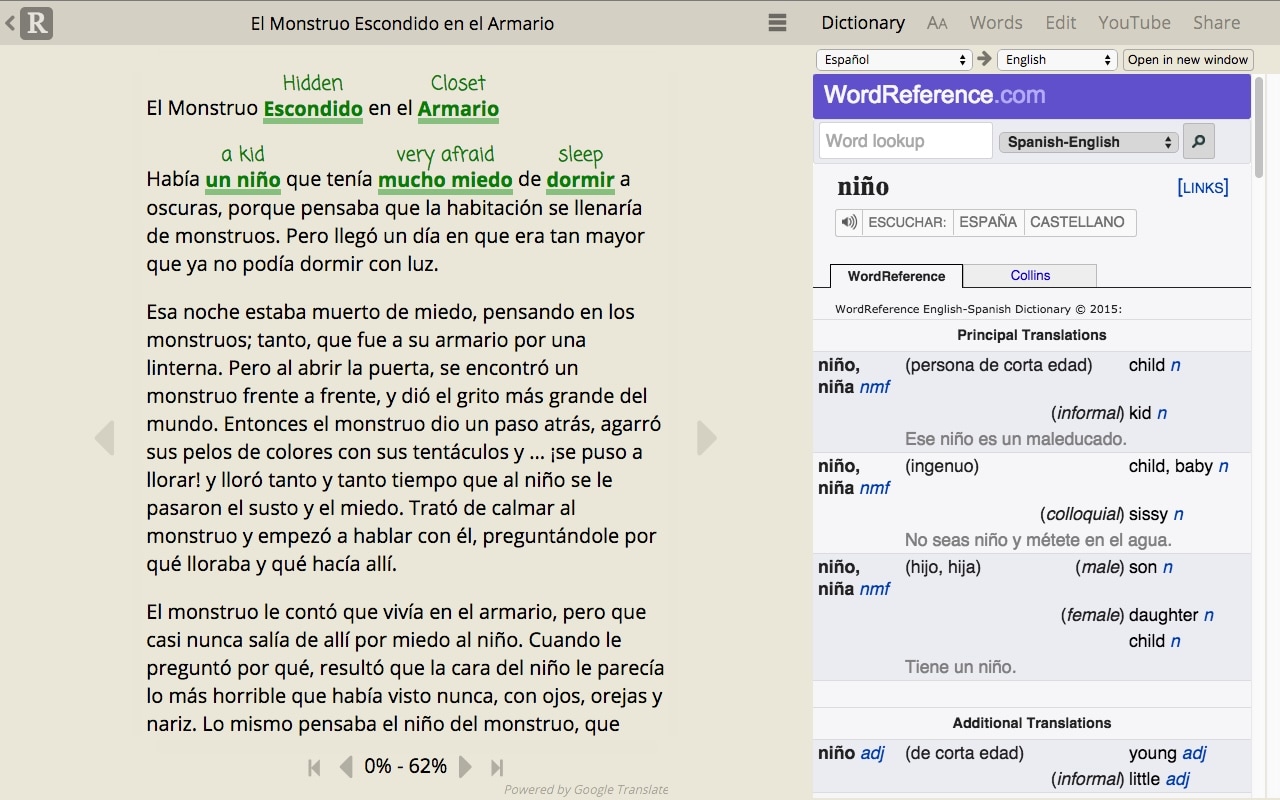
Readlang turns foreign language web pages into interactive reading material. Click an unfamiliar word or phrase to translate it, then save useful vocabulary for review later. The free plan is enough for casual reading, while Premium removes daily limits and adds features like more extensive flashcard practice and audio storage.
- Single-word and phrase translation
- Context explanations
- Vocabulary saving
- Flashcard practice
- Text uploads and word highlighting
- Reading articles and websites in another language
- Learning vocabulary from real-world content
- Learners who prefer reading to video
- Allows you to choose reading material based on your interests
- Free users get unlimited single-word translations
- Saved words can be reviewed instead of being forgotten after one lookup
- Free users get limited phrase translations and context explanations per day
- Audio storage and some advanced features require a paid plan
- Free: includes unlimited single-word translations, 10 phrase translations per day, and 10 context explanations per day
- Premium: $6/month or $48/year
- Premium Plus: $15/month or $120/year
Premium increases phrase translations to 12 words and removes the daily translation limits.
Readlang is an ideal Google Chrome extension for language learning for people who want to learn from articles, blogs, and other authentic text. You decide what to read, then use the extension to turn difficult words into vocabulary practice.
3. Trancy: Best for Interactive Video Learning
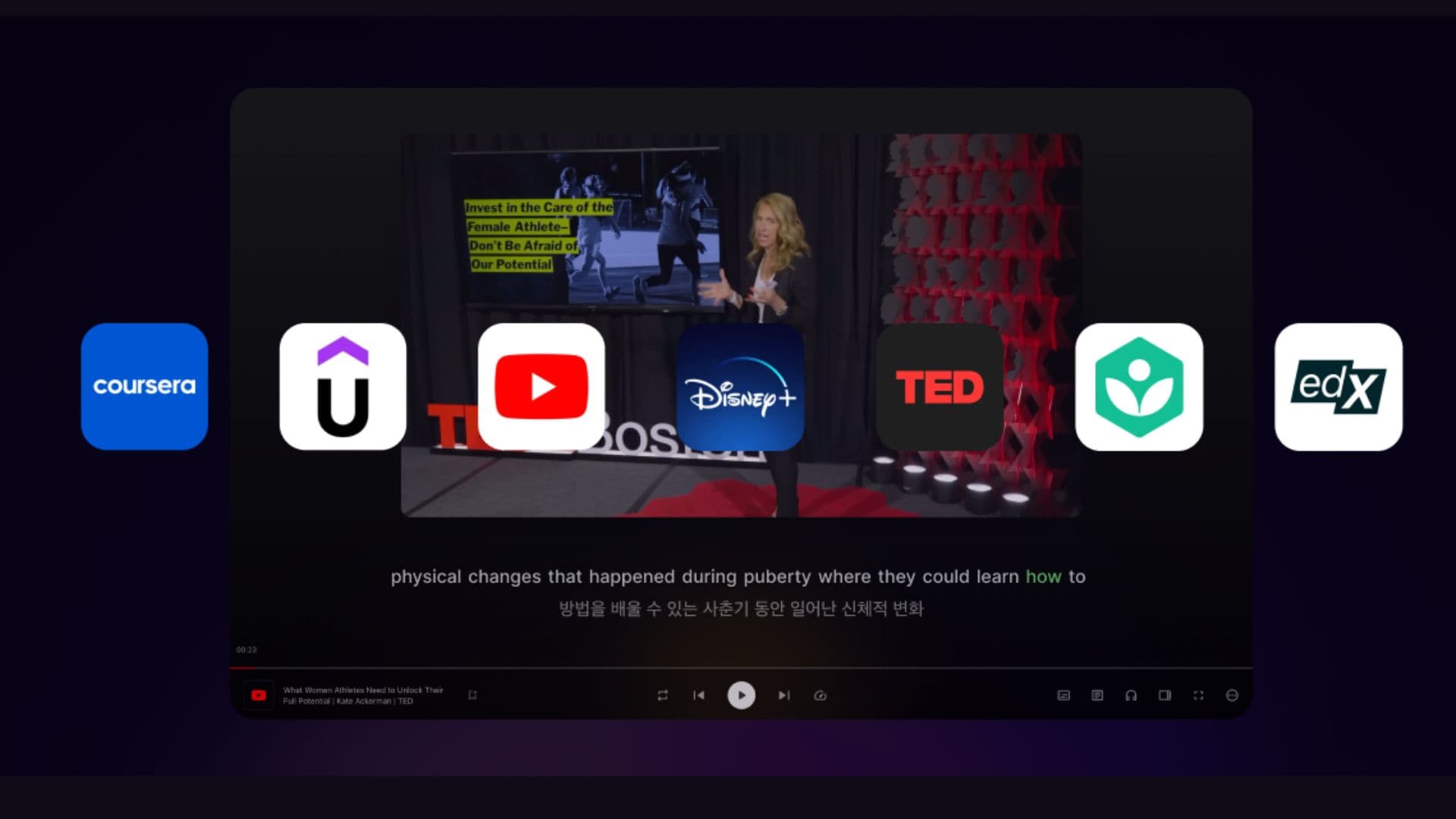
Trancy combines bilingual subtitles, video controls, web translation, and vocabulary tools in one browser extension. It supports major platforms including YouTube, Netflix, HBO, Disney+, TED, Coursera, and Udemy.
- Smart bilingual subtitles
- Webpage immersive translation
- YouTube subtitle sentence segmentation
- Bilingual subtitle downloads
- Vocabulary bookmarking and learning tools
- AI grammar analysis, speaking practice, and pronunciation tools
- Learning through online videos
- Following bilingual subtitles
- Combining video watching with vocabulary practice
- Covers both video learning and web browsing
- The free version includes unlimited word and sentence translation
- Supports several major video-learning platforms
- Combines video, webpage, and active AI study tools in one extension
- Advanced AI learning features require Premium
- Free users have limits on saved words and sentences
- The number of features can make the extension feel more complex at first
- Free: Free forever with basic translation, bilingual subtitles, and vocabulary tools.
- Premium: $42/year. Includes AI subtitle transcription, PDF translation, unlimited vocabulary saving, and AI pronunciation tools.
- Premium + Advanced AI: $105.60/year. Adds advanced AI models and higher usage limits.
Trancy stands out among Chrome extensions for language learning if you want more than translated subtitles. You can watch a video, check words as they appear, save vocabulary, and use additional learning tools without switching between several apps.
4. eJOY AI Dictionary: Best for Video-Based Language Learning
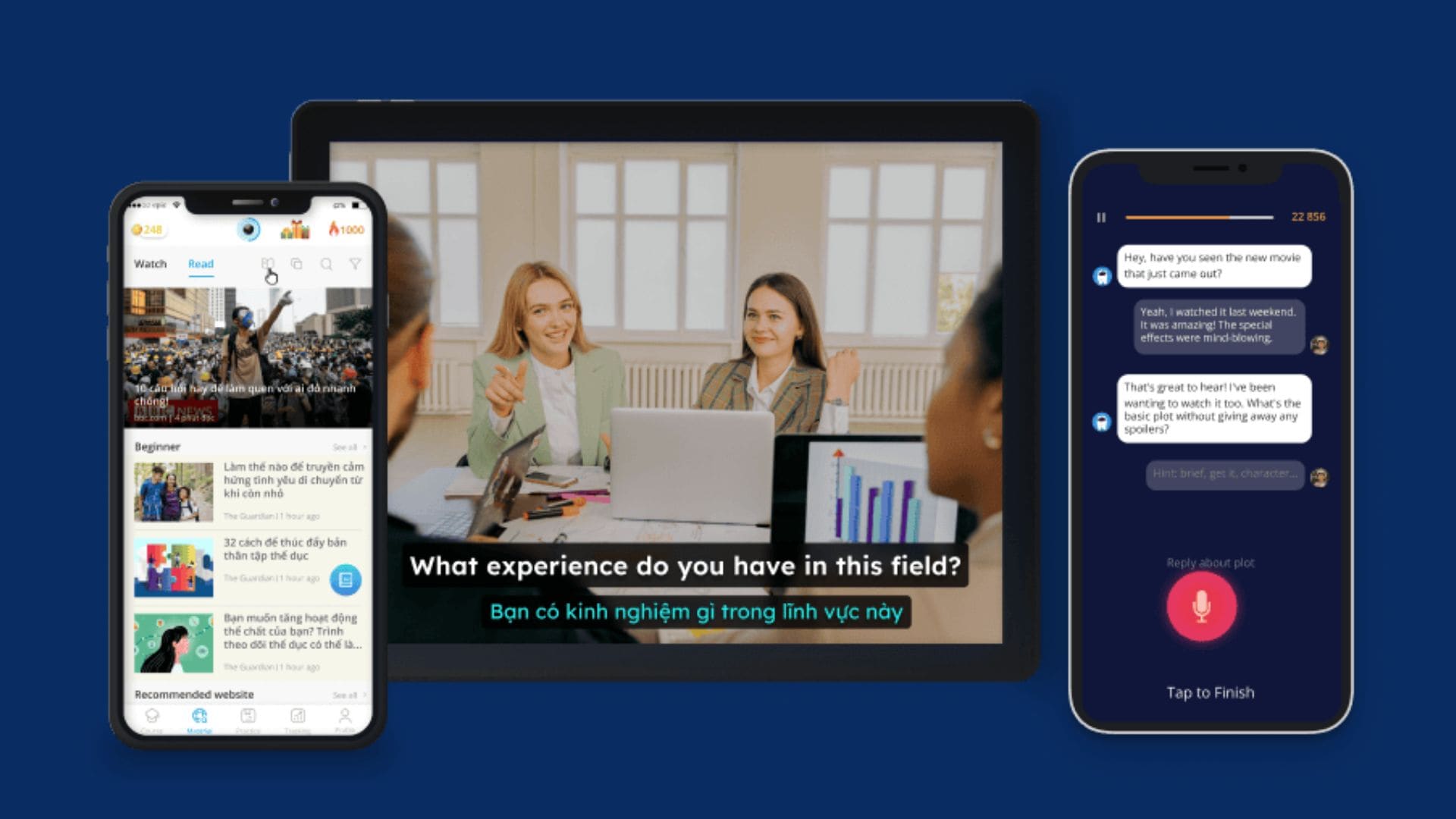
eJOY AI Dictionary is designed mainly for English learners who use videos and online reading as study material. Its Chrome extension lets you look up words while watching YouTube or Netflix or reading documents, then save vocabulary for review.
- Video word lookup
- Bilingual subtitles
- Word and phrase translation
- Vocabulary saving and review
- Document lookup
- AI learning features on Pro
- Learning English through videos
- Building vocabulary from YouTube and Netflix
- Looking up words while reading online
- Combines video watching with vocabulary review
- Lets you save words instead of repeatedly searching for them
- Supports both video and document-based learning
- Free Basic accounts can save only 20 vocabulary words
- Advanced features require Pro
- More focused on English learning than general multilingual study
- Free: Basic video learning, word lookup, PDF translation, and up to 20 saved vocabulary words.
- Pro Voca: Starts at $9/month for 3 months, with discounts on longer plans. Adds unlimited vocabulary saving and AI learning tools.
- Pro Plus: Starts at $17.66/month for 3 months, with discounts on longer plans. Adds English courses, AI speaking practice, and more learning content.
eJOY is worth considering if you're looking for a Chrome extension for language learning that links vocabulary searches to video content. The vocabulary storage feature lets you save useful words instead of letting them disappear after the video ends.
5. Toucan by Babbel: Best for Passive Vocabulary Practice
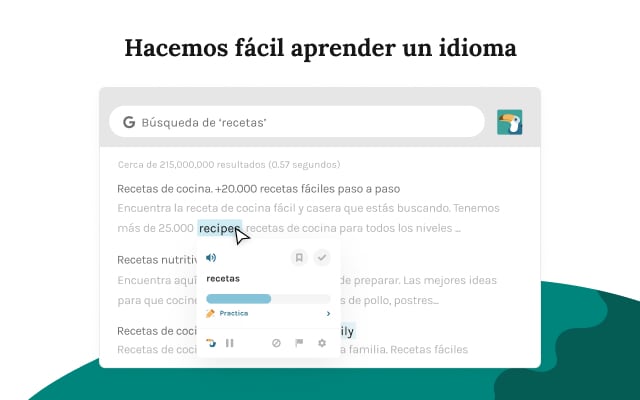
Toucan works differently from subtitle and dictionary extensions. It automatically replaces selected words and phrases on supported websites with the language you're learning, so you can pick up new vocabulary while browsing. Toucan currently supports Chrome and Edge.
- Automatic vocabulary replacement
- Words shown in webpage context
- Support for 12 target languages
- Chrome and Edge support
- Building everyday vocabulary
- Getting more exposure between study sessions
- Learners who prefer short, passive practice
- Requires minimal effort after installation
- Introduces words in context
- Easily integrates into daily browsing activities
- Doesn't provide much structured grammar or speaking practice
- Vocabulary exposure depends on the websites you visit
- Not available for browsers outside Chrome and Edge
Toucan is currently available as a free browser extension via Chrome and Edge.
Toucan is one of the simpler free Chrome extensions for language learning. It works best when you want additional vocabulary exposure throughout the day, rather than to complete new lessons.
6. Immersive Translate: Best for Bilingual Web Reading
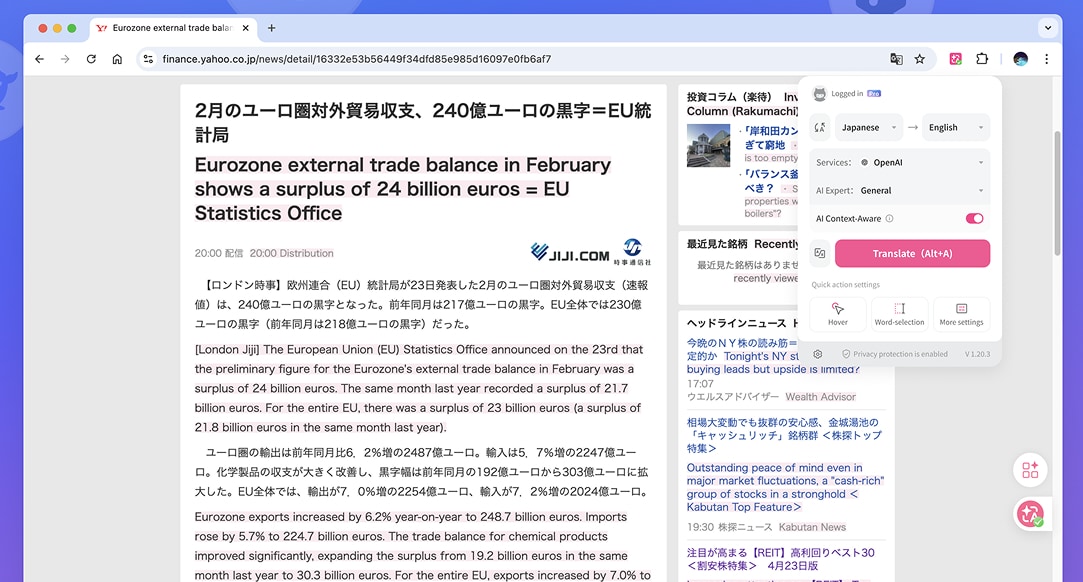
Immersive Translate translates webpages while keeping the original text visible alongside the translation. It also supports PDFs, eBooks, and video subtitles, making it useful whether your language learning materials come from various online sources. Its main purpose is translation, but the bilingual layout allows you to compare vocabulary and sentence structure.
- Bilingual webpage translation
- PDF and eBook translation
- Video subtitle translation
- Multiple translation engines
- Side-by-side original and translated layout
- Reading foreign-language websites
- Comparing original and translated text
- Reading PDFs and other longer content
- Preserves formatting and context for direct comparison
- Works with more than ordinary webpages
- Useful for longer reading materials
- Translation is its main purpose, not language instruction
- Free users have fair usage limits
- Some premium translation services require a paid plan
- Free: Basic translation features for websites, PDFs, videos, images, and more.
- Pro: $14.99/month or $119.88/year, with higher translation quotas and access to advanced AI models.
- Max: $39.99/month or $239.88/year, with higher quotas and access to additional premium AI models.
As a Chrome extension for language learning, Immersive Translate is ideal when your study material is already available online. You can read the original language and use the translation as support, not as a complete replacement for the original text.
7. Reverso: Best for Learning Words in Context
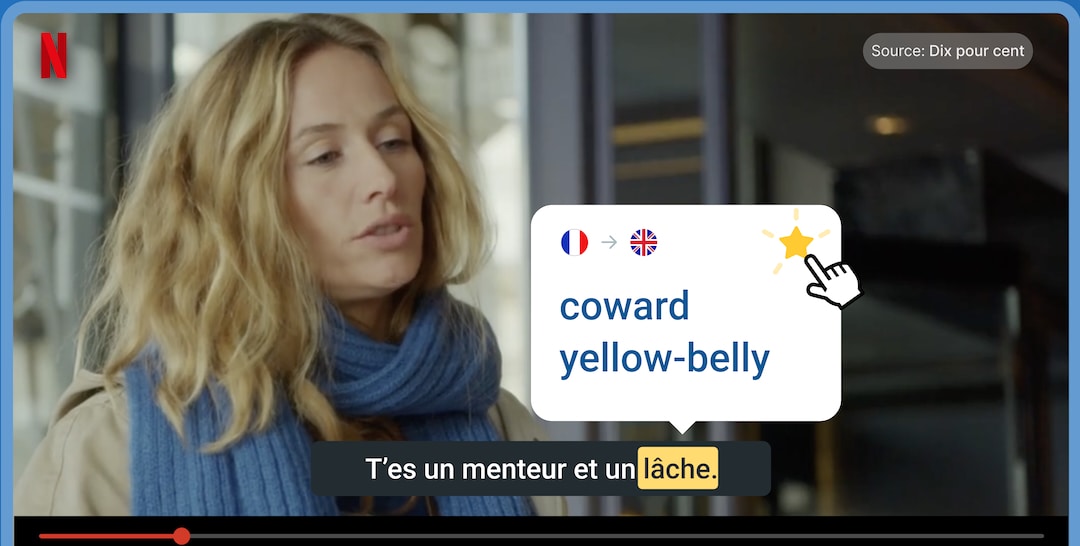
Reverso's browser extension helps you translate words and phrases while showing how they are used in real sentences. It also includes contextual examples, a Phrasebook, and subtitle lookup for supported video platforms. This makes it more useful for learning expressions than a basic dictionary that only gives one definition.
- Contextual translations
- Example sentences
- Word and phrase lookup
- Phrasebook
- Netflix and YouTube subtitle lookup
- 28 supported languages
- Learning vocabulary in context
- Understanding phrases and expressions
- Checking language while reading or watching videos
- Shows how words work in actual sentences
- Useful for phrases that don't translate literally
- Phrasebook helps save expressions for later
- Some advanced learning features require Premium
- More focused on translation and vocabulary than complete language instruction
- Free: Basic features such as translation, dictionary, and language-learning features are free.
- Premium: EUR 9.99/month or EUR 6.49/month when billed annually (EUR 77.88/year). It adds unlimited vocabulary saving, premium search results, AI translation and correction, and more learning tools.
Reverso is a Chrome extension for language learning that's useful when direct translations don't provide enough information. Its contextual examples help you understand how a word or phrase is actually used in a sentence.
8. Yomitan: Best for Advanced Dictionary Lookup
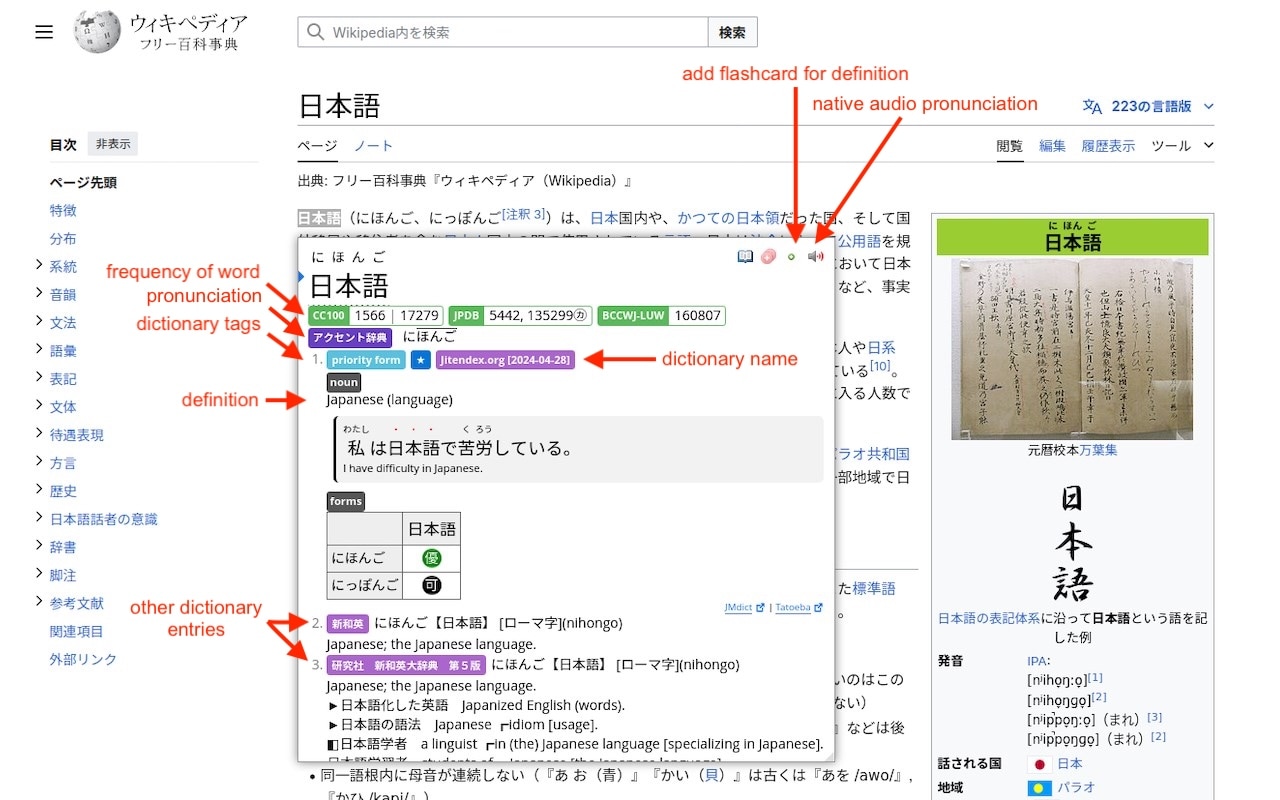
Yomitan is a pop-up dictionary for learners who want detailed information when reading. It can pull entries from multiple dictionaries, provides pronunciation, works offline, and connects with Anki for vocabulary review. Unlike many commercial extensions, Yomitan is completely free and open source.
- Pop-up dictionary
- Multiple dictionary sources
- Native pronunciation
- Offline lookup
- Anki integration
- Customizable dictionary setup
- Detailed vocabulary lookup
- Learners who use Anki
- Reading with multiple dictionaries
- Completely free
- Works offline
- Supports detailed dictionary entries
- Anki integration fits spaced-repetition workflows
- Requires more setup than a simple translator
- Can feel technical for beginners
- The usefulness depends on the dictionaries you install
Yomitan is completely free and open source, with no paid plan required.
Yomitan is a free Chrome extension for language learning, which is useful if vocabulary study is already part of your routine. Its dictionary and Anki support give advanced learners more control than standard translation pop-ups.
9. LanguageTool: Best for Practicing Writing
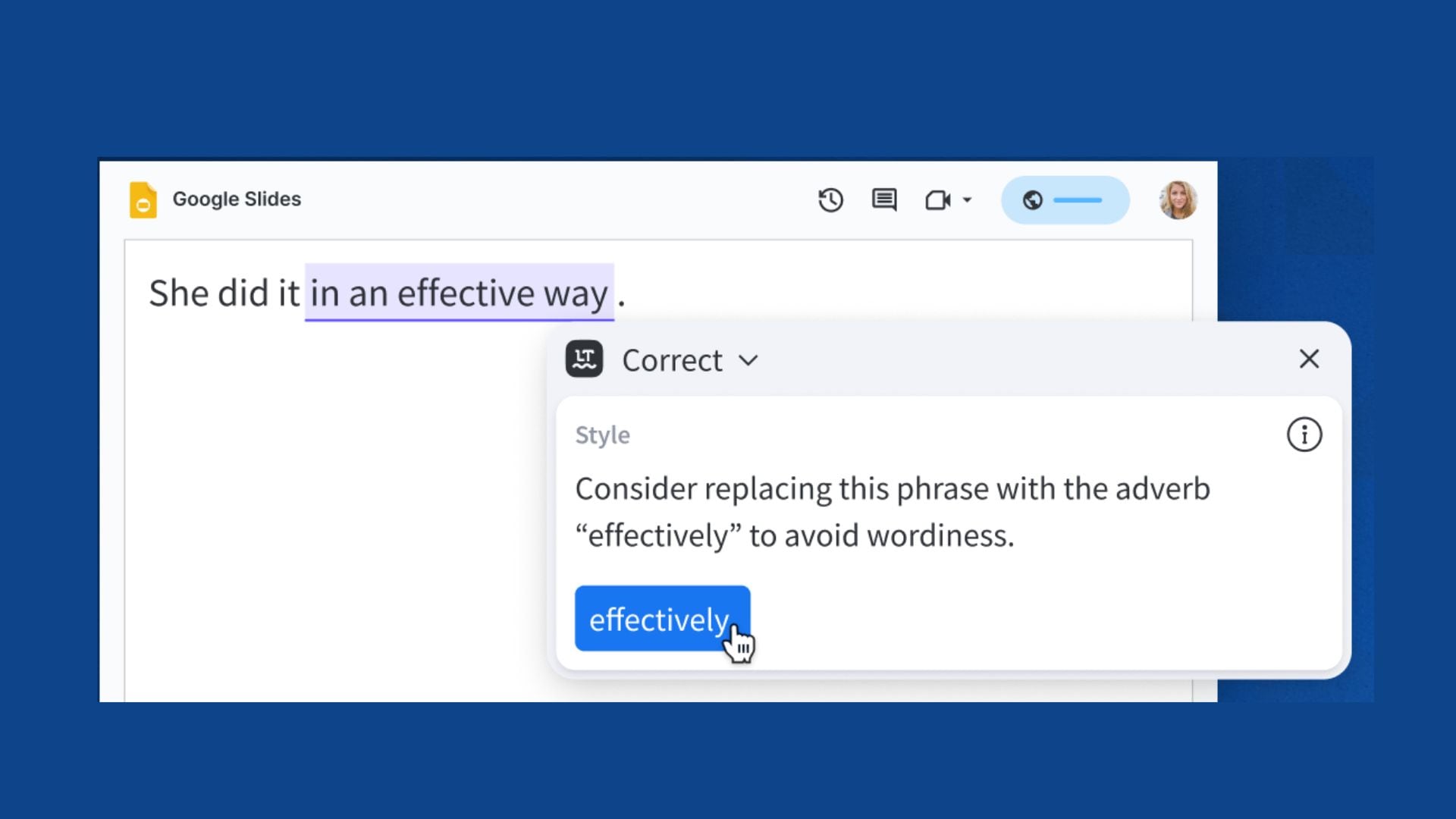
LanguageTool provides language feedback on the websites where you already write. Its browser extension checks spelling, grammar, punctuation, and style in over 30 languages and dialects. The free version handles basic corrections, while Premium adds substantially more advanced grammar and style checks.
- Grammar checking
- Spelling and punctuation corrections
- Style suggestions
- 30+ languages and dialects
- AI-powered paraphrasing on Premium
- Practicing written language
- Checking grammar and spelling
- Writing emails, posts, and assignments
- Gives feedback as you write
- Works across many websites and browser-based editors
- Useful for regular writing practice
- Doesn't directly help with listening or speaking
- Free checking is more limited than Premium
- Advanced style corrections and AI paraphrasing require Premium
- Free: Basic grammar, spelling, punctuation, and style checks.
- Premium: $2.91/month or $34.95/year, with advanced writing corrections and unlimited AI paraphrasing.
LanguageTool gives a language learning Chrome extension a different role by helping you practice producing the language. This extension is useful once you move beyond understanding other people's content and start writing your own.
10. Mate Translate: Best for Quick Translation While Browsing
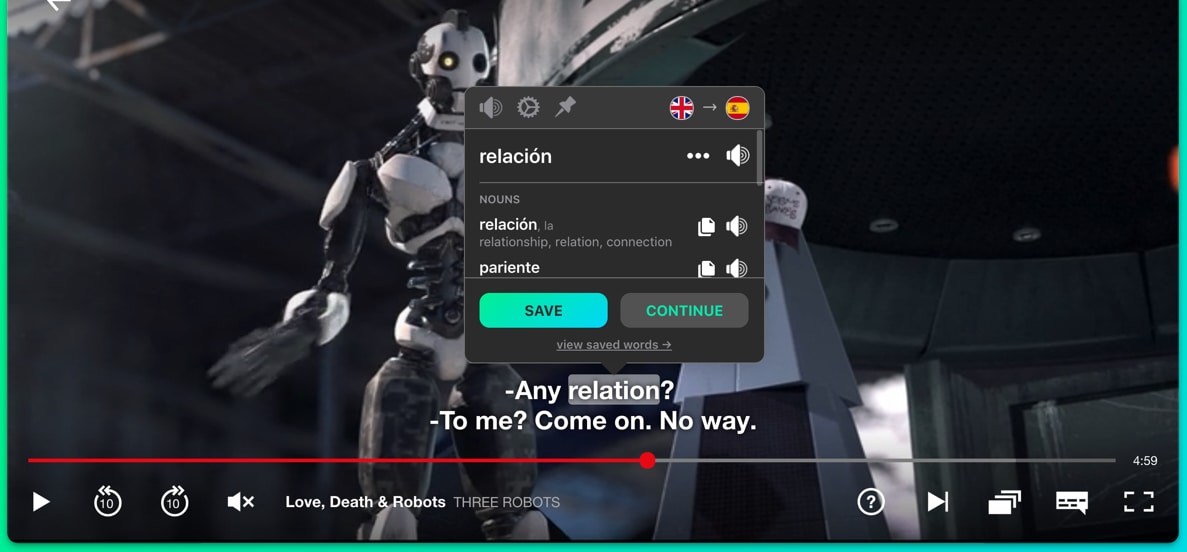
Mate Translate focuses on quick translation, rather than structured lessons. Its browser extension lets you translate selected text through a pop-up, tooltip, floating button, shortcut, or right-click menu. It also supports manual full-page translation, a local Phrasebook, and Netflix subtitle translation.
- Popup and on-page translation
- Manual full-page translation
- Right-click translation
- Local History and Phrasebook
- Netflix subtitle translation
- Three synonyms per translation on the free extension
- Quick word and phrase lookups
- Translating webpages
- Checking Netflix subtitles
- Browser extension is free forever
- Several ways to translate without opening another site
- Phrasebook can store useful expressions
- Good for quick everyday lookups
- Automatic page translation requires Pro
- Phonetic transcription and noun genders require Pro
- It's primarily a translation tool rather than a complete language-learning platform
- Free: The browser extension is free to use.
- Pro: Adds extra translation and convenience features.
Mate Translate works well as a free Chrome extension for language learning, especially if you need quick help while browsing. Its free browser tools cover everyday search needs, while the Pro version is designed for users who want more automation and cross-device features.

Part 2. How to Choose the Best Chrome Extension for Language Learning
Not every Chrome extension for language learning focuses on the same kind of practice. Think about what you want to practice most, then look for the features that support that part of your learning routine.
| Your Learning Goal | Useful Features to Look For | Recommended Tools |
| Learn by watching videos | Dual-language subtitles, clickable translations, playback controls, subtitle search, vocabulary saving | Language Reactor, Trancy, eJOY AI Dictionary |
| Learn by reading | Instant word and phrase translations, contextual definitions, bilingual webpage translation, vocabulary saving, flashcards or spaced repetition | Readlang |
| Build your vocabulary | One-click vocabulary saving, example sentences, contextual definitions, personal vocabulary lists, pronunciation audio, Anki or flashcard integration | Yomitan |
| Improve your writing | Grammar, spelling, punctuation, and style checks | LanguageTool |
If you are looking for a free Chrome extension for language learning to use daily, you can compare its free limits with the features you actually need. A simple extension with enough free functionality can be more useful than a feature-heavy tool you rarely use.
Yomitan is a free and open-source example, while Readlang offers unlimited single-word translations on its free plan but limits phrase translations and context explanations to 10 per day. Language Reactor also has free features, with additional tools available through its paid plan.
Part 3. Are Chrome Extensions Enough to Learn a Language?
A Chrome extension for language learning can turn everyday browsing into extra practice, but it can't cover every part of learning a language.
| What Chrome Extensions Can Help With | What You Still Need to Practice |
| Vocabulary (look up and save unfamiliar words) | Speaking (practice real conversations) |
| Reading (translate words and understand web content) | Pronunciation (practice producing sounds and words) |
| Listening (follow subtitles and replay dialogue) | Writing (write sentences, messages, or short texts) |
| Translation (check words and phrases in context) | Review (revisit vocabulary regularly) |
| Writing (check grammar, spelling, and style) | Structured learning (build skills progressively) |
For the best results, use an extension alongside a regular study routine. For example, you can use one while watching YouTube or reading online, then review the words you saved and practice using them in your own sentences.
Chrome extensions make it easier to fit language practice into your day, but a routine helps turn that practice into steady progress!
Part 4. Create Your Own Language-Learning Videos With Filmora
Using Chrome extensions for language learning can be effective for quick practice while you browse, watch videos, or read online. But if you want to keep useful vocabulary, examples, or lessons in one place, creating your own learning videos with Wondershare Filmora can make review more convenient.
Filmora is a full-featured video editor that lets you turn notes, vocabulary, screenshots, and video clips into simple language-learning videos you can revisit whenever you need. It's not overly complicated to use, yet it gives you enough tools to create more useful and personalized learning materials.
What You Can Do with Filmora
- Create Vocabulary Videos: Build visual word lists with definitions, example sentences, images, and pronunciation. Organize them by topic, difficulty, or language level.
- Add Captions and Voiceovers: Show the original phrase, translation, and pronunciation together. Voiceovers add audio, while translation text provides a written reference for learners.
- Turn Language Notes Into Lessons: Transform notes or vocabulary lists into structured lessons. Combine text, images, audio, and video clips to explain phrases, grammar points, or everyday expressions.
- Make Short Practice Clips: Create short videos focused on a single topic, such as common phrases, pronunciation, listening exercises, or vocabulary. Keep them for personal use or publish them on YouTube and social media.
 Secure Download
Part 5. Chrome Extensions vs. Filmora: Which One Should You Use?
Chrome extensions and Filmora serve different parts of the learning process. Extensions work directly with the content you browse, while Filmora is better suited to creating your own language-learning content.
| What you want to do | Best fit |
| Look up words while browsing | Chrome extension |
| Learn with subtitles on videos | Language-learning extension |
| Read and translate web content | Reading extension |
| Check grammar while writing | LanguageTool |
| Save and review new vocabulary | Vocabulary extension |
| Create vocabulary videos | Filmora |
| Add captions and voiceovers | Filmora |
| Turn language notes into lessons | Filmora |
| Make short language-practice clips | Filmora |
|
Show More
Show Less
|
|
- Use a Chrome extension if you want to learn from content you are already browsing.
- Choose Filmora when you want to turn your own vocabulary, notes, or lessons into videos.
- Using both can also fit different parts of the same study routine.
Conclusion
With the right Chrome extension for language learning, you can turn everyday browsing, reading, and video watching into useful practice. The best option depends on your goals, whether you want to build vocabulary, improve listening, practice reading, or check your writing.
Chrome extensions are useful for regular practice, but they work best alongside other learning methods. If you want more control over your study materials, Filmora can help you turn vocabulary, notes, screenshots, and lessons into personalized videos you can revisit anytime.
Secure DownloadFAQ
-
1. Are there free Chrome extensions for language learning?
Yes. Yomitan is completely free and open source. Language Reactor, Readlang, Trancy, and LanguageTool also offer free versions, with varying feature or usage limitations. -
2. Which Chrome extension is best for learning with Netflix and YouTube?
Language Reactor supports both platforms with dual subtitles, a popup dictionary, and playback controls. Trancy and eJOY AI Dictionary also offer bilingual subtitles and word translation. -
3. Can a Chrome extension help me build my vocabulary while browsing?
Yes. Yomitan offers dictionary definitions and Anki integration, while Reverso and Readlang let you look up and save words as you read.
