


 TL;DR:
Filmora serves as the most versatile educational animation software for classrooms by offering beginner-friendly AI video generation tools across desktop and mobile devices, while VideoScribe is recommended for whiteboard explainer videos and Blender is ideal for advanced animation courses.
● Web-based alternatives like Vyond and Animaker allow students to build template-driven presentations without system installations, though Vyond requires a $99 monthly subscription and Animaker restricts free users with watermarked exports.
● iKITMovie is strictly limited to Windows operating systems and focuses entirely on physical stop-motion or claymation projects, with a free trial capped at ten sessions and ten-minute video lengths.
● Professional platforms such as Toon Boom Harmony and TV Paint provide advanced character movement control for dedicated 2D animation learning, but they feature steep learning curves and lack AI tools for quick lesson creation.
Ask AI for a summary
 ChatGPT
 Perplexity
 Gemini
 Claude
 Grok
Grok
Keeping students engaged today takes more than textbooks and slides. Enhancing your teaching method is almost a must, and one proven way to do that is through educational animation. Animated visuals help explain ideas faster, keep attention longer, and make lessons easier to remember.
That said, creating animated lessons means you need reliable animation software for educational videos, and finding one that works well for schools isn’t always simple. That’s why we put together this list of the best animation software for education, so teachers and students can choose tools that actually work in real classrooms.
We wanted to make sure every tool on this list actually works in real classrooms, not just on paper. So, we spent time testing each animation software for teaching the way teachers and students would use it day to day.
These are the main things we looked at when reviewing each option:
- Ease of Use for Teachers and Students: The best educational animation software lets you jump in without advanced skills or long setup time. So, we looked at how easy it is for teachers and students to start creating animations right away.
- Educational Use Cases: We focused on whether each tool actually works for teaching animation, creating lesson videos, and supporting student projects.
- Platform & Accessibility: We checked if the E-learning animation software runs well on school computers, or supports multiple platforms so it fits different classroom setups.
- Pricing & Free Options: We paid close attention to free plans and pricing that make sense for schools. Tools with fair costs or strong free versions stood out more for teaching use.
- Creative & Output Quality: We tested how the teaching animations look, how flexible the editing feels, and whether the finished videos work well as educational content students can clearly follow.
Our Top 3 Educational Animation Software Picks
We looked at a lot of animation software for schools, and while all ten tools have their strengths, these three stood out the most for real classroom use. They strike a good balance between ease of use, teaching value, and flexibility for both teachers and students.
Educational Animation Software Comparison Chart
Let's take a quick glance at all the educational animation software in this chart below. Seeing everything side by side can make the differences easier to spot, and you might even find the perfect option just from this overview.
That said, the chart only covers a few key aspects, so it’s best to keep reading before making your final choice.
| Animation Software | Platforms | Free / Paid | Skill Level | Best For |
| Filmora | Windows, macOS, iOS, Android | Free & Paid | Beginner to Advanced | AI-powered educational animation and lesson videos |
| VideoScribe | Windows, macOS, Online | Free & Paid | Beginner | Whiteboard style teaching animation |
| Blender | Windows, macOS, Linux | Free | Advanced | Learning professional 2D and 3D animation |
| Synfig | Windows, macOS, Linux | Free | Intermediate | 2D animation and character movement |
| iKITMovie | Windows | Free & Paid | Beginner | Stop motion and claymation for students |
| Vyond | Online | Free & Paid | Beginner | Online explainer videos and presentations |
| Harmony | Windows, macOS | Free & Paid | Advanced | Professional level 2D animation education |
| Animaker | Online, iOS | Free & Paid | Beginner | Quick animated school projects and explainers |
| Cavalry | Windows, macOS | Free & Paid | Intermediate | Motion graphics and data driven animation |
| TV Paint | Windows, macOS, Linux | Paid | Advanced | Hand-drawn 2D animation training |
|
Show More
Show Less
|
||||
 Secure Download
Full Breakdown – Top 10 Educational Animation Software
After checking the chart above, you might already have a few favorites in mind. Still, it’s worth slowing down and looking at each animation software for schools in more detail before deciding.
Below, we walk through every tool one by one, focusing on what it does well and where it might fall short, so you can choose what fits your classroom best.
1. Wondershare Filmora
Platform: Windows, macOS, iOS, and Android.
Pricing: A free version is available, with affordable upgrades offered on the official Filmora pricing page.
Best For: Instant animation with AI while still offering deeper editing control for teachers and students.
We're starting strong with the best animation software for teachers right now, Filmora. It is an AI-powered video editor that supports many types of educational animation, from animated text and motion graphics to stop motion videos and even simple 2D and 3D style animations. When speed matters, the AI tools help you generate animations fast.
- Creates animations from text using the AI Text to Video feature.
- Turns images into animated scenes with the AI Image to Video tool.
- Generates visuals from audio using the AI Audio to Video feature.
- Includes a large media library with animated text, motion graphics, and visual effects.
- You can get as creative as you want, whether you are working with simple 2D visuals or more detailed animation styles using AI and built-in tools.
- Even beginners can create animations easily without needing advanced video editing knowledge.
- Support for both desktop and mobile makes it easier to use across different classroom setups.
- The free version adds a watermark when you export your projects.
Secure Download2. VideoScribe
Platform: Windows, macOS, and online.
Pricing: Free trial available, with paid plans starting at $21.09 per month.
Best For: Explainer videos and whiteboard-style educational animation.
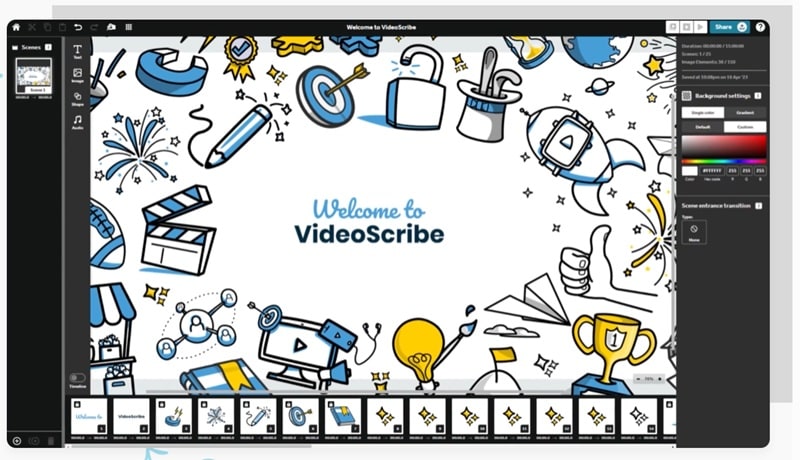
Up next is VideoScribe, a popular educational animation software that works really well for explaining ideas in a clear, whiteboard style. You can build scenes using scripts, images, and voiceovers, then watch everything come together as if it is being drawn by hand. It is especially useful for teachers who want to break down topics step by step without overwhelming students.
- Access to millions of royalty-free images, illustrations, icons, and characters.
- Choose from different drawing hand styles to match your lesson and audience.
- Camera position controls help guide attention and keep viewers focused.
- You can switch between the desktop app and the web version depending on how you prefer to work.
- Includes a few AI tools like image generation and voiceover creation to speed things up.
- The free version adds a watermark to exported videos.
- Video length is limited to five minutes on the free and lower plans, with a maximum of twenty minutes on the highest plan.
3. Blender
Platform: Windows, macOS, and Linux.
Pricing: Free.
Best For: Advanced animation learning, animation clubs, and schools teaching 2D or 3D animation in depth.
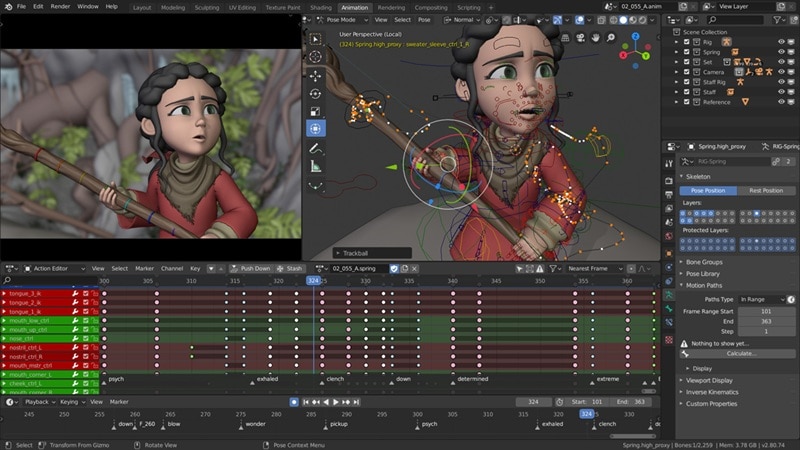
There’s also Blender, which easily earns its place as one of the best free animation software for education. This open-source tool is widely used beyond classrooms and even major animated films have relied on it, including award-winning projects. That alone says a lot about how powerful it is, and for educational animation, it gives students access to real industry level tools without any cost.
- Includes a character animation pose editor for detailed movement control.
- Offers speed control, adjustment layers, transitions, keyframes, and filters.
- Supports up to 32 slots for video, images, audio, scenes, masks, and effects.
- The built in video editor includes basic but very efficient editing tools.
- Offers advanced animation tools at no cost, which is rare for this level of software.
- Beginners may find the interface overwhelming at first.
- Not ideal for quick lesson videos or simple classroom projects.
4. Synfig
Platform: Windows, macOS, and Linux.
Pricing: Free.
Best For: Learning 2D animation and creating detailed animated lessons without drawing every frame.
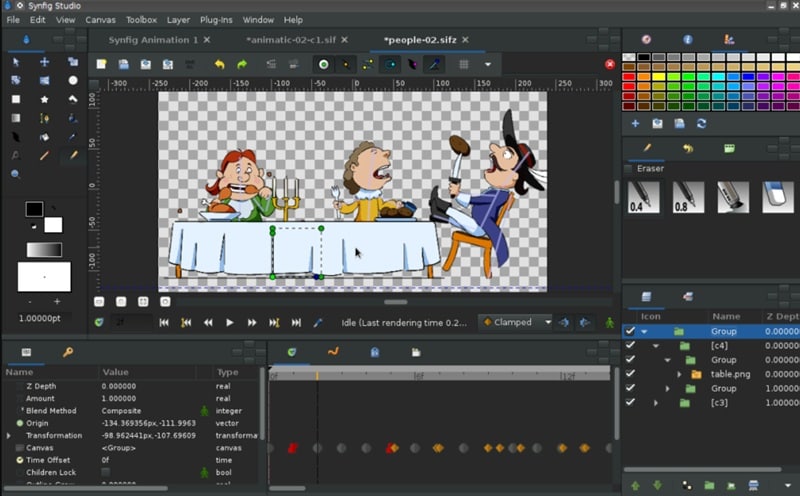
Another free educational animation software worth looking at is Synfig Studio. It is an open-source 2D animation tool built for creating smooth, high-quality animation using vector and bitmap artwork. Synfig works especially well for schools teaching 2D animation basics or character movement.
- Offers more than fifty layers to build artwork and animations of different complexities.
- Includes a full bone system for cutout animation using bitmap images or vector artwork.
- Allows you to create advanced character puppets and dynamic animation structures.
- You can link different layer settings together using simple math-based controls.
- Completely free to use with no watermark on exported videos.
- Limited to 2D animation styles only.
- Does not include AI tools, which means teachers may need more time to create content.
5. iKITMovie
Platform: Windows.
Pricing: Free trial available, with the full version priced at $69.
Best For: Stop motion and claymation projects for students.
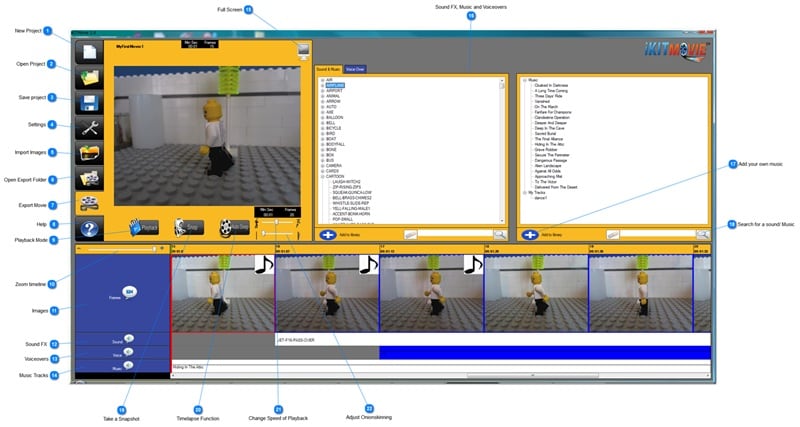
If you are looking for animation software for students, iKITMovie is worth checking out, especially for hands-on stop motion projects. It is designed to help students create animations using physical objects like clay figures, toys, or drawings. Students can record scenes, preview their characters live, and slowly piece together a full animation.
- Add voiceovers, music, or sound effects directly to animated scenes.
- Upload finished animation videos straight to YouTube.
- Includes a library of over two thousand sound effects.
- The interface is clearly divided into steps that match the animation process, which helps students stay organized.
- Live preview makes it easier to see how characters move while editing.
- The free trial is limited to ten sessions, and each session allows only ten minutes of video.
- The overall design feels dated, which may not appeal to some students.
6. Vyond
Platform: Online.
Pricing: Free trial available, with paid plans starting at $99 per month.
Best For: Online explainer videos and animated presentations for classes and student projects.
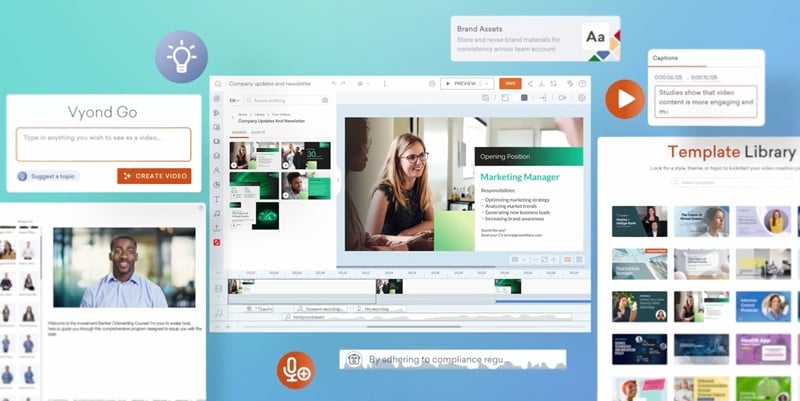
If you prefer not to install any software and are looking for an online animation tool for students, Vyond is a solid option to look at. It is widely used for explainer videos in professional settings, but the same features work well for schools and classrooms. Teachers can quickly build animated lessons, and students can use them for presentations or group projects without worrying about system requirements.
- Create animated projects using text-to-video tools.
- Choose from a wide range of AI avatars with expressive movements.
- Access a large collection of video templates, including options made for educational content.
- Very easy to use, even for beginners with no animation background.
- Templates help speed up lesson creation and student projects.
- The free trial is not available in some regions.
- Pricing is way higher compared to other animation software for schools.
7. Toom Boom Harmony
Platform: Windows and macOS.
Pricing: Free version available, with paid plans starting at $30 per month.
Best For: Advanced 2D animation courses and schools teaching professional animation skills.
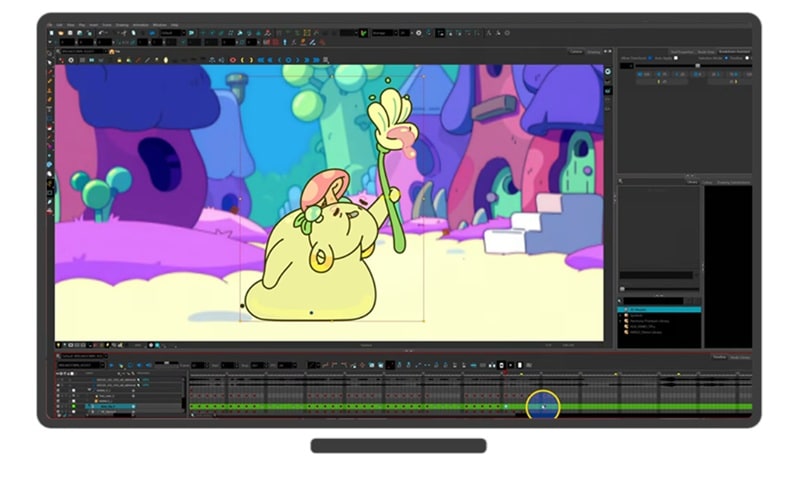
Toon Boom Harmony is another strong choice when you are looking for educational animation software. This tool works best for higher-level classes, animation programs, or students who already understand the basics and want to go deeper. It lets you fine-tune character movement, timing, and motion in a very detailed way.
- Supports importing 3D models in USDZ format along with animation data and camera movements.
- Allows direct import of Photoshop ABR brushes to expand drawing options.
- Lets you refine pencil lines by adjusting opacity and thickness using built-in retouch tools.
- Projects can be saved in a compact file format, which helps with remote collaboration.
- Includes advanced pose tools to fine-tune rigged characters and keyframed animation.
- The free version is very limited and mainly useful for testing the software.
- Not ideal for quick lesson videos or simple classroom animations.
8. Animaker
Platform: Online and iOS.
Pricing: Free version available, with paid plans starting at $27 per month.
Best For: Quick animated school projects, explainer videos, and beginner friendly animation for students.
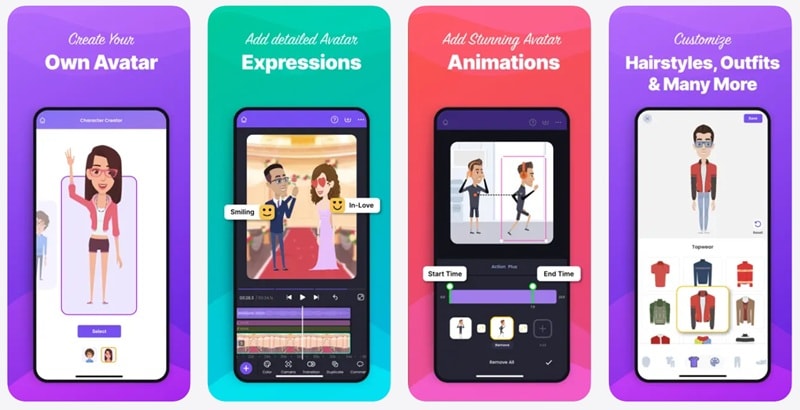
Animaker is a well-known online platform that works especially well for students and classroom educational animation projects. It also has an iOS app, which makes it a handy animation app for school when students need to work on projects outside the classroom. The interface feels simple and welcoming, with plenty of templates that help students get started without feeling stuck.
- Create realistic voiceovers from more than 8000voices across over 170 languages.
- Generate backgrounds, icons, and props from simple text prompts.
- Add subtitles automatically using fast AI-powered caption tools.
- You can create a full 2D animated project just by using prompts.
- Includes a wide range of templates covering many school and learning topics.
- The free plan adds a watermark to exported videos.
- More advanced features require a paid plan.
9. Cavalry
Platform: Windows and macOS.
Pricing: Free version available, with paid plans starting at €16 per month.
Best For: Motion design, data visuals, and structured 2D animation for more advanced classes.
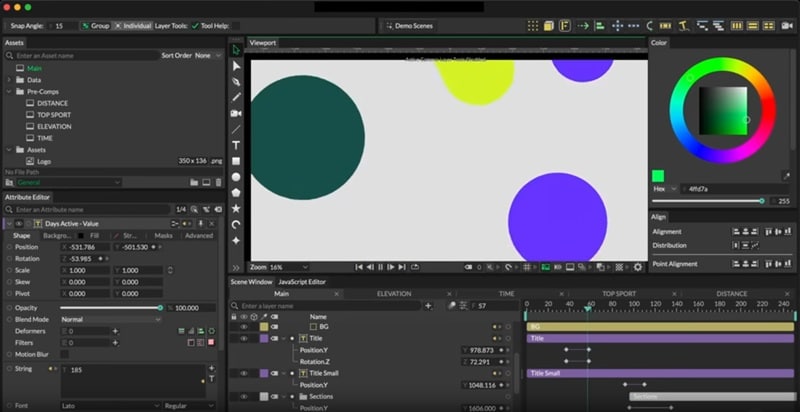
Cavalry is another free animation software for teaching that deserves a spot on your radar. It was built by animators for animators, with a strong focus on making 2D animation smarter and faster to create. While it is commonly used for advertising and data visualization, teachers can also use it for lessons that need clean motion graphics or animated explanations.
- Includes advanced tools like rig control, forge dynamics, and rubber hose animation.
- Offers more than 30 built-in behaviors to bring animation scenes to life.
- Supports text styling like backgrounds, underline, strikethrough, and super or subscript.
- The free version does not expire and works well for basic animation needs.
- Viewport rendering is very fast, which helps keep the workflow smooth.
- It is not designed specifically for classroom projects, so teachers may need time to adapt it.
- Animation styles are limited to 2D only.
10. TV Paint
Platform: Windows (10 and 11), macOS, and Linux.
Pricing: One-time purchase starting at €650.
Best For: Hand-drawn 2D animation and advanced animation courses.
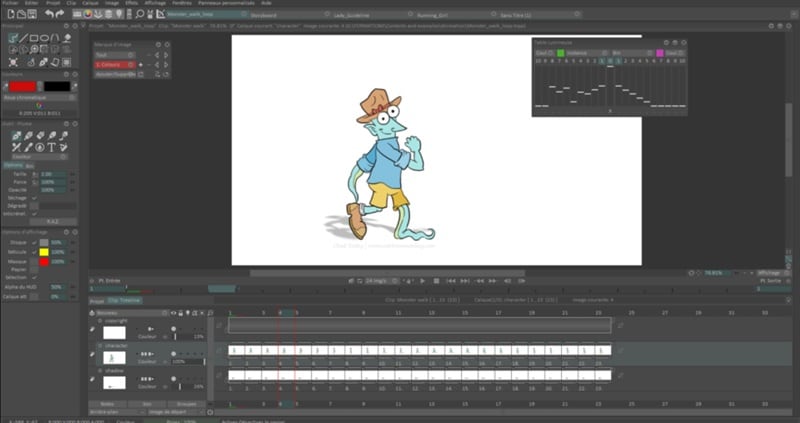
For the last pick on our list, we are going with a more advanced option for educational animation software, TVPaint. This tool is built for professional level 2D animation and is especially good if you want a natural, hand-drawn look. It feels close to drawing on paper, which makes it a great fit for schools teaching traditional animation techniques.
- A powerful brush engine with fully customizable brushes.
- A new puppet layer system based on bitmap technology.
- Strong color and texture tools for detailed artwork.
- Built on bitmap technology, which gives drawings a natural and organic feel.
- A strong choice for schools focused on hand-drawn animation projects.
- There is no free version, and the price is high for many schools.
- It can feel like too much software for basic classroom projects.
Part 3. How to Choose the Right Educational Animation Software
By now, you’ve seen what each educational animation software brings to the table, and you might already be leaning toward one or two options. That said, a tool that works great for one teacher or group of students may not feel right for another.

So, the guide below should help you narrow things down and choose what actually works for your teaching style.
When You Want to Create Animated Lesson Videos Quickly
Filmora works really well here because it offers multiple AI tools for instant animation results, along with a large template library that makes lesson creation much faster. Animaker is also a good option if you prefer working with pre-built scenes and simple drag-and-drop templates.
When You Need One Tool for Both Teachers and Students
Filmora stands out because it balances powerful features with an interface that still feels friendly for beginners. Teachers can create polished animated lessons, while students can use the same tool for projects without feeling overwhelmed. This makes it a practical animation software for schools where different skill levels share the same setup.
Secure DownloadWhen You Need Whiteboard or Explainer-Style Teaching Animation
Clear explanations are key when teaching new or complex topics. Whiteboard-style animation slows things down and helps students follow each step more easily. VideoScribe is a strong choice here since it focuses on hand-drawn visuals that work well for explaining ideas in a simple and structured way.
When You Want Advanced Animation Training or Clubs
For animation clubs or higher-level courses, students need tools that go beyond basics. Blender and Toon Boom Harmony make sense in this case because they offer deep control and professional-level features that support serious animation learning.
When You’re Teaching Younger Students
Younger students need tools that feel fun, simple, and easy to understand. Filmora works well here because it keeps things visual and approachable while still offering creative options.
Secure DownloadConclusion
Finding the right animation software for educational videos can take time, especially with so many tools to choose from. That’s why we put together this list of 10 educational animation software options that actually work for teachers and students in real classrooms. Each tool has its own strengths, but when it comes to balance and ease of use, the best animation software for education is Filmora.
Filmora makes educational animation simple with AI tools that turn text, images, or audio into animated videos in just a few steps. It also includes a large media library with ready-to-use animations and effects, making it easy to create engaging lessons without extra effort.
