

 TL;DR:
Virtual Product Placement (VPP) allows creators to digitally insert or replace branded assets in post-production using AI tools like Wondershare Filmora, eliminating the need for physical on-set props and enabling late-stage sponsorships without costly reshoots.
● Filmora's AI Image-to-Video Element Editing specifically requires the uploaded target video to be trimmed to between 2 and 5 seconds long, and replacing an existing item yields the best results when the new product matches the original object's size and shape.
● Inserting items into static photos using the Nano Banana Pro-powered AI Image Generator requires a precise text prompt that manually defines the product's relative scale, perspective, lighting direction, and contact shadows to blend naturally.
● Unlike permanent on-set physical props, VPP gives TV, music, and social media producers the flexibility to dynamically scale, localize, or update sponsor placements within the exact same base footage long after filming concludes.
Ask AI for a summary
 ChatGPT
 Perplexity
 Gemini
 Claude
 Grok
Grok
Ever wonder how a brand appears seamlessly in a video even if it wasn't on set? The secret is Virtual Product Placement (VPP). This AI-powered technology allows creators to insert branded products into existing footage during post-production. In this guide, we'll explore how AI product placement is changing digital marketing and how you can use Wondershare Filmora to achieve professional results effortlessly.
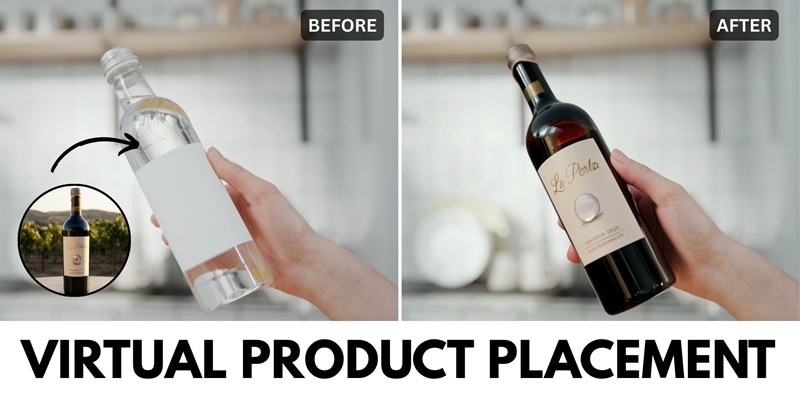
Part 1. What is Virtual Product Placement? The Future of Seamless Advertising
Product placement has been around for a long time as an advertising method to boost brand awareness. Virtual product placement builds on this idea and uses AI technology to insert brands into digital content as products, signage, or visual elements during post-production without changing the original footage.
This approach makes it a practical solution for situations where physical product placement is not possible, such as when filming has already finished, or on-set placement was never planned in the first place.
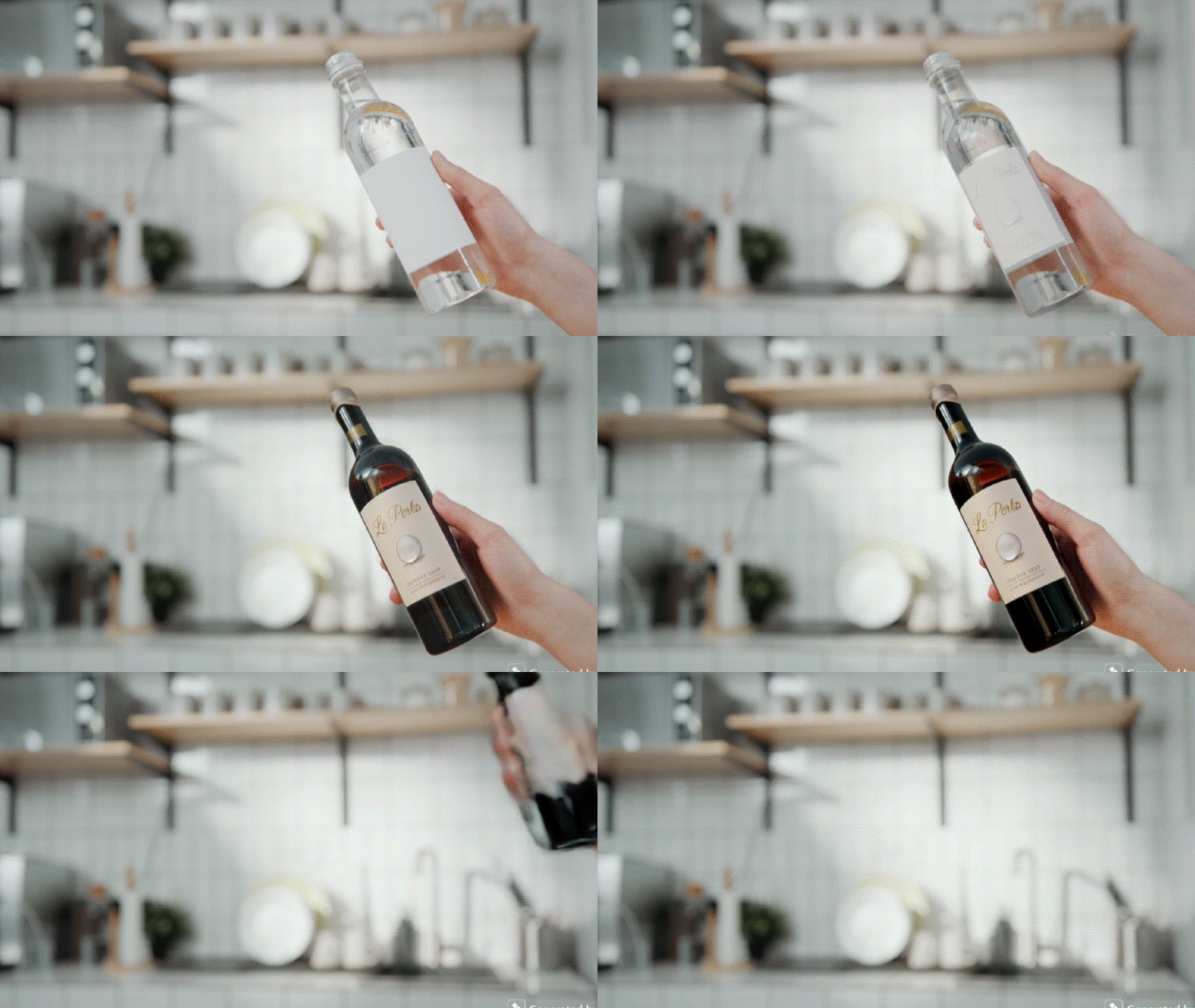
Virtual Product Placement vs. On-Set Placement
| Features | Traditional On-Set Placement | Virtual Product Placement |
| How It Appears | Physical products placed during filming | Products added digitally after filming |
| Production Cost | Higher due to props, potential reshoots, and crew | Lower since no physical setup is needed |
| Audience Engagement | Fixed placement with no variation | Can be adapted to different audiences |
| Flexibility | Permanent. Cannot be changed once filmed. | Highly flexible. Can be updated, localized, or changed anytime. |
| Scalability | Limited to one version of the content | Easy to scale across markets and campaigns |
|
Show More
Show Less
|
||
Benefits of virtual product placement
- Lower production costs since there is no need for physical props, set changes, or reshoots
- No disruption to filming because products are added after the shoot is already finished
- Easy to update or replace products anytime, even long after the content is released
- Longer campaign lifespan since the same content can support new sponsors over time
- Scalable across platforms, making it simple to reuse one video for multiple campaigns and formats
Brands usually spend anywhere from a few thousand to tens of millions of U.S. dollars on product placement. With virtual product placement, they get more control over those costs.
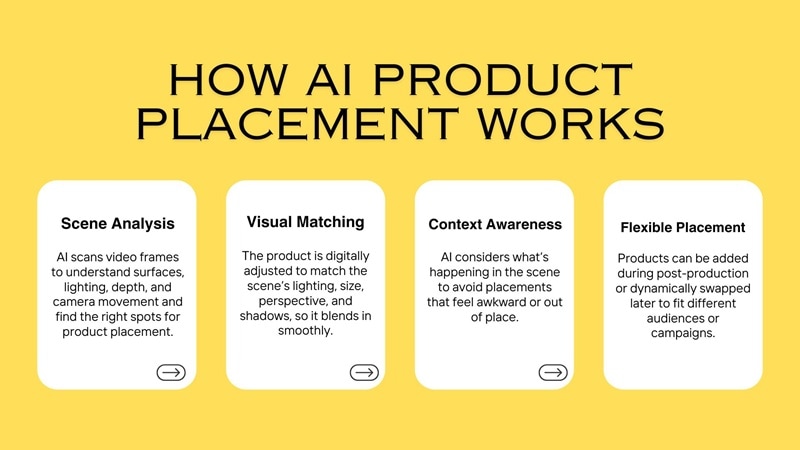
How AI Product Placement Works
Because virtual product placement relies on AI, much of the process is automated. AI product placement generators can analyze a scene, understand depth, lighting, and motion, and insert products so they blend naturally with the original footage. As a result, the workflow becomes faster and much easier to manage.
Part 2. How to Use AI Product Placement in Wondershare Filmora (Step-by-Step)
After you have already understood how virtual product placement works, the next step is finding the right tool for AI product placement and learning how to actually use it.
Wondershare Filmora is the best AI video editor for virtual product placement. Whether you're an influencer or a marketer, Filmora's AI Image-to-Video and AI Image Generator features allow you to seamlessly add sponsored products to videos in minutes.
- For videos, you can use Filmora's AI Video Element Editing feature to add or replace elements in a scene.
- For images, Filmora comes with an AI Image generator powered by Nano Banana Pro, which you can use to remove existing objects or insert branded products into a photo.
 Secure Download
Both methods work by combining prompt descriptions with reference images or videos that you upload. The prompt tells the AI what to add or replace, while the reference helps it understand the scene, perspective, and lighting so the product fits naturally into the content.
How to Add a Product to a Video with Filmora
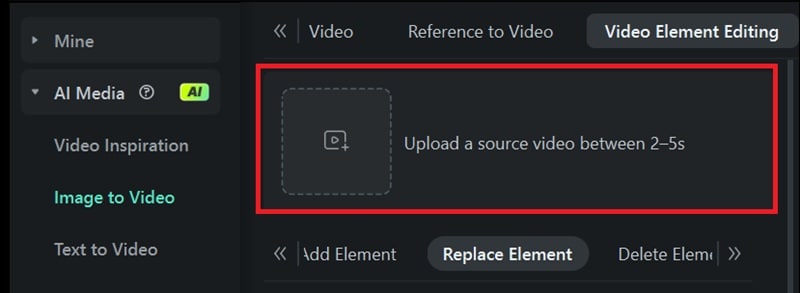
After creating a new project in Filmora, head to Stock Media > AI Media > Image to Video. Then, select the "Video Element Editing" tab and choose "Replace Element."
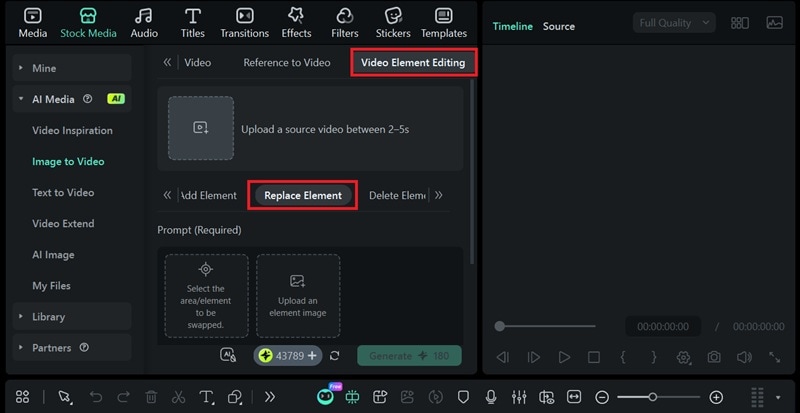
Note: If you want to place a new product into the scene instead of replacing one, choose Add Element.
Secure DownloadInside the panel, upload the video you want to edit (between 2–5 seconds). You can trim it first in Filmora if the clip is longer.
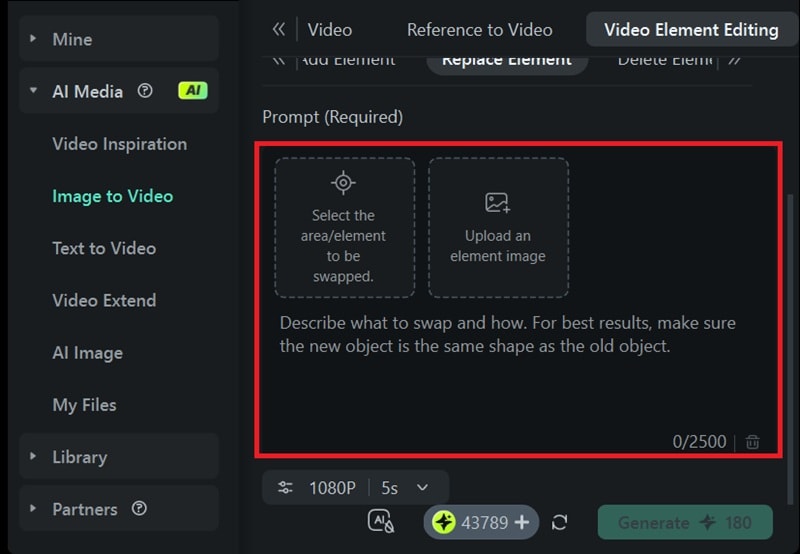
After that, add the product you want to replace the original item with, then click "Select the area/element to be swapped."
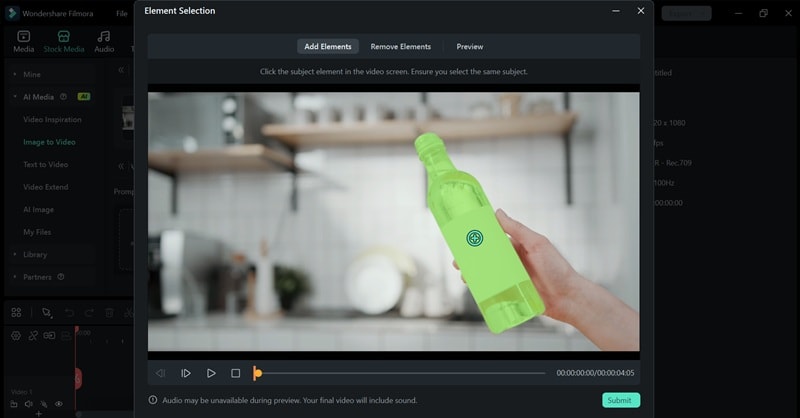
You'll be able to select the target area in the video. Just click the object you want to replace, and Filmora will automatically detect the selected element.
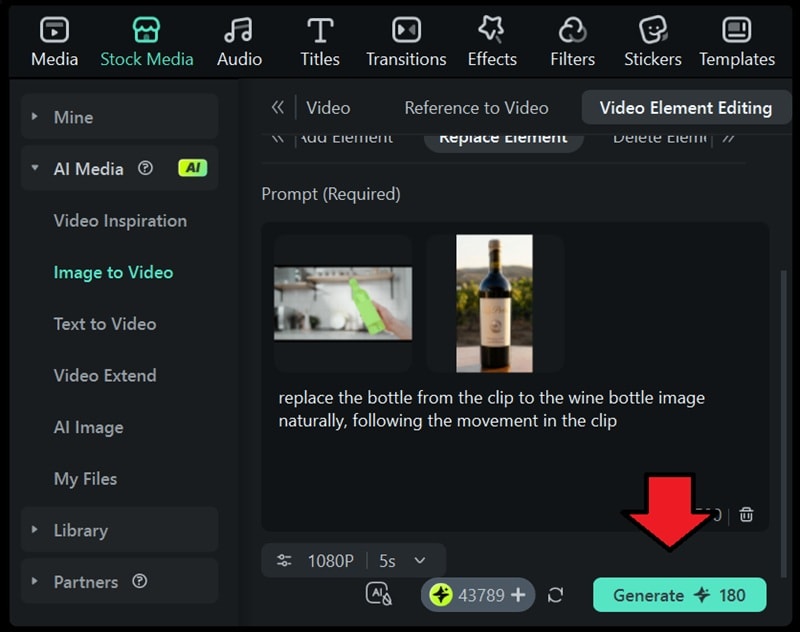
Enter a short prompt to describe how the product should appear in the scene. Then, click Generate. You will see the original item replaced with the new product.
Tip: For the best result, make sure the new object has a similar size and shape to the original item in the footage.
How to Add a Product to an Image with Filmora
While AI product placement is commonly used in videos, you can also place products into images using Filmora's AI Image Generator, powered by Nano Banana Pro. You can insert items like branded products into a photo even if you don't have any photo editing skills.
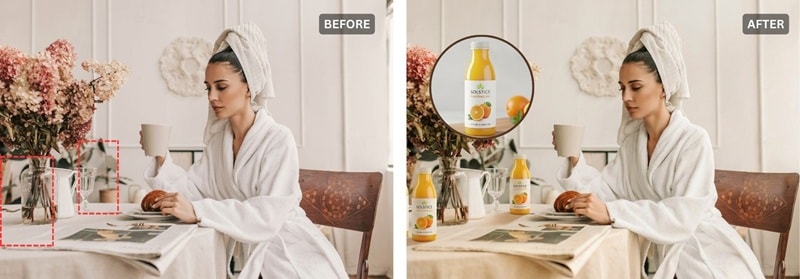
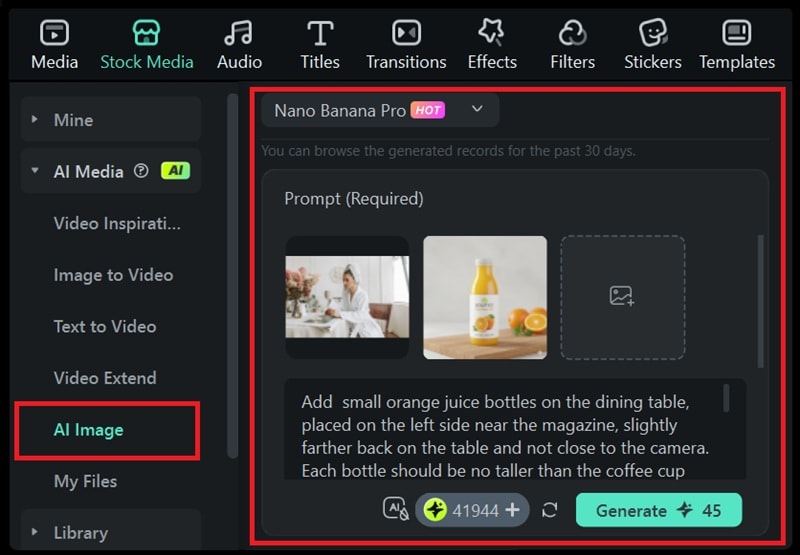
What you need to do is upload both the background image you want to edit and the product image you want to add. After that, describe how the product should appear in the scene. Make sure to include these aspects:
- Size and scale relative to nearby objects
- Exact placement
- Perspective and depth
- Lighting direction and color tone to match the existing light source
- Shadows and contact points
- Clear visibility without overlapping people or objects
Part 3. Where Does Virtual Product Placement Work Best? Top 5 Content Formats
Since virtual product placement is added after the content is already filmed, it works best in content that gets watched repeatedly or updated often. Some of the most effective content formats for VPP are:
1. Television Shows & Films
For ongoing TV series or films that secure sponsorship deals after filming is already done, AI product placement can save the whole production crew from reshooting the entire scenes and rebuilding sets just to feature a product. They can add, swap, or update a brand quickly without slowing down the release schedule or altering the original footage.
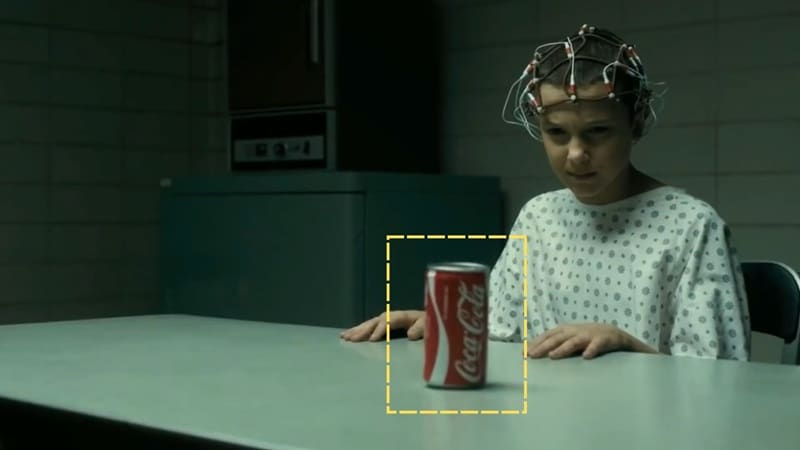
Image: Stranger Things (Netflix)
2. Music and Performance Videos
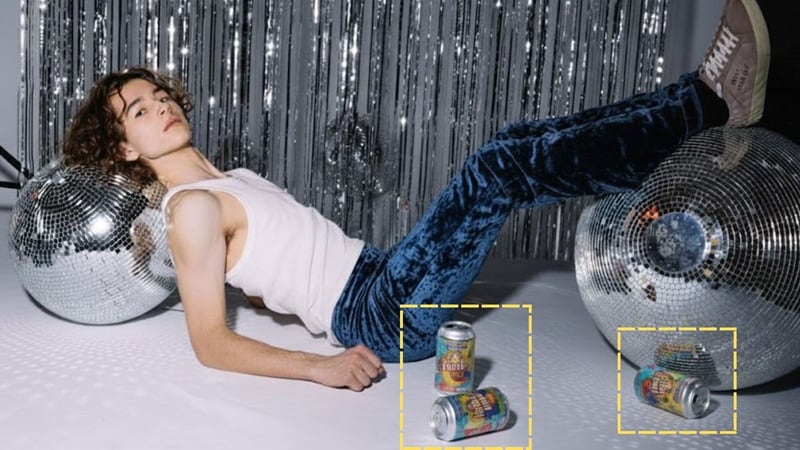
Music videos and live performance content get replayed over and over, which makes them perfect for virtual product placement. Brands can be added to props, screens, or backgrounds without taking attention away from the performance, and the same video can be reused with different brand placements as campaigns change.
3. Social Media Content
When social media creators or influencers already have footage that a brand decides to sponsor later on, they can use AI product placement to add the product without reshooting the video or photo. It also becomes practical to swap in different products for different campaigns, creators, or regions using the same content.

Results of Virtual Product Placement
When placed in the right context, virtual product placement shows strong results:
- Compared to traditional TV ad breaks, virtual product placement can increase audience reach by roughly 22% to 49%, depending on the market and type of program.
- More than half of viewers (56%) who saw a product placed virtually went on to use or buy it, compared with 34% of viewers exposed only to standard TV ads.
- Industry analysts estimate that virtual product placement in film and television made up about 63% of all U.S. product placement spending in 2023.
- Beyond sales, VPP also lifts brand perception. For example, Amazon reported that M&M's virtual placement in Bosch raised brand favorability by 7% and increased purchase intent by 15%.
Conclusion
Even if the brand deal comes in after filming is already finished, you won't have to stress about reshooting everything or rearranging your entire production plan. With virtual product placement, products can be added or swapped in during post-production while the original footage stays exactly the same.
With Wondershare Filmora, virtual product placement is no longer reserved for Hollywood studios. Download Filmora today to start integrating brands into your content with the power of AI product placement technology.You can work around the time, budget, and resource limits that you deal with, and still produce content that works for your brand partnerships.

