


 TL;DR:
Choosing the best YouTube video translator depends on your primary need: Wondershare Filmora and Wayin AI are ideal for creators repurposing content with AI dubbing, while Immersive Translate and zTranslate provide real-time, side-by-side subtitle translations for viewers.
● Browser extensions and mobile apps like Immersive Translate, zTranslate, and YouTube Translator & YouTube Video Dubbing strictly require the original video to already have closed captions to function, meaning they cannot translate videos lacking pre-existing subtitle files.
● If you require AI voice dubbing with lip-sync, Wondershare Filmora operates locally on Windows and macOS for 23 languages, HeyGen supports over 175 languages but restricts free tier exports to 3-minute videos, and Vidnoz offers pre-generation script proofreading but utilizes a per-minute pricing model for processing.
● For research and note-taking, platforms like YouTube to Transcript and Maestra isolate the text output, allowing users to remove sponsored segments or intros and leverage built-in AI prompts to convert translated transcripts directly into summaries and study notes.
Ask AI for a summary
 ChatGPT
 Perplexity
 Gemini
 Claude
 Grok
Grok
Not understanding the video you watch is frustrating, yet it’s something almost everyone deals with at some point. Even though YouTube offers auto-translation, you can’t always count on it, since the feature depends on whether the uploader allowed it in the first place.
When there are no captions to rely on, you need to use YouTube video translators that can do it for you. Technology, especially with AI, has advanced enough to help you generate subtitles with high accuracy and even dub the voice into other languages.
Among all the options out there, we’ve narrowed down the best translator for YouTube videos you can try now. No need to sort through everything yourself – check our review and pick the tool that fits you best!
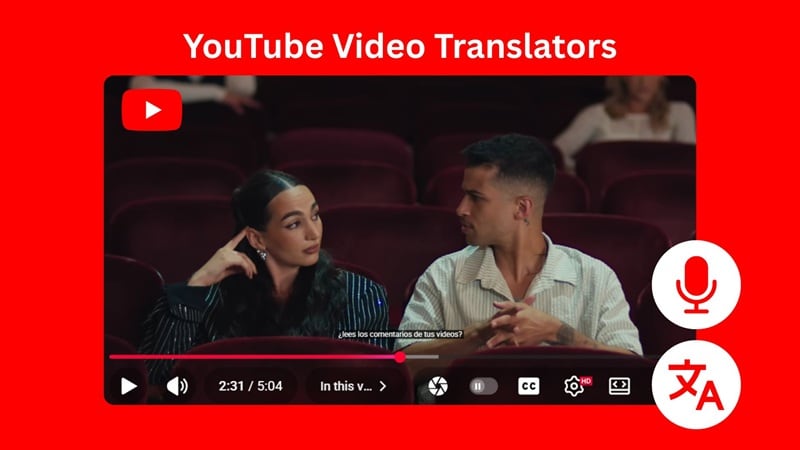
Picking the best YouTube video translator isn’t easy, especially with so many tools promising "fast" and "accurate" translations. To make things fair and useful, we test each tool hands-on and focus on the areas that matter most in real situations, with criteria as follows:
- Translation Accuracy: We compare the translated output with the original speech or captions to see how well the tool handles meaning, tone, and context.
- Subtitle Readability: We check how clear and well-timed the subtitles are, whether they overlap with existing captions, and how easy they are to follow during playback.
- Voice Dubbing and Lip Sync: Some tools listed here have the ability to generate translated voice-overs or match the new audio with the speaker’s mouth movements.
- Supported Languages and Export Options: We provide information regarding many languages each tool supports and whether you can export subtitles or dubbed videos in common formats like SRT, TXT, or MP4.
After that, we divide these YouTube video language translators into two groups: tools that can translate both subtitles and audio to create dubbed versions with lip sync, and tools that only handle subtitle translation.
Our Top 3 YouTube Video Translator Picks



Best Translators for YouTube Videos with Lip Sync or Dubbing
For someone with hearing difficulties, YouTube audio translators that offer lip sync or full dubbing can make videos much easier to follow. Moreover, they are also becoming a key part of many creators’ strategies to make their content more inclusive and reach wider audiences.
Before exploring our recommended YouTube audio translators in more detail, you can take a quick look at what each tool compares to help you get a feel for what they offer.
| Platform | Languages Supported | Translation Accuracy | Subtitle Export | Rating* | |
| Filmora | Windows, macOS | 23 languages | High | 4.7/5 | |
| Maestra | Web, browser extension | 125 languages | High | 4.8/5 | |
| HeyGen | Web, iOS | 175+ languages | High | 4.8/5 | |
| YouTube Translator & YouTube Video Dubbing | Browser extension | 50+ languages | Low | 2.8/5 | |
| Vidnoz | Web | 140+ languages | Moderate | 4.5/5 | |
|
Show more
Show less
|
|||||
*) Ratings are based on personal hands-on experience and other users’ reviews.
 Secure Download
1. Wondershare Filmora
Wondershare Filmora is an AI-powered video editor with built-in AI Translation and Speech to Text features that can work as a language translator for YouTube videos with fast and accurate results. You can generate subtitles, convert speech and export into text, edit and customize the caption, and even create dubbed versions in different languages right inside the editor.
- Edit subtitle with preview: See your changes instantly while adjusting the caption.
- Export subtitle in SRT or TXT format: Save your captions in common subtitle formats for use on YouTube or other platforms.
- Repurpose content with stylish hardsubs: Create readable yet stylish hardsub versions for social media or reposting.
- Translate and dub in one workflow: Handle text translation and voice dubbing without jumping through different settings.
- AI lip-sync: Match translated audio with mouth movements for a more natural result.
- Voice Modeling: Clone your own voice to generate translated lines that still sound like you.
- Produces highly accurate subtitles and translations using advanced AI.
- Gives you full control to edit timing, text, and style.
- Everything is built into the editor, so your workflow stays simple.
- Lets you export SRT files or embed subtitles directly into the video.
- Requires installation on your device.
- AI features use credits.
Windows, macOS (also available on iOS and Android through AI Captions).
Free version available, with subscription and one-time purchase options.
23 languages (English, Spanish, German, Hindi, Chinese, Japanese, Korean, and more).
YouTube creators or anyone who needs to translate videos, export subtitles, and create multi-language dubs in one smooth workflow, with plenty of customization options and flexible editing controls.
We recommend Filmora for creators who want a simple setup for multilingual content. Since it’s a full video editor, you can do more than just translate. It also works well for viewers who need more control and customization options over subtitles and translation compared to what YouTube offers.
Secure Download2. Maestra
Maestra is an online AI video translator you can use to translate YouTube videos you've downloaded. It can turn spoken audio into subtitles and also dub the video using its AI voice selections. All you need to do is upload the video file, select the languages, choose whether you want to enable the AI dubbing feature, and refine the subtitles if needed.
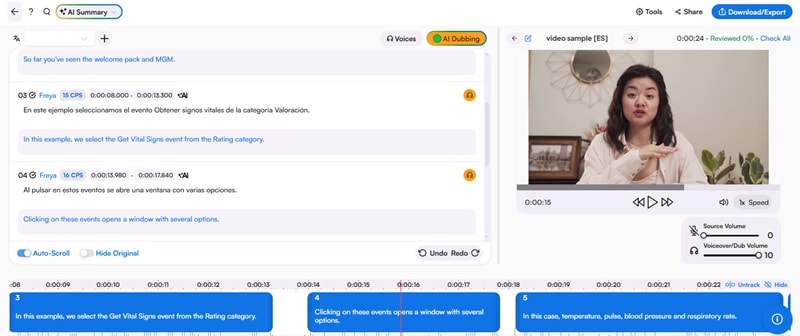
- AI Summary: Quickly generate short summaries of your video content.
- Text Editor: Proofread and edit subtitles using an easy-to-use editor.
- YouTube, OBS, and vMix Integrations: Pull videos directly from your YouTube channel or connect OBS or vMix to use the web captioner for real-time translation during broadcasts.
- Live Video Translation (via Browser Extension): Translate YouTube videos while watching using the browser extension or web captioner.
- Start for free with limited, watermark-free usage
- Supports multiple subtitle formats like SRT, TXT, VTT, XML, and more
- Offers a large variety of AI voices with different tones and styles
- Lets you manually edit and customize subtitles after they're generated
- Doesn't let you use your own voice for dubbing
- Mostly focused on translation and captioning, with fewer editing tools
- Only export video in MP4 format and audio in MP3 format
Online (web), browser extension.
Free plan available for limited usage. Pro plans start from $49/month for longer durations.
Up to 125 languages for translation, and 29 languages for AI dubbing.
Casual creators who prefer a web-based interface to edit subtitles, generate transcripts, and dub videos. It's also ideal for those exporting captions for different platforms since Maestra supports flexible subtitle formats.
Maestra can be an option if your main focus is getting multilingual subtitles for your video. Its helpful extras like AI Summary and Keyword Extraction make it even better if you're working on educational content, tutorials, or anything that needs quick breakdowns.
3. HeyGen
HeyGen is another AI-driven YouTube video translator online designed to turn your videos into natural-sounding multilingual content. You can either upload your video or paste a YouTube link. Then, HeyGen will translate the speech and sync the new audio with the speaker's mouth if you select translation with dubbing.
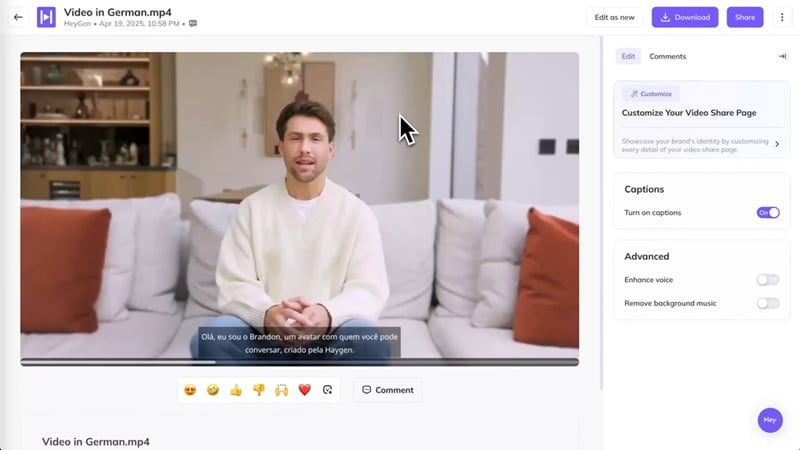
- Subtitle Editing: Add subtitles, refine the tone, and adjust styling to match your brand or content theme.
- AI Dubbing: Translate spoken audio into another language with natural-sounding delivery.
- Voice Cloning: Recreate your own voice in the target language for consistent branding across videos.
- Side-by-Side Preview: Instantly review the translated version before finalizing or downloading.
- Accepts direct YouTube URLs for fast translation
- Provides realistic dubbing with near-perfect lip-sync
- Includes AI Avatar tools, which you can pair for localized video presentations
- Free users can translate only up to 30 languages, with 3 videos per month
- Free plan limits each video to 3 minutes
- Processing the translation with dubbing can be slow
Online (web), also available on iOS
Free version available. Paid subscription starts from $29/mo for more access to languages and accents.
175+ languages
YouTubers, content creators, educators, and businesses who want natural-sounding multilingual videos with realistic lip-sync. It's especially great for creators who want their translated content to look and sound like the original speaker.
HeyGen offers one of the most seamless YouTube translation experiences. Even though the processing can take a little time, the final output is pretty satisfactory. The voice dubbing sounds natural, and the lip-sync lines up well with the speaker's mouth.
4. YouTube Translator & YouTube Video Dubbing
YouTube Translator & YouTube Video Dubbing is an extension that lets you translate supported YouTube videos in real time. But to use it, the video needs to have subtitle files already. If the video has no captions, the extension won't be able to translate it.
Once the extension is installed, you can start using it by opening any YouTube video with subtitles. You'll see the extension icon and a "Translate Video" option appear under the player. Choose your preferred language, save your settings, and click the icon again to start the translation.
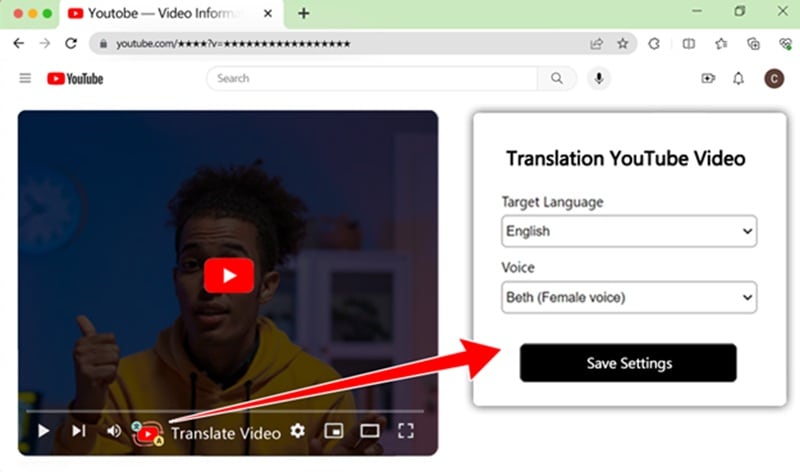
- Smart Synchronous Dubbing: Automatically syncs the dubbed voice-overs with video playback.
- AI Subtitles: Uses AI to generate accurate subtitles for YouTube videos, improving clarity and accessibility for viewers.
- Multiple Voice Options: Offers both male and female voices and supports various languages with localized accents
- Free for 20 minutes of YouTube videos
- Displays translated subtitles beside the video instead of overlapping it
- The syncing is often off, with no manual timing adjustment
- Original background audio is muted during dubbing
- The voice sounds robotic and lacks tone
Browser extension
Free version available with a limited duration. Paid subscription starts at $6/mo to unlock more languages and quota.
52 languages
Anyone who wants to dub YouTube interviews or simple explanation videos from another language into English, where the conversation is easy to follow.
YouTube Translator and YouTube Video Dubbing is a convenient option when you want to hear a translated English dub while you watch. Since it runs as a browser extension, the option appears right on the YouTube player, so you can turn it on instantly.
5. Vidnoz
Vidnoz provides an AI Video Translator that works smoothly for YouTube content. You can upload a video file or paste a YouTube link to start using it. And for better accuracy, you can add a subtitle file if you have one. Vidnoz also offers extra tools like lip-sync and script proofreading to ensure the final output quality.
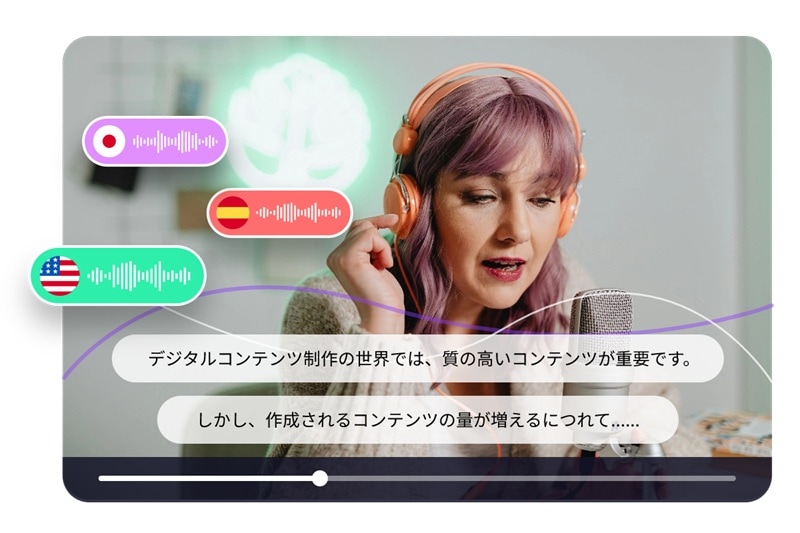
- Multi-voice detection: Automatically identifies different speakers to maintain a more natural dialogue flow.
- Accent handling: Adjusts pronunciation for clearer results.
- AI voice cloning: Mimics and recreates the original speaker's voice in another language.
- Simple interface that works directly with YouTube links
- Script proofreading helps fix translation mistakes before generating the audio
- Some advanced features are locked behind the Pro plan
- No automatic language detection for the input video
- Pays per minute of generation, which can become pricey for translating long videos
Online (web)
Starts at $27/mo for 15 minutes of video translation time.
140+ languages, with fewer options for the input video
Viewers who need quick translations of short YouTube clips, especially when you want fast dubbing or subtitles.
Vidnoz keeps the workflow simple, supports direct YouTube links, and offers helpful extras like lip-sync and script proofreading. Though the cost for a YouTube translator online can be expensive, especially for longer videos, it's another reliable way to get accurate translations.
Best YouTube Video Subtitle Translators (Text Only)
If you are someone who only needs a simple YouTube subtitle translator that focuses on clean text output without dubbing or lip-sync features, we have also prepared a separate list for that.
These tools are perfect when you just want readable subtitles, fast translations, or transcripts you can save and use as notes.
| Platform | Languages Supported | Translation Accuracy | Subtitle Export | Rating* | |
| RecCloud | Web | 100+ languages | High | 4.3/5 | |
| YouTube to Transcript | Web | 125+ languages | Moderate | 4.3/5 | |
| zTranslate | iOS, Android | 110+ languages | Low to Moderate | 3.5/5 | |
| Wayin AI | Web | 100+ languages | Moderate | 4.5/5 | |
| Immersive Translate | Browser extension, iOS, Android | 100+ languages | High | 4.6/5 | |
|
Show more
Show less
|
|||||
*) Ratings are based on personal hands-on experience and other users’ reviews.
1. RecCloud
RecCloud is an online YouTube video translator, which is also available as a mobile app, that delivers pretty good translations. Though, it often struggles with more nuanced speech. The setup is simple; you only need to paste the YouTube link, pick your target language, and let it process. Each minute of translation requires 2 credits.
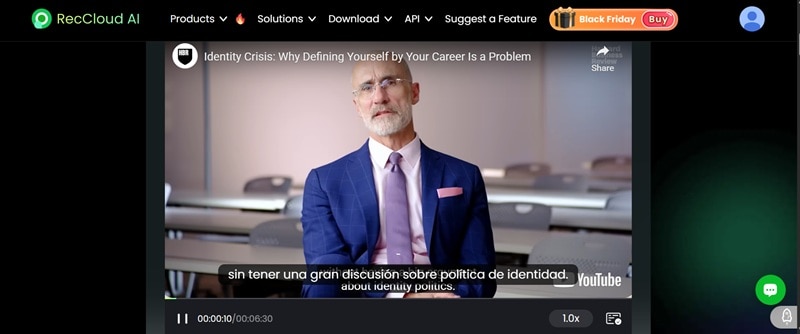
- Video and Subtitle Export: Download the translated video or export subtitle files
- Direct URL Support: Translate video directly from a YouTube link without uploading
- Fast processing speed
- As a new user, you get at least one free video translation if you log in
- Subtitles can overlap with the original ones, making them harder to read
- Some phrases can be mistranslated or interpreted too literally, instead of contextually
- No option to download the original transcript for reference
Starts at 9.00/week for 300 credits
100+ languages
Users who just want to translate a YouTube video fast.
RecCloud keeps everything super straightforward. Paste a YouTube link, pick your language, and it gets right to work. You can preview the translated subtitles directly on the video.
2. YouTube to Transcript
Just like its name, YouTube to Transcript mainly serves as a caption transcriber for YouTube videos. However, it also includes several useful features, like translation.
It will first transcribe the video in its original language. After that, you can select the language you want to translate and select the action you want to take (e.g., get a clean transcript or make a summary in the target language).
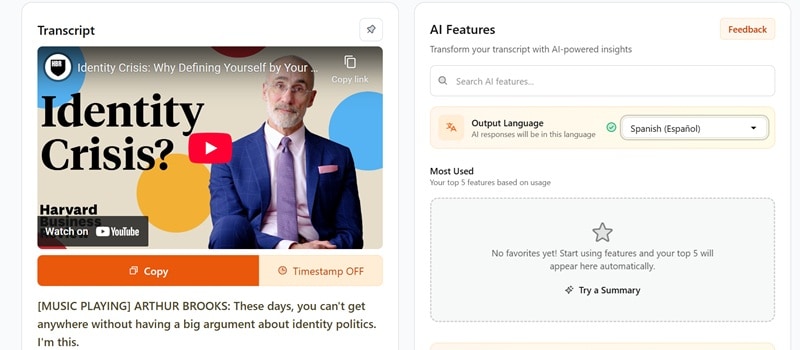
- Translation: Select your preferred language and translate the transcript into more than 125 languages
- Remove unwanted sections: Cut out sponsored segments, intros, outros, or any parts you don’t want in the final transcript
- Free AI prompt library: Use built-in prompts to turn your transcript into summaries, notes, insights, creative drafts, and more
- Embedded Player: Watch the video while viewing the transcript side by side for easier reviewing
- Works as an all-around tool for video transcription, not just a translator
- Generates summaries, key insights, and clean notes from the YouTube video you translate
- Lets you jump to specific moments by clicking any line in the transcript
- No free trial; you need to pay to start using
- Struggles with complex languages or figurative expressions
Online (Web)
Starts at $4.00/mo
125 languages
Users who want a YouTube video translator that helps with note-taking, brainstorming, and digging into longer videos for research.
YouTube to Transcript is good when you want the text more than the video. You will get a transcript first, and then you can ask the tool to translate and get summaries, insights, or even trimmed versions without distractions like intros and sponsored segments, depending on how you want it. The side-by-side player also makes reviewing easier.
3. zTranslate
If you often watch YouTube on your phone, using a dedicated translator app like zTranslate is more convenient. After installing it on your phone, you only need to open the app, search for the video you want by entering keywords, and select it from the list.
However, note that only videos with closed captions will appear since this YouTube video subtitle translator relies on existing subtitles to translate. Clips without captions can’t be translated. You’ll also need to sign in so the app can verify access to its database.
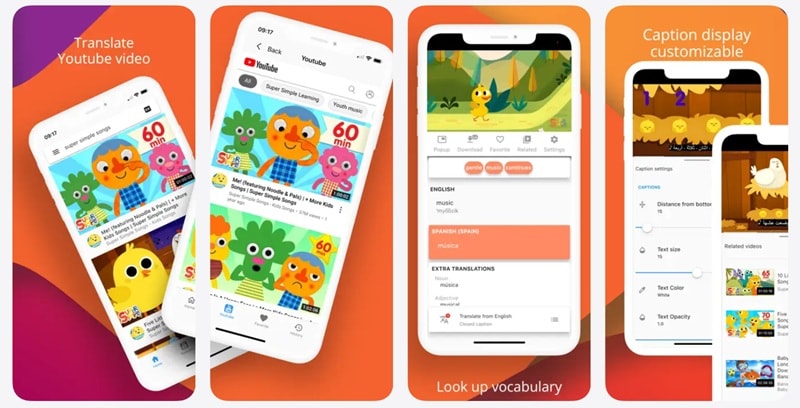
- Watch videos with subtitles in your language: Pick any video that already has captions, then translate those subtitles into the language you prefer.
- Subtitle comparison for learning: Shows the original and translated subtitles at the same time.
- Built-in dictionary lookup: Tap any word to see its meaning without leaving the video.
- Shadowing practice: Supports the shadowing method, where you repeat the audio right after hearing it.
- Trusted by millions of users for translating YouTube videos on mobile
- Helpful for language learning while watching a YouTube video
- Only works with videos that already have subtitles
- Contains ads
- Many users report frequent buffering during video playback
Free download, with an in-app purchase at $4.99 to remove ads.
110+ languages
Students and mobile users who want to learn languages through YouTube videos and need quick, on-the-go translations directly from their phone.
zTranslate is our pick for translating YouTube videos right on your phone. You can also use it to learn the language, where you tap words for instant definitions.
4. Wayin AI
Wayin AI comes with an AI Video Translator that lets you translate videos by either pasting a YouTube link or uploading your own file. It also supports links from TikTok, Twitch, Facebook, and several other platforms. One of its biggest perks is the 60 minutes of free subtitle translation you get every day, so you can try and test it first before investing your money in it.
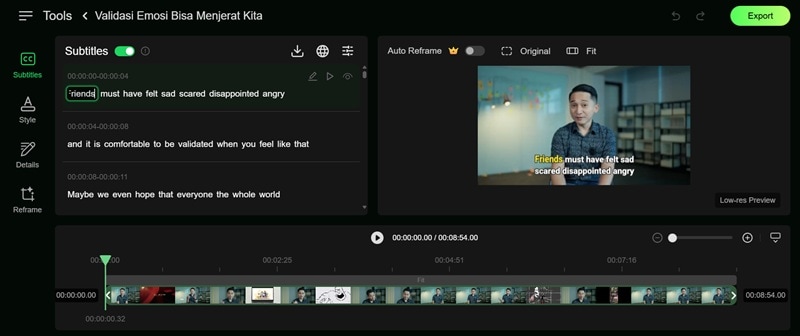
- Editable subtitles with preview: Adjust and refine lines while seeing changes in real time
- Caption preset templates: Quickly restyle subtitles for a more aesthetic look
- Auto Reframe (Pro): Adjusts framing for different platforms, perfect for repurposing content across different platforms
- Subtitle display options: Choose to show the original text, translated text, or both
- Download translated subtitles in SRT or TXT formats
- Export the video with generated captions in MP4
- You can play and view the translations word by word while listening to the original voice
- The platform looks like still in the development phase, with bits of placeholder code appearing in the interface
- Translations are often word-for-word, making mistranslations quite common
Online (Web)
Free version available with limited duration. Paid subscription starts at $13.99/mo
100+ words
YouTube creators who want to repurpose their content in another language while still having the freedom to adjust and polish the subtitles. It’s also helpful for anyone learning a language, since you can see each word highlighted as it’s spoken.
The word-by-word highlighting makes the translation easier to follow, especially if you’re learning the language. And since you can still edit and refine the subtitles afterward, you’re not stuck with whatever the AI produces on the first try.
5. Immersive Translate
Immersive Translate is a browser extension (and also available as a mobile app) that automatically translates YouTube subtitles as you watch. It can show both the original and translated text at once on the YouTube video you are watching.
It offers a free YouTube video translator for general translation and uses AI language models to provide more context-aware translations than basic subtitle tools. You only need to open the YouTube video, and the subtitles will translate automatically. The video needs to have a subtitle for it to work properly.
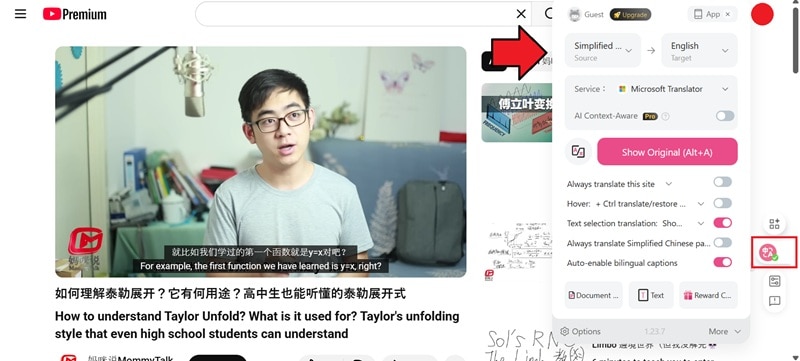
- Choose your AI translator: Immersive Translate lets you pick from supported popular AI translation services like DeepL, Microsoft Translator, OpenAI, DeepSeek, Claude, Gemini, and more.
- Full video translation support: Not only handle subtitles, but it can also translate YouTube video titles and descriptions to help you navigate through foreign videos.
- AI-Context Aware (for Pro users): Provides smarter, more natural translations that understand sentence meaning rather than translating word by word.
- Delivers fast, real-time subtitle translations while you watch
- Displays original and translated subtitles side by side
- Starts working on its own right after installation
- The video needs to have a subtitle for it to work properly.
- Relies on an internet connection to function.
- Offers no option to manually edit or customize the translated subtitles
- More advanced, context-aware translations are only available in the Pro version
Browser extension (Chrome, Firefox, Safari, Edge, etc.), iOS, and Android
Free for general translation. Paid subscription starts at $34.99/mo for higher translation quality.
100+ languages
YouTube viewers who want to translate a YouTube video while watching it directly on the platform.
Immersive Translate makes it really easy to follow foreign videos. The translation quality is solid, and you can even view the original and translated subtitles side by side. Unlike online converters, everything appears right on the YouTube player, so you get instant translation as you watch.
What to Consider When Choosing a YouTube Video Translator?
The reasons you’re looking for a YouTube video translator can be very different from someone else’s, so the "best" tool really depends on how you plan to use it. From the list above, we’ve grouped the most common needs and picked out the tools that do the job best for each case.
1. For Note Taking
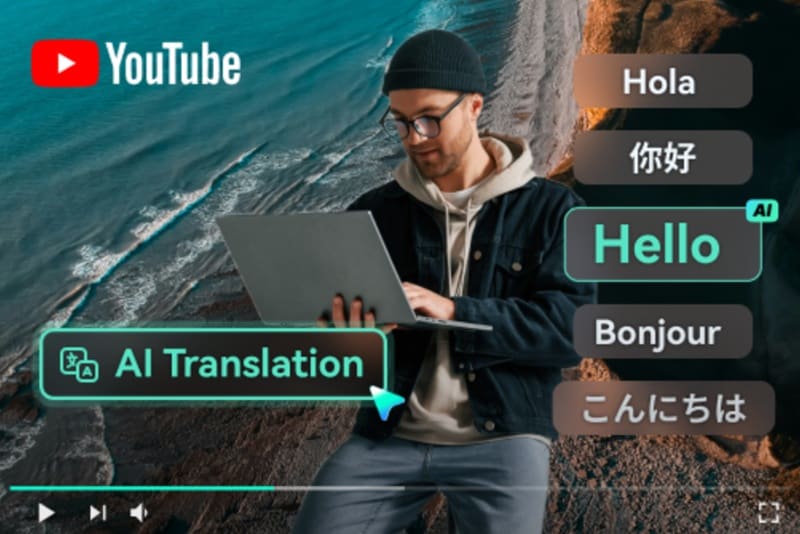
If you rely on YouTube for studying or research, you’ll want a translator that focuses on high-accuracy transcripts. Plus points if they can jump to timestamps, remove unnecessary sections, and turn the transcript into summaries or notes. These features will help a lot in making long videos in another language easier to digest.
Recommended tools: Maestra, YouTube to Transcript
2. For Casual Watching and Learning

Most of you probably just want an easy way to understand what’s being said while watching YouTube content. In that case, look for translators that work in real time and show subtitles directly on YouTube or even your phone screen (depending on your preferred device).
YouTube voice translators with dual subtitles or instant translation also make it easy to follow along and pick up new words as you watch. Also, it’s better if the translator supports direct YouTube links, so you can get the translation right away without downloading first.
Recommended tools: HeyGen, YouTube Translator & YouTube Video Dubbing, Vidnoz, RecCloud, zTranslate, Immersive Translate.
3. For Repurposing Content
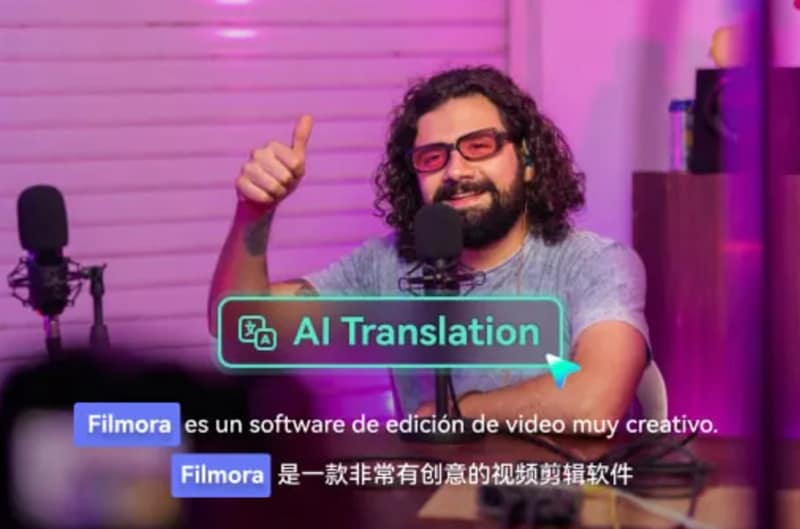
For creators who want to make their videos more accessible, boost views, and reach audiences in other languages, you’ll need a tool that does more than basic subtitle translation. Look for options that let you edit and style captions, export them in multiple formats, or even generate natural-sounding dubs with lip-sync so you can repurpose your video more easily.
Recommended tools: Wondershare Filmora, Wayin AI
Secure DownloadConclusion
Have you decided on which YouTube video translator to use? Some tools are great for quick subtitles, while others help you dub your videos with lip sync.
But with all the options we’ve covered here, you won’t run out of choices when it comes to translating YouTube content, be it for your own videos or for understanding someone else’s. For a more complete experience, download and try Filmora, where you can translate, edit, dub, and customize everything in one place.
