

 TL;DR:
Magic Light AI is a fast, cloud-based text-to-animation generator ideal for beginners, but Wondershare Filmora is the recommended alternative for creators who need frame-by-frame editing control and no credit limits.
● The 2026 version of Magic Light AI delivers faster rendering, enhanced lip-syncing, and expanded character libraries that automatically maintain visual consistency across multiple scenes.
● Magic Light AI restricts usage through a strict credit system capped at 300 free credits upon registration, which will quickly deplete if you create long-form content or need to revise occasional rendering errors.
● Wondershare Filmora is best for users requiring detailed timeline adjustments, as it combines AI video drafting with advanced features like keyframing, scene cuts, and custom transitions without generation quotas.
Ask AI for a summary
 ChatGPT
 Perplexity
 Gemini
 Claude
 Grok
Grok
Magic Light AI is a cloud-based generative AI platform that converts text prompts into animated videos. This 2026 review evaluates its text-to-video capabilities, UI simplicity, and credit-based pricing compared to pro-grade alternatives like Filmora.
Looking for an easy way to turn ideas into animated videos? This detailed Magic Light AI review covers everything: features, pricing, and key limitations. We'll show you why this AI cartoon generator is popular and, more importantly, introduce Wondershare Filmora as the top Magic Light AI alternative for creators who need more editing control and flexibility.
Still, Magic Light AI has its drawbacks. If you are curious, this article will explain what Magic Light AI is, break down its features, share hands-on impressions, list its pros and cons, and suggest who it is best suited for. You'll also discover some great alternatives if you need more flexibility.
Key Takeaways:
- Magic Light AI provides efficient text-to-video animation within a cloud-based environment.
- The 2026 update includes improved lip-syncing and a broader character library.
- For users requiring frame-by-frame control and no credit limits, Wondershare Filmora is the top alternative.
Part 1. What is Magic Light AI? Key Highlights and New Updates
Magic Light AI is an AI-powered platform designed to simplify and make video creation accessible. It works by turning text prompts into animated scenes that feature characters, voice narration, and dynamic backgrounds.
You don't have to spend hours editing or animating manually. Rather, you can generate videos in minutes by describing what you want to see. This makes it a powerful tool for creators, educators, and marketers who need content quickly.
Key Highlights
- Quick Text-to-Video Generation – Create videos in just a few minutes.
- Customizable Characters – Adjust style, look, and personality for more unique results.
- Voice Syncing – Add AI-generated voiceovers that match your scenes.
- Scene Consistency – Maintain the same characters and visual theme across multiple clips.
What's New
This year, Magic Light AI introduced more visual styles, better rendering speed, and improved voice integration. These updates make the platform more reliable and capable of producing higher-quality results, especially for longer videos.
Pricing & Plans
Magic Light AI offers a free trial so new users can test the platform before committing. Paid plans are subscription-based and range from Basic to Pro, depending on your needs. The service uses a credit system to generate videos, meaning the number of videos you can produce depends on the credits included in your plan.
Part 2. Features and Usability
Core Features
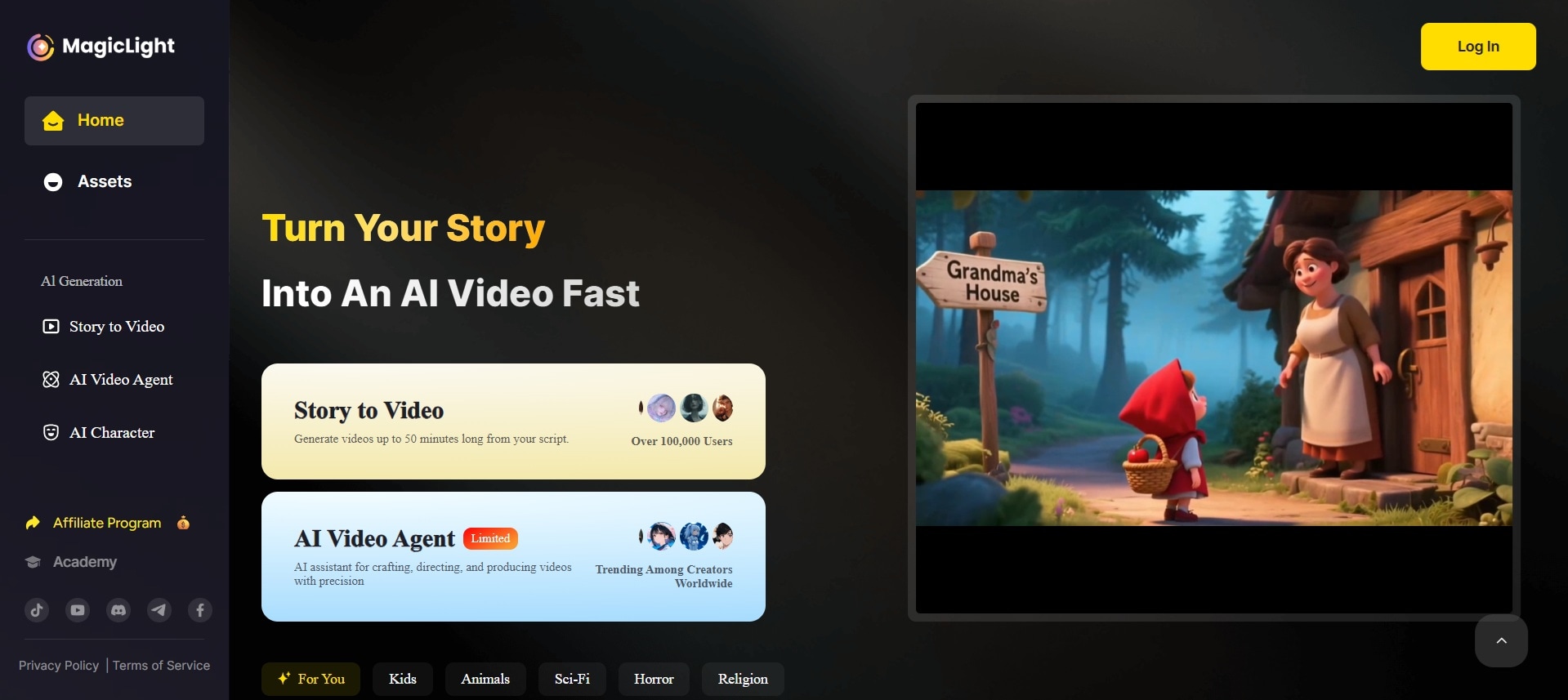
Magic Light AI is built to simplify the entire video creation process. Its main strength is its ability to convert text prompts into complete animated videos with minimal effort. Some of its main features include:
- Text-to-Video Conversion – Describe a scene or story, and watch it turn into an animated video.
- AI Avatars – Choose from a variety of characters or generate unique ones to fit your content.
- Lip-Syncing – Characters' mouths move in sync with voiceovers for a natural look.
- Customizable Backgrounds – Select or generate backgrounds to match the tone and setting of your story.
- Flexible Video Length – Ideal for all types of content, from short social media clips to longer educational content.
System Requirements & Accessibility
Since Magic Light AI is completely cloud-based, there's no need for expensive hardware or heavy installations. You can access it from any modern browser on a desktop or a laptop, making it easy to use even on low-spec devices.
Ease of Use
One of Magic Light AI app's biggest advantages is its beginner-friendly interface. You don't need advanced editing knowledge to create videos. The platform uses a straightforward, step-by-step workflow with drag-and-drop elements that make the process simple. This makes it accessible for creators of all skill levels who want to focus on storytelling rather than technical editing.
Part 3. User Experience
Hands-On Review
Creating a video with Magic Light AI feels simple and approachable. You just type a short prompt describing the scene or story you want, then select your characters, choose a background style, and select a voice for narration. Once everything is set, the platform quickly puts together a preview video. You can watch it, edit any parts that don't look right, and then render the final version in higher quality. The process feels smooth and easy to follow, even if it's your first time using the tool.
Performance Testing
In testing, Magic Light AI delivered quick results. Most short clips are rendered in just a few minutes, while longer videos take slightly more time but are still faster than traditional animation workflows. The AI avatars look polished, and lip-syncing works well most of the time. The voice generation is clear and natural, with multiple tones and accents to choose from. Character consistency across multiple scenes is generally good, which helps keep your story visually coherent.
Limitations
Despite its strengths, Magic Light AI has some limitations that need to be considered. The credit-based system means you need to keep track of how many videos you can generate per month, which may feel restrictive for heavy users. Occasionally, the platform may produce scenes that need multiple revisions to look right, costing extra credits. It also offers less detailed control compared to full video editors, which can be limiting if you want highly customized results.
Part 4. Pros and Cons of Magic Light AI
Every tool has its strengths and limitations, and Magic Light AI is no exception. While it excels as a quick and accessible way to turn text prompts into animated videos, there are a few aspects where it may fall short for users who need deeper customization or advanced editing control.
Here's a clear breakdown of its main pros and cons to help you decide if it's the right tool for your projects.
- Fast Video Generation: Magic Light AI can create animated videos in minutes, saving hours compared to traditional animation or manual editing.
- Beginner-Friendly Interface: Its simple layout and guided steps make it easy for anyone to use, even without prior editing experience.
- Consistent Characters and Scenes: The platform keeps characters and visual styles consistent across multiple clips, which is perfect for storytelling.
- Cloud-Based and Accessible: You can use it from any modern browser without needing powerful hardware or software installation.
- Built-in AI Voice Integration: Multiple AI voices are available to narrate your videos, giving them a polished and professional feel.
- Credit-Based System: You are limited by the number of credits in your plan, which can feel restrictive if you produce a lot of content.
- Limited Customization: Fine-tuning character movements, camera angles, or scene transitions is more limited than in full video editors.
- Occasional Rendering Errors: Some scenes may not turn out as expected, requiring extra revisions and credits to fix.
- No Deep Editing Tools: More experienced creators might miss features like keyframing, detailed timeline editing, or special effects control.
- Requires a Stable Internet Connection: Since everything runs online, a slow or unstable internet can affect your workflow.
Part 5. Who is Magic Light AI For?
Magic Light AI is designed for people who want to create animated videos quickly without spending hours learning complex editing software. Its simplicity and AI automation make it ideal for a wide range of creative projects.
Recommended Use Cases
- YouTube and Social Media Videos – Ideal for creators who need eye-catching short-form content.
- Educational Content – Teachers and trainers can turn lessons into engaging animated explainer videos.
- Marketing Campaigns – Marketers can produce product demos, ads, and storytelling content in minutes.
- Personal Projects – Great for hobbyists who want to experiment with animation or share fun ideas online.
Target Users
- Beginners and Non-Editors – Anyone who wants to create videos but lacks editing skills.
- Solo Creators – Freelancers, independent creators, and small business owners who need fast content creation.
- Content Teams – Small teams who want to speed up their production process and keep their visual style consistent.
Part 6. Looking for More Control? The Best Magic Light AI Alternative
The Magic Light AI is excellent for quickly generating animated videos, but it may not provide the level of control that some creators need. If you'd like to have a good alternative option, you can check Wondershare Filmora to get more creative freedom and bypass credit limits.
 Secure Download
Filmora combines a complete video editor with built-in AI tools. It gives you both automation and flexibility. Some of the AI features you can find in Filmora are:
- AI Text-to-Video – Turn scripts or prompts into video drafts you can fine-tune inside Filmora's editor.
- AI Voice Generator – Choose from multiple voices or create a custom one to match your content's tone.
- AI Image Generator & Stylizer – Generate images or apply creative styles to enhance your visuals.
- Smart Scene Cut & Smart Shorts – Automatically detect scene changes or repurpose long videos into bite-sized clips.
Why Choose Filmora Over Magic Light AI?
- More Editing Control ✅ Adjust each frame, add effects, transitions, and custom animations.
- All-in-One Solution ✅ Combines AI tools with a complete video editor in one platform.
- Better for Polishing Videos ✅ Ideal for refining AI-generated drafts into professional-quality content.
- Wide Creative Options ✅ Access filters, motion graphics, audio editing, and more.
- No Credit Limitations ✅ Unlike Magic Light AI's credit system, you can edit as much as you want within your plan.
- Beginner to Pro Friendly ✅ Easy for beginners but powerful enough for experienced editors.
Use Case Comparison
- Magic Light AI is ideal when you need a quick solution from concept to video with minimal manual editing.
- Filmora AI is better when you want creative flexibility, detailed customization, and polished results.
Conclusion
In this article, you've seen how Magic Light AI is an exciting option for anyone who wants to bring ideas to life quickly through animated videos. Its ability to turn simple prompts into characters, voices, and complete scenes makes it a powerful tool for creators who value speed and simplicity.
However, its credit-based system and limited customization may leave some users wanting more control. If you need a comprehensive creative workflow, Filmora AI offers a great balance of automation and detailed editing features. Choosing between them depends on whether you prioritize quick generation or full customization for a polished and professional finish.

Frequently Asked Questions
-
Is Magic Light AI free to use?
Magic Light AI offers a free trial, so you can try its features before committing. However, the free version has limited credits (300 free credits upon registration). To unlock more video renders and higher-quality exports, you'll need to choose one of the paid plans. -
Can Magic Light AI make long YouTube videos?
Yes, Magic Light AI supports longer video generation, but note that longer projects will consume more credits. For regular long-form content, consider upgrading to a higher-tier plan with more credits. -
Does Filmora have text-to-video AI?
Yes, Filmora has an AI Text-to-Video, allowing you to generate video drafts from scripts or prompts directly in the editor. You can refine the results with Filmora's complete suite of editing tools for professional results.
