


 TL;DR:
Google's Nano Banana 2 Lite is a highly affordable, rapid-iteration image generation model built on the Gemini 3.1 Flash-Lite Image architecture that delivers outputs in just 4 seconds for $0.034 per 1,000 images, making it best suited for high-volume A/B testing and concept variations rather than finalized artwork.
● Outputs are strictly limited to 1K resolution and lighter reasoning capabilities, meaning standard Nano Banana 2 or Nano Banana Pro remain necessary for multi-element spatial prompts, clean text rendering, or large-format printing.
● When compared to OpenAI's GPT Image 2, Nano Banana 2 Lite guarantees a lower fixed cost and faster generation time, but sacrifices the up to 2K resolution scaling and deeper reasoning that GPT Image 2 provides through its token-based configuration.
● The model is accessible to free Gemini mobile and web users with an expected daily quota of around 20 images, but every output automatically embeds an invisible SynthID watermark alongside a visible Gemini logo.
Ask AI for a summary
 ChatGPT
 Perplexity
 Gemini
 Claude
 Grok
Grok
Google just released Nano Banana 2 Lite, the fourth member of its Nano Banana image generation family. Claimed to be faster and more cost-efficient than the standard Nano Banana 2, it’s built for those who love to experiment and generate dozens of variations without burning through their budget.
For those who’ve been curious about what the new update brings, we tried Nano Banana 2 Lite ourselves and compared it against Nano Banana 2, Nano Banana Pro, and OpenAI's GPT Image 2 to see how it actually holds up against the competition.
Part 1. What is Nano Banana 2 Lite?
Released on June 30, 2026, Nano Banana 2 Lite is Google's fastest and most affordable Nano Banana image model yet. Positioned below Nano Banana 2 and Nano Banana Pro, it generates images in about 4 seconds, which is approximately 2.7x faster than Nano Banana 2 (Gemini 3.1 Flash Image).
Nano Banana 2 Lite is built on Gemini 3.1 Flash-Lite Image architecture, with the model ID gemini-3.1-flash-lite-image on the API side. It handles text-to-image, editing, and multi-image composition through one API.
Nano Banana 2 Lite Pricing
Nano Banana 2 Lite costs $0.034 per 1,000 images at 1K resolution. That's about half of what Nano Banana 2 charges for the same resolution ($0.067 per 1K image), and roughly a quarter of what Nano Banana Pro charges at 2K resolution ($0.134 per image).
Can free Gemini users generate images with it? Yes, at least on the consumer app side, since Nano Banana 2 Lite is rolling out to the Gemini app for everyone.
Part 2. Nano Banana Pro vs Nano Banana 2 vs Nano Banana 2 Lite
Beyond what already sets these three models apart, we can put the differences side by side to see how they compare.
| Nano Banana Pro | Nano Banana 2 | Nano Banana 2 Lite | |
| Speed | Slowest (up to 1 min, depending on the quality) | 8-25 seconds per image, depending on the quality | 4 seconds per image |
| Cost | ~$0.139 - $0.24 | ~$0.067 - $0.151 | $0.034 at 1K only |
| Image Quality | 2K, 4K | 1K, 2K, 4K | 1K only |
| Reasoning | High | Medium | Low |
| Text Rendering | ⭐⭐⭐⭐ | ⭐⭐⭐⭐ | ⭐⭐⭐ |
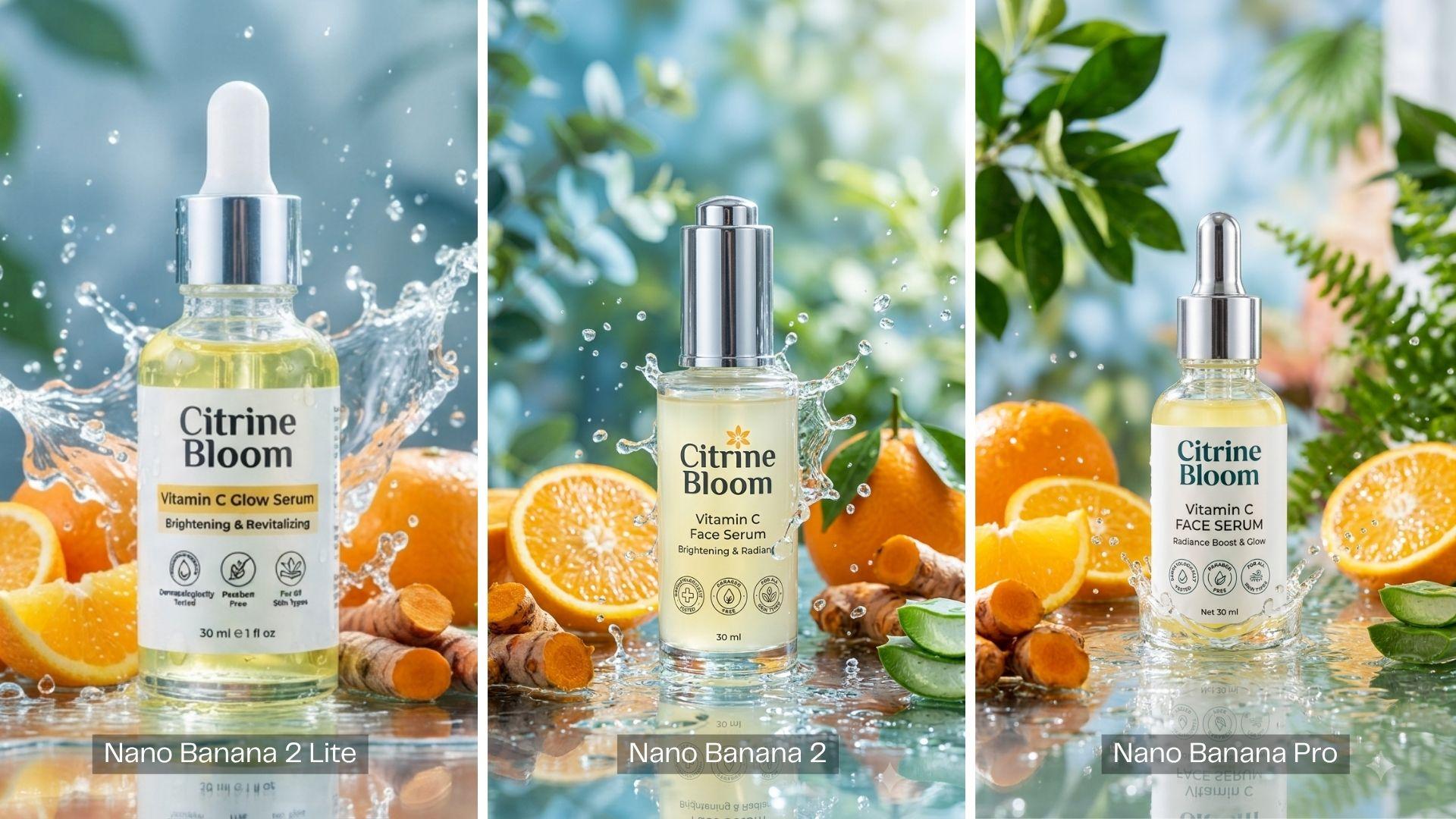
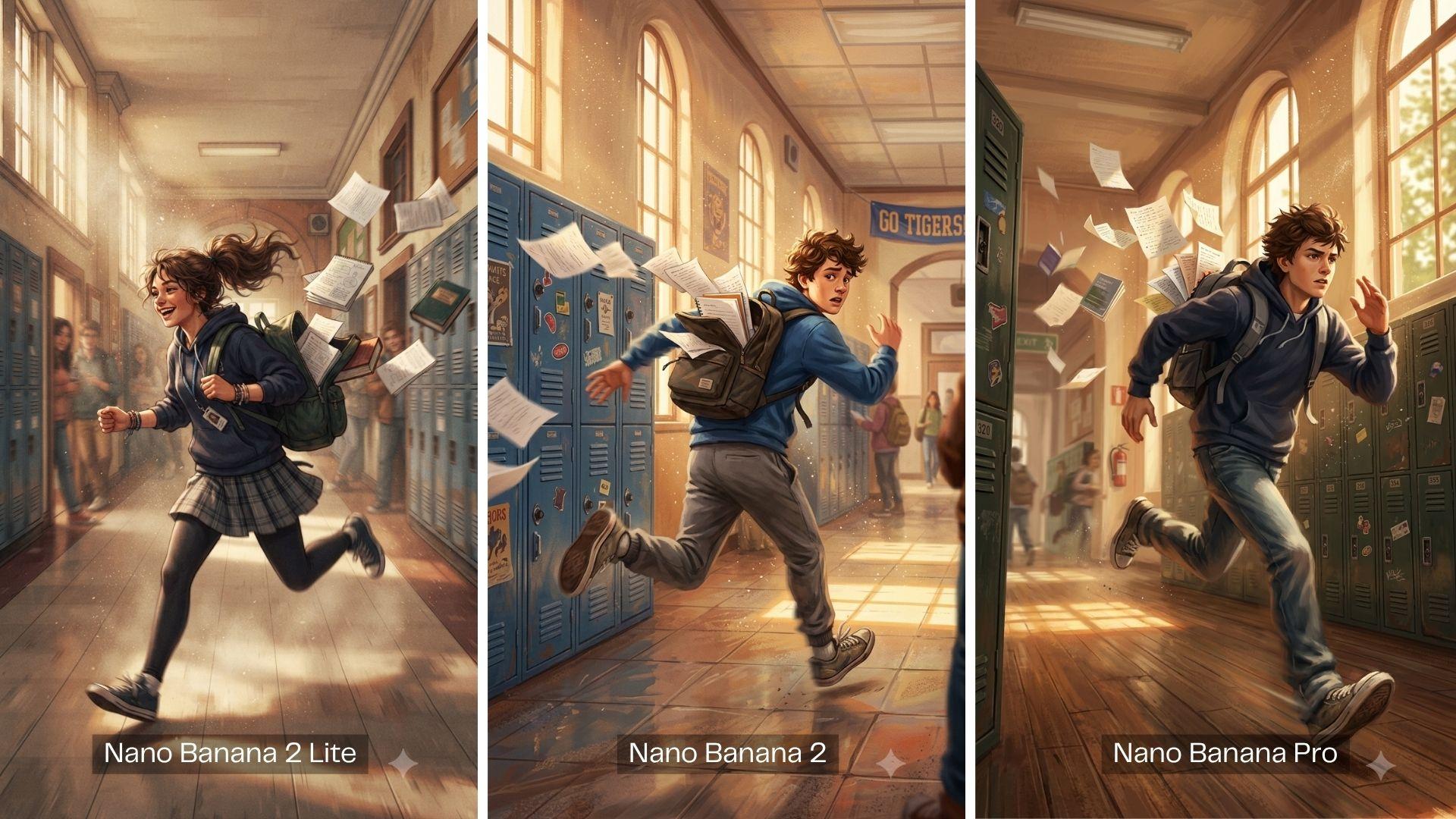
Within one minute, Nano Banana 2 Lite could generate 21 images while Nano Banana 2 generated only 3 images of the same prompt. If you're generating dozens of variations to pick the best one, Lite's speed and price make it far cheaper.
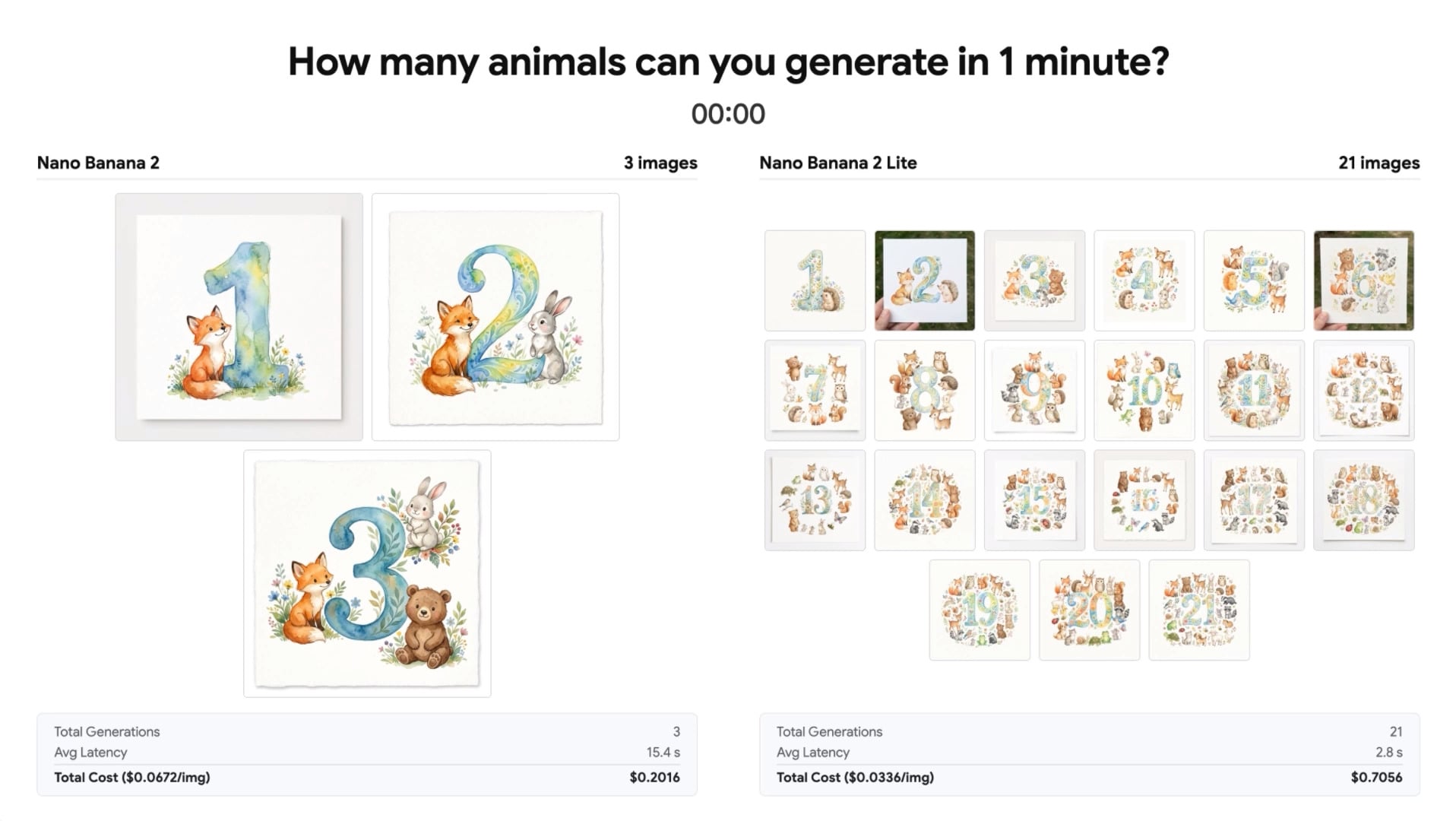
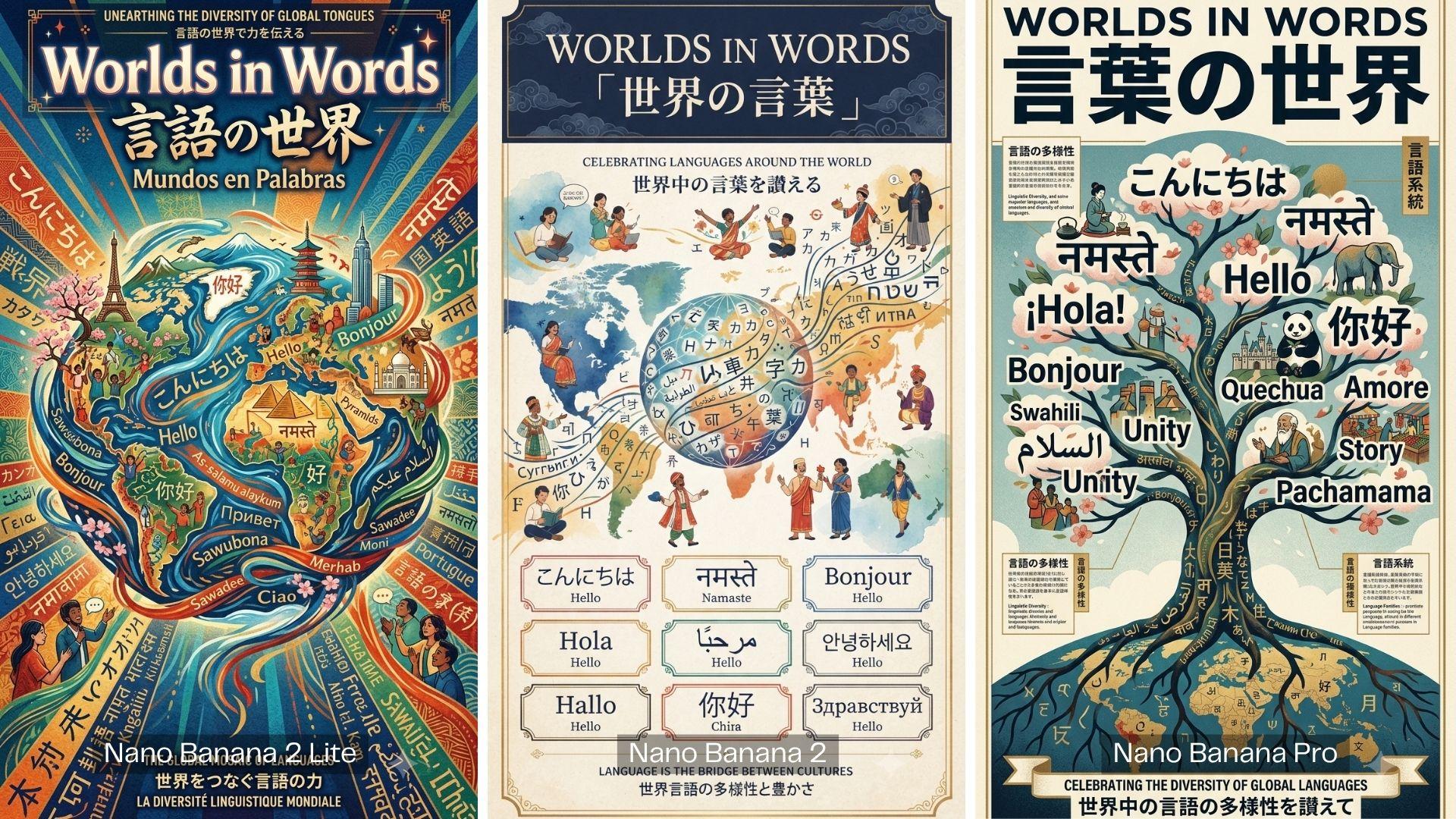
What it sacrifices is resolution. If the final image needs to survive being blown up to poster size or has small text that needs to render cleanly, Pro or standard Nano Banana 2 at higher resolution is still the safer call.
Image Quality
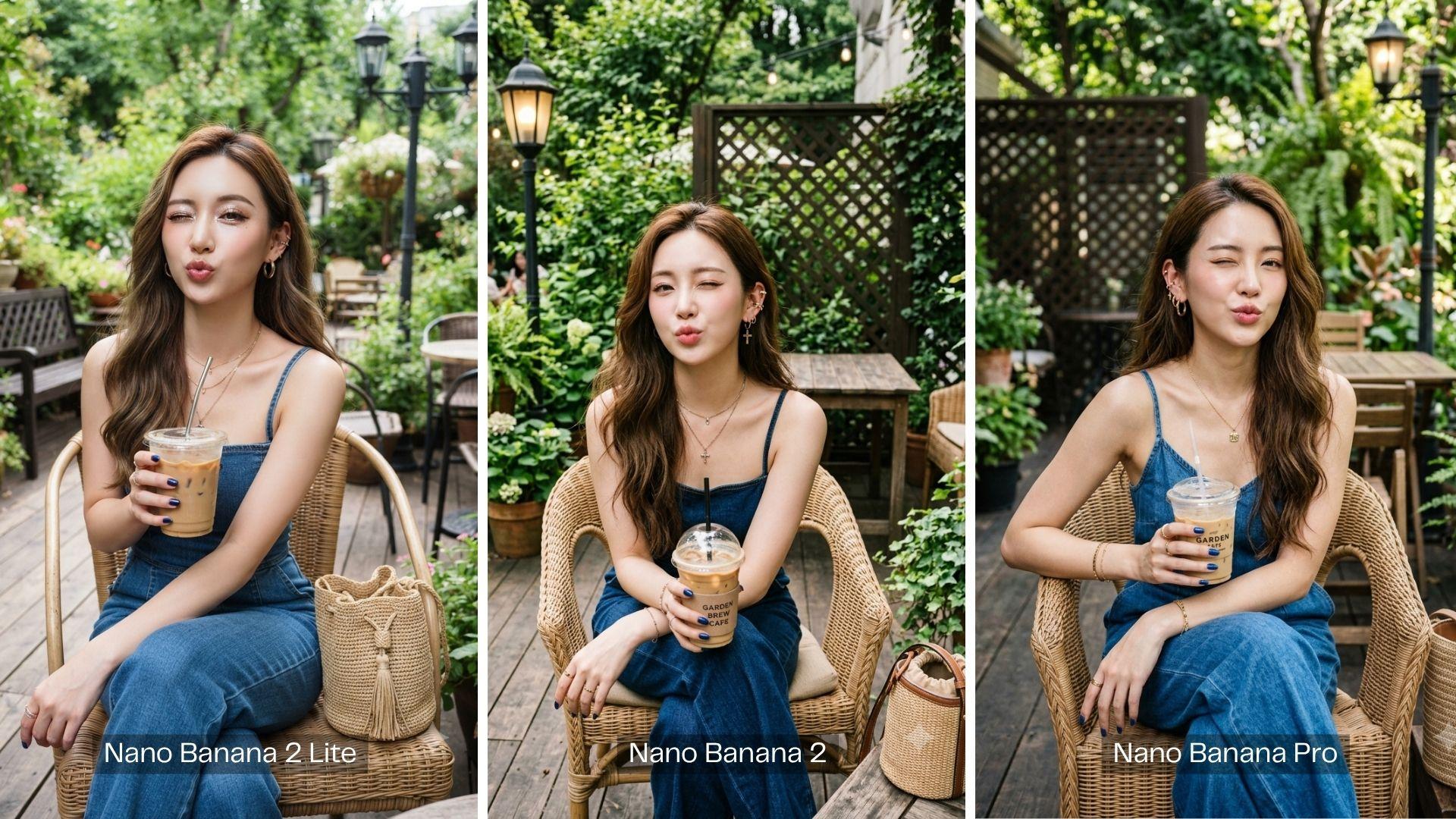
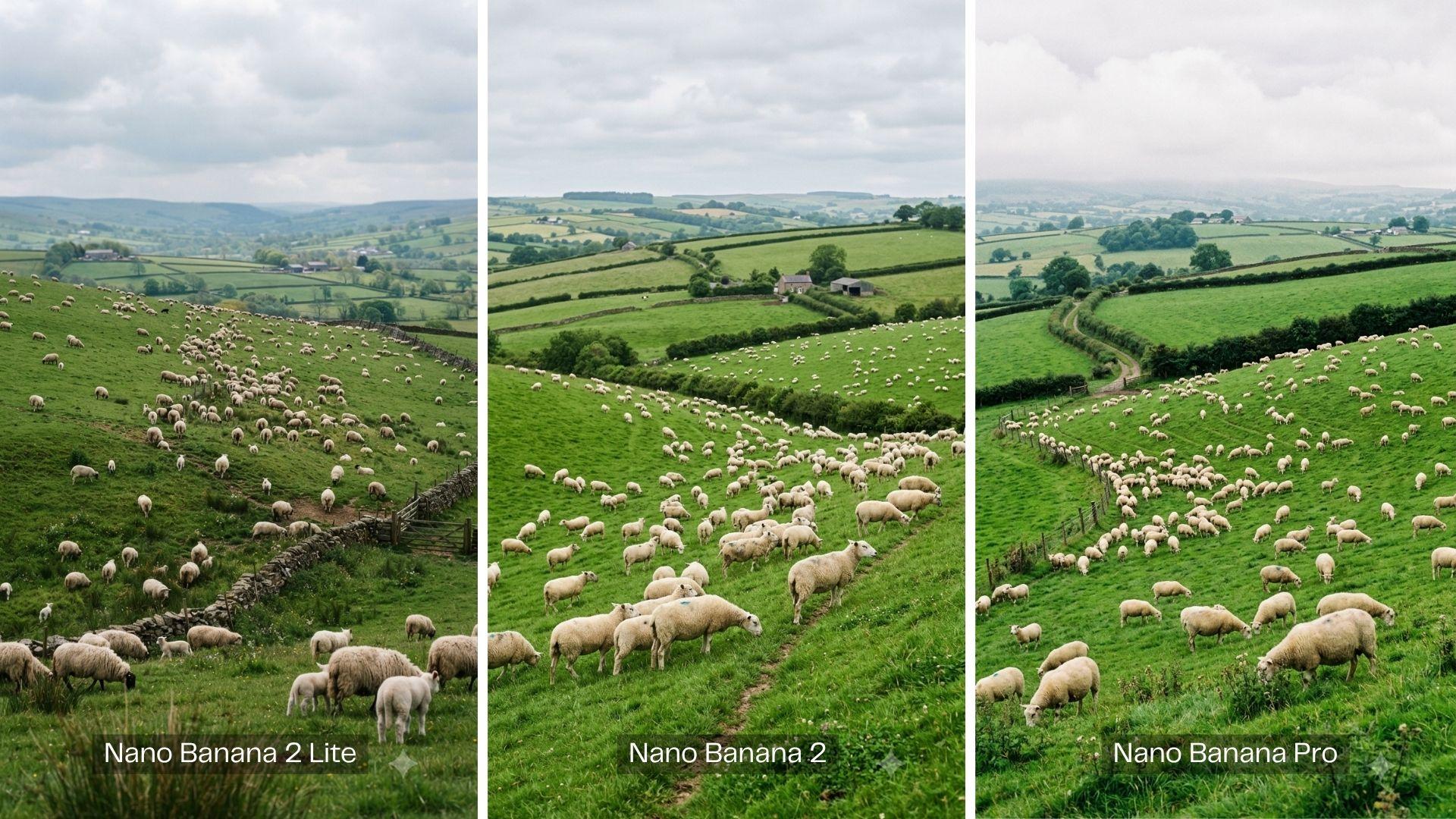
In terms of image quality, there are only slight differences between Lite and the standard models. Only on complex prompts, multiple elements, or tricky lighting where the differences start to show.
1. Portraits
2. Scenery / Landscape
3. Product Photography
4. Digital Artwork
5. Poster / Infographic
Part 3. How to Access and Use Nano Banana 2 Lite
Nano Banana 2 Lite is live now through:
- Gemini API
- Google AI Studio
- Gemini Enterprise Agent Platform
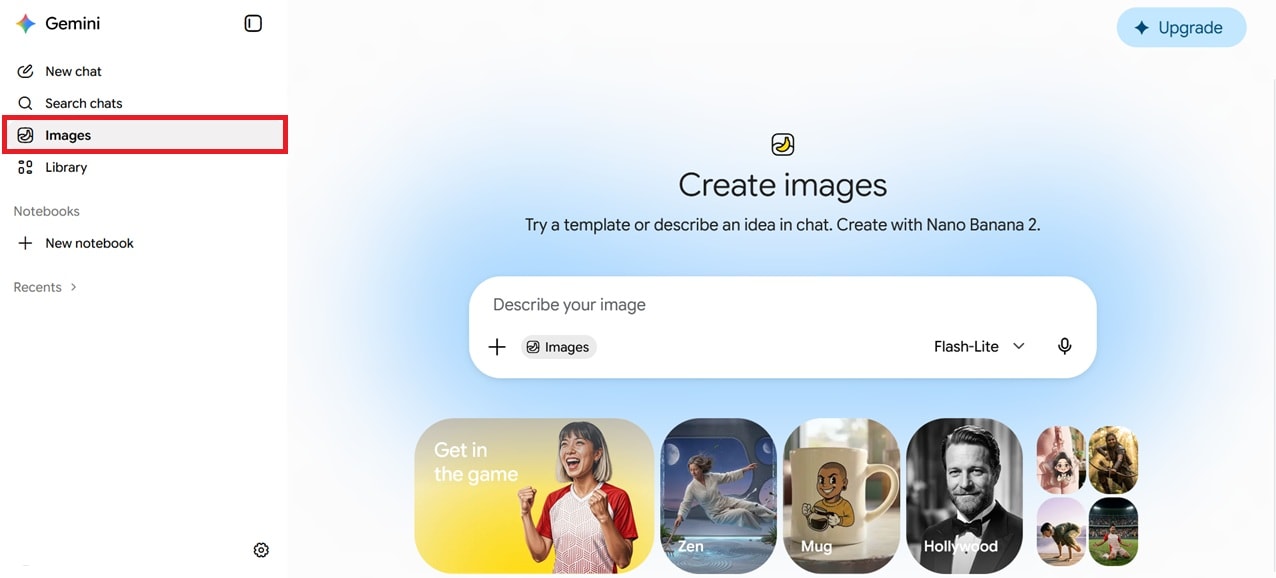
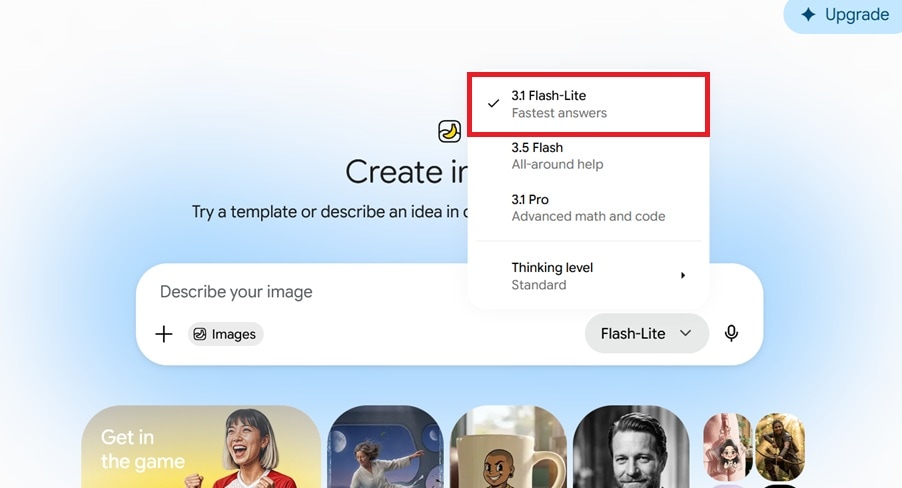
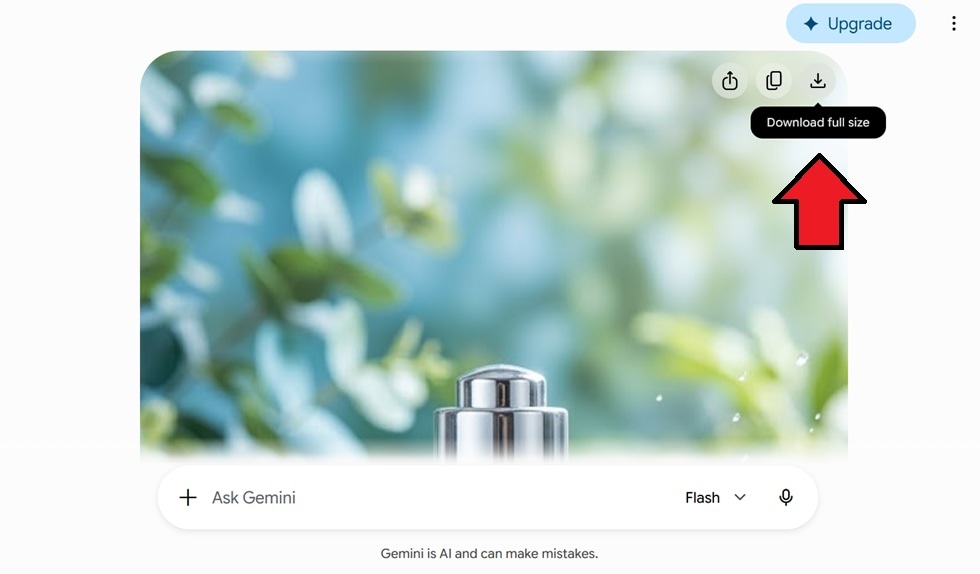
And it's rolling out to AI Mode in Search, the Gemini app, NotebookLM, Google Photos, and Google Ads. If you're using the Gemini app, the setup is mostly a matter of switching which model handles your image generation.
How to use Nano Banana 2 Lite
Part 4. Nano Banana 2 Lite vs GPT Image 2: Which One is Better?
While we already know that Nano Banana 2 Lite provides a faster, budget-friendly option among the Nano Banana lineup, let's take a closer look at how it holds up against its current competitor, OpenAI's GPT Image 2.
Depending on how you configure it, GPT Image 2 can either undercut Nano Banana 2 Lite or cost several times more for the same prompt. If we put them side by side, this is how they compare.
| Nano Banana 2 Lite | GPT Image 2 | |
| Cost | $0.034 per 1K image | Token-based; $0.005-$0.006 at Low, $0.041-$0.053 at Medium, $0.165-$0.211 at High |
| Speed | About 4 seconds per image | 8-40 seconds, depending on the quality and complexity |
| Image Quality | 1K resolution | Up to 2K (or 3840x2160 px) |
| Reasoning | Lighter reasoning | Deeper reasoning |
| Text Rendering | ⭐⭐⭐ | ⭐⭐⭐⭐ |
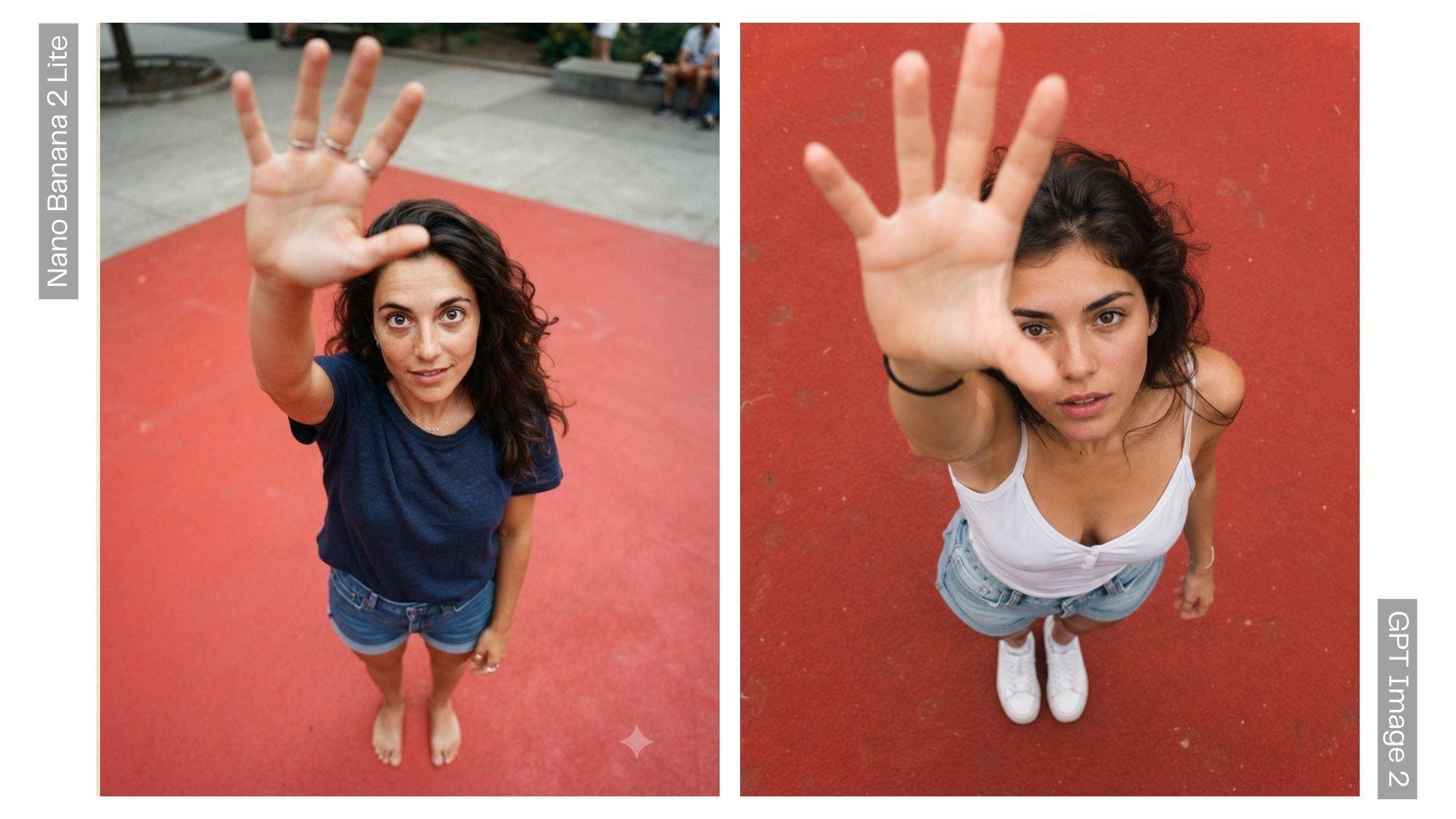
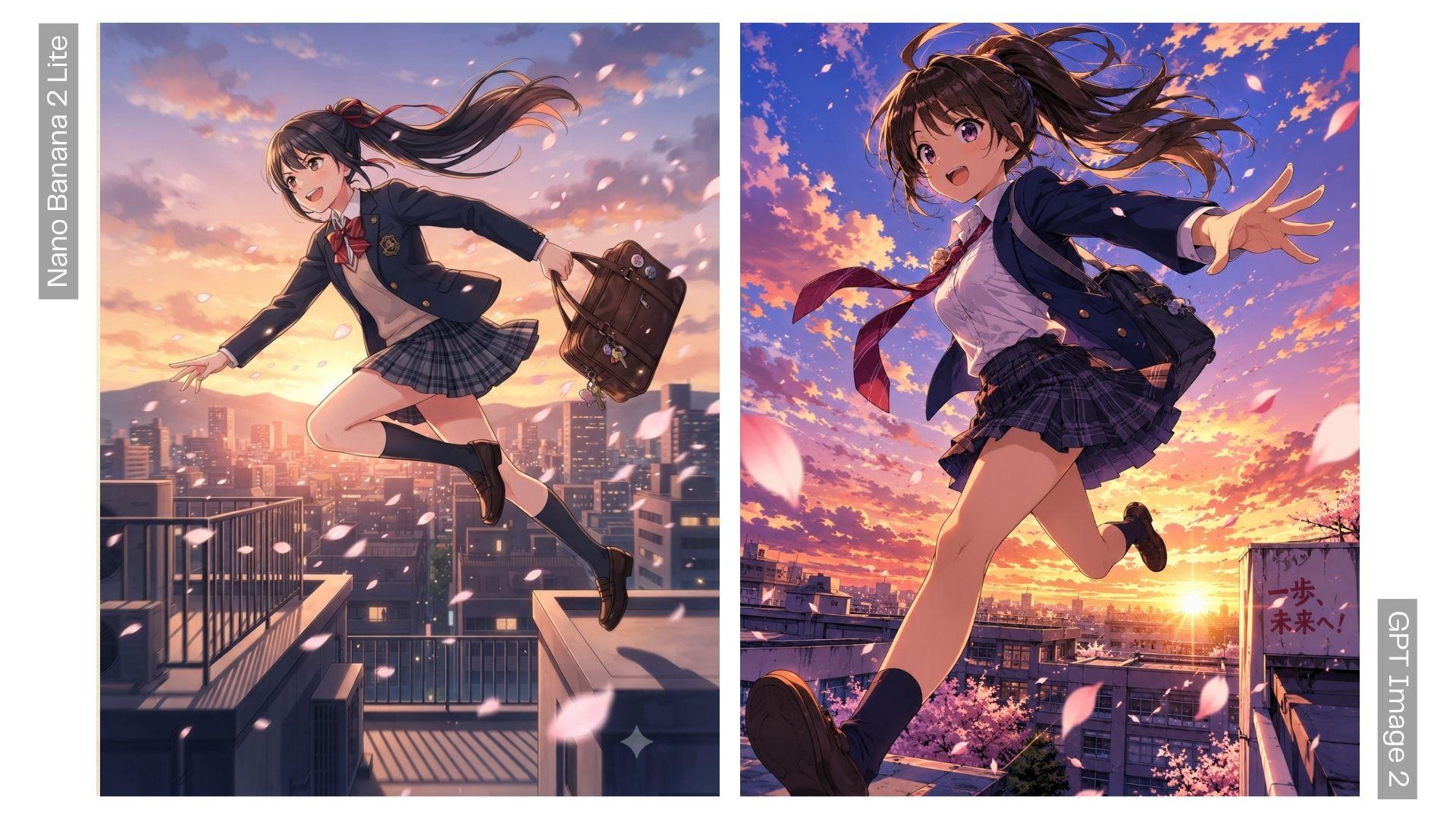
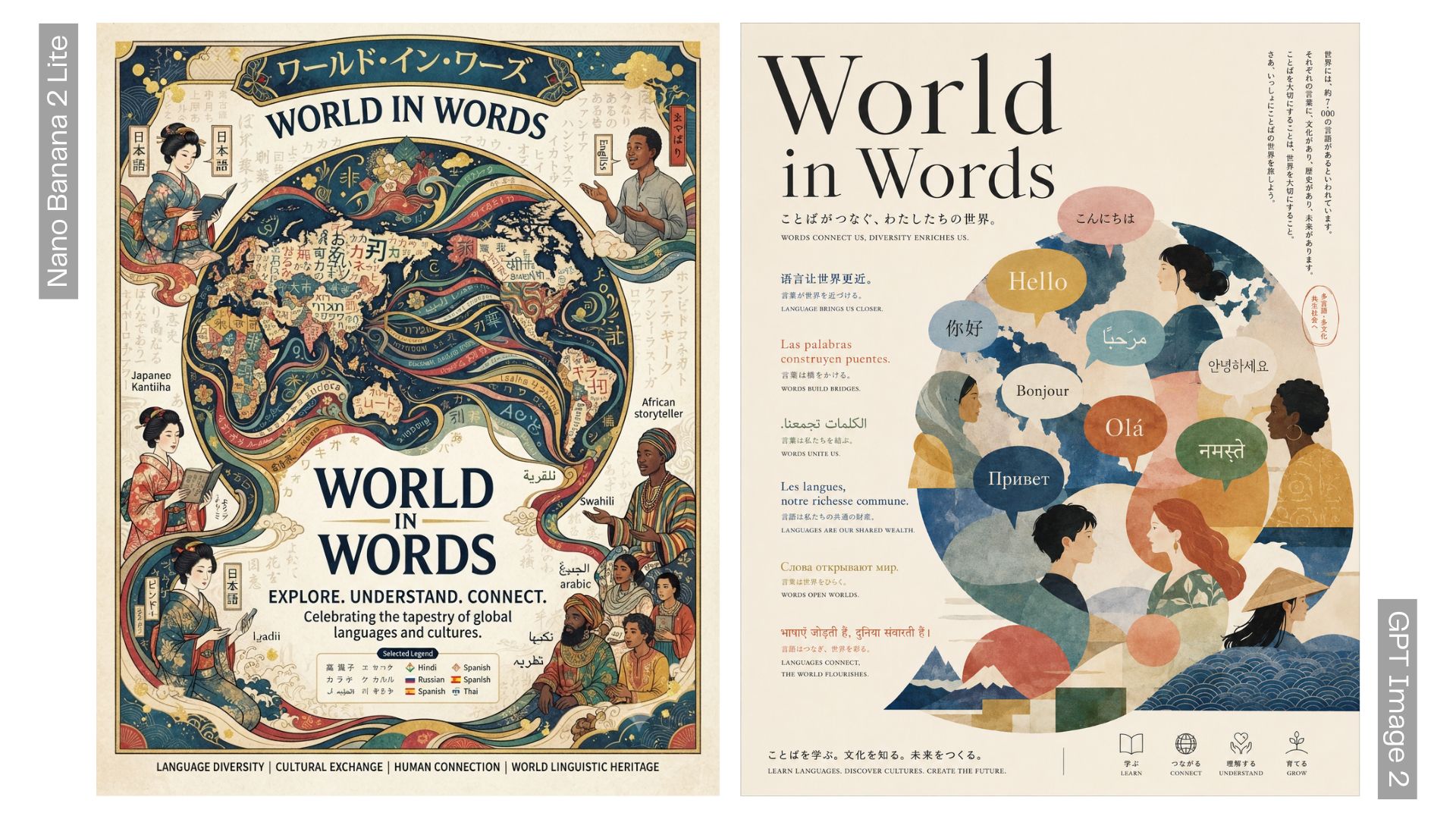
To see how the quality differs, we ran the same prompt through both models ourselves. Take a look at the side-by-side of Nano Banana 2 Lite vs GPT Image 2 outputs below and judge which one you like better.
1. Portraits
2. Digital Artwork
3. Poster / Infographic
Part 5. Pros and Cons of Nano Banana 2 Lite
After running our own prompts alongside the specs Google published, we can sum up where Nano Banana 2 Lite is actually good at and where it falls short.
- Genuinely fast. Around 4 seconds per image made rapid iteration painless, especially when testing multiple variations of the same prompt.
- Cheapest option in the Nano Banana lineup.
- Held up well on straightforward prompts. The quality felt close to the standard Nano Banana 2 for simple shots and everyday scenes.
- Character and object consistency across generations was pretty solid.
- Limited to 1K resolution. It’s not meant for print, large banners, or detail work.
- Reasoning felt noticeably lighter on complex prompts. Sometimes still weak on multi-element scenes with specific spatial relationships or layered lighting.
- Not the model to reach for when you need the image to be as polished as possible.
Bonus: Create More Polished Visuals with Filmora's Timeline
Given how fast Nano Banana 2 Lite churns out variations, you’ll likely end up with more images than you know what to do with. The next best thing you can do to make use of those stills is to turn them into something people actually watch and enjoy more.
Instead of burning through your generation limit trying to get the “perfect” image, you can edit or take what you already have into Wondershare Filmora and turn it into a finished product yourself, whether that’s a moving poster, product reveal video, a social ad, or a before-and-after sequence.
Why Use Filmora?
- Manual control on top of AI automation. Unlike Google's AI Studio or Gemini app, Filmora works inside a video editing timeline. You can arrange generated images into a sequence, apply motion, sync transitions to music, or layer in text and callouts, not just generate and export.
- Access to multiple Nano Banana models in one place. Filmora supports Nano Banana Pro and Nano Banana 2 for its in-app AI image generator. Google is not the only way to get your hands on the models.
- A broader AI toolkit built around the same footage. You can find more AI tools and features that are worth exploring once you're already generating stills and want to take the next step. They can help you polish your image or video faster.
Google may have its own tools for turning stills into motion, say, Veo 3.1 for video generation and Google Flow for stitching AI outputs together. But those tools are still built around generating more AI content by relying on prompt only.
If you want actual manual control over pacing, transitions, text placement, and how your images flow together, Filmora can get the job done.
 Secure Download
Conclusion
For those who need to churn out dozens of image variations without draining their budget, Google has answered your call with Nano Banana 2 Lite. It’s fast, cheap, and, most importantly, accessible even to free users. Just keep in mind it only goes up to 1K resolution.
If you only need to test concepts fast or generate high volumes for A/B testing, Nano Banana 2 Lite is already enough for you. After that, run them through Filmora's timeline to turn those stills into something more polished.
FAQs
-
Can I use Nano Banana 2 without login to Google?
If you're using Nano Banana 2 through Google's own ecosystem, you'll need a Google account. But with third-party apps that support the model, like Filmora, you can generate Nano Banana images under their own subscription instead. -
Is Nano Banana 2 Lite free?
Nano Banana 2 Lite is accessible to free Gemini users. However, Google has yet to publish a specific daily generation limit for Lite separately from its other models. Free usage likely comes with a daily quota, similar to how Nano Banana 2 currently limits free users to around 20 images/day. -
Can I turn Nano Banana 2 Lite images into videos?
Yes, but you'd need a separate tool to animate your Nano Banana Lite 2 images. You can use Google’s built-in options, like Veo and Google Flow, or bring the images into a video editor like Filmora for more manual control over pacing, transitions, and sequencing. -
Can I use Nano Banana 2 Lite to edit images?
Yes. Nano Banana 2 Lite supports image editing and multi-image composition through the same API used for text-to-image generation, so you can also upload a reference photo and modify it. -
Is Nano Banana 2 Lite available on iOS or Android?
Yes, through the Gemini mobile app, which is available on both iOS and Android. -
Is there a watermark on Nano Banana 2 Lite images?
Yes. Every image generated by Nano Banana 2 Lite carries an invisible SynthID watermark along with a small visible Gemini logo, as part of Google’s system for marking AI-generated content.
