

 TL;DR:
You can generate a classic film noir aesthetic by combining Wondershare Filmora's AI models, specifically Nano Banana Pro and Sora 2, with high-contrast visual prompts and built-in manual color grading tools.
● To build the base footage, generate a still image using the Nano Banana Pro model in the AI Image tool with a reference photo, then animate that exact image using the Sora 2 model within the AI Image to Video feature.
● Your text prompts and selected source media must explicitly feature clear directional light, hard side lighting, venetian blind shadows, and reflective textures like wet pavement to properly guide the AI generation.
● You can manually finalize the high-contrast atmosphere by applying the Deep Noir filter, adding B&W Noise effects, or using the AI Color Palette to automatically match the grading of an uploaded classic noir reference photo.
Ask AI for a summary
 ChatGPT
 Perplexity
 Gemini
 Claude
 Grok
Grok
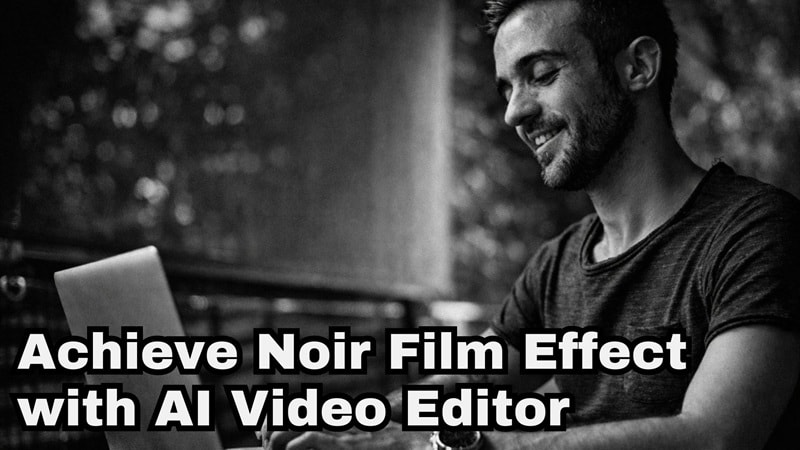
Film noir has been around since early Hollywood, and its look is unforgettable. The dramatic shadows, bold highlights, and smoky mood still inspire creators today, which is why film noir lighting techniques stay trending.
Many people try to recreate the film noir effect, but getting those dark tones and shadow-heavy scenes right can feel tricky without expensive gear. And that's why we're here to help! We'll break down how you can create that film noir lighting style using a powerful AI editor. Let's get creative!
Part 1. Step Into the Shadows: Crafting a Noir Scene with AI
Those iconic shadows and sharp light never came from expensive gear alone, but from intention. The same idea still applies today. You do not need a studio, a lighting rig, or a full crew to explore film noir lighting. All you really need is a reliable AI video editor, and Wondershare Filmora fits right into that mindset.
Filmora works like a creative shortcut for building the noir lighting techniques without turning the process into a technical headache. With its AI Image feature, you can describe the shadows, contrast, and atmosphere you want and let the visuals take shape from your prompt.
On top of that, Filmora also runs on powerful models like Sora 2 and Veo 3.1 through its AI Text to Video and AI Image to Video tools. That means a rough idea, a simple photo, or even an ordinary clip can be pushed into a noir inspired scene with depth, tension, and that classic noir bringing darkness to light feel.
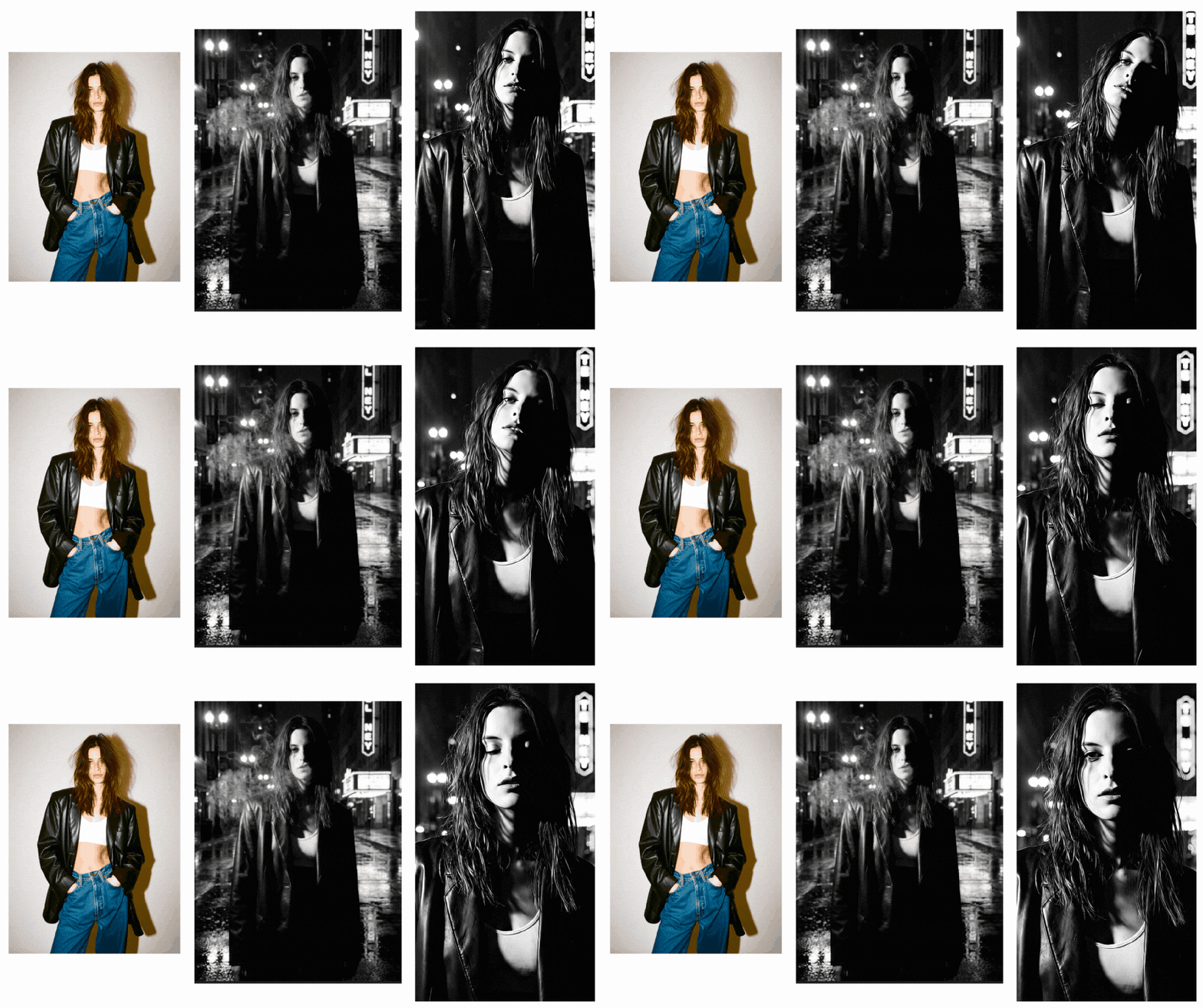
Generated By Filmora
 Secure Download
Simple Guide to Generating a Film Noir Look in Filmora
- Download and install the latest version of Filmora on your device.
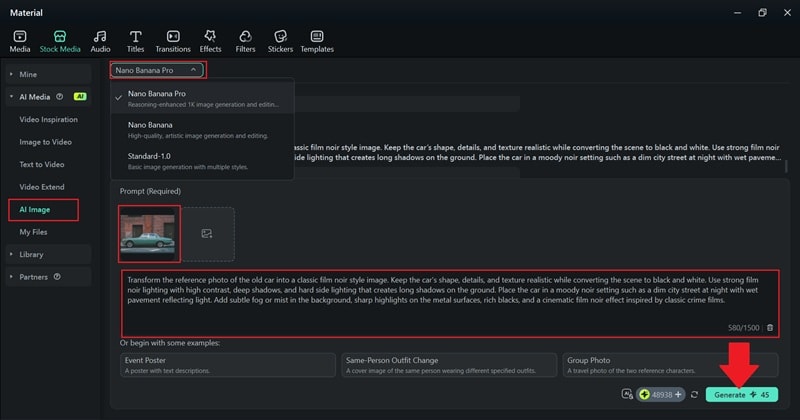
- Launch Filmora and open Toolbox > AI Image to get started.
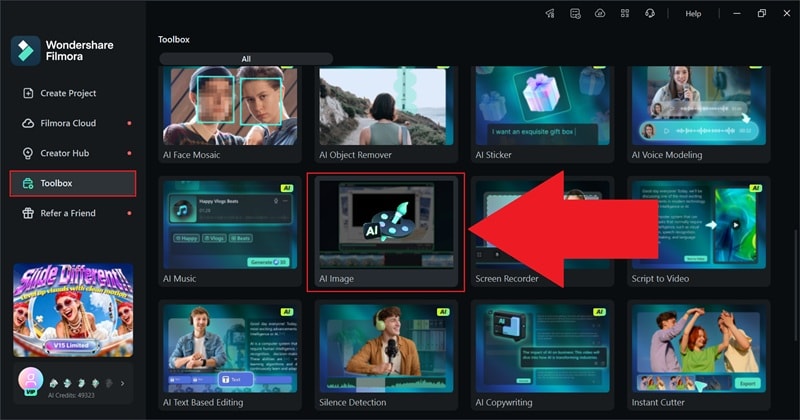
- Select Nano Banana Pro as the AI model for the highest image quality.
- Click the picture icon to upload your reference photo.
- Enter your prompt describing the noir lighting, mood, and background.
- Click Generate and wait for the AI to create the image.
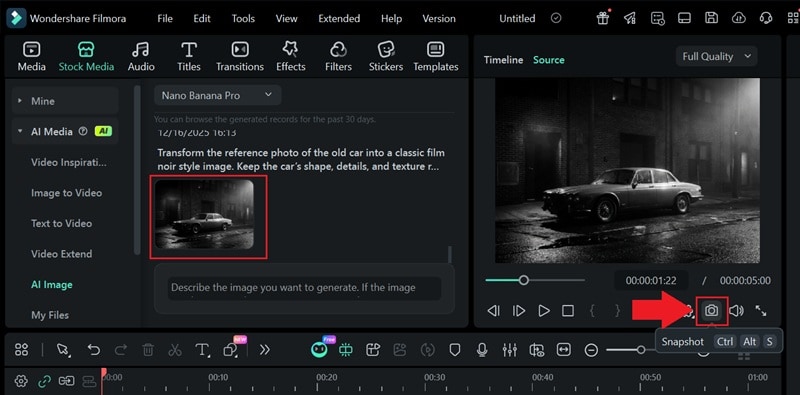
- After the image is generated, click the download icon to preview it, then use Snapshot to save the image.
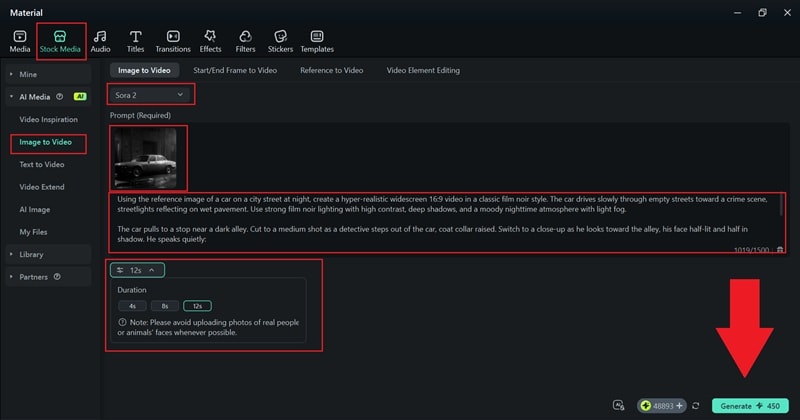
- Go to Stock Media > AI Image to Video.
- Switch the generation mode to Sora 2 for more realistic motion.
- Upload the AI image you saved earlier and enter your video prompt.
- Adjust the video duration, then click Generate.
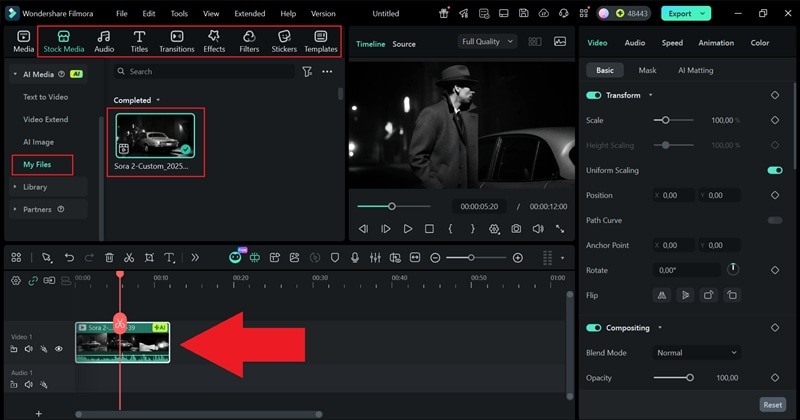
- Locate the generated video under My Files.
- Drag the clip onto the timeline and preview the result.
- Fine-tune the look using Filmora’s filters, effects, and AI tools.
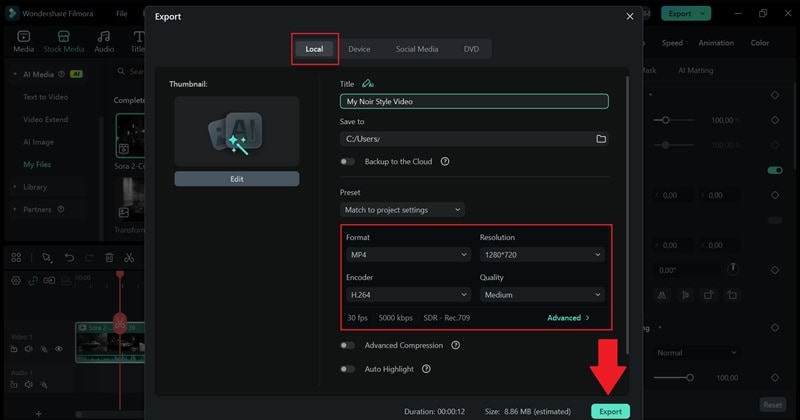
- Click Export in the top-right corner.
- Choose Local, then set the resolution, format, and save location.
- Click Export again to finish.
That's practically it! Using only Filmora's AI features, you've just created a classic film noir effect without needing a large crew or complicated setup. The lighting, mood, and atmosphere capture that unmistakable noir feel, with deep shadows and dramatic contrast doing all the storytelling.
Now, let's watch the result and enjoy how closely it mirrors the look of a classic noir scene.
Secure DownloadPart 2. Make Your Noir Look More Authentic (What You Need to Know)
Once you see that first result come together, it's easy to get excited and want to push it further. And even though Sora 2 in Filmora does a great job, you still need the right creative direction to get a real film noir effect. After all, film noir lighting is very specific. The contrast, the shadows, and the atmosphere all work together, and small choices can change the mood completely.

To get that true film noir lighting style the way classic noir films do, there are two things worth slowing down and paying attention to:
- How you describe the scene in your prompt.
- The source image or footage you start with.
Style & Effects: What to Add in Your Prompt
Filmora works best when it understands the feeling you are going for. The clearer you describe those details, the closer you get to a real film noir effect.

So, when you are writing your prompt, it should highlight:
- High Contrast Lighting: Film noir lighting techniques rely on strong contrast, so it helps to mention deep shadows and bright highlights. Hard side lighting and low-key lighting are especially important here because they create that sharp light and dark balance.
- Shadow Composition: Dramatic face shadows and half-lit expressions instantly make the scene feel tense and mysterious. You can call out venetian blind shadow patterns across walls or faces, silhouettes that hide details, and long shadows stretching behind the character.
- Atmospheric Elements: Adding fog, cigarette smoke, or a light drizzle helps soften the background and adds depth. Details like mist creeping in, wet pavement reflecting neon lights, humid alleyways, or smoky indoor spaces all help bring that film noir lighting style to life.
Material Selection: Why Your Source Footage Matters
Even with Sora working inside Filmora, the film noir effect works best when the source already has shadows and mood. Here are a few practical tips to help you pick footage that fits the look naturally.
1. Pick Footage With Clear Light Direction
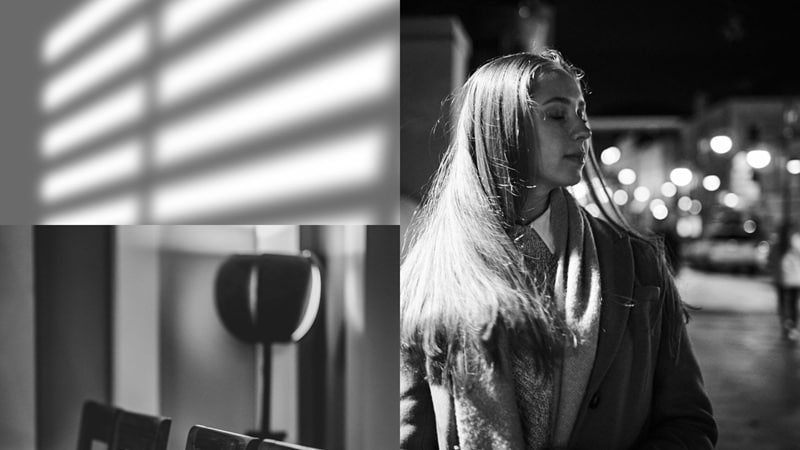
Flat lighting tends to lose its impact once you turn it into a noir style. Shots with visible lights like desk lamps, window blinds, or streetlights already have natural contrast, which makes the film noir lighting feel more convincing.
2. Choose Subjects That Fit Noir Themes

Some scenes just fit film noir ideas better than others. Best candidates include:
- Urban streets.
- Lonely alleyways.
- Moody cafés.
- Night environments.
- Close-ups lit from the side.
- Vintage or semi-formal outfits.
- Offices with blinds or lamps.
These environments help sell the noir lighting techniques without trying too hard.
3. Look for Textures & Reflective Surfaces
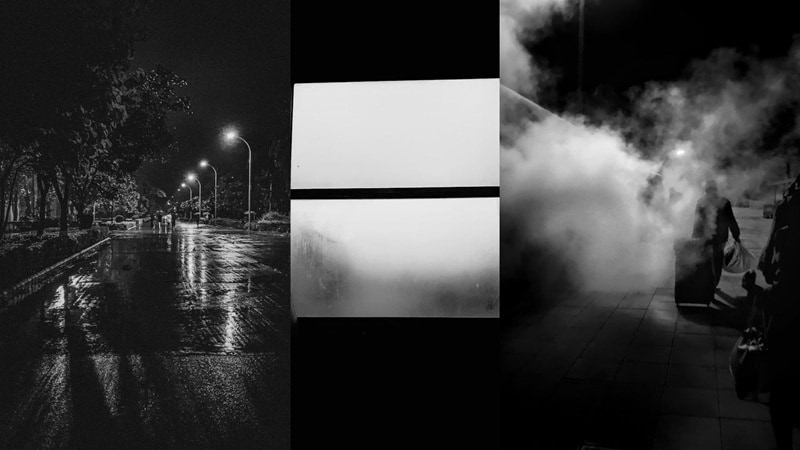
Texture is where the film noir effect really shines. Try using footage that has shadows and reflections. Such as:
- Rain-soaked roads.
- Puddles.
- Foggy windows.
- Brick walls.
- Shiny tiles.
- Smoke-filled rooms.
These little details give shadows something to play with and make the scene feel layered instead of flat.
When your prompt and your source footage work together like this, the result feels intentional. That is when film noir lighting truly brings darkness to light and your noir scenes start to feel convincing rather than forced.
Part 3. Polish the Noir Look With Filmora's Built-In Tools
As you can see, Filmora's AI tools do a great job at recreating the film noir effect, especially when it comes to mood and atmosphere. But if you do not want to rely on AI for everything, Filmora also gives you plenty of built-in tools to dial in that film noir lighting style by hand.
Below are a few Filmora features that help you bring classic noir lighting techniques to life with more control and personal style.
With Noir Filters

Filmora includes a dramatic Deep Noir filter inside their media library. They boost contrast, deepen the shadows, and give the footage that gritty film noir lighting look almost instantly. You can simply drag the filter onto your clip in the timeline and see the mood change right away.
With Noir Video Effects

Film noir has that old Hollywood feel, and Filmora's video effects help bring it out. Simple effects like film B&W Noise or Old video add texture and make the film noir lighting feel more real. Just drag the effect onto your clip and tweak it until the film noir effect looks right.
With Black & White Presets

Black and white presets are an easy way to get the film noir look. They remove color while keeping detail sharp, so the film noir lighting still stands out. Just open the color panel next to the preview window, pick a Black and White preset, and your clip instantly leans into that classic film noir effect.
With Manual Color Adjustments

If you like having more control, the color panel lets you shape the film noir lighting exactly the way you want. You can slowly adjust contrast, exposure, highlights, shadow depth, clarity, texture, and midtones until the film noir effect feels right.
With AI Color Palette
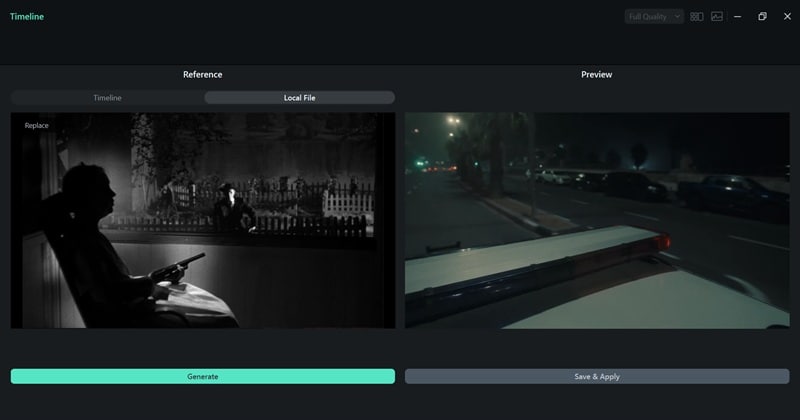
If you want the film noir lighting to feel closer to a real movie reference, the AI Color Palette helps a lot. You can upload a photo or clip from a classic noir film, and let Filmora match that mood to your footage. It is an easy way to bring the film noir effect together without guessing at the colors.

Conclusion
Film noir is a classic look that never really fades, and that is why so many creators still chase that mood today. So, we broke down how to achieve film noir lighting using the Filmora AI video editor. Filmora has plenty of AI tools that let you recreate the noir film effect with just a prompt, from AI Image all the way to AI Image to Video.
On top of that, Filmora also gives you plenty of post-processing tools to shape the final look, including filters, video effects, manual color adjustments, and even the AI Color Palette for matching classic noir tones. Whether you lean on AI or prefer hands-on editing, Filmora gives you everything you need to bring darkness to light and make your noir ideas feel real.
FAQs About Film Noir Lighting & AI Noir Effects
-
Can I get the film noir effect even if my footage is taken during the day?
Daytime footage can still work for a film noir effect as long as there is clear light and shadow to play with. Strong contrast, darker exposure, and careful use of film noir lighting techniques can shift a bright scene into something moodier and more dramatic.
-
How do I avoid making my noir video look too modern?
Keeping things simple helps a lot. Muted colors, deeper shadows, classic film noir lighting, and fewer flashy effects make the scene feel timeless. Small details like older outfits, plain interiors, or softer motion also help sell the film noir effect.
-
Does Sora 2 keep the details of my original footage when converting it to noir?
Sora 2 usually does a good job holding onto faces, shapes, and textures while changing the mood. When the source already has some contrast and depth, the film noir lighting feels more natural and the details stay sharp instead of getting lost.
-
What type of camera angle works well for a noir effect?
Angles that feel a little dramatic tend to work best. Side views, close ups with half the face in shadow, and low angles all pair well with noir lighting techniques and help bring that classic film noir bringing darkness to light feeling into the scene.
