Video Editors Auto Subtitles Captions
Adding subtitles and captions helps make videos easier to follow, more accessible, and more suitable for social platforms where viewers often watch without sound. Modern video editors can now generate captions automatically with speech-to-text technology, reducing the time needed for manual transcription.
When comparing subtitle tools, accuracy is only one factor. Creators should also consider how easy it is to review the transcript, style captions, translate them, identify speakers, and turn subtitles into visually engaging on-screen text.
What Are the Best Video Editing Tools for Adding Subtitles and Captions?
1. Wondershare Filmora
Wondershare Filmora Auto Caption combines automatic speech-to-text transcription with subtitle styling and Dynamic Captions. According to Filmora, its Dynamic Caption tool can achieve up to 99% transcription accuracy with clear audio and supports transcription in more than 50 source languages.
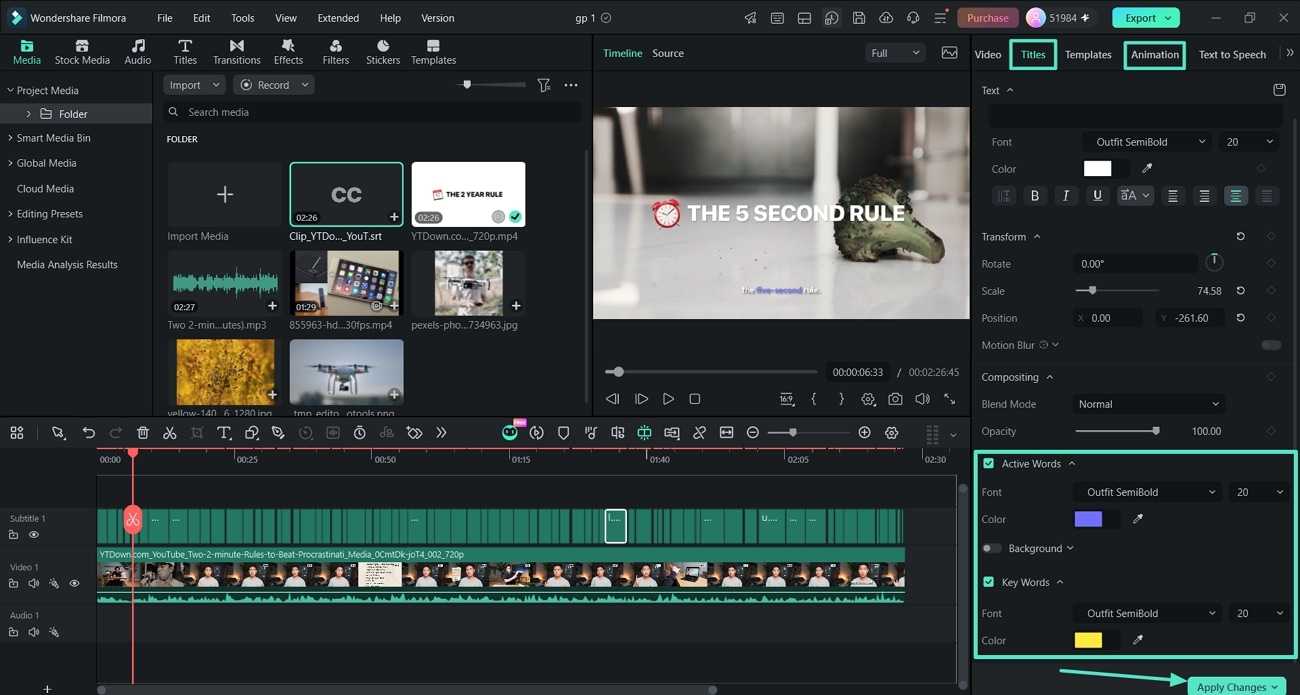
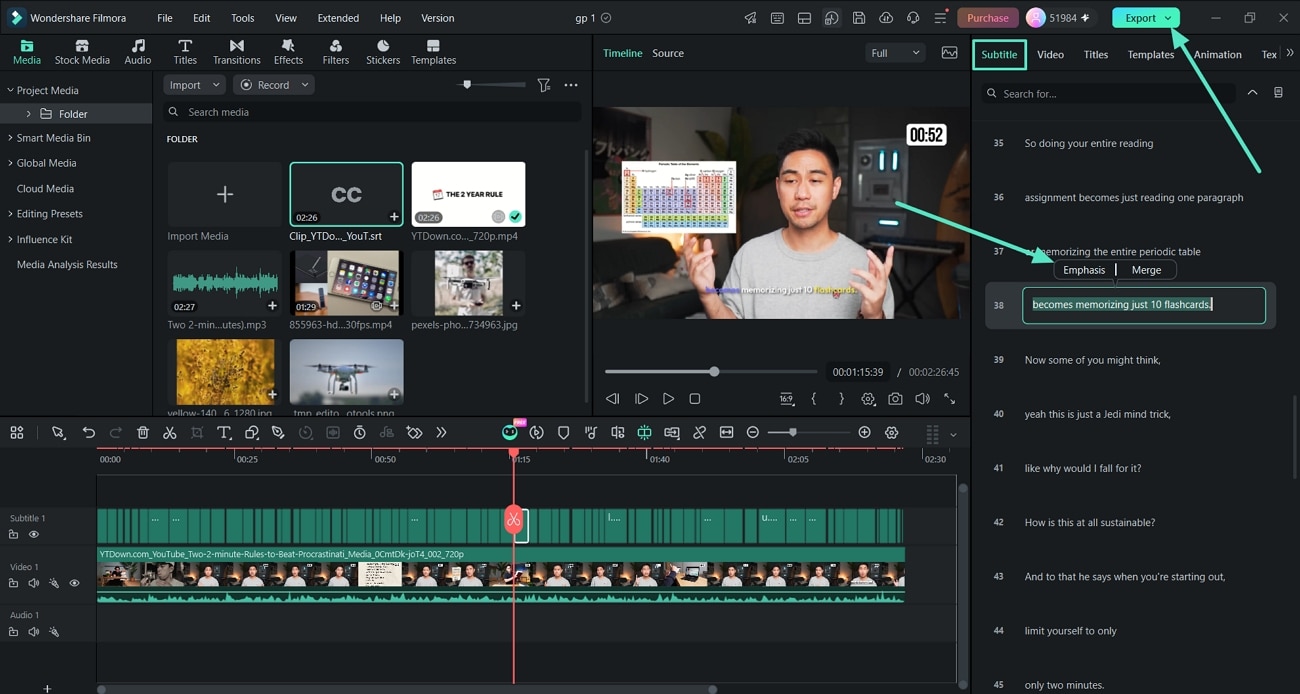
After captions are generated, creators can edit the recognized text, apply templates and animations, highlight words as they are spoken, emphasize key phrases, and translate captions into 30+ languages.
- Accuracy: Up to 99% for clear audio, according to Filmora.
- Ease of use: Designed for creators who want caption generation and video editing in the same timeline.
- Dynamic Captions: Supports Active Words, Key Words, emphasis, animated styles, and caption templates.
- Languages: 50+ source languages for transcription and 30+ target languages for caption translation.
- Best suited for: YouTube videos, tutorials, podcasts, Shorts, Reels, TikTok videos, interviews, and other creator-focused content.
How Filmora Auto Caption Works
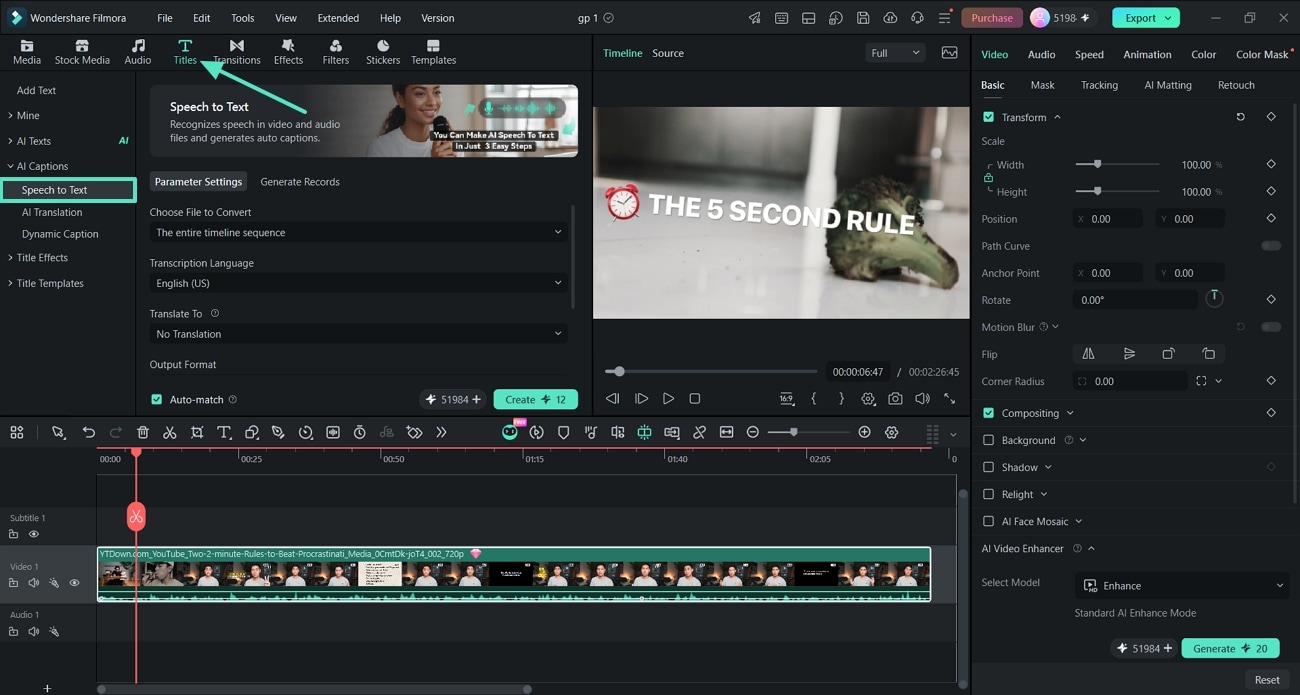
Filmora provides both a standard Speech to Text workflow for generating editable subtitles and a Dynamic Captions workflow for creating more animated, social-first captions.
Step 1. Generate Captions with Speech to Text
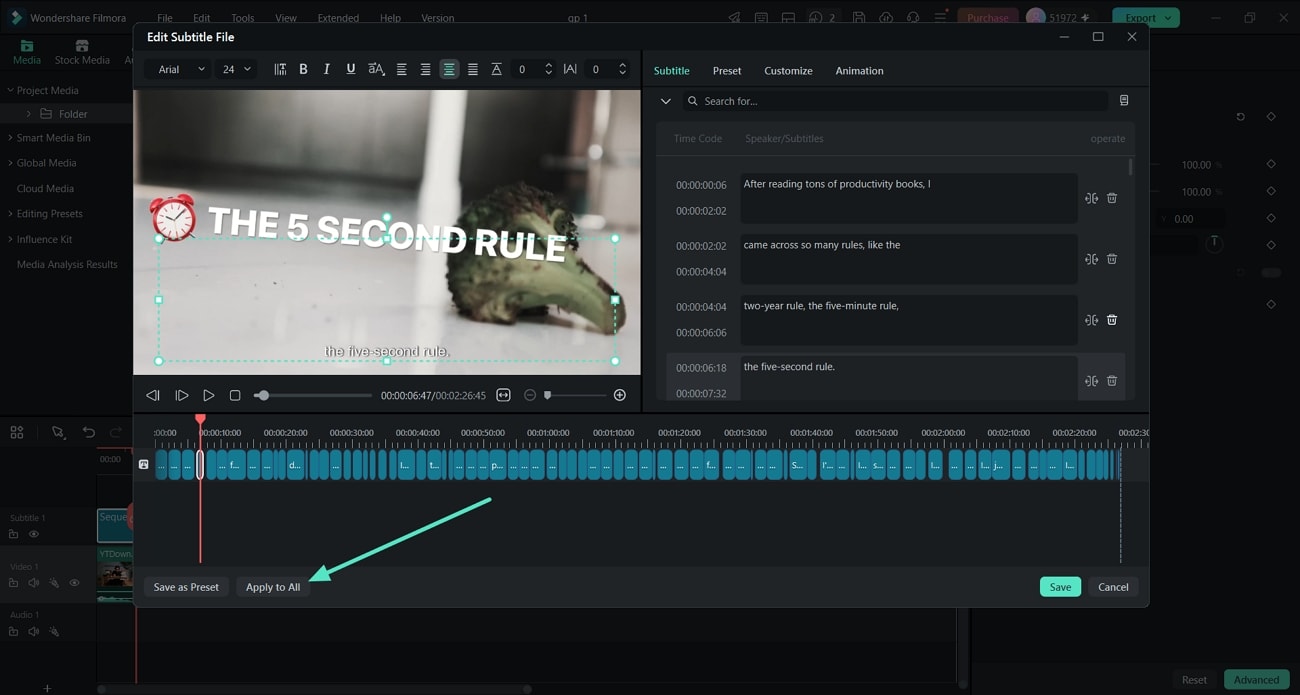
Step 2. Review and Edit the Captions
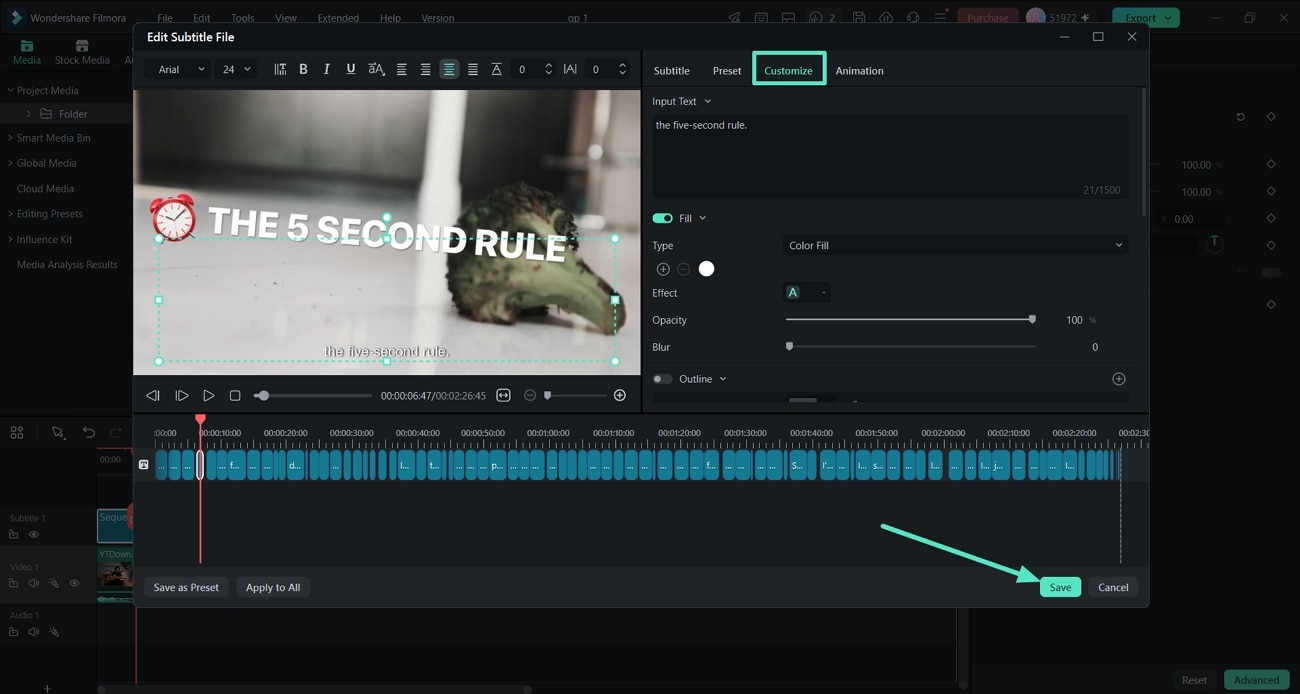
Step 3. Customize the Caption Style
Create Dynamic Captions in Filmora
For social and creator-focused videos, Filmora can also turn spoken audio directly into animated Dynamic Captions. This is useful when subtitles are part of the visual style rather than only an accessibility layer.
Step 1. Create Dynamic Captions
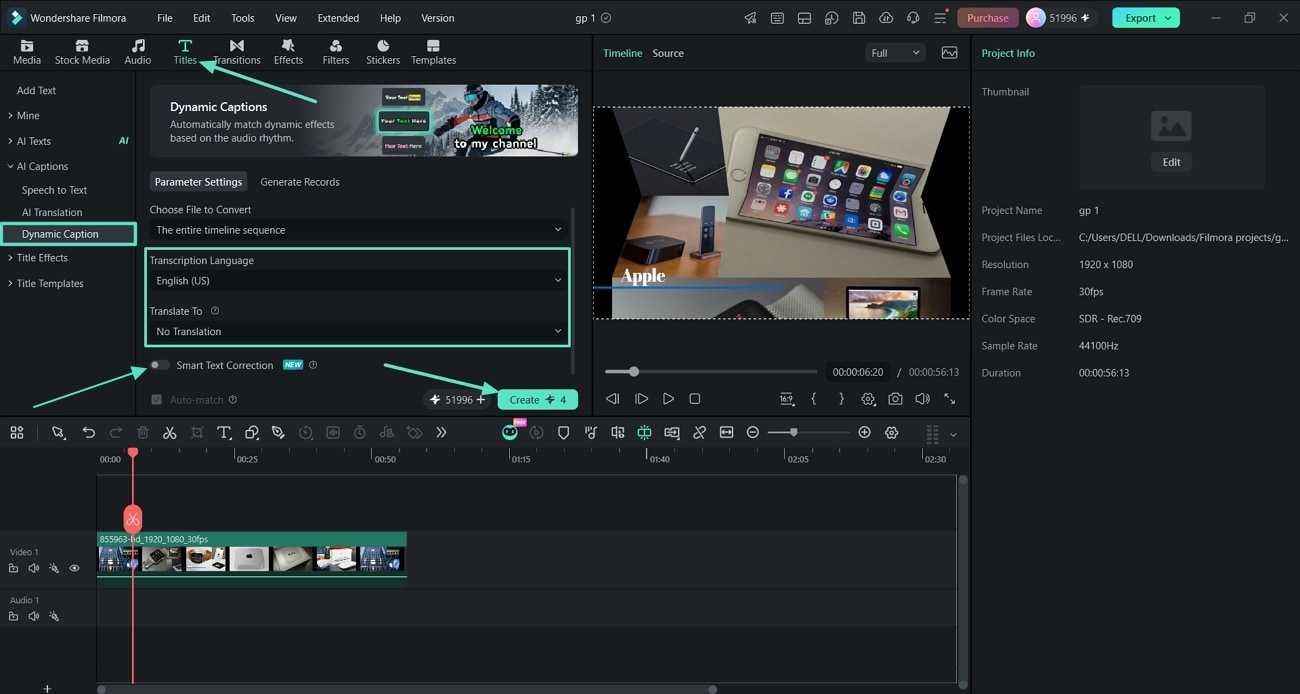
Step 2. Highlight Active Words and Key Words
Step 3. Emphasize Important Words
Explore Filmora Auto Caption →
For detailed instructions, see the Auto Caption Guide for Windows or the Auto Caption Guide for Mac.
2. Adobe Premiere
Adobe Premiere provides an integrated Speech to Text workflow for automatically transcribing dialogue and creating captions from the transcript. It supports speaker labeling, language selection, caption styling, multiple caption formats, and translated caption tracks.
Premiere also offers detailed controls over caption length, duration, line count, spacing, styles, and export formats, making it suitable for editors who already work in a professional timeline-based workflow.
- Accuracy: Adobe does not publish a single universal transcription accuracy percentage in its current caption documentation.
- Ease of use: Powerful and integrated, but its broader professional editing interface can take longer to learn.
- Caption workflow: Automatic transcription → Create captions from transcript → Style or translate captions.
- Best suited for: Professional video editing, long-form production, broadcast-oriented workflows, and teams already using Premiere.
3. CapCut
CapCut provides Auto Captions across its Web, Desktop, and Mobile versions. Creators can select a spoken language, automatically generate captions, then edit the text, timing, and appearance directly within the project.
Its caption workflow is particularly accessible for short-form and social media creators. CapCut also supports bilingual subtitle workflows in supported versions.
- Accuracy: CapCut does not publish one consistent universal accuracy percentage in its current help documentation.
- Ease of use: Beginner-friendly, especially for mobile and short-form workflows.
- Availability: Auto Captions are available on Web, Desktop, and Mobile.
- Best suited for: TikTok, Reels, Shorts, vlogs, and fast social media production.
4. Descript
Descript takes a different approach by making the transcript a central part of the editing workflow. Once a video or audio file is transcribed, creators can edit the media by editing the text and then turn the transcript into synchronized captions.
According to Descript, its AI transcription can achieve up to 95% accuracy. It also supports caption styling, speaker labels, text-based editing, and subtitle translation.
- Accuracy: Up to 95%, according to Descript.
- Ease of use: Particularly intuitive for users who prefer document-style editing.
- Caption workflow: Automatic transcript → Edit text → Generate and style captions.
- Best suited for: Podcasts, interviews, webinars, talking-head videos, and text-led editing workflows.
5. VEED
VEED is a browser-based video editor with automatic subtitle generation. Creators can upload a video, select the spoken language, generate subtitles, and then edit or style them directly in the browser.
VEED also supports speaker detection in supported plans and provides a broad set of transcription and translation languages, including English (UK).
- Accuracy: VEED markets high auto-subtitle accuracy, but results still depend on audio quality, accents, background noise, and terminology.
- Ease of use: Easy to access because the workflow runs in a web browser.
- Best suited for: Agencies, social teams, browser-based workflows, and creators who do not want to install desktop software.
Software |
Published Accuracy Claim |
Ease of Use |
Caption Strength |
|---|---|---|---|
| Wondershare Filmora | Up to 99% with clear audio | Easy | Auto Caption + Dynamic Captions + animated word highlighting |
| Adobe Premiere | No single percentage published | Advanced | Professional transcription, caption formatting, translation, and export |
| CapCut | No single percentage published | Very easy | Fast Auto Captions across Web, Desktop, and Mobile |
| Descript | Up to 95% | Easy for text-based editing | Transcript-first video editing and synchronized captions |
| VEED | Vendor describes high accuracy; results vary by audio | Easy | Browser-based automatic subtitles and multilingual workflows |
Note: Accuracy percentages from different vendors should not be treated as a controlled benchmark because each company may use different datasets, audio conditions, languages, and testing methods. Real-world transcription quality also depends on microphone quality, background noise, speaker overlap, accent, speech speed, and specialist terminology.
What Are the Top Video Editing Programs for Adding Subtitles and Closed Captions in the UK?
For creators in the UK, the basic requirements are similar to those in other English-speaking markets: accurate transcription, editable captions, language support, styling controls, and reliable export. Performance with regional accents can vary depending on the speaker and recording quality, so automatically generated captions should always be reviewed before publication.
For UK English specifically, it is useful to choose software that either supports English broadly or provides an explicit UK English transcription option.
Subtitle Tools Worth Considering for UK Creators
- Wondershare Filmora: Combines automatic transcription with Dynamic Captions, animated word highlighting, styling, and caption translation in the same video editing workflow.
- Adobe Premiere: Provides professional Speech to Text, caption tracks, multiple caption formats, speaker labeling, styling, and translation tools.
- VEED: Explicitly supports English (UK) for subtitle transcription and provides a browser-based auto-subtitle workflow.
- Descript: Useful for interview, podcast, and dialogue-heavy content because captions are generated from an editable transcript.
- CapCut: A practical option for UK social creators who prioritize quick automatic captions on mobile, desktop, or web.
Why Filmora Works Well for Creator-Focused Caption Workflows
For creators who want more than plain subtitles, Filmora combines speech-to-text generation with visual caption editing. Dynamic Captions can highlight words as they are spoken, emphasize important phrases, and apply animated caption treatments without manually animating every text element.
This makes the workflow particularly useful for social videos, interviews, podcasts, tutorials, educational videos, and other content where captions need to remain readable while also supporting the visual style of the video.


Generate and Style Captions Automatically
 Secure Download
Frequently Asked Questions About Auto Subtitle Software
Which video editor has the most accurate automatic captions?
Published accuracy figures are not directly comparable because vendors may test under different conditions. Filmora reports up to 99% transcription accuracy for clear audio, while Descript reports up to 95%. Adobe Premiere and CapCut provide automatic transcription workflows but do not publish one universal accuracy percentage in their current official documentation.
Which subtitle software is easiest to use?
Ease of use depends on the workflow. Filmora and CapCut provide straightforward timeline-based caption tools, VEED works directly in a browser, Descript is especially intuitive for people who prefer editing through text, and Premiere offers deeper professional controls but has a more complex interface.
Can Filmora automatically generate animated captions?
Yes. Filmora's Dynamic Captions can generate synchronized captions from spoken audio and apply features such as Active Words, Key Words, emphasis, templates, and animations.
Does Filmora support multilingual captions?
Yes. Filmora supports transcription in 50+ source languages and can translate generated captions into 30+ target languages.
Which caption software supports UK English?
Several major caption tools support English transcription. VEED explicitly lists English (UK) as a supported transcription language. For any automatic caption tool, regional accents, background noise, overlapping speakers, and specialist terminology can affect recognition quality, so captions should be reviewed before publishing.


