

 TL;DR:
Wondershare Filmora is the optimal AI faceless video generator for creators who need to balance automated text-to-video generation powered by Sora 2 or Veo 3.1 models with comprehensive manual editing control across Windows, macOS, iOS, and Android.
● InVideo AI delivers fully automated, prompt-based social media videos without manual timelines, HeyGen and Synthesia offer lifelike multilingual avatars for corporate or educational use, and Lumen5 specializes in repurposing written articles into text-driven videos.
● Completely free, watermark-free generation is restricted to open-source GitHub pipelines requiring technical setup, while commercial tools only permit clean exports through limited free AI credits or trial batching strategies.
● Platform algorithms require faceless videos to target strict completion rate windows of 15–45 seconds for TikTok and 20–50 seconds for YouTube Shorts, alongside mandatory captions to accommodate silent viewers.
Ask AI for a summary
 ChatGPT
 Perplexity
 Gemini
 Claude
 Grok
Grok
Scroll through YouTube Shorts or TikTok, and you'll notice that many viral videos have no host or no face. These faceless channels attract millions of views and generate significant income. With a powerful AI faceless video generator, anyone can build a successful channel. AI now writes scripts, selects visuals, and generates voiceovers with precision.
These channels are not lucky accidents. They are built with systems. AI now writes the script, selects visuals, generates voiceovers, and assembles the video with precision. People who were once too shy to speak on camera can become full-time creators.
This article explains how an AI faceless video generator helps creators today. Then, we will compare the best tools available and help you choose the best workflow that suits you.

Part 1: Why You Should Start a Faceless Channel Today
Becoming a video content creator doesn't always mean you have to be on camera. After all, short-form platforms now prioritize retention, clarity, and consistency, not creator visibility. YouTube Shorts, TikTok, and Reels heavily promote narration-based and text-driven videos.

And in many cases, automation and niche channels outperform personality-based pages. These formats bring several key advantages that make faceless channels especially appealing for creators today:
- No camera pressure: You can avoid on-camera exposure, confidence issues, and privacy concerns altogether.
- Lower production cost: There's no need for filming setups, lighting equipment, or repeated reshoots.
- Scalable output: Multiple videos can be produced daily using AI.
- Multi-channel potential: A single creator can manage multiple niches simultaneously.
How far you can go with this approach largely depends on the AI faceless video generator you choose. In the next section, we'll look at the best tools worth using.
Part 2: Top 5 AI Faceless Video Generators to Scale Your Content in 2026
Choosing the right tool determines how fast you can publish, scale, and stay consistent. The following are the best AI faceless video generators, focusing on automation, output quality, and real usability.
1. Wondershare Filmora (Best for Editing & AI Tools)
Wondershare Filmora is the premier AI faceless video generator for creators seeking professional results. Beyond automation, its AI-powered features like Text-to-Video, AI Copywriting, and Text-to-Speech allow you to craft high-retention faceless videos for YouTube and TikTok without needing a camera. As a full-featured AI video editor, it includes a range of tools designed to streamline content creation and let you produce complete videos without recording any footage yourself.
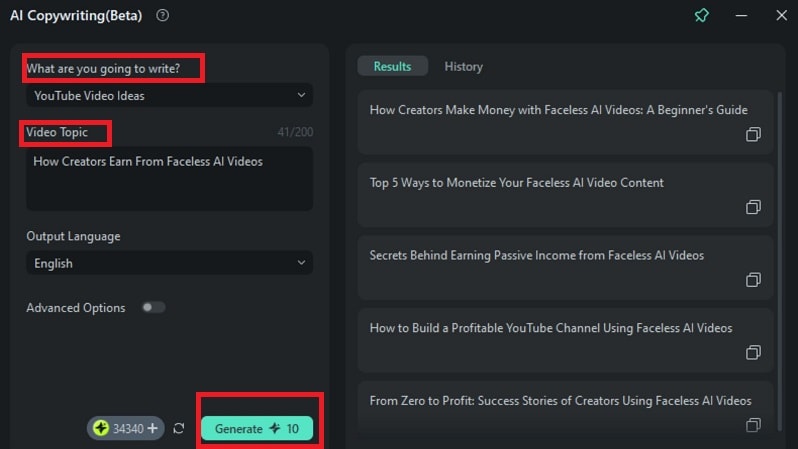
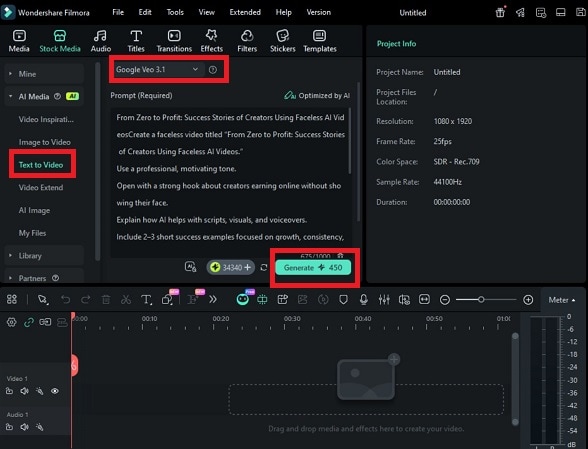
First, you can use its AI copywriting to generate scripts or brainstorm your ideas. Then, use AI Text-to-Video to create a short video from a text prompt, complete with scenes and audio such as dialogue, sound effects, or background music. Beyond generation, Filmora's built-in editing tools let you fine-tune the result manually, which makes generating AI faceless videos more flexible and effective.
 Secure Download
- AI Text-to-Video (powered by advanced AI models like Sora 2 or Veo 3.1)
- AI Image to Video to animate still images into dynamic video clips with motion, depth, and visual transitions.
- AI Script to Video, where you can paste in a full script and let the editor automatically match scenes, visuals, transitions, and background music.
- AI Idea to Video to generate a short video based on a rough idea or topic.
- AI Copywriting to create hooks, narration, titles, or descriptions.
- Strong balance between automation and editing control
- Suitable for short-form and long-form faceless videos
- Helps improve retention through smart trimming and captions
- Reliable option for consistent publishing workflows
- Free exports include a watermark
- Some AI tools require credits after free usage
Compatibility: Windows, macOS, iOS, Android
Filmora balances speed with control. AI builds the base video quickly, while editing tools improve clarity and retention. This allows creators to test ideas, refine strong videos, and scale faceless channels with confidence.
2. InVideo AI (Best for Social Media)
InVideo AI focuses on full automation. It is built for creators who want an AI faceless video generator that handles everything from idea to publish-ready video. A single prompt triggers script writing, visual selection, voiceover, music, and scene layout. No timelines or manual editing are required, which makes it highly effective for fast-moving social media content.
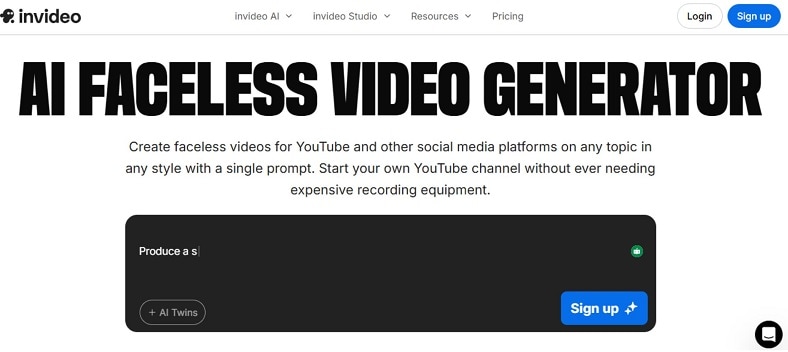
- Prompt-based faceless video generation
- Automated scripts, visuals, voiceovers, and music
- Workflow templates for Shorts, Reels, and YouTube videos
- AI avatars and optional virtual presenters
- Multi-language voiceovers and accents
- Access to millions of licensed stock visuals
- Extremely fast video creation
- No learning curve or editing experience needed
- Optimized for social media formats
- Supports many niches and content styles
- Limited manual editing control
- Free version includes a watermark
- Less flexibility for advanced storytelling
InVideo AI is recommended for creators who prioritize speed and volume. It works well as a free AI faceless video generator for producing Shorts, Reels, and quick YouTube content. For automation-focused social growth, it delivers consistent results with minimal effort.
3. HeyGen (Best for Realistic Avatars)
HeyGen is built for creators who want an AI faceless video generator with a human presence, without appearing on camera. It converts scripts into videos using lifelike AI avatars that speak naturally and move realistically. This approach works well for creators who need trust, clarity, and consistency in communication-heavy videos.

- Script-to-video generation with realistic AI avatars
- Large library of customizable avatars
- Multilingual voiceovers with natural lip sync
- Voice cloning for brand-consistent narration
- Multiple video templates for explainers and social content
- API access for teams and automated workflows
- Highly realistic avatar movement and speech sync
- Professional look without filming or equipment
- Supports many languages and accents
- Easy to use for non-technical creators
- Pricing may be high for solo creators
- Free plan is limited
- Advanced features may require setup knowledge
- Rendering can take longer for complex videos
Compatibility Web-based platform, available for both iOS and Android devices.
HeyGen is ideal when faceless videos still need a visible speaker. It suits education, marketing, and corporate content where trust matters. For creators seeking an ai faceless video generator with realistic avatars, HeyGen delivers consistent, professional results at scale.
4. Synthesia (Best for Multilingual Avatar Videos)
Synthesia is an AI faceless video generator for presenter-led videos without filming. It turns text into videos using realistic AI avatars that speak naturally in many languages. This suits training, marketing, education, and corporate communication. A clear on-screen speaker helps build trust and improve understanding.

- Script-to-video generation with AI avatars
- 65+ pre-built avatars with different styles
- Text-to-speech in 120+ languages and accents
- Custom avatar creation on higher plans
- Ready-made templates for training and explainers
- Enterprise-grade security and compliance
- Strong multilingual support for global audiences
- Realistic speech and lip synchronization
- Simple workflow with no editing background needed
- Regular updates and expanding avatar library
- Higher pricing compared to basic tools
- Limited creative freedom versus full editors
- Custom avatars require premium plans
- Minor "uncanny" expressions in some avatars
Compatibility: Fully web-based platform
Synthesia is recommended for creators and teams who need consistent, multilingual videos with a visible presenter. It fits faceless workflows where credibility, clarity, and scale matter more than manual editing flexibility.
5. Lumen5 (Best for Text-to-Video Repurposing)
Lumen5 is an AI faceless video generator built for turning written content into short, engaging videos without filming or narration on camera. It uses AI to analyze text, break it into scenes, and match each section with visuals, motion, and music. This makes it especially useful for blogs, articles, and social posts that need visual reach.
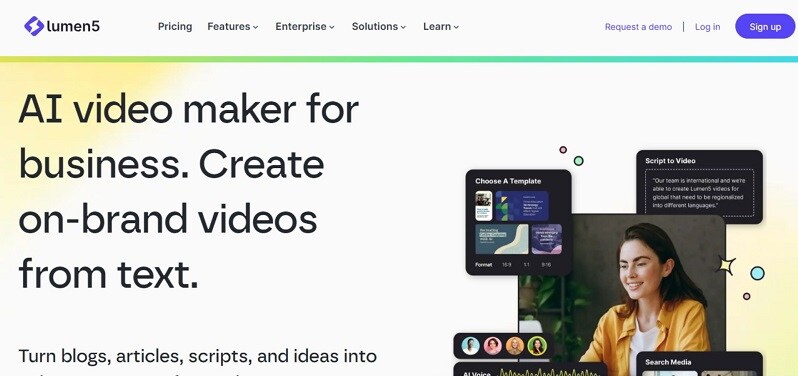
- AI-assisted text-to-video conversion
- Automatic scene creation from written content
- Large stock media library with licensed visuals
- Brand customization with logos, colors, and fonts
- Multiple aspect ratios for YouTube, Instagram, and LinkedIn
- Template-based layouts for quick publishing
- Very easy to use, even for beginners
- Excellent for converting existing text into videos
- Strong visual consistency with branding tools
- Good selection of templates and stock assets
- No AI avatars or presenter-led formats
- Limited advanced editing controls
- Higher-tier plans required for premium exports
- Less effective for dialogue-heavy content
Compatibility: Web-based platform
Lumen5 is ideal for creators who already produce written content and want fast video versions. It fits faceless workflows focused on reach and clarity, making it a practical AI faceless video generator for marketing, education, and social publishing.
Part 3: How to Find an AI Faceless Video Generator Without a Watermark
An entirely free AI faceless video generator without a watermark is rare. Most tools include watermarks by default on free plans. The options below are the only practical ways to get clean output.
- Open-source (GitHub) pipelines: Some AI faceless video generator GitHub projects use FFmpeg, open-source text-to-speech, and free stock APIs (Pexels, Pixabay). These produce watermark-free videos but require technical setup and license checks.
- Limited free exports: Certain platforms offer one-time or promo-based clean exports for new users. For example, Filmora uses AI credits to generate faceless videos, but it often includes free AI credits that let you create videos and export them without a watermark. These options are legitimate, but they're limited and not meant for unlimited use.
- Trial batching strategy: Creators often prepare scripts and assets first, then export multiple videos during a short trial period to avoid watermarks. This approach helps maximize limited free credits or trial access while producing enough content to schedule.
Part 4: Step-by-Step Guide: Creating Your First Viral Video with AI Practical Tutorial to Increase User Dwell Time
Out of all the best AI faceless video generators we've discussed, Filmora is a recommended place to start. It already has everything you need to make a video from scratch, even without filming anything, and then edit it altogether on the same platform.
For your first video, we'll show how the process works from idea to finished clip using Filmora.
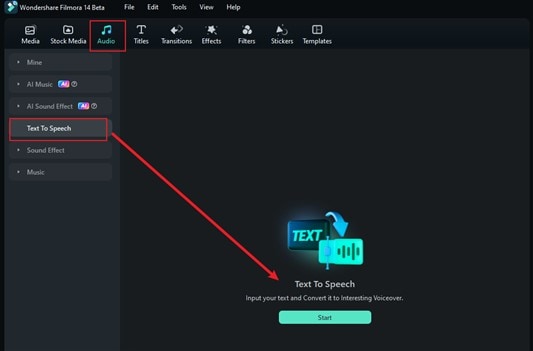

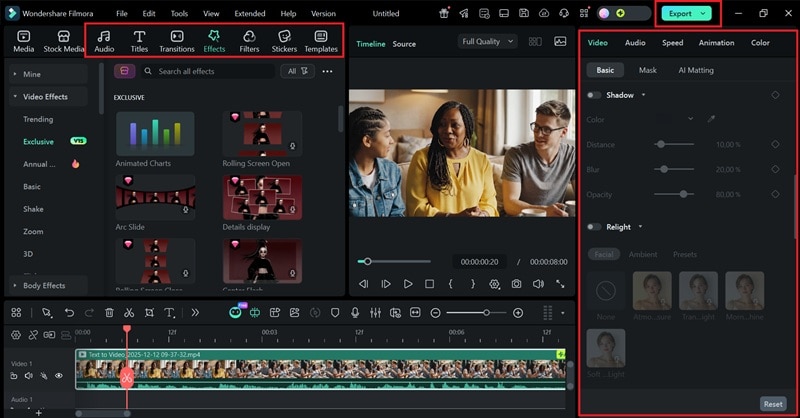
Filmora's mobile app also supports faceless workflows. You can generate videos, add AI voiceovers, apply captions, trim clips, and format videos for Shorts or Reels directly on your phone.
Part 5: Best Practices for Ranking Your Faceless Videos on YouTube & TikTok
Faceless videos rank when they meet platform-specific signals, not when they rely on creativity alone. Recent platform updates confirm that retention, clarity, and consistency matter more than creator visibility.
1) Win the first 3 seconds (retention trigger)
Both platforms now measure early retention as a primary ranking signal. Use a clear hook, bold text on screen, and immediate context. Avoid slow intros.
- YouTube Shorts ranking signal: average view duration and retention
- TikTok ranking signal: watch time in the first seconds
2) Design for silent viewing
A large percentage of users watch without sound. Faceless videos perform better when the meaning is clear visually. Best practices:
- Always add captions
- Keep sentences short
- Highlight key words with motion or contrast
3) Optimize video length, not maximum length
Shorter videos often outperform longer ones for new channels. Current sweet spots:
- TikTok: 15–45 seconds
- YouTube Shorts: 20–50 seconds
The goal is completion rate, not duration.
4) Post consistently, not randomly
Algorithms reward predictable publishing patterns. Faceless creators gain an edge because AI tools allow frequent posting. Recommended cadence:
- 1–2 Shorts per day (YouTube)
- 1–3 posts per day (TikTok)
5) Match content to search intent (YouTube advantage)
YouTube favors faceless videos that answer clear questions or explain concepts. Use simple, direct titles and descriptions aligned with viewer intent. Examples:
6) Use clean visuals and stable pacing
Rapid cuts without meaning reduce retention. Use motion only when it supports the message. Faceless videos rank higher when:
- Scenes change with purpose
- Text stays readable
- Visual clutter is avoided
Conclusion
This article showed how AI tools reduce friction at every stage, from scripting to publishing, while keeping creators invisible and focused on ideas. Each tool serves a different purpose, but the strongest workflows combine automation with control. That balance matters when retention and pacing decide reach.
An AI faceless video generator only delivers results when paired with smart editing and platform-aware strategy. Among the options discussed, Filmora fits naturally into this model by allowing creators to test concepts, refine performance, and scale output without locking creativity into rigid automation. The result is content that grows quietly, steadily, and with intent.

