

 TL;DR:
For video and game creators, ElevenLabs delivers the most realistic human dialogue using its v3 voices, while Zack Bogucki and HYOCT specialize in retro RPG text blips, and Wondershare Filmora provides the overarching Veo 3.1 workflow to convert these scripts into full visual scenes.
● Choose ElevenLabs for expressive, multi-language human voice acting controlled by typed emotional instructions, or select Narakeet for a beginner-friendly 800-voice library suited for multi-character scripts, though Narakeet suffers from slower generation and lower audio realism.
● Opt for Zack Bogucki’s Wwise-powered generator or HYOCT’s free tool when requiring classic game text sounds; however, note that Bogucki is limited to four character styles with a tricky Android installation, while HYOCT features a video-ready green screen mode but lacks recent software updates.
● To generate accompanying visuals for your dialogue without switching applications, use the Text to Video tool in Wondershare Filmora by specifically selecting the Veo 3.1 model and inputting detailed text prompts that dictate character emotions, pacing, and camera angles.
Ask AI for a summary
 ChatGPT
 Perplexity
 Gemini
 Claude
 Grok
Grok
Typing a script is easy, but creating natural back-and-forth dialogue is a challenge for video creators. That's why using an AI dialogue voice generator is essential for TikTok storytellers, virtual drama creators, and indie game developers. These powerful tools transform written lines into expressive, realistic conversations. Below, we review the best free and paid AI dialogue voice generator options for 2025, including those perfect for generating authentic RPG dialogue sound.
Part 1. What Exactly Is a Dialogue Voice Generator?
At its core, an AI dialogue voice generator is a tool that takes the lines you type and turns them into spoken dialogue that actually sounds like people talking. Not the old robotic text-to-speech, but something that feels closer to real performance.
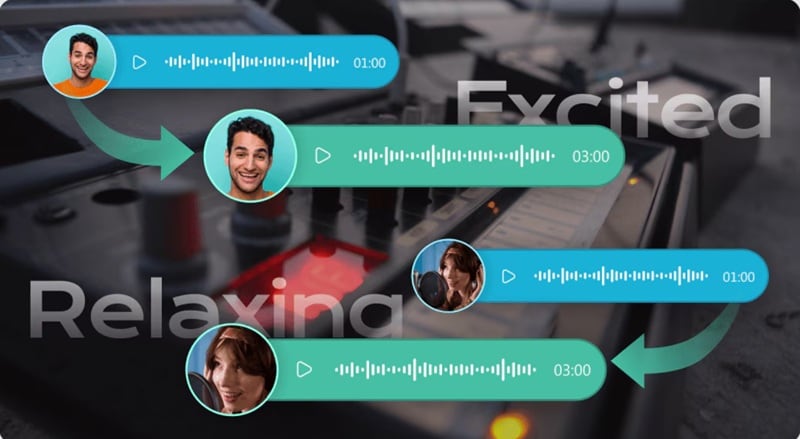
Here's what sets it apart and makes the voices sound more natural:
- Back and forth timing: It understands the natural rhythm between characters and keeps the flow smooth.
- Emotional tone: It adds mood and feeling, so the voices don't sound flat or robotic.
- Multi-character assignment: It lets you choose different voices for each character in the scene.
- Realistic pacing and pauses: It pays attention to how people actually talk and adds those small timing details.
So, instead of stiff robotic narration, you get something that actually feels alive and fits right into videos where personality matters.
AI Dialogue Generator vs. Sound Generator
People mix these two up all the time because they kind of look similar on the surface. They both help you shape how your scenes feel, but they're made for totally different moments in your story. Here's the main difference:
| Feature | AI Dialogue Voice Generator | RPG Dialogue Sound Generator (or Undertale Style) |
| What It Creates | Full spoken lines that sound like real people talking | Short audio cues like text blips, retro typing, emotion pops, and UI sounds |
| Main Purpose | Makes conversations feel natural, expressive, and alive | Adds personality, timing, and style to scenes or dialogue boxes |
| Best Use Case | Video storytelling, character scenes, TikTok skits | RPG dialogue sound, Undertale style chats, retro game vibes |
| Audio Style | Human tone, emotion, pacing, performance | Beeps, blips, retro chiptune sounds, expressive sound effects |
| Character Support | Lets you assign different voices to different characters | One style per sound effect, usually short and punchy |
| Overall Vibe | Smooth, natural, emotional conversations | Fun, stylized, game inspired reactions and text effects |
|
Show More
Show Less
|
||
Part 2. The 4 Best AI Dialogue Voice Generators & RPG Dialogue Sound Tools for Video Creators (2025 Review)
Now that you understand better about dialogue voice generators, let's move on to find the tools that actually do the job well. Lucky for you, we've rounded up some of the best ones.
Below are some of the best tools in different categories, so you get a good mix depending on the style you are trying to create. If you want natural conversations, retro game vibes, or something playful and character driven, you'll find a tool here that fits perfectly.
1. ElevenLabs: The Best AI Dialogue Voice Generator for Realistic Performance
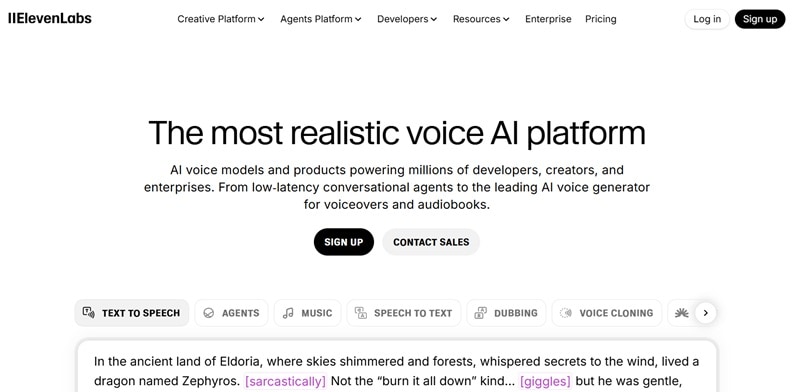
ElevenLabs has been around for a while, and even though there are tons of AI dialogue voice generator tools popping up everywhere, this one still holds its spot at the top. At first glance, it might look like another simple TTS tool, but once you try the newer v3 voices, you hear the difference right away. The dialogue sounds rich, expressive, and way more natural.
Standout Feature:
- Supports a huge range of languages, including English, Indonesian, Swedish, French, and German.
- Lets you add instructions like whispering, laughing, or dramatics to shape the performance.
- Runs online, so you can use it from any device without extra setup.
- Comes with extra tools like sound effects, voice cloning, and a voice changer to match your project style.
- Ideal for audiobooks, podcasts, dubbing, and videos with lots of back-and-forth dialogue.
- You can control the character's delivery by typing instructions directly into the script.
- Making the character voices sound more varied can be a bit confusing for beginners.
- You need to sign in and create an account before you can start.
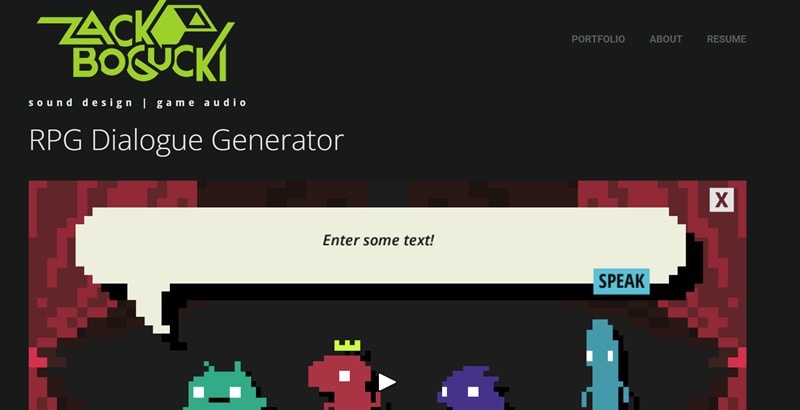
2. Zack Bogucki: The Best RPG Dialogue Sound Generator
RPG games have such iconic text sounds, but there are surprisingly few tools that can recreate them. That is why this RPG dialogue sound generator by Zack Bogucki is such a good find. He is a professional sound designer, and he built this tool so you can type your text, pick a character, and instantly get that classic RPG style dialogue sound.
Standout Feature:
- Uses Wwise to manage the audio so the output feels polished and clean.
- Lets you control pitch, volume, tone, speed, and even gender to match the exact sound you want.
- Has random and default buttons that make quick adjustments really easy.
- The sound is very close to what you hear in classic RPG model games.
- Available on both desktop for Windows and mobile for Android so you can use it anywhere.
- The number of character styles is still pretty limited with only four options.
- The installation process can be a little tricky, especially on mobile, even though the website does provide clear instructions.
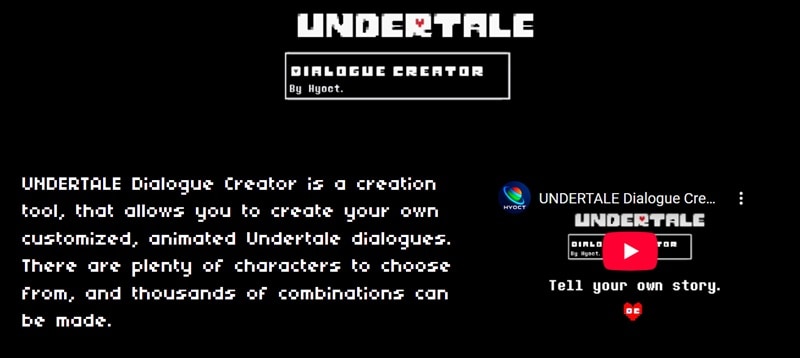
3. HYOCT: The Best Undertale Dialogue Sound Generator
If you ever went through an Undertale phase, you already know how unique and charming those dialogue sounds are. HYOCT created an Undertale dialogue sound generator that really captures that same feel. It lets you build your own custom Undertale-style dialogue box, complete with animated text and character sounds.
Standout Feature:
- Voices from iconic Undertale characters like Sans, Papyrus, Toriel, Asgore, and others.
- Options to create custom characters for your own stories.
- Available on Windows, Linux, and iOS so you can run it on almost anything.
- Totally free to download and use.
- Comes with a green screen mode that works great for video projects.
- It has not received updates in a long time.
4. Narakeet: The Best Dialogue Sound / Audio Generators
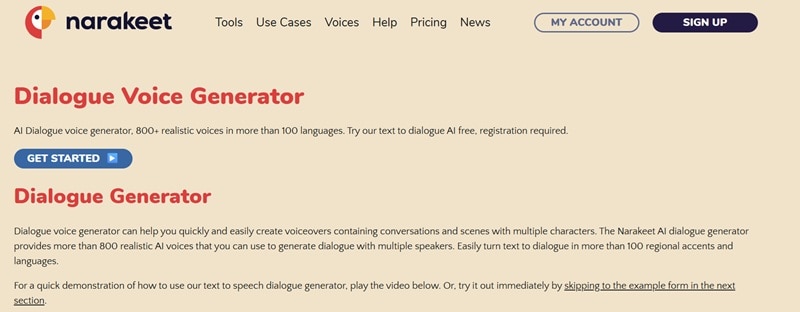
To close off our list, Narakeet's dialogue voice generator makes it really easy to create scenes with multiple characters talking. You just type your script, assign the character for each line, and the tool does the rest. It also has a surprisingly big collection of voices and accents from all over the world, so your project can have a bit more personality without too much effort.
Standout Feature:
- More than 800 AI voices with backgrounds like Asian American, African American, West Coast, East Coast, Southern, and many more.
- Over 100 accents, including English, Welsh, Mexican, Filipino, French, and more.
- A beginner-friendly interface that keeps everything straightforward.
- The free account is already great for testing or making small personal projects.
- The huge mix of voices and accents gives you a lot of room to be creative.
- Generating the audio can take a little time.
- The realism is not the strongest, and it sometimes feels a bit like a language exam recording.
Part 3. How to Pick the Right Tool for Your Project (Without Overthinking It)
Now that you've seen the different styles of AI dialogue voice generators, it gets a lot easier to choose one that actually fits what you're making. But before you decide, just think about the kind of content you want to create because each tool shines in its own way.
Here are a few things that really help you pick the right match for your project:
- Does It Support Dual Characters?
A good AI dialogue voice generator should let you run more than one voice at the same time. This makes your scenes feel natural because you can build real conversations instead of stacking single lines one by one.
- Does It Support Emotions?
A solid dialogue voice generator gives you emotional tone options like happy, calm, angry, or whispering. These little shifts bring your characters to life and make the storytelling feel more expressive.
- Can You Adjust the Speech Rate?
Being able to control the talking pace is a huge help. Slow delivery keeps things dramatic, and fast pacing gives you that lively back-and-forth rhythm that works great for skits.
- Does It Offer Unique Audio Styles?
Tools that offer special audio styles open up a lot of creative rooms. Retro RPG sound beeps, undertale dialogue sound generator effects, anime inspired voices, and cinematic tones all help match the vibe of your project.
Part 4. Turn AI Dialogue Voice into a Full Video Scene: The Filmora + Veo 3.1 Workflow
All those dialogue voice generators we mentioned above are great for creating voices, but at the end of the day you are still holding nothing but audio. If your goal is to turn those lines into an actual scene that moves and feels complete, you need something that handles more than just sound. Thankfully, there's Wondershare Filmora that makes everything a lot easier.
 Secure Download
Why Filmora?
Filmora is not just a regular editor anymore. With Google's Veo 3.1 and Sora 2 built right inside its Text-to-Video feature, you can start with nothing but a simple idea in your head, type it out, and watch it turn into a full scene. It includes;
- AI-generated Videos: Describe the moment and let Veo 3.1 build the visuals for you.
- AI Dialogue: Turn your script into character voices without recording anything.
- AI Sound Effects: Add those little audio touches that make scenes feel alive.
- Cinematic Editing: Adjust the mood, pacing, and look so the final result matches what you pictured.
It is basically a full studio in one app. It saves you from jumping between an AI dialogue voice generator for the talking and another tool for the visuals.
Quick Guide: How to Use Veo AI Generator and Dialogue Audio in Filmora
- Download and install the latest version of Filmora on your device.
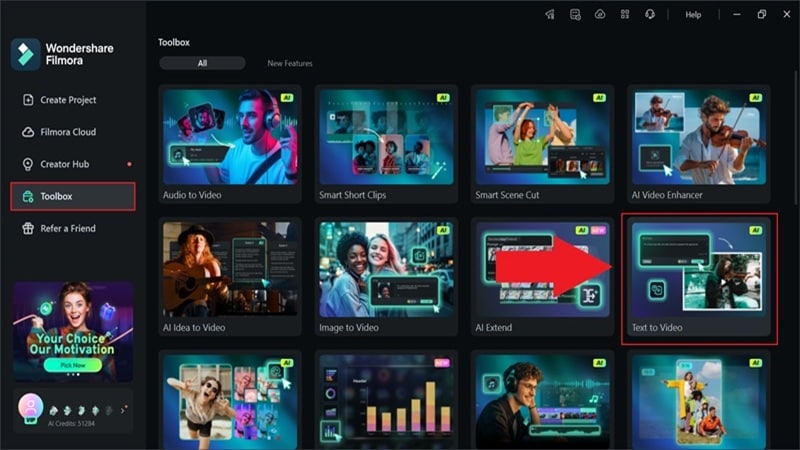
- Open the program and go to the "Toolbox".
- Scroll through the options and select "Text to Video" to start creating your scene.
 Secure Download
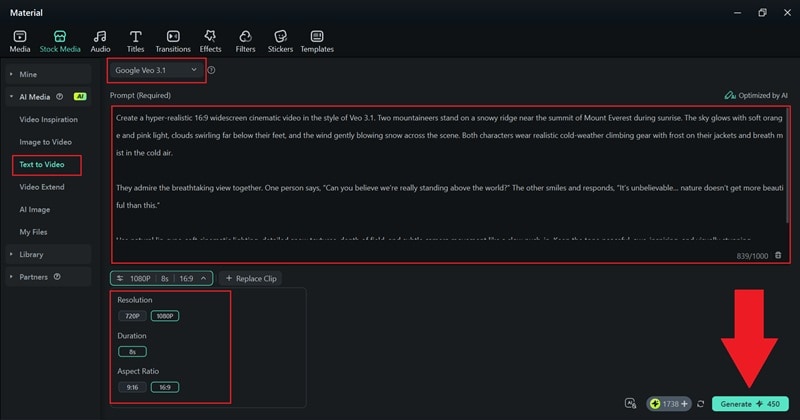
- Inside the feature page, switch the mode to "Veo3.1" for the best visual quality.
- Type your prompt in the description box and make it as clear and detailed as you can.
- Set the resolution, aspect ratio, and duration. Click "Generate" and let Filmora create the video.
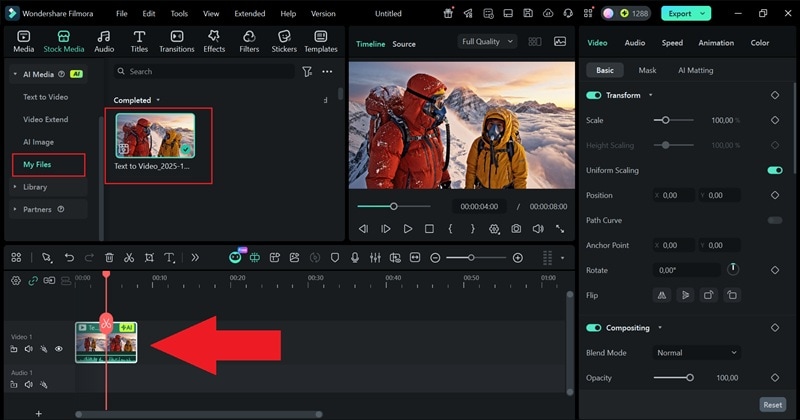
- When Filmora finishes generating, the result will appear in the "My Files" section.
- Drag the video to the Filmora timeline and press play to check how it looks.
- If you want to refine it, explore Filmora's collection of filters, video effects, AI tools, and other editing features to shape the scene the way you like.
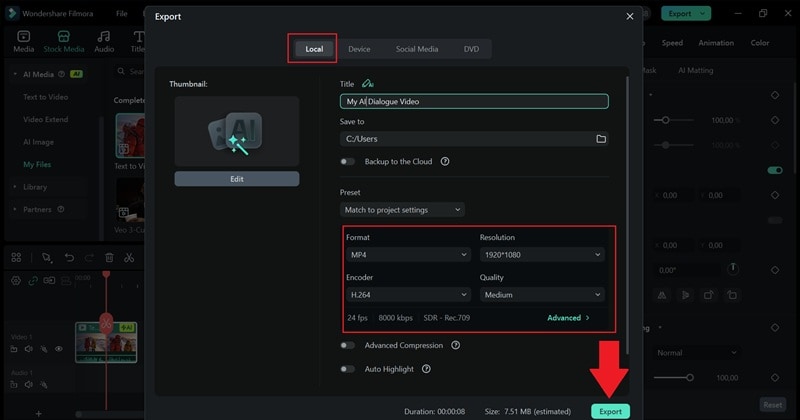
- Click "Export" in the top right corner once you are done with the edits.
- Choose "Local" to save the video to your device, set the resolution and file location, pick the format you want, and click "Export" again to finish.
And that is really all you need to do. The steps are simple, but the final result can look and sound surprisingly real, complete with dialogue that feels like it came from actual people. If you are curious how it turns out, go ahead and check the result for yourself.
Part 5. Try These Dialogue Prompts for Better Quality Scenes
Now that you have seen how well Filmora's AI Text-to-Video as an AI dialogue voice generator, it is clear how much the prompt shapes the final result. After all, a strong prompt helps the AI understand the scene, the vibe, and the dialogue you want, which makes everything feel smoother and more expressive.
To save you time, here are a few ready-to-use ideas that work really well with Filmora and Veo 3.1.
For a Moody Rainy Argument Scene

Prompt to use: A tense night scene on a rainy street where two characters argue under a flickering streetlamp. Wet reflections on the ground, close up shots, dramatic lighting. Character one says "You never listen to me." Character two replies "I am trying, just tell me what you want." Emotional delivery with visible tension in their faces.
For a Dramatic Sunset Confrontation

Prompt to use: A hero and rival standing on a cliff at sunset, strong silhouettes, wind moving their clothes, wide cinematic angle. Character one says "This ends today." Character two replies "Then show me what you have left." Intense and serious delivery with slow pacing.
For a Calm Night Walk Scene

Prompt to use: A quiet street at night with warm streetlights, soft shadows, and slow walking animation. Character one says "The city feels different at night." Character two replies "Yeah, like it finally takes a breath." Gentle and reflective tone with slow pacing.
For a Classroom Comedy Scene

Prompt to use: A lively classroom with bright colors, scribbles on the board, and students chatting. Character one says "Did you study for the test" Character two replies "I studied how fast I can accept failure." Lighthearted and comedic tone.
Conclusion
Dialogue is one of the easiest ways to pull people into a story, and with the help of AI it becomes so much faster to create moments that feel alive. So, we walked through different AI dialogue voice generator tools, from the fun RPG dialogue sound generator made by Zack Bogucki to the niche Undertale dialogue sound generator by HYOCT that captures that classic retro charm.
All of these AI dialogue voice generators work great on their own, but if you need a solution that also brings your visuals to life, Wondershare Filmora is the ultimate choice. With its powerful AI Text-to-Video feature, Filmora turns simple prompts into complete video scenes with high-quality AI voices and movement. Stop jumping between tools—download Filmora today and build your complete story in one place.

