


 TL;DR:
Creating viral AI videos for platforms like TikTok requires crafting highly specific, three-part prompts using OpenAI's Sora 2 or its widely accessible alternative, Google Veo 3.
● Access to Sora 2 is currently limited to an invite-only rollout exclusively for users in the United States and Canada through the iOS application.
● Successful AI generation requires setting the aspect ratio to 9:16 and structuring prompts to strictly include an absurd action, cinematic camera details, and explicit sound or location descriptions.
● Users without Sora access can utilize Google Veo 3 integrated within the Wondershare Filmora desktop and mobile apps, which provides native sound synchronization and immediate in-app editing capabilities.
Ask AI for a summary
 ChatGPT
 Perplexity
 Gemini
 Claude
 Grok
Grok
Sora AI videos are currently trending online. This groundbreaking tool from OpenAI produces stunningly realistic video clips that are sometimes hard to tell it was AI-generated. Many of them, though, are just straight up absurd, which was obviously only made possible with the help of AI.
As a result, many viral Sora AI videos are spreading like wildfire across TikTok, racking up millions of views and leaving many audiences both amazed and curious to try it for themselves.
We have gathered some of the funniest and popular Sora AI video clips that everyone's talking about. You will also get to learn how to create them yourself, with proven strategies to help your content go viral!
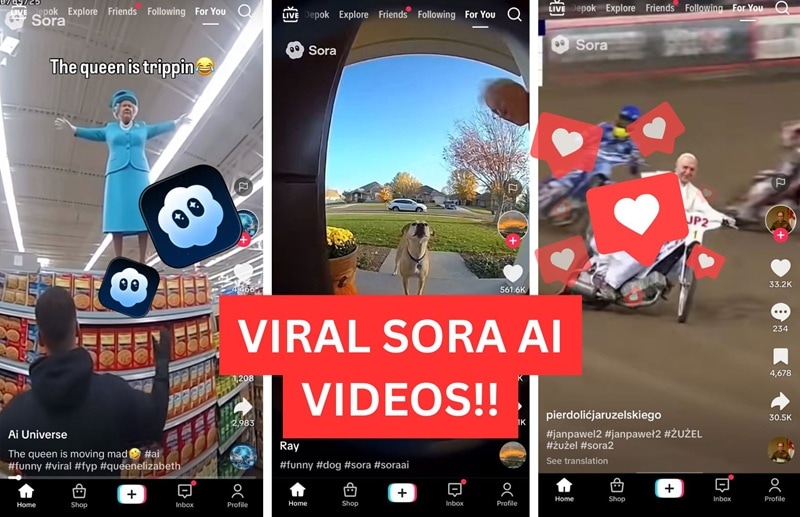
Part 1. Top 20+ Funny / Viral Sora AI Videos on TikTok
These are the clips everyone's been waiting for. The most hilarious, bizarre, and viral Sora AI videos have been compiled here, each one racking up massive view counts on TikTok!
1. Einstein & Hawking on Darts - The two late scientists are in a dart match with huge crowds.
2. The Queen is moving - The late Queen Elizabeth dances in a supermarket
3. Super Power Dog - A dog is spraying a homeowner with a water cannon-like mouth
4. Stephen Hawking Boxing - The famous scientist Hawking is in an MMA fight against the late Queen Elizabeth.
5. Dog sprays a house - A dog hilariously sprays and demolishes a house front door using water from its mouth.
6. Airplane on the driveway - A grandma is angry at a plane getting too close to her front door!
7. Gorilla vs Tornado - An angry gorilla bangs on the door before being sucked by a passing whirlwind.
8. Cat Caught - A Cat is caught driving and seen driving away.
9. Vacuum Sprint - A 4-way sprint race while holding the vacuum cleaners.
10. Chainsaw Chiropractor - The latest sora trend in this viral wellness treatment is a chainsaw!
11. Chilli Car - A man gets caught driving a car while almost drowning in a carload of chilli sauce.
12. Babushka Bonanza - A grandma in Slavic attire outran a car while riding a donkey.
13. Pope takes the two wheels! - The pope is out about drifting in a motocross race.
14. Cat to the rescue - A cat makes a last-second rescue for a baby who almost fell, a good reminder for us all!
15. Chimp on a magical carpet - A chimpanzee is seen speeding on a highway with a magic carpet. The police patrol is not too happy.
16. MJ on the crips - The late singer legend, Michael Jackson, captivates a fried chicken joint as he tries to grab the crispy popular food.
17. Grandma Cleaning Day - No one disturbs Grandma on a housekeeping duty, including a scary clown.
18. A boar problem - A wild boar abruptly disrupts an old couple's quality time.
19. Scifi Motorbike - A young man speeding away in a sci-fi bike after being stopped by the police.
20. Queen of Street Food - The late British ruler is trying the latest Jamaican street food sold by a very polite vendor.
Part 2. How to Create Your Own Viral Sora 2 AI Videos
To start making Sora AI videos, you’ll need access to the Sora platform first. In its latest update, OpenAI introduced Sora 2, which, unfortunately is still invite-only during its initial rollout. For now, it’s available to users in the United States and Canada through the new Sora app on iOS.
If you’re one of the lucky users with access to Sora 2, you can follow the step-by-step tutorial on creating Sora 2 AI videos. You can also view helpful materials, such as this YouTube video:
Step 1: Access Sora 2 AI
- Access the Sora iOS App or Sora Web Interface using an OpenAI or ChatGPT account.
- Tap the "Create" button to open the prompt window.
For those wanting to star in their own videos (a popular viral trend), create and verify a digital avatar through the Cameo feature during onboarding.
Step 2: Write a Prompt Using the Great 3-Part Structure
Creating a viral Sora AI video comes down to one essential skill: crafting the perfect prompt. The Sora AI responds best to prompts that paint a clear, vivid scene; one that specifically describes the action, setting, and even camera angles down to the smallest detail.
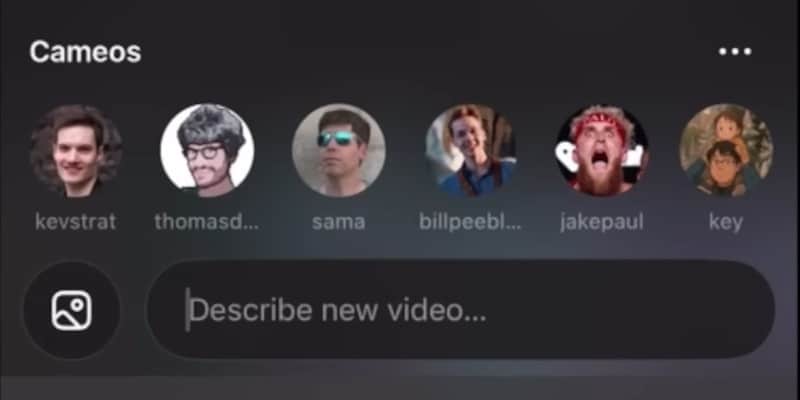
A viral prompt usually includes the combination of realism and creative absurdity. You can follow this simple three-part structure to deliver the best results:
- The Absurd Action: Define the subject and the funny or impossible action. Example: "A chihuahua wearing a tiny police uniform chasing a squirrel up a tree."
- Cinematic Style: Specify the look, lighting, and camera movement. Example: "Filmed on a high-speed FPV drone, early morning sunlight, cinematic 4K quality."
- Sound and Setting: Describe the location and audio elements. Example: "In a suburban park, add wailing police sirens and chipmunk chatter."
Combined Prompt Example: "A chihuahua wearing a tiny police uniform chasing a squirrel up a tree. Filmed on a high-speed FPV drone, early morning sunlight, cinematic 4K quality. In a suburban park, add wailing police sirens and chipmunk chatter."
Step 3: Generate and Finalize the Settings
Input the prompt into the generator. Set the aspect ratio to 9:16 (Portrait) for optimal TikTok and Shorts formatting. Choose the clip length, typically between 10 and 15 seconds. Hit "Create" and wait for the video to render.
Step 4: Iterate and Publish
Watch the generated clip and check for visual glitches like distorted hands or melting objects. If adjustments are needed, click "Remix" and modify one element of the prompt.
Download the final MP4 file once satisfied with the result. Upload directly to TikTok using hashtags like #SoraAI and #aivideo, along with theme-specific keywords for better visibility and a chance of getting viral!
Part 3. How to Create an AI Video Using Sora 2 Alternative
For those without Sora 2 AI access, Google Veo 3 integrated into Wondershare Filmora can be your alternative. This combination generates hyper-realistic AI videos with synchronized sound and provides immediate editing capabilities within the same platform.
 Secure Download
The seamless workflow eliminates jumping between multiple tools. You can use Filmora to generate AI-generated video content and edit it directly within the platform. The AI Text-to-Video feature is available on both the Filmora mobile app and the desktop app (for Windows and macOS).
Step 1: Access the Veo 3 Generator in Filmora
Launch the latest version of Filmora on your mobile device. Tap the "Veo 3" feature on the home screen
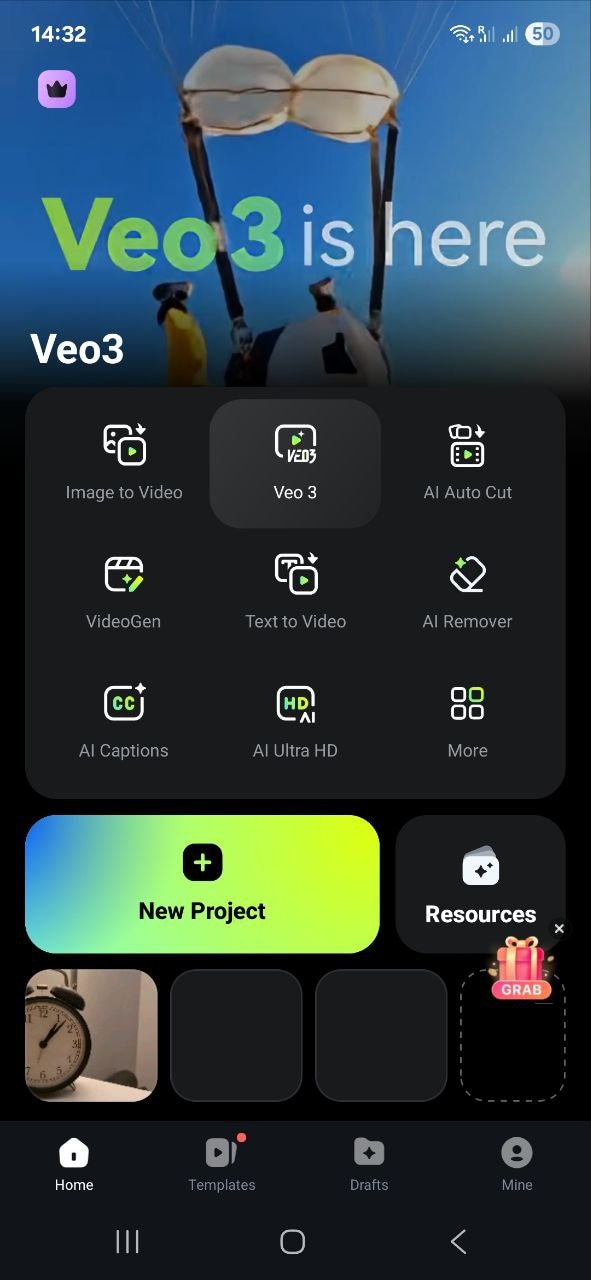
Step 2: Write a Detailed Prompt
The same viral prompt principles apply to Veo 3. Specificity matters, especially regarding audio, as Veo 3 excels at native sound synchronization. Type the detailed concept into the prompt box. More specific prompts yield better results.
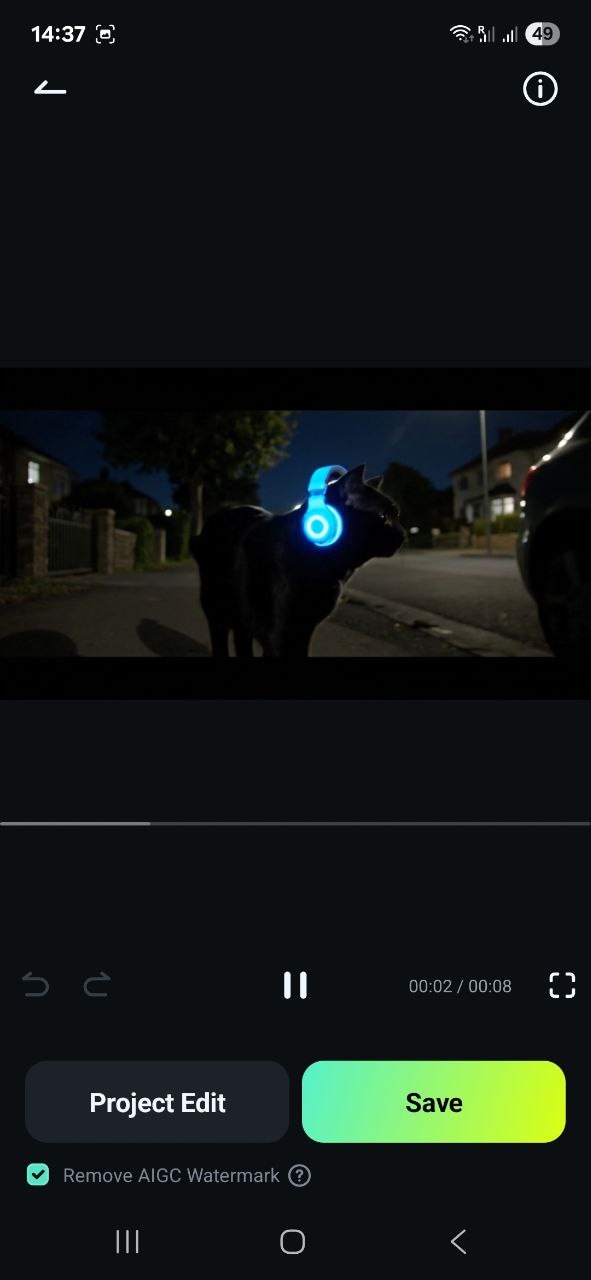
Example: "A cat listening to music at night while walking in a quiet neighborhood. It looks cool. Add a chill electronic music as sound".
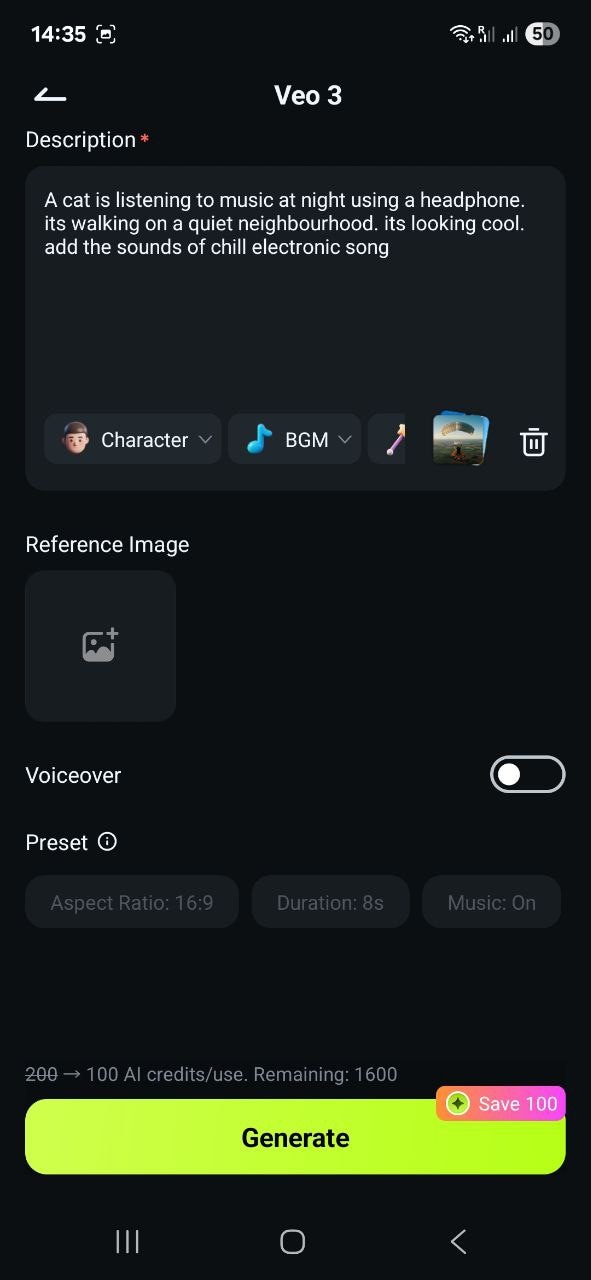
Step 3: Hit Generate and Wait
Click "Generate" and wait a few minutes while the clip renders. There will be progress information as well as the estimated generation time.

Step 4: Review the Video Result
After the process is completed, you can review the generated video result. You can click “Project Edit” if you want to edit and enhance the video using Filmora’s video editing tools.
Step 5: Export and Share
If you are satisfied with the video, you can save the video by tapping the “Export” button. You can then find the video in the Gallery of your phone, where you can share it with your friend or upload it directly to TikTok, ready to be the next viral video!
Secure DownloadConclusion
The AI video landscape is transforming rapidly through tools like Sora 2 and Veo 3. Being viral no longer depends on expensive equipment but on creating creative and engaging prompts.
Sora AI Video delivers raw, surreal energy perfect for social sharing, while Veo 3, integrated with Filmora, offers superior cinematic control, native audio, and professional editing features.
This evolution means the barrier to creating hyper-realistic, eye-catching content has effectively disappeared. Whether the goal is simple absurdity or narrative polish, the tools now exist for anyone to generate viral videos.
