


Selling products online means keeping your visual content fresh. A single product may need catalog photos, lifestyle shots, model shots, and social media short videos. But since producing all of that takes time, especially when you're regularly launching new items, WeShop AI aims to simplify the process with tools for product photography, virtual try-on, and video creation.
But how well do WeShop AI tools work? And are they worth the cost? Let’s look at its features, free plan, pricing, and limitations in our WeShop AI review below.
Part 1. What Is WeShop AI?
WeShop AI helps online sellers create product photos, showcase clothing on virtual models, change outfits in existing images, and turn still photos into short videos. Its tools cover e-commerce tasks like product photography, virtual try-on, and fashion editing.
The WeShop AI Clothes Changer, for example, lets you experiment with different looks, while its image and video tools support other types of visual content. These features make WeShop AI worth trying for sellers who want to create product images and promotional videos without arranging a new photoshoot for every variation.
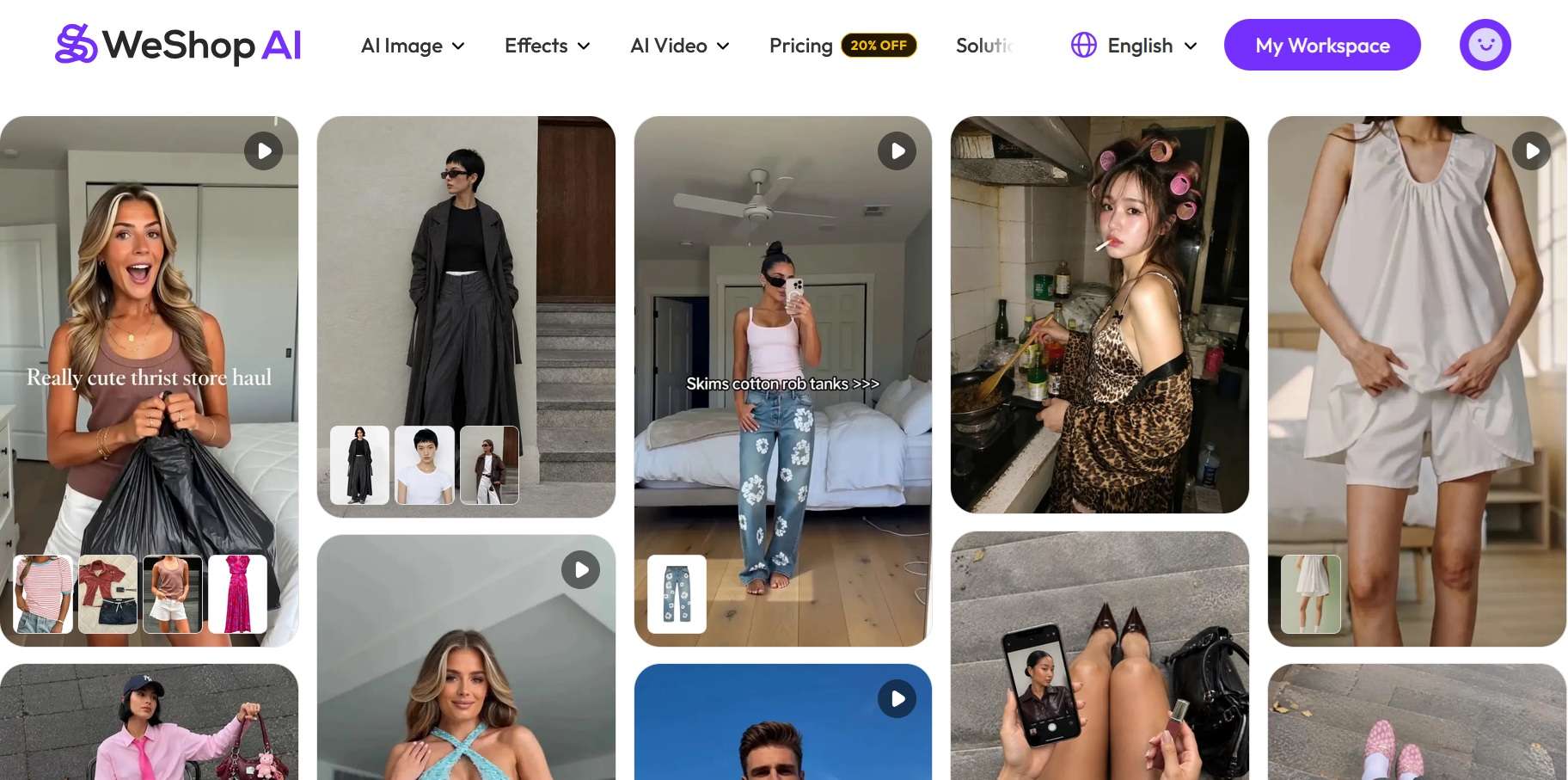
How to Use WeShop AI: Web, Mobile, and Desktop
- Web: WeShop AI runs in your browser at https://www.weshop.ai/, where you can generate product visuals and create videos online.
- Mobile: WeShop AI app (available on Google Play and App Store) lets you work from your phone. Signing up via the app offers 300 points. Avoid using WeShop AI Mod APK.
- Desktop: WeShop also offers a desktop app and WeShop Canvas, a separate workspace for creating and refining visuals. WeShop Canvas is available for macOS 13 or newer, with Windows listed as coming soon.
Part 2. Create Product and Fashion Images With WeShop AI
From polished product shots to virtual outfit changes, WeShop AI offers several image tools together for ecommerce sellers. However, the feature availability varies by platform and subscription plan.
AI Product Photography
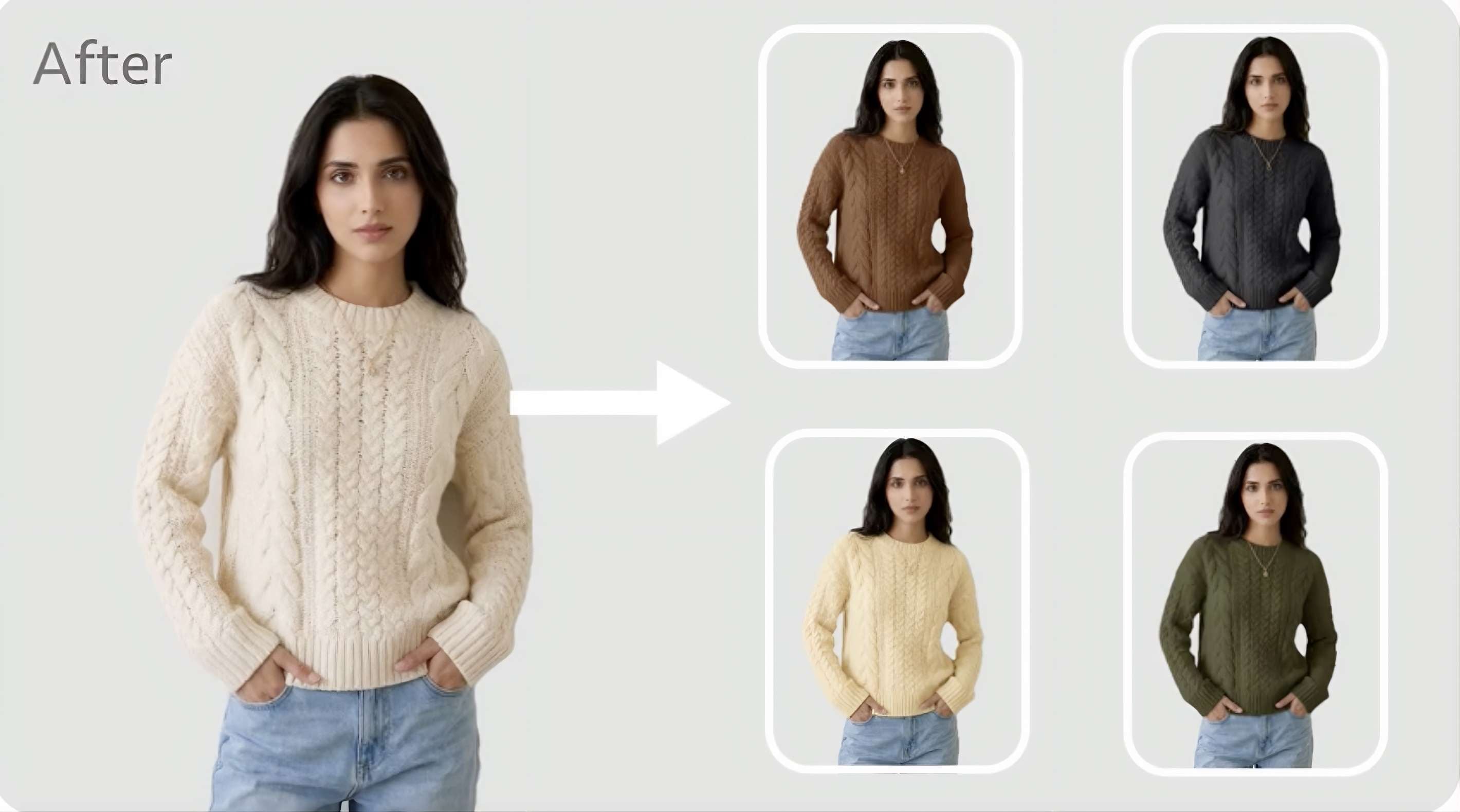
WeShop AI product photography lets you place an uploaded product image in a generated scene, making it easier to create different backgrounds and lifestyle shots.
- AI Photo Recolor: Changes the color of products or other objects with minimal loss of texture and detail.
- AI Photo Enhancer: Improves image quality.
- Model & Background Swap: Replace the person or setting in a photo while keeping the main product in focus.
AI Clothes Changer and Virtual Try-On
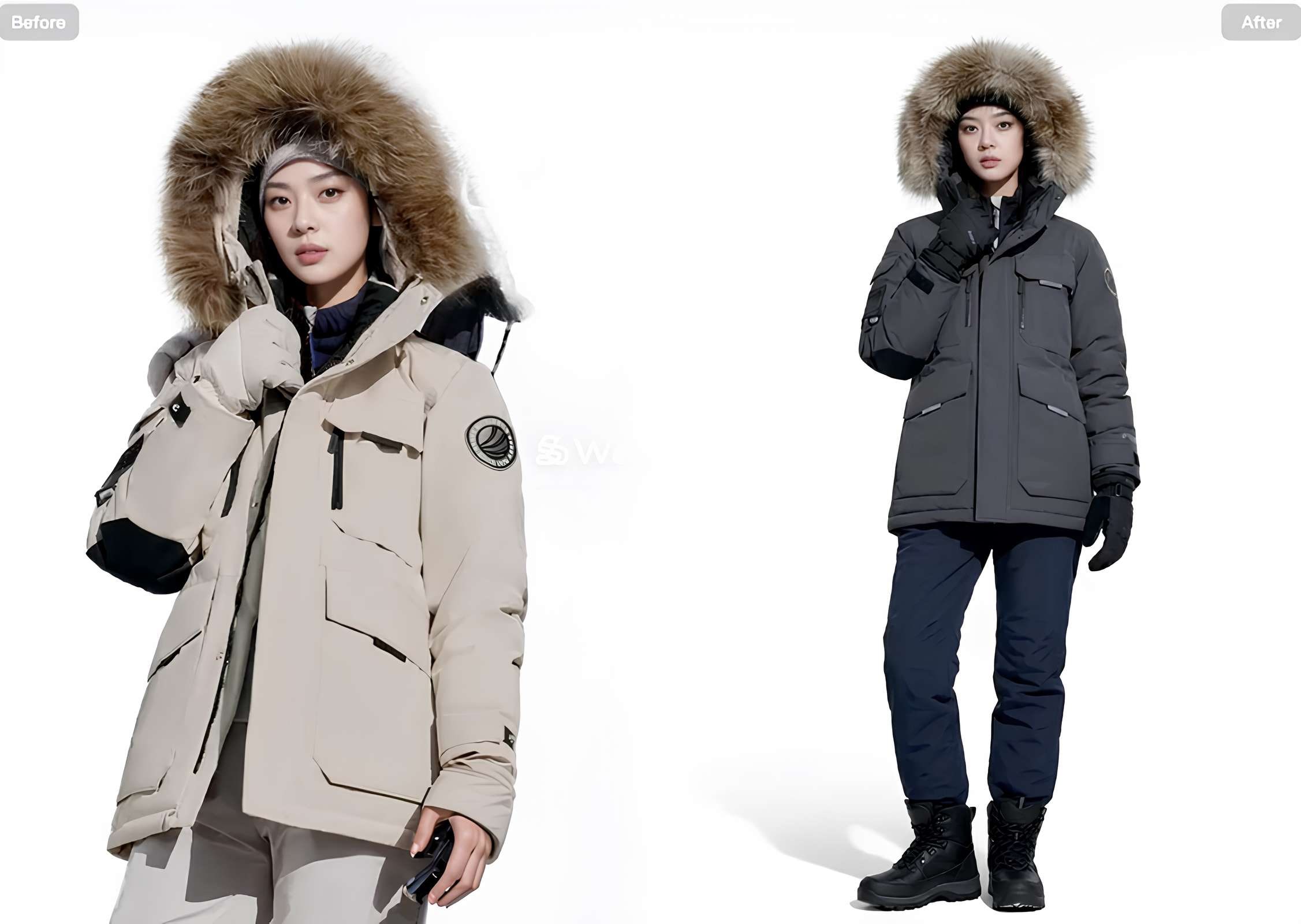
The WeShop AI Clothes Changer lets you change the outfit in an existing photo. Other fashion tools help sellers present clothing in different styles and on virtual models.
- Virtual Try-On: Previews clothing on a model.
- AI Outfit Generator: Creates outfit ideas and styling variations.
- AI Fashion Model: Generates fashion images featuring AI models.
- Change Pose: Creates alternative poses for fashion photos.
AI Fashion Models and Other Image Tools
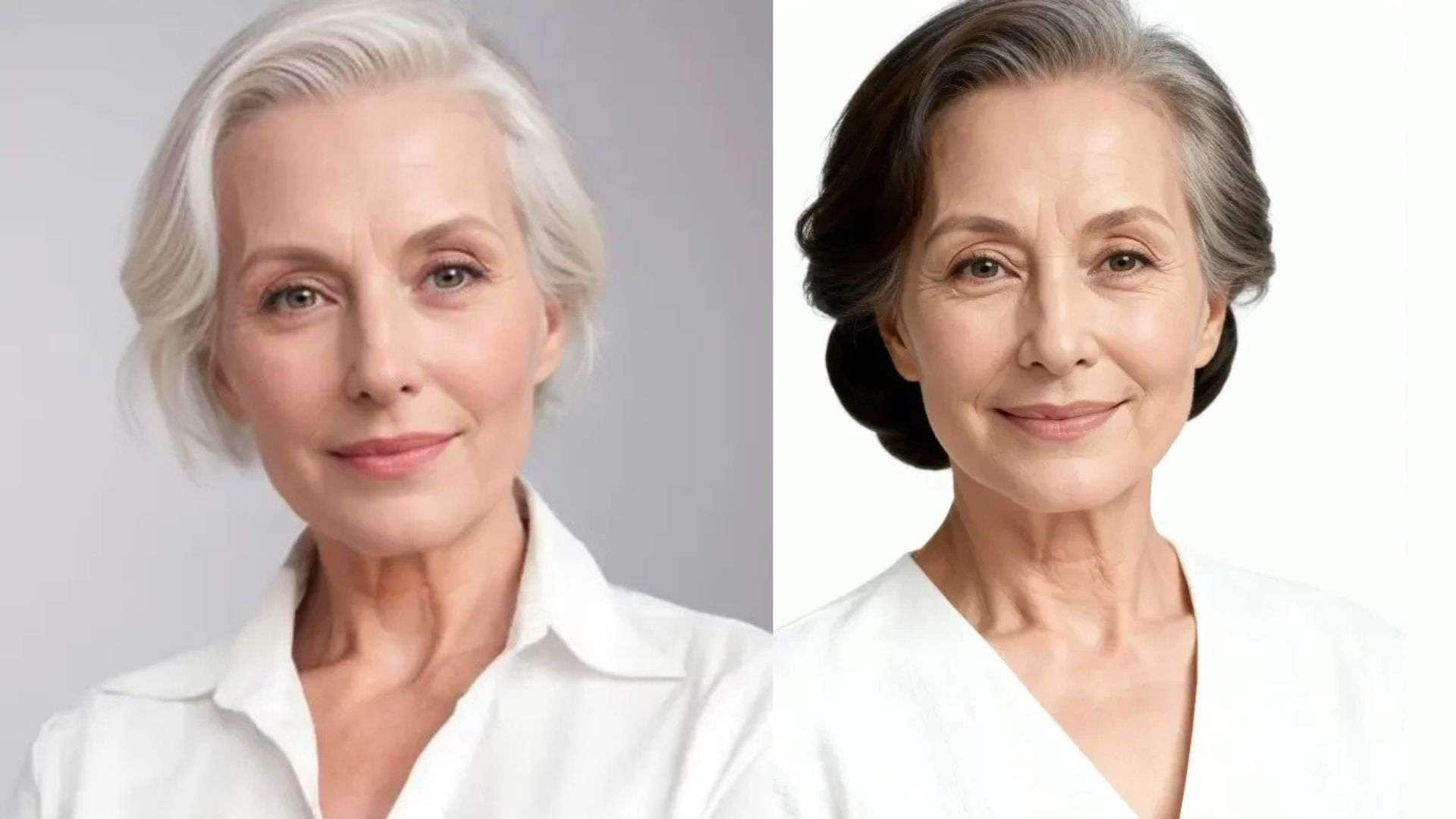
Beyond clothing edits, WeShop AI offers face-editing and image-cleanup tools.
- Face Forge: Reshape, merge, or swap faces to create different facial combinations.
- Background Remover: Removes the background from an image.
- AI Hands & Feet Fixer: Helps correct issues with hands and feet.
- Magic Eraser: Removes unwanted elements from an image.
Part 3. Turn Product Images Into Videos With WeShop AI
Product photos highlight key details, and short videos add movement, styling, and different angles. The WeShop AI video generator turns existing images into clips for product pages, social media, and promotional campaigns.
AI Image-to-Video

WeShop AI for image-to-video lets you animate a still image using a text prompt. Depending on the selected model, you can also provide starting and ending frames to guide the clip.
- Motion prompts: Describe how the product, model, or camera should move.
- First and last frames: Guide the opening and ending shots, where supported.
- Video settings: Choose from the duration and aspect ratios available for your selected model.
This feature is useful for WeShop AI product video shoots when you want to create short promotional clips from existing photos.
Video Agent
The WeShop AI Video Agent creates videos from a single image or text prompt, with tools for arranging scenes and transitions.
- Image or text input: Start with a product photo or describe the video you want.
- Scene creation: Use its storyboard workflow to build a more complete clip.
- Marketing videos: Create content for product showcases, ads, and social media.
According to WeShop AI’s FAQ, Video Agent tasks start at 500 points. You can check the displayed cost before generating, as point usage may vary by task.
WeShop AI Video Models
WeShop AI supports video models such as Seedance 2.5, Seedance 2.0, MiniMax H3, Kling 3.0, Sora 2, and Veo 3. Other options are available, and the lineup may change.
For product videos, compare each model's prompt adherence, motion, and ability to preserve product details. Inspect logos, packaging, colors, and garment patterns before using a generated clip in an ad or product listing.
Part 4. WeShop AI Pricing and Free Plan
The WeShop AI free plan gives you 200 points to try selected tools before paying for a subscription. Paid plans offer more points, broader model access, and higher task limits. Your best choice depends on how often you create images and videos.
What You Get With the WeShop AI Free Plan
- 200 points.
- Access to selected AI models, with some premium models unavailable.
- One concurrent job at a time.
- Generation frequency limits.
These points are enough to try selected image tools, but video generation can use hundreds of points per task.
WeShop AI Pricing Plans
WeShop AI has three paid plans, with a 20% discount for annual billing. Here’s how their pricing and point allowances compare.
| Plan | Pro | Ultra | Enterprise |
| Monthly billing | $9.99/mo | $45/mo | $457/mo |
| Annual billing | $7.99/mo | $36/mo | $365.60/mo |
| Points included | 12,000/yr | 72,000/yr | 180,000/yr |
| Concurrent jobs | 16 | 48 | 48 |
|
Show More
Show Less
|
|||
What Each Plan Is Best For:
- Pro: Individual sellers, creators, and small businesses that need regular product images and videos.
- Ultra: Growing ecommerce brands and marketing teams producing content at higher volumes.
- Enterprise: Larger businesses and agencies with heavier content demands and API integration needs.
Part 5. WeShop AI Alternative for AI Video and Editing: Filmora
WeShop AI focuses on e-commerce visuals, from product photography and virtual try-ons to promotional clips. For projects that need more detailed editing, Wondershare Filmora is a WeShop AI alternative that offers AI image and video generation with tools to edit and refine the final video.
What You Can Do With Filmora
Filmora offers tools to create visuals and turn them into ready-to-use marketing content:
- AI Image Generator: Create visuals from text prompts or reference images, making it a WeShop AI alternative with AI text-to-image capabilities.
- AI Video Generator: Generate clips from text or images using supported models.
- Multitrack Timeline: Arrange footage, music, voiceovers, titles, and effects.
- AI Idea-to-Video: Turn a concept into a video draft.
- Auto Captions: Generate subtitles from speech.
- Video Templates: Customize ready-made designs for social media and marketing.
- AI Effects: Apply creative effects to video clips.
These tools are only part of what Filmora offers. As a full video editor, it lets you refine AI-generated clips with trimming, captions, and music. Its AI image-to-video templates also let you test different hairstyles, outfits, or poses from one image, so it works well as a WeShop AI alternative with AI image-to-video capabilities.
 Secure Download
Conclusion
WeShop AI helps you create product photos with new backgrounds, preview different outfits, and make short videos for your online store or social channels. One important thing to keep in mind is point usage, since generating videos can cost considerably more than editing images.
If you also need to enhance the final video with custom captions, transitions, music, and effects, Filmora is a WeShop AI alternative worth considering. Choose WeShop AI for product visuals and Filmora when you want more flexibility to edit and polish your videos.
FAQs
-
Is WeShop AI safe?
WeShop AI's privacy policy explains how the platform collects and uses your personal information. If you're uploading photos of people or unreleased products, review the policy before using them. -
Can WeShop AI change clothes in photos?
Yes. WeShop AI Clothes Changer lets you replace outfits in an existing photo. You can also use Virtual Try-On to preview clothing on models without arranging a new photoshoot. -
Can I use WeShop AI for commercial purposes?
WeShop AI is designed to help businesses create e-commerce visuals. Before using generated content in product listings or ads, check its current terms for commercial-use rights and any restrictions.
