

 TL;DR:
Top nature sound apps provide specialized offline capabilities and custom 3D audio mixing across iOS and Android, serving as the foundational audio that creators can directly pair with the Filmora Mobile AI video editor's stock footage or Text-to-Video tools to produce custom ASMR loops.
● Device compatibility and offline features dictate app selection: aSleep is exclusively for iOS and collects no data, Animal Sounds (Android 4.1+) and Ambience (Android 4.2+) are limited to Android, while Rainy Mood and Sleep Sounds support completely offline playback to minimize battery consumption.
● When assembling videos in Filmora Mobile, the workflow strictly requires importing or generating a visual clip first before the timeline permits uploading local ambient audio files downloaded from your chosen sound app.
● To create clean ASMR videos using Filmora's AI Text-to-Video feature, users must manually disable the Music option during the prompt setup to ensure the software outputs visual-only footage that will not clash with layered app sound effects like fire crackles.
Ask AI for a summary
 ChatGPT
 Perplexity
 Gemini
 Claude
 Grok
Grok
Struggling to sleep or find focus? The right nature sounds app for iOS or Android can be a game-changer. We've compiled the 10 best nature sound apps for sleep and relaxation to help you find your perfect ambient noise. But the best part? We'll also show you how to easily combine these soothing audio tracks with stunning visuals using the Filmora Mobile AI video editor, allowing you to create your own viral relaxing and ASMR nature videos in minutes.
Best 10 Nature Sounds App Options
1. YouTube
YouTube serves as an excellent nature sounds app platform where users can access thousands of high-quality nature recordings completely free. As a versatile app for nature sounds, YouTube offers everything from best nature sounds for sleep to meditation-focused audio content.
Binaural beats videos, where two different frequencies of sounds are combined to create a new frequency tone are getting highly popular among people. These are believed to help in lowering stress, anxiety and depression and increase concentration, attention, and efficiency of an individual.
It can also be helpful in attaining mental peace and serenity. The app even contains peaceful meditation sounds that ease the ability to focus and remain relaxed during the whole process. It is highly a user-friendly app and is absolutely free to download on the Android Smartphones.
2. Atmosphere: Relaxing Sounds
Atmosphere consistently ranks as the best nature sounds app for stress relief and mental relaxation. This premium nature sound app combines sophisticated audio engineering with user-friendly design to deliver an exceptional listening experience.
The key feature of this application is that it allows users to import their personalized audios and mix them with various default acoustics available within the app itself.
The soothing sounds available here are divided into 8 different environments such as Beach, City, Park, Countryside, Home, Underwater, Forest and Oriental. Users can also mix and match the sounds between environments to produce a tailored theme.
Compatible with Android 5.0 or up, and iOS 10.0 or later

3. Rainy Mood
Rainy Mood provides the most genuine rain, thunderstorm, and lightening sounds available online.
It not only relieves tension and anxiety but also helps users suffering from insomnia.
This app even contains natural white noise facility that helps in getting rid of any unwanted sounds around us.
The various rain sounds are available here in different environments such as heavy rain, tropical rain, umbrella, rain on tent, rain on porch etc. The best thing about this app is that it can work in offline mode, i.e. without any Internet connection. This eventually results in less power consumption.
Compatible with both iOS and Android OS 5.0 and up

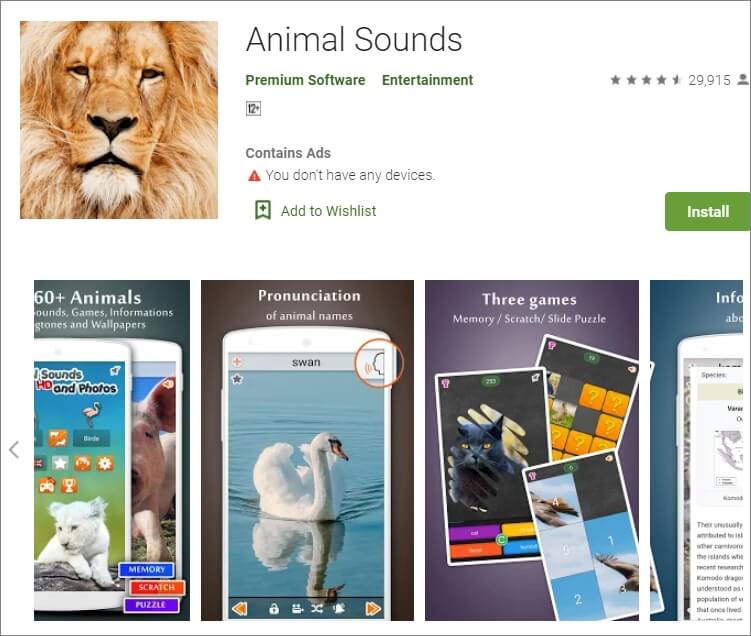
4. Animal Sounds
Animal Sounds is a one-stop destination for all animal lovers. The program provides the most detailed information about animals, and also contains hundreds of animal sounds and photographs from all over the globe.
The quality of audios and pictures is remarkably high and clear. The sounds here are categorized under pet animals, mammals, farm animals, bird sounds, wild animals, reptiles and amphibians.
The application also provides the facility of customized ringtones and wallpapers to its users.
Compatible with Android 4.1 and up
5. Sleep Sounds
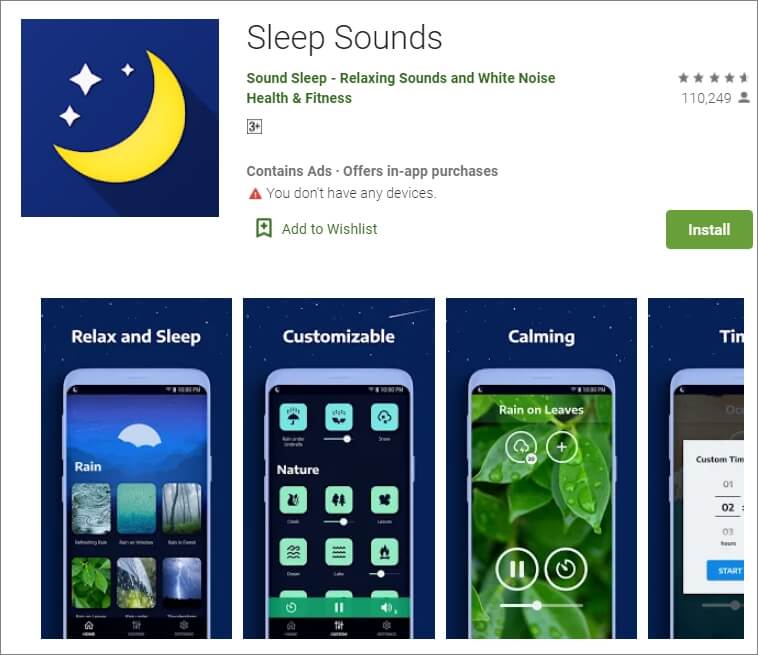
Sleep Sounds is one of the top trending apps nowadays owing to the increasing problems of insomnia and irregular sleep patterns among people. It is very helpful for an uninterrupted quality sleep.
The calm and soft music gradually tranquilizes the mind and the user eases into a good sleep. Its interface is user-friendly with beautiful images in the background.
The sounds here are categorized under rain, nature, relax, transport, noise, and white noise classes. This app also works without an Internet connection.
Compatible with Android 4.4 or later
6. Calm
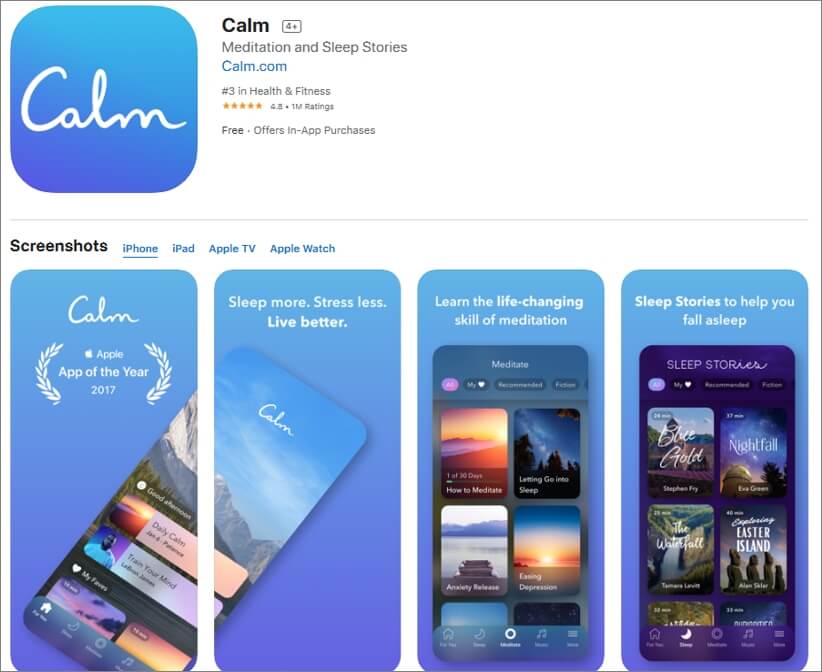
Calm is best suitable for the people who practice meditation on a daily basis. It is available for free and can be used by the beginners as well as experienced users.
The main features include guided meditation programs, breathing sessions, adult bed-time stories, masterclasses by the international coaches, etc.
Here, one can choose a personalized guide for meditation from several topics such as relationships, self-esteem, breaking habits, forgiveness, mindfulness, etc. Users can even track their daily progress on the basis of time spent by them on the app.
Compatible with Android and iOS 10.0 and watchOS 6.0 or later
7. Ambience – Nature sounds: sleep and meditation
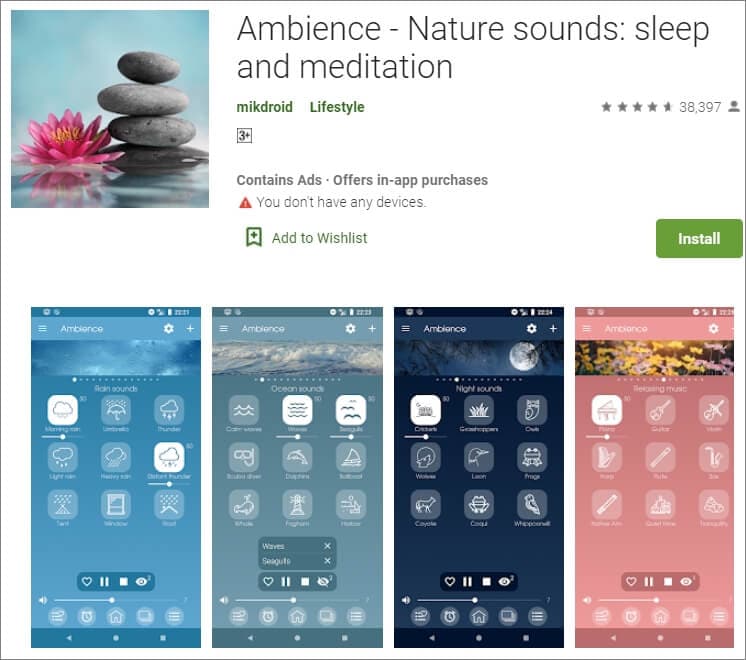
Ambience is another one of the most popular apps for nature sounds providing peace and serenity to its users through relaxing and soothing tones.
It has a very simple and clean user interface which makes it a highly demanding program. The main features include the facility of mixing maximum 10 sounds at the same time. Along with various preset mixtures of audios that are available here, users can also save their customized combinations for future use.
Compatible with Android 4.2 and up.
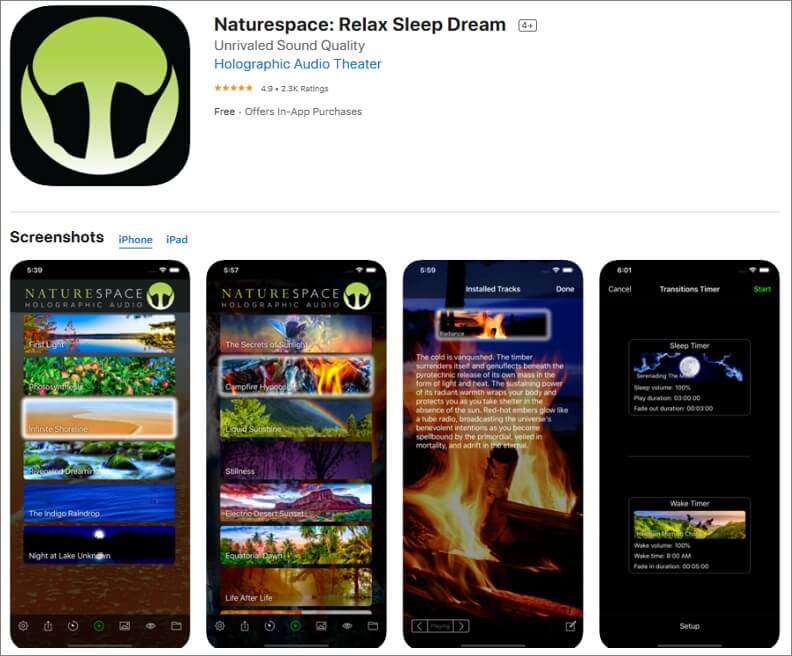
8. Naturespace: Sleep Relax Focus
Naturespace is a unique app containing real time 3D recordings of natural places such as forests, deserts, mountains, etc. The equipment used in the program for recording the sounds are of extremely high quality, and as a result, the listening experience is out of this world.
The clarity of the sound surpasses almost every other application available in this genre of nature sound apps. It also provides the facility of sleep and wake timer to its users. The simple user interface along with earbud optimisation facility makes the software highly efficient and popular among people.
Compatible with Android 4.0 or up and iOS 9.0 or later
9. SimplyNoise – Free White Noise
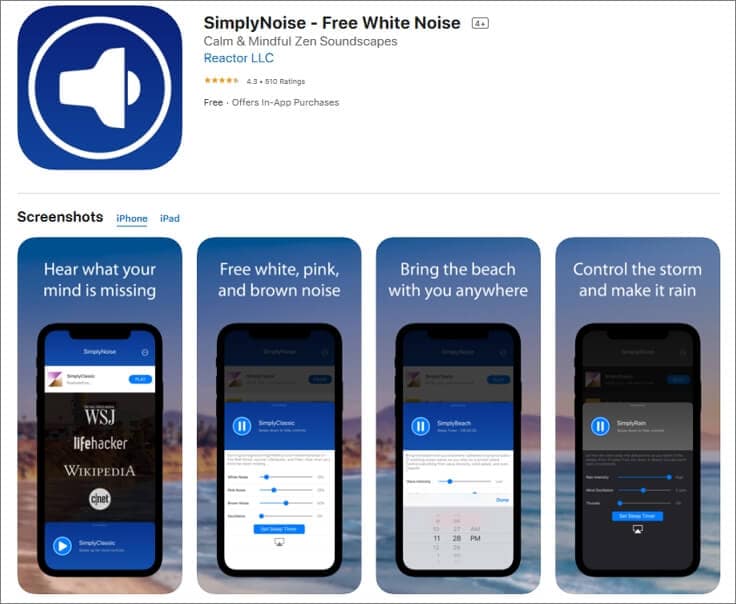
Simply Noise is one of the most basic apps for nature sounds as it provides only one acoustic without any background noises. As there are no such complexities involved, it can also be used by people who are not tech-savvy.
The categorization of sounds is done here as white noise, pink noise, and brown noise. Users can select any of these according to their requirement.
This app is best suitable for people who are unable to concentrate on a particular thing, or suffer from sleeping disorder. Sleep-timer option is also available here.
Compatible with iOS 8.0 or later and Android
10. aSleep
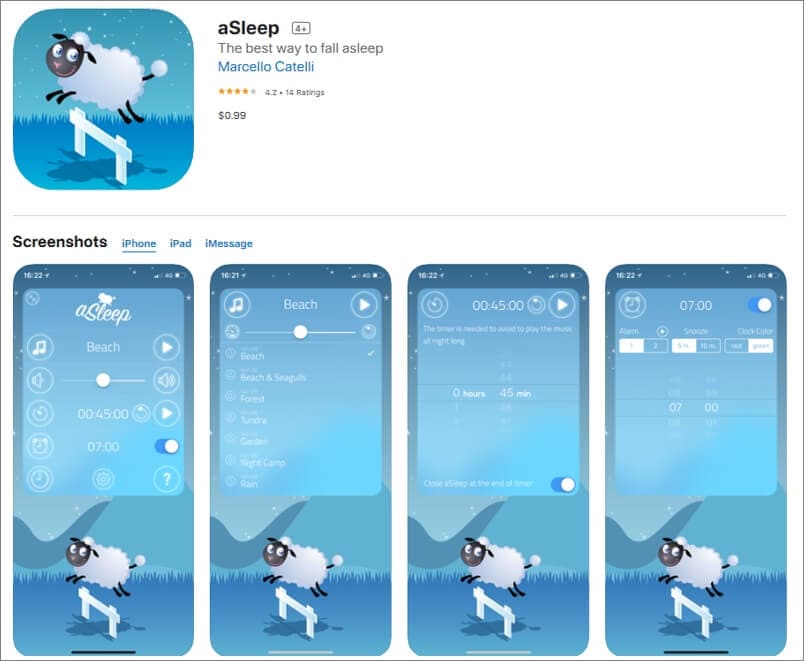
Available for iOS devices like iPhone and iPad, aSleep offers around 64 realistic stereo nature sounds to help you relax your mind and fall asleep almost instantaneously. With the built-in Timer feature, the music can be programmed to stop automatically after a certain amount of time to save your device's battery.
Furthermore, the also works as an alarm clock that wakes you up with nature sounds at your predefined hour. The application is also good for kids as it can be used to play lullabies to help them get a tight sleep at night. And the program does all this without collecting any data from your iDevice.
Create Relaxing Nature Videos with Your Favorite Ambient Noise App & Filmora Mobile
After exploring the best nature sound apps for iOS and Android, the next creative step is figuring out how to use those calming audio tracks in a video project. This is where Filmora Mobile, the AI-powered all-in-one video editor, simplifies the process. Known for its advanced features, the mobile version is the perfect partner for your favorite ambient noise app. This seamless hybrid workflow lets you quickly pair your nature sound effects with stunning video visuals in just a few taps. It's the easiest way to create aesthetic, relaxing, or ASMR nature videos without needing complex equipment.
 Secure Download
It is an all-in-one video editor that's known for its advanced AI features, and the mobile version is just as dependable as the desktop one. This hybrid setup allows you to take any audio you love from your favorite ambient noise app and pair it with visuals in just a few taps. It is a laid-back way to aesthetic nature videos without any complex equipment.
Below are three easy workflows you can use:
Method 1: Combine App Nature Sounds with Filmora's Stock Footage for Easy Loops
If you already have a favorite app and you really like how its nature sounds feel, this method is the easiest way to use it. Just take the audio you want from the app and drop it into Filmora, then build the visuals around it.

You can make rain loops, soft forest scenes, ocean shots, or anything that matches the mood of your nature sounds.
Quick Tutorial:
- Open your nature sound app and download the audio you want to use.
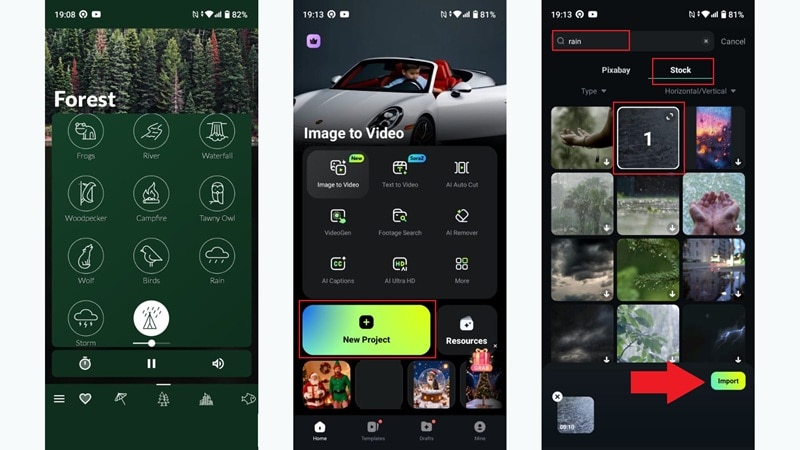
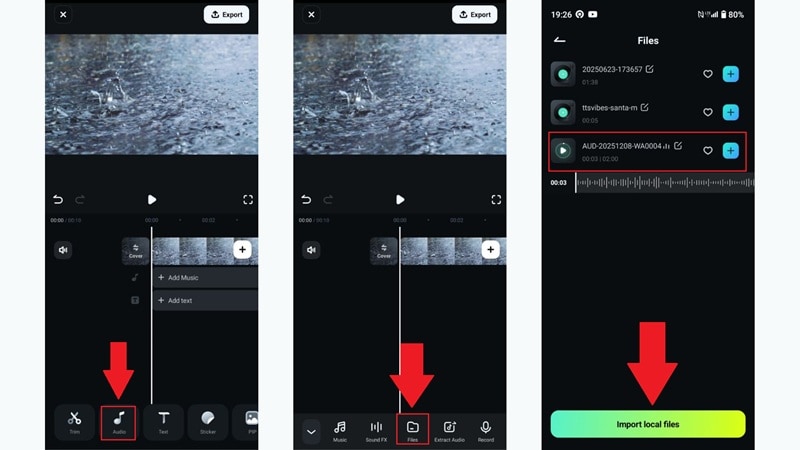
- Open Filmora Mobile and tap New Project to start a clean timeline.
- Filmora Mobile requires a visual clip before adding audio. Go to the Stock section.
- Search for visuals that match the vibe of your audio and tap Import to add them to your timeline.
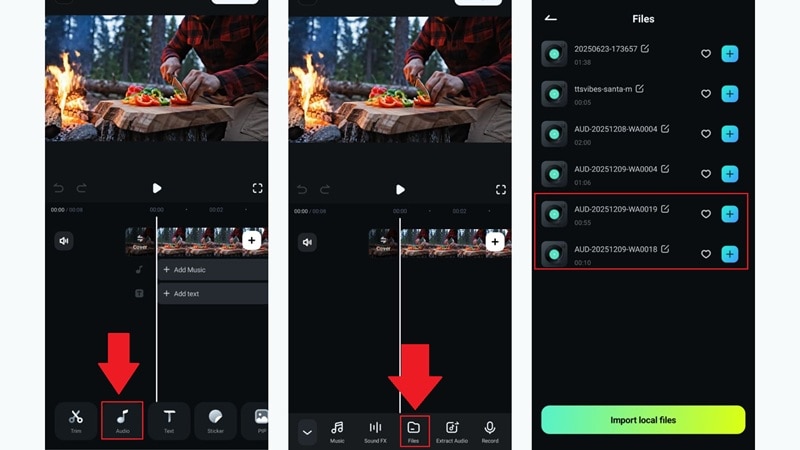
- Tap the Audio tab under the timeline.
- Select Files in the menu that appears.
- Find the downloaded nature sounds on your device and choose Import Local Files to add them.
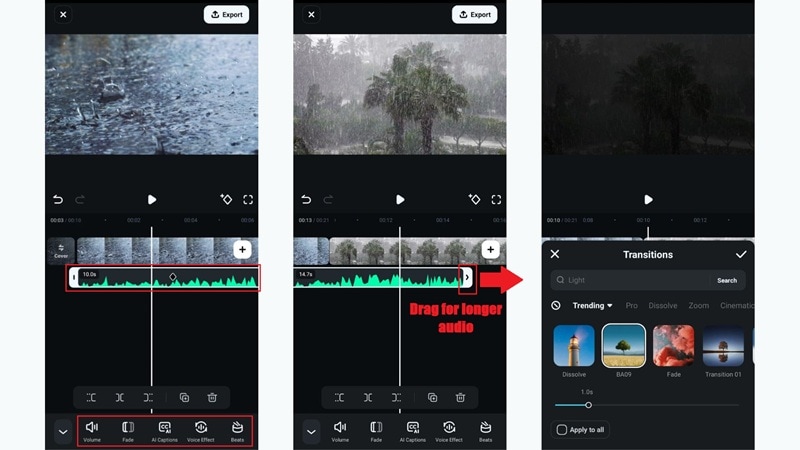
- Tap the audio track in the timeline to begin editing.
- You can extend your video by tapping the plus icon and adding more Filmora stock footage.
- Drag the end of the audio track to the right to make the nature sounds last longer.
- Add transitions between clips for smooth playback.
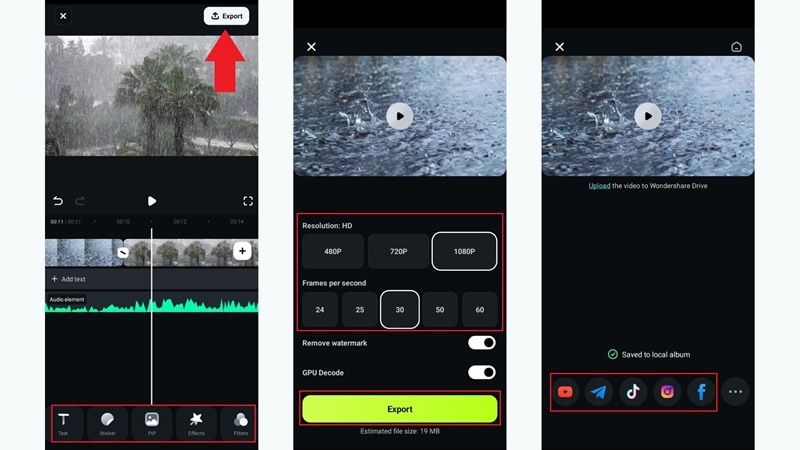
- Add stickers, filters, or text to finish the aesthetic, then tap Export.
- Choose your resolution and FPS, then tap Export again to save.
- Use the web icon to share directly to your social media.
And that's it! Your nature sounds come from the app, and Filmora provides matching stock visuals to create a peaceful, relaxing clip. Here's what the final result looks like:
Method 2: Use Filmora's AI Text-to-Video to Create Visuals & Layer Your App Sounds
Other than extensive stock footage, Filmora also comes with its own AI-powered audio and visuals through the Text-to-Video feature, and it works really well for nature scenes. You can create an AI video with soft rain or gentle wind, then layer the sounds from your favorite nature sound app on top of it.
This simple combo creates a fuller sound mix that feels more alive and relaxing. For example, you can generate a scene of rain in an Amazon-style forest, then bring in a soft songbird track from your favorite ambient noise app to complete the mood.
Quick Tutorial:
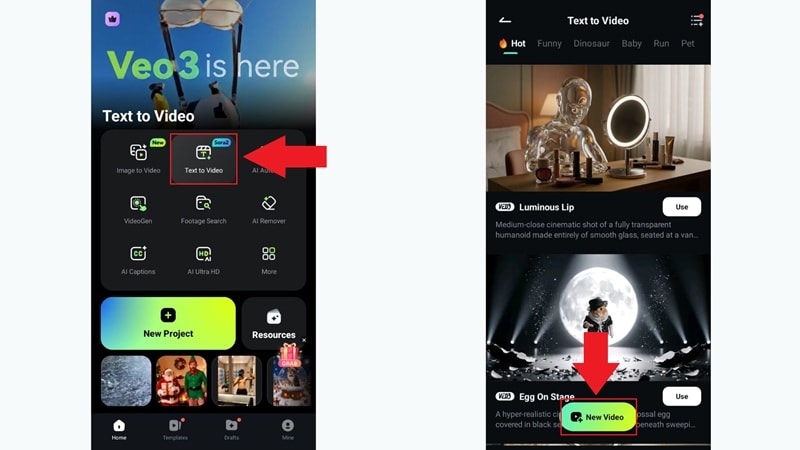
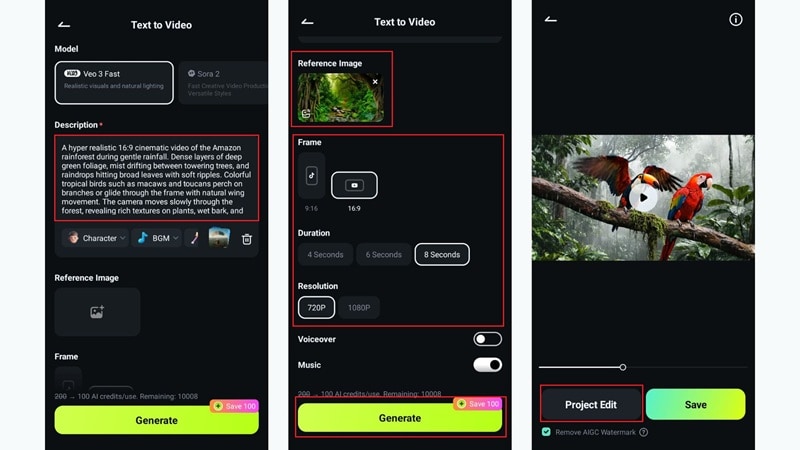
- Open Filmora Mobile and tap Text to Video on the main menu.
- Browse through the available themed templates.
- If you prefer starting from scratch, tap New Video.
- Type your concept into the description box with as much detail as possible.
- Scroll down to adjust advanced options: add a reference image, choose duration, and select resolution.
- Tap Generate to let Filmora create the AI video.
- Once finished, tap Project Edit to continue refining your video.
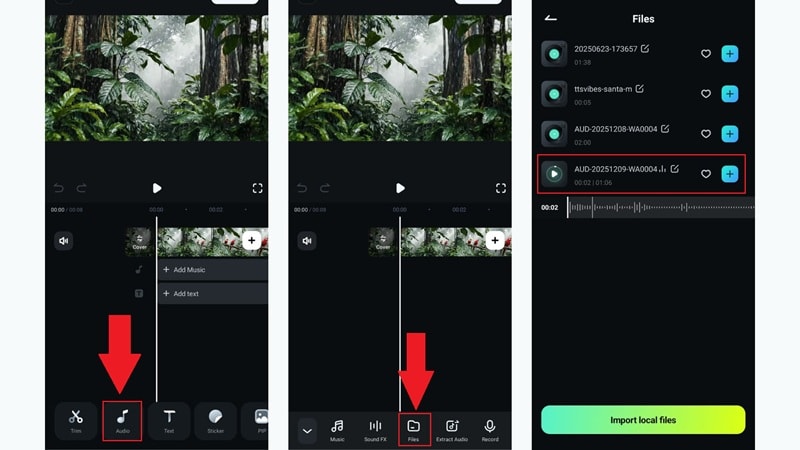
- In the Filmora timeline, tap Audio.
- Select Files to access the audio stored on your device.
- Locate the bird nature sounds downloaded earlier and tap the plus icon to add them.
- Adjust the birdsong and rain audio so they blend naturally.
- Add effects, filters, or any additional edits you want.
- Tap Export to save or share your final video.
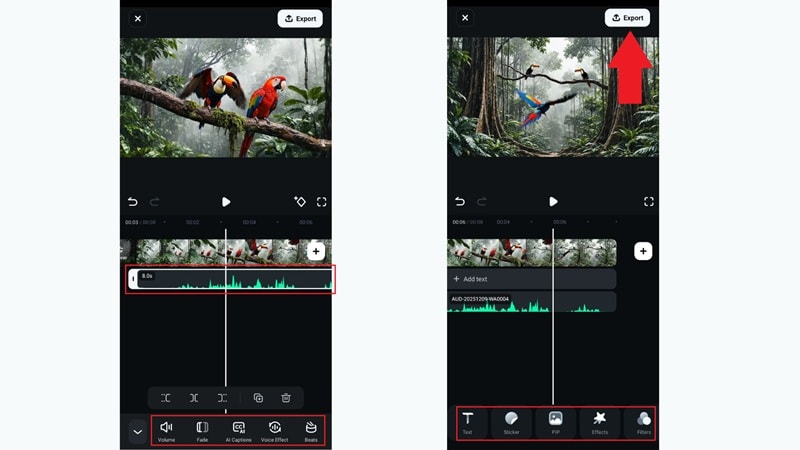
There you have it! This method gives you more creative visuals through AI generation while keeping the authenticity of real nature sounds from your app — the perfect blend of creativity and realism.
Now go ahead and check out the video result.
Method 3: Generate Natural ASMR Videos Using Filmora AI & Dedicated App Sound Effects
If the previous method gave you a fuller sound mix, this next method works well for creators who love making calm ASMR clips for TikTok or YouTube.
The workflow is like this: your nature sound app gives you one or two clean nature sounds like a crackling fire. Filmora handles the visuals through its AI Text to Video feature and blends everything together so the whole video feels smooth and relaxing from start to finish.
Quick Tutorial:
Scroll down and turn off the Music option so the tool focuses on visuals only. Tap Generate to create your video.
When it is ready, choose Project Edit to continue adjusting it.
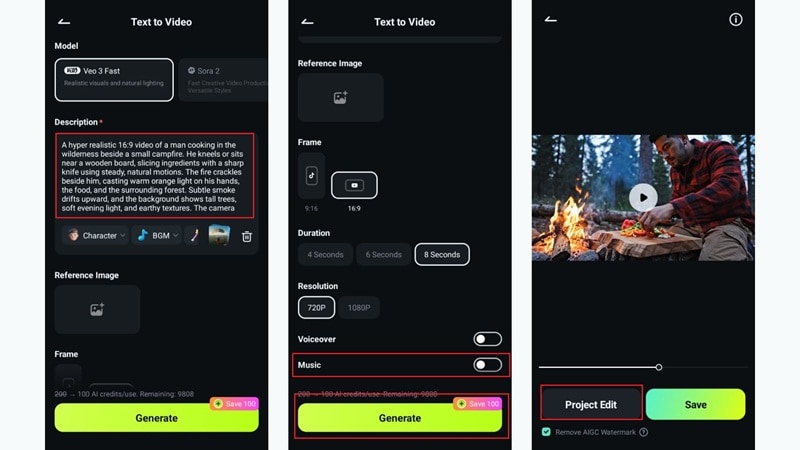
Look for the fire crackling and knife-on-wood sounds you downloaded from your app, then tap the plus icon to add them to your project.
Add any filters, effects, or small touches you want to finish the scene.
Tap Export to save your video or share it the same way you shared your previous edits.
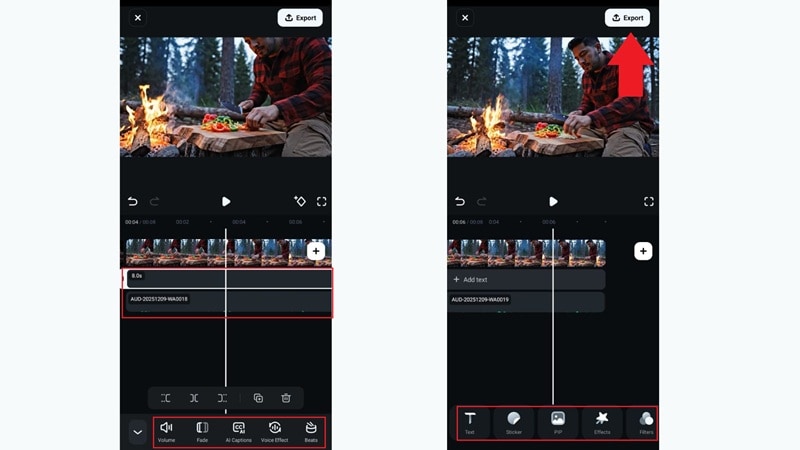
Just like that, you are already done! This last method feels similar to the previous one, but the vibe is softer because the visuals come from Filmora's AI feature, while the ASMR sounds come from your ambient noise app.
It gives the video a more personal, relaxing feel—perfect for unwinding at night. Now let's take a look at how it turned out.
Ready-to-Use Prompts for Nature-Themed Videos
The last two methods give you really nice results, but the final look of your video still depends a lot on how you write your prompt. After all, a good prompt guides Filmora into building visuals that actually match the calm mood of your nature sounds and feel soothing to watch.
To make things easier for you, here are some simple prompts you can copy and use for all kinds of nature videos
Forest Ambience Prompts
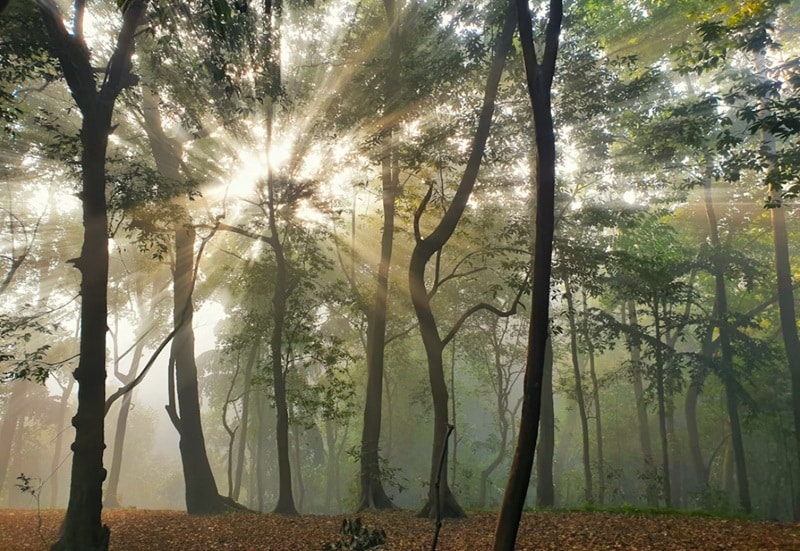
1. Soft Morning Forest Glow
"A quiet pine forest at sunrise with warm light slipping between tall trees, gentle fog moving along the ground, slow camera motion, soft dust in the air, peaceful mood, high detail."
2. Deep Jungle Mist Walk
"A dense tropical forest with thick mist drifting through huge leaves, subtle water drops hitting plants, slow tracking forward, rich green tones, immersive and calm."
3. Calm Woodland Creek Scene
"A small forest creek with clear water running over smooth stones, light reflections on the surface, soft leaves swaying overhead, steady wide shot, soothing and serene atmosphere."
Rain Ambience Prompts

1. Cozy Window Rain Scene
"A warm room with rain sliding down a window, soft reflections from city lights outside, gentle camera focus shifts, calm atmosphere, quiet evening mood."
2. Rainfall In A Forest Clearing
"A wide shot of a green forest clearing during steady rainfall, drops hitting leaves, soft mist around the trees, natural movement, peaceful and grounded."
3. Rain Over A Quiet Street
"A small neighborhood street at night with rain falling on dim pavement, puddles forming slowly, soft reflections from warm house lights, slow cinematic motion, calm and soothing."
Winter / Snow Prompts

1. Quiet Snowy Pine Trail
"A calm pine forest covered in fresh snow, soft flakes drifting down, gentle morning light on the branches, slow camera glide, peaceful winter mood."
2. Frozen Lake At Dusk
"A wide view of a frozen lake with soft pink sky reflections, light snow blowing across the ice, still atmosphere, subtle movement, calm and cold beauty."
3. Cabin Night Snowfall
"A small wooden cabin glowing with warm light while snow falls steadily around it, smoke rising from the chimney, cozy winter feeling, steady cinematic frame."
Magical Nature Prompts

1. Enchanted Forest Glow
"A dreamy night forest filled with soft glowing plants, tiny light particles floating in the air, gentle camera movement, calm magical atmosphere."
2. Mystic Waterfall Garden
"A bright fantasy waterfall surrounded by colorful flowers that shimmer lightly, soft mist rising, slow wide shot, peaceful and otherworldly mood."
3. Moonlit Crystal Meadow
"A quiet open meadow lit by a bright full moon, small crystal formations shining softly, smooth panning motion, serene and magical feeling."
Conclusion
There are so many nature sounds app free download options on mobile now, and each one brings its own way of helping you relax, sleep, or clear your head. That is why we rounded up ten of the best nature sounds app choices for both Android and iOS so you can pick the one that feels right for you.
If you ever want to take those calming tracks and pair them with soothing visuals, Filmora Mobile is the easiest way to make it happen. This AI editor gives you several simple methods to blend your ambient sound app with clean and beautiful visuals. You can pull from its huge stock footage library or use the AI Text to Video feature to build scenes based on your prompt.
Filmora Mobile keeps everything smooth and fun, which makes creating your own calming videos feel like a piece of cake.

