
Complete Review for Samsung Gear 360 Camera

Oct 28, 2026• Proven solutions
 TL;DR:
The Samsung Gear 360 is a legacy dual-lens camera that is outdated for new purchases, but its existing stitched spherical footage can still be repurposed into standard flat videos using modern editing workflows.
● The original hardware and software ecosystem is obsolete, with the camera suffering from visible stitching seams, limited manual controls, and heat restrictions during extended recording sessions.
● Stitched MP4 footage can be imported into editors like Filmora to select specific camera angles and apply virtual movements using Wide Angle, Linear, Fisheye, or Tiny Planet perspectives.
● Modern reframing tools convert the original spherical recordings into standard flat formats for social media, as exporting the final project as an interactive 360-degree video is not supported.
Ask AI for a summary
 ChatGPT
 Perplexity
 Gemini
 Claude
 Grok
Grok
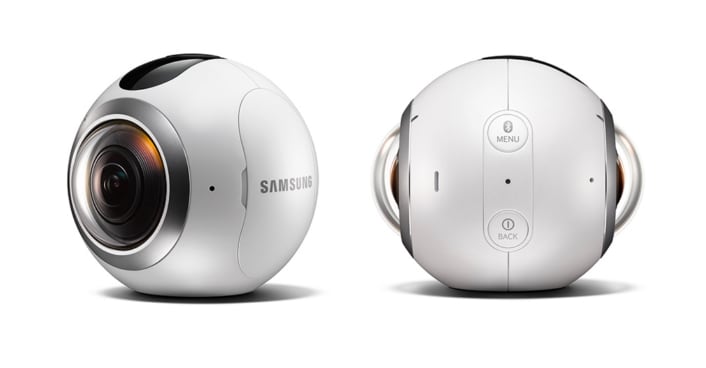
Samsung Gear 360 was one of Samsung's early consumer cameras designed specifically for capturing spherical 360-degree photos and videos. With its compact dual-lens design, the camera helped make immersive content creation more accessible without requiring a complex multi-camera VR rig.
Although the original Gear 360 is now a legacy camera, it can still be useful for understanding the development of consumer 360 video. This review covers its design, recording capabilities, specifications, strengths and limitations, as well as how you can work with compatible 360 footage in a modern video editing workflow.
Related article: Top 10 Affordable 360 Degree Cameras >>
- Part 1: Complete Review of Samsung Gear 360 Camera
- Part 2: Basic Specs of Samsung Gear 360 Camera
- Part 3: Pros and Cons at a Glance
- Part 4: Is Samsung Gear 360 Still Worth Using?
- Part 5: How to Edit and Reframe Samsung Gear 360 Footage
Part 1 Complete Review of Samsung Gear 360 Camera
Brief Introduction
Samsung Gear 360 was introduced during the early growth of consumer virtual reality and spherical imaging. Its dual fisheye lenses were designed to capture footage in opposite directions and combine those views into 360-degree photos and videos.
For its generation, the Gear 360 offered a relatively compact way to experiment with immersive video compared with the larger multi-camera rigs previously used for professional 360 production.
Design and Build
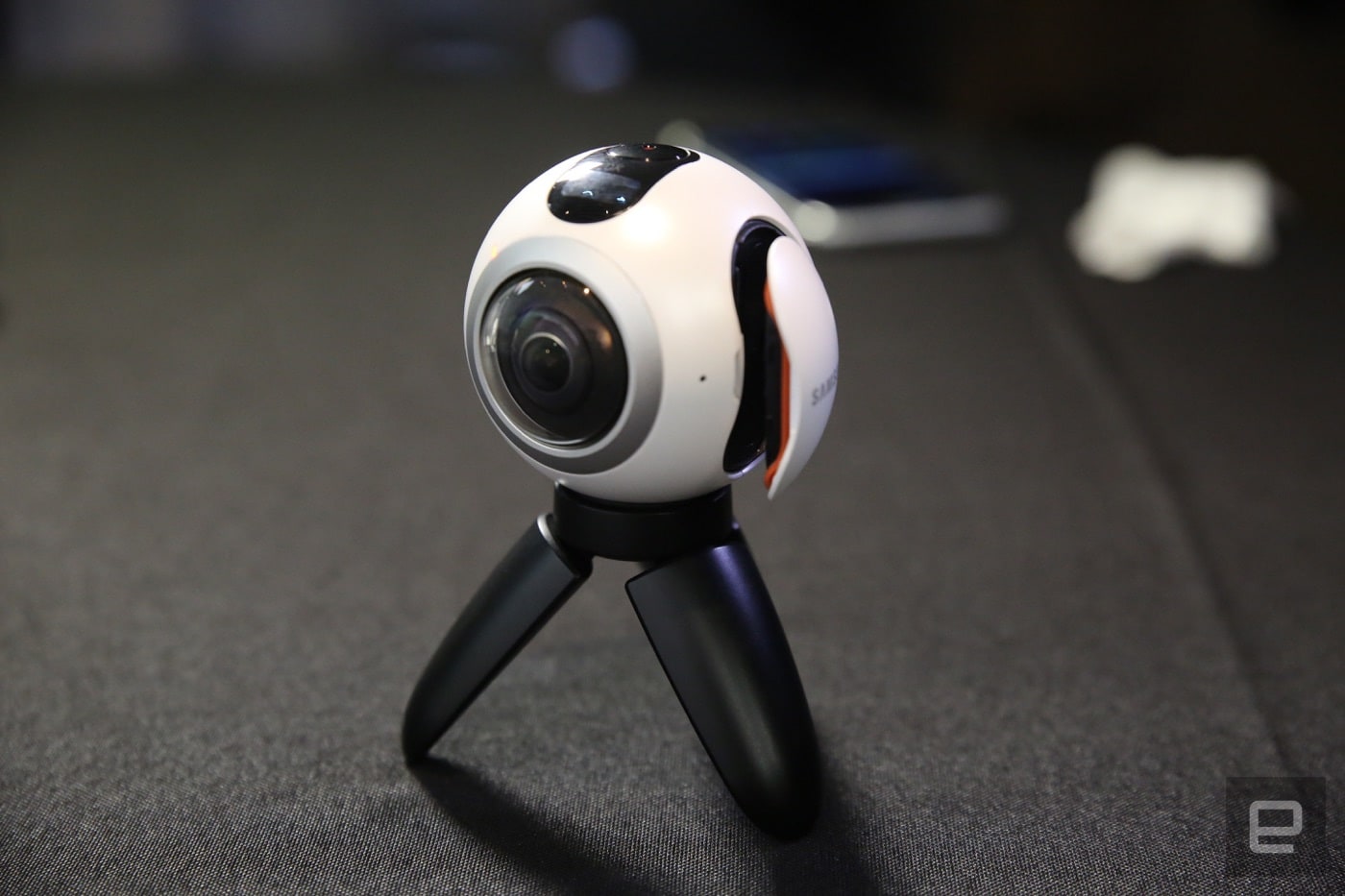
The original Samsung Gear 360 uses a compact dual-lens design with fisheye cameras facing opposite directions. The body includes controls for menu navigation, power, and recording, together with a tripod mount for positioning the camera.
The camera supports microSD storage up to 128 GB and provides Wi-Fi, USB, and Bluetooth connectivity. Its compact design made it easier to carry and position than many professional multi-camera 360 rigs available during the same period.
How to Record Videos
The Gear 360 provides controls for selecting the front lens, rear lens, or both lenses for spherical capture. Its available shooting options include 360-degree recording, still images, and time-lapse capture.
When both lenses are used, each lens records a wide-angle view covering one side of the environment. The two views are then stitched together to create spherical 360-degree content.
Where to Use It
The compact design makes the Gear 360 suitable for recording travel, gatherings, outdoor activities, panoramic environments, and other scenes where capturing more than one fixed camera direction can be useful.
Image and Video Quality
The following points summarize some of the strengths and limitations associated with image and video capture on the original Samsung Gear 360.
1. Image Quality
The good:
- Dual fisheye lenses capture a wide portion of the surrounding scene.
- Designed specifically for spherical and panoramic imaging.
- Offers relatively high-resolution still images for its generation.
- Can capture scenes that would otherwise require multiple conventional camera angles.
The limitations:
- Differences between the two lenses can make the stitching seam visible in some scenes.
- Strong light sources can introduce flare or ghosting.
- Image quality can vary across different parts of the stitched sphere.
2. Photos
The good:
- Supports high-resolution spherical still images using its dual-camera system.
- Captures the surrounding environment in a single 360-degree composition.
The limitations:
- Sharpness may not remain consistent across the complete spherical image.
- Manual exposure controls are relatively limited compared with modern cameras.
3. Videos
The good:
- Supports high-resolution 360-degree video recording for its generation.
- Includes time-lapse recording.
- Includes loop recording.
- Designed to work with Samsung's VR ecosystem.
The limitations:
- Extended recording sessions may cause heat-related limitations.
- Manual control options are limited compared with newer 360 cameras.
- Its original software and device ecosystem is now dated.
Original Editing and Sharing Workflow
When the Gear 360 was introduced, Samsung provided its own software ecosystem for stitching, managing, and sharing footage. Gear 360 Manager and ActionDirector were commonly used to process content before it was shared to compatible 360 platforms and VR experiences.
Today, creators working with compatible stitched 360 footage may prefer a more conventional editing workflow. Instead of keeping every project as an interactive spherical video, you can also reframe the 360 footage into a standard video and control exactly which direction the audience sees.
Check this video to see how the Samsung Gear 360 Camera was used:
Part 2 Basic Specs of Samsung Gear 360 Camera
|
Full Name
|
|||
|
Manufacturer
|
|||
|
Original Price
|
|||
|
Original Availability
|
|||
|
Parameter
|
Description
|
Parameter
|
Description
|
|
Weight
|
153 grams |
Size
|
66.7 × 56.3 × 60.1 mm |
|
Memory
|
microSD card storage up to 128 GB |
Connectivity
|
Wi-Fi, USB 2.0, and Bluetooth |
|
Battery
|
1,350 mAh |
Body Material
|
Plastic |
|
Sensor Type
|
Dual CMOS |
Lenses
|
Dual f/2.0 fisheye lenses |
|
Aspect Ratio
|
2:1 |
Tripod Mount
|
Yes, with mini tripod |
|
Image Resolution
|
Dual camera up to 7776 × 3888; single camera up to 3072 × 1728 |
Video Resolution
|
Dual camera up to 3840 × 1920; single camera up to 2560 × 1440 |
|
Image Format
|
JPEG |
Video File Format
|
MP4 |
Part 3 Pros and Cons at a Glance
| Pros | Cons |
|---|---|
| High-resolution 360 capture for its generation | Legacy hardware and software ecosystem |
| Self-contained and relatively easy to use | Not fully waterproof |
| Compact dual-lens design | Original mobile integration depends heavily on Samsung's ecosystem |
| Splash-resistant and dust-resistant design | Stitch lines may be visible in some scenes |
| Replaceable battery and microSD card | Limited manual controls compared with newer 360 cameras |
| microSD storage up to 128 GB | Older capture technology compared with current-generation 360 cameras |
| Time-lapse and loop recording | |
| Wi-Fi, USB, and Bluetooth connectivity |
Part 4 Is Samsung Gear 360 Still Worth Using?
Samsung Gear 360 is now better viewed as a legacy 360 camera than as a current camera recommendation. Its dual-lens design, compact body, removable storage, and spherical recording capabilities made it an important consumer 360 camera for its generation, but newer cameras now offer more advanced stabilization, higher-resolution capture, improved stitching, and more convenient editing workflows.
If you already own a Gear 360, however, compatible footage can still be useful. One of the advantages of 360 recording is that the footage contains much more of the surrounding scene than a conventional camera shot. That gives you additional flexibility when deciding how to present older recordings today.
Part 5 How to Edit and Reframe Samsung Gear 360 Footage
Once your Samsung Gear 360 footage has been stitched into a compatible 360 video format, you do not necessarily have to publish it as an interactive spherical video. Another option is to reframe the footage into a standard flat video, selecting the exact angle you want viewers to see.
With Filmora's 360° Video Reframing tools, compatible 360 footage can be reframed directly on the editing timeline. This lets you treat the original spherical recording like a virtual camera that can be repositioned after filming.
Choose Your Camera Angle After Recording
You can look around the spherical scene and adjust controls such as the field of view, horizontal angle, vertical angle, camera distance, frame zoom, and roll. This gives you control over which part of the original Gear 360 recording appears in the final frame.
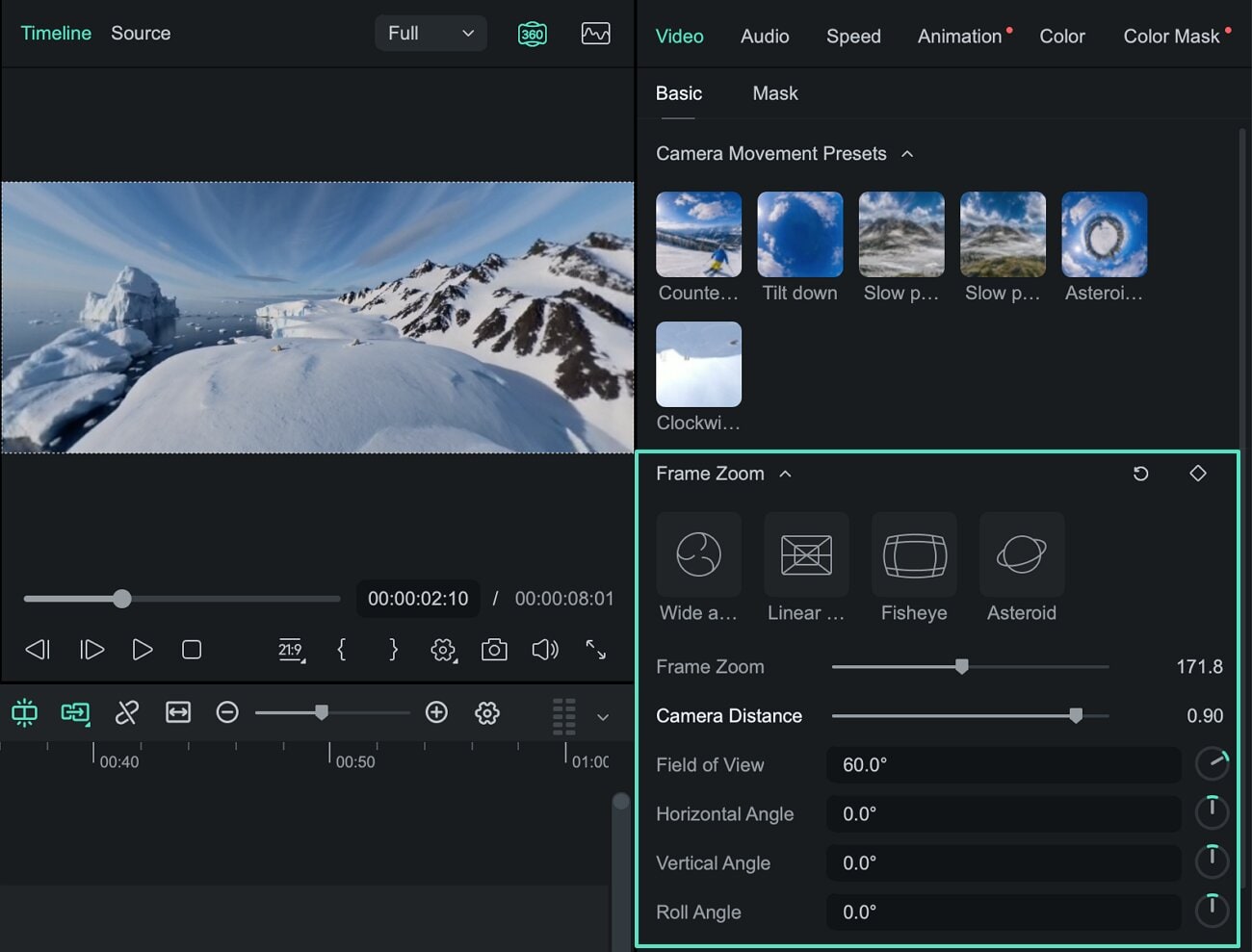
For example, if a Gear 360 recording captured people in several directions, you can start with one subject, turn the virtual camera toward another person, and then move the viewpoint back again—all without physically changing the camera position during the original recording.
Change the Perspective of 360 Footage
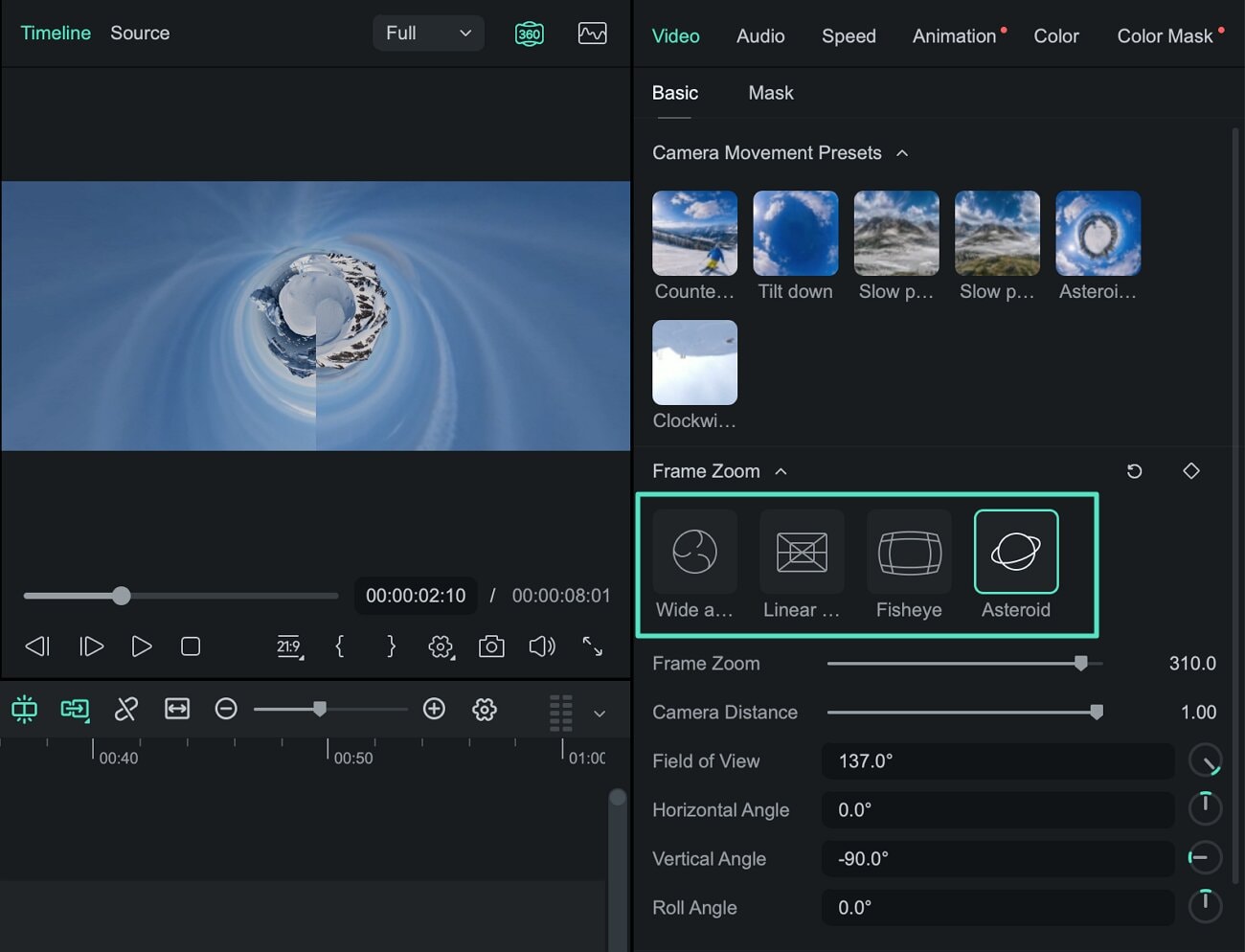
Filmora also provides different display modes for reframed 360 footage, including Wide Angle, Linear, Fisheye, and Tiny Planet. These modes let you create different visual perspectives from the same spherical recording.
Create Virtual Camera Movement
Instead of keeping one viewpoint throughout the clip, you can use motion presets or keyframes to animate the virtual camera. This makes it possible to create pans, zooms, rotations, and changing viewpoints from the original 360 recording.
- Reframe after recording: Choose the most useful angle from the spherical scene.
- Adjust the field of view: Create wider or tighter framing from the same footage.
- Change perspectives: Use Wide Angle, Linear, Fisheye, or Tiny Planet views.
- Create virtual camera moves: Animate pans, zooms, rotations, and viewpoint changes with presets or keyframes.
- Continue editing: Trim footage and add titles, audio, effects, speed changes, and other edits on the Filmora timeline.
- Create standard videos: Export the reframed footage as conventional content for YouTube, TikTok, Instagram Reels, Shorts, and other platforms.
Explore Filmora's 360 Video Editing Tools →
For a detailed workflow, see the 360° Video Reframing Guide for Windows or the 360° Video Reframing Guide for Mac.
Frequently Asked Questions About Samsung Gear 360
Is Samsung Gear 360 still available?
Samsung Gear 360 is a legacy 360 camera rather than a current-generation Samsung camera product. Availability now depends primarily on used or remaining third-party stock rather than a current Samsung retail lineup.
Can Samsung Gear 360 footage still be edited?
Yes. Once footage from the Gear 360 has been properly stitched and saved in a compatible 360 video format, it can be used in editing workflows that support spherical footage.
Can I turn Samsung Gear 360 footage into a normal video?
Yes. 360° video reframing allows you to select a specific viewpoint from spherical footage and convert it into a standard flat video. This is useful when you want to reuse older Gear 360 recordings for conventional videos or social media content.
Can Filmora reframe Samsung Gear 360 footage?
Filmora can reframe compatible stitched 360 footage. You can change the viewing direction, field of view, and perspective, create virtual camera movement with presets or keyframes, and then export the reframed result as a standard video.
Does Filmora export interactive 360 video?
Filmora currently exports reframed 360 footage as a standard flat video based on the viewpoint and camera movement you create. It does not currently export the edited project as a complete interactive 360-degree video.
This article will tell you what is 360 camera and the application of 360 degree cameras in the market.
by Benjamin Arango Oct 28, 2026 07:29 AM
If the Gear 360 isn’t the right choice for you. Luckily, there are lots of other models out there. Let’s look at five of the best.
by Benjamin Arango Oct 28, 2026 07:31 AM
Benjamin Arango
staff Editor
