


 TL;DR:
Wondershare Filmora is the top recommended overall sports highlight video maker for World Cup 2026 clips because its AI Smart Scene Cut automatically extracts key action sequences from full match recordings across Windows, macOS, Android, and iOS.
● Sport Reelz and MatchCut are optimized specifically for athletes and coaches creating recruiting tapes, offering tracking arrows, spot shadows, and freeze frames instead of casual social media editing tools.
● Warpstream provides specialized iOS and iPadOS touchscreen tools like replay and repetition counters for mobile creators, whereas Vidio.AI and VEED are browser-based platforms built for social media curators who need AI auto-clipping and dynamic captions.
● Creators should be aware that official World Cup broadcast footage is typically copyright-protected, and the free software tiers of these platforms generally restrict final exports with watermarks, AI credit caps, or strict video length limits.
Ask AI for a summary
 ChatGPT
 Perplexity
 Gemini
 Claude
 Grok
Grok
The 2026 World Cup is already building massive hype. This time, the tournament is hosted across the USA, Canada, and Mexico, with 48 teams and 104 matches to follow. That is a huge jump from Qatar 2022, which had 32 teams and 64 matches.
For creators, fans, athletes, and sports pages, this is a perfect chance to make shareable clips to keep updated. But to make that effective, you need the right sports highlight video maker to do the job. And that's why we're here! We will compare the best apps for making sports highlights and World Cup-inspired edits more easily.

A good sports highlight maker should help you find the best moments, cut fast, add energy, and export clips that look good on social media. So, we focused on searching for the tools that handle soccer clips, fast action, vertical videos, and quick sharing.
The main criteria used to choose these tools are:
- Ease of Use: A soccer highlight video maker should be simple enough for fans, students, athletes, and casual creators.
- Music & Audio Syncing: Sports videos feel better when the beat matches the cut. So, built-in music, sound effects, and audio tools are a big plus.
- Social Media Readiness: A good sports highlights video editor should support common formats and aspect ratios for YouTube, TikTok, Instagram Reels, Shorts, and team pages.
- AI or Auto-Editing Support: The best apps to make sports highlights should include AI highlight detection, auto-clipping, smart trimming, or template-based editing that are more useful for long match footage.
- Platform Availability: We considered whether the sports highlight reel maker works on desktop, browser, iPhone, Android, or multiple platforms.
Fast Track: Our Top 3 Sports Highlight Reel Tools
We are going to dissect seven of the amazing video editors for football highlights in detail below. But if you are short on time and need to start cutting tournament clips right away, here are the three best options tailored for completely different creation styles.



Sports Highlight Video Maker Comparison Chart
Before we break down each tool, here is a quick look at all the sports highlight reel makers covered in this guide. This table makes it easier to compare platforms, pricing, and best use cases at a glance.
| Tool | Platforms | Free / Paid | Helpful Features | Best Use Case |
| Filmora | Windows, macOS, Android, iOS | Free & Paid plans available | AI Smart Scene Cut, AI Smart Short Clips, speed ramping, captions, effects, music, timeline editing | All-around sports highlights |
| Sport Reelz | Online | Free & Paid plans available | Highlight tagging, player spotlight, recruiting links, pro editor option | Athlete recruiting reels and team highlight videos |
| Warpstream | iOS, iPadOS | Free & Paid plans available | Replay, spotlight, freeze frame, player tracking, timers, arrows | iPhone sports highlight reels |
| MatchCut Highlight Reel Maker | Android, iOS | Free & Paid plans available | Freeze frames, spot shadows, arrows, overlays, music | Student-athlete recruiting videos |
| Vidio.AI | Online | Free & Paid plans available | AI sports highlight maker, flexible format uploads, multiple sports category | AI-assisted online highlight creation |
| FlexClip | Online | Free & Paid plans available | Sports templates, text, music, stock media | Fast online sports templates |
| VEED | Online | Free & Paid plans available | Highlight video maker, subtitles, music, trimming, AI tools | Social clips with captions and simple editing |
 Secure Download
Top 7 Best Sports Highlight Reel Makers for World Cup 2026 Clips
Now, it is time to look at each of the best apps to make sports highlight videos in more detail. We will use the same format for every tool, so you can compare them easily and decide which sports highlight video maker fits your workflow best.
1. Wondershare Filmora
Platforms: Windows, macOS, Android, iOS.
Best For: World Cup 2026 fan edits, commentary podcast, football highlight tapes, basketball highlight videos, or social media sports montages.
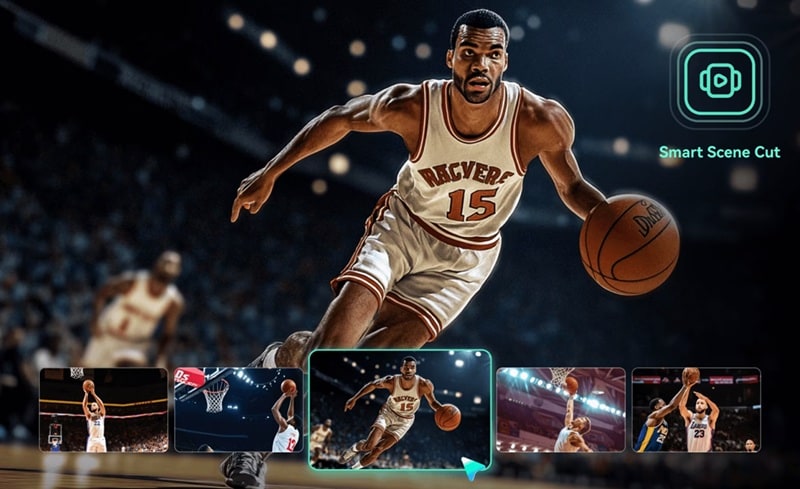
To start off our list, we recommend the best software to make sports highlight videos, Filmora. This all-in-one editor is a mix of AI and timeline control. You can use AI Smart Scene Cut to help find key scenes from long footage, then bring those clips into the timeline and add music, captions, slow motion, effects, and transitions. Because of this, you are not locked into one type of sports content.
Pricing: Free version available. Paid plans are flexible and affordable, with individual plans shown on Filmora’s pricing page.
- AI Smart Scene Cut to help extract highlight scenes from long match footage.
- AI Smart Short Clips to turn longer videos into short clips for TikTok, Reels, and Shorts.
- Speed ramping and slow motion for goals, dunks, tackles, saves, and replay-style moments.
- Auto captions and text tools to add player names, scores, match details, or quick commentary.
- Music, effects, transitions, and templates to make highlight reels feel more energetic.
- Strong balance between easy editing and advanced control, so beginners can start fast without feeling boxed in.
- Works well for both vertical social clips and longer YouTube-style highlight reels.
- Blazing fast rendering and exporting speeds, even with 4K match files.
- Seamless project sharing between your computer and your phone.
- The free version may not be enough if you want watermark-free final exports.
- AI tools require AI credits.
Secure Download2. Sport Reelz
Platforms: Web Browser.
Best For: Athletes, parents, coaches, and teams who need recruiting-focused highlight reels.
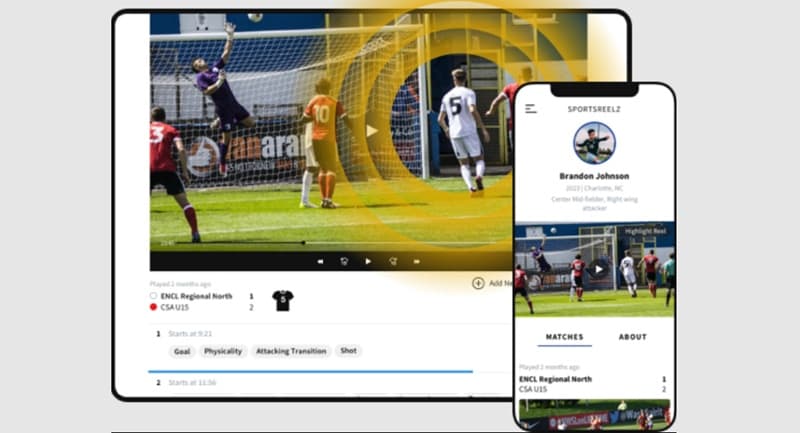
Next up, we have Sport Reelz. If your “highlight video” is not just for fun, then this is one of the best apps to make sports highlight videos for free. Instead of acting like a general video editor, it focuses on player reels, recruiting videos, coach sharing, and game footage organization. You can use it to make edits of specific players you like on the World Cup.
Pricing: Free to start with a 14-day free trial. Paid plans start at $30 per month.
- Player spotlight to help viewers find the athlete in the clip.
- Upload game film from phones, cameras, screen recordings, or other video platforms.
- Drop visual circles, halos, or arrows over a specific player to help scouts track them across a crowded pitch.
- Built specifically for athlete highlight reels, so the workflow feels more focused than a general video editor.
- You have the option to hire a pro to make the edits if you want a more professional result.
- Not ideal for casual World Cup fan edits or trendy social media clips.
- Less flexible if you want full creative control over transitions, effects, and advanced edits.
3. Warpstream
Platforms: iOS, iPadOS.
Best For: iPhone users who want to create sports highlights, athlete profiles, and training clips directly from mobile footage.
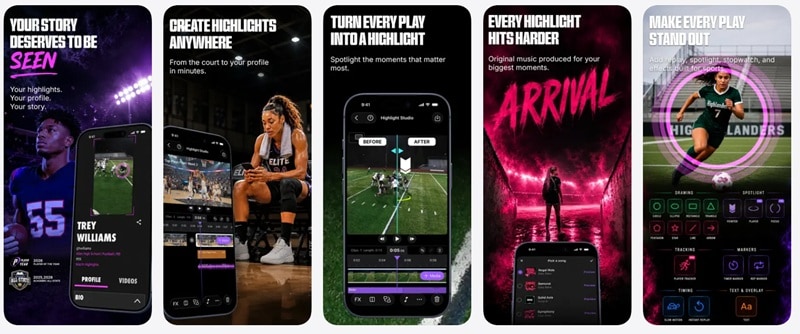
If you're looking for the best app to make sports highlight videos on iPhone, then Warpstream is the perfect solution. The app feels more athlete-focused than a regular mobile editor. You get tools like replay, spotlight, freeze frame, slow motion, player tracking, timers, arrows, and athlete profiles. That makes it useful for quick sports clips that need more context than a simple trim.
Pricing: Free download with in-app purchases starting from $14.99 per week.
- Add replay, spotlight, freeze frame, and slow motion effects.
- Use timers, repetition counters, arrows, and telestration tools.
- Stitch multiple clips into highlight reels.
- Includes sports-specific tools like replay, spotlight, freeze frame, timers, arrows, and player tracking.
- Very modern, clean user interface that feels great on a touchscreen.
- Pro pricing can feel expensive for casual creators.
- Better for short athlete clips than full tournament recap videos.
4. MatchCut Highlight Reel Maker
Platforms: Android, iOS.
Best For: Student athletes, parents, and players who need recruiting reels from phone videos.
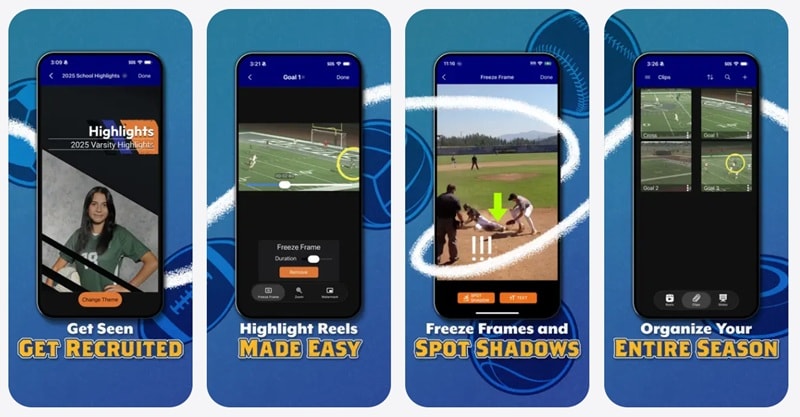
Since our previous recommendation was only for iPhone users, you can try MatchCut as an awesome Android alternative. It is basically a recruiting reel app, but also rightfully one of the best apps to make football highlights. It also gives you sports-friendly tools like freeze frames, arrows, spot shadows, overlays, subtitles, and reusable clips.
Pricing: Free version available. Pro plan is $9.99.
- Add freeze frames to pause on important plays.
- Use arrows, lines, spot shadows, stickers, and overlays.
- Add royalty-free music and subtitles.
- Very gentle on your phone's battery compared to heavy multi-track mobile editors.
- Lets users reuse clips to make different reel versions for different coaches or recruiters.
- Not the best fit for World Cup fan edits, match reactions, or creator-style sports videos.
- Some users complained they cannot export their project.
5. Vidio.AI
Platforms: Web Browser.
Best For: Social media curators and sports pages who want to turn long YouTube match broadcasts into hundreds of snackable vertical shorts.
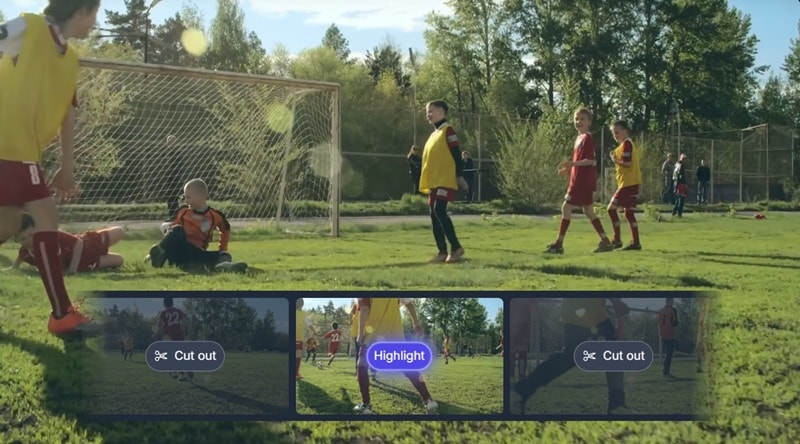
Vidio.AI is another reliable option for video editing sports highlights. Instead of manually cutting every play, you can use its AI-driven workflow to help create highlight-style videos from uploaded footage. You can use it for free with watermark, and then upgrade later if you need higher limits, watermark removal, or better output resolution.
Pricing: Free plan available. Paid plans start at $10 per month.
- Automatically scans long files to pinpoint goals, close-ups, referee cards, and loud crowd celebrations.
- Supports various formats including GIF, MP4, MOV, MPG, WEBM, and MPEG.
- Free Basic plan for testing.
- Saves an immense amount of time by cutting hours of video down in minutes.
- Incredibly consistent formatting across massive batches of clips.
- The feature is only on paid plans in some countries.
- Some higher-quality exports and larger upload limits require paid plans.
6. FlexClip
Platforms: Web Browser.
Best For: Small business owners, local clubs, and casual content creators who want a quick online sports highlight video maker with templates.
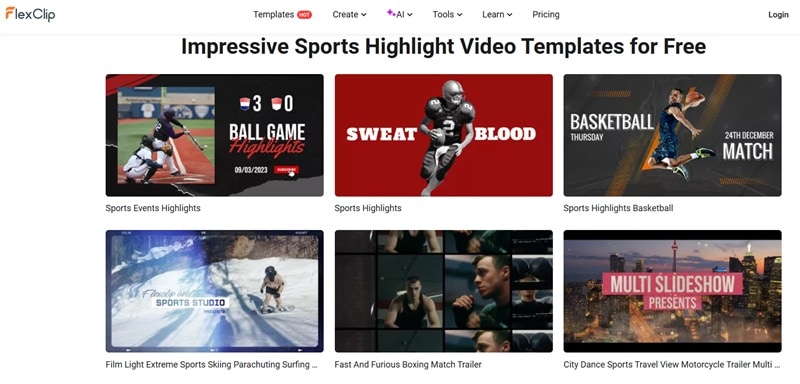
Continuing down our list, we have FlexClip. This is a free sports highlight video maker that works best when you want speed and simplicity. It gives you sports templates for football highlights, basketball highlights, match highlights, sports events, and more. That makes it especially useful for World Cup 2026 fan edits, team promos, match recaps, and short social videos.
Pricing: Free version available. Paid plans start at $19.99 per month.
- Ready-made sports highlight video templates.
- Add videos, photos, text, music, and voiceover.
- AI tools such as auto-subtitles, AI text-to-video, and AI music-related features.
- Very easy to use, even if you have never edited sports videos before.
- Good for quick World Cup-style edits, team promos, and social media clips.
- Less powerful for long match footage compared with desktop editors.
- Advanced sports effects like player tracking or detailed replay edits are limited.
7. VEED
Platforms: Web Browser.
Best For: TikTok and Reel creators who want their soccer edits to look highly aesthetic, punchy, and modern.
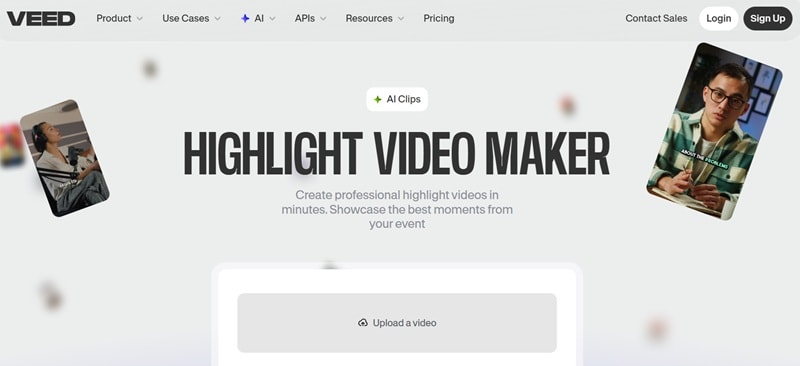
VEED is one of the best highlight video makers that is not only for sports, since it gives you enough editing tools to trim, rearrange, caption, and polish highlight videos quickly. And because it works fully online, you don't need to install anything for your World Cup 2026 fan edits.
Pricing: Free trial available. Paid plans start at $20 per month.
- Transcribe commentator audio into stylish, highlighted on-screen text instantly.
- Instantly change the mood of your match day footage with trendy cinematic color grades.
- AI tools for faster content creation and cleanup.
- Works well for Reels, TikTok, Shorts, and quick match recap videos.
- Great cloud collaboration features if you are editing clips with a creative team.
- Not made specifically for sports, so it lacks deeper sports-focused tools.
- The free tier includes a VEED watermark and restricts your video export length.
How to Choose the Right Sports Highlight Video Maker
So far, we’ve recommended seven of the best apps to make a sports highlight video. The question now: which one is the best of the best? But the thing is, the right tool depends entirely on what you want to achieve and what device you are holding.
Let's break down exactly which video editor for sports highlights you should grab based on your specific situation:
| Your Situation | Recommended Tool | Reasoning |
| You Want the Best Overall Tool | Filmora | Best for trimming, music, effects, captions, AI tools, and final polishing in one place. |
| You Are an Athlete, Parent, or Coach | Sport Reelz / MatchCut | Sport Reelz is better for recruiting reels and coach-friendly sharing, while MatchCut is great for mobile student-athlete reels. |
| You Edit Everything on iPhone | Warpstream | Great for quick sports edits from iPhone footage, with replay, spotlight, and training-style effects. |
| You Want a Free Online Tool | FlexClip | The interface is straightforward, and their pre-made sports layouts means you can drop in your clips and export a finished project in minutes. |
| You Want AI to Help | Filmora / Vidio.AI | Both utilize smart scene analysis to look at long game archives and pull out key highlights automatically. |
| You Are Making World Cup 2026 Fan Edit | Filmora | Strong choice for beat-heavy edits, captions, transitions, vertical videos, and polished social media exports. |
| You Need a Football Highlight Tape Maker | Sport Reelz / Filmora | Sport Reelz works well for recruiting tapes, while Filmora gives you more freedom for custom edits with music, slow motion, and effects. |
Secure DownloadConclusion
The World Cup 2026 is going to be a massive moment. And by using the best video editor for sports highlights, you will have endless chances to turn match moments into clips people actually want to watch. Our recommendations include Sport Reelz, Warpstream, MatchCut Highlight Reel Maker, Vidio.AI, FlexClip, and VEED.
But if you want the best software to make sports highlight videos that can grow with your editing needs, Filmora is the easiest overall recommendation. It gives you AI tools like Smart Scene Cut, full timeline control, captions, music, effects, and social-friendly exports in one workspace.
FAQs About Sports Highlight Video Makers
-
What is the best video editing software for sports highlights?
Filmora is one of the best video editing software for sports highlights because it combines AI tools, timeline editing, speed controls, captions, music, and effects in one place. It is easier to use than many professional editors but still gives you enough control to create polished highlight reels. -
What should I include in a sports highlight reel?
A good sports highlight reel should include your strongest moments first. Add goals, assists, saves, tackles, blocks, steals, dunks, passes, or any play that shows skill clearly. -
How long should a soccer highlight video be for social media?
For TikTok, Instagram Reels, and YouTube Shorts, keep it around 15 to 60 seconds. For a match recap, 1 to 3 minutes is usually enough. -
Can I legally use broadcast footage to make World Cup highlight videos?
Official World Cup broadcast footage is usually protected by copyright. You may be able to use short clips under certain commentary, criticism, or fair use situations, but that depends on the country, platform, and how the footage is used. To play it completely safe, many content creators focus on utilizing fan-vlog footage, stadium crowd reactions, or player warm-up clips that they record themselves.
