

 TL;DR:
You can create viral movie mashups by introducing a sudden, unexpected twist into a highly recognizable cinematic scene using Wondershare Filmora's automated generation and audio synchronization tools.
● Use the AI Text to Video feature set to OpenAI Sora 2 mode to instantly generate custom, dissonant visual elements from simple text prompts without requiring advanced editing skills.
● Apply the Auto Beat Sync tool to compile existing movie clips into fast-paced compilations that automatically align scene cuts and visual effects with the rhythm of your background music.
● Maximize viewer shareability by allowing the familiar setup to register fully before revealing one single, clear twist, utilizing contrasting music tracks to enhance the comedic parody effect.
Ask AI for a summary
 ChatGPT
 Perplexity
 Gemini
 Claude
 Grok
Grok
You've probably seen it while scrolling. A movie scene you know by heart, and then something feels… wrong. That's a movie mashup. It's an edit that takes something familiar and twists it just enough to surprise you. Maybe the character doesn't fit, the music is weird, or the mood flips out of nowhere.
For creators, this trend is hard to ignore. And once you understand how mashups work, making one yourself feels much more doable than you'd expect by using a movie mashup generator. So, follow along as we guide you through the concept, the creativity, and the tools behind viral mashup edits.
Part 1. Why Movie Mashups Instantly Grab Attention
As mentioned earlier, movie mashups work because they flip the mood of a familiar scene, which is why they often feel like a movie parody.
Most mashups follow a simple pattern called a highly familiar matrix and a dissonant injection. And if you want to learn how to make a video mashup, you need to understand these concepts. So, let's break them down one by one.
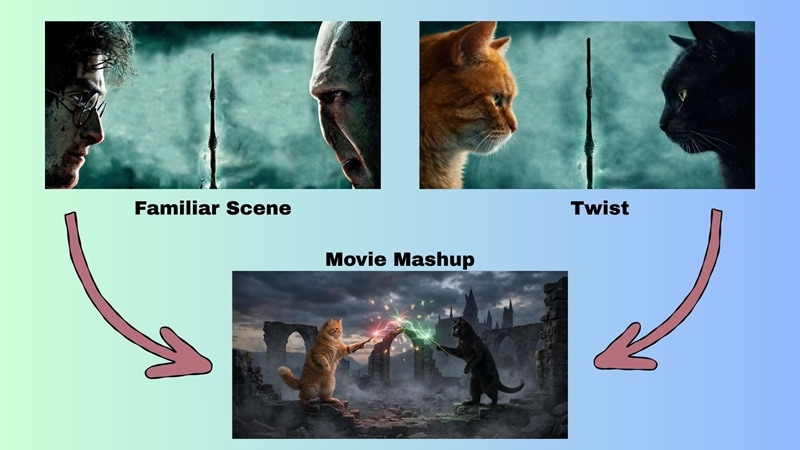
Highly Familiar Matrix: The Scene Everyone Recognizes
This is the foundation of the movie mashup. It's the part that feels safe and familiar. In movie mashups, this usually comes from:
- A well-known genre like superhero, romance, horror, or action.
- A classic scene such as a training montage, final battle, or emotional moment.
- A familiar look with dramatic music, cinematic lighting, or slow motion.
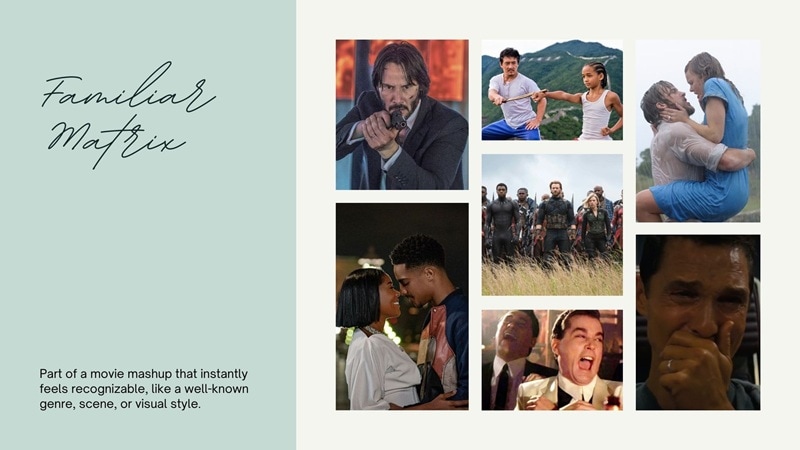
Because of this, viewers instantly get what they're watching. There's no guessing. The mood and rhythm are clear within seconds.
Dissonant Injection: The Thing That Clearly Doesn't Belong
Now comes the fun part. This is where the movie mashup breaks expectations on purpose. It can be something like:
- A ridiculous or unexpected character.
- Funny audio over a serious scene.
- A modern meme dropped into a classic movie moment.
- A sudden shift that turns drama into humor.
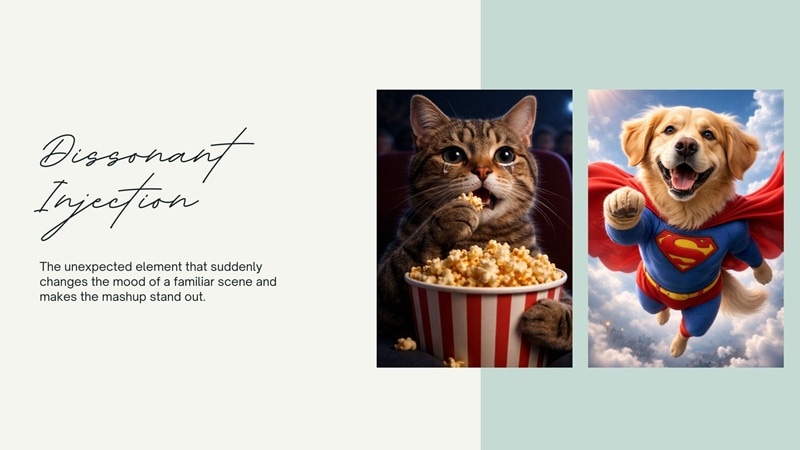
The impact doesn't come from the joke alone. It comes from seeing something familiar collide with something unexpected. That contrast is what makes movie mashups so hard to scroll past.
Part 2. How to Make a Video Mashup Without Advanced Editing Skills
Understanding the concept of movie mashups is one thing—but actually making one can get tricky. To keep your clips, transitions, and effects consistent, a reliable video mashup maker is essential. Wondershare Filmora offers AI-assisted tools that simplify the entire process, making it easy to craft professional-looking mashups in minutes.
 Secure Download
Here's how Filmora helps you create a video mashup more easily:
- AI Text to Video Feature: You can describe the kind of familiar scene you want, and the AI generates images or video clips based on that idea, giving you quick material to build around.
- Auto Beat Sync Feature: This automatically cuts and lines up your clips with the music, which works great for mashups that depend on timing and rhythm.
On top of that, Filmora comes with a big media library packed with music, sound effects, transitions, and overlays. These little details help sell the parody and make the contrast in your movie mashup feel clear.
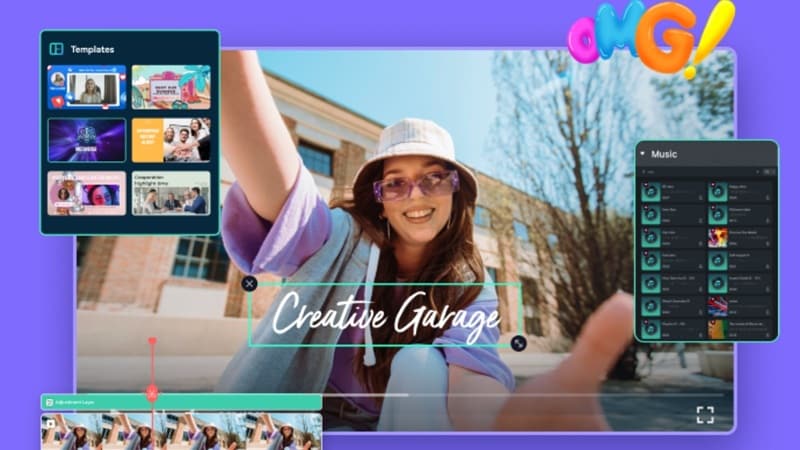
With everything in one place, figuring out how to create a video mashup feels far less intimidating, even if this is your first time. Let's walk through it together.
Method 1: AI-Assisted Mashups (Advanced Option)
This is the option to go with when you want your movie mashup to really break expectations, just like the examples we talked about earlier. The steps are easy to follow, and most of the work comes down to your idea and a bit of creativity.
Install the latest version of Filmora and open the app. Then, follow the guide below, and you'll see how it all comes together.
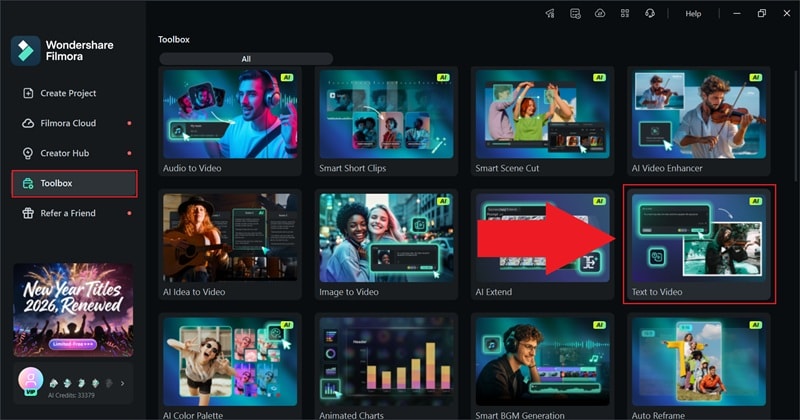
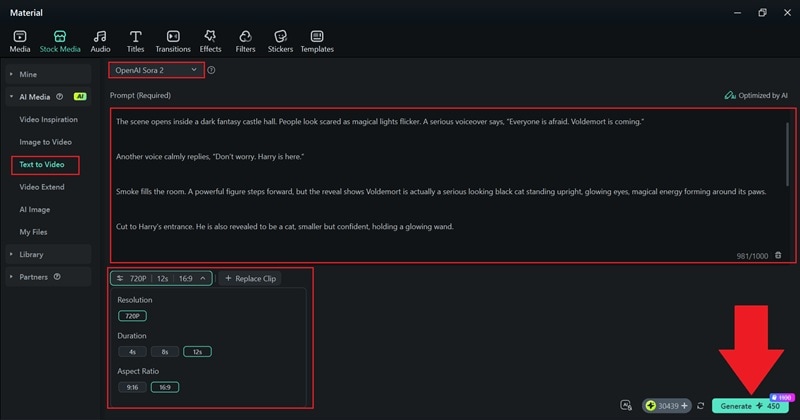
- Set the mode to "OpenAI Sora 2" for the best visual quality.
- Enter your prompt in the description box and describe the scene.
- Choose the duration, resolution, and aspect ratio.
- Click "Generate" to create the video.
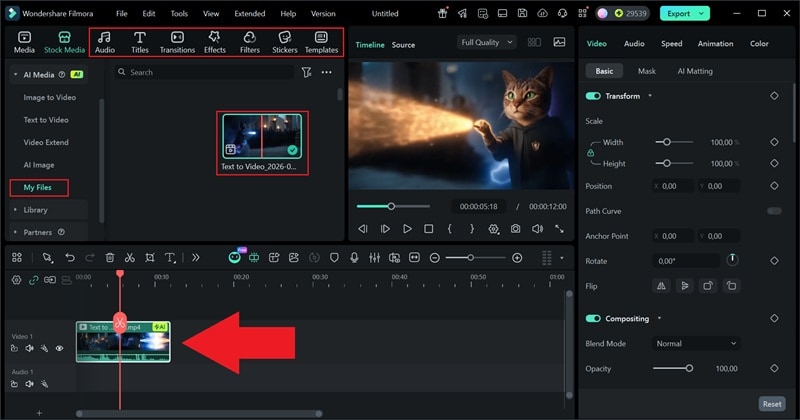
- Locate the video in the "My Files" section.
- Drag the clip onto the timeline to watch it play back in full.
- Polish the result by adding music, filters, effects, transitions, or any other final touches.
- Click "Export" and select "Local" to save the video to your device.
- Choose the file name, save location, format, and resolution.
- Click "Export" again to complete the process.
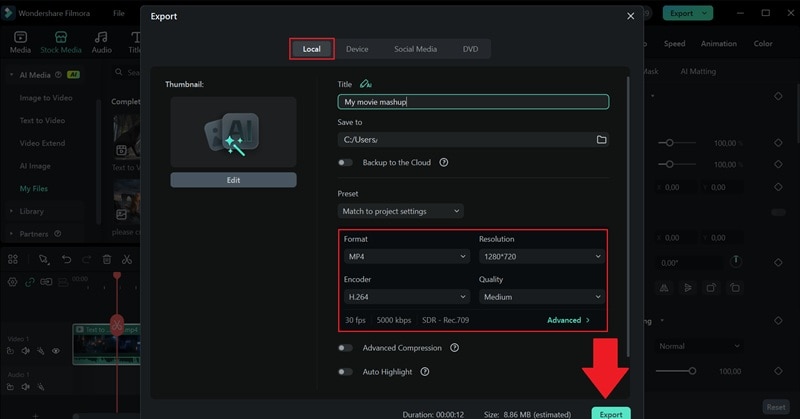
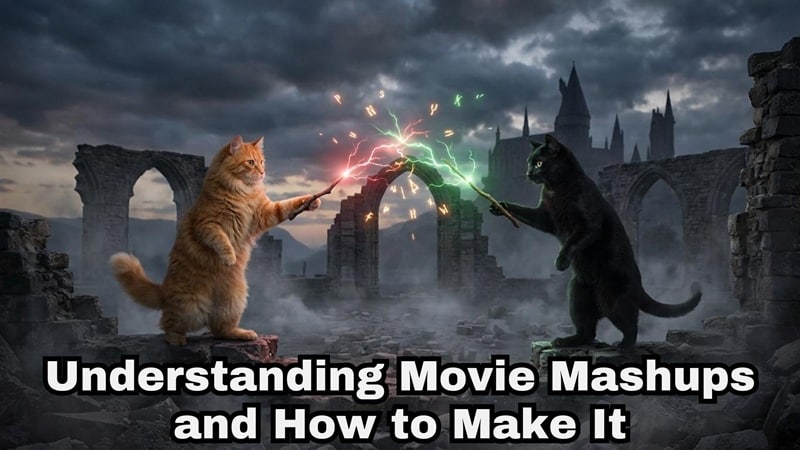
Now, watch how your movie parody video turns out and enjoy the surprise. In our video, we turn the dramatic Harry and Voldemort showdown into a cat battle instead.
Method 2: Beat-Based Mashups (Fast & Viral)
There's actually another way to make a "movie mashup" with Filmora, and this one is all about keeping pace by using clips of existing movies. Instead of flipping expectations, this style focuses on cutting together familiar scenes into a tight, rhythmic compilation. It works especially well for quick edits that feel fun and easy to watch.
To make this kind of mashup, you'll mainly use the Auto Beat Sync feature. It lines up your clips with the music so the whole video flows naturally.
Secure DownloadFollow the guide below to see how to put together this type of video mashup step-by-step:
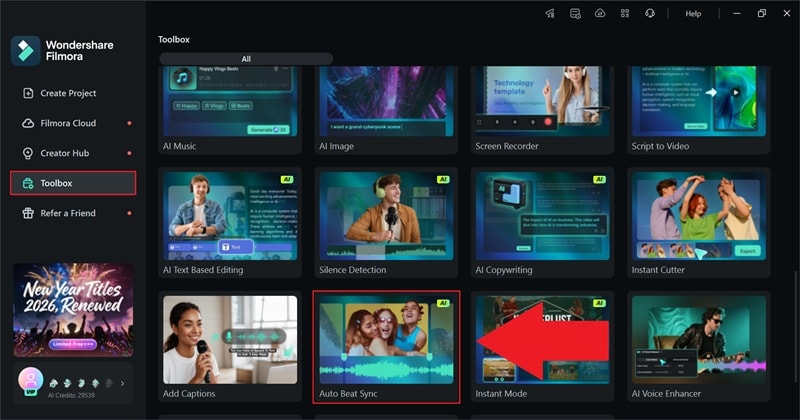
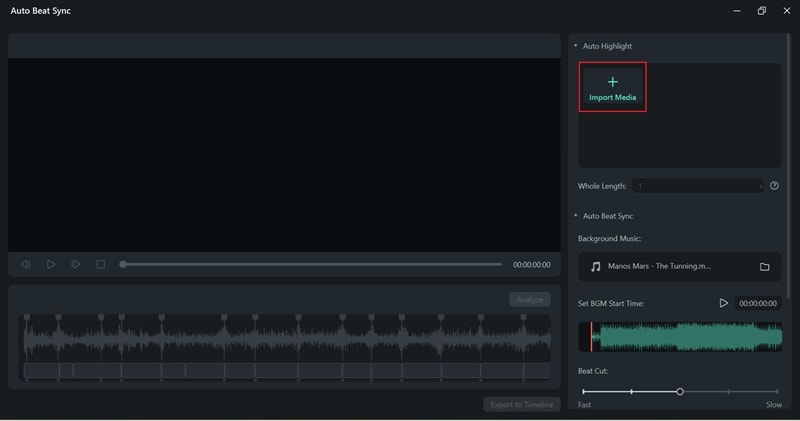
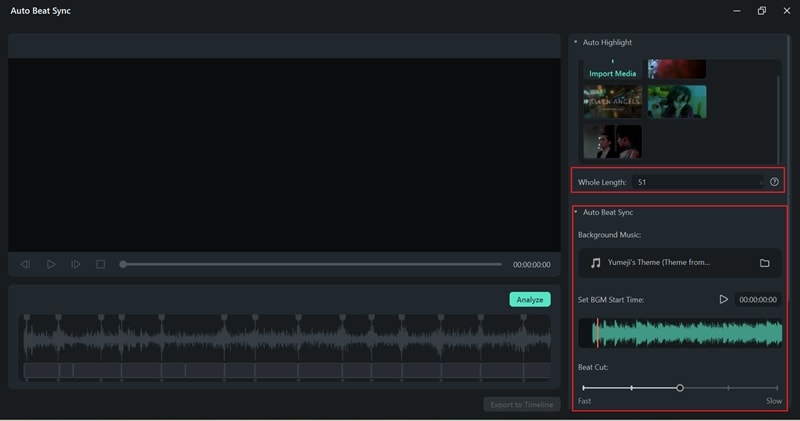
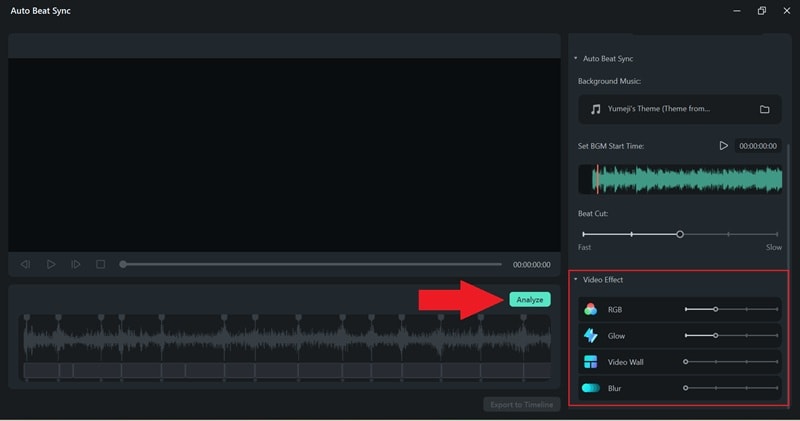
Watch the generated result once the process is complete.
- If you like how it looks, select "Export to Timeline" to continue editing.
- If not, adjust the settings and click "Analyze" again to refine the outcome.
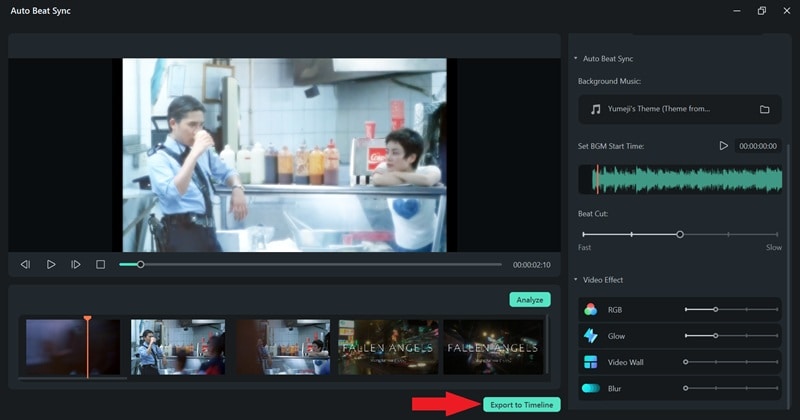
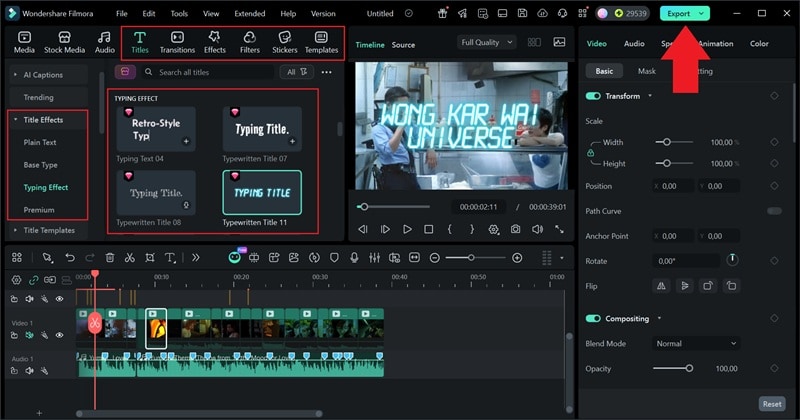
As you can see, this type of movie mashup is more about rhythm and flow than surprise. To see how it differs from the first video you made, take a look at the clip you just created using Auto Beat Sync.
Part 3. Turning Mashups Into Movie Parodies People Actually Share
Sometimes, knowing how to make a movie mashup is not enough, it needs to be effective, or else people will scroll away. A movie mashup becomes a real movie parody when the contrast feels planned, not accidental. When it works, it feels clever. When it doesn't, it just feels loud.
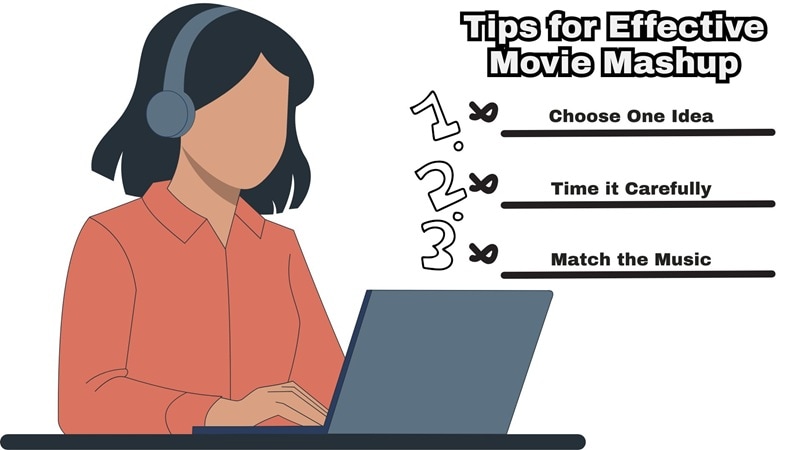
If you want people to stick around and share your video mashup, keep these tips in mind:
- Give the Scene a Second to Register: A good movie mashup lets people recognize what they're watching first. When the scene feels familiar, viewers relax and stay long enough to enjoy the twist that comes next.
- Drop The Twist at the Right Time: Whether it's a joke, a character swap, or a tone change, the dissonant moment should come after the setup feels clear. This timing is what turns a simple edit into a proper movie parody.
- Stick to One Clear Idea: Trying to cram too many jokes into one edit can make things feel noisy. One strong contrast usually lands better and keeps the movie mashup easy to follow.
- Match the Music: Picking the right music helps sell the contrast. A serious track makes the twist feel funnier, while a playful track can soften the parody and keep it light.
Conclusion
Movie mashup edits work because they take familiar scenes and flip them in a way that feels fun and unexpected, and this guide walks you through exactly how that happens. We covered the core ideas behind a movie mashup and showed how to make a video mashup using a reliable movie mashup generator like Wondershare Filmora.
With Filmora, you can create movie mashups from simple text prompts, which makes experimenting with ideas feel quick and natural. On top of that, Filmora comes packed with music, effects, templates, and smart editing tools that help bring everything together smoothly. It's a setup that makes creating movie parody-style edits feel less complicated and a lot more enjoyable.

FAQs About Movie Mashup Generators
-
1. What makes a video mashup feel intentional instead of random?
A video mashup feels intentional when there is a clear idea behind it. The scene is familiar, the twist is obvious, and the timing feels right. -
2. Can a movie mashup generator be used for parody content on social media?
Yes, a movie mashup generator works really well for movie parody content on social platforms. Short edits that remix familiar scenes with an unexpected twist often perform well because they are easy to understand and fun to share. -
3. How long should a movie mashup be to keep viewers watching?
Most movie mashups perform best when they stay between 6 and 15 seconds. This gives you enough time to set up a familiar scene, drop the twist, and end before viewers lose interest. Shorter mashups also loop better, which helps with watch time. -
4. Can movie mashups work without famous scenes?
They can. A movie mashup does not always need famous clips to work. Familiar genres, common movie moments, or well-known visual styles can be just as effective when paired with a strong twist. -
5. Is a video mashup maker online free enough for serious creators?
A video mashup maker online free is great for testing ideas and learning the basics. For creators who want more control, better pacing, and polished results, using a proper movie mashup generator like Filmora usually makes the process smoother and more flexible.
