

 TL;DR:
For professional surgical equalization, FabFilter Pro-Q 4 is the top paid choice, while TDR Nova provides the best free dynamic EQ alternative for vocal mixing and de-essing.
● Marvel GEQ and SSL Native X-EQ 2 are ideal for clean, transparent mastering, whereas PTEq-X and H-EQ are specifically designed to add vintage analog-style warmth to instruments.
● ReaEQ offers an extremely low-CPU solution for large projects, but it is strictly limited to Windows operating systems and lacks dynamic EQ capabilities or linear-phase modes.
● VST3 plugins integrate natively into Wondershare Filmora for video editing, provided they are installed strictly in the default OS directories (C:\Program Files\Common Files\VST3 for Windows or /Library/Audio/Plug-Ins/VST3/ for macOS) to ensure detection.
Ask AI for a summary
 ChatGPT
 Perplexity
 Gemini
 Claude
 Grok
Grok
For every music producer, EQ is one of the most important tools in the mixing process. And with so many equalizer plugins (or EQ VSTs) available today, shaping your sound, balancing frequencies, cleaning up muddiness, and placing each element perfectly in the mix has become more accessible.
You no longer need access to high-end studio hardware to achieve professional results. We've tested a bunch of equalizer plugins and put together a list of the best ones you can download right now.

Our Top 2 EQ VST Picks
Part 1. Equalizer Plugins (EQ VST) Comparison Chart
There are way too many EQ plugins out there, and trying them all could take forever. So we did the work for you.
But before we jump into the details, you can check out a quick comparison chart of the top EQ VST plugins (both free and paid) that we'll cover in this guide. At a glance, you can see which ones are best for vocals, mastering, beginners, and more, along with platform compatibility and plugin type.
| EQ Plugins | OS Compatibility | Type | Free/Paid | Best For |
| FabFilter Pro-Q 4 | Windows, macOS | Parametric + Dynamic EQ | Paid | Precision mixing and mastering |
| TDR Nova | Windows, macOS | Dynamic + Parametric EQ | Free | Vocal control and dynamic EQ tasks |
| MEqualizer | Windows, macOS | Parametric EQ + Visual Tools | Free | Beginners and visual mixing |
| ReaEQ (Cockos) | Windows | Parametric EQ | Free | Low-CPU EQ and quick edits |
| Marvel GEQ (Voxengo) | Windows, macOS | Linear Phase Graphic EQ | Free | Clean EQ for mastering and post |
| Kirchhoff-EQ | Windows, macOS | Parametric EQ | Paid | Advanced mastering and tone shaping |
| H-EQ (Waves) | Windows, macOS | Hybrid Analog/Digital EQ | Paid | Analog-style tone |
| PTEq-X (Ignite Amps) | Windows, macOS | Analog EQ | Free | Vintage warmth for vocals/instruments |
| Neutron EQ (iZotope) | Windows, macOS | Smart EQ + Dynamic Processing | Paid | AI-assisted mixing |
| SSL Native X-EQ 2 | Windows, macOS | Parametric EQ | Paid | Surgical EQ and mastering |
|
Show More
Show Less
|
||||
Part 2. Top 10 Equalizer Plugins Free & Paid
For a more detailed understanding of each plugin's strengths, limitations, and ideal use cases, this section breaks down the 10 best EQ VST plugins. We've included key details like OS compatibility, EQ type, and pricing to help you decide which tools best suit your workflow.
1. FabFilter Pro-Q 4
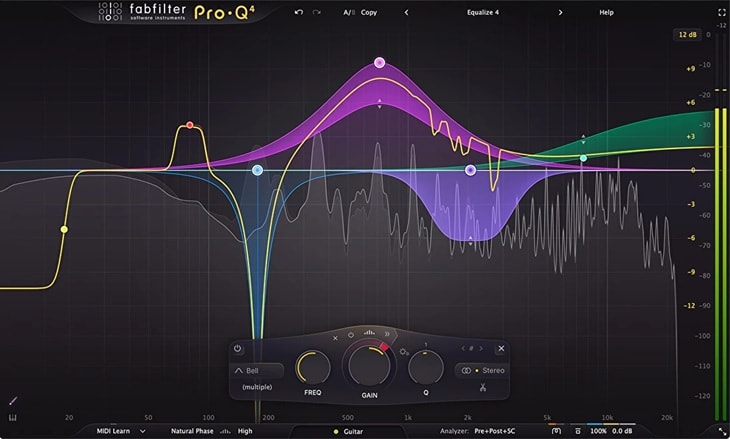
If you're open to investing in a premium plugin, you may want to consider FabFilter Pro-Q 4. It is one of the most respected EQ plugins in the industry, which is known for its clean sound, precision, and visually stunning interface.
- Smooth workflow with drag-and-drop control
- Excellent visual feedback for surgical adjustments
- Clean and transparent sound
- Supports surround sound and Dolby Atmos (up to 9.1.6 immersive audio)
- Relatively expensive compared to other EQ plugins
- Advanced features may overwhelm beginners
- Up to 24 EQ bands with dynamic EQ on all bands
- Linear Phase and Natural Phase modes
- Mid/Side and Left/Right processing
- Real-time spectrum analyzer with solo band mode
- EQ Sketch for quick, intuitive curve drawing
- Zero latency, linear phase, and Natural Phase modes for flexible processing quality
- Offers a free trial
- Pro-Q 4 Plug-in only: $179
4.3/5 on AudioPluginGuy, 8/10 on musictech.com, and 5/5 (2,414 reviews) on Plugin Boutique, praised for its versatility, pristine sound quality, and intuitive design.
Target Users and Use Cases
Professional engineers who do high-end mixing and mastering, especially when precise tonal control is required.
Brief Reviews:
Dave Pensado, Grammy Award-winning mix engineer, praised FabFilter Pro-Q for having one of the best GUIs of any EQ out there and said it sonically compares to the best in the industry. If you want the best, this plugin deserves a spot at the top of your list.
2. TDR Nova
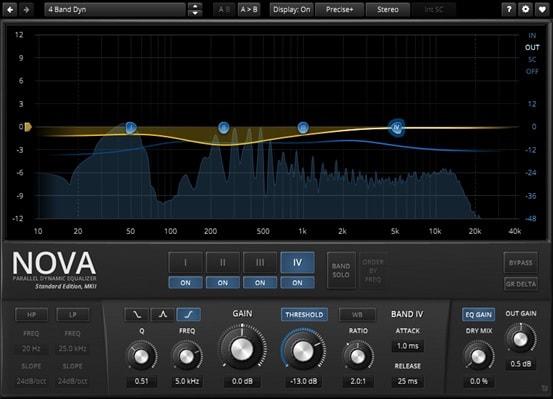
TDR Nova is a dynamic equalizer VST plugin that combines the functions of a parametric EQ and a multiband compressor. Unlike typical static EQs, it reacts dynamically to your audio signal, which is ideal for taming harsh frequencies or lifting weak elements in a mix.
- Completely free while offering many professional-level features
- Can function as a dynamic EQ, multiband compressor, or de-esser
- Includes preset manager, undo/redo, A/B comparison, and workflow tools
- Steeper learning curve for users new to dynamic EQ concepts
- Not ideal for very complex surgical EQ tasks
- Lacks automatic EQ matching found in some premium plugins
- Parallel dynamic equalizer with real-time audio response
- Four dynamic EQ bands with full dynamics control
- Built-in high-pass and low-pass filters
- Supports both parametric EQ and dynamic EQ workflows
- Classic knob-style interface for intuitive control
- Equal loudness function to prevent misleading level changes
Mixing engineers, music producers, podcasters, and mastering engineers who need dynamic control over specific frequency ranges. Especially effective for de-essing vocals, cleaning up muddy mixes, and controlling resonant peaks in instruments.
TDR Nova combines an intuitive spectrum analyzer with powerful dynamic EQ capabilities. It starts as a simple EQ, but with minimal setup can become an extremely precise and flexible dynamic processing tool for both beginners and professionals.
3. MEqualizer
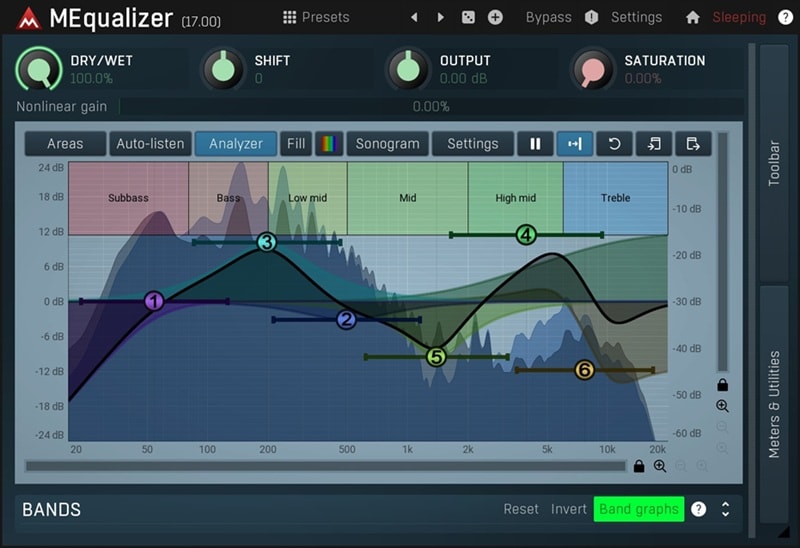
MEqualizer is part of MeldaProduction's free suite and offers six fully adjustable bands, a built-in spectrum analyzer, and advanced filter shape control. It's a pretty versatile and customizable EQ VST plugin for anyone getting started in audio production.
- Regularly updated with new features and improvements
- Highly flexible interface with powerful sound-shaping capabilities
- Ultra-fast performance optimized for modern AVX2 and AVX512 processors
- Built-in safety brickwall limiter to keep output below 0dB
- Installer includes the full Melda suite, which can feel bloated
- Preset browsing is less intuitive than many modern plugins
- Tube saturation and harmonics sound less natural than premium analog emulations
- 6-band EQ with multiple filter types
- Built-in spectrum and sonogram analyzer
- Automatic gain compensation for consistent loudness
- Integrated tube saturation and harmonics control
Beginners, hobbyists, and budget-conscious producers looking for a free yet capable and customizable EQ. Also useful as a lightweight backup EQ for advanced users handling quick fixes or secondary tasks.
MEqualizer stands out as a solid free EQ plugin. With six adjustable bands, detailed visual feedback, and built-in saturation, it offers more than enough flexibility for basic to intermediate mixing needs.
4. ReaEQ
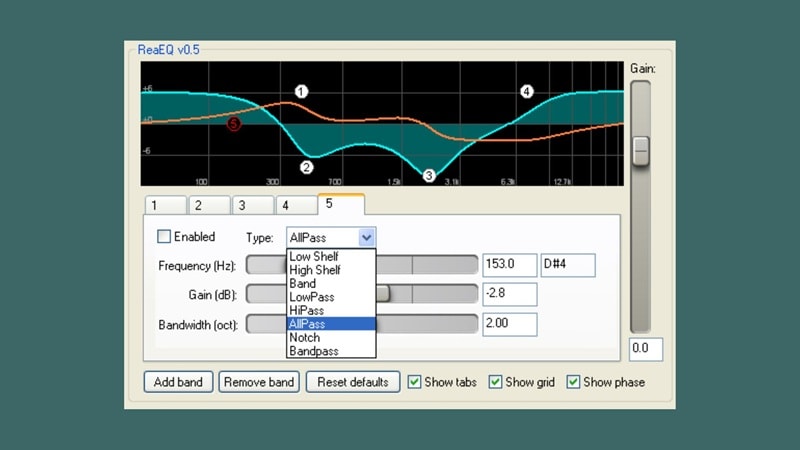
ReaEQ comes as part of the ReaPlugs VST suite, originally developed for REAPER DAW. It offers a no-nonsense parametric EQ with unlimited bands and extremely low CPU usage, making it perfect for quick adjustments.
- No preset limit on the number of EQ nodes
- Lightweight and suitable for large sessions without heavy CPU usage
- At higher sample rates, filter shapes may sound squished without oversampling
- No linear-phase mode, spectrum matching, or dynamic EQ
- User interface feels outdated
- Parametric EQ with unlimited bands
- Supports shelf, band, high/low-pass, notch, bandpass, and allpass filters
- Visual display of frequency and phase response
- Displays note and octave information for selected frequencies
- Individual bypass control for each band
- Expandable full-graph view for precise editing
Producers, engineers, and hobbyists who need a lightweight, no-frills EQ for everyday mixing tasks. Especially suitable for older systems or very large sessions where CPU efficiency matters.
ReaEQ may look old-school, but it remains one of the most efficient and practical EQ plugins available. Its unlimited bands and low CPU footprint make it a reliable workhorse for fast EQ adjustments on virtually any track.
5. Marvel GEQ (Voxengo)
Marvel GEQ is a free EQ plugin with linear-phase graphics featuring 16 fixed-frequency bands, which means it provides clean and phase-accurate EQ adjustments ideal for mastering and precise tone shaping. It's especially ideal for live sound or film post-production.
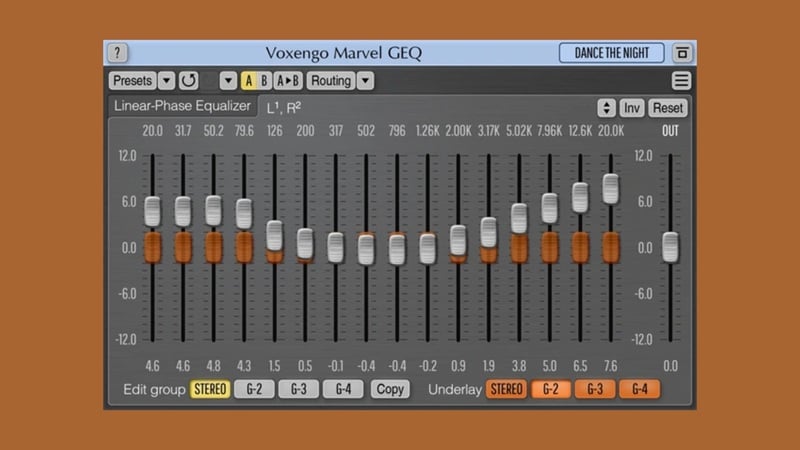
- Praised for its clean, clinical tone
- Supports stereo, mid-side, and up to 8 channels, making it ideal for mastering
- Handles stereo and 5.1/7.1 formats easily with flexible routing
- Fixed band frequencies offer less flexibility than parametric EQs
- Not suitable for surgical EQ tasks requiring precise frequency control
- Supports up to 8 input/output channels (depending on host capabilities)
- Stereo, mono, and mid/side processing for flexible channel control
- Built-in internal channel routing
- Zero-latency performance for real-time processing
- Transparent, mastering-grade EQ quality
Anyone who needs clean and transparent EQ, particularly for mastering, live sound applications, or film and post-production workflows.
Marvel GEQ is a niche yet powerful free tool. For users seeking a linear, transparent graphic EQ capable of handling multi-channel projects with zero latency, it remains a reliable choice.
6. Kirchhoff-EQ
Kirchhoff-EQ is a modern, feature-packed parametric equalizer plugin designed to compete with the best in the market. It offers 32 bands, vintage-mode modeling, advanced dynamic EQ features, and exceptional sound quality.
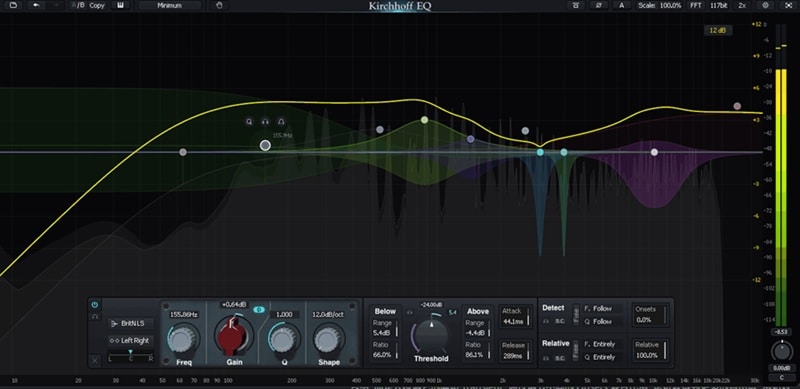
- Offers multiple phase modes: zero-latency, analog-style, linear, and hybrid
- Advanced dynamic EQ tools with per-band control
- Intuitive interface with advanced visualization
- Exceptional sound quality with warmth and transparency
- Premium pricing compared to basic EQ plugins
- High CPU usage with advanced settings
- Always-on 64-bit internal processing with optional ultra-high 117-bit precision
- Adaptive filter behavior based on psychoacoustic principles
- Toggleable ultra-high-resolution processing for clean and detailed sound
- Includes 15 distinct filter types for creative flexibility
- Continuously adjustable filter slope settings
- Emulations of 32 classic vintage EQ curves
Professional mixing and mastering engineers who demand both precision and musicality. Ideal for detailed tone shaping, dynamic EQ applications, and creative sound design.
Kirchhoff-EQ is used by professionals such as Michael Brauer (Coldplay, John Mayer) and Mark Wingfield. It’s praised for delivering “a lot of warmth and punch” while remaining “incredibly smooth and transparent,” making it a go-to EQ for high-end productions.
7. H-EQ (Waves)
H-EQ is a hybrid equalizer plugin that blends the warmth of vintage analog EQs with modern digital precision. It includes emulations of classic British and American consoles, along with flexible digital filters, real-time analyzers, and mid/side processing.
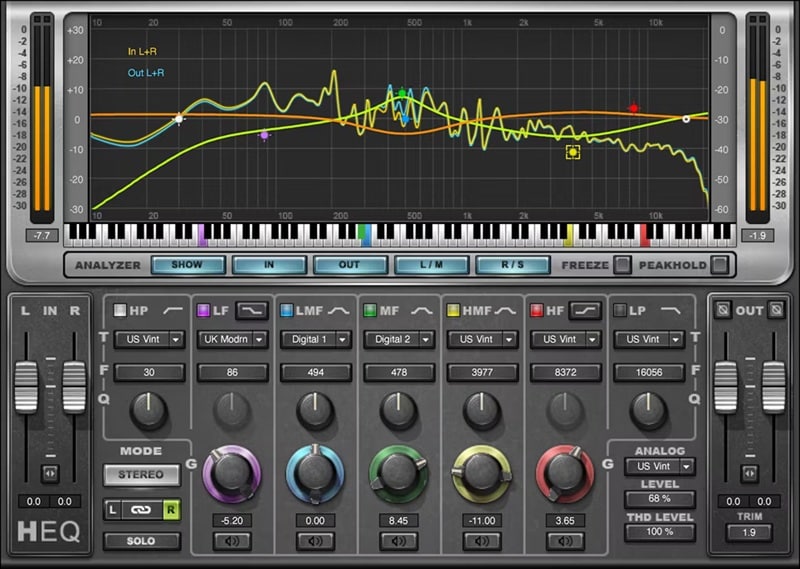
- Extremely versatile with both analog-style warmth and precise digital EQ capabilities
- Innovative features like asymmetrical bell curves, musical keyboard reference, and adjustable harmonic distortion
- Excellent for shaping tone across a wide range of genres
- Helpful visual tools for accurate frequency control
- Interface can feel outdated compared to newer plugins
- Limited dynamic EQ features
- Can use a noticeable amount of CPU resources
- Built-in real-time spectrum analyzer with freeze function
- Mid/Side and Left/Right processing options
- Flexible high-pass and low-pass filters
- Adjustable analog-style saturation and noise
- Visual editing with extras like soloing bands, phase flip, per-channel control, and a Lite mode for lower CPU usage
Mixing engineers, producers, and home studio users who want the best of both worlds: analog warmth and digital precision. Great for shaping vocals, drums, guitars, and full mixes, especially when you're aiming for a musical tone with character.
The flexibility of switching between vintage console tones and clean digital EQ is a huge plus. The analog models give a really nice color, and the analyzer makes it super easy to pinpoint frequencies.
8. PTEq-X (Ignite Amps)
PTEq-X is a free EQ plugin with high-quality emulation of classic Pultec-style. It models vintage tube equalizer circuits with surprising accuracy and offers a warm, musical tone perfect for vocals, guitars, and mastering.
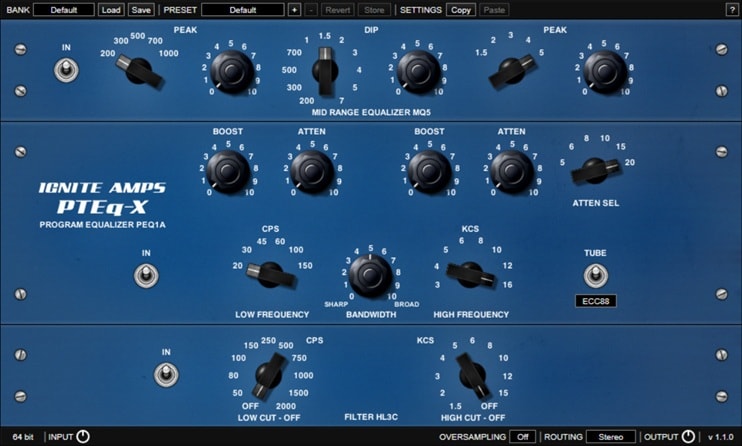
- Mono and stereo support
- Improved frequency accuracy for MQ5 and HL3C models
- Fully automatable parameters
- Free and regularly updated with professional-grade quality
- No built-in spectrum analyzer or visual feedback
- The interface may feel limited for detailed surgical work
- Three EQ modules with authentic analog-style curves
- Advanced analog tube stage emulation with four selectable tube types
- Switchable EQ and tube stages to optimize CPU usage
- Optional linear-phase oversampling to reduce aliasing
- Independent input/output gain controls
- 64-bit double precision internal processing
Those who love the rich, smooth character of vintage analog EQs, especially the legendary Pultec units, will love PTEq-X. It excels on vocals, guitars, bass, and full mixes, which adds warmth and depth that digital EQs often lack.
For a free EQ plugin, PTEq-X really nails the sound of classic tube EQs. While it's not made for precision tasks, its musical curves and rich analog vibe make it an essential tool for sweetening and adding warmth to your mixes.
9. Neutron EQ (iZotope)
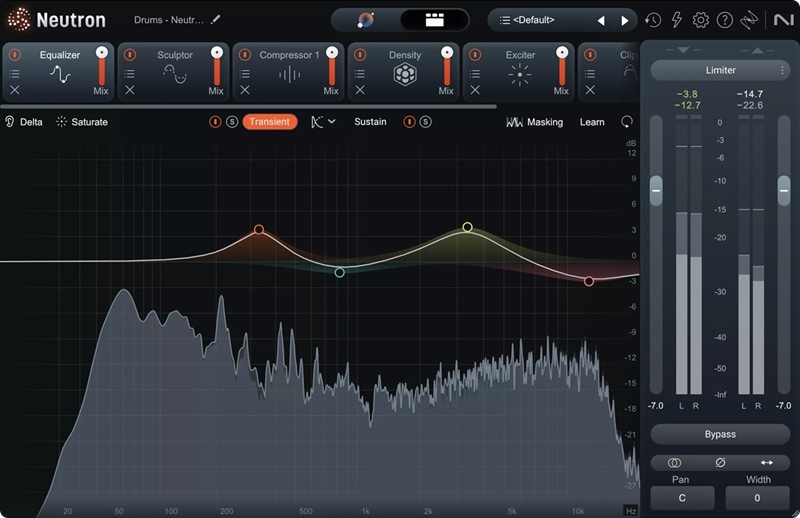
Neutron's EQ (which shares technology with the Filmora-compatible Ozone 11 Equalizer) is an equalizer plugin that is part of iZotope's intelligent mixing suite. Users can add up to 12 EQ bands directly on the curve with a click. Each band comes with its own control panel, offering static or dynamic processing and advanced sidechain options.
- AI-assisted features streamline mixing tasks
- Precise dynamic EQ with intelligent sidechaining
- Seamless integration with the full Neutron ecosystem
- Requires iZotope ecosystem for full functionality
- Higher price point than standalone EQ plugins
- All 12 EQ bands support a variety of filter shapes and can operate in static or dynamic mode, with sidechaining options for reactive frequency adjustments
- Soft Saturation adds gentle analog-style warmth to your mix
- EQ Learn automatically identifies key frequency areas like harsh tones or resonances
- New Delta listening feature lets you isolate what the EQ is changing, with improved visual metering for better control
- Offers a free trial
- Pro-Q 4 Plug-in only: $179
9/10 on MusicTech.
Target Users and Use Cases:
Intermediate to professional mix engineers who want powerful EQ tools with intelligent assistance. Ideal for users already working within iZotope's ecosystem.
Brief Reviews:
One of the most intelligent EQ plugins on the market. While it's a bit pricy, you can try the free trial to explore its capabilities before committing. A great choice if you're ready to invest beyond the limitations of free EQ plugins.
10. SSL Native X-EQ 2
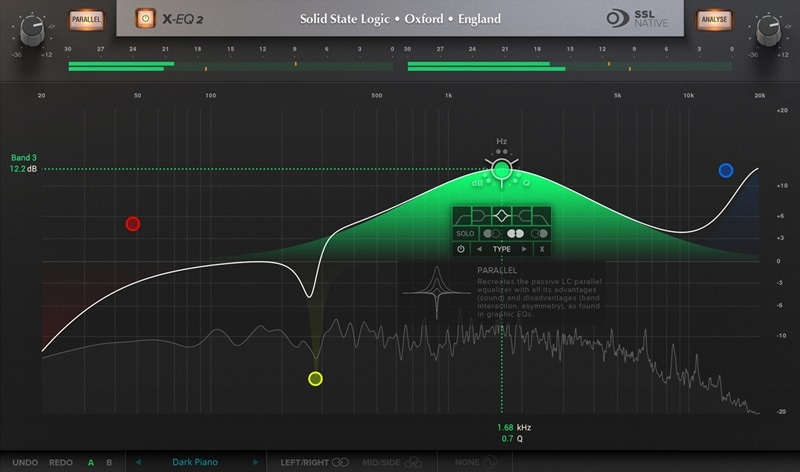
X-EQ 2 is a pro-level equalizer plugin from Solid State Logic. It features up to 24 bands with precise control and includes a wide range of filter types, including vintage curves and special “anti-cramping” filters. Ideal for surgical audio work.
- Smooth, transparent sound thanks to SSL's anti‑cramping technology, avoiding harsh digital EQ artifacts
- Mastering-grade flexibility with 24 bands, 17 filter types, and Mid/Side as well as Left/Right processing
- CPU‑efficient DSP offers a responsive workflow without taxing system resources
- Limited manual control over Q on presets, though bands can be added freely
- No built-in A/B comparison; clone-based recall may interrupt workflow
- The spectrum analyzer is basic, with no averaging or peak hold features
- 24-band fully parametric EQ with high-quality SSL anti-cramping filters
- CPU-efficient design with optimized DSP performance
- 17 filter types, including multiple cut, bell, shelf, and custom shapes
- Flexible control with draggable nodes, mouse wheel, and precise data entry
- Mid/Side and Left/Right processing support
- Band solo and bypass options
- Real-time spectrum analyzer with phase and step response displays
4.5/5 on Sweetwater; 5/5 on PluginBoutique.
Target Users and Use Cases
Professional audio engineers and producers who require surgical precision and transparency in equalization. Excellent tool for mastering, mixing, and complex sound design tasks.
Brief Reviews:
The anti-cramping filters and extended band count make it one of the most powerful EQ VSTs in its class. It's a surgical-grade equalizer with unmatched transparency.
Part 3. How to Choose the Right EQ VST Plugins for You?
We can understand if you're feeling overwhelmed by the sheer number of EQ plugins out there. It's not the easiest choice to make, especially if you're a beginner trying to navigate between free tools, premium options, and everything in between.
To make things easier, ask yourself these simple questions:
1. What are your corrective needs?
Some EQs are better at sculpting vocals, others work better with guitars, drums, etc.
Fixing vocals? Use a dynamic EQ plugins like TDR Nova or Neutron EQ to reduce harshness or control sibilance.
Shaping instruments like drums or guitars? Try musical-sounding EQs like H-EQ or Kirchhoff-EQ.
Mastering your mix? Go for clean, transparent EQs like Marvel GEQ or SSL X-EQ 2.

2. What is your budget?
Free options don't always mean lower quality, while paid plugins often bring extra flexibility, polish, or features. Free EQ plugins like ReaEQ, MEqualizer, and PTEq-X are more than enough for most beginner to intermediate needs.
However, premium EQ plugins like FabFilter Pro-Q 4 or Kirchhoff-EQ give you more features, better sound, and a smoother workflow.
3. Will your system handle it?
Some EQ VSTs are super lightweight, perfect for low-spec setups or big projects with tons of tracks. Others are CPU-intensive due to oversampling, real-time graphics, or analog emulation. If you want lightweight EQ plugins, try ReaEQ or Marvel GEQ.

4. What DAW are you using?
Most EQ plugins are compatible with all major DAWs, but it's still good to double-check. You can refer back to the list we've provided in this guide. Or, check the compatibility in the plugin's official documentation or on the developer's website.
Filmora VST3 Compatibility: Elevating Your Video Audio
While many video editors rely solely on built-in tools, Filmora offers direct support for a variety of professional VST3 plugins, including several top-tier equalizers. This allows video creators to utilize the industry-standard tools discussed above directly within their video editing workflow. Specifically, Filmora officially supports EQ plugins from:
- FabFilter: Including the industry-leading Pro-Q 4 (and Pro-Q 3, Pro-Q 2), which is detailed in our top-10 list.
- iZotope Ozone 11: This powerful suite includes Ozone 11 Dynamic EQ and Ozone 11 Equalizer, offering advanced mastering-grade control.
- Other supported tools: While not strictly EQs, utility plugins like TDR Kotelnikov (Compressor) and LoudMax (Limiter) are essential companions for final mix balancing.
This compatibility means Filmora users can achieve professional audio results—from cleaning dialogue to cinematic sound design—without leaving the video editor.
Bonus: How to Use EQ VST Plugins to Get the Best Sound
Once you've chosen the best EQ VST plugins, the next step is knowing how to actually use it to improve your audio. Better yet, you can take things further by creating a full visual and audio experience for content like YouTube videos, podcasts, or short films.
One of the best beginner-friendly editing software programs that supports VST plugins is Wondershare Filmora. You can easily install it and get started without any complicated setup. Moreover, Filmora comes equipped with a robust set of built-in audio and video editing tools, which makes it a great all-in-one solution for your creative needs.

 Secure Download
How to Use EQ VST3 Plugins in Filmora
Windows: C:\Program Files\Common Files\VST3
macOS: /Library/Audio/Plug-Ins/VST3/
Tip: Always use the default folder. Custom locations can cause Filmora to miss the plugin.
Conclusion
Still on the hunt for the perfect EQ plugin? We hope this guide has helped you narrow down the options and made your search a little easier. The best EQ plugin is the one that fits your workflow, budget, and goals.
To get started using EQ VST plugins, you can try Wondershare Filmora. It's one of the most beginner-friendly editors out there—simple to install, easy to navigate, and packed with built-in tools anyone can use to enhance their audio and video projects.

