

A lot of creators try to figure out how to make your voice deeper because a lower tone can make you sound calm, confident, and authoritative. A prime example... So, if you've been wondering how to make your voice sound deeper or how to make your voice deeper naturally, there are real, actionable ways to achieve it. Some people seek out exercises how to make your voice deeper for permanent results, while others prefer quick tools. We will cover methods for everyone—whether you need to learn how to make your voice deeper fast or are curious about how to make your voice deeper permanently.
Part 1. How to Make Your Voice Deeper Naturally (5 Safe Daily Exercises)
Believe it or not, you can actually learn how to make your voice deeper permanently without forcing it, even if your natural pitch is on the higher side. With the right routine of exercises how to make your voice deeper, your tone can start to feel heavier, richer, and more grounded. These exercises are suitable for everyone, including those searching for how to make your voice deeper permanently for male or female results.
Here are five easy and safe exercises on how to make your voice deeper that you can start doing right away:
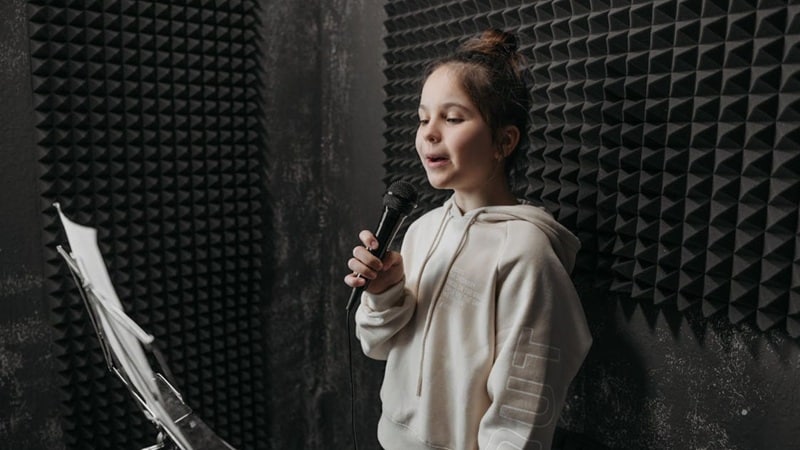
- The Hum Down Habit: Start from a higher tone and let it slide down to your lowest comfortable note. This warms up your vocal cords and teaches them how to settle into a heavier sound.
- Chest Vibes Training: Put your hand on your chest, take a slow breath, and speak gently. Feeling that vibration helps you stay in your chest voice, which gives you a fuller and heavier sound.
- Slow and Steady Speaking: Read a short line at a slow pace and keep your pitch steady. Talking slower naturally brings your voice down, which is a helpful habit for anyone learning how to make the voice deeper.
- Early Morning Voice Work: Your morning voice is always a bit lower, so use that time to train. Read anything for a few minutes to get familiar with that deeper tone and make it easier to repeat later.
- Straw Flow Strengthening: Hum through a straw for a couple of minutes to keep your vocal cords relaxed and steady. This simple exercise builds control and supports your progress when working on how to make your voice sound deeper.
Part 2. How to Make Your Voice Deeper Fast (In 5 Minutes) with Filmora AI Voice Changer
Those natural exercises are essential for a permanent change, but they work slowly. If you're trying to figure out how to make your voice deeper fast, or even how to make your voice deeper in 5 minutes, quick tools are the answer. Wondershare Filmora's AI Voice Changer is one of the easiest ways to shift your tone instantly and make your voice sound deeper on mic recordings.
The good news is that you don't have to wait months or rely on luck. If you want a quick upgrade that still feels clean and polished, AI tools can shift your voice instantly. And out of all the choices out there, Wondershare Filmora is one of the easiest and most reliable ways to do it.
 Secure Download
Why Filmora Is Great for Making Your Voice Deeper
Full Control For Your Voice
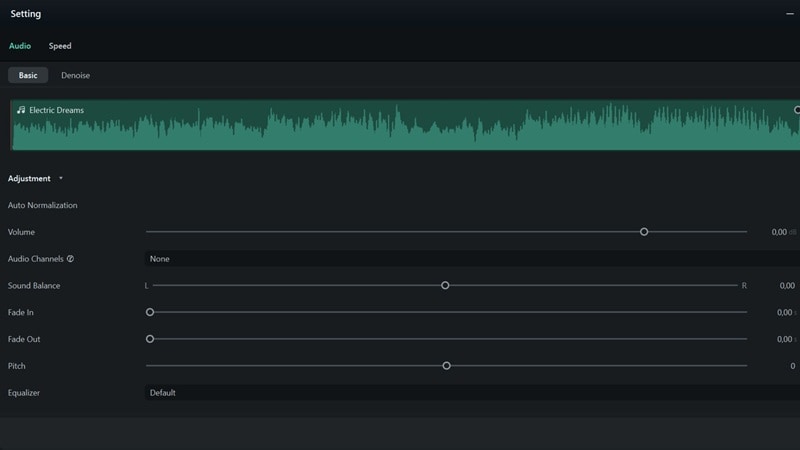
Filmora lets you adjust pitch, EQ, and tone in a really simple way. It helps you shape a heavier sound and makes it easier to practice without dealing with complicated settings.
Type and Get A Deep Voice
The AI Text to Speech feature is perfect when you do not feel like recording. You just type your script and pick from a bunch of character voices, including deeper options that fit the tone you want.
Instant Deep Voice Effects
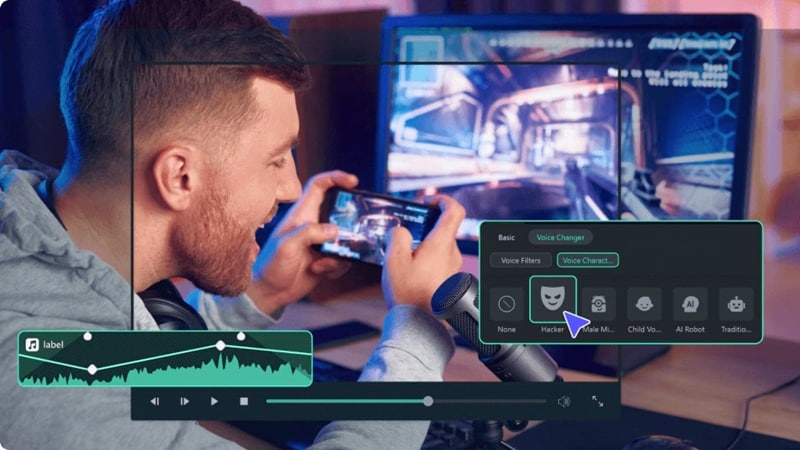
The AI Voice Changer inside Filmora has ready-made effects that can shift your voice right away. You can make your voice sound deeper, richer, or even more dramatic with just a simple adjustment.
Everything In One Place
After creating your deeper voice, you can stay inside the same editor to add music, captions, and visuals. It keeps everything simple, especially if you want a deeper tone and a polished video at the same time.
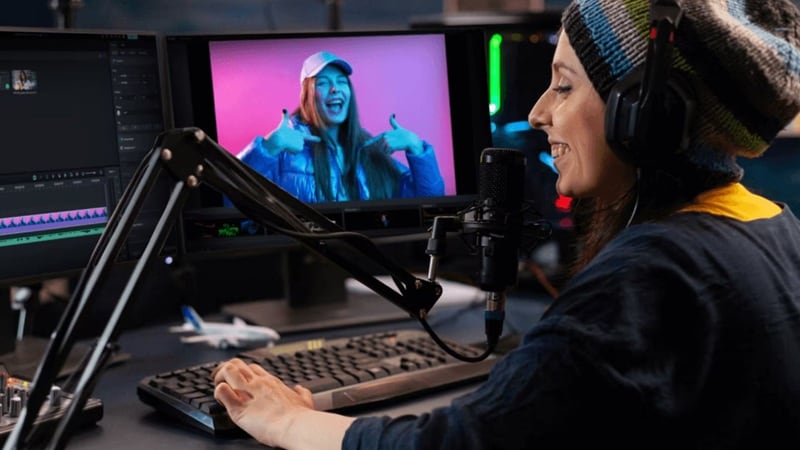
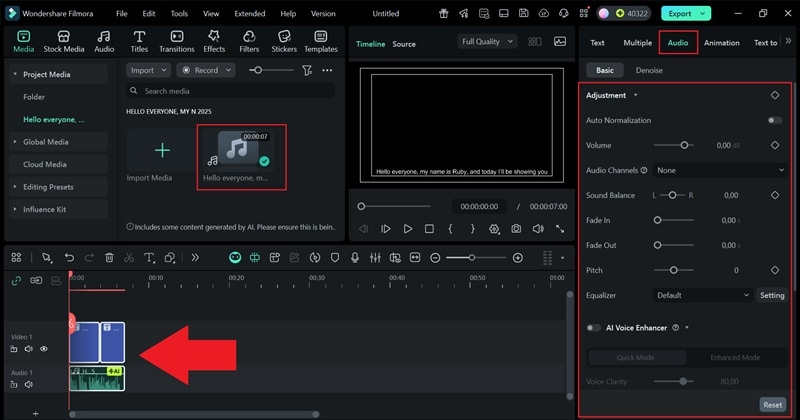
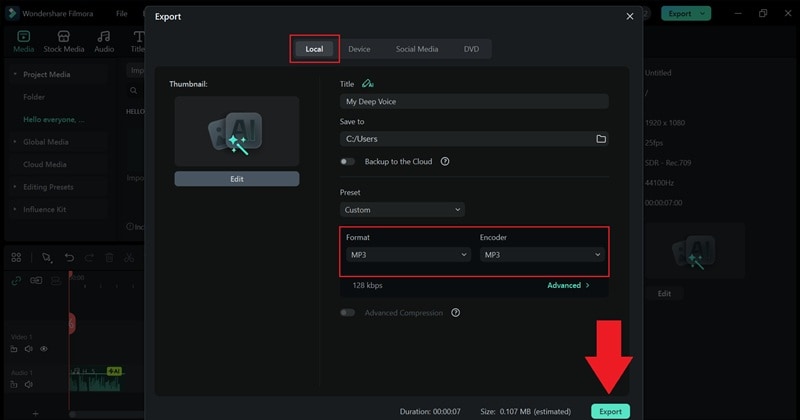
Quick Guide: How to Use Filmora's AI Text-to-Speech for a Deeper Voice
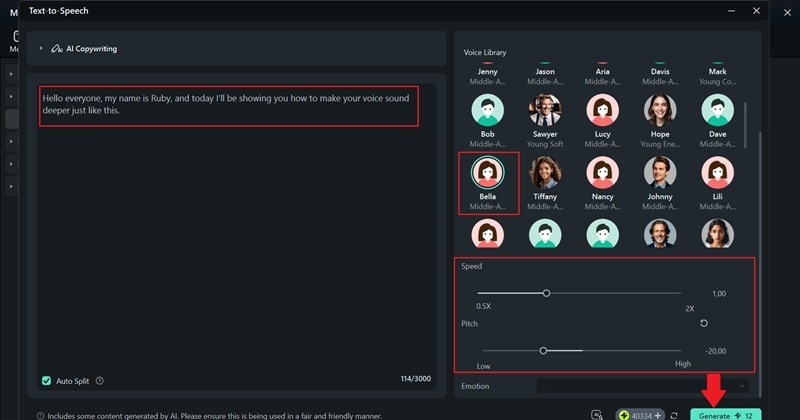
As mentioned above, Filmora's text-to-speech tool is really fun to play with because it gives you so many different voices to choose from. It even helps if you are trying to figure out how to make your voice deeper for woman, since you can choose a deeper female voice that still feels real and comfortable.
Here is a simple way to use it without overthinking anything:
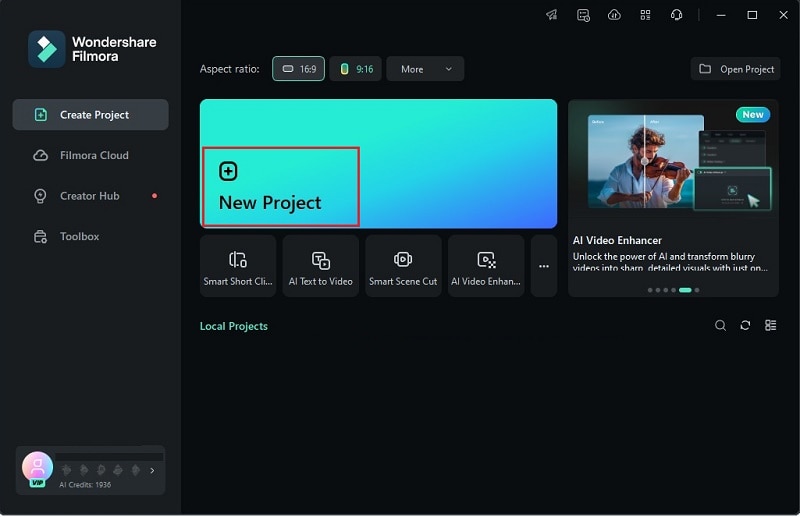 Secure Download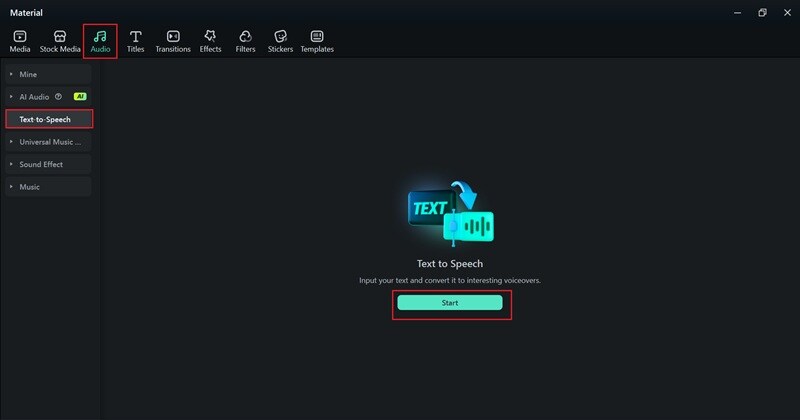






Part 3. Mobile Workflow: How to Make Your Voice Deeper Using Filmora App (iOS & Android)
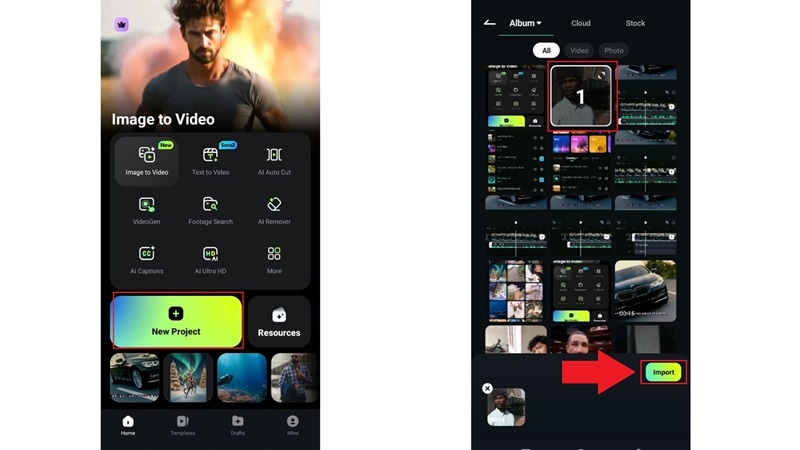
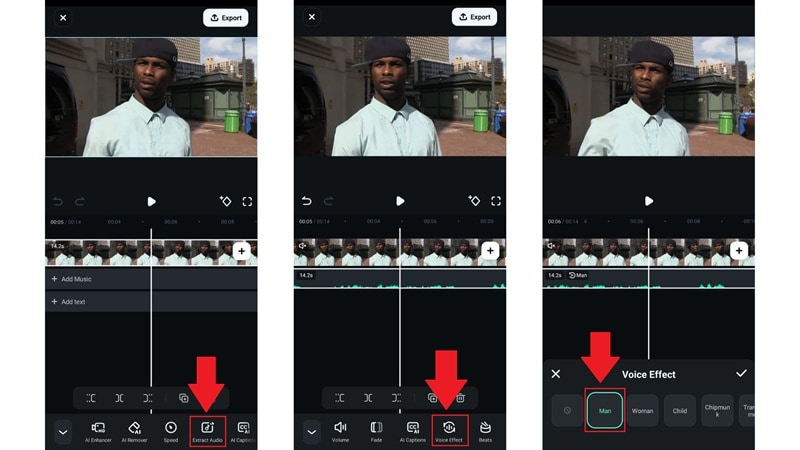
One of the coolest things about Filmora is that the mobile app is almost as powerful... This is great for creators who want to quickly learn how to make your voice deeper woman or how to make your voice deeper without testosterone effects for character work on the go. It's a quick and simple way to work on how to make your voice deeper when you are not at your computer.
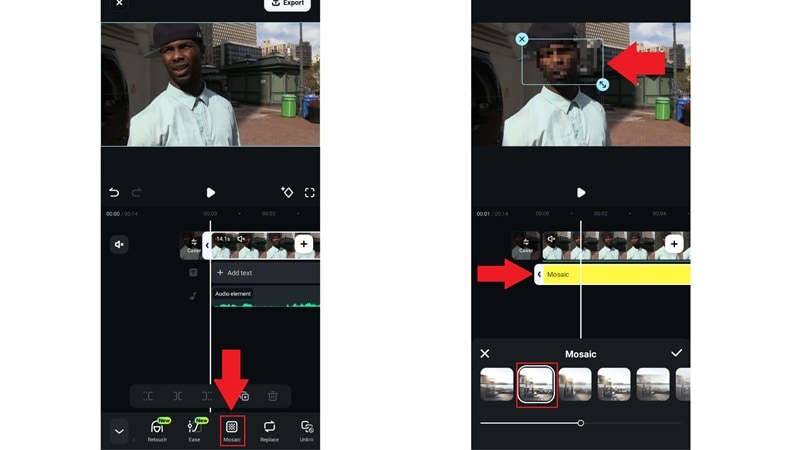
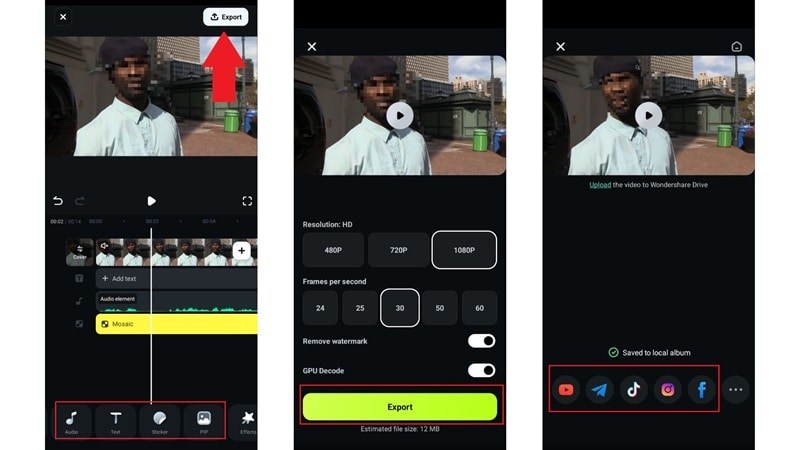
Secure DownloadFor mobile, let's use Filmora's AI voice effects instead. These effects can shift your voice instantly and help you get a deeper sound with just a few taps. Here is how it works:
Part 4. Top 5 Content Ideas That Sound Best With a Deeper Voice
Now that you've seen how simple Filmora makes everything, it is much easier to figure out how to make your voice deeper in whatever way works best for you. And since Filmora is an all-in-one editor, you are not just shaping the audio, but you can build the whole video around it, too.
So, let's actually put that deeper tone to good use. Here are a few content ideas that naturally sound better with a heavier voice and might inspire your next project.

- Soft Low Tone ASMR: People love low and warm tones because they feel gentle and personal. So, it works really well if you want to make your voice sound deeper for soothing ASMR clips.
- Faceless Story Channels: A deeper voice fits perfectly for gaming highlights, commentary, or that cozy dark academia vibe. It helps your content feel more grounded when you want to stay off camera.
- Spine Tingling Horror Reads: If you enjoy telling scary stories, a heavier tone sets the mood right away. It brings that slow, eerie feeling that horror fans love.
- Power Driven Motivation Clips: Motivational videos always hit harder with a deeper voice. The tone feels strong and encouraging, perfect for short pep talks or longer inspirational messages.
- Character Voice Over Skits: If you enjoy making fun sketches or acting out scenes, a deeper voice gives your characters more personality. It is a great way to experiment with how to make your voice deeper naturally while creating something entertaining.
Conclusion
It is completely normal for creators to get curious about how to make your voice deeper because a deeper tone really opens up fresh content ideas. So, we walked you through how to make your voice deeper naturally with easy exercises you can do at home, which will help over time. But if you need something quick, there is also a simple way to learn how to make your voice deeper fast, and that is by using Filmora.
This AI-powered editor gives you helpful tools like AI text-to-speech that can create clean deep voices from just a typed script, and an AI voice changer that shifts your own recording into a richer and heavier tone. On top of that, it is an all-in-one editor, so your audio and video stay in the same workspace. Filmora helps you create content smoothly from start to finish, even when you want a deeper and more polished voice for your projects.

FAQs About Making Your Voice Deeper
-
Can short-term actions like drinking cold water or coffee make my voice deeper?
Cold drinks or coffee might change your voice for a moment, but it will not give you a real deeper tone. If you want something that lasts, habits and simple exercises work much better for how to make your voice deeper naturally.
-
Is it dangerous or possible to damage my vocal cords by forcing my voice deeper?
Forcing your voice too low can strain your vocal cords, especially if you push past your comfortable range. A safer approach is to use breathing control and light exercises instead of forcing a deeper sound.
-
Can women achieve a significantly deeper voice for narration without using voice changers?
Women can absolutely build a lower and warmer tone through practice. Chest resonance work and slow paced speaking help a lot, so it is possible to learn how to make your voice deeper for women in a natural way.
-
What causes my voice to sound naturally deeper in the morning?
Your vocal cords are more relaxed when you wake up, which gives you that naturally deeper morning voice. That's why many people use this time to practice how to make their voice sound deeper because the lower tone comes out more easily.
-
What are the best methods I can find for how to make your voice deeper reddit users recommend?
Users on Reddit often discuss methods ranging from breathing exercises how to make your voice deeper to specific vocal warm-ups and even diet changes. They emphasize that while daily practice is key to how to make your voice deeper permanently, professional creators often use editors like Filmora to instantly make your voice sound deeper on mic recordings for immediate results, bypassing the need for months of training.
