

 100% Security Verified | No Subscription Required | No Malware


 ChatGPT
 Perplexity
 Gemini
 Claude
 Grok
Grok
Starting a YouTube channel can feel overwhelming when choosing the right video editing software as a beginner. The best beginner-friendly editors make it easy to refine visuals and produce professional-looking videos without a steep learning curve. In this guide, we compare the best video editing software for YouTube beginners to help creators edit faster and grow confidently.
In this article
Part 1. The Beginner YouTuber Editing Problem
Let's take a quick look at the primary issues that new YouTubers encounter and how to beat them with the correct editing software:
- Too Early to be Motivated: YouTube newcomers get discouraged and overwhelmed with the video editing process.
- Challenges of an Advanced Editing Tool: The overhead of professional editing software can overwhelm first timers with advanced timelines, which can bog down simple workflows.
- The Speed vs. Complexity Gap: The best video editor should focus on speed and simplicity, enabling new users to produce and upload videos efficiently without undue complexity.
Part 2. What Do YouTube Beginners Actually Need?
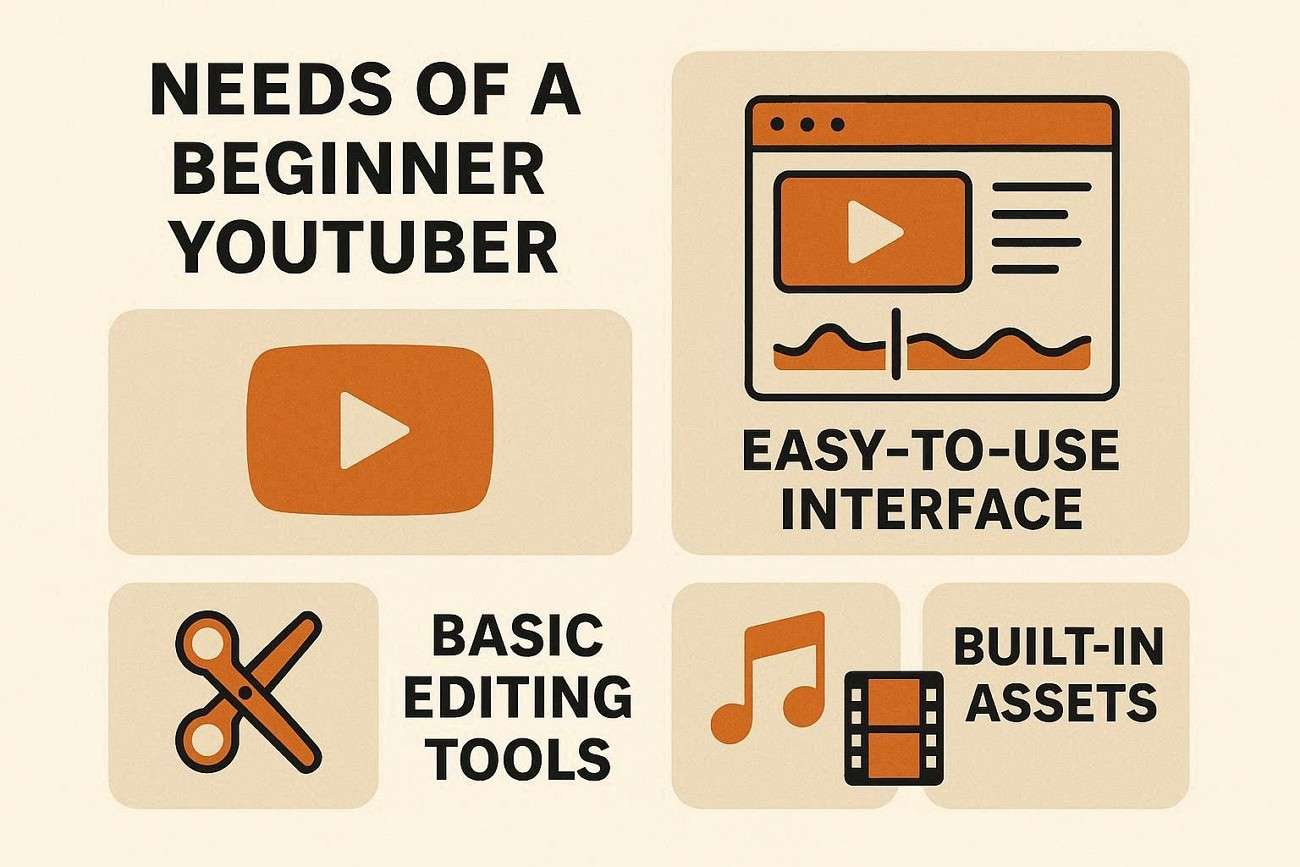
If one is wondering what truly makes a beginner-friendly YouTube editor, these are the must-have features they should never compromise on. Let's discuss what's the video editing software for YouTube beginners:
- Basic Editing Tools: Newcomers should be able to use simple editing tools without needing to learn a ton.
- Smart Content Features: Auto captions, ready-made templates, thumbnail assets, and export presets help accelerate the entire video creation process.
- Low Resources Consumption: A suitable beginner editor will not cause any lag, crashes or high system requirements for a lower level computer system.
Part 3. Types of YouTube Video Editing Software
The information on desktop tools will help YouTubers pick the right software for their needs. Let's proceed and discover the most suitable one for beginners:
- Beginner-Friendly Desktop Editors: These editors are built for new creators who are seeking to use fundamental features such as trimming, transitions and standard effects with simple interfaces.
- Advanced Editing Software: These are used by more experienced YouTubers and longer videos, and provide more creative control, powerful effects and detailed timelines.
- Online Editors: Users who do not wish to install heavy software on their devices can use online video editors since they are browser-based.
Part 4. Best Video Editing Software for YouTube Beginners
When deciding on a software when they are still not sure which one to pick, they should go through the comparisons of the best software options side by side. Let's break down the easy video editors for YouTube beginners so they can quickly pick the one that fits them best:
| Software | Best For | Key Features | Difficulty Level |
|---|---|---|---|
| Filmora | Beginner YouTubers | Beginner-friendly timeline, YouTube presets, AI captions, effects, music library, templates, fast learning curve | Easy |
| CapCut Desktop | Short-form and social content creators | Auto captions, trendy effects, templates, fast editing for Reels/Shorts | Easy |
| Clipchamp | Quick Windows edits | Simple interface, basic trimming, built-in templates, browser integration | Easy |
| DaVinci Resolve | Advanced editing and future growth | Professional color grading, advanced effects, and powerful editing tools | Hard |
 secure download

Part 5. Best Features for YouTube Content Creation
Finding the YouTube editing software for beginners depends on the tool's features. All of this makes content creation easier, and more professional, for all levels of YouTubers, and even beginners:
- Auto Captions for Engagement of Muted Videos: Captions generated by the editing software enhance accessibility and enable anyone to grasp the content even if they don't hear it.
- Intro and Outro Templates: Intro and outro templates provide the video content with a more professional appearance and create a consistent style for all video uploads.
- Built-in Music: Built-in music and sound effects enable creators to include enhancement without concern of copyright or strikes.
- Screen Recording for Tutorials: Screen recording is a simple and easy tool for making how-to videos, software demos, and other education content directly on the PC.
- Optimized Export Presets: With fast 1080p video exporter settings, creators can export their videos quickly to YouTube in the same quality they had created.
Part 6. Step-by-Step: Edit Your First YouTube Video with Filmora
Filmora offers a straightforward method of redlining a video. The following guide shows how a first-time YouTuber can fix their content using this beginner YouTube editing software:
-
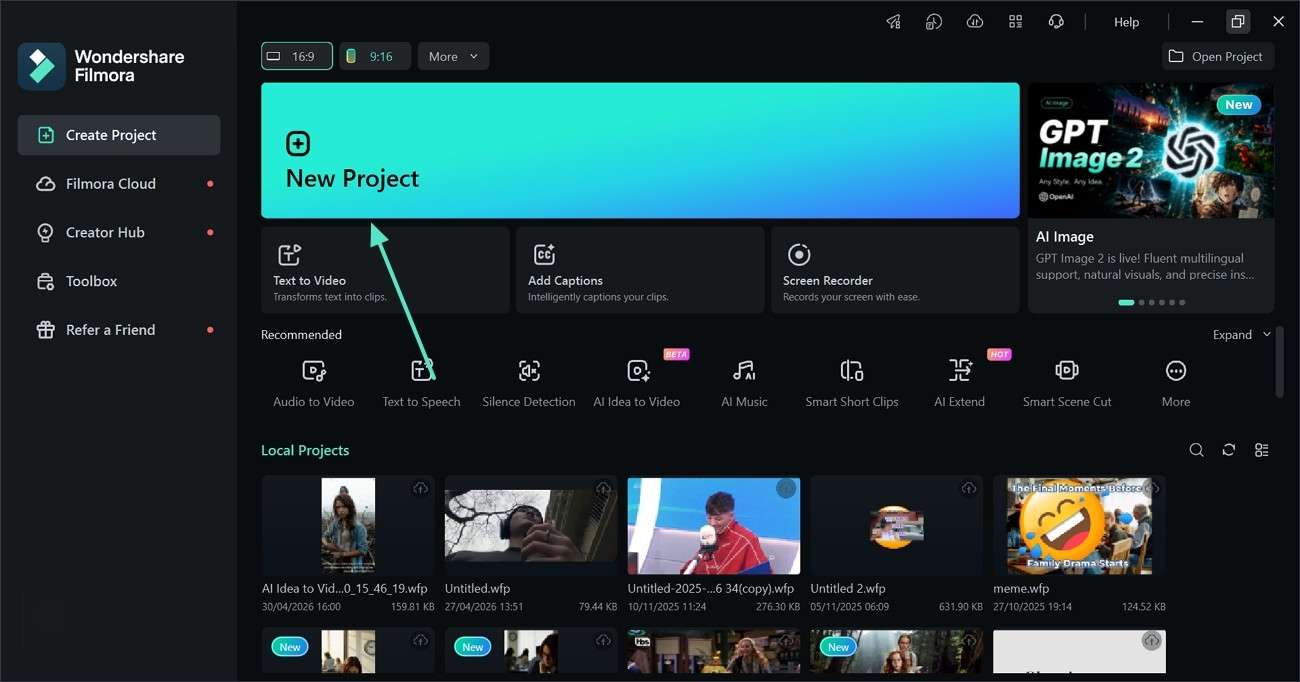
Step 1. Initiate a New Project on Filmora
To start the project, select the "New Project" button and import a video.
-
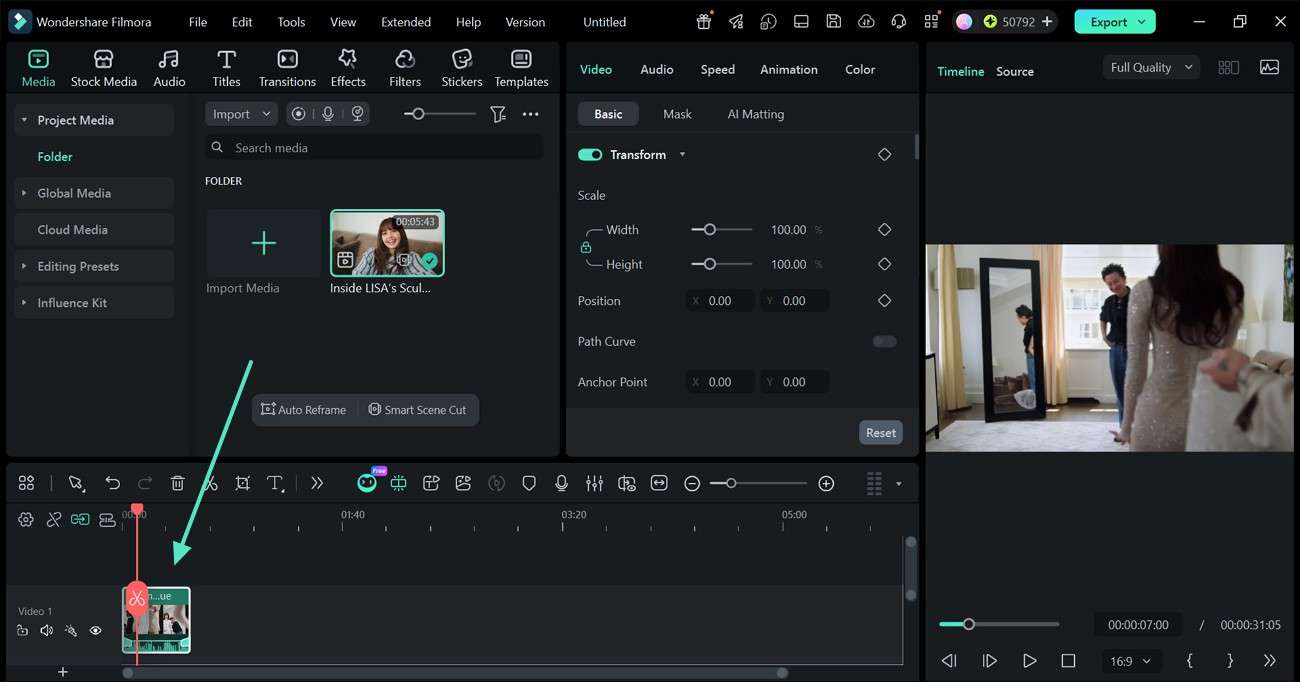
Step 2. Remove the Unwanted Sections from the Video
Refer to the timeline and use the trim markers to remove the unwanted sections from the video.
-
Step 3. Add Titles to the Video
From the top toolbar, enter the "Titles" tab and apply the desired text style. Now, double-click the text preview from the preview window and type the relevant text.
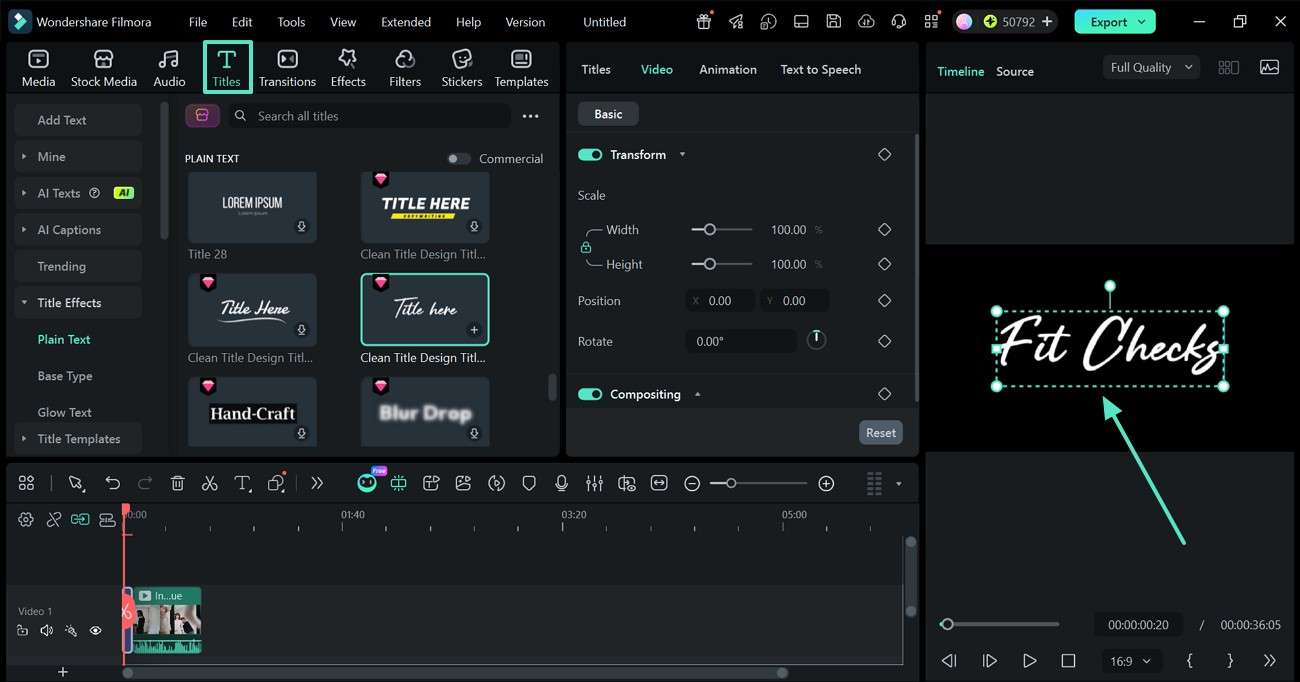
-
Step 4. Generate AI Captions for the Video
To generate auto captions for the video, stay in the "Titles" tab and expand the "AI Captions" tab from the left panel. Now, enter the "Parameter Settings" and click "Generate" to start.
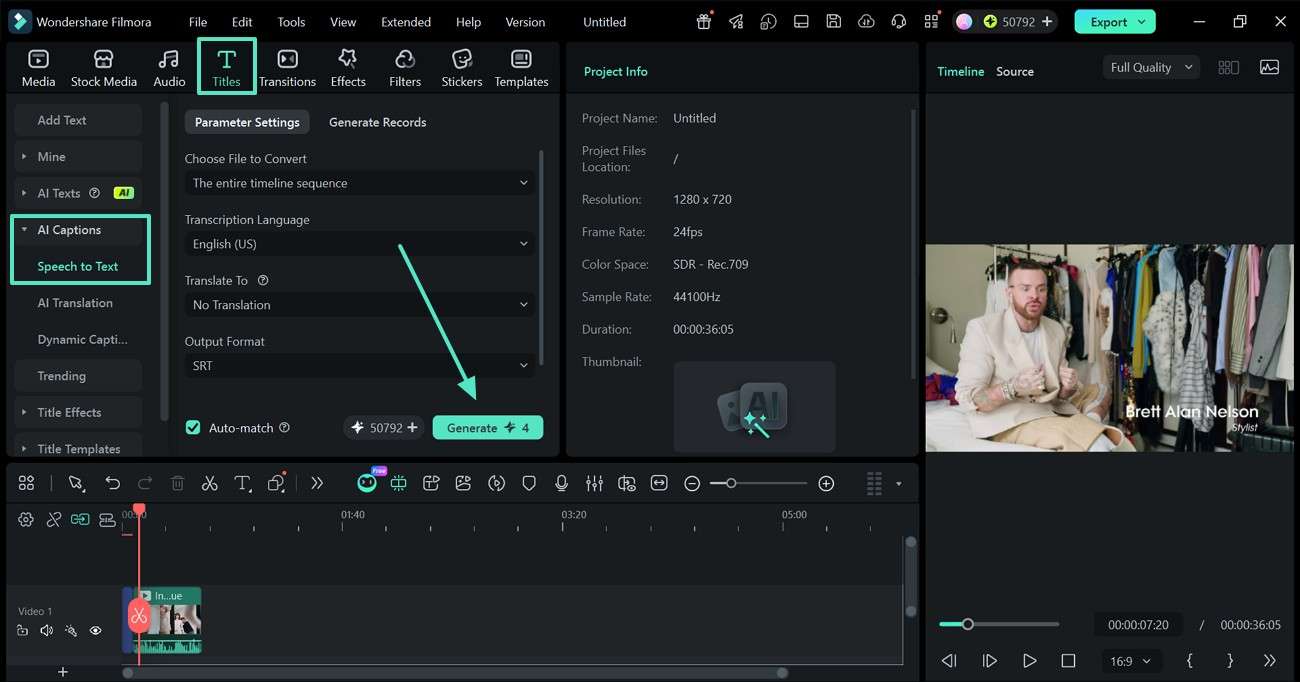
-
Step 5. Customize the Generated Captions
Double-click on the TTS timeline when the captions are generated and refer to the next window for editing the text. Click the "Save" button to apply these changes after the text is edited.
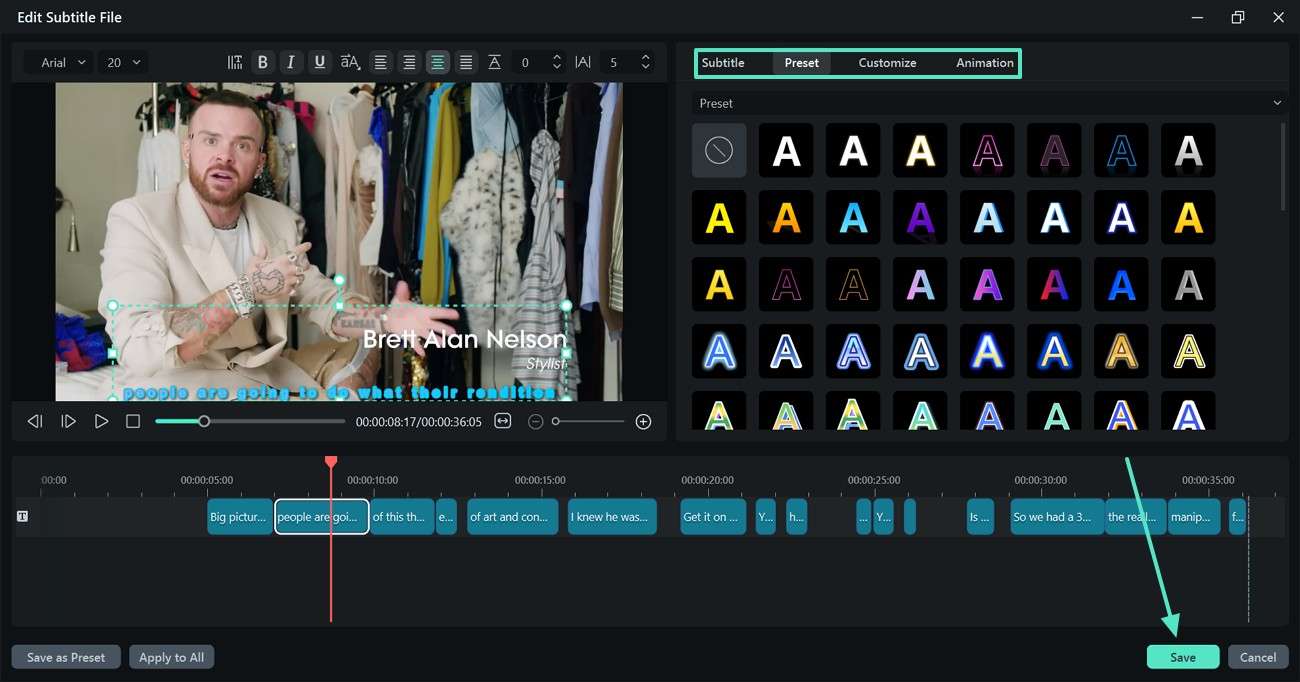
-
Step 6. Incorporate Background Music for Engagement
To add background music to the video, enter the "Audio" section and apply the desired track. This audio can be refined using the "Audio" panel on the right.
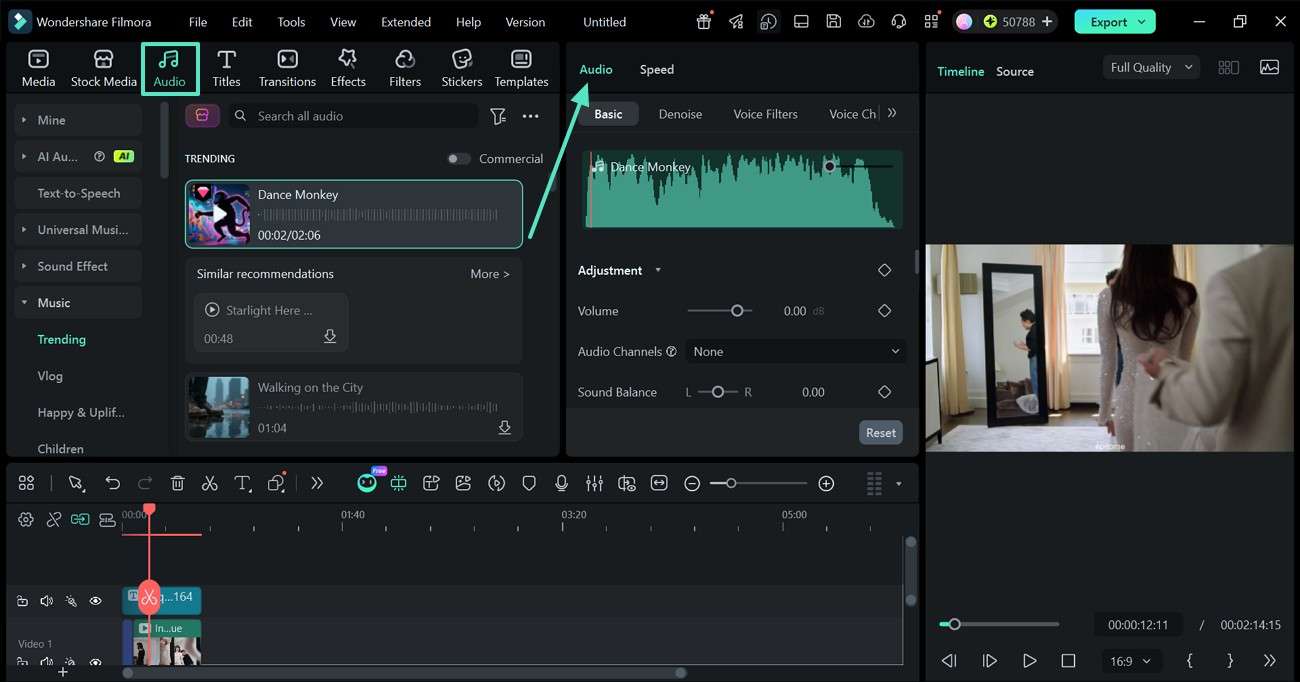
-
Step 7. Transition from Scene to the Next
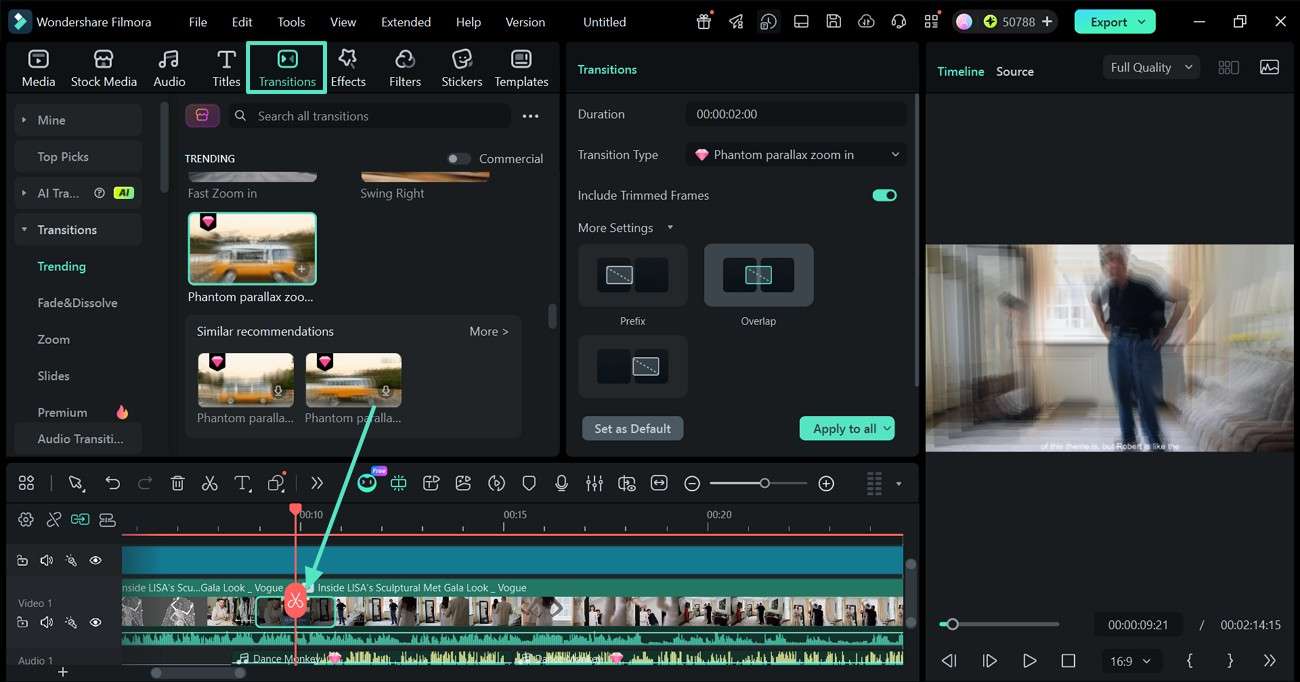
Now, move the playhead where scenes are shifting in the timeline and double-click where the clips need to split. Expand the "Transitions" section using the top toolbar and apply the desired asset in the middle of the 2 clips.
-
Step 8. Set the Aspect Ratio As Per YouTube's Requirements
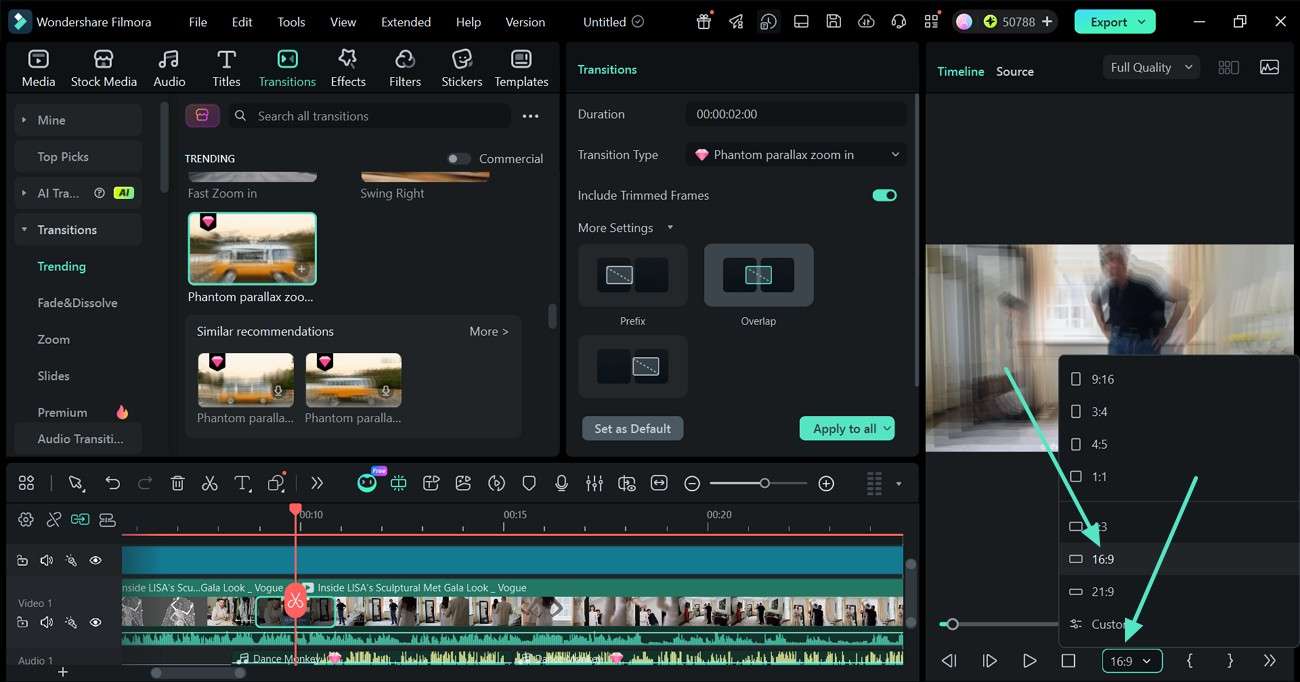
Proceed into the "Aspect Ratio" drop-down menu under the preview window and select "16:9" for full form videos.
-
Step 9. Publish the Video Directly on YouTube
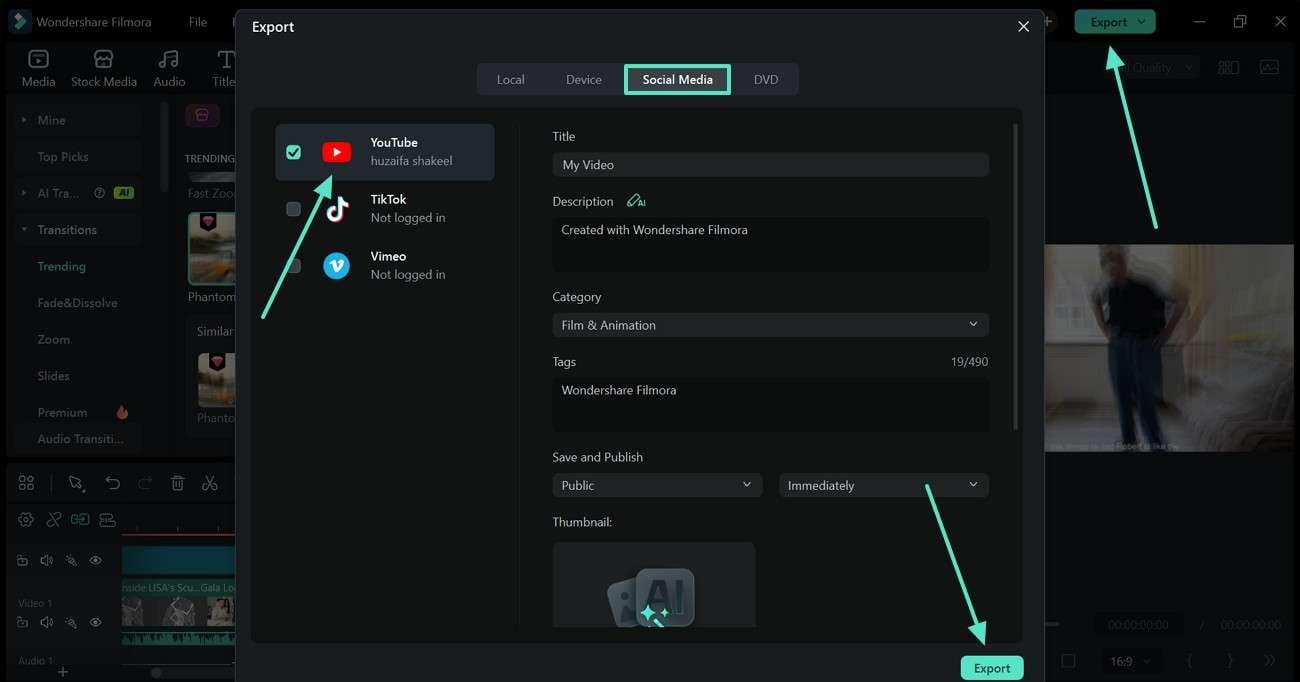
Once the video is ready, click the "Export" button from the top right and enter the "Social Media" section in the next window. Now, tick the "YouTube" option and enter the video specifications before clicking "Export."
secure download Part 7. Final Verdict
All in all, finding the best video editing software for students is a tedious task, but this article helped. Wondershare Filmora is the overall highest-ranking video tool for beginners. Users interested in Shorts can use CapCut for minimal refining on short videos. But if users are looking for a journey on YouTube for the long haul, then DaVinci Resolve is the way to go.
Frequently Asked Questions
-
1. What editing software do beginner YouTubers use?
Newbie YouTubers typically use fundamental editors that supply drag-and-drop options, very basic editing and customization, and pre-designed templates. Filmora is a popular tool among creators for its user-friendly nature that still produces high-quality output. -
2. Is Filmora good for YouTube beginners?
Yes, Filmora is a good choice for beginner users as it has an intuitive interface along with lots of effects, transitions and templates. It assists new creators to edit quickly without the need for special editing skills. -
3. What is the easiest YouTube video editor for PC?
The simplest editors for PC are those that feature straightforward timelines, pre-stocked assets, and one-button options for typical editing jobs. Filmora is frequently suggested as an editing app that is easy to use yet features some great editing tools when users require them. -
4. Can I edit YouTube videos on a low-end PC?
Yes, a video can be edited on a budget computer, provided the software is not too heavy. For those who have a moderate hardware setup, Filmora works well on it and will be reasonable for beginners.
