



 100% Security Verified | No Subscription Required | No Malware


 ChatGPT
 Perplexity
 Gemini
 Claude
 Grok
Grok
With the number of video editing software available, it can be difficult to find the best software in India. From producing YouTube videos to business promotions or professional projects, the right editor can enhance the workflow and content quality. This guide will show the readers the best video editing software in India in terms of editing performance, user friendliness, and features for all skill levels.
In this article
Part 1. Why Indian Creators Need the Right Video Editor
India has a growing number of content creators, from YouTubers and students to freelancers and small business owners. Keep reading to discover the best video editing software in India for every type of creator:
- Growing Creator Economy: The Creator Economy is booming in India, with millions of new creators producing content on YouTube. Use of a good video editor can make content production quicker and of high quality.
- Low Budget Hardware Requirements: Several Indian videographers edit video files on low-cost desktops and laptops that can have trouble with heavy software. Lightweight and optimized editing tools help avoid lag and slow rendering times.
- Affordable and Easy Editing: The best video editing software should be affordable and stable on commonly used hardware. Indian creators often prefer tools that balance price and simple editing features.
Part 2. What to Look for in Video Editing Software in India
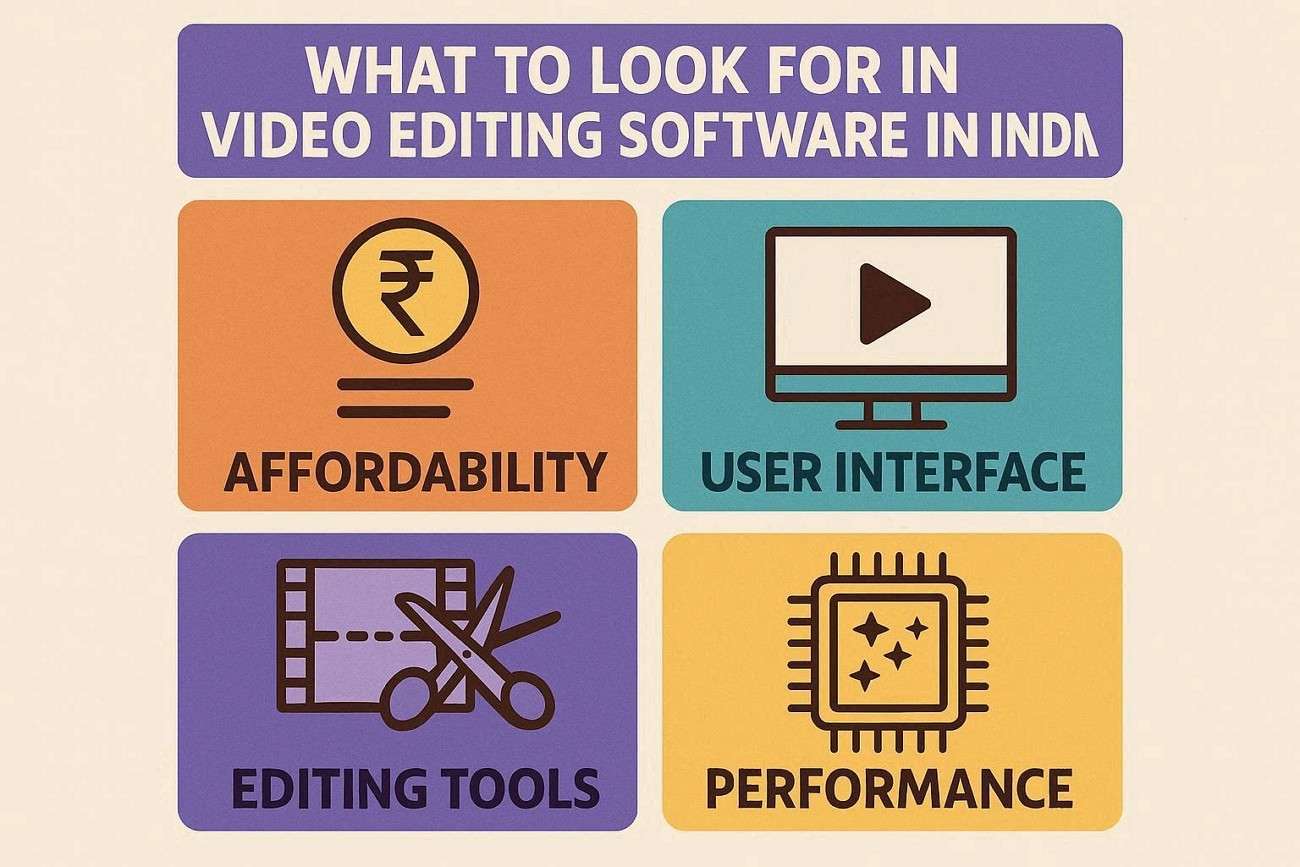
The selection of the best video editing software in India is dependent on the user's budget, device performance, and the purpose of their videos. Check out the best video editor in India to choose the best fit for budget, editing style, and content creation requirements:
- Value for Money: Indian creators seek software that comes with useful features at a reasonable price. Upgrade options and flexible plans simplify the process of starting small and growing with editing requirements.
- Low End PC Compatibility: Many people edit videos on an entry-level video on an older computer with less power. The lightweight and stable editing software ensures that users will not encounter crashes or be plagued by lengthy export processes.
- Ease of Use: Indian creators need hassle-free workflows for Hindi and regional content. Easy workflows for Hindi and regional content are significant for Indian creators.
- Different Content Types Templates: Platform-specific templates are available for built-in different content types that reduce editing time. Professional results are achieved by the use of ready-made effects, transitions, and layouts to edit content at a much faster speed.
Part 3. Types of Video Editing Software Indian Users Can Choose
Indian creators have many video editing options depending on their experience level, device, and content style. Go through these elements to see the best video editing app in India and select the best software according to user requirements:
- Simple Desktop Editors: These are the best editors for beginners, students, and those who are just starting out and prefer a simple drag-and-drop interface. Often, there are pre-formatted templates for these tools as well as simple editing options so that they can be mastered quickly.
- Advanced Software for Advanced Creators: Advanced creators and professionals might require software that offers advanced editing capabilities. YouTube channels, filmmaking, and business projects can be edited using these types of editors.
- Mobile Editing Apps for Quick Videos: These apps are convenient for creators who want to edit short-form social media videos like Instagram Reels or YouTube Shorts. They allow users to edit quickly and publish instantly from a mobile device.
- Online Editors for Simple Projects: Web-based video editors work well for users creating quick presentations or design-focused videos. They are easy to access without downloads and often include built-in templates for faster editing.
Part 4. Best Video Editing Software in India
With many editing tools available, choosing the best video editing software in India depends on the budget, skill level, and hardware. The table below compares popular options based on user-specific needs:
| Software | Best For | Key Features | Ease of Use | PC Performance |
|---|---|---|---|---|
| Filmora | Beginners, YouTubers, students, and small businesses | Affordable pricing, beginner-friendly interface, AI captions, templates, reels and YouTube exports, effects, transitions | Very Easy | Works well on budget PCs |
| CapCut | Reels, short-form creators, and social media videos | Quick editing, auto captions, trendy effects, mobile-friendly tools, short video templates | Easy | Lightweight for most devices |
| Canva | Marketing, educational, and design-based videos | Drag-and-drop editing, templates, presentations, brand content creation | Moderate | Runs smoothly online |
| DaVinci Resolve | Professional creators and advanced editors | High-end color grading, advanced editing, VFX, audio tools | Moderate to hard | Needs stronger hardware |
| Adobe Premiere Pro | Professional video production | Advanced timeline editing, integrations, professional tools, and effects | Hard for beginners | Heavy on low-end PCs |
Part 5. Best Editor by Indian User Type
Use this comparison to choose India's best video editing app as per user needs and start creating videos more efficiently without overspending on unnecessary features:
| User Type | Best Video Editor | Why It Is Recommended |
|---|---|---|
| Students | Filmora and Canva | Filmora is easy for school and college projects, while Canva works well for presentations and simple creative videos. |
| YouTube Beginners | Filmora | Beginner-friendly editing tools, templates, AI captions, and simple YouTube export options make content creation easier. |
| Instagram/Reels Creators | Filmora and CapCut | Great for short videos with quick editing, captions, transitions, effects, and vertical video formats. |
| Professional Editors | DaVinci Resolve and Adobe Premiere Pro | Best for advanced editing, professional timelines, color grading, visual effects, and complex projects. |
| Low-End PC Users | Filmora | Filmora can run smoothly with optimized settings, while lightweight editors work better on older or budget PCs. |
Part 6. Step-by-Step: Start Editing in India with Filmora
Wondershare Filmora is a viable tool for creating region-specific content. Follow this guide and explore how this Indian best video editing app can be used by Indian creators:
-
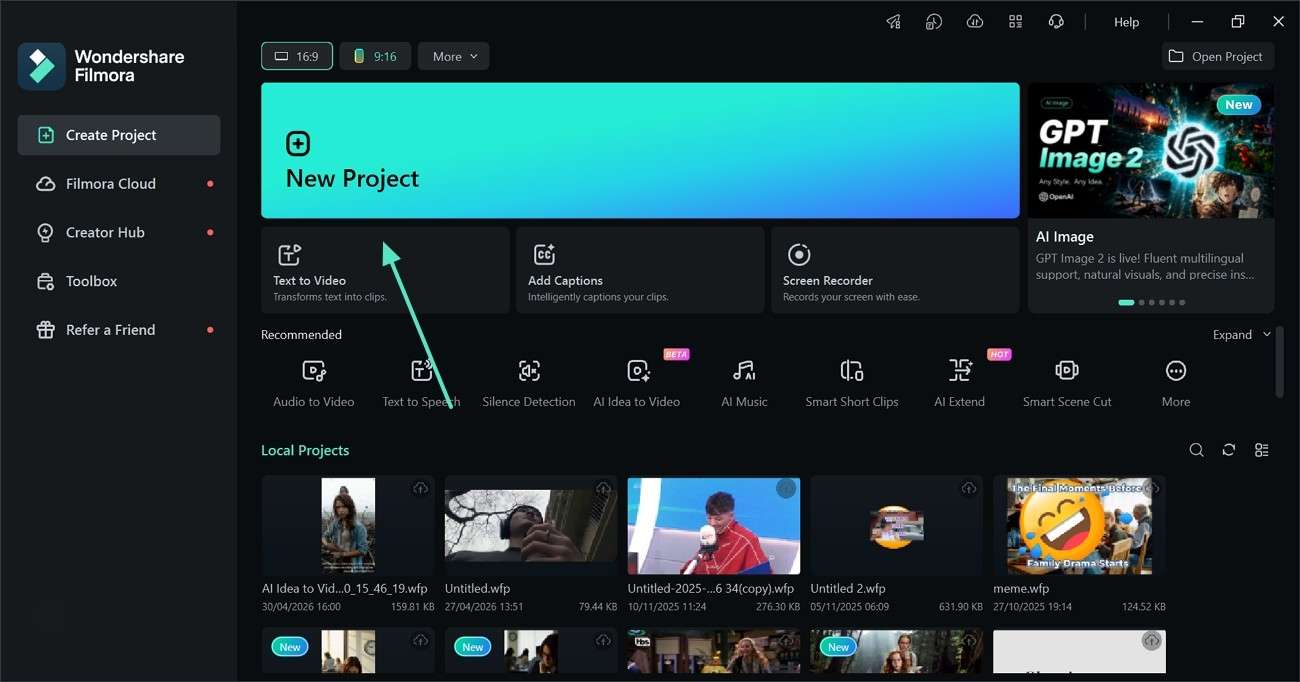
Step 1. Choose a Project Format and Import a Video
To start, decide on the format for the video and click the "New Project" button from the tool's main interface.
-
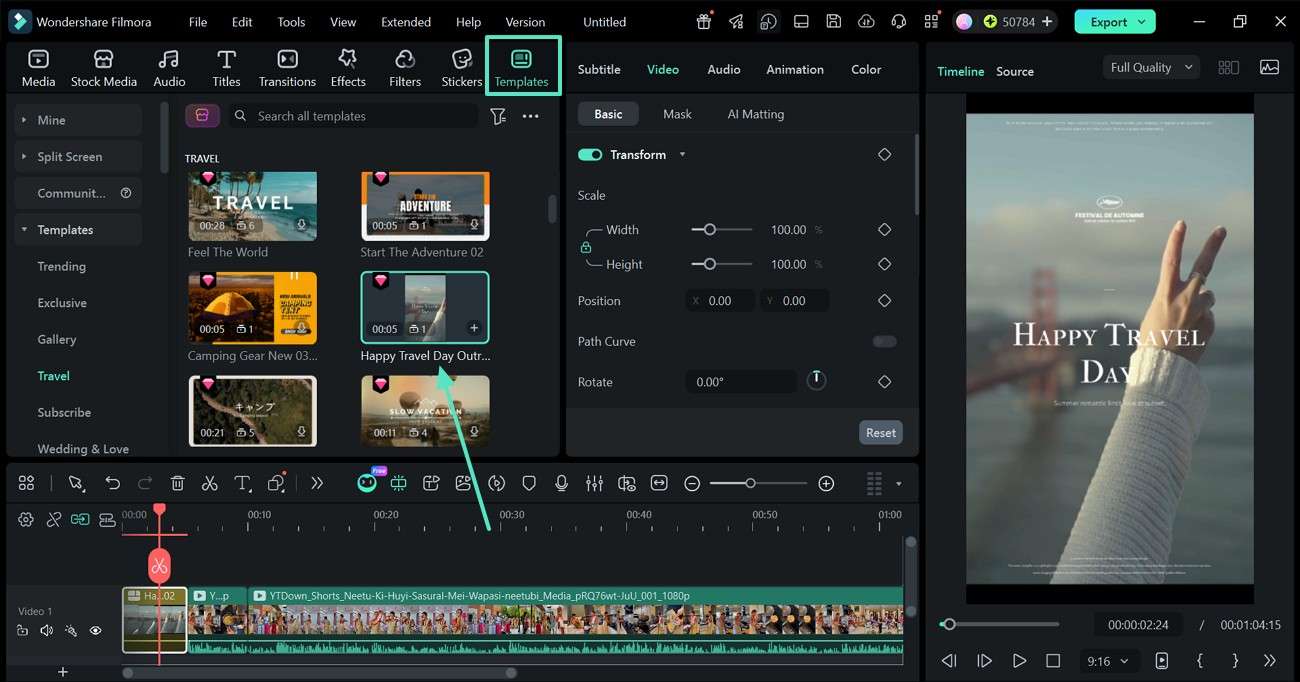
Step 2. Use the Built-in Video Templates
Use the "Templates" tab at the top to apply the desired intro or outro clip to the video.
-
Step 3. Generate Hindi Captions for the Video
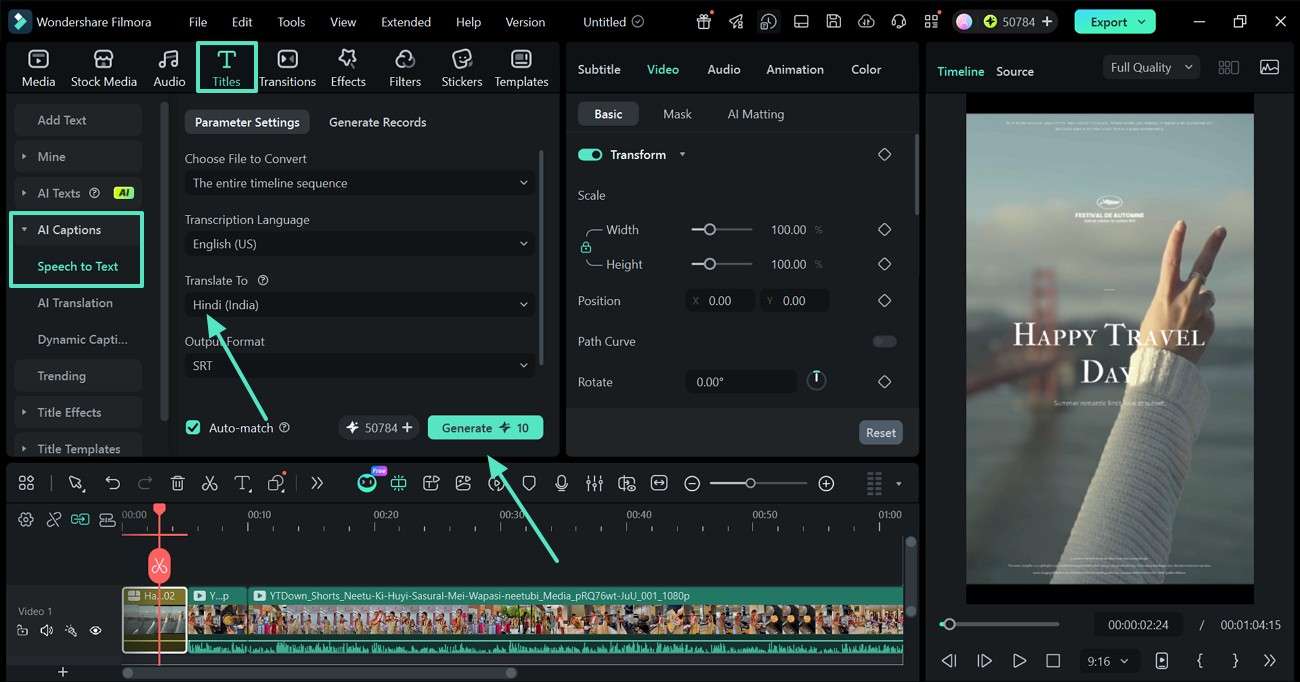
To cater to the Indian audience, enter the "Titles" tab from the top and select the "Speech-to-Text" option from the "AI Captions" section on the left. Now, select "Hindi" as the translation language and click the "Generate" button to start.
-
Step 4. Customize the Hindi Captions
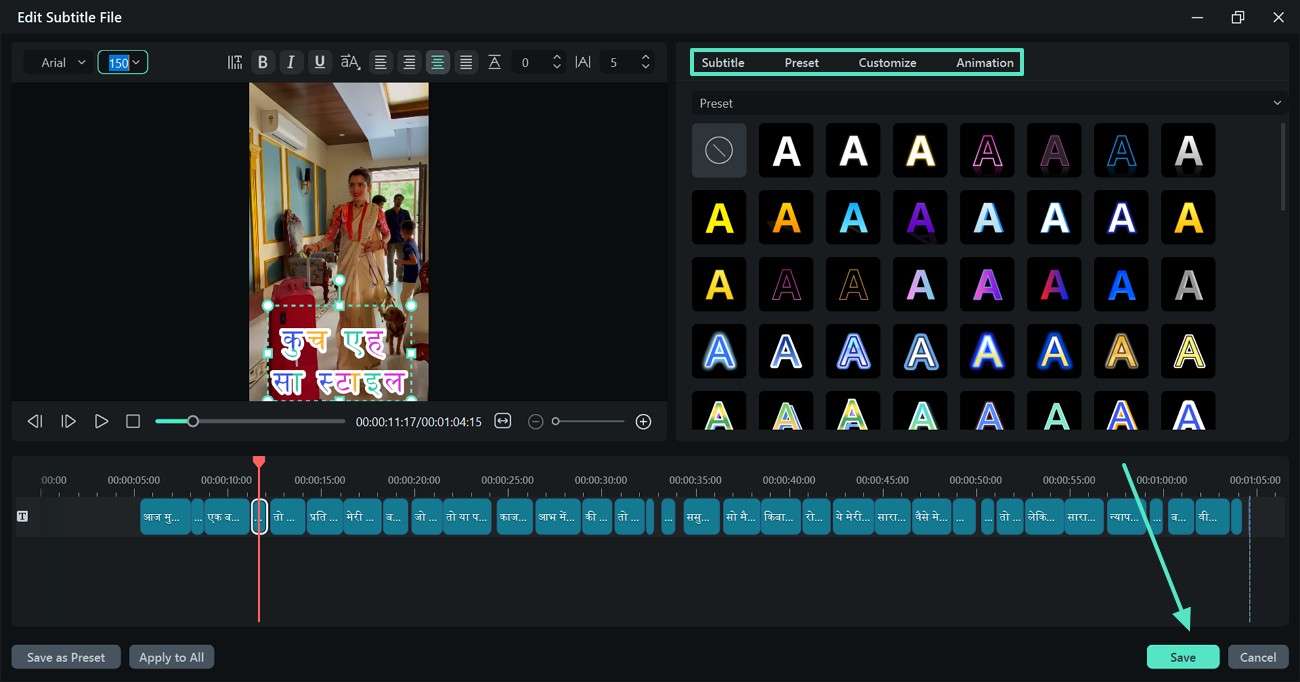
As the captions are generated, double-click the text track on the timeline and refer to the customization window. Here, adjust the text style and click the "Save" button to apply the changes.
-
Step 5. Add Hindi Text to Convey a Message
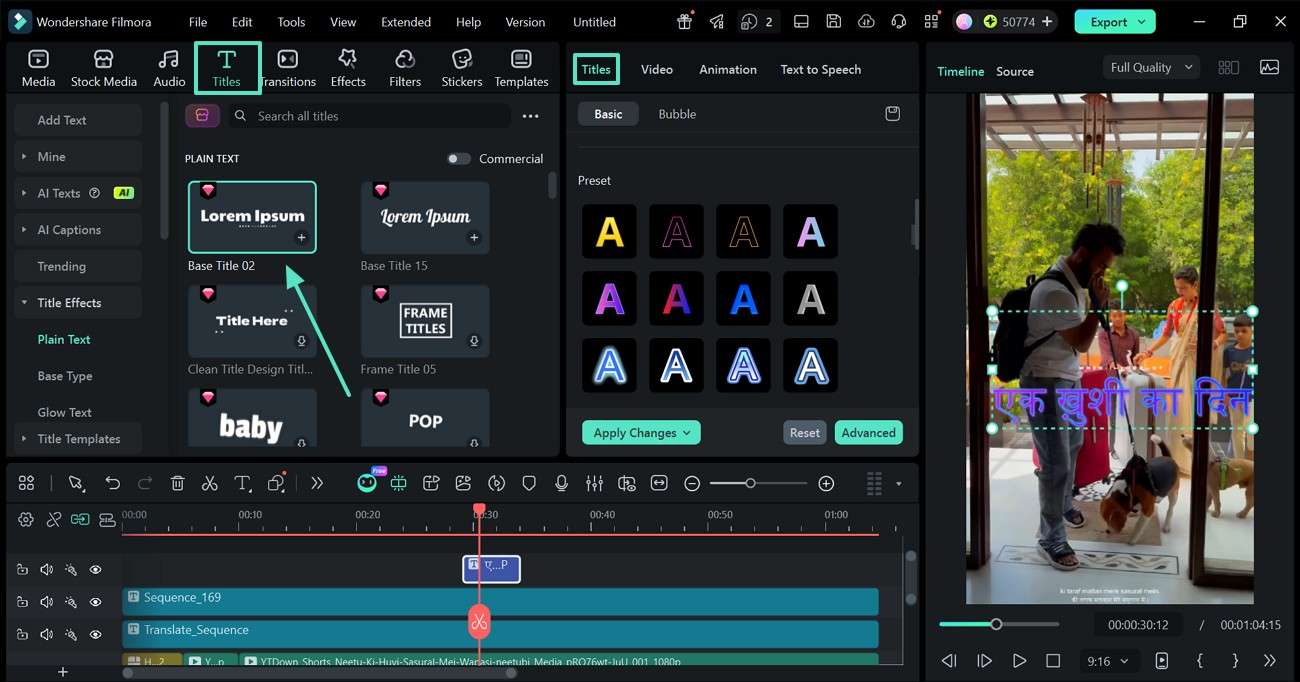
Stay in the "Titles" tab and select the desired style for the video. Double-click the text preview and style it using the "Titles" section on the right.
-
Step 6. Integrate Some Hindi Music
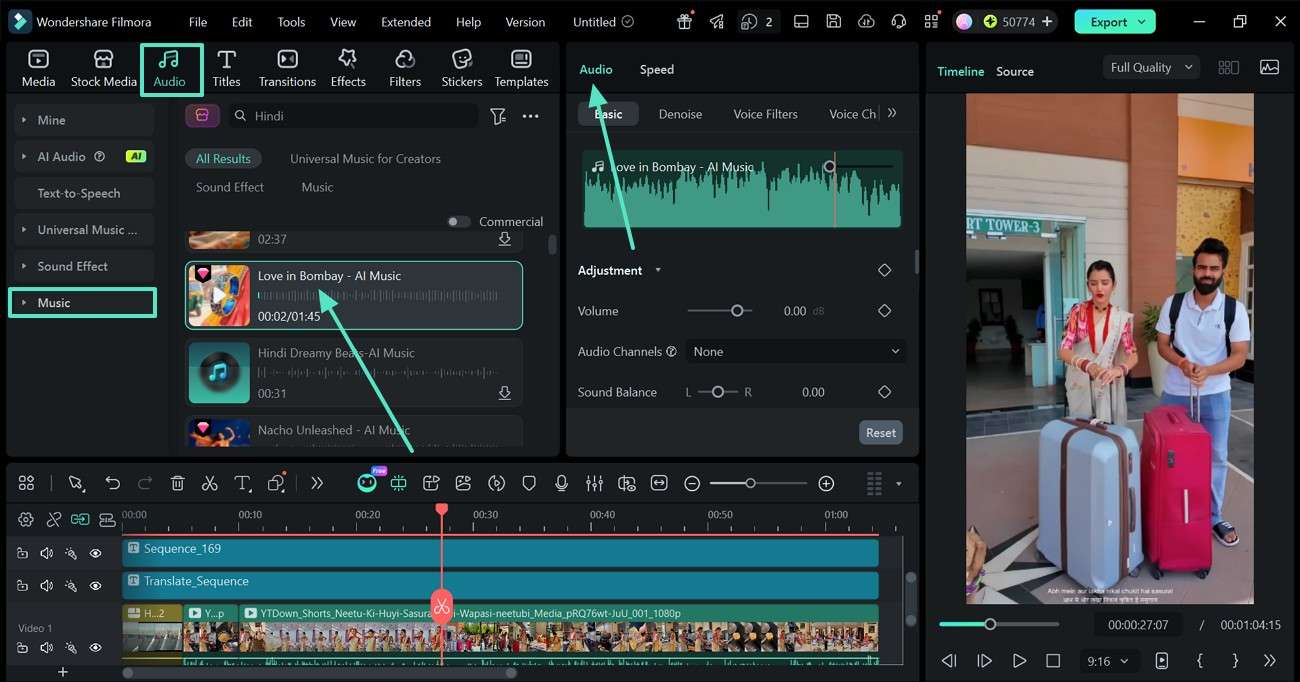
Set the mood for the video by entering the "Audio" tab from the top. In the "Music" section, apply the desired track to the video. This audio track can be refined using the "Audio" panel on the right.
-
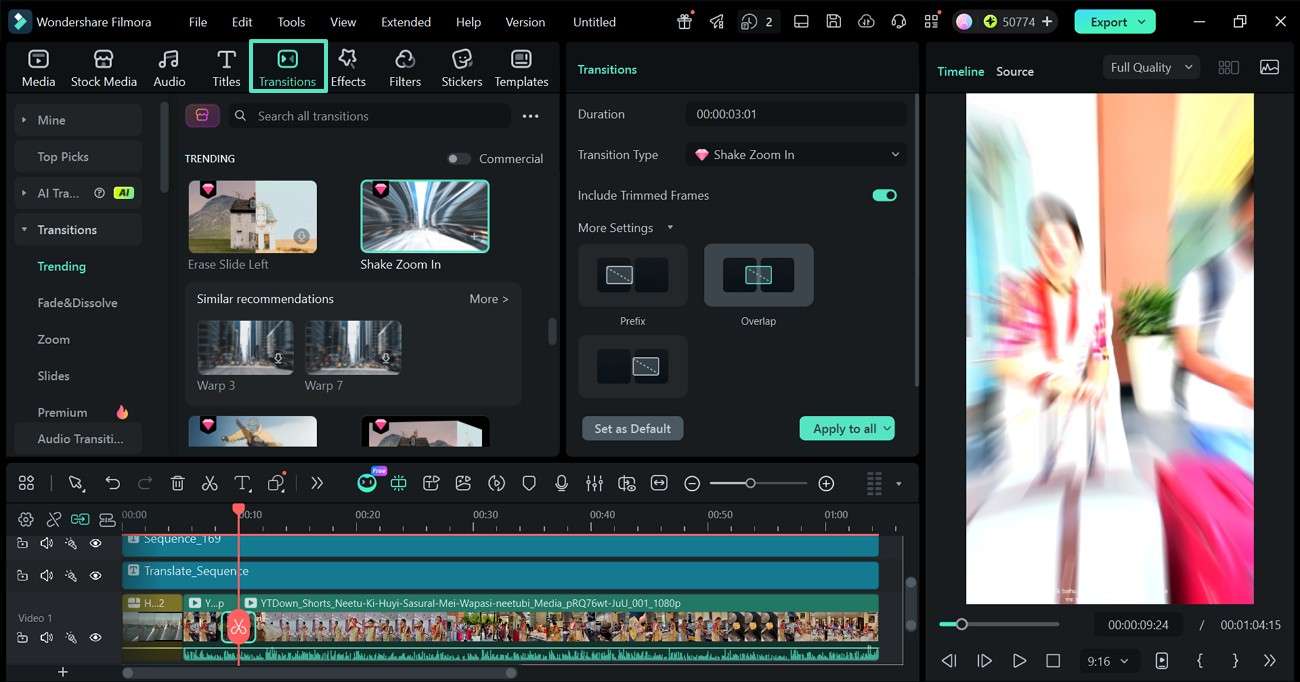
Step 7. Add Smooth Video Transitions
To smoothly flow from one scene to the next, move the video playhead where the transition is needed and double-click on the track to split the clips. Now, open the "Transitions" section and apply the suitable asset between the 2 clips.
-
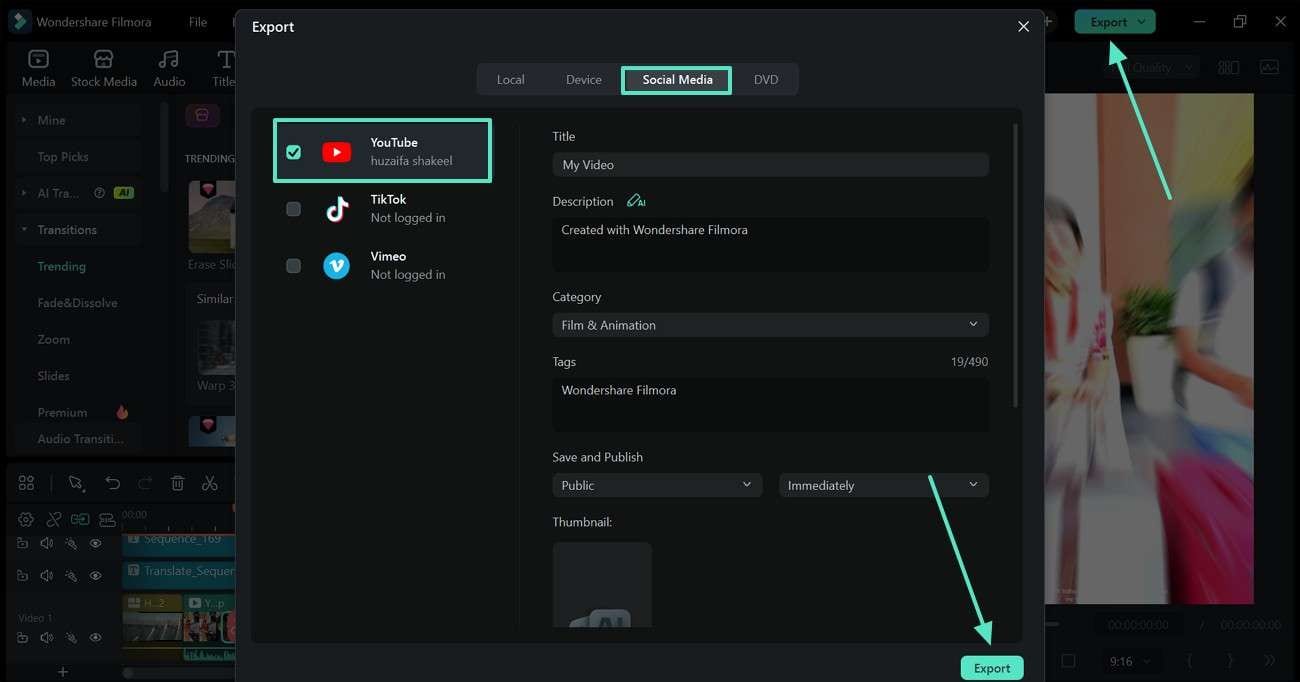
Step 8. Share the Video Directly on YouTube
Once the video is ready, click on the "Export" button on the top right and refer to the export window. Now, enter the "Social Media" section and select "YouTube" from the left. After entering the upload details, click the "Export" button to share the video directly across the platform.
Part 7. Final Verdict
The best video editing software in India can vary from person to person, depending on the specific requirements and expertise of the user. Because of its user-friendliness and performance, Wondershare Filmora is the best all-rounder for beginners. DaVinci Resolve is a powerful choice for hardware-oriented professionals. CapCut is best for short videos, whereas Canva is best for design editing.
Frequently Asked Questions
-
1. Which is the best video editing software in India?
The ideal video editing software in India is based on the editor's budget, skill level, and editing requirements. Filmora is easily one of the best overall options due to its combination of affordability, user-friendliness, AI capabilities, and performance. -
2. Which video editor is best for Indian YouTubers?
Amongst the popular alternatives, Filmora is liked by many Indian YouTubers because it provides easy editing and templates with the ability to directly export YouTube video content. For advanced creators, Adobe Premiere Pro and DaVinci Resolve are also available options for professional editing processes. -
3. What is the best affordable video editor in India?
Wondershare Filmora is one of the top editing software in India that offers premium features without demanding its users to pay a high price. It is for students, freelancers, small businesses, and beginner creators. -
4. Which video editor works on low-end PCs in India?
Some of the Indian users like to use lightweight editors that will run on budget laptops and older desktops. The performance of Filmora is good, and it can also be used to minimize lag time on low-specification PCs.
