

 100% Security Verified | No Subscription Required | No Malware


 ChatGPT
 Perplexity
 Gemini
 Claude
 Grok
Grok
In this article
Scene detection is a smart feature that automatically finds shot changes in your footage and splits them into separate clips, making editing faster and more organized. It's a huge time-saver for projects like tutorials, long recordings, or event videos where manually cutting every scene would take hours.
Among the tools that offer this feature, Premiere Pro scene edit detection and Filmora scene detection are the ones most creators talk about. Both are designed to simplify the workflow, but they take very different approaches.
That's why our Filmora scene detection vs Premiere Pro scene edit detection comparison matters. We will help you figure out which editor matches your style and makes the editing process smoother.
Part 1. Quick Look Comparison: Scene Detection in Action
Scene detection in Premiere Pro and Filmora both bring something useful to the table, each with its own way of handling cuts. But before we get into the details, let's take a quick look at how the two editors stack up against each other so you can see the general contrast right away.
| Feature | Premiere Pro Scene Edit Detection | Filmora Scene Detection |
|---|---|---|
| Ease of Use | Advanced setup with multiple options | One-click, beginner-friendly |
| Output Options | Cuts, markers, or sub-clips | Splits into multiple clips |
| Customization | Flexible choices between markers or cuts | Preview window shows each cut with duration, and you can remove unwanted segments. |
| Speed | Slower on long/high-res footage | Quick and lightweight |
| Best For | Professional editors | Beginners & Pro creators |
Part 2. Getting to Know Premiere Pro's Scene Edit Detection
Now that you've seen how the two tools compare at a glance, let's look closer at how scene edit detection in Premiere Pro works. This feature is built to scan a clip and spot every time the scene changes, then break it into smaller parts so you can edit with more control.
Using it is very straightforward. You just need to right-click the clip you're working on and choose “Scene Edit Detection”, or head to the top menu and select Clip > Scene Edit Detection.
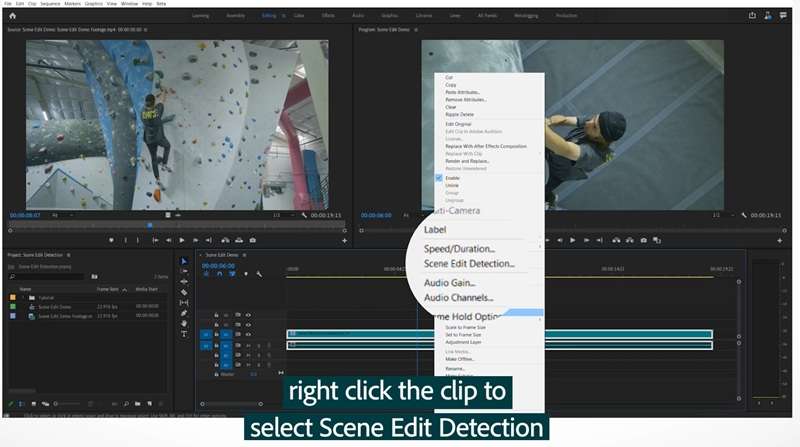
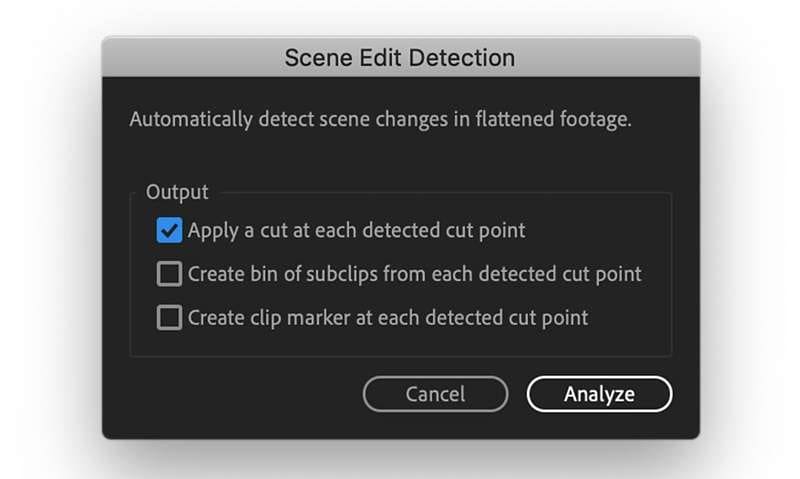
From there, Premiere Pro gives you three ways to handle the results:
- You can let it add cuts automatically wherever a new scene starts.
- You can have it create sub-clips that break the footage into smaller pieces inside a new bin.
- You can just drop markers at each point without cutting the clip.
The Good and Bad of Premiere Pro Scene Edit Detection
After walking through how Premiere Pro scene edit detection works, it's easy to see both the strengths and the drawbacks. Here's a quick look at the pros and cons.
Part 3. A Closer Look at Filmora's Scene Detection
We've gone through how Premiere Pro scene edit detection works, so now let's see what Filmora scene detection has to offer. The idea is similar, but Filmora makes it simple by automatically spotting scene changes and splitting a long video into smaller clips.
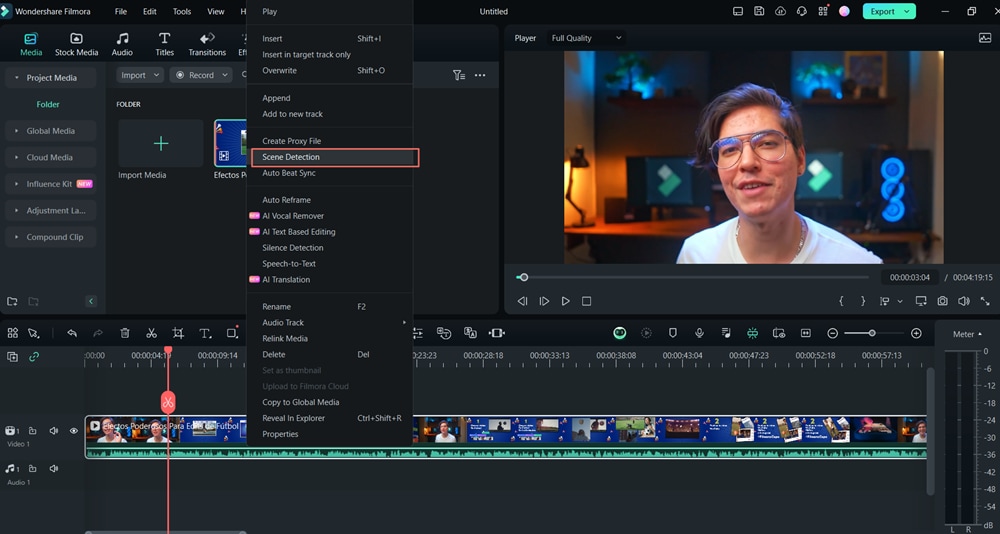
It's also very simple to operate. You just need to right-click the video you're working on and choose “Scene Detection”, or select the clip and go to Tools > Scene Detection.
 secure download

A pop-up window will appear where you can hit Detect, and within seconds the footage is broken into smaller parts. You can preview each one, then click “Add to Timeline” to move all the segments into your project for editing.
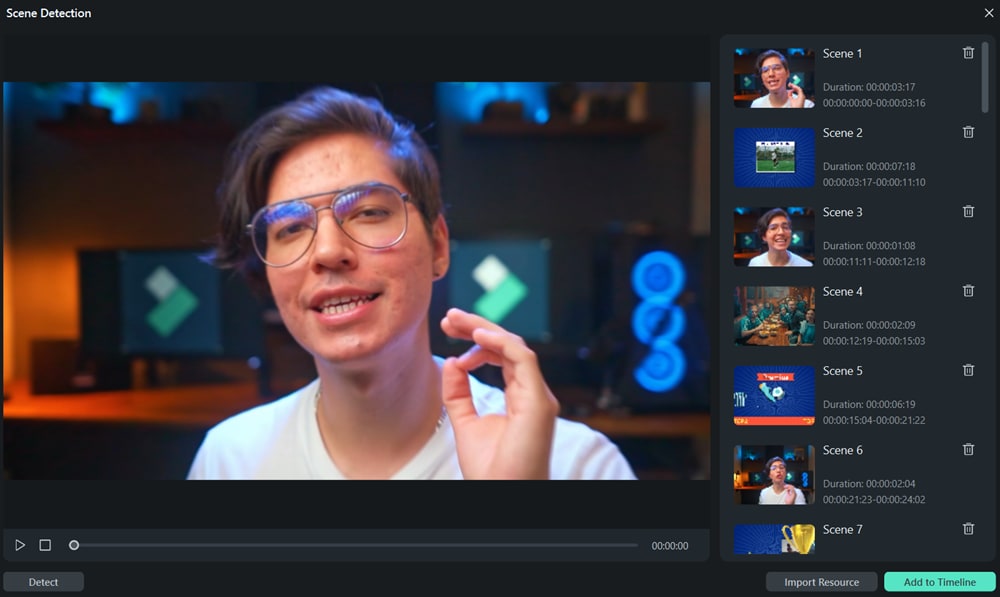
The Strengths and Limits of Filmora Scene Edit Detection
Looking at the workflow, Filmora scene detection is built for speed and simplicity, which makes it great for breaking down long footage without extra effort. Here's a look at what it does well and where it falls short.
Part 4. Head-to-Head: Feature-by-Feature Comparison
Comparing Filmora scene detection vs Premiere Pro scene edit detection goes beyond simply cutting clips apart. The real difference comes from the features that influence your editing flow and how much control you have along the way. Let's break them down:
1. Ease of Use and Learning Curve
Filmora Scene Detection: It keeps things straightforward. You just right-click, choose Scene Detection, and let it break your footage into smaller clips. It's quick, intuitive, and perfect if you don't want to get lost in extra settings.
Premiere Pro Scene Edit Detection: It gives you more control, but it also asks you to know the difference between markers, sub-clips, and cuts. For experienced editors, that flexibility is a plus, but beginners may find it a bit heavy at first.
✨Winner: Filmora
Filmora takes the lead here because of its simplicity. Premiere Pro still holds value for pros who want more control, but Filmora makes the process faster and less intimidating.
2. Output Options and Customization

Filmora Scene Detection: It takes a simpler route and splits the video right away. That said, it gives you a preview window where you can check the duration of each cut and remove the ones you don't need.
Premiere Pro Scene Edit Detection: Offers plenty of flexibility. You can let it cut the clip automatically, drop markers at each scene change, or generate sub-clips in the project panel. This is helpful if you like keeping options open before making permanent cuts.
✨Winner: Premiere Pro
Premiere Pro edges ahead here thanks to its variety of output choices and deeper customization. Filmora is still excellent for fast, no-fuss edits, but Premiere Pro scene edit detection suits editors who want more control.
3. Speed and Performance on Large Files
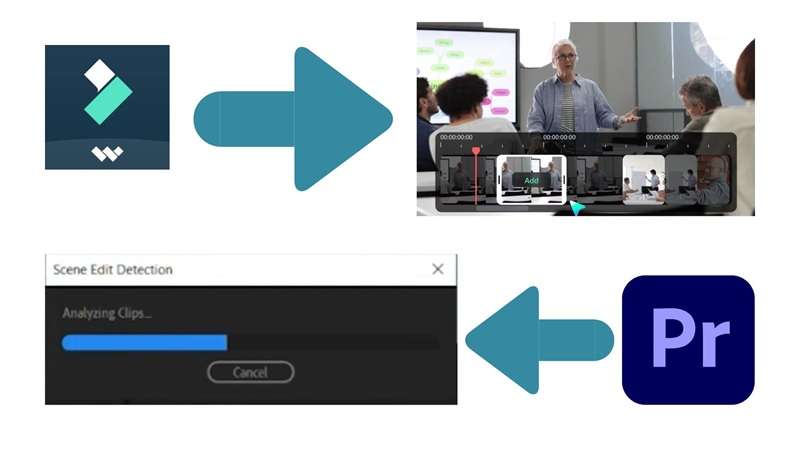
Filmora Scene Detection: Filmora is built for speed and efficiency across all features. So, Filmora scene detection also processes long videos quickly and runs smoothly even on less powerful machines, which makes it a great match for content like lectures, tutorials, or vlogs, where you just need simple segmentation.
Premiere Pro Scene Edit Detection: Meanwhile, scene edit detection in Premiere Pro focuses more on precision. It can handle complex footage and high-resolution files with accuracy, but the analysis takes longer, especially on long projects.
✨Winner: Filmora
Filmora wins when it comes to pure speed and convenience. That said, Premiere Pro is still the stronger choice for pro editors who value accuracy and are willing to wait a little longer for detailed results.
4. System Requirements and Hardware Friendliness

Filmora Scene Detection: Filmora is much lighter on resources. It runs smoothly on most mid-range laptops and PCs, making it more approachable for students, casual editors, or anyone who doesn't have access to high-end gear.
Premiere Pro Scene Edit Detection: This one needs a stronger machine to run at its best. It leans heavily on RAM, CPU, and GPU power, which means older or lower-spec computers can struggle, especially during long or complex analysis.
✨Winner: Filmora
Filmora takes this one because it's hardware-friendly and more accessible. Premiere Pro remains the go-to for professionals with powerful setups, but Filmora opens the door for a wider range of users.
5. Target Audience and Use Cases

Filmora Scene Detection: This feature is a better fit for beginners and casual creators. It gives content makers a simple way to break down long recordings without the extra steps, making it perfect for quick edits and everyday projects.
Premiere Pro Scene Edit Detection: On the other hand, Premiere Pro scene edit detection is built with professionals in mind. It's ideal for filmmakers, YouTubers, and editors who need precise control for commercial projects or complex timelines with multiple scene layers.
✨Winner: Tie
Both tools serve their audiences well. Premiere Pro takes the lead for pros who demand full control, while Filmora shines for creators who value speed and simplicity.
6. Similar Tools
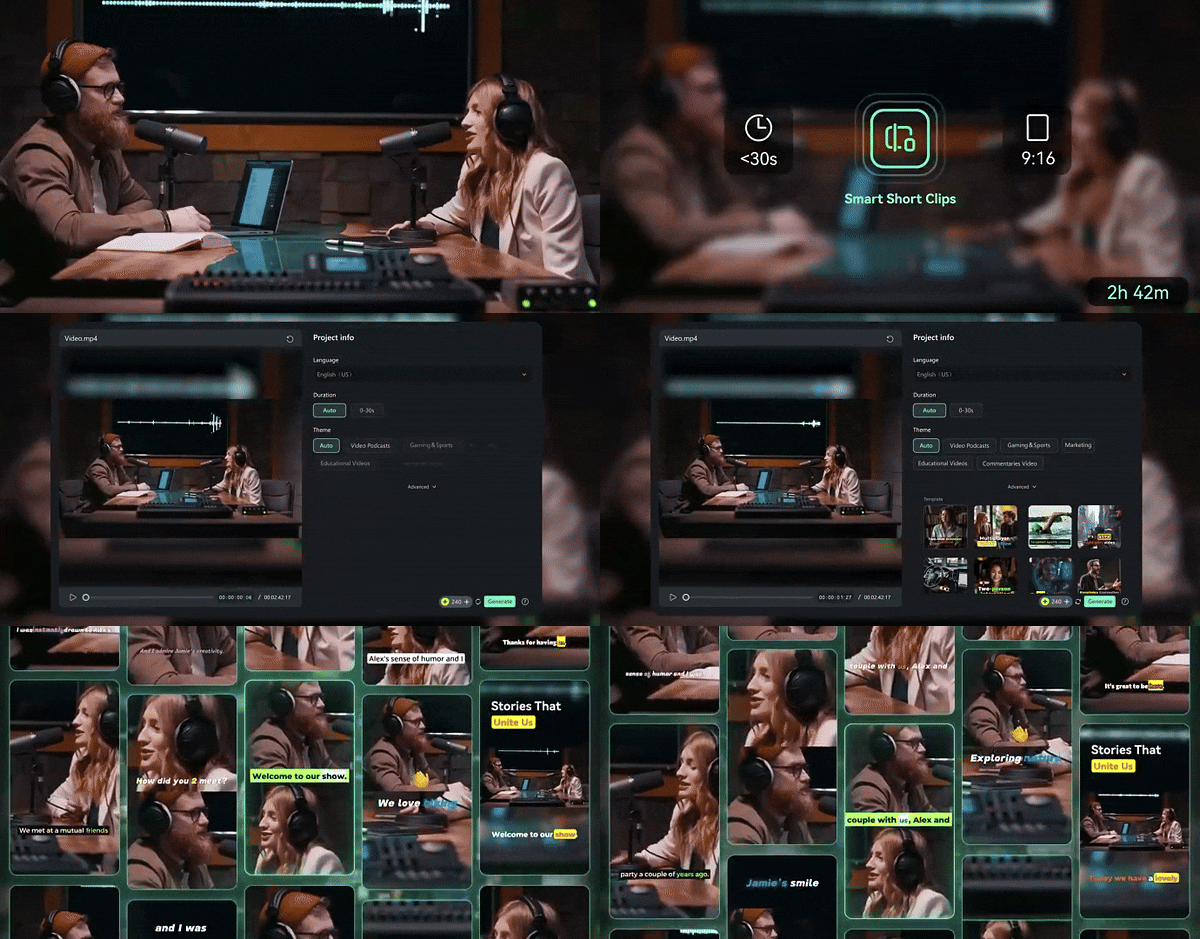
Filmora: It goes beyond basic scene detection with extra AI features. Tools like AI Smart Short Clips can turn long recordings into quick highlight reels with music and captions, while AI Smart Scene Cut spots key moments with people or tagged objects and automatically splits them into separate shots for easy editing.
Premiere Pro: It doesn't include instant highlight generators, but it does have Adobe Sensei-powered media intelligence. This lets you search your footage by typing keywords, so the software can identify and pull up the right clips without scrubbing through everything manually.
✨Winner: Filmora
Filmora takes the win here thanks to its ready-to-use AI tools that make editing faster and easier. Premiere Pro's search function is powerful for larger productions, but Filmora gives creators more value with its smart, time-saving features.
7. Cost and Accessibility

Filmora: This editor is much easier on the wallet. You can choose a one-time license or a lower-priced subscription plan, which makes it far more accessible for students, beginners, or anyone who doesn't want to commit to heavy monthly fees.
Premiere Pro: This editor is only available through an Adobe Creative Cloud subscription, starting at around $22.99 per month. It's a higher price that gives you access to powerful professional features, but the ongoing cost can add up quickly.
✨Winner: Filmora
Filmora clearly wins this round. It offers affordable pricing without locking you into long-term costs, making it the better option for most creators who just want scene detection and useful editing tools.
8. Cross-Platform Flexibility
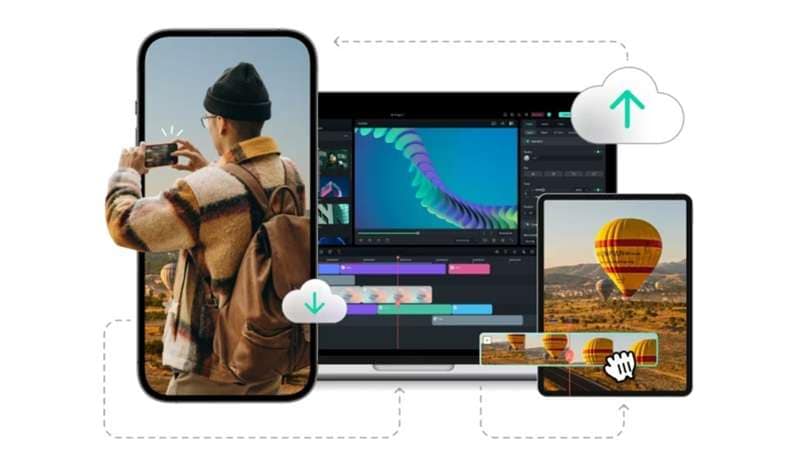
Filmora: It is available on Windows, macOS, and even has a mobile version. While scene detection itself is mostly a desktop feature, Filmora as a whole is easier to access across different devices, giving creators more flexibility.
Premiere Pro: It runs well on both Windows and macOS, but that's where it stops. There's no mobile version that supports scene edit detection, so you're limited to desktop use.
✨Winner: Filmora
Filmora comes out ahead because it's not tied to the desktop alone. Even if the scene detection feature is desktop-focused, having a mobile app makes it more versatile for everyday creators.
Conclusion
Scene detection is a feature that feels like heaven for beginners since it takes away the grind of cutting scenes by hand. So, we walked through how it works in both Premiere Pro and Filmora. Premiere Pro scene detection does the job well and gives you options for customization, while Filmora scene detection leans more on speed and simplicity.
After breaking down both tools, Filmora comes out slightly ahead thanks to its easy workflow and extra AI support. With features like AI Smart Short Clips and AI Smart Scene Cut, it goes beyond basic scene detection to save even more time.
Frequently Asked Questions
-
Does scene detection affect video quality?
No, scene detection only splits your footage into smaller clips. The original quality of your video stays the same whether you use Filmora scene detection or Premiere Pro scene edit detection.No, scene detection only splits your footage into smaller clips. The original quality of your video stays the same whether you use Filmora scene detection or Premiere Pro scene edit detection.Can I undo scene edit detection in Premiere Pro?Can I undo scene edit detection in Premiere Pro? -
Can I undo scene edit detection in Premiere Pro?
Yes, you can. If Premiere Pro scene edit detection creates cuts or markers you don't want, you can easily remove them or revert back to the original clip.Yes, you can. If Premiere Pro scene edit detection creates cuts or markers you don't want, you can easily remove them or revert back to the original clip.Can Filmora detect scenes in high-resolution videos like 4K?Can Filmora detect scenes in high-resolution videos like 4K? -
Can Filmora detect scenes in high-resolution videos like 4K?
Absolutely. Filmora scene detection works smoothly with 4K footage and breaks it into segments without lowering the resolution.Absolutely. Filmora scene detection works smoothly with 4K footage and breaks it into segments without lowering the resolution.Which software is better for beginners trying scene detection?Which software is better for beginners trying scene detection? -
Which software is better for beginners trying scene detection?
Filmora is the easier choice for beginners. Its scene detection is straightforward and fast, while Premiere Pro scene edit detection is better suited for advanced editors who want more control.Filmora is the easier choice for beginners. Its scene detection is straightforward and fast, while Premiere Pro scene edit detection is better suited for advanced editors who want more control.Grammarly
