


 TL;DR:
For creating professional football highlights in 2026, Wondershare Filmora is the best overall choice for beginners and coaches needing AI-powered sports tools, while Adobe Premiere Pro and DaVinci Resolve serve professional media teams requiring advanced multicam workflows.
● CapCut is the top mobile application for creators producing fast, short-form social media content with AI cutout tools, whereas VEED provides the best browser-based experience for teams needing automatic subtitles and cloud collaboration.
● When selecting desktop software for long match recordings, note that Final Cut Pro is restricted strictly to macOS users for a $299.99 one-time purchase, while DaVinci Resolve offers a robust free version across platforms before requiring a $295 upgrade for Studio features.
● To efficiently process full match footage, leverage specific sports editing tools such as motion tracking for tactical player analysis, speed ramping for replay sequences, and automated features like Smart Scene Cut to identify key plays without manual timeline scrubbing.
Ask AI for a summary
 ChatGPT
 Perplexity
 Gemini
 Claude
 Grok
Grok
A great football highlight video does more than just a compilation of goals and assists. The right editing can make key plays easier to follow, add context to important moments, and create a highlight reel that stands out to coaches, scouts, teammates, or fans. Whether you're working with complete match recordings, training footage, or clips captured on your phone, choosing the right football video editor can save hours of work while improving the final result.
In this guide, we've rounded up the best football video editor apps in 2026, from beginner-friendly apps to advanced editing software. We'll compare their standout features, highlight-making tools, and overall value to help you find the best option for creating professional soccer videos.
Part 1. What Makes a Great Football Video Editor?
Before jumping into the tools, it's worth knowing what sets a good soccer video editor apart from a great one. Match footage typically involves long recordings, fast-paced action, and plenty of clips to sort through, so the right software should speed up the editing process without sacrificing quality.

Part 2. Best Desktop Football Video Editors
If you're editing full match recordings, creating player highlight reels, or producing content for a sports team or channel, desktop software typically offers the most comprehensive control. These editors provide advanced timeline tools, better performance for large video files, and features that make it easier to turn lengthy match footage into polished football highlights.
Here are the best desktop football video editors to consider in 2026.
1. Wondershare Filmora
Filmora is a beginner-friendly football video editor that makes it easy to turn full match recordings into highlight reels, player showcases, coaching videos, and social media clips. It combines sports-friendly editing tools with AI-powered features, helping creators produce high-quality soccer content without a complicated learning curve.
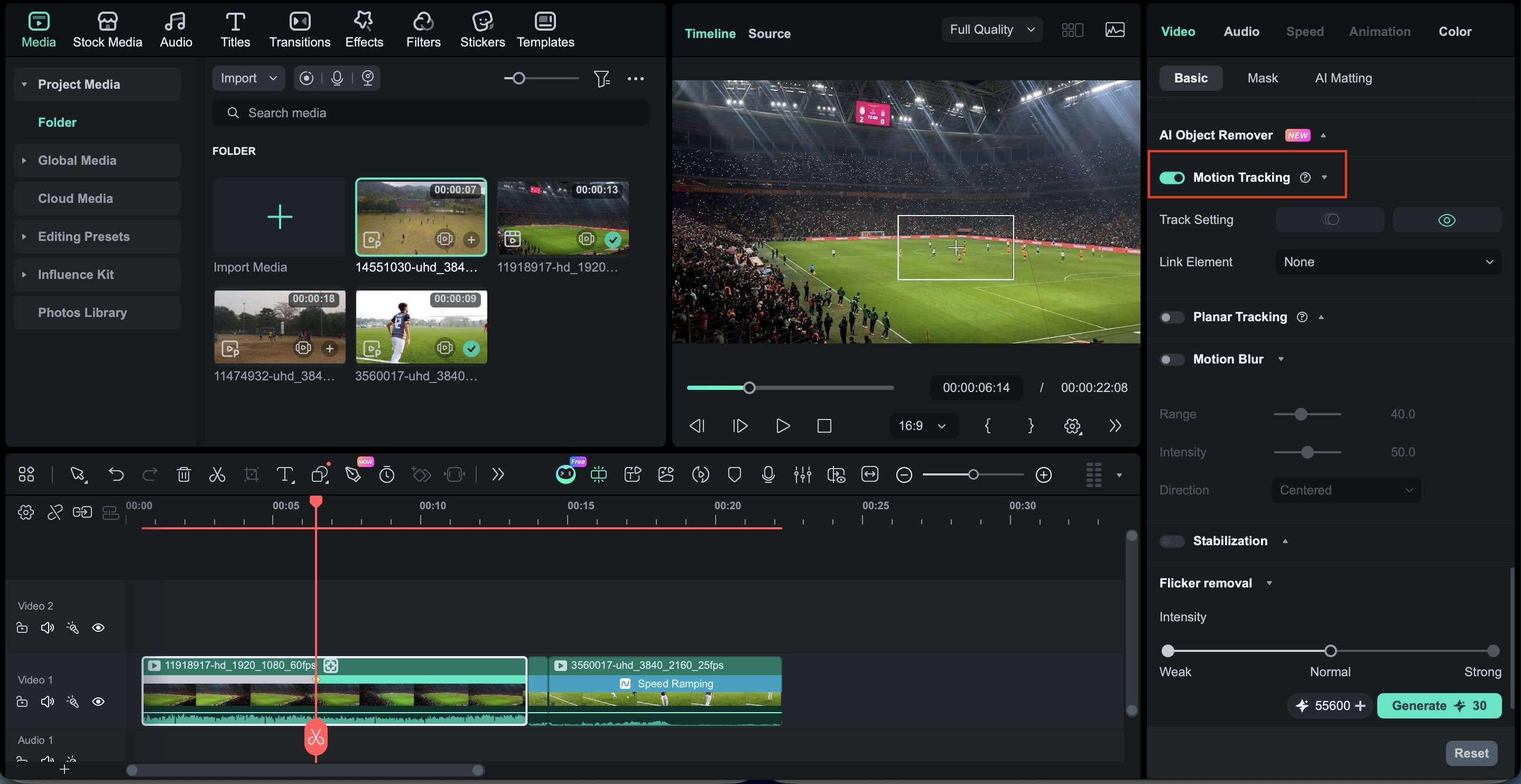
- Motion Tracking for player analysis and tactical breakdowns
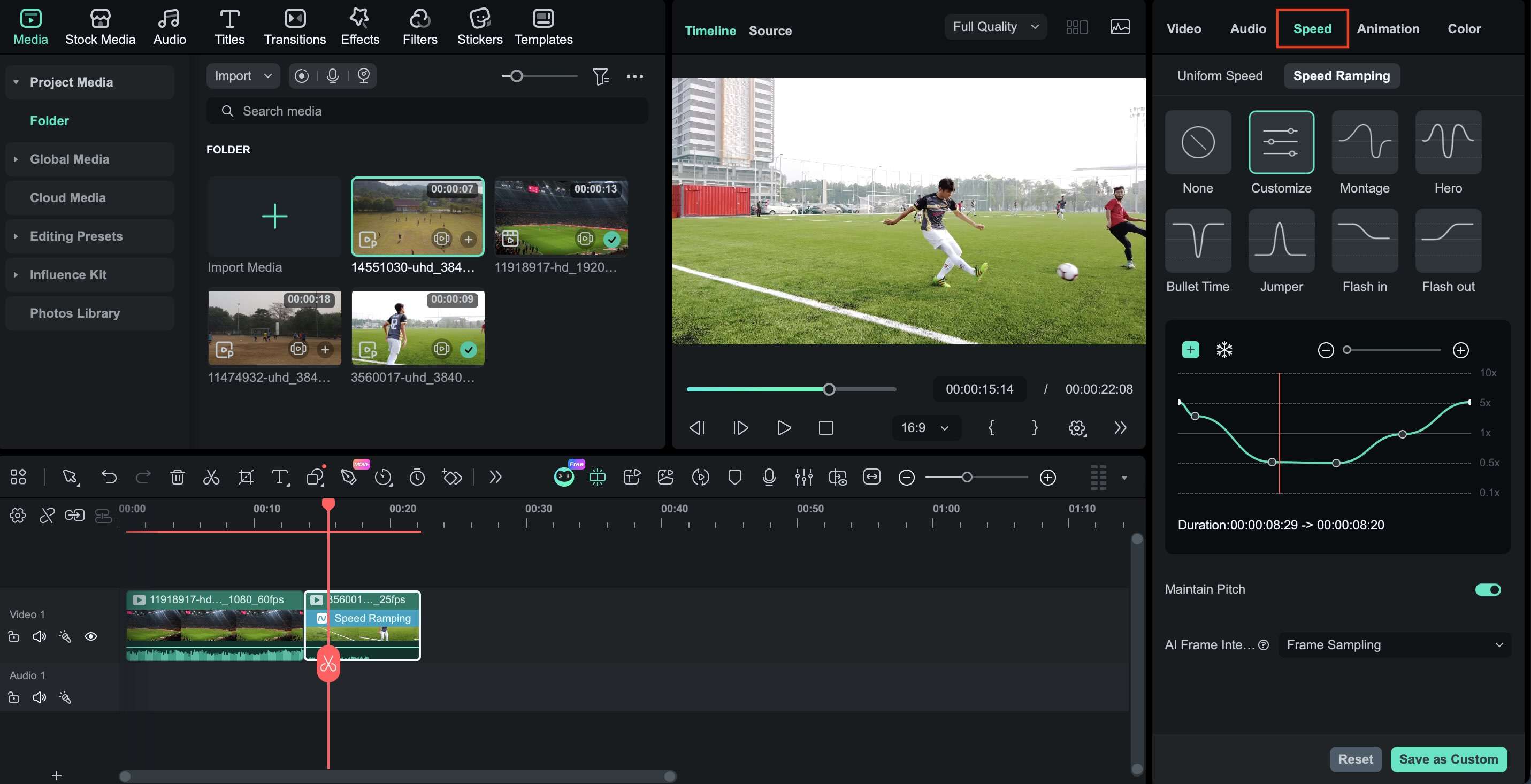
- Speed Ramping for goals, saves, and replay sequences
- AI Subtitle Generation for match reviews and coaching videos
- Multi-Camera Editing for full match recordings
- Keyframing for player stats, team logos, and sports graphics
- AI Smart Cutout for player spotlight effects
- Smart Short Clips for creating quick highlights from full match footage
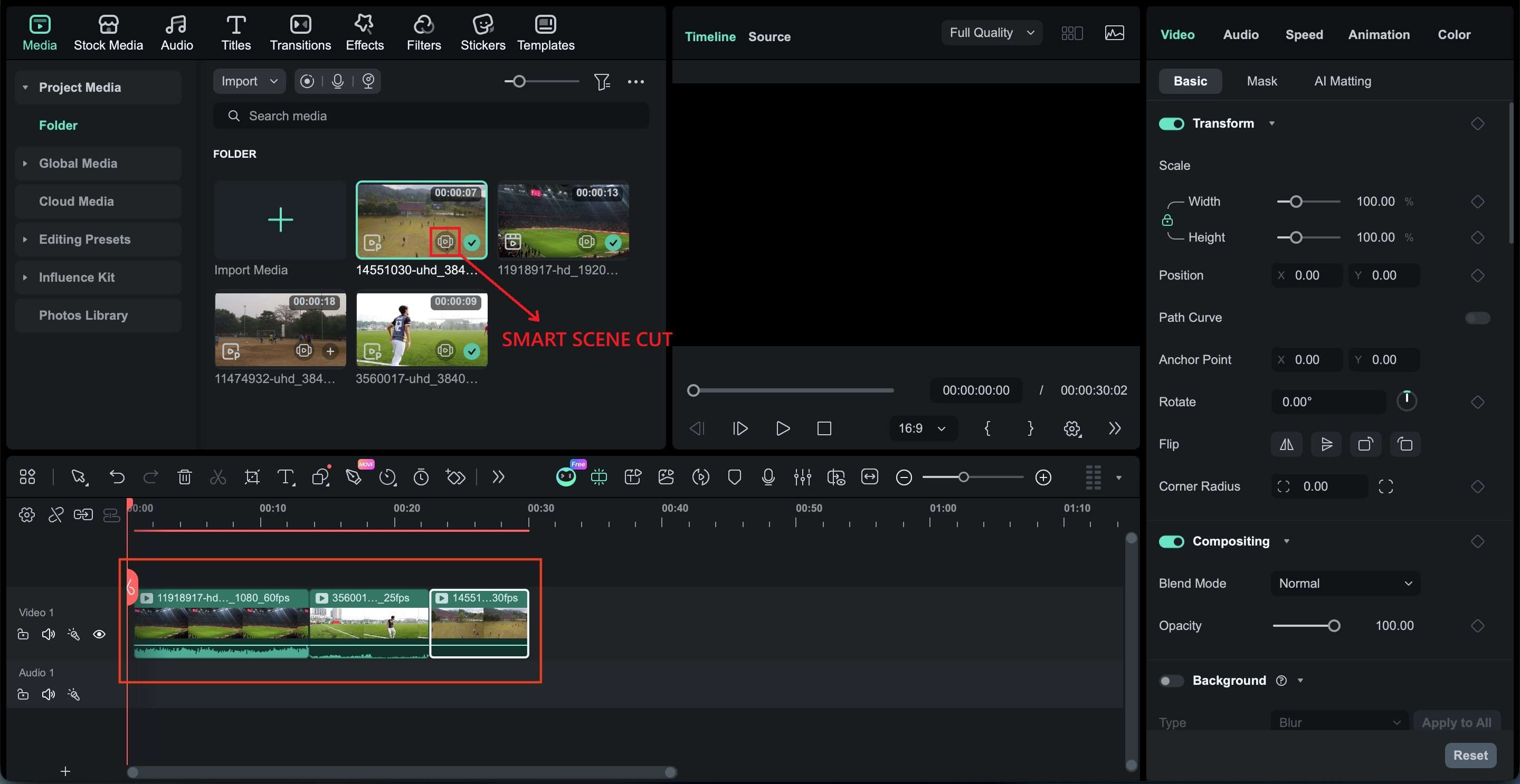
- Smart Scene Cut for automatically identifying key moments, plays, and transitions
- Built-in creative assets and stock media for highlight reels, sports intros, lower thirds, transitions, and promotional content
- Fast workflow for football highlight creation
- Strong balance between AI tools and manual editing
- One of the best video editing software for football highlights, with features like AI Smart Scene Cut and Smart Short Clips
- Sports-friendly features without a complex interface
- Supports both short-form and long-form football content
- Available on Windows, Mac, iOS, and Android) with cloud and syncing features
- Not designed for large collaborative production teams
- Some AI tools require separate credits
- Fewer broadcast production features
Players, coaches, academies, YouTube creators, and social media sports creators.
Filmora provides both a free version and a free trial for you to explore the app before committing. You can find its subscription and lifetime license options on Filmora's pricing page.
2. Premiere Pro
Premiere Pro is a professional soccer editing software used by sports broadcasters, media teams, and experienced creators. Its advanced editing controls, multicam workflow, and graphics capabilities make it a strong option for match analysis, tournament coverage, and professional football highlight packages.
- Multi-Camera editing for tournament and match coverage
- AI Transcription for match commentary and interviews
- Advanced timeline controls for precise highlight editing
- Motion Graphics Templates for scoreboards and player profiles
- Color Correction for consistent match footage
- Team Projects for collaborative sports editing
- Industry-standard workflow used across sports media
- Excellent multicam editing capabilities
- Extensive plugin and template ecosystem
- Strong project organization for large footage libraries
- Seamless integration with Adobe Creative Cloud
- Subscription-only pricing
- Steeper learning curve for new editors
- Requires more powerful hardware
- It may be excessive for simple football highlight reels
Professional editors, football clubs, sports media teams, and agencies.
7-day free trial. Premiere Pro single-app subscription starts at $22.99/month, while the Creative Cloud Pro plan includes Premiere Pro plus 20+ Adobe apps for $69.99/month.
3. DaVinci Resolve
DaVinci Resolve is a highly capable football video editing app that combines video editing, color grading, visual effects, and audio tools in a single platform. This software is popular among creators who want professional-quality football highlights and cinematic match footage without paying for an ongoing subscription.
- Professional Color Grading for stadium and outdoor match footage
- Fusion Effects for tactical analysis and sports graphics
- Multi-Camera Editing for full football matches
- Fairlight Audio Tools for commentary cleanup
- Motion Graphics for tactical presentations
- Advanced Export Controls for YouTube and recruitment videos
- One of the strongest free football video editing software options
- Industry-leading color correction tools
- Editing, VFX, audio, and grading in one application
- Excellent value for advanced creators
- Strong multicam editing workflow
- More technical interface than Filmora
- Requires relatively powerful hardware
- Some AI tools are limited to Studio
- Takes longer to learn than editors focused on beginners
Football analysts, sports filmmakers, advanced creators, and videographers.
The free version is available with limited features. DaVinci Resolve Studio costs $295 for a one-time purchase.
4. Final Cut Pro
Final Cut Pro is a video editing software designed specifically for Mac users. Its optimized performance, fast rendering, and streamlined editing workflow make it well-suited for handling long football match recordings, player highlight reels, and sports content for YouTube or social media.
- Magnetic Timeline for faster football highlight editing
- Multicam Editing for multi-angle match footage
- Object Tracking for player-focused graphics and labels
- Advanced Color Tools for match footage enhancement
- Apple Silicon Optimization for smooth 4K editing
- HDR Support for high-quality sports content
- Outstanding performance on Apple Silicon Macs
- Fast rendering and export speeds
- One-time purchase instead of a subscription
- Efficient workflow for long match recordings
- Professional features without excessive complexity
- Available only on macOS
- Smaller plugin ecosystem than Premiere Pro
- Less common in collaborative production environments
- Limited cross-platform flexibility
Mac-based football creators, coaches, sports videographers, and content creators.
$299.99 for a one-time purchase.
Part 3. Best Mobile Football Video Editor Apps
Although desktop software offers the most editing flexibility, many creators now edit football highlights directly from their phones. Mobile apps are convenient for uploading match highlights shortly after the game ends, creating social media content, or quickly compiling player highlight reels without transferring footage to a computer.
The best football video editor apps combine quick editing tools with features such as slow motion, motion effects, text overlays, and export options for sharing on social media. Here are some of the top mobile apps for editing football and soccer videos in 2026.
5. CapCut
CapCut is one of the most popular football video editor apps for short-form content. Its combination of AI tools, templates, speed controls, and social media-friendly editing features allows you to easily create football highlights, goal compilations, and match recaps directly from a smartphone.
- Speed Controls for goal replays and highlight moments
- Auto Captions for match commentary and voiceovers
- AI Cutout for player spotlight edits
- Text Animations for scores and match updates
- Templates for football reels and shorts
- Cloud Sync for editing across devices
- Fast workflow for short-form sports content
- Large collection of effects and templates
- Beginner-friendly interface
- Strong AI-assisted editing features
- Available on iOS, Android, and desktop
- Some advanced features require a Pro subscription
- Less suitable for long match recordings
- Limited precision compared to desktop editors
- Certain exports and templates may vary by region
Football creators producing TikTok, Instagram Reels, YouTube Shorts, and short match highlights
Free version available with limited features and export option. CapCut Pro subscription is available as a monthly plan at $19.99/annual plan at $179.99.
6. InShot

InShot is a video editor for football highlights that focuses on simple, fast editing for mobile users. Its clean interface makes it easy to trim clips, add music, create slow-motion replays, and prepare football highlights for social media platforms. This app is useful for creators who prioritize speed over advanced editing features.
- Video Trimming for match highlights
- Slow Motion for goals and key plays
- Text Overlays for player names and scores
- Canvas Resizing for multiple social platforms
- Music and sound effect library
- Quick Export Options for mobile sharing
- Easy to learn for first-time editors
- Fast editing workflow
- Excellent social media export options
- Lightweight and responsive on most devices
- Useful for quick football highlight creation
- Fewer advanced editing tools
- Limited multi-clip editing compared to competitors
- Some effects and assets require a premium plan
- Not ideal for complex football analysis videos
Casual creators, players, and coaches share football clips on social media.
Free version available. InShot Pro subscription available:
- InShot Pro - Monthly $4.99
- InShot Pro - Yearly: $19.99
- InShot Pro - Lifetime: $49.00
7. VN
VN offers a powerful editing experience for a free mobile app. It includes multi-track editing, keyframe animation, speed controls, and advanced timeline tools that give users more creative freedom when producing football highlight videos and player showcases.
- Multi-Track Editing for complex highlight projects
- Keyframe Animation for sports graphics
- Speed Curves for dynamic replay effects
- Picture-in-Picture for tactical breakdowns
- Custom Filters for match footage
- Flexible Timeline Controls for precise editing
- Feature-rich free version
- More manual control than many mobile editors
- No steep learning curve
- Supports detailed football highlight editing
- Minimal export restrictions
- Smaller asset library
- Fewer AI-powered features
- The interface can feel crowded on smaller phones
- Limited collaboration tools
Creators who want more editing control without moving to desktop software.
Free to use. Optional premium features may vary by region.
8. KineMaster

KineMaster combines ease of use with advanced mobile editing features. It supports multiple video layers, chroma key tools, keyframe animation, and precise timeline controls, perfect for creators who want to produce polished soccer highlights and match analysis videos on mobile devices.
- Multi-Layer Editing for football analysis videos
- Keyframe Animation for player callouts and graphics
- Chroma Key for sports presentations
- Audio Mixing for commentary and crowd sounds
- Frame-by-Frame Trimming for precise highlight cuts
- Asset Library for titles, effects, and transitions
- Advanced editing tools for a mobile app
- Strong layer-based editing workflow
- Good balance between control and usability
- Suitable for longer football projects
- Available on iOS and Android
- Premium subscription unlocks many advanced assets
- The interface may feel complex for beginners
- Performance can vary on older devices
- Smaller template ecosystem
Mobile creators who produce detailed football highlights, match reviews, and tactical content.
Free version available. KineMaster Premium subscription is available starting from $7.99/month or $51.99/year.
Part 4. Best Online Football Video Editors
Mobile apps are certainly useful for quick edits on the go, but online editors offer another level of convenience. Since they run directly in a web browser, you can access projects from almost any device without installing software.
If you're looking for a football video editor that works online, these browser-based tools offer a good mix of editing features, templates, and collaboration options.
9. VEED
VEED is an online football video editor designed for creators who want to produce football highlights, match analysis videos, and social media content with minimal setup. Its browser-based workflow, automatic subtitles, and AI-powered tools make it a practical option for creating football videos without the need to download traditional football editing software.
- Auto Subtitle Generation for match reviews and commentary
- AI Video Editing Tools for faster highlight creation
- Text and Graphics for scoreboards and player callouts
- Screen Recording for tactical analysis videos
- Brand Templates for team content
- Cloud-Based Collaboration and Project Storage
- Easily accessible from any browser
- Strong subtitle and caption tools
- Quick workflow for football social content
- Useful collaboration features
- The free plan has export limitations
- Large projects may feel slower than desktop editors
- Advanced editing tools are more limited
Coaches, sports creators, analysts, and teams who create football highlights online.
A free plan is available. Paid plans include:
- Creator: $10/month
- Pro: $21/month
- Studio: $35/month
10. Kapwing

Kapwing is a browser-based football highlight video maker that focuses on collaborative editing and social media content creation. It offers simple editing tools, AI-powered features, and cloud-based workflows that are useful for teams looking to create soccer clips, recruitment videos, and match highlights from various devices.
- AI Subtitle Generation for football content
- Online Video Trimming for match highlights
- Collaborative Editing for teams
- Templates for social media football videos
- Text and Graphics for player profiles
- Cloud-Based project management
- Excellent collaboration tools
- Beginner-friendly interface
- Good template selection
- Useful AI-powered workflow features
- Free exports include limitations (watermark, 720p, max. 1-min)
- Less suitable for complex editing projects
- Advanced effects are relatively limited
Sports teams, coaches, social media managers, and football content creators.
The free plan is available with limited credits. Paid plans available start from $16/month.
11. Clipchamp

Clipchamp is a browser-based soccer video editing software from Microsoft that integrates ease of use with practical editing tools. It works well for creating football highlights, player showcases, and soccer videos, especially for users who want a straightforward editor with cloud integration and ready-made templates.
- Template-Based Editing for football highlights
- Text Overlays for scores and match information
- Stock Audio and Music Library
- Screen Recording for coaching content
- Cloud Integration with Microsoft Accounts
- Quick Export Options for social platforms
- Clean and beginner-friendly interface
- Convenient for Windows users
- Good selection of templates
- Fast export workflow
- Browser-based accessibility
- Limited advanced editing tools
- Fewer sports-specific features
- Less flexibility than desktop software
- Internet-based workflow may not suit all users
Players, coaches, students, and casual creators who are producing football content online.
- Free plan available with limited AI features, stock assets, filters, and effects
- Premium plans available range from $11.99/month for individuals to $3 to $7/user/month for business users
12. Canva
Canva has expanded beyond graphic design into a capable online football video editor for creating football highlights, promotional videos, team announcements, and social media content. Its drag-and-drop workflow, extensive template library, and built-in design tools make it useful for clubs, academies, and creators producing branded football content.
- Sports Templates for Football Reels and Promotions
- Drag-and-drop video editing
- Text Animation for match results and player highlights
- Brand Kit for club and team content
- Magic Studio AI Tools
- Cloud-Based Collaboration
- Huge template library
- Easy to create branded football content
- Excellent collaboration features
- Simple learning curve
- Strong integration between design and video tools
- Not built for detailed match editing
- Limited timeline precision
- Advanced video editing tools are basic
- Premium assets require Canva Pro
Football clubs, academies, social media managers, and creators who create promotional football videos.
Limited assets and features in the Canva free version. Canva Pro subscription is available starting from $12.99/month.
Which Football Video Editor Is Best for You?
Not all soccer editing software is designed for the same type of content creator. A coach putting together a match review certainly has different needs than a content creator who uploads goal compilations on social media or a videographer who produces professional match highlight reels.
Let's breakdown of our top recommendations:
| Category | Recommended Tool | Why It Stands Out |
| Best for Beginners | Filmora | Easy-to-learn, sports-friendly editing tools and AI features that help create football highlights faster. |
| Best for Professional Editing | Adobe Premiere Pro | Advanced timeline controls, multicam editing, and professional workflows are used across sports media and broadcasting. |
| Best Free Option | DaVinci Resolve | Delivers professional editing, color grading, visual effects, and audio tools without requiring a subscription. |
| Best for Mobile Creators | CapCut | Quick editing workflow, AI-powered tools, and strong support for TikTok, Reels, and Shorts football content. |
| Best Online Editor | Veed | Browser-based football editing software with automatic subtitles, collaboration tools, and easy access from any device. |
In short:
- If you're creating player recruitment reels, coaching breakdowns, or match highlights for YouTube, Filmora offers the most balanced experience for most users.
- For those working on professional soccer productions, Premiere Pro or DaVinci Resolve may be a better fit
- CapCut and VEED are excellent choices for creators who prioritize speed, convenience, and social media publishing.
The good news is that most of the tools on this list offer a free plan, trial, or free version, so it's easy for you to try out various soccer video editors before deciding to subscribe or make a one-time purchase.
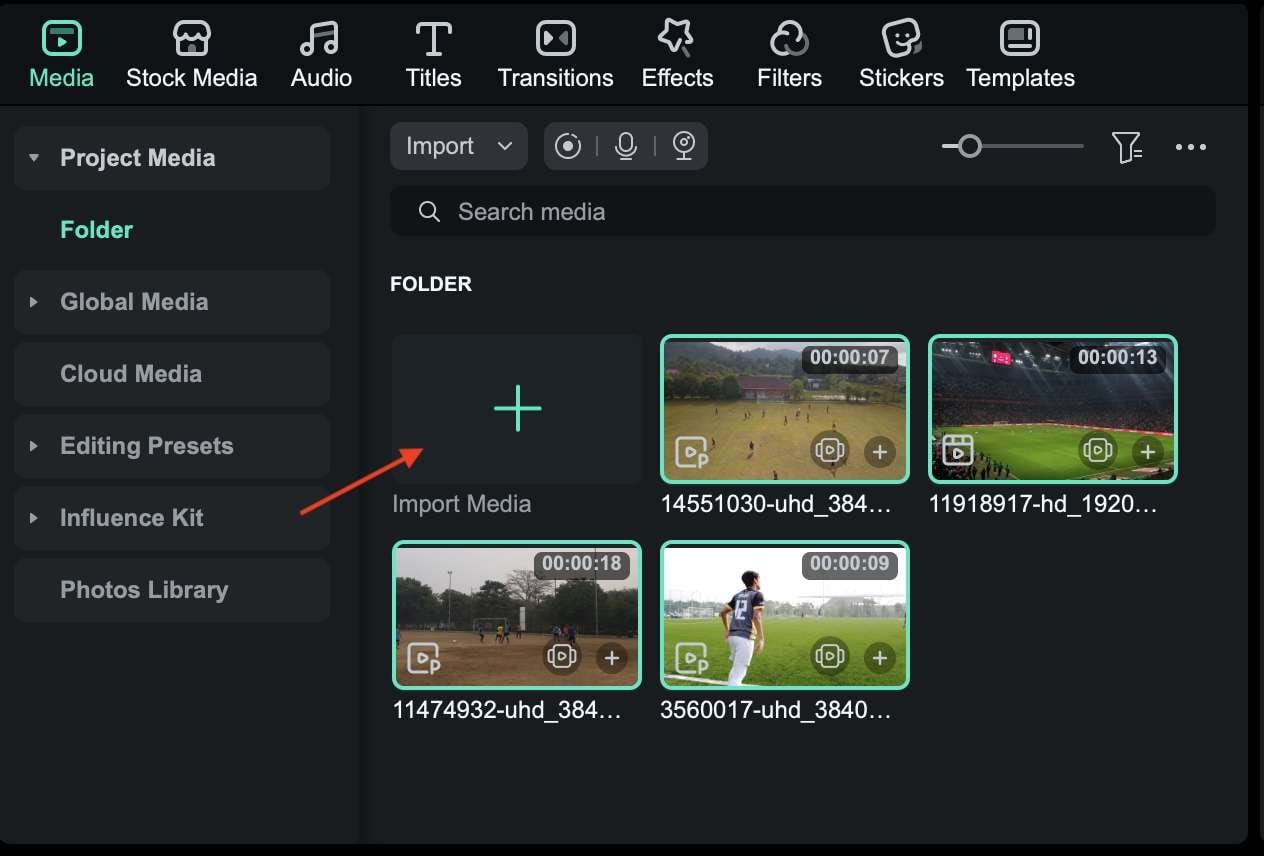
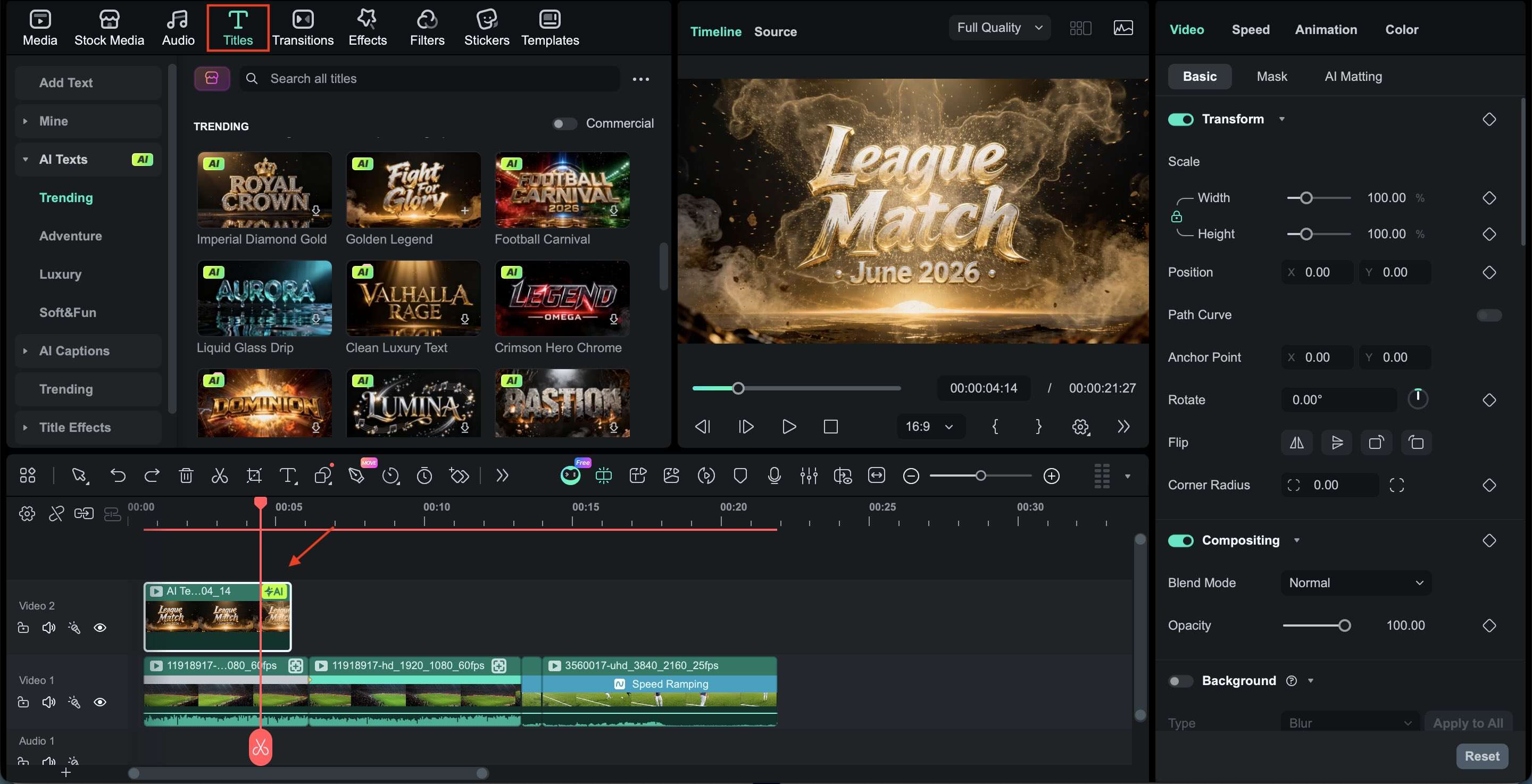
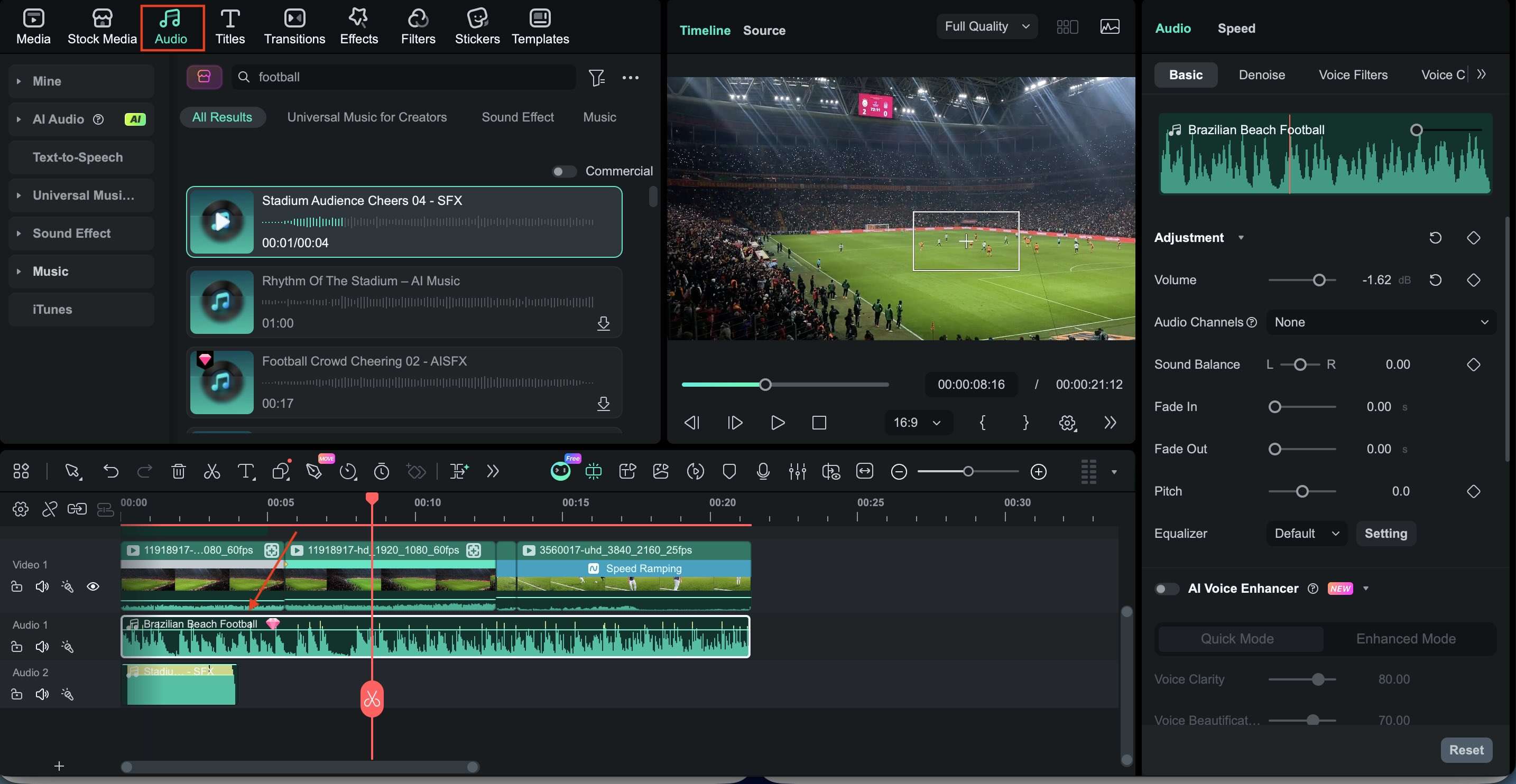
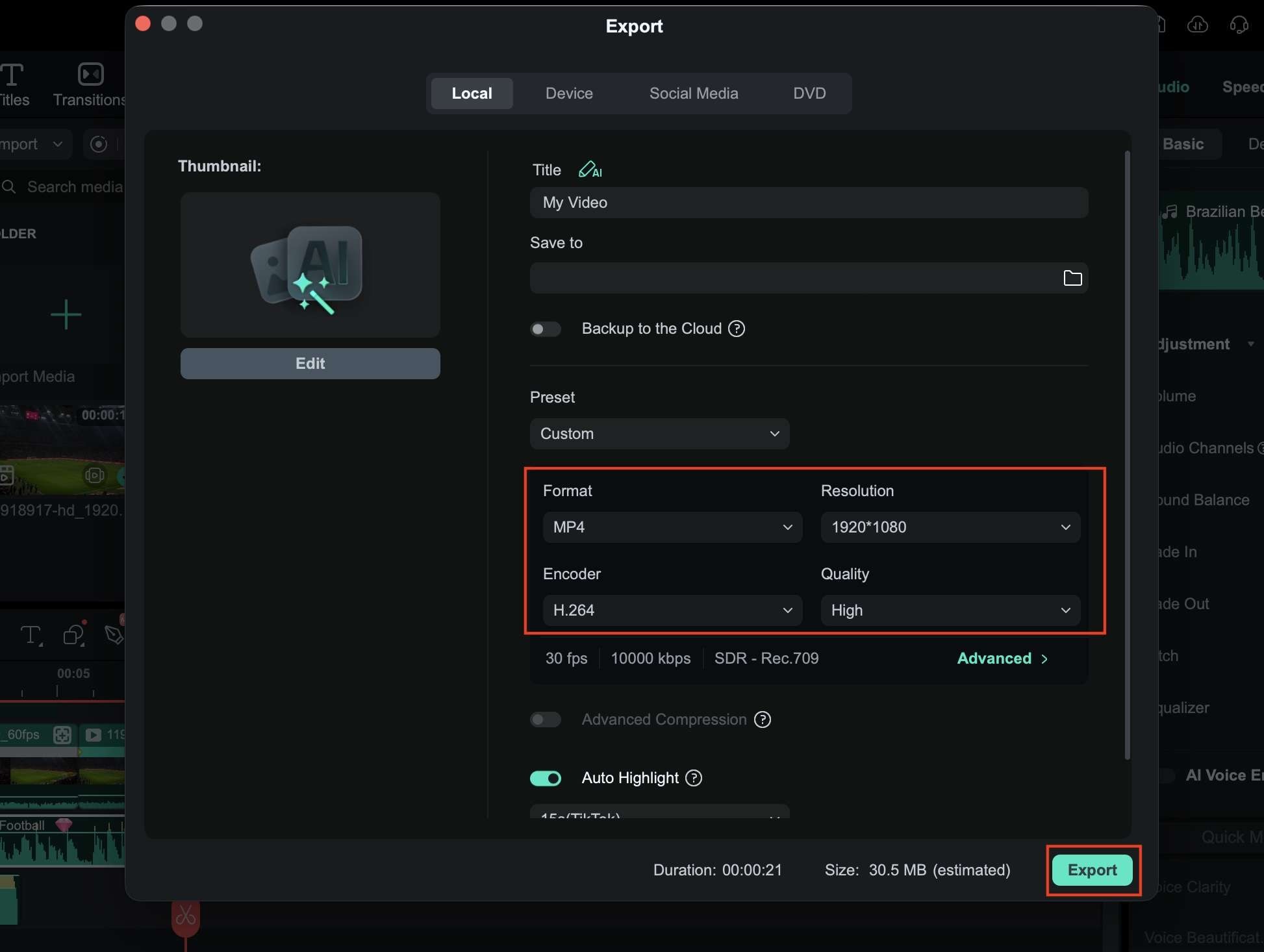
Part 5. How to Make Football Highlight Videos with Filmora
Creating a football highlight video doesn't require a complicated workflow. As one of the best video editing tools for soccer highlights, we will demonstrate how to do it easily with Filmora's editing tools and AI-powered features.
Conclusion
Football videos can serve many purposes, from player recruitment reels and coaching analysis to match highlights and social media content. The right football video editor helps you organize footage more efficiently, highlight key moments, and create videos that are easier for viewers to follow and enjoy. Some tools focus on speed and simplicity, while others offer advanced controls for detailed editing and production.
From Filmora and Premiere Pro to DaVinci Resolve, CapCut, and VEED, each option brings something different to the table. Try out free versions and trials if available, compare the most important features, and choose the editor that best fits your workflow and content goals.
FAQs
-
1. What is the best football video editor for beginners?
Filmora is one of the best football video editors for beginners as it combines an easy-to-use interface with features such as motion tracking, speed ramping, AI subtitles, and customizable titles. It allows users to create professional-looking football highlights without a steep learning curve. -
2. What software is best for creating football highlight videos?
Some of the most popular options include Filmora, Adobe Premiere Pro, DaVinci Resolve, and Final Cut Pro. Filmora is ideal for quick highlight creation, while Premiere Pro and DaVinci Resolve offer more advanced tools for professional editing and match analysis. -
3. Is there any free football video editing software?
Yes. DaVinci Resolve is widely regarded as one of the best free football video editors available. The software includes professional editing, color grading, visual effects, and audio tools without requiring a subscription. -
4. Can I edit football highlights on my phone?
Absolutely. Apps like CapCut, InShot, VN, and KineMaster allow you to trim and match footage, add slow-motion replays, include text overlays, and export football highlights directly from your mobile device.
