


 TL;DR:
Choosing the right glitch text generator depends on your readability requirements: Unicode-based tools like PSDDude and LingoJam apply intense, stackable character distortion for chaotic aesthetics, while font-based generators like Quicktools and Pixelied maintain high legibility across social platforms.
● Unicode distorters like Zalgo and LingoJam rely on adjustable craziness sliders to create extreme horror-style text, but pushing this intensity makes longer phrases unreadable and frequently breaks text formatting on mobile devices or specific platforms like X.
● Font-based platforms bypass messy character stacking completely, making tools like Quicktools, FlyerWiz, and Glyphy the best options for marketers and creators needing guaranteed text clarity on platforms like Instagram, Discord, and Facebook.
● To animate static glitch text into video overlays, you must paste the generated text into a video editor like Wondershare Filmora and manually apply keyframes, RGB Split, Shake, or Static Noise filters before exporting the sequence as an MP4 or GIF.
Ask AI for a summary
 ChatGPT
 Perplexity
 Gemini
 Claude
 Grok
Grok
Feeling like your regular text looks a little too boring and plain? Try using a glitch text. It usually works by stacking special Unicode "combining characters" on top of your letters, which makes everything look scrambled and a bit chaotic, yet still in a cool way.
Since our keyboard can’t type those characters on its own, you need a glitch text generator to create them for you. After that, you can simply copy, paste, and tweak the look however you like, and add them to your caption, bio, designs, or even a bold video intro.
If you have been thinking of trying one, check out our recommended list of the best distort text generators online here.
How We Test
- Each tool was reviewed for its ease of use and the speed at which users can copy or download results.
- We compared the variety of styles and the uniqueness of distortion effects.
- We prioritized high-value tools that offer complete features without intrusive paywalls.
- We also considered the ad experience, focusing on how clean and fast each interface feels.
Our Top 3 Picks for Glitch Text Generators

Glitch Text Generators Comparison Chart
Before getting into more details, take a quick look at how these glitch text generators stack up.
| Free/Paid | Ads | Customization | Styles Variation | Export as GIF/WEBM | Readability | |
| PSDDude | Free | No | High, adjustable distortion | Limited (Unicode glitch only) | Yes | High distortion |
| LingoJam | Free | No | Craziness level | Limited (Unicode glitch only) | No | Heavy distortion |
| Quicktools | Free | Yes | Moderate (via Picsart) | Various font styles | Yes (WEBM via Picsart) | Low distortion |
| Glyphy | Free | Yes | Low (font selections only) | Various font styles | No | Medium distortion |
| Zalgo | Free | Yes | Craziness level | Limited (Unicode glitch only) | No | Heavy distortion |
| FlyerWiz | Free | No | Moderate (via app) | Various font styles | Yes (via app) | Low distortion |
| Pixelied | Free | Yes | Low (font selections only) | Various font styles | No | Low distortion |
| Bigbangram | Free | No | Low (font selections only) | Various font styles | No | Low distortion |
| Creative Fabrica | Free | No | Low (font selections only) | Various font styles | No | Medium distortion |
Top Glitch Text Generators You Can Copy and Paste
Now that you've seen how each option compares, let's take a closer look at the tools themselves.
The tools we've gathered below give different kinds of "glitch text." Each has its unique style and customization level, ranging from light distortion to unreadable, "corrupted" visuals.
1. PSDDude
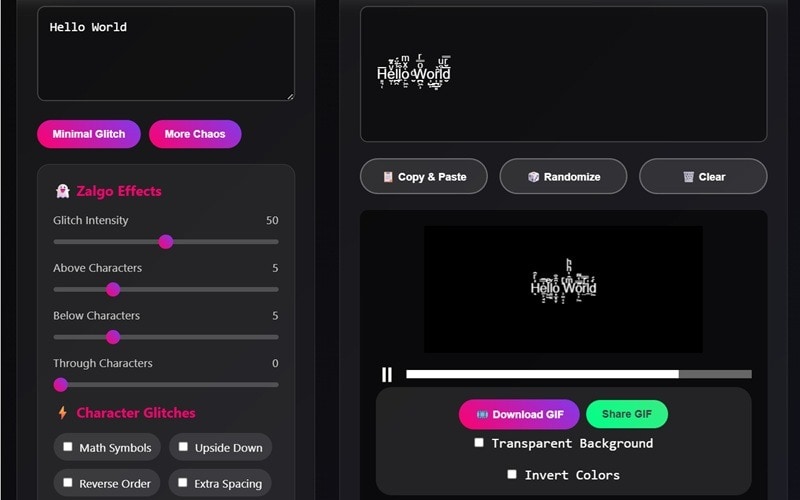
PSDDude is an online text generator that includes a glitch text maker. It shows you both a regular preview and an animated GIF version, which makes it super handy for captions, memes, or anything you want to share on your socials right away.
- Live preview for both text and GIF
- Flexible GIF export settings without watermark
- Plenty of glitch controls for detailed customization
- Extra symbol styles add variety
- No font customization
- Limited GIF color choices (only black or white)
- Can become unreadable if too many symbol styles are stacked
- Better suited for short phrases or single lines
Free
Generally still readable across most platforms, but the visual style doesn't stay perfectly intact. Because the glitch effect uses stacked Unicode characters, many apps trim or clip the symbols that appear above and below your text.
Adjustable glitch levels and controls (Above Characters, Below Characters, and Through Characters distortion), as well as modifiers (Math symbols, Upside-down text, Reverse order, Extra spacing, Cyrillic symbols, and Greek symbols).
Anyone who wants quick glitch text or a glitchy GIF for captions or social media posts.
P̱͇͕̖̏ͯͭS̫̋D͖͓ͪ̐D͙̪̙̼́̋u͓͙̒ͤd͕̬̼̎̊͑e͇̜͊ͫ̐, е̴̡͜͟͝ ̶̿͜͜д̷̡̢́͜ ̶̴̸̣̈́́̀͟ṵ̴̾͘͞ ̸̀͟͢Д̷̌͜͝ ̴̴̶̢̤́D̢̢͢͢ ̶̷̡̱͟С͘͝͠ ̵̡̢̢̡͝П̶̢̽́, Ԁ̶͚̑ͮ̏̀ ̴̢̽ͩͥ͞͠S̅ͥͬ́͟͠ ͇͘͘ᗡ̵̢͇̽ͨͪͨ́͜ ̸̡̬̎̉̽ͧ͟ᗡ̵̖̐ͣ͊ͬ̋̀͟͢ ̢̡̗̅̒͢n̥ͩͮͬͥ̀͟͝ ̑̋̋́͟͞͝p̶̴̓̀͠ ̢ͬ́̀ǝ̵̷ͧ̎̀͜͜
2. LingoJam
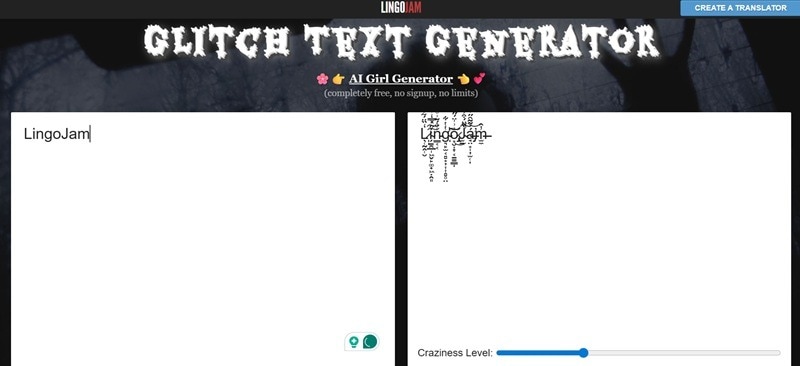
LingoJam instantly transforms your text into a glitchy, distorted style by mixing in corrupted Unicode symbols. You can dial up the craziness level to make the distortion mild or completely wild. It's a quick solution for creators who want to copy and paste distorted text into bios, captions, or chats for a "broken screen" aesthetic.
- Completely free text distortion conversion that works instantly.
- No registration, instantly copy/paste results.
- Craziness level slider to control how intense or chaotic the glitch effect gets.
- Output is sometimes unreadable on mobile devices.
- No options for fonts or color styling.
- Can break formatting on some platforms.
Free
Varies by platform, readable on Instagram and Discord, may glitch incorrectly on X or YouTube comments.
Users can control distortion intensity using a slider.
Quick social media use or usernames that need a chaotic glitch look.
Ľ̶̢̯̮̝̖i̶̬̽͗n̶̙̮͋̇̆͊̚g̸̨̹͔̪͉͖͙̲̱̩̘̰̬̔͌̊͜o̶͍͇̩̐̃̏͊̅̈̎́̅̃͝͝͝J̵͉̤͆́́́̊̌͒͆̑͛̋͘̕͜͠a̷͎̘̭͎̳̮͇͛͌̓̀̈̄̿̌́̉̕͠͠m̷͖̠͆̉, L̸̙̚i̶̞̋n̶̠̏g̵̝͝o̶͚̍J̷̜͝ḁ̸̄m̶̘̅
3. Quicktools by Picsart
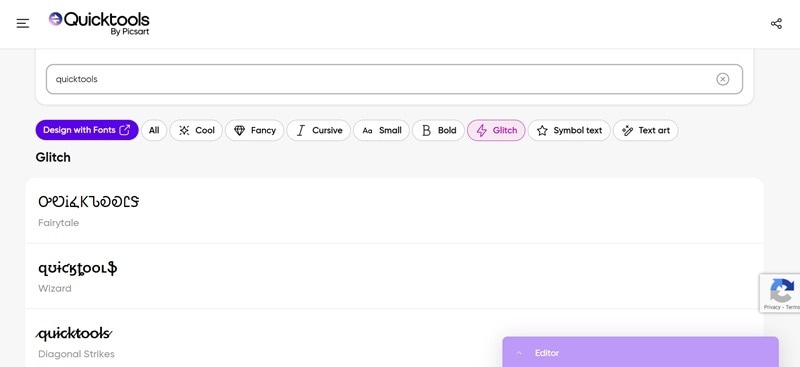
Quicktools is a set of quick online tools from Picsart, which includes a built-in glitch generator text option. Though the effect here is not too extreme and stays readable, it's a nice choice if you want a distorted look without completely scrambling the text.
- Copy the text or add it directly to your design (via Picsart).
- Works with any text input, including emojis.
- Plenty of fonts to choose from.
- Some save options (e.g., PNG) require a Plus subscription when using Picsart.
- No support for Unicode style glitches.
Free (for simple glitch text generation). The Plus plan starts from $13/mo.
Stays fully readable on all platforms (X, Instagram, YouTube, Discord, etc.)
Limited for the text itself, but you can adjust colors and make extra edits through Picsart's editor.
Creators editing directly on mobile or web without design software.
զʊɨƈӄȶօօʟֆ, ͓̽Q͓͓̽̽u͓͓̽̽i͓͓̽̽c͓͓̽̽k͓͓̽̽t͓͓̽̽o͓͓̽̽o͓͓̽̽l͓͓̽̽s͓̽, Ꝗᵾɨȼꝁŧøøłs
4. Glyphy
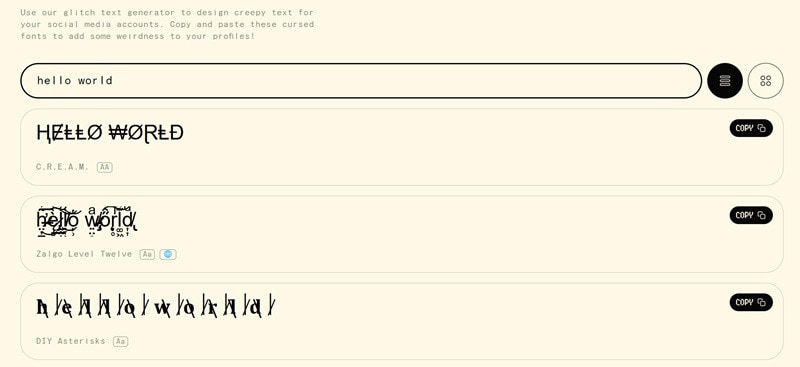
Glyphy provides a clean glitch generator text with several style options. Most of the text styles are still readable while still incorporating an edgy, tech-glitch style suitable for social media or digital content.
- Simple text generator with several font options to choose from.
- Copy and paste the text wherever you need it, including bios, captions, or chats.
- Simple interface, ad-free.
- Doesn't offer image, GIF, or video export.
- No customization of the glitch effect.
Free
Medium readability, compatible with most platforms (X, Instagram, Discord, Reddit, Twitch, etc.)
Only lets you choose the font style.
Users who want fast copy-paste text distortion for social handles or captions.
₲ⱠɎ₱ⱧɎ, Ģ̶̷̷̷̘̤͉̝͔̦̘̪̙͈̤͛̿ͧ̽̈́̔̿ͫͣ͗̿̀̈̍͊ͨ͘͠ͅļ̸̵̸̛̘͕͖̳͓̖͙̘̪̩̣̰̲̬͈̿̇̓̄ͫ̾̊̄ͦ̉̓̽́̀ͤ̑ͣ͡͞͞y̴̢̥̠̬̻̪̳̭̠̩̹̳̝͙̦̬͍̩͔̻͗̓̒̌̇ͥ͗ͥ̾̅ͣͪ̑͂̀͂ͨͨ̚͟͝p̷̧̥͙̪̯̯̫̫̲̠̩͍͉̝̒̀͆̋́̈́͋ͩͮ̍ͪ͜͡h̶̝̯̻ͤͬͩ̓ͮ̃_̱͔̰͑ͭͣ͋ͧ͂ͫ̍̈́̕͘y̲͙̘̰ͫ̈͗̋, 𝐆⃥⃒̸𝐥⃥⃒̸𝐲⃥⃒̸𝐩⃥⃒̸𝐡⃥⃒̸𝐲⃥⃒̸
5. Zalgo
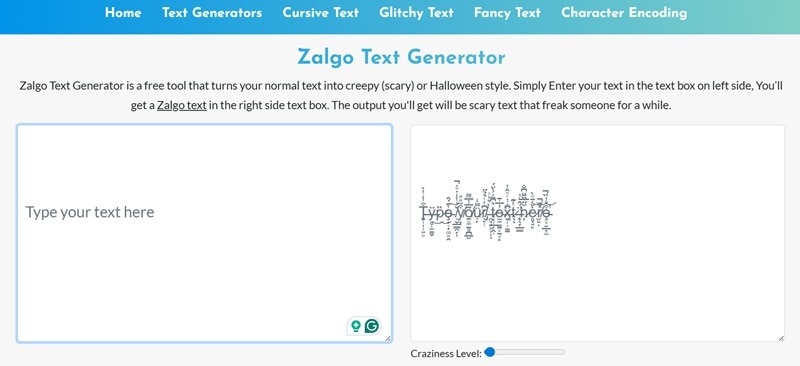
Zalgo remains the classic text distortion tool for chaotic or horror-inspired effects. It works similarly to LingoJam, where you can adjust the craziness level to control how intense the Unicode corruption gets around your letters. The higher you push that craziness level, the more characters start stacking above, below, and around your text.
- Adjustable craziness level.
- No registration needed, just copy and paste the result.
- Slider to control how intense or chaotic the glitch effect becomes.
- Heavy distortion makes long text unreadable.
- Only supports copy and paste.
- Doesn't support emoji.
Free
Low readability on some OS; better for short words or names.
Adjust distortion range precisely using a slider.
Turning plain text into a heavily garbled, distorted style. Ideal to use in design projects, creepy visuals, or dramatic titles.
z̵̦͕̰͓̙̏̿̍͗a̸͚͎̫̠̖̓̏̚ͅļ̸͕̹̲̦̅̈́̂g̷̪̩̮̘̹̖̣̖̺̅͊́̈́̉̕̚͜͝ŏ̴̧͓̠̜̜̜̍̈́̅͠, Ⱬ₳Ⱡ₲Ø, Z̵̤͙̗͉̈́a̶̧̝͖̲͖͊̑l̷̝̽̓̕͘g̸̨̪͍͚͓̅́̅͂ò̴̤̗̥̗
6. FlyerWiz
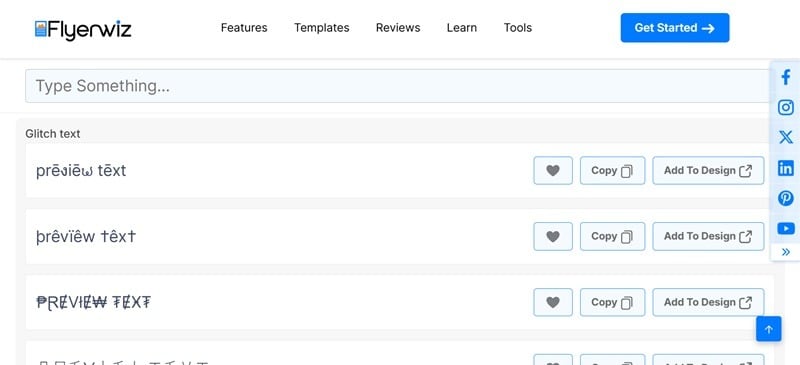
While you can copy and paste the text on its own, you can also drop it straight into your design through the FlyerWiz app on your phone if you want to place it on your image or layout featuring a glitch text effect. It comes with several glitch-like fonts to choose from, though most of them stay readable, unlike Unicode distortion.
- Lets you add and export it on high-resolution design files through the FlyerWiz app.
- You can save or favorite your preferred glitch text styles for quick access later.
- Limited Unicode text support.
- Customization options are only available inside the app.
Free.
FlyerWiz's text distorter works well on mobile, desktop, and stays readable across all social platforms since the glitch styles come from fonts, not overloaded Unicode characters.
Limited. Most adjustments, like placement, color, and layout, need to be done inside the FlyerWiz app.
Marketers, content creators, and event designers who want to make social posts or posters with a clean glitch look using a mobile-friendly design tool.
flฯērຟiຊ, ₣ⱠɎɆⱤ₩łⱫ, F̷l̷y̷e̷r̷w̷i̷z̷
7. Pixelied
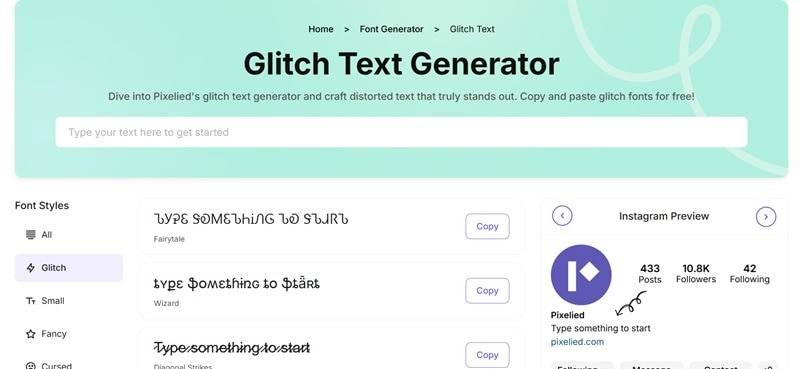
Pixelied offers an intuitive glitch text effect generator from available fonts that uses its built-in fonts to create a glitch look, instead of piling on heavy Unicode characters. This way, your text stays clear and easy to read whenever you are using it.
- Shows a built-in social media preview, so you can see how your text will look on Instagram or Facebook.
- Most of the glitch effect stays readable and doesn't completely break the text.
- Plenty of glitch-style fonts to choose from.
- Not optimized for Unicode glitch effects.
- Limited customization options beyond the available font styles.
Free.
High readability; results ideal for social media bios, captions, videos, websites, and banners.
Limited to basic adjustments. You can only choose the font style, with no advanced controls for distortion or color.
Anyone who needs a web-friendly glitch text effect for social media bios, captions, thumbnails, or simple graphics.
ᎮᎥጀᏋᏝᎥᏋᎴ, ͓̽P͓͓̽̽i͓͓̽̽x͓͓̽̽e͓͓̽̽l͓͓̽̽i͓͓̽̽e͓͓̽̽d͓̽, Ᵽɨxɇłɨɇđ
8. Bigbangram
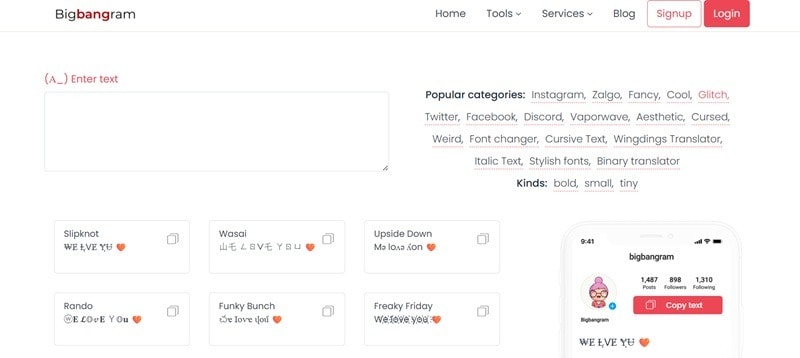
Bigbangram is a simple tool that converts your words into glitchy text optimized for social platforms. It's a simple way to upgrade your bio or captions with a digital distortion effect that remains legible. You only need to type the word, pick a font style, and copy and paste the text.
- Glitch text stays readable on all major social platforms.
- Supports and reads emoji (though not affected).
- Offers different styles with varying levels of readability.
- Limited style variations.
- No visual export or animation.
- Few font style options compared to other tools.
Free
Works well on multiple social media platforms, such as Instagram, X, and Facebook.
You can only pick the font style, with no deeper controls for distortion, colors, or other effects.
Social media captions, bios, display names, or short text that needs a glitch effect.
฿ł₲฿₳₦₲Ɽ₳₥, ҍ์ցҍąղցɾąʍ, ƀɨǥƀȺnǥɍȺm
9. Creative Fabrica
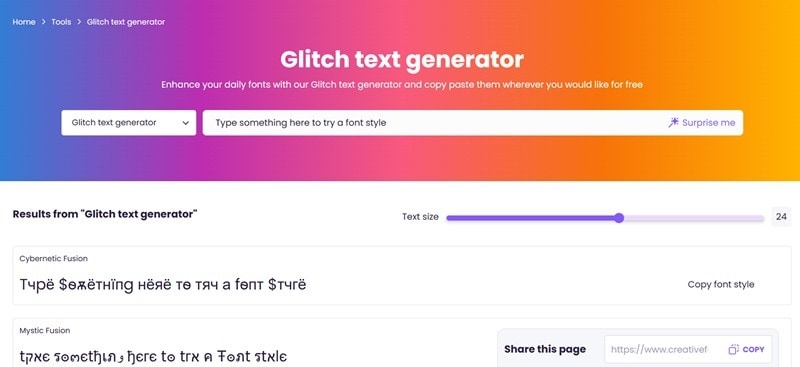
Creative Fabrica is actually a creative assets marketplace that also offers a text font generator with glitch-style options. Its glitch effect text generator works by transforming your input into stylized font characters, so you only need to type your text, pick one of the available glitch looks, and copy it to use in your project.
- You can explore plenty of other font styles beyond glitch.
- Adjustable text size so you have more flexibility when previewing and choosing the look you want.
- Lacks advanced customization options like color changes or distortion controls.
- The distortion level depends on the font style you choose.
- Highly distorted styles, like Distorted Harmony, may not display correctly on mobile or certain messaging apps.
Free.
Readability is generally good for most styles, and the text works on most social media and messaging platforms. More complex glitch fonts may vary in appearance depending on the device.
Customization is limited to the preview area, where you can adjust the text size. If you need deeper control, such as colors, spacing, or distortion tweaks, you'll have to use an external design tool.
Social media posts, display names, captions, and simple projects where you want a glitch look.
͓̽c͓͓̽̽r͓͓̽̽e͓̽a͓͓̽̽t͓͓̽̽i͓͓̽̽v͓͓̽̽e͓̽ ͓̽f͓̽a͓͓̽̽b͓͓̽̽r͓͓̽̽i͓͓̽̽c͓̽a͓̽, ȼɍɇȺŧɨvɇ fȺƀɍɨȼȺ, ̯͉̀̇ͥ̕c̸̵̠̦̞͕̺͛̔ͨ̀ͮ̀̚ͅr̷̨̲̦̰̪̠͈̥̻̗̣͚̺̿̅̓̇̀̒̐̏̀̕͜͟e̒ͦ̇̈҉͙͓̳a̷̙̬͍̪̗̝̤̪͗̀ͫ̂͏̨̯̲̭͞t̵̡̠̘̙̮̥̯̰̮̘̣̭̰͓̖̗̄͋̆͗̊ͮ̏̑ͯ̈̉͞i̓͏͙̬̝͉͎̱̗͖͙̼͍ͪͪ̽̑͊́͢v̷̩̣̗̩͇̦̠͈̥̻̗̣͚̺̎͂̀́̏̀̕e̒ͦ̇̈҉͙͓̳ ͉͎̱̗͖͙̼͍ͪͪ̽̑͊́͢v̩̣̗̩͇̦̎͂̀́a̷̵̙̬͍̪̗̝̤̪͚̗͗̀ͬb̷̵̼̠͕͔̯̟̖͙͕̺̋ͥ̋ͯ͆̍ͮ̀̚̚͢ͅr̨̲̦̰̪̮̘̣̭̰͓̖̗̿̅̓̇̀̒̐̆͗̊ͮ̏̑ͯ̈̉͜͟͞i̓͏͙̬̝̯͉̀̇ͥ̕c̸̠̦̞͛̔ͨ̀a̷̙̬͍̪̗̝̤̪͗̀
How to Add and Customize the Glitchy Text on Your Video?
Copying and pasting the text you generated using the glitch text generator is perfectly fine for social posts or messages, but if you want it to move, animate, or blend into your video as a title or overlay, you’ll need to bring it into a video editor. A beginner-friendly option that can handle this easily is Wondershare Filmora.
You can bring your glitchy text into Filmora, add extra distortion, RGB split, or flicker effects, and instantly preview how everything looks in motion. After that, you can turn it into a music intro, a gaming clip, or a cool digital title for your video.
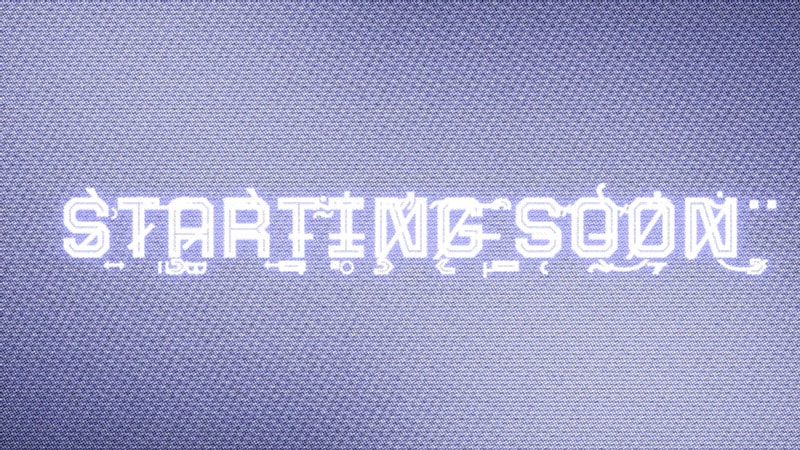
The text effects are easy to adjust, so you can match the look you want and blend it nicely with any glitch text you made from any of these glitch font generators.
Why Use Filmora to Add and Animate Glitch Text
- Title & Text presets: Features tons of ready-made title styles, including several glitch-style titles.
- Keyframe Animation: Precise control over position, scale, and opacity for animated glitches.
- Built-in Glitch Effects: Add distortion, RGB split, static textures, noise, or shake effects to enhance the digital glitch feel.
- Font Support & Styling: Import your own fonts and fine-tune spacing, size, weight, shadows, and other styling controls, according to your needs.
- Blend Modes & Opacity: Layer your glitch text on top of your video and blend it in so it looks naturally part of the scene.
- Export Flexibility: Export as MP4, MOV, or animated GIF at social-ready presets.
- Fast Preview & Timeline: Real-time preview enables you to adjust glitch intensity and timing quickly.
 Secure Download
How to Customize and Make Glitch Text in Filmora
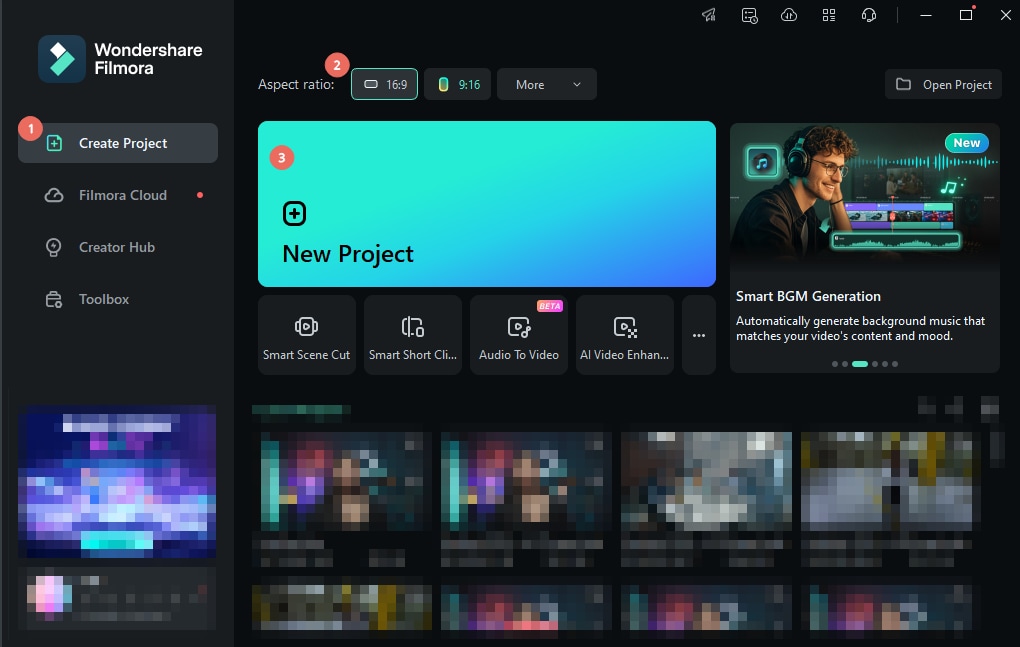
Step 1: Create a New Project
Open Filmora, choose your preferred aspect ratio, and start a new project.
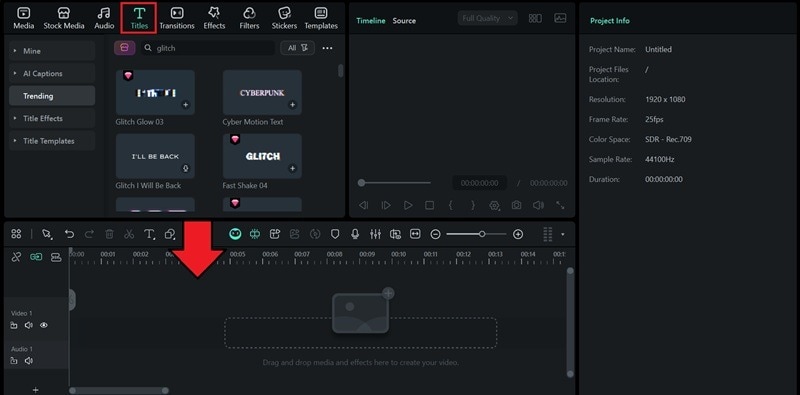
Step 2: Add a Title
Head over to the Titles tab and pick a preset. If you want something that already feels glitchy, search for a glitch-style title in the library. Drag your chosen title onto the timeline.
Step 3: Customize the Text
Select the title track on the timeline to open the editing panel. Paste your glitchy text from the glitch text generator.
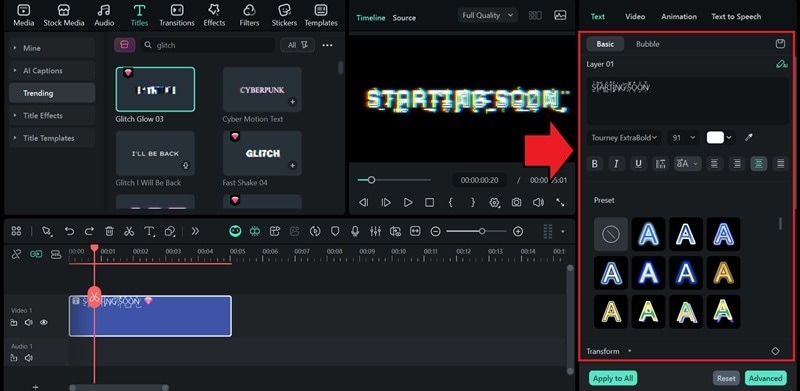
After that, you can also adjust size, weight, and alignment so the text reads clearly on screen.
Step 4: Add a Background Clip (Optional)
You can enhance the glitch text by adding a supporting background clip or image under the title layer. Either import your own visuals or pick something from Filmora’s Stock Media library.
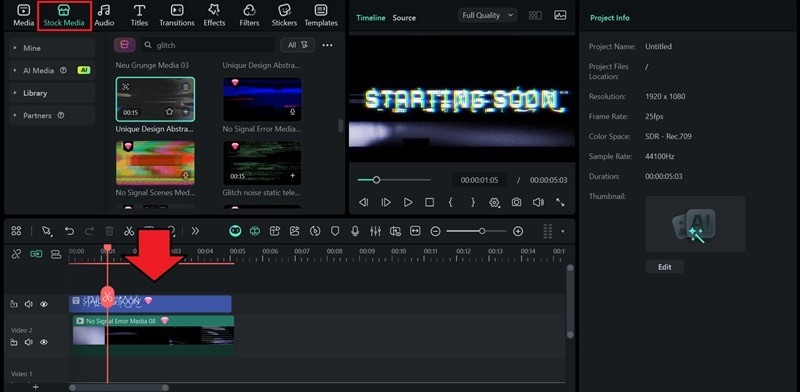
Step 5: Add a Glitch or Distortion Effect
Open Effects and search for glitch-style filters. Filmora has options like RGB Split, Shake, Wave Distortion, Static Noise, and more. Layering a couple of these can give your text a stronger glitch vibe.
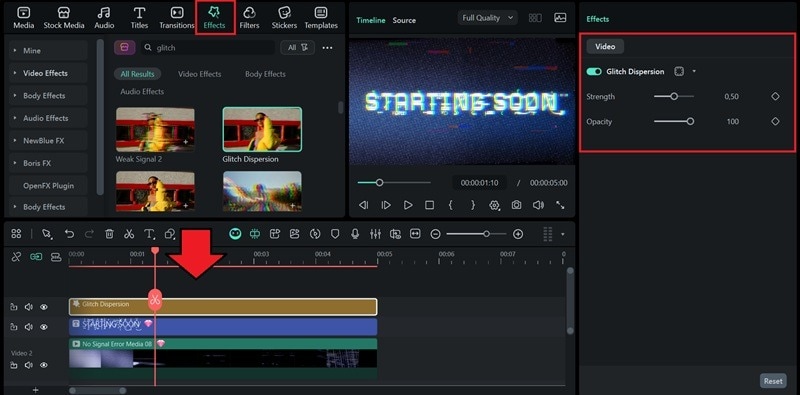
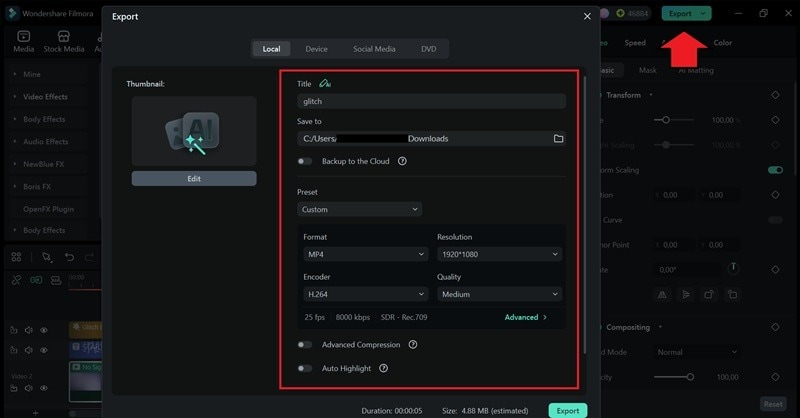
Step 6: Export your Glitch Text Animation
Click "Export," then choose either GIF for short loops or MP4 for video. You can also fine-tune settings like resolution, frame rate, and bitrate to match your platform.
 Secure Download
Conclusion
Have you decided which glitch text generator you want to try? When plain text just doesn’t hit the vibe you want, glitch text effects can instantly make your words feel louder, edgier, and more attention-grabbing.
However, for those who want to take it further, from animating to layering and blending these effects into videos, Filmora provides an all-in-one editing solution. You can add the glitchy text you just generated, and then play with RGB split, flicker animations, and basically turn simple text into something bold that you can post anywhere.
