


 TL;DR:
The primary advantage of ImagineArt 2.0 over the 1.5 models is its superior prompt adherence and strict composition control for commercial-grade photorealism, rather than a dramatic leap in base image quality.
● ImagineArt 2.0 and 1.5 Pro require 25 credits per image and are optimized for exact framing and native 4K deliverables respectively, whereas ImagineArt 1.5 costs 15 credits and remains the most cost-efficient option for standard photorealism.
● Consistent text rendering remains a fundamental weakness across the entire model family, making them unsuitable for typographic layouts without utilizing external editors like Wondershare Filmora.
● The 2.0 model tends to generate minimal interpretations unless explicitly prompted with exact lighting, mood, and composition details, while the original ImagineArt 1.0 model has been completely removed from the platform.
Ask AI for a summary
 ChatGPT
 Perplexity
 Gemini
 Claude
 Grok
Grok
We know ImagineArt as an AI platform with its own proprietary image generation that shares the same name. Now, with the launch of ImagineArt 2.0, the platform introduces what its team calls “the most capable model.”
But how much better is it compared to ImagineArt 1.5 and 1.0? We put all three generations side by side to find out the key differences and whether ImagineArt 2.0 really lives up to the upgrade.
Part 1. ImagineArt Image Generator: Quick Overview
The ImagineArt AI image generation model, developed by the ImagineArt platform, is centered on photorealism. It started with ImagineArt 1.0, built on a Mixture of Experts (MoE) architecture, which laid the foundation for what came after.
ImagineArt 1.5 built on top of it with improved photorealism, prompt accuracy, text rendering, and expression capture. Then came ImagineArt 1.5 Pro, a higher-resolution variant optimized for production-ready outputs, before the release of ImagineArt 2.0, the current flagship.
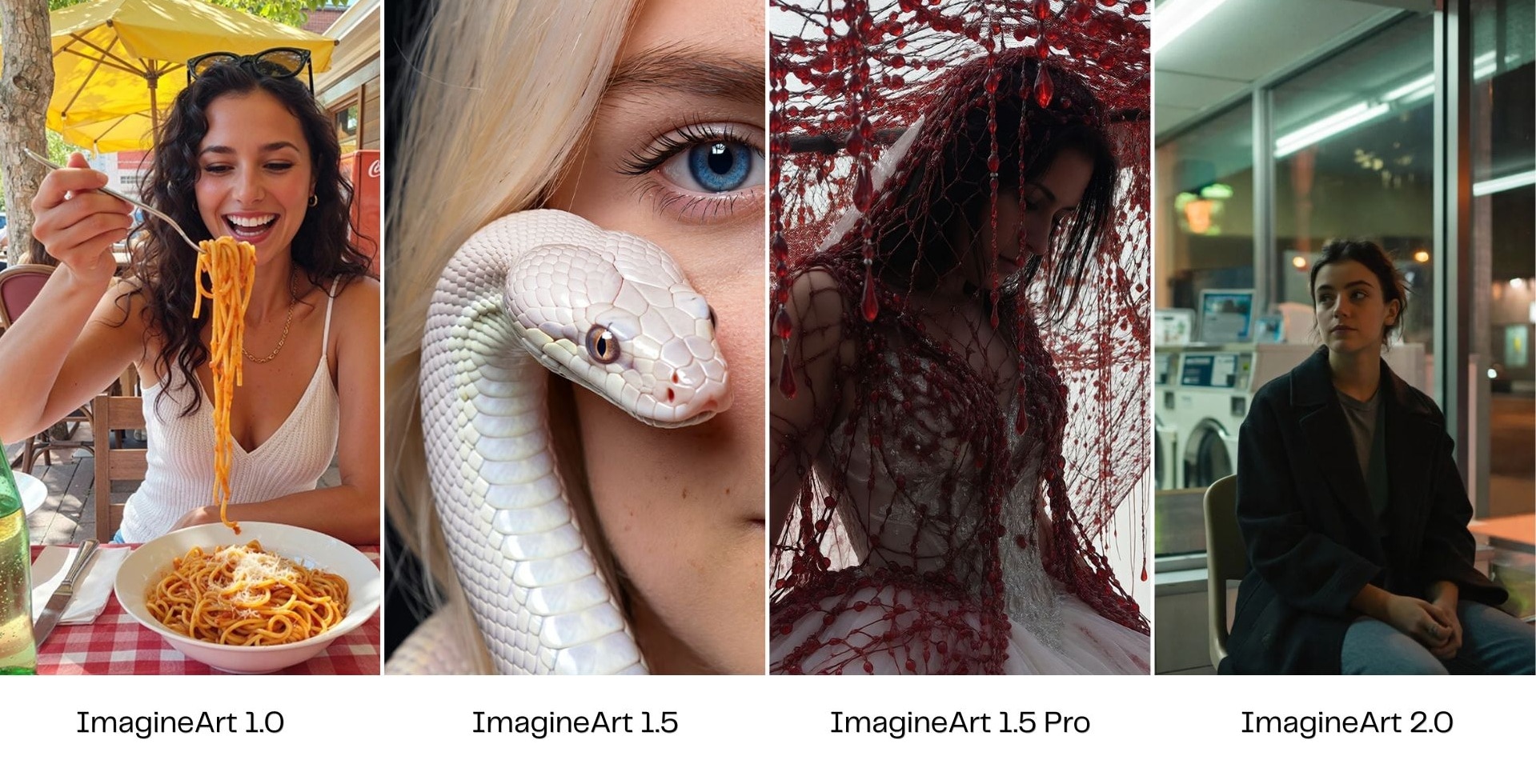
What’s New in ImagineArt 2.0
ImagineArt 2.0 delivers a few key capability upgrades over the 1.5 family:
- Next-generation photorealism, with greater detail fidelity across all subject types.
- Enhanced prompt comprehension, with better handling of complex prompts involving mood, lighting, composition, and relationships between elements.
- Superior composition control with improved subject placement, framing, depth of field, and spatial accuracy.
- Most accurate rendering of human subjects, with better skin details, facial expressions, and body proportions.
- Commercial-grade output, suitable for campaigns, product launches, editorial visuals, and high-quality hero images.
- Wide subject range, which performs well across portraits, landscapes, product photography, architecture, and lifestyle imagery.
Can You Generate Images for Free?
ImagineArt offers a free plan with 100 free credits for new users after registration. And to generate with an ImagineArt model, the number of credits required depends on the model you use:
- ImagineArt 1.5: 15 credits per image
- ImagineArt 1.5 Pro: 25 credits per image
- ImagineArt 2.0: 25 credits per image
Note: The ImagineArt 1.0 model has been removed from the ImagineArt platform, so it is no longer available for image generation.
More advanced features and higher usage limits require a subscription plan with additional credits. Check out ImagineArt’s pricing (2026) below:
| Free | Basic | Standard | Ultimate | Creator | |
| Pricing | $0 | $13/mo or $9/mo (billed yearly) | $30/mo or $20/mo (billed yearly) | $50/mo or 34/mo (billed yearly) | $250/mo or 175/mo (billed yearly) |
| AI Credits | 100 | 3,000 | 8,000 | 16,000 | 100,000 |
| Monthly Image Generations | ~4-5 | ~600 | ~1,600 | ~3,200 | ~20,000 |
| Supported Models | Basic | Basic | Basic and premium | Basic and premium | Basic and premium |
| Concurrent Image Generations | - | 4 | 8 | 12 | 16 |
| Visibility | Public | Public | Private | Private | Private |
Part 2. ImagineArt 2.0 vs ImagineArt 1.5 vs ImagineArt 1.0 at a Glance
The improvements between ImagineArt versions are not equally noticeable across every use case. Before diving into detailed tests and side-by-side examples, here’s a quick overview of how ImagineArt 2.0, 1.5 Pro, 1.5, and 1.0 compare in key areas.
| ImagineArt 2.0 | ImagineArt 1.5 Pro | ImagineArt 1.5 | ImagineArt 1.0 | |
| Realism | ⭐⭐⭐⭐⭐ | ⭐⭐⭐⭐⭐ | ⭐⭐⭐⭐ | ⭐⭐⭐ |
| Prompt accuracy | ⭐⭐⭐⭐⭐ | ⭐⭐⭐⭐ | ⭐⭐⭐ | ⭐⭐⭐ |
| Text rendering | ⭐⭐⭐ | ⭐⭐⭐ | ⭐⭐ | ⭐⭐ |
| Resolution | High-res output (flagship) | Native 4K | Standard res | Standard res |
| Multi Reference | Supported | Supported | Supported | Supported |
| Best for | High-stakes commercial work, hero shots, final deliverables | 4K output, composition control | Cost-efficient photorealism | Concept generation |
Part 3. Testing How Each Version Performs Across Different Projects
To keep the comparison fair, we ran the same prompt across all three versions in each category.
1. Portraits and Human Realism
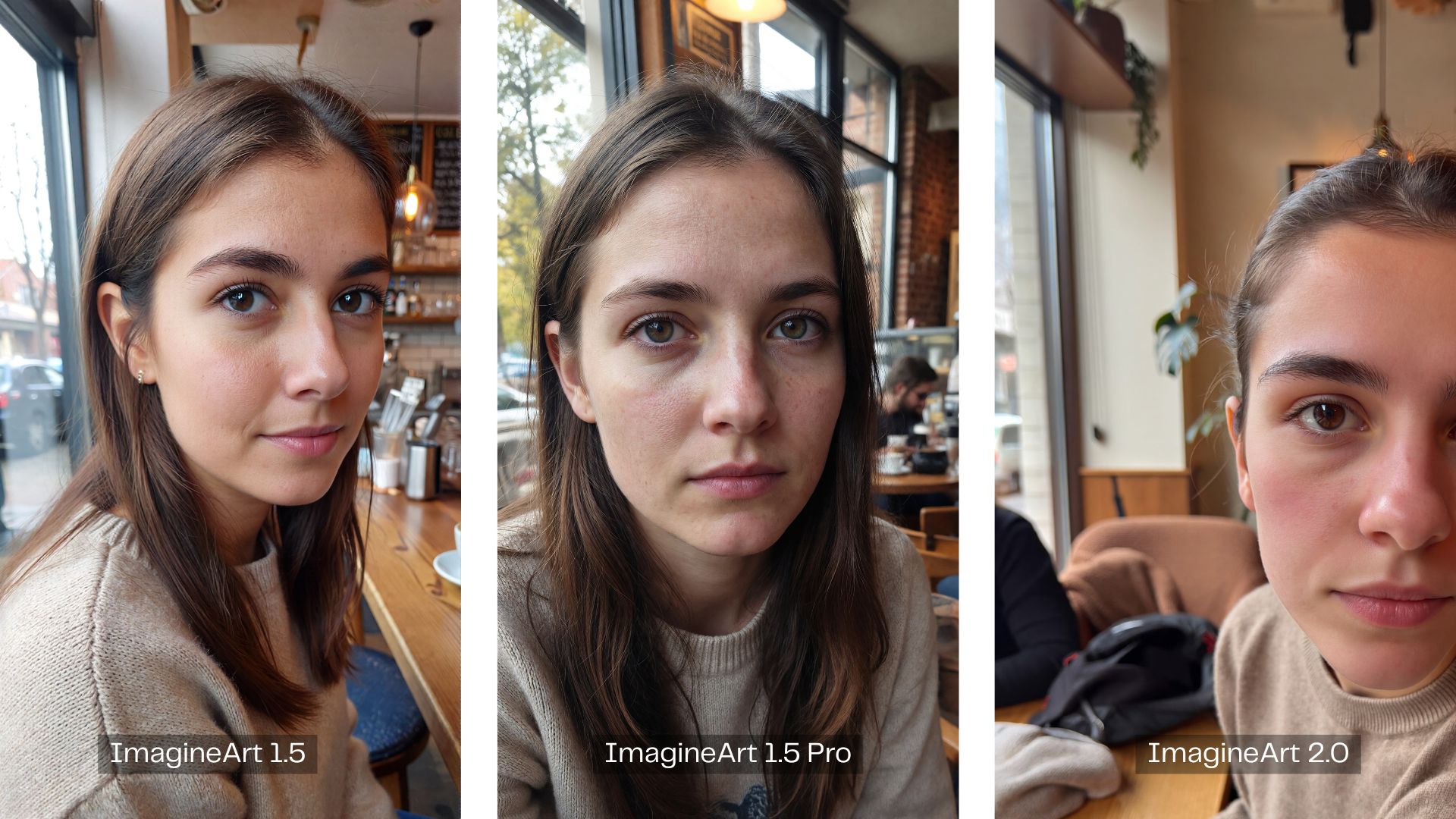
ImagineArt has always leaned hard into photorealism, and it shows across all three versions. Regardless of which model you pick, portraits come out with natural lighting and convincing skin detail. ImagineArt 1.5 already covers the ground you need at a lower cost than 1.5 Pro or 2.0. The upgrade to 2.0 becomes more justified when you need more detail work.
2. Concept Art
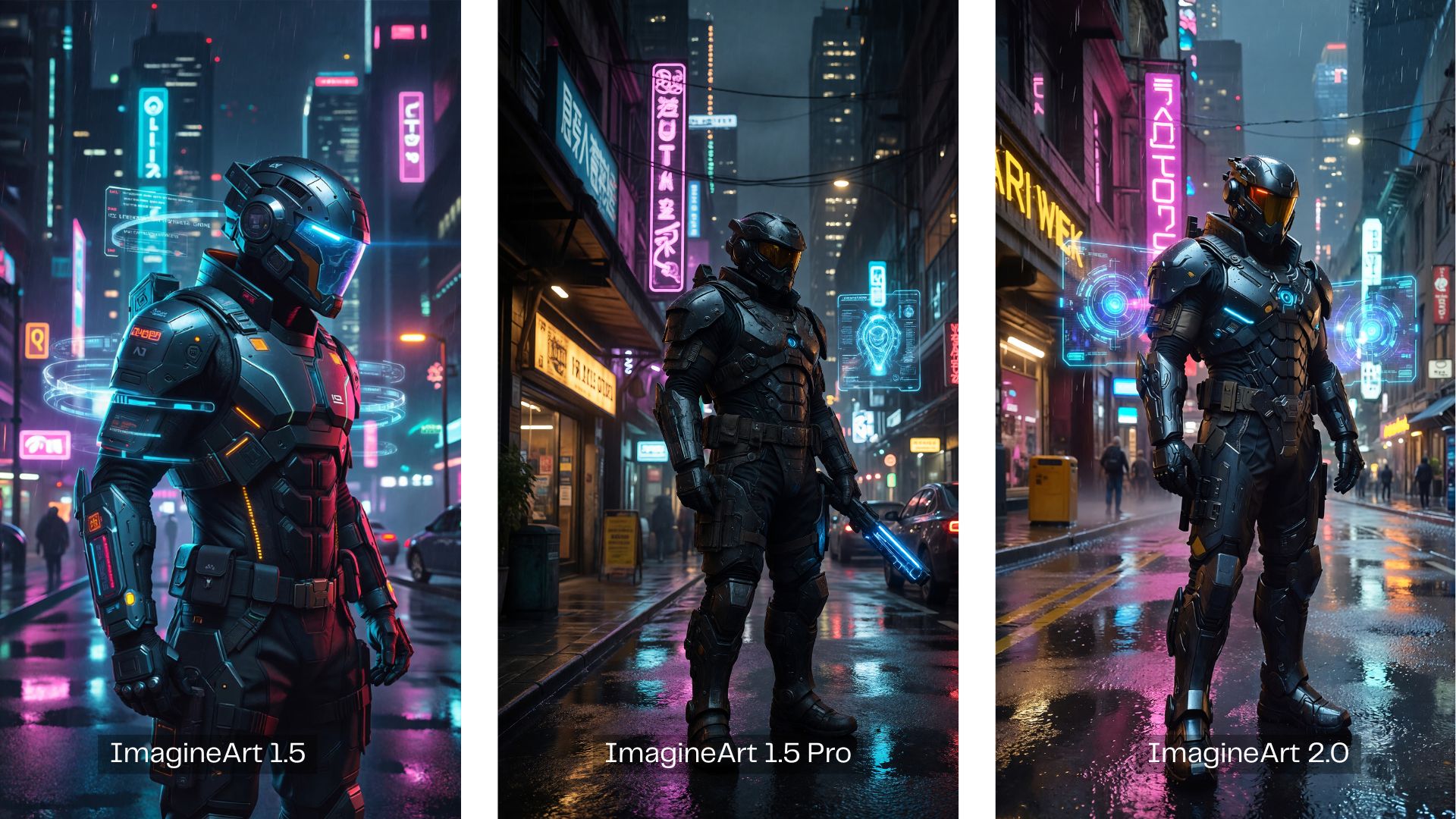
The gap between ImagineArt 1.5 Pro and 2.0 is narrow in the concept art we tested, since both handle lighting and atmosphere well. But outputs from ImagineArt 1.5 still carry a slightly plastic look, with less convincing surface depth and flatter lighting overall. Both 1.5 Pro and 2.0 have already addressed this with a visible improvement in lighting quality.
3. Product Photography
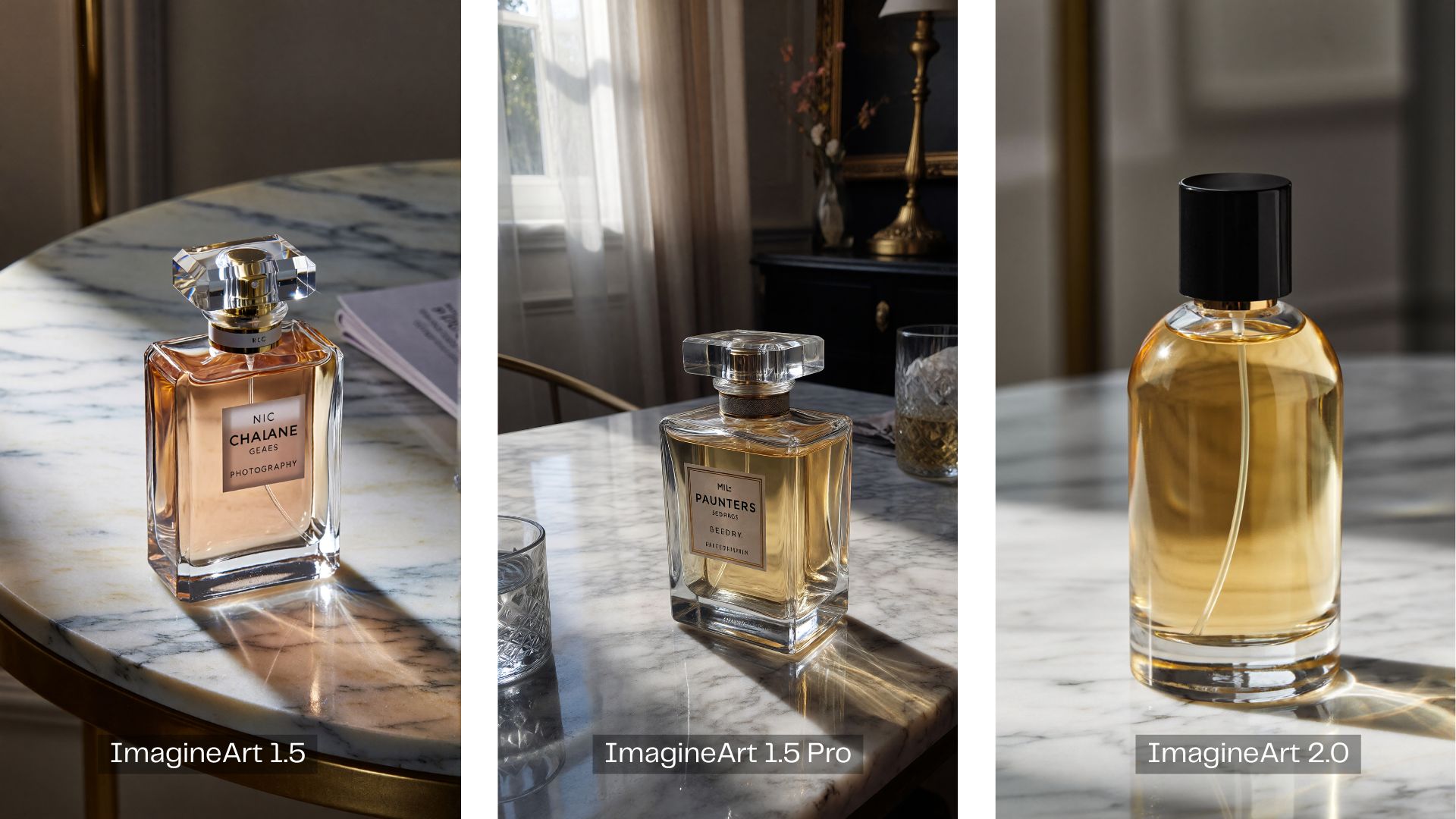
We prompted all three versions to generate “professional product photography of a luxury perfume bottle on a marble table.” ImagineArt 2.0 rendered a clean result, but it stayed minimal unless you explicitly described how the bottle should look. ImagineArt 1.5 and 1.5 Pro took more creative initiative by adding more detail on the perfume based on their own interpretation of the prompt.
4. Text in Images
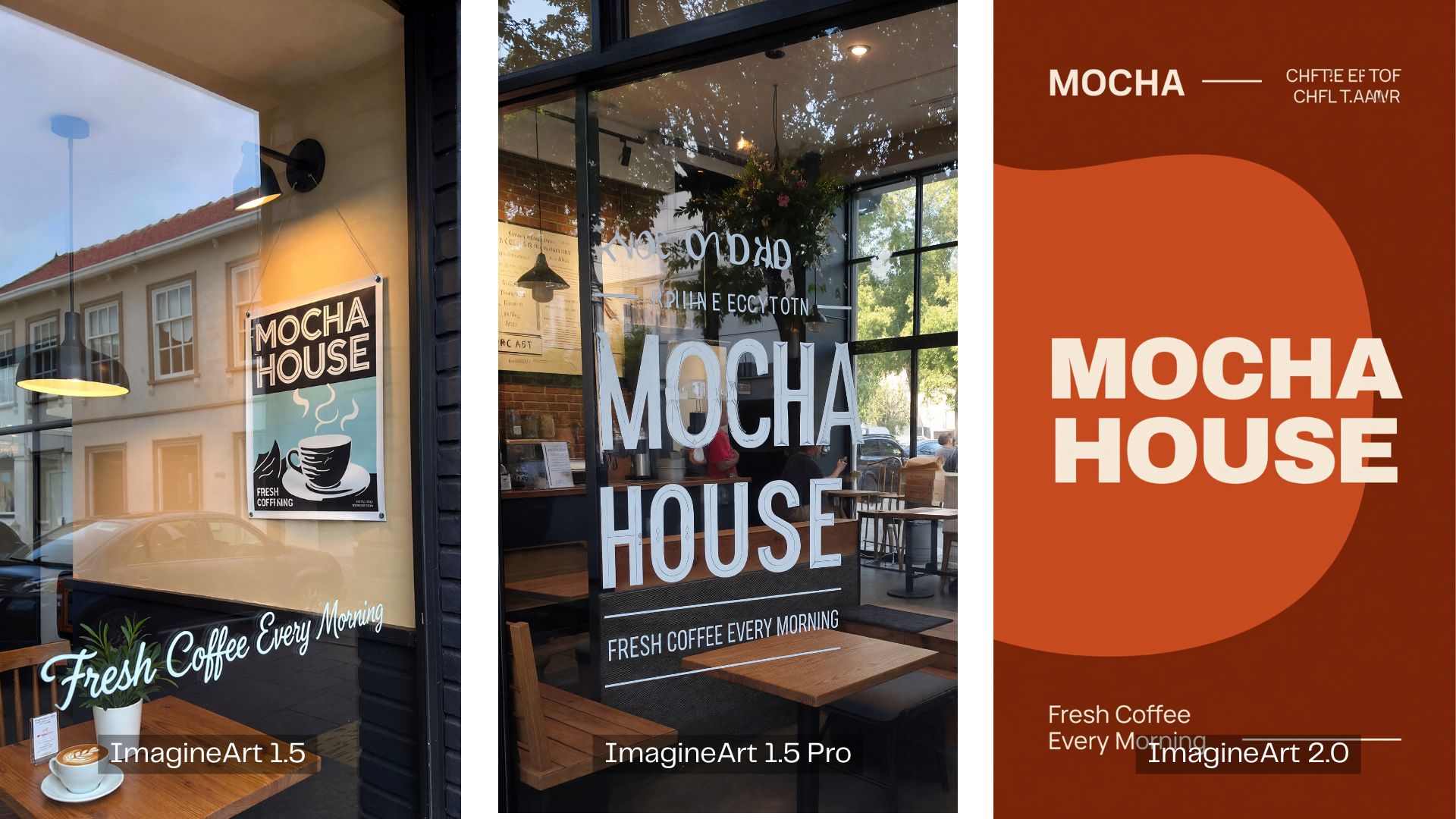
ImagineArt is still weak on in-image text across generations. Although three versions can render short labels or simple phrases legibly, it’s still not consistent. Text generated outside of what you explicitly prompt tends to come out unreadable or scribbled.
Where 2.0 separates itself is prompt adherence. We asked for a poster design, but only ImagineArt 2.0 actually produced a poster. The other two defaulted to a photo.
Verdict: How Good is ImagineArt 2.0?
For the overall image quality, the difference between ImagineArt 1.5 Pro and ImagineArt 2.0 is actually fairly small. The biggest upgrade is in prompt accuracy, with ImagineArt 2.0 doing a better job of following detailed instructions and capturing specific elements from your prompts.
If you want to save credits, ImagineArt 1.5 actually still delivers solid results, especially for photorealistic images. However, text rendering is still a weak point across the entire model family. It’s not made for text-heavy formats like infographics or typographic layouts.
Pros and Cons of ImagineArt 2.0
- Best photorealism in the ImagineArt lineup
- Stronger prompt adherence than any previous version
- Output quality holds up for commercial and production use
- Native support for all major aspect ratios without quality loss
- Fast processing
- Not suitable for text-heavy formats
- Requires more explicit prompting for better results
Bonus: The Next Step After Creating Images with ImagineArt
ImagineArt 2.0 can help you create the image, but the creative process doesn't have to end there. If you're looking to animate your AI-generated images, build them into a full video, or add text and graphics, you can take your creation straight into Wondershare Filmora.
 Secure Download
Edit and Create More Content with Filmora
Filmora is a video editor built for creators who want professional results without the complexity of advanced editing software. It covers everything from basic cuts to AI-powered tools, which makes it a great place to take your creation further.
The experience with Filmora is different from working inside ImagineArt. While ImagineArt offers more than image generation alone, Filmora is a dedicated editing environment where:
- You don't have to upload and re-upload every time you want to edit, adjust, or repurpose your content
- You can edit more freely with manual controls that don't rely entirely on AI generation to get the result you want
A few things you can do with Filmora after generating your images include:
Generate and Animate Your Images
Filmora's AI tools cover both AI image generator (powered by GPT Image 2, Nano Banana 2 and Nano Banana Pro) and Image-to-Video features that cover animation from text prompts or ready-made AI templates, so you can bring your images to life without starting the whole process yourself.
Add Text or Caption As You Wish
Text rendering is still a weak point for ImagineArt 2.0. In Filmora, you can add titles, captions, and animated text directly on your visuals with full manual control over font, size, style, and placement.
Build a Full Video from Your Images
Filmora lets you assemble your ImagineArt outputs into a complete video with transitions, background music, voiceover, and color grading on one timeline. You get the speed and convenience of AI image generation, along with the creative control of a full-featured video editor.
Clean Up Your Outputs
Filmora's AI background remover, image enhancer, and portrait retouching tools work well as a post-processing step, especially for product shots or portraits that need refinement before publishing.
Secure DownloadConclusion
What actually changed the most between ImagineArt 2.0 and ImagineArt 1.5 is how well the model follows your instructions. They do still nail it on photorealistic images, but the weakness in text rendering is still something none of the versions have fully solved.
In such cases, the best you can do is to take your ImagineArt outputs into an AI editor like Filmora, where you can generate and edit you images, such as adding titles, captions, and animated text, with full manual control.
FAQs
-
Does ImagineArt 2.0 support image editing?
While you can edit images on ImagineArt platform using a text prompt, the model it supports doesn’t include ImagineArt 2.0. You can edit your image through the Inpaint feature with Nano Banana Pro, Flux 2 Pro, or Seedream 4.5 instead. -
What are the differences between ImagineArt 1.5 and ImagineArt 1.5 Pro?
ImagineArt 1.5 and 1.5 Pro share the same foundational model, but 1.5 Pro is built for production-ready output. The key additions in the Pro version are native 4K resolution, stronger composition logic, and more reliable visual balance out of the box. -
Is ImagineArt 2.0 better than Midjourney or DALL-E?
It depends on what you're generating. ImagineArt 2.0 is strong in photorealism and prompt adherence, which puts it in competitive territory with Midjourney V7 and DALL-E 3 for realistic imagery. Midjourney still has an edge in stylized and artistic outputs, while DALL-E 3 integrates tightly with ChatGPT for conversational image generation. -
How do I get better results from ImagineArt 2.0?
Be specific in your prompts. Include details on lighting, mood, composition, color palette, and subject placement. ImagineArt 2.0 follows prompts more literally than previous versions, so the more direction you give, the closer the output will be to what you have in mind. This version tends to stay minimal unless you tell it exactly what you want.
