

 100% Security Verified | No Subscription Required | No Malware


 ChatGPT
 Perplexity
 Gemini
 Claude
 Grok
Grok
A YouTube subscribe template can make all the difference when you’re trying to grow your channel. Viewers often forget to subscribe, and a simple reminder can change that. A subscribe template gives you a pre-made animation that encourages people to like, subscribe, and hit the bell.
The result is a tool that does more than prompt action. It strengthens your brand identity, keeps your channel consistent, and helps retain your audience. If you are a content creator looking to boost your reach, keep reading. This article will also show you how to use the right YouTube subscribe animation template for your videos.
In this article
Part 1: Free and Paid Resources for Like and Subscribe Templates
As a content creator or video editor, you know every channel has different needs and budgets. For this reason, it helps to explore both free and paid options, because each can add real value. Easily customize a like and subscribe template for YouTube videos from the list below:
 secure download

Pink Retro Subscribe YouTube Video
A glowing magenta subscribe button with cyan “like” and “share” buttons on a dark brick wall. Perfect for gaming, EDM sets, or tech reviews.
Red and White Simple Subscribe Button YouTube Video
Clean and professional with a bold red button and bell icon. Works well for tutorials, online classes, or cooking channels.
Black and White Modern Thank You for Watching Video
Features a “Thanks for Watching” outro with a glossy red subscribe button. Best for business, finance, or coding tutorials.
Red and Yellow Modern Subscribe Template
Flashing red and yellow animations for like, comment, and subscribe. Great for vlogs, workouts, or dance tutorials.
Purple Playful Illustrative Subscribe Button YouTube
Retro pixel-style purple graphics for gaming, animation, or toy content.
Colorful Modern Travel Vlog YouTube
A collage layout with a traveler, tropical visuals, and a bold subscribe button. Perfect for travel vlogs and food tours.
Like Subscribe Green Screen YouTube
Overlay a green screen subscribe popup on any background. Works for cooking, reaction, or review videos.
Profile Subscribe Button
A red subscribe button with a bell and profile cutout. Great for personal brands, coaches, and vloggers.
Neon Red Subscribe YouTube
Minimal red pixelated text on black. Best for tech reviewers, esports, or digital artists.
Like Share Subscribe Video
Metallic 3D lettering for “like,” “share,” and “subscribe.” A polished look for business, real estate, or motivational content.
Cat Mascot Subscribe YouTube
A playful outro with a yarn ball and cartoon cat pushing the subscribe button. Fun for pets, family, or comedy skits.
YouTube Subscribe Video
A complete outro with a central subscribe button, prompts for engagement, and a thank-you note. Works for cooking, fashion, or educational content.
Part 2: Choosing the Right YouTube Subscribe Animation Template
The best choice for a subscribe template is one that feels true to your content and supports your channel’s goals. What this means is you need to look past looks and focus on how it works with your style, pacing, and audience. Below are some tips for you to spot the right fit.
Consider Animation Speed
Fast-paced vlogs benefit from quick animations, while tutorials may need slower, calmer motions to avoid distraction.
Match Your Channel’s Style
Minimalist channels work best with subtle animations, while gaming and entertainment thrive on bold, colorful designs.
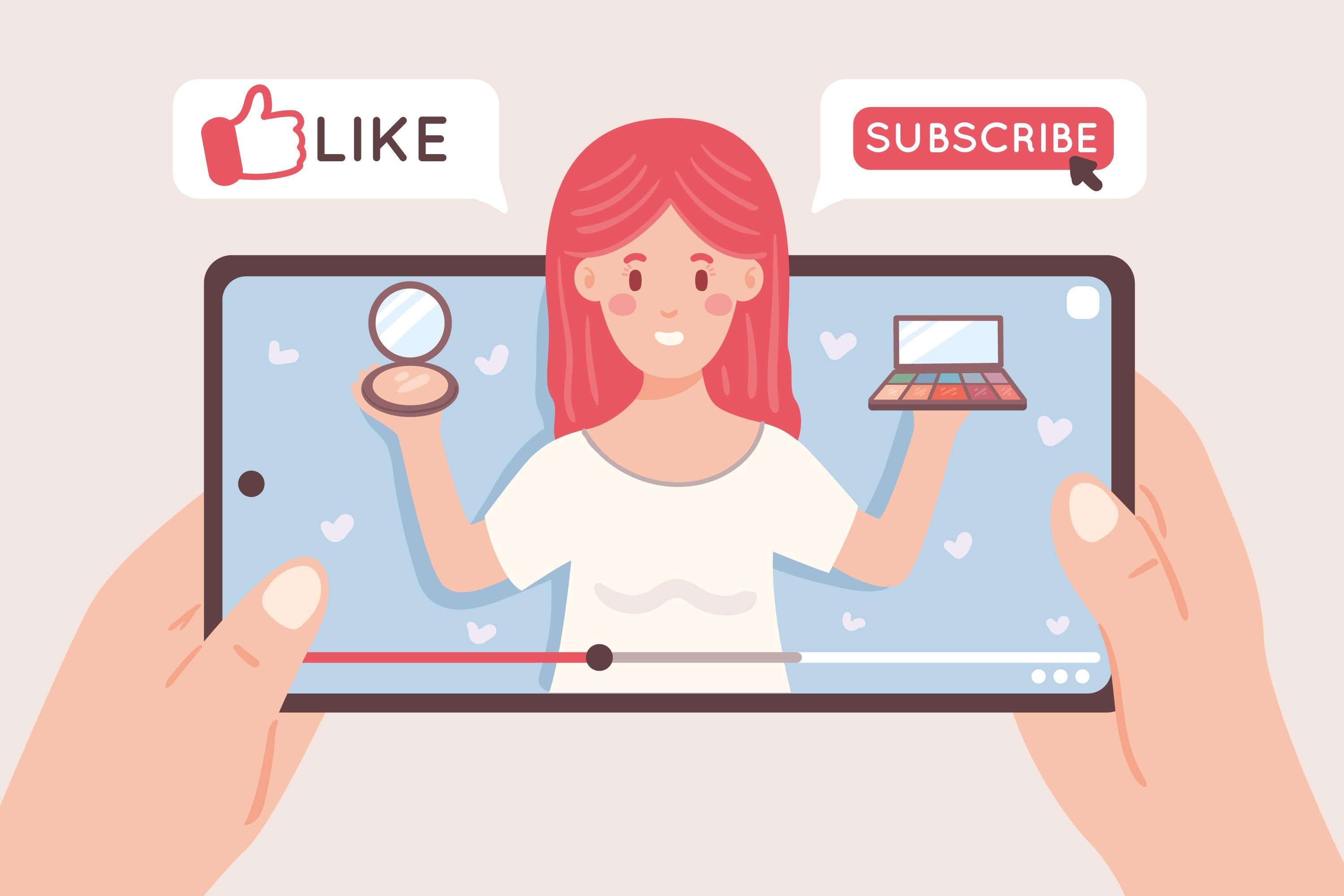
Think About Sound Design
Choose subtle sounds for educational content, or bold clicks and swooshes for gaming or sports channels.
Focus on Audience Experience
Animations should enhance action, not distract from content. A well-timed template keeps viewers engaged naturally.
Part 3: Simplify Adding Subscribe Animation for YouTube Videos with Filmora
If you opt for a video editing software, it is a good idea to find tools that do not consume much time and help you produce professional-looking content. Wondershare Filmora covers both aspects and has YouTube subscribe templates that you can edit in a few minutes.
- Built-in Assets: Templates, stickers, titles, and audio cues like the subscribe bell.
- Ease of Use: Drag-and-drop editing and preset animations for quick professional results.
- Advanced Features: Auto-captions, text-to-video, and more to save time.
- AI Thumbnail Creator: Edit 270+ templates or generate optimized thumbnails with AI.
Part 4: Steps to Add a YouTube Subscribe Animation to Videos
Adding a YouTube subscribe animation template to your video is easier than you might think. Here’s how to add a subscribe button in Filmora:
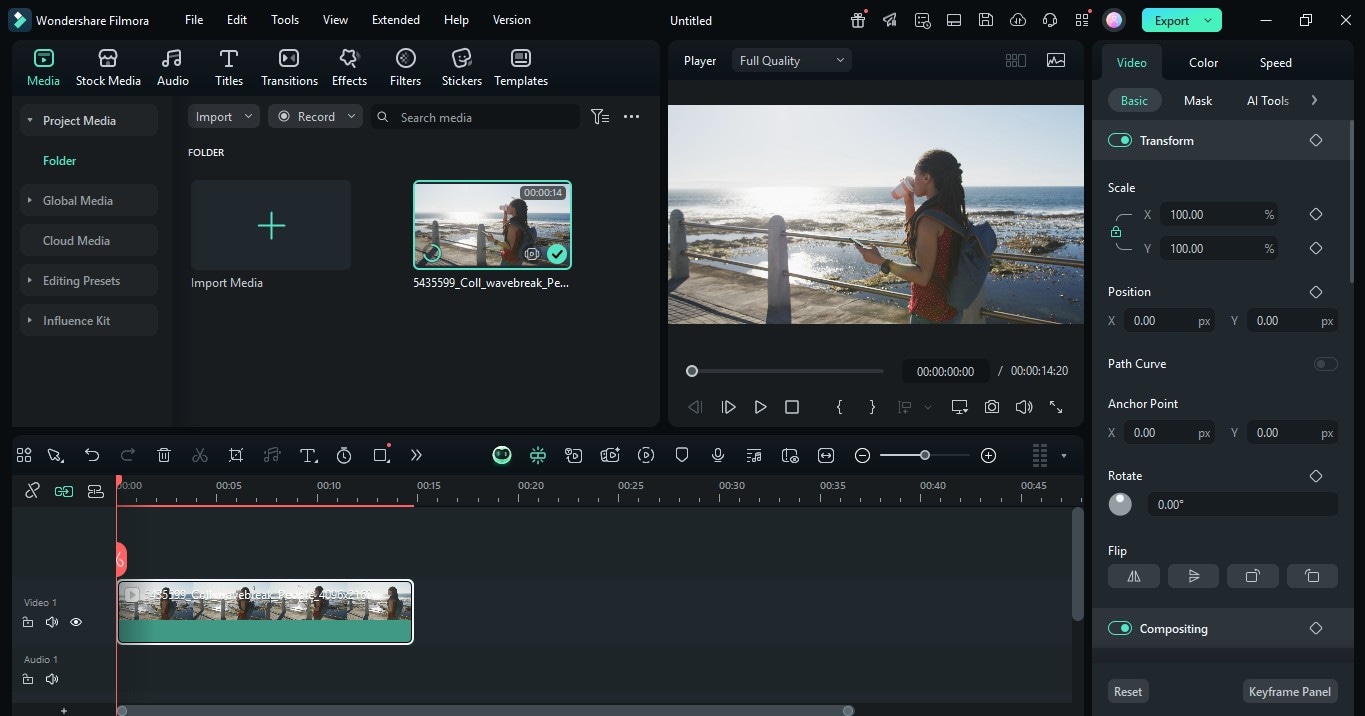
- Step 1: Start a new project, import your media, and drag them to the timeline.
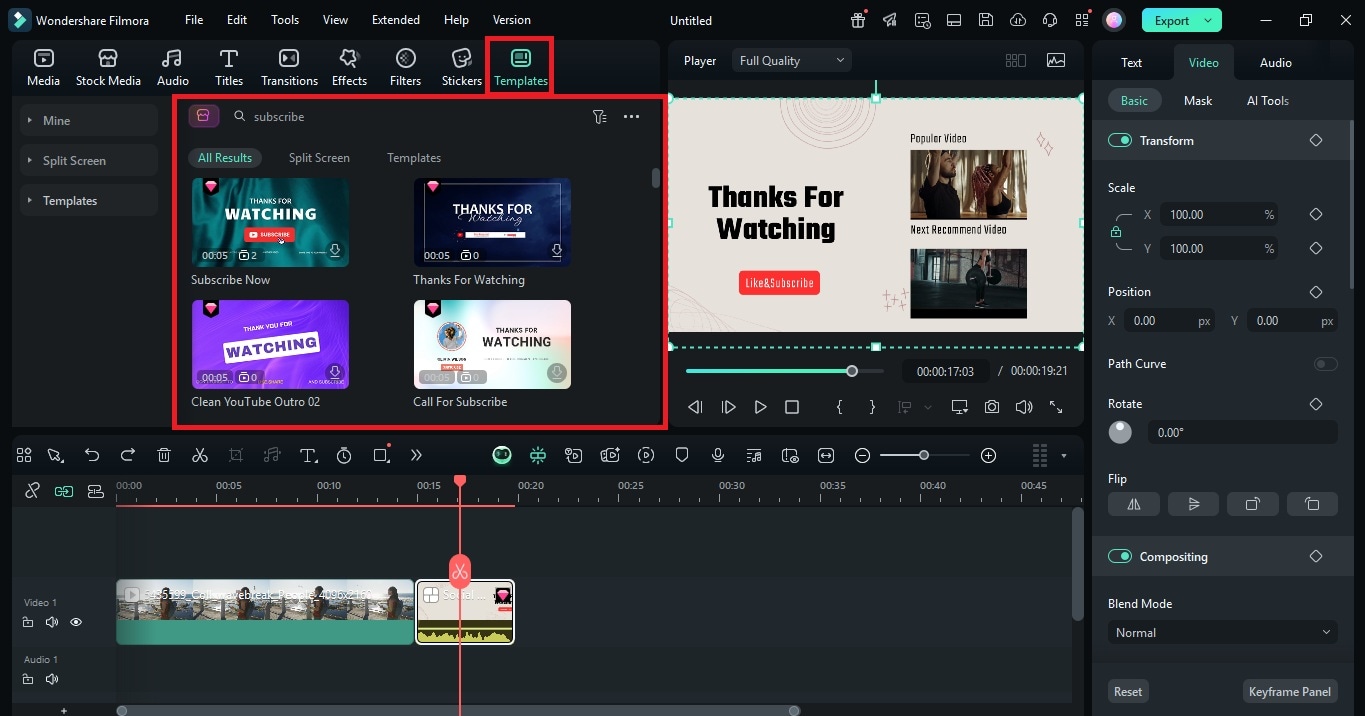
- Step 2: Go to Templates, search for “subscribe,” and drag your choice to the timeline.
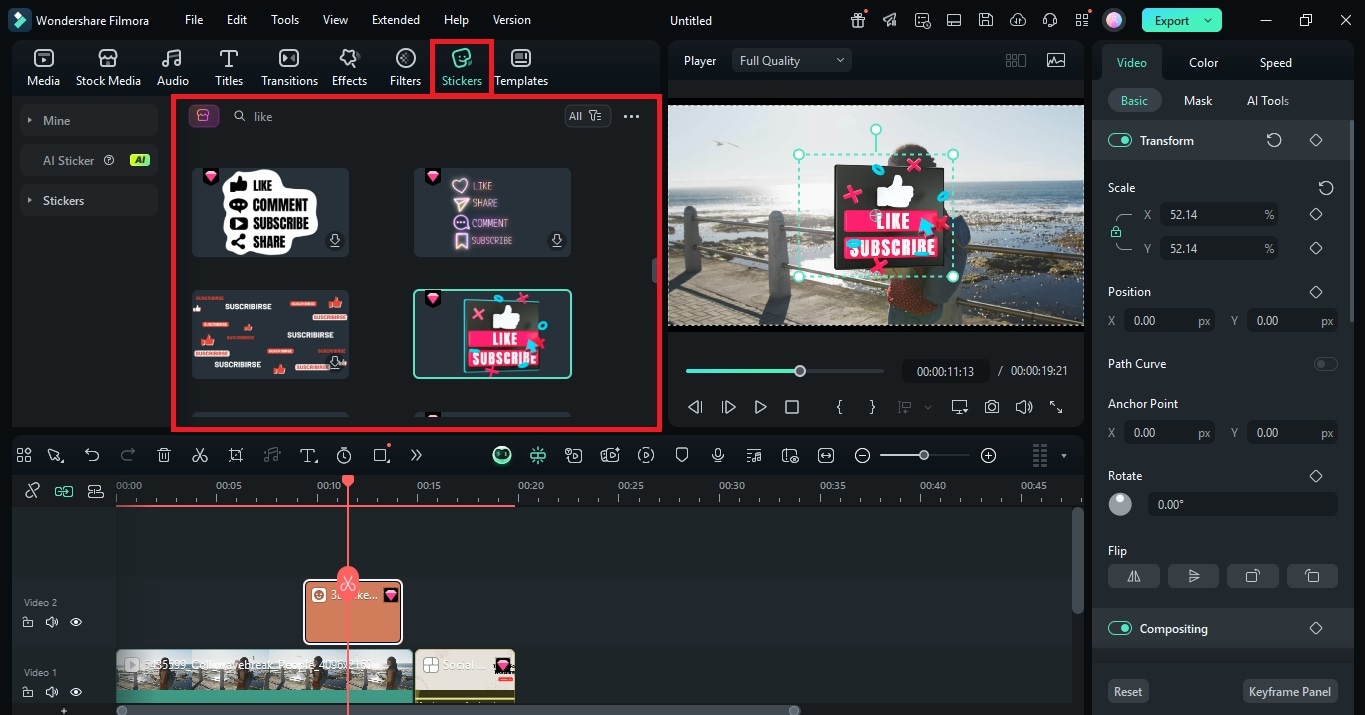
- Step 3: Use the Stickers tab to add social icons, then resize and position them in the Player window.
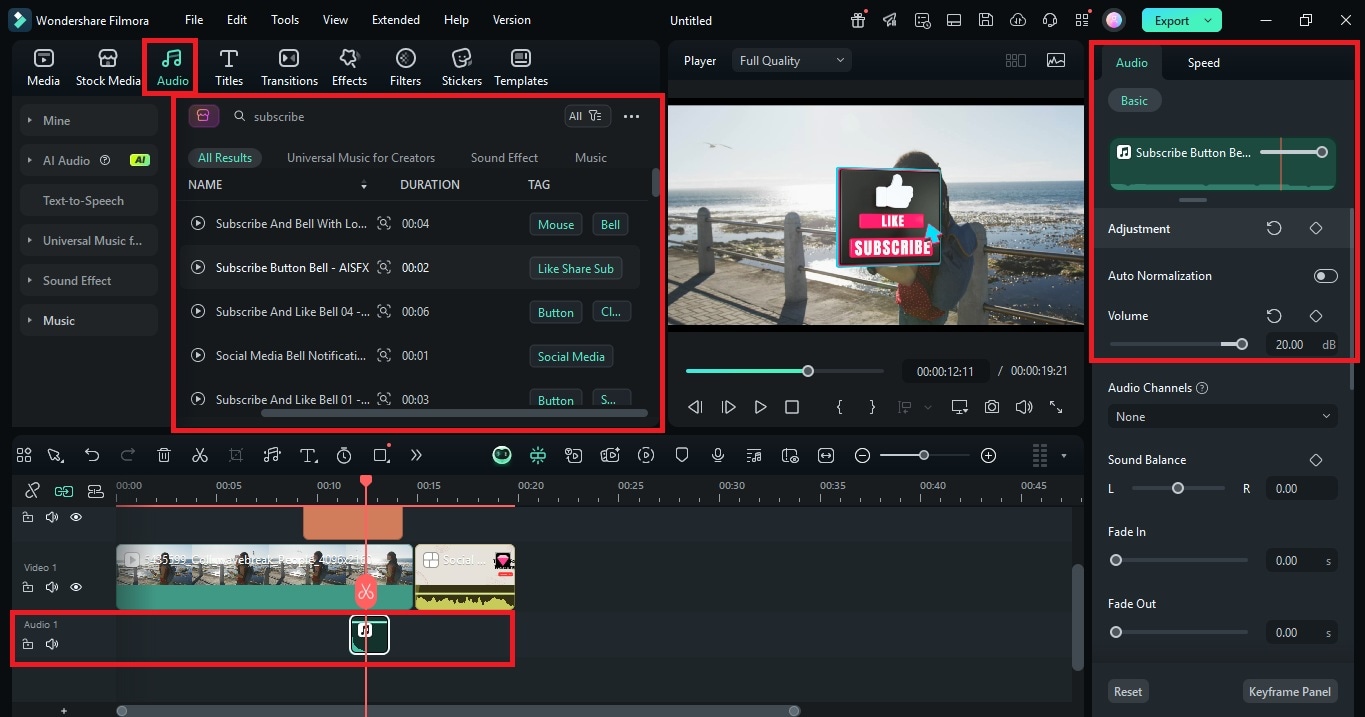
- Step 4: Add audio from the library, such as a bell or click, and adjust its volume.
- Step 5: Save your project and export the final video.
Final Thoughts
A YouTube subscribe template is more than a simple button. It strengthens your branding, encourages action, and helps your channel grow. In other words, it turns casual viewers into loyal subscribers.
So, download Filmora and try the editing tools that make the process simple. It offers you many templates, simple video editing options, and AI tools. The outcome is YouTube content that appears refined and attracts the audience simultaneously. You can immediately get started and see how fast your subscriber count can increase when you have the right tools.
secure download 