
Cinematic Nature Examples & Guides
Explore popular rural landscape footage applications and editing guides
Loading more rural landscape footage...
 Category:
 Duration:
 Aspect Ratio:
Everything You Need to Edit Rural Landscape Footage
A well-placed rural landscape footage clip can instantly elevate the production value of your videos. Filmora provides an expansive built-in library of high-quality countryside b-roll that drops straight into your timeline—no external searching needed.
Premium Agriculture B-Roll Ready for Your Timeline
Premium Agriculture B-Roll Ready for Your Timeline
Skip searching across multiple websites. Filmora's integrated Stock Media library offers premium rural landscape footage. Find agriculture B-roll in seconds and drag it directly into your project, optimized for every aspect ratio.
- Abundant Choices - Access everything from a vibrant vineyard crop to a serene harvest season footage.
- Seamless Integration - Find and insert high-quality rural landscape footage directly on your editing timeline.
- Multi-Format Readiness - Perfectly formatted clips for YouTube, TikTok, Reels, and traditional widescreen films.
Enhance Countryside Vistas With Advanced AI Tools
Enhance Countryside Vistas With Advanced AI Tools
Turn raw nature clips into polished videos with Filmora's AI Video Editing tools. Stabilize shaky footage, enhance colors automatically, and fine-tune contrast and saturation for professional-looking countryside scenes.
- Smart Stabilization - Effortlessly smooth out your sweeping drone or handheld countryside b-roll shots.
- Intelligent Color Correction - Instantly enhance the natural greens and earthy tones of your rice field footage.
- Cinematic Effects - Apply professional LUTs and filters to create a distinct mood for your rural scenes.
Generate Custom Vistas and Cinematic Soundscapes

Generate Custom Vistas and Cinematic Soundscapes
Need the perfect establishing shot? Use Filmora's AI Image to Video feature, powered by Nano Banana 2, Nano Banana Pro, ChatGPT, and DALL-E 3, to generate realistic rural landscape footage. Pair it with atmospheric audio from the built-in generator for a cinematic finish.
- Powerful AI Models - Select from Nano Banana Pro or other robust engines for unmatched creative freedom.
- Custom Scene Generation - Easily create unique agriculture b-roll footage simply by typing a descriptive prompt.
- Immersive Audio Generation - Use the AI Music Generator to produce beautiful, royalty-free background scores.
Frequently Asked Questions About Rural Landscape Footage
How to Edit Rural Landscape Footage in Filmora
Bring your countryside b-roll to life in three simple steps. Follow this guide to import, enhance, and export your stunning nature clips for maximum visual impact.
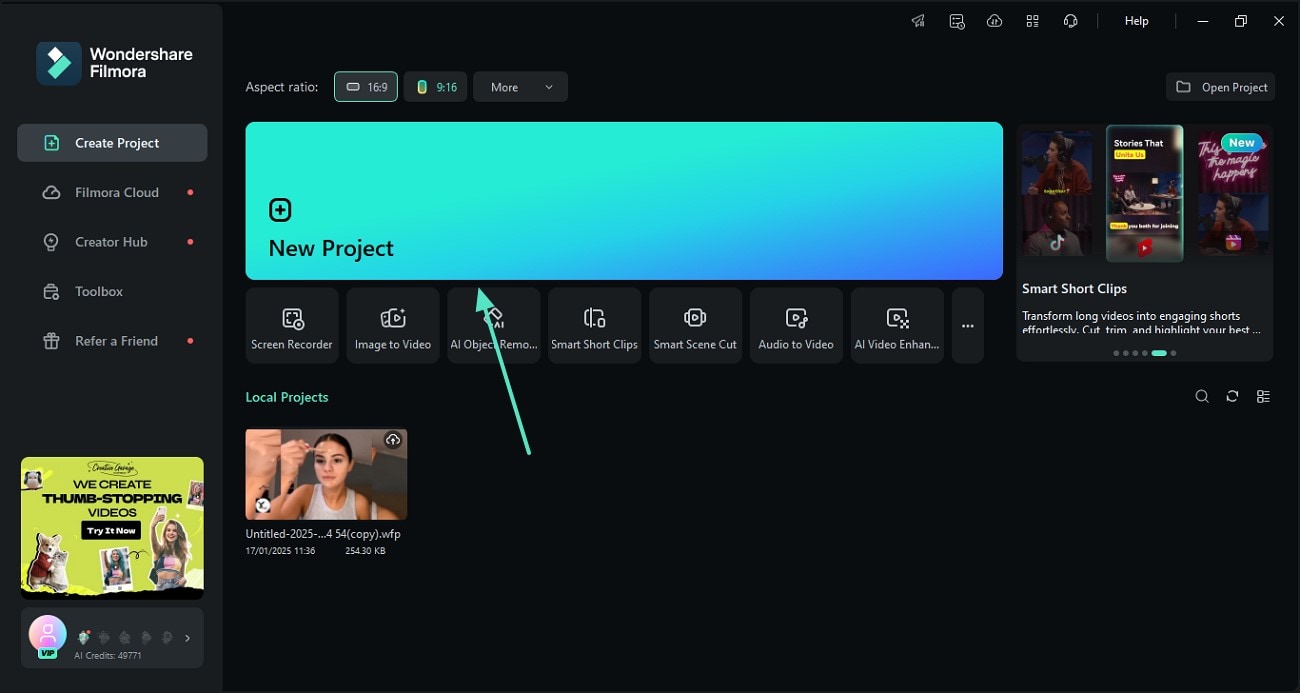
Step 1 Import Your Agriculture B-Roll
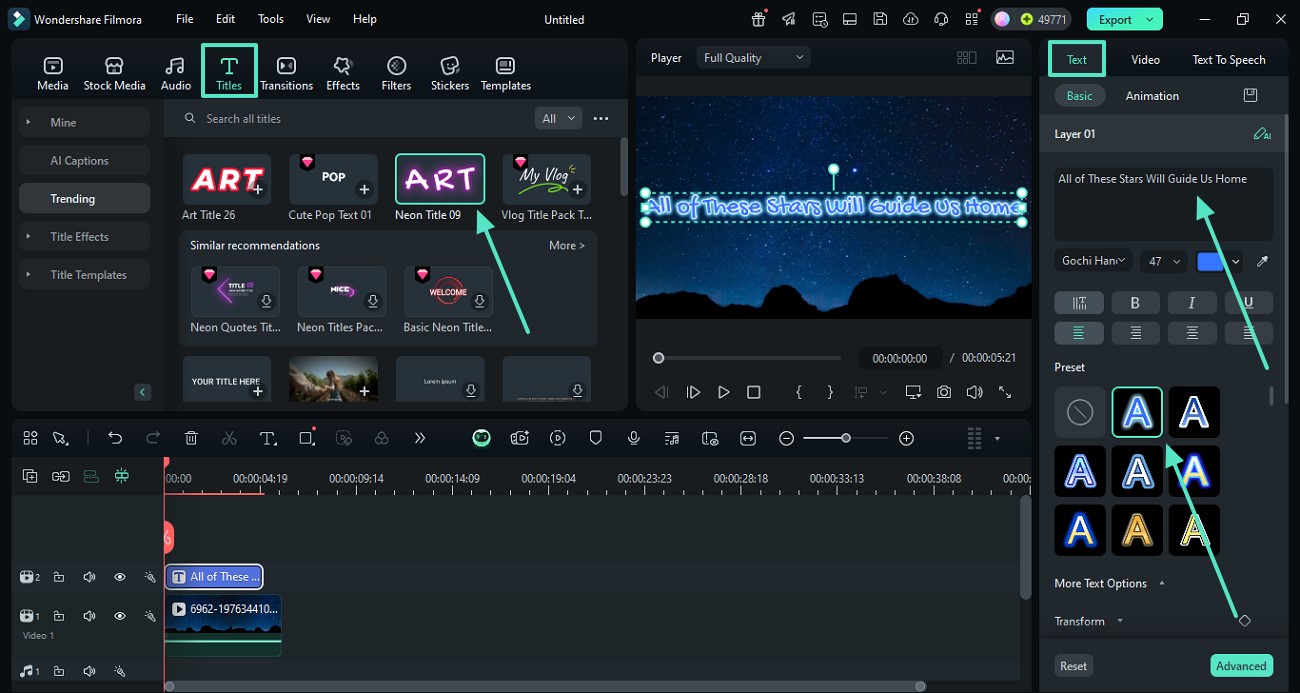
Step 2 Enhance the Countryside Vistas
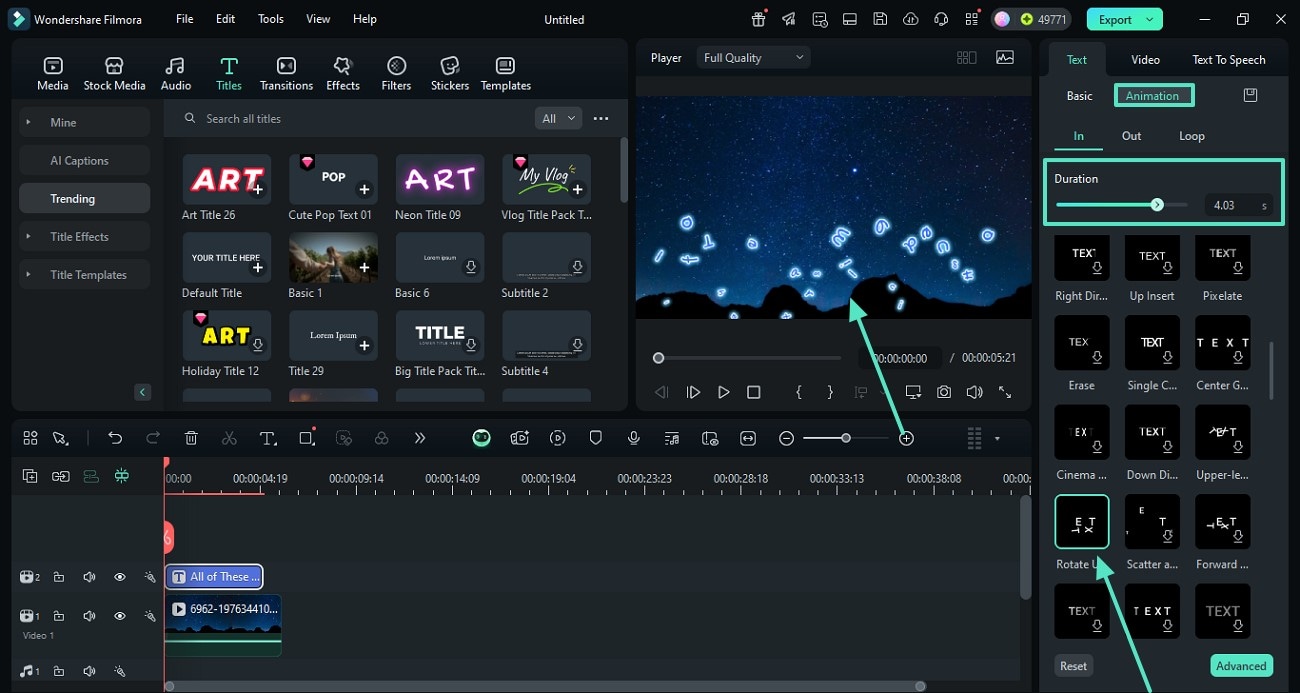
Step 3 Export Your Cinematic Masterpiece
-
1: Import Your Agriculture B-Roll
Open Filmora and browse the integrated stock library for premium rural landscape footage, or import your own crop field clips. Drag your selected videos onto the timeline to begin your edit. -
2: Enhance the Countryside Vistas
Utilize Filmora's advanced color correction and AI stabilization tools to refine your rice terrace aerial view. Add cinematic effects and adjust lighting for that perfect harvest season warmth. -
3: Export Your Cinematic Masterpiece
Preview your blue sky clouds time lapse to ensure perfect pacing. Click "Export" to save your high-resolution video, ready to captivate your audience on YouTube or social media platforms.
Explore More Creative Possibilities 🌟
Filmora isn't just for editing standard clips—it is your ultimate all-in-one creative companion. Whether you are generating a majestic vineyard crop, refining intricate agriculture b-roll footage, or pushing the boundaries of visual storytelling, our comprehensive suite of AI-driven tools empowers you to turn any raw idea into a breathtaking masterpiece. Discover more AI prompt generators below to spark your next big project and seamlessly integrate them into your workflow!








