
Fresh Fruit Overlay Examples & Guides
Browse trending tropical fruit overlay styles to make your videos pop
Loading more football overlays...
 Category:
 Duration:
 Aspect Ratio:
Everything You Need for Stunning Fruit Video Overlays
A vibrant fruit overlay can instantly transform an ordinary clip into an energetic, engaging piece of content. Filmora provides an expansive library of templates, robust AI creation capabilities, and advanced AI Video Editing features so you can add that refreshing visual pop to any project seamlessly.
Blend Tropical Fruit Overlays Naturally
Blend Tropical Fruit Overlays Naturally
Add a fresh summer feel to vlogs, food videos, and ads with tropical fruit overlays. In Filmora, simply drag them onto the timeline and use blending modes to match the scene's light and shadow.
- Drag and Drop Workflow - Easily place a fresh fruit overlay above any layer without complex setup.
- Advanced Blending Modes - Naturally merge the bright colors of the fruit overlay with your original footage.
- Complete Control - Adjust opacity, saturation, and hue to perfectly match your scene's aesthetic.
Create Custom Fruits With AI
Create Custom Fruits With AI
Can't find the right fresh fruit overlay? Filmora's AI Image generator helps you create realistic or stylized fruit assets with models like ChatGPT, DALL-E 3, Nano Banana 2, and Nano Banana Pro.
- Multiple Premium AI Models - Choose between powerful models to get the exact style of tropical fruit overlay you want.
- Instant Extraction - Use the Video Background Remover tool to instantly isolate AI-generated fruits.
- Endless Possibilities - Create everything from hyper-realistic splashes to illustrated pop-art elements.
Track Floating Fruits in Motion

Track Floating Fruits in Motion
Use Motion Tracking to attach fruit overlays to moving subjects. It's ideal for drink highlights, dance clips, and playful scenes that need natural movement.
- One-Click Object Pinning - Instantly attach your fruit video overlay to any moving target within the frame.
- Keyframe Animation - Manually refine the path of your tropical fruit overlay for complex sequences.
- Stylized Enhancements - Combine motion with rich Video Effects to enhance depth and realism.
Frequently Asked Questions
How to Add a Fruit Overlay in Filmora
Incorporate a fresh fruit overlay into your cinematic edits in just a few simple steps.
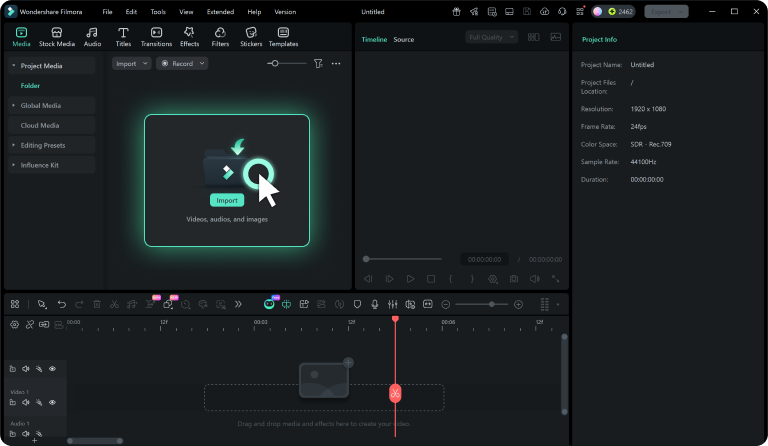
Step 1 Browse & Select
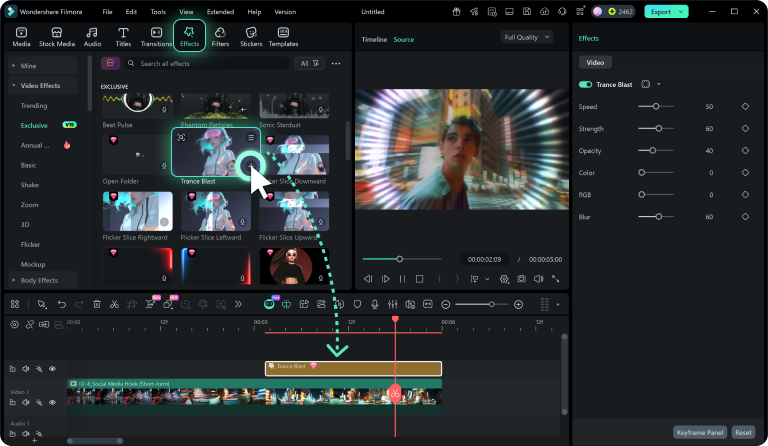
Step 2 Add to Timeline
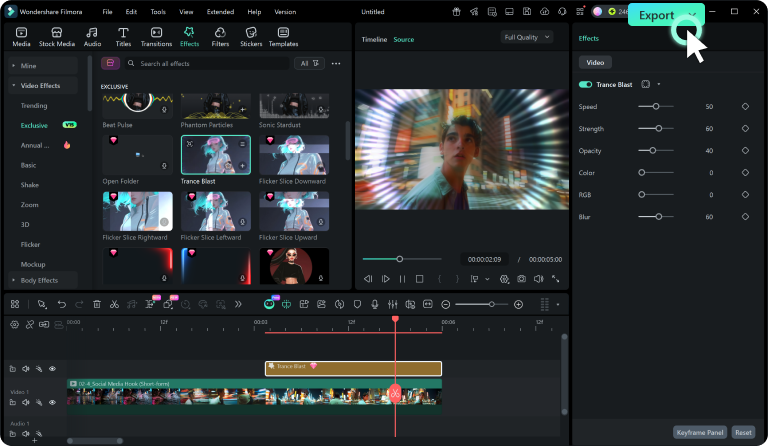
Step 3 Blend & Adjust
-
1:Browse & Select
Search the Creative Assets library for a vibrant fruit video overlay, or use the AI Image tool to generate one. -
2:Add to Timeline
Drag your chosen tropical fruit overlay onto a layer above your main footage to begin customizing its appearance. -
3:Blend & Adjust
Adjust the blend modes, opacity, and apply a Video Effects filter to seamlessly integrate the fruit overlay.
Elevate Your Edits Beyond a Basic Fruit Overlay
Filmora offers extensive tools to complement your fresh fruit overlay. Utilize the AI Video Generator to craft unique backgrounds, or try the AI Music Generator for dynamic audio tracks. Enhance spoken dialogue with Text to Speech, ensuring your content is fully immersive and engaging from start to finish.








