
Graduation Text Examples & Guides
Explore popular graduation text applications and how-to guides for celebration videos
Loading more graduation text examples...
 Category:
 Duration:
 Aspect Ratio:
Everything You Need to Put Graduation Text on Video
A well placed graduation text can turn an ordinary clip into a polished, professional celebration video. Filmora gives you a full library of video templates with built in text animation presets that drop straight into your timeline without any complex keyframing required.
Whether you are introducing the class valedictorian, opening a party vlog, or adding a scene title to a commencement short film, Filmora provides the precise tools you need. Pick a sleek layout, type your words, and publish directly to your preferred platform.
Cinematic Graduation Title Options For Every Aesthetic
Cinematic Graduation Title Options For Every Aesthetic
Stop spending time building text layouts from scratch. Filmora features a rich collection of animated typography designed specifically for commencement videos. These ready made designs instantly elevate your graduation text, providing everything from elegant opening titles to dynamic lower thirds.
- Drag And Drop Application - Place your chosen style directly onto the timeline for instant results.
- Dynamic Motion Presets - Choose from multiple entrance and exit animations for a smooth visual experience.
- Versatile Screen Ratios - Find designs perfectly sized for vertical shorts and widescreen cinematic formats.
Complete Creative Control Over Your Graduation Text
Complete Creative Control Over Your Graduation Text
Tailor your happy graduation text to match the specific vibe of your class or university with AI video editing tools. Filmora allows you to tweak every visual element, ensuring your celebratory message stands out clearly against moving background elements and crowds.
- Custom Typography Selection - Change fonts and scale sizes to reflect your unique academic style.
- Precision Placement Tools - Position words accurately across multiple layers for depth and dimension.
- Vibrant Color Matching - Adjust fill colors and drop shadows to perfectly match your school colors.
Generate Brilliant Happy Graduation Text With AI

Generate Brilliant Happy Graduation Text With AI
Struggling to find the right words to celebrate the class of the year? The AI Copywriting feature inside Filmora seamlessly generates inspiring graduation text and commencement quotes, expanding your creative limits by utilizing powerful built-in models to draft your perfect message.
- Smart Text Generation - Instantly create compelling quotes using built in artificial intelligence.
- Audio Synchronization - Align your freshly generated titles perfectly with speech and background music or use auto caption tools.
- Multilingual Output Options - Translate your celebration messages instantly to share with family worldwide.
Frequently Asked Questions About Graduation Text
How To Create A Graduation Title In Filmora
Open Filmora, select a graduation title template, customize your happy graduation text, and export your celebration video.
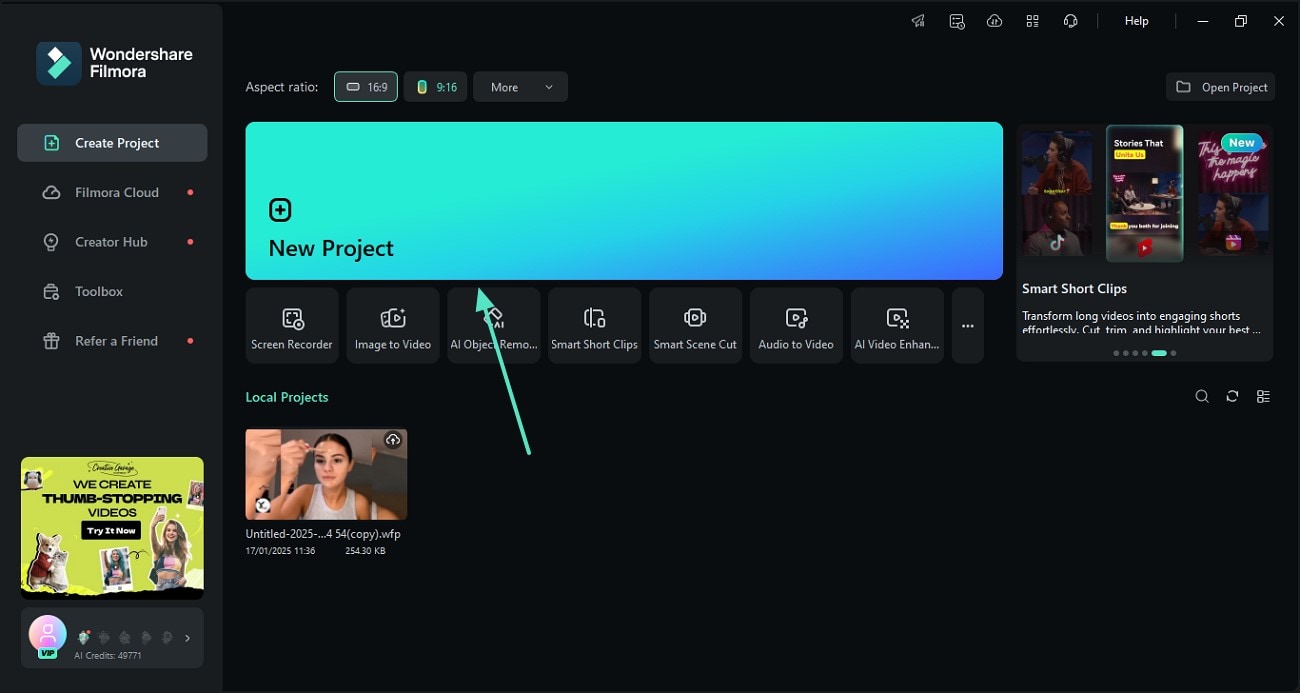
Step 1 Open Filmora And Import Your Footage
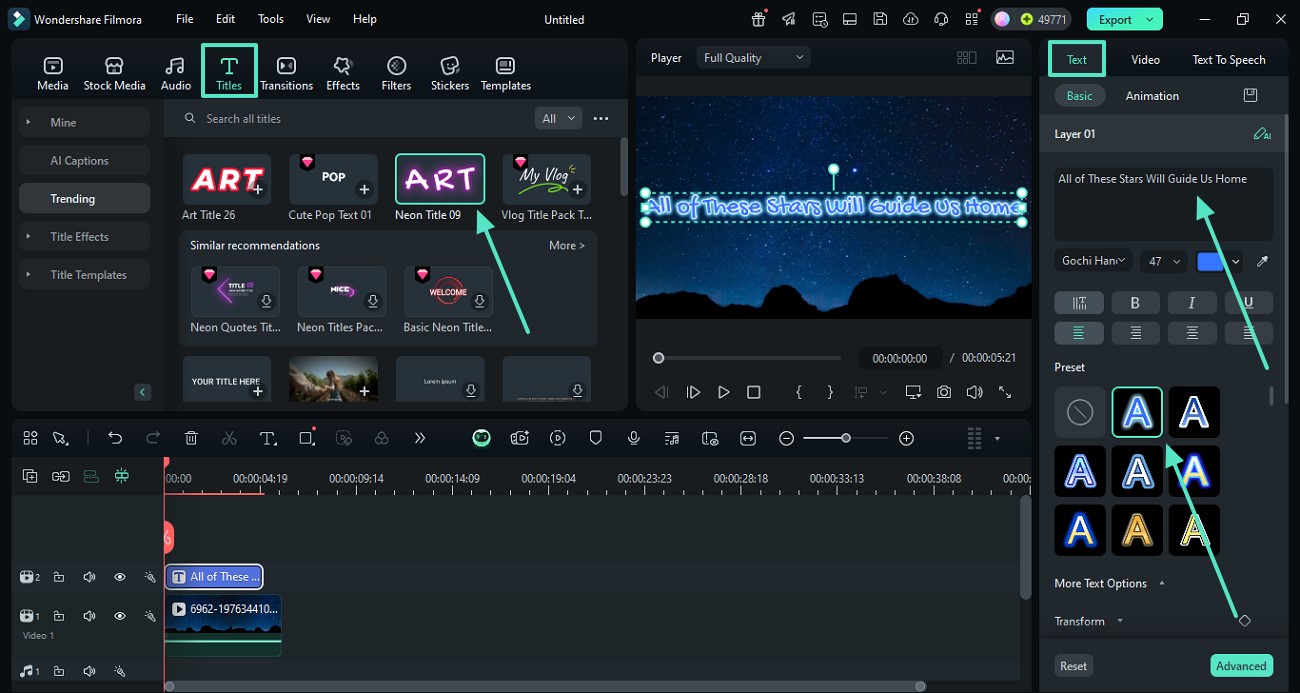
Step 2 Choose A Graduation Title Template
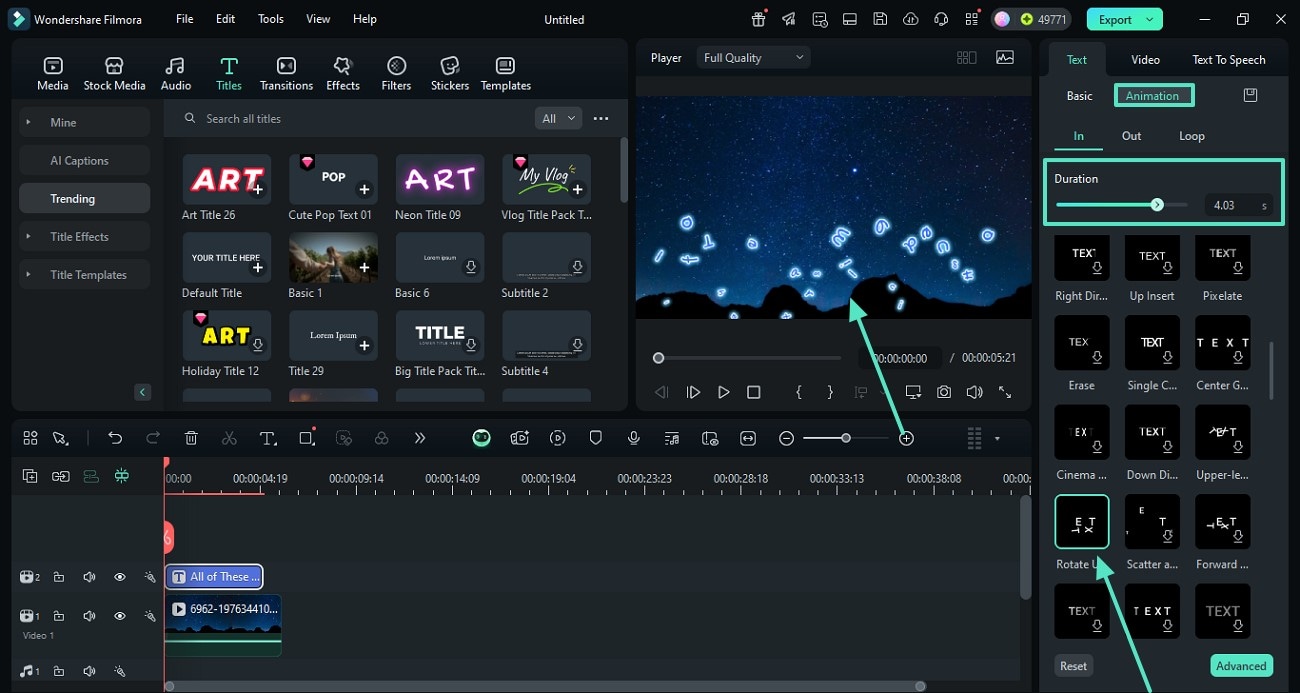
Step 3 Customize And Export Your Video
-
1:Open Filmora And Import Your Footage
Launch Filmora, create a new project, and import your commencement clips. Then open the titles panel to begin crafting your graduation text. -
2:Choose A Graduation Title Template
Browse the library and select your preferred graduation title template. Drag it to your timeline and type in your happy graduation text. -
3:Customize And Export Your Video
Refine the color and timing, then apply effects if needed. Preview the final sequence and export your video with a stunning graduation title.
Expand Your Creative Video Journey
Elevate your commencement projects far beyond a simple graduation title. Explore a variety of advanced features to enhance your footage, from adding stunning visual effects to utilizing smart tools for automatic editing. Whether you want to correct color from an outdoor ceremony or add a cinematic aesthetic, Filmora provides the perfect environment to polish every memory.








