 TL;DR:
While many tools advertise as free, Wondershare Filmora provides the best creative control for multi-platform lyric video editing, Canva excels at quick template-based designs, and Lyrical Video Status Maker is the optimal choice for generating 30-second clips on Android.
● Exporting videos from any of these platforms requires an account login, and free tiers heavily restrict output through watermarks (Filmora), 10-second preview limits (Freebeat AI), or mandatory paid subscriptions for final downloads (Capify, LyricEdits).
● Platforms offering automatic lyric transcription and AI scene generation, such as Somio AI and LyricEdits, frequently struggle with inaccurate audio syncing and off-theme visuals, requiring you to manually correct the text timing in their timeline editors.
● Youka is the best dedicated option for karaoke-style videos due to its six synchronized text display styles and 4K exports, but it restricts free users to 15 trial credits and limits videos to a single static or looping background.
Ask AI for a summary
 ChatGPT
 Perplexity
 Gemini
 Claude
 Grok
According to the Luminate 2025 Music Report, more than 120,000 tracks are released on streaming platforms daily. You could be the next person to share a track with the world!
Many tools can help with different parts of the process, from writing lyrics to creating a lyric video for your song. These videos let listeners sing along or read the lyrics while the song plays. You don't need advanced editing skills to make one. There are plenty of free lyric video makers to choose from. We've rounded up 8 tools worth trying. Read on to compare their features, pros, and cons.
What Matters When Choosing a Free Lyric Video Maker
You can find many free lyric video makers online, but not all of them offer the same features or flexibility. To help you find the right tool, we compared each platform based on the following criteria:
- Lyrics and Audio Syncing: We looked for tools that let you add lyrics to videos online and sync the text with your song. Bonus points for tools that can generate lyrics automatically.
- Customization Options: How much control does the free lyric video creator offer? Does it include fonts, text animations, backgrounds, colors, and visual effects?
- Video Quality and Export Options: We looked for online lyric video makers with multiple resolution and file format options. Plus, are there watermarks or export restrictions on the free version?
- Additional Features: Does the tool offer useful extras, such as AI-generated visuals, ready-made templates, audio visualization, or stock media to make your lyric video more creative?
Part 1. 8 Best Lyric Video Makers: A Quick Comparison
Among the many free lyric video makers available, we've selected eight of our top picks. Here's a closer look at how they differ. This overview can help narrow down your options before reading the full reviews.
| Tool | Platform | Highlight | Free Plan | Watermark |
| Wondershare Filmora | iOS, Android, macOS, Windows | A versatile video editor offering AI tools, ready-made templates, and creative resources | Available with limitations | On the Free plan |
| Freebeat AI | Online, iOS, Android | AI lyric video generator with built-in tools for basic video adjustments | Limited to a 10-second preview | On the Free plan |
| LyricEdits | Online | An online lyric video maker that offers several video styles | Available | On the Free plan |
| Lyrical Video Status Maker | Android | A free lyric video generator that combines trending songs with your own photos | Available | Yes |
| Capify | Online | An online lyric video maker with customizable text styles and animations | Free previews | No |
| Youka | Online, Windows, macOS, Ubuntu/Debian | A karaoke-style lyric video maker for creating videos with synchronized lyrics | Free trial | On the Free plan |
| Canva | Online, iOS, Android, Windows, macOS | An online lyric video maker with a range of templates and design tools | Available | No |
| Somio AI | Online, Android | An AI lyric video tool for creating videos with personalized visual styles | Free trial | No |
|
Show More
Show Less
|
||||
Part 2. Best Tools to Make Lyric Videos From Music
The table above is a good starting point, but there's more to consider when choosing a tool. Below, you'll find a closer look at each free lyric video maker. It covers the features, pricing, pros, and cons to help you find the right fit.
1. Wondershare Filmora
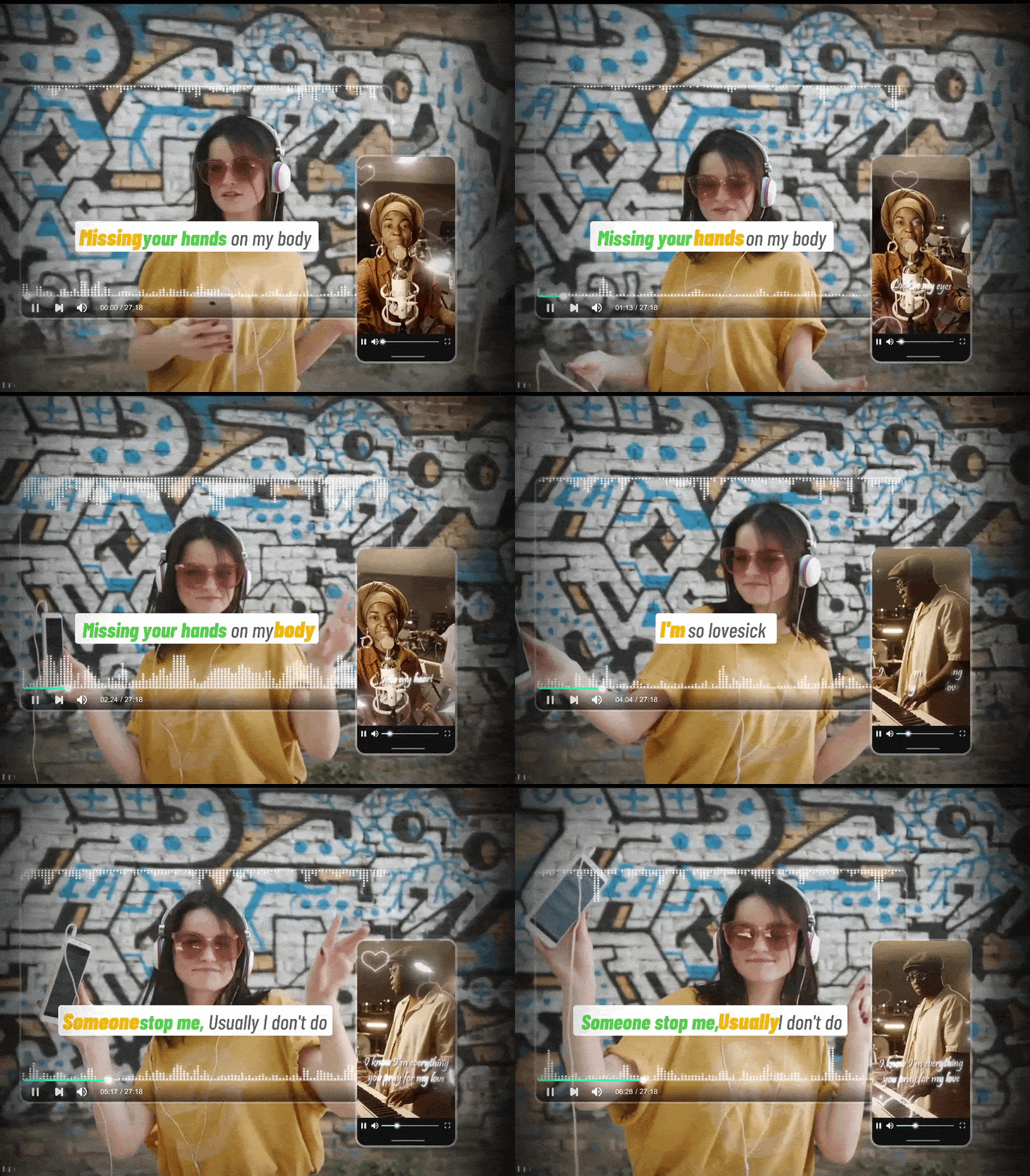
Filmora is one option to consider if you want to make a lyric video for free. It offers several ways to style your video. You can animate song lyrics, add moving backgrounds and visual elements, or use audio visualizers that follow the rhythm of your song. These features give you more ways to shape the look and feel of your video.
- AI Video Generators and Stock Footage: Create visuals that match your song using AI Video Generators, or choose from Filmora's library of stock footage and B-roll clips.
- AI Music and Sound Effect Generator: Generate additional music or sound effects to complement your track and add more variety to your lyric video.
- Audio Visualizers and Particle Effects: Use Audio Visualizers or Particle Video Effects to create simple visuals that move with the music.
- Text Animations and VFX Titles: Make your lyrics stand out with animated text and stylized titles using Text Animations and VFX Text Titles.
iOS, Android, macOS, Windows.
- Easy enough for beginners to get started, with advanced features that also suit professional editors.
- Available on multiple devices, making it easier to switch between them and continue your editing workflow.
- Includes a tool for publishing videos to social media and tracking their performance.
- Free exports include a watermark.
- Some AI tools need AI credits.
Visit Filmora's pricing page for details on available plans.
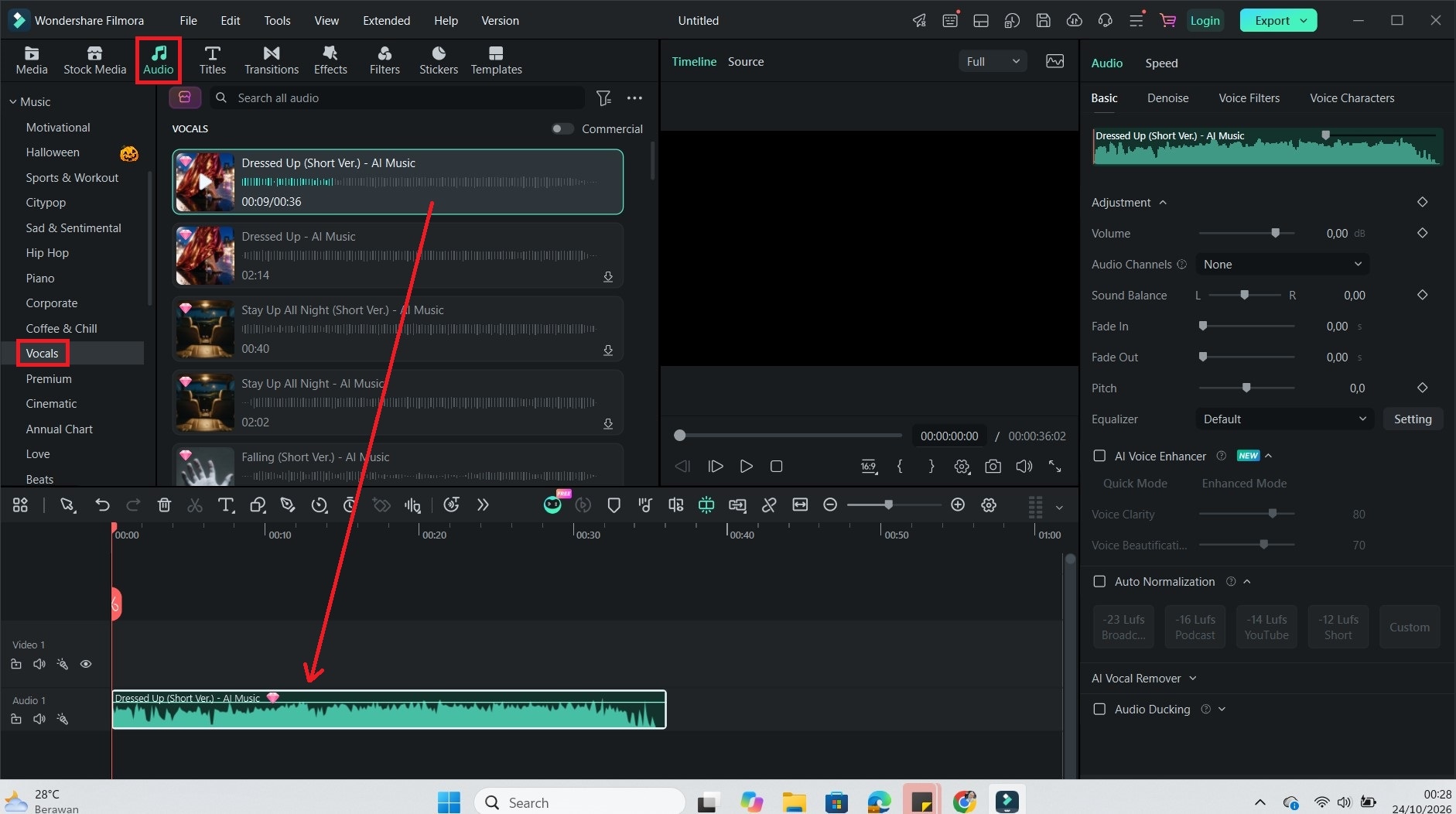
A Guide to Making Lyric Videos in Filmora
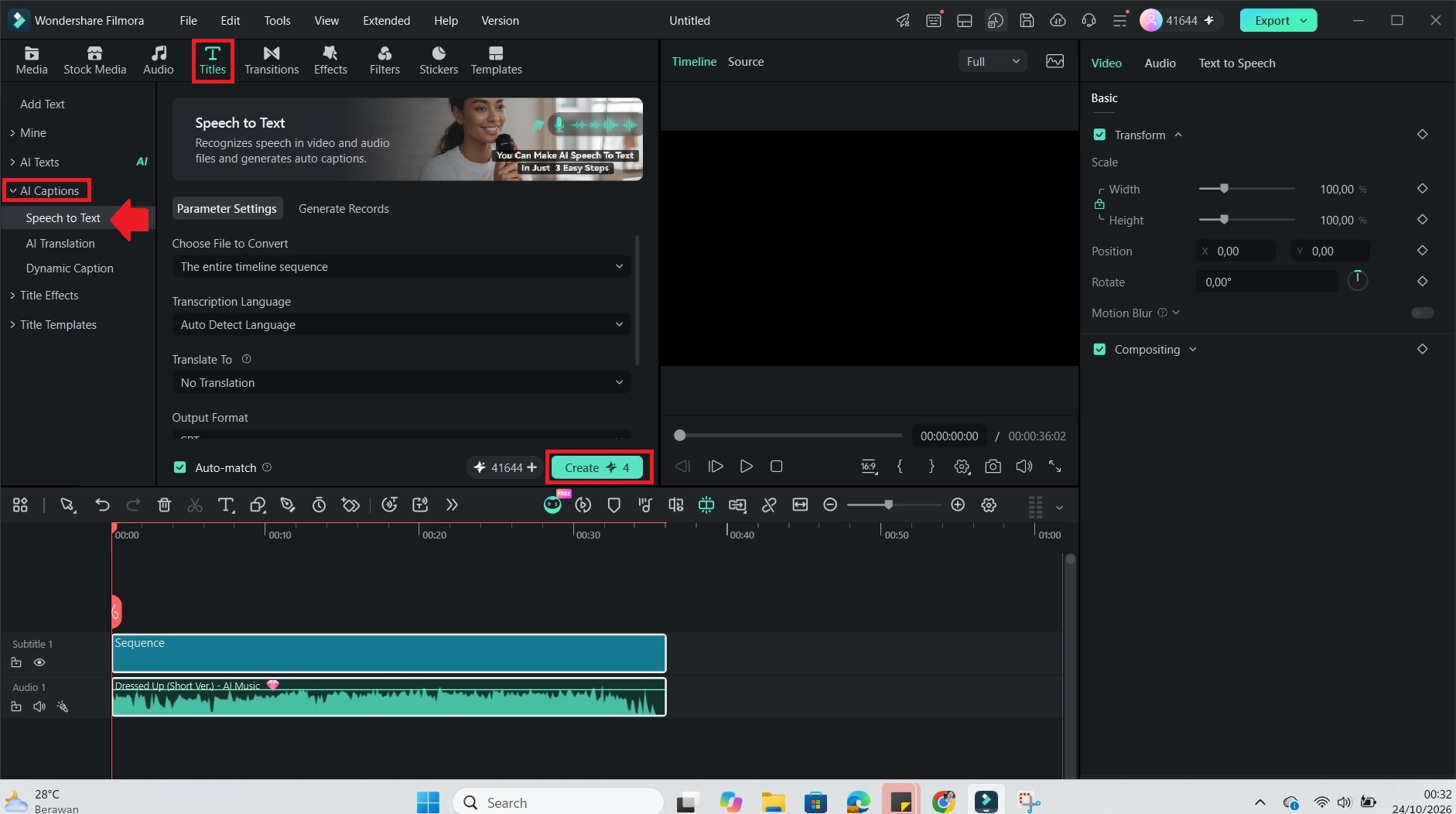
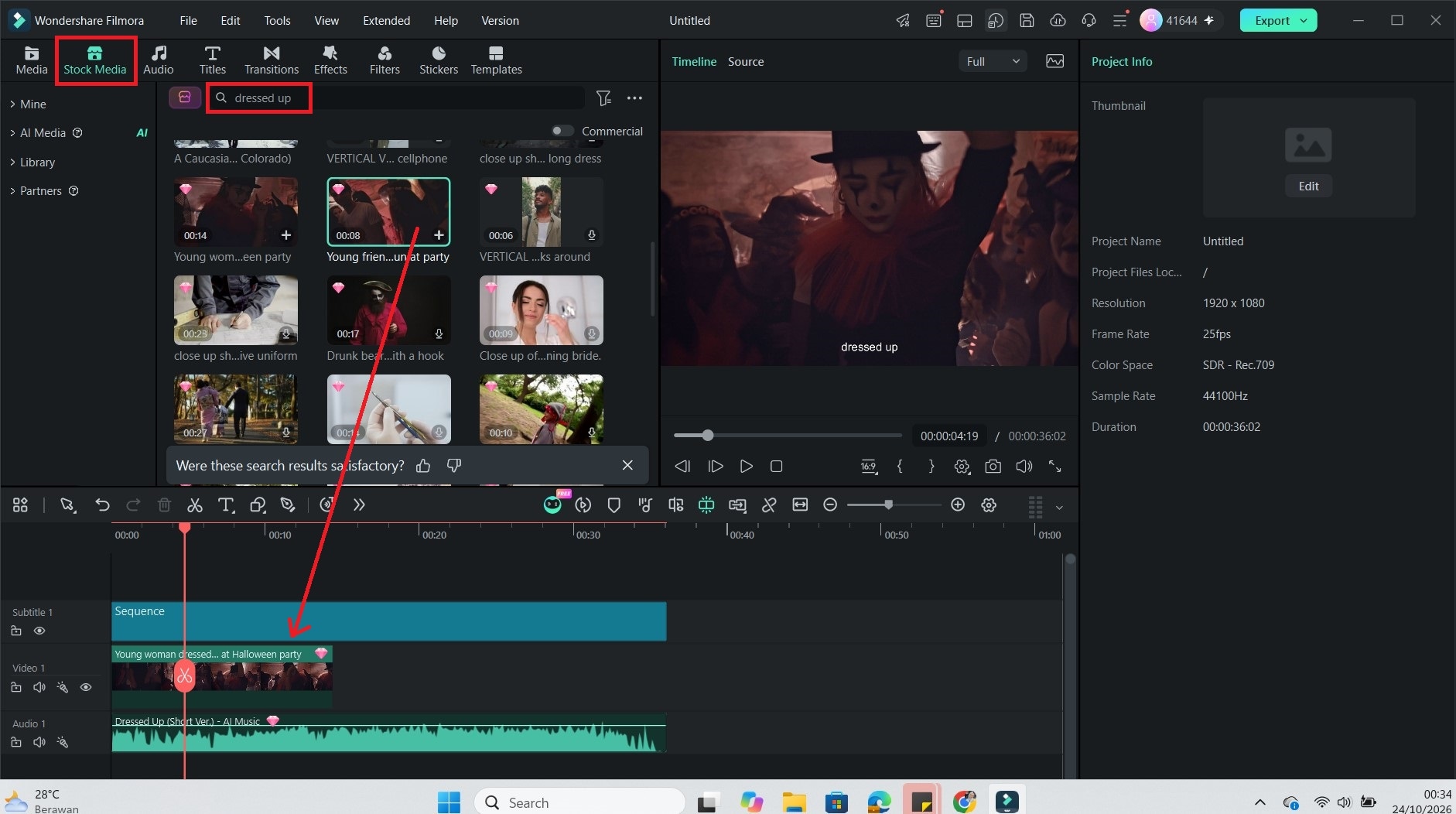
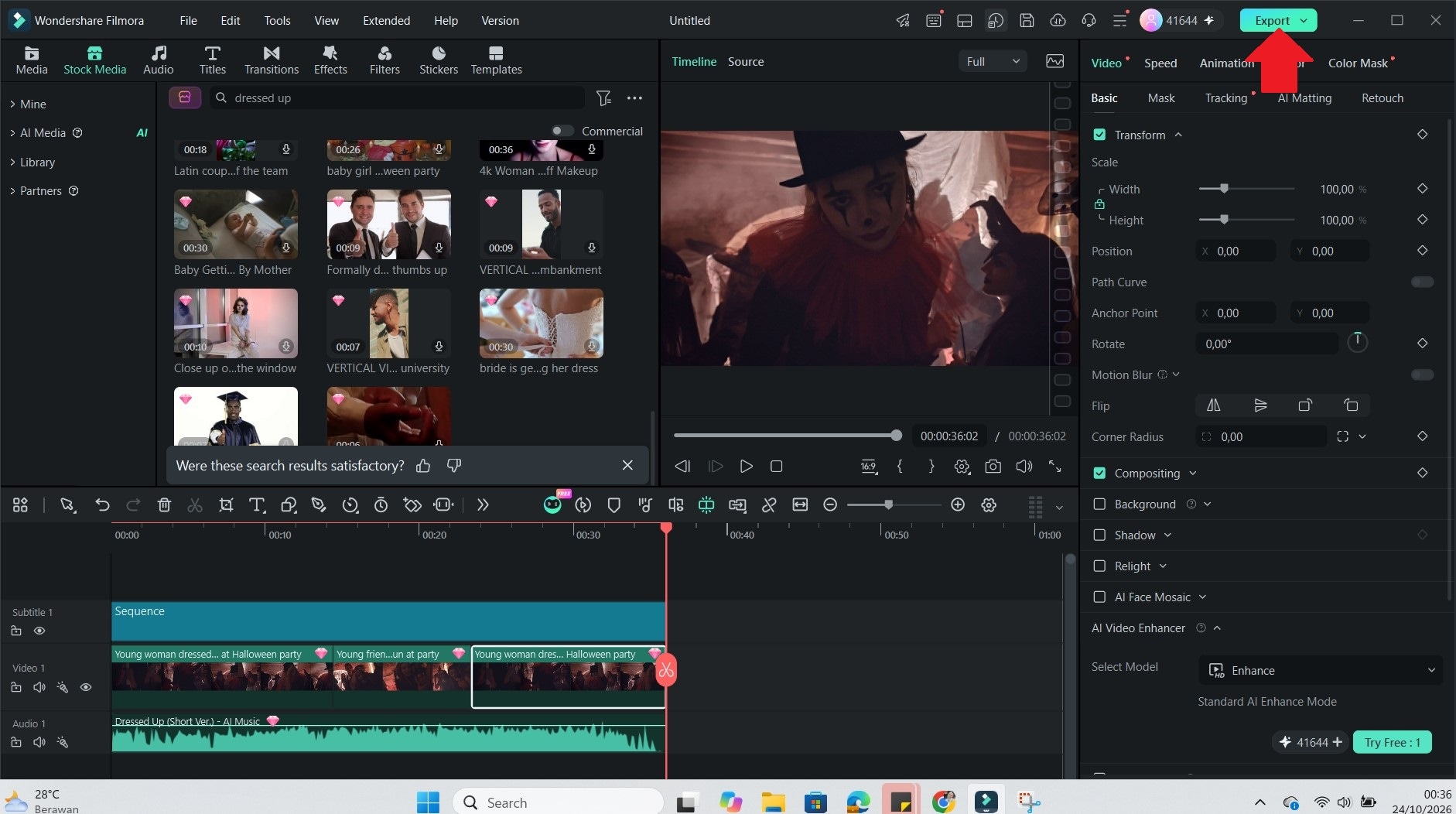
 Secure Download
2. Freebeat AI
Freebeat AI can help you make lyric videos online. Upload your own songs or use popular tracks available on the platform. Once you choose a song, you can select a visual theme and add prompts to guide the look of your video. The free plan lets you preview a 10-second clip.

- Auto-Generated Lyrics: Automatically generates lyrics for your uploaded song and syncs them with the music.
- Preset Themes and Custom Prompts: Choose from preset visual themes, let Freebeat AI select the visuals automatically, or customize them with your own prompts.
- Built-In Video Editor: Includes a video editor for making simple adjustments to your generated lyric video.
Online, iOS, Android.
- Simple to use, with clear steps that help beginners create a lyric video.
- Maintains the original audio quality in the generated video.
- The generated videos have good visual quality overall.
- Generating a video may take a while.
- Aspect ratio options are limited to vertical (9:16) and widescreen (16:9).
- Without custom prompts, the visuals can feel repetitive and lack variety.
Free trial is available. Paid plans range from $34.99 to $249 per month.
3. LyricEdits
If you're looking for an online lyric video creator, LyricEdits is worth a look. It's a good option if you want to create lyric videos with fantasy or animated scenes. You can also upload your own images to shape the look of your video. Once it's ready, export it to a supported video editor for further editing.

- Multiple Ways to Visualize Your Music: Choose from different video styles, such as karaoke, storytelling, lyric videos, and music visualizers.
- Automatic Lyric Transcription: The tool detects and transcribes lyrics from your song in more than 90 languages.
- Customizable Scenes and Text: Personalize your video by changing the storyline, visual style, fonts, scenes, and lyric timing.
Online.
- Supports multiple audio formats, with a maximum file size of 100 MB.
- You can download the generated lyrics as an SRT file and use them in compatible video editors.
- Provides customer support and a Discord community where users can exchange tips and help each other.
- The customization process may feel complicated for beginners.
- The generated visuals can look artificial rather than realistic.
- Generated visuals can occasionally miss the intended theme or meaning of the song.
Free preview available. Paid plans start at $39 per month.
4. Lyrical Video Status Maker
Lyrical Video Status Maker is a free mobile app for creating short lyric videos. Add your own photos, combine them with music, and customize the video with effects and animations. You can create clips of up to 30 seconds to share with others.
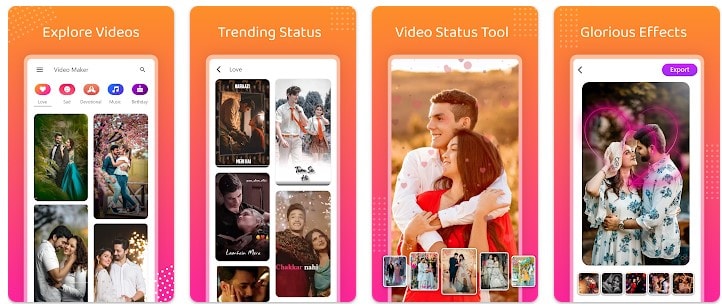
- Creative Editing Tools: Customize your videos with music, text overlays, stickers, and a range of visual effects.
- Image Transitions and Overlays: Choose from different photo transitions, add gradient overlays, blur your backgrounds, crop images, and apply lyric effects.
- High-Quality Video Output: Save your finished clips in Full HD or 4K.
Android.
- Lightweight app that runs smoothly on your device and is easy to use.
- Create a full-screen lyric video status in about a minute.
- Share your videos for special occasions, from birthday wishes to romantic messages and personal memories.
- Frequent banner ads, pop-ups, and video ads can interrupt editing and exporting.
- Pre-made templates offer limited control over fonts, particle effects, and animations.
- High-resolution exports can drain your battery and use up storage space.
Free to use, with in-app purchases available.
5. Capify
You may have come across Capify if you've been searching for an online lyric video creator. The platform gained attention for helping create lyric videos for Don Toliver that reportedly reached 20 million views. It also offers automatic captioning and tools to create videos with stylized text and visuals.
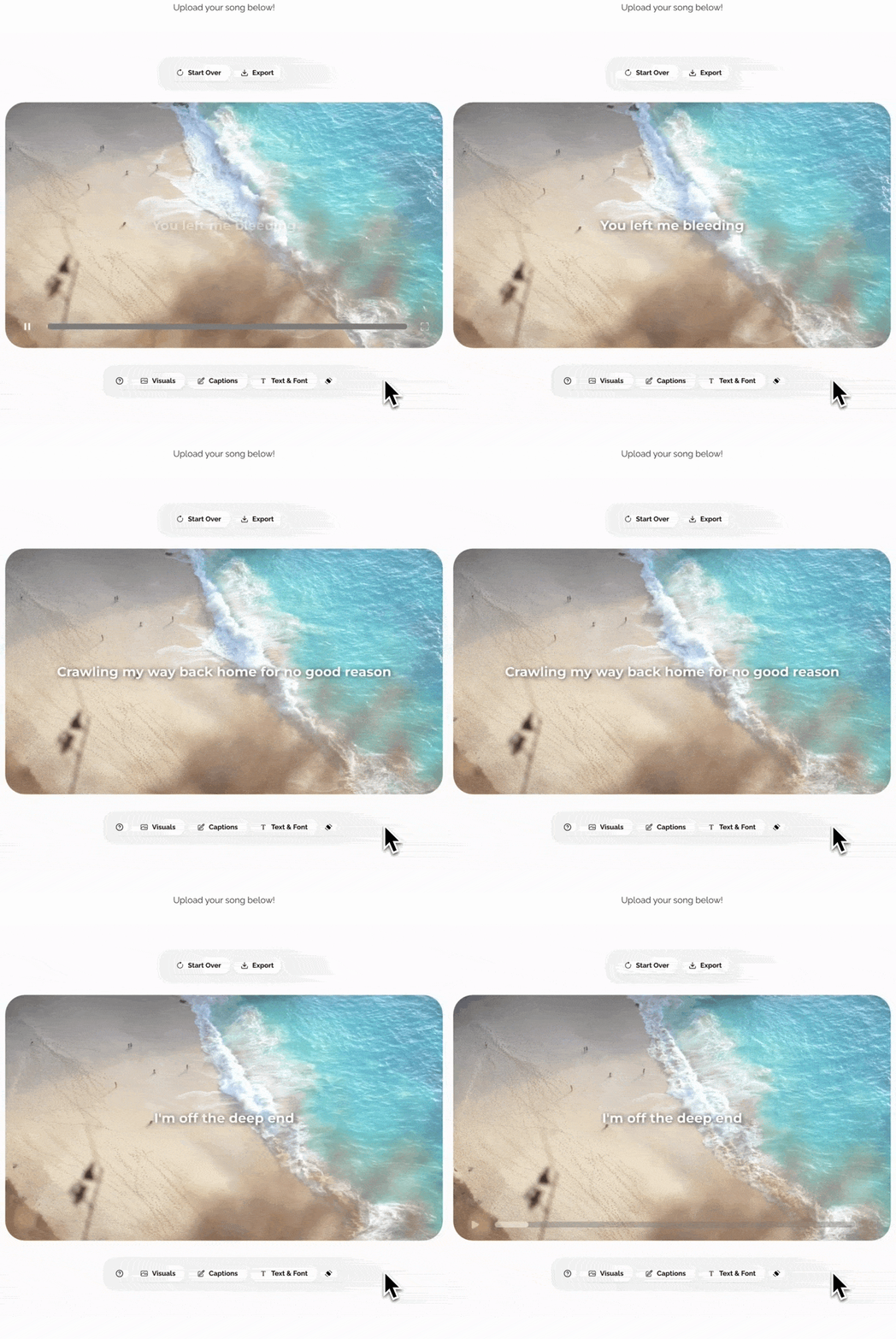
- Extensive Asset Library: The platform offers a range of visual assets, including images, videos, fonts, text animations, and effects to help you customize your lyric videos.
- Adjust Lyrics to Match Your Style: You can adjust the lyric text format, customize its shadow, upload your own images and videos, and add lyrics manually.
- Simple Timeline Editing: You can use the built-in editor to make quick changes to your video before exporting it.
Online.
- Clean and minimalist interface.
- Provides a detailed walkthrough of each feature, making it easy to learn how the tool works and revisit the tutorial whenever needed.
- Supports 1080p video exports and formats tailored to platforms such as YouTube, TikTok, and Instagram Reels.
- By default, the same image or video loops throughout the lyric video.
- Some lyrics may appear at the wrong time or be broken into awkward lines.
- It doesn't automatically create full music videos with AI-generated scenes.
Free previews are available. To export the finished video, it requires a $29 or $39 monthly plan.
6. Youka
Youka is a great choice if you want to make lyric videos online in a karaoke style. You just need to upload your own song to create a video with synchronized lyrics, then share it on YouTube or social media. You can also make videos using other artists' songs as long as you have the necessary permission.

- Different Ways to Display Lyrics: Choose from six display styles. It includes karaoke, single-line, scrolling, duet, multilingual, and chord display.
- AI-Powered Audio Processing: Youka integrates ElevenLabs and AudioShake to support its audio processing workflow.
- High-Quality Exports: Export videos in up to 4K resolution while maintaining audio clarity.
Online, Windows, macOS, Ubuntu/Debian.
- The video generation process is fast.
- Supports various audio and video file formats, with uploads of up to 300 MB.
- Free users can use 15 credits to try the available tools and see how they work.
- Customization options are very limited, with only a few fonts, styles, and text animations to choose from.
- Only supports one background at a time, whether it's a color, image, or video.
- Automatic lyric syncing can be inaccurate.
Free trial available. Buy credits starting at $9.99 per month.
7. Canva
Canva offers a free lyric maker that helps create lyrics based on your ideas. Simply describe the song you want to write, and its Lyric Generator will help bring your ideas into words. Once your lyrics are ready, you can use Canva's lyric video templates to create a video that matches your song.
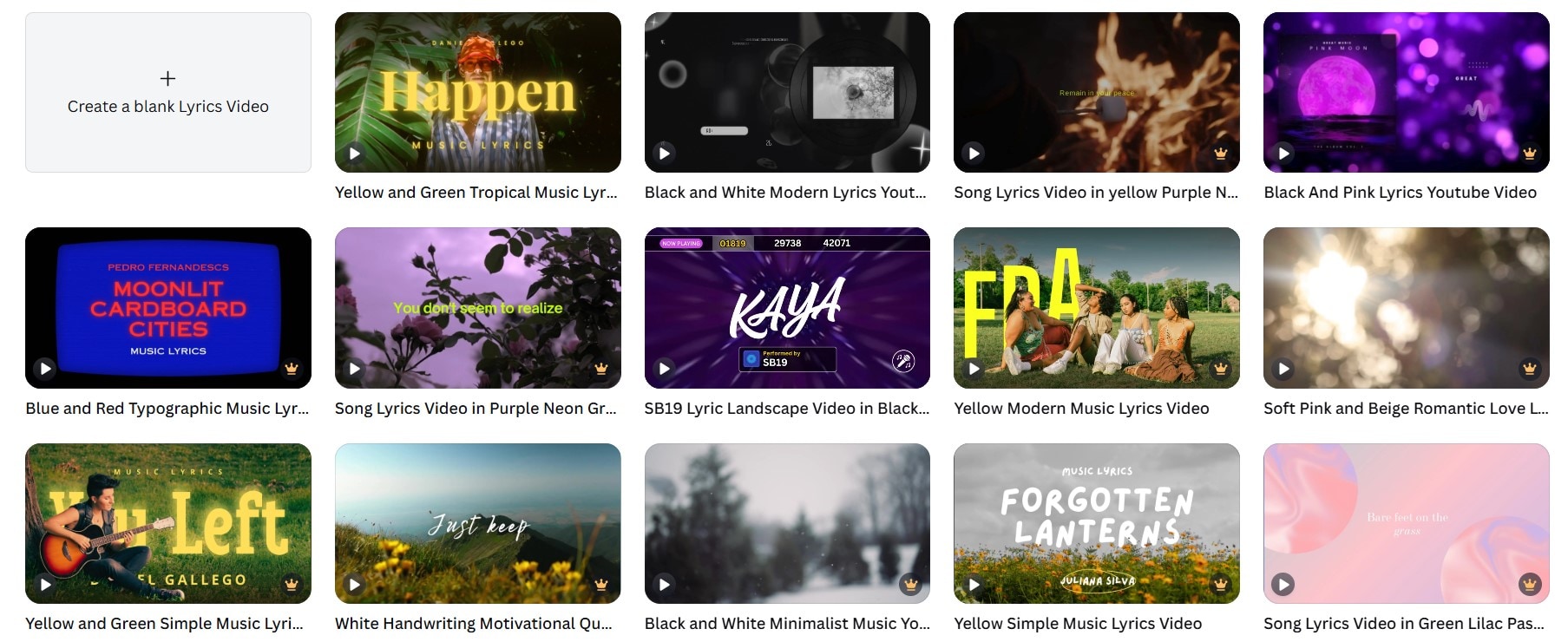
- Wide Selection of Templates: Canva offers up to 59 lyric video templates to create videos for your songs.
- Fonts and Creative Assets: Choose from a wide range of fonts, illustrations, stickers, icons, stock photos, video clips, and animated elements to customize your lyric video.
- Beat Sync: Automatically adjusts your video clips and animations to match the rhythm of your soundtrack.
Online, iOS, Android, Windows, macOS.
- The platform is relatively easy to pick up, even for first-time video editors.
- Produces high-quality videos that you can customize for different social media platforms.
- Provides a Brand Kit to save your logos, brand colors, and fonts.
- Video editing can feel slow or demanding on some devices.
- Many templates use a single background, so you'll need to make manual adjustments if you want to include different visuals.
- Most templates are around 25 to 30 seconds long.
Free plan available. Paid plan prices vary by region.
8. Somio AI
Somio AI is another option if you're looking for a free lyric maker. You can customize your lyrics by choosing the genre, mood, structure, and language that fit your song idea. Once your lyrics are ready, you can also customize the lyric video to match your preferred style.
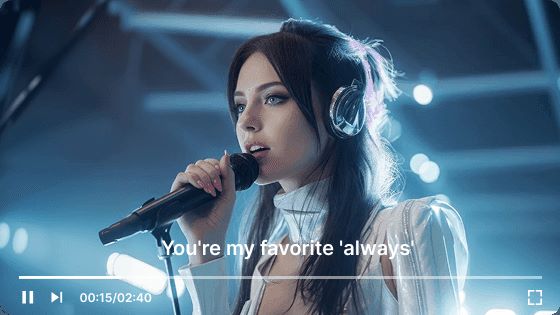
- Auto-Synced Lyrics: Automatically syncs the lyrics with your song so the words appear at the right time in the video.
- Multilingual Song Recognition: Recognizes and transcribes songs in 14 languages, making it easier to create lyric videos for different tracks.
- Multiple Visual Styles: Generates videos in different styles, including cartoon, fantasy, and realistic visuals.
Online and Android.
- Easy to use, even for beginners.
- Exports videos without a watermark.
- Free users get 10 credits, enough for one free lyric video generation trial.
- If the lyrics don't sync correctly, you'll need to adjust their timing manually in the timeline editor.
- The generated visuals may not always match your prompts, and Somio AI offers limited advanced tools for creating more detailed or synchronized visuals.
- The audio mix may need some manual editing to sound polished.
Free trial available. Pricing for the paid tiers starts at $9.99 a month.
Part 3. Editor's Pick: Which Lyric Video Maker Should You Choose?
The right free lyric video maker depends on how much control you want. Template tools are quick, and lyric-first apps are good for getting words on screen. But if you plan to release more than one song, you'll probably want an editor you can grow with.
- For Full Creative Control: Wondershare Filmora
Choose Filmora if you want to do more than place lyrics over a background. Personalize your video by styling the lyrics, adding effects synced to the soundtrack, and combining different visual elements.
- For Short Clips on Your Phone: Lyrical Video Status Maker
Lyrical Video Status Maker is a practical choice to put together a video wherever you are. Its simple workflow lets you turn your photos into a shareable clip in just a few steps.
- For a Quick, Template-Based Video: Canva
Canva makes it easier to get started with a lyric video when you're short on time. Pick a template that fits your song, then customize the text, colors, and other design elements to make it your own.

Conclusion
Creating and sharing your own music is more accessible than ever. You don't even have to write the lyrics from scratch anymore. If you have a song concept in mind, Canva and Somio AI are free lyric makers worth trying.
Also, you have plenty of free lyric video makers to explore. LyricEdits and Somio AI can generate scenes. Freebeat AI, Capify, Youka, and Canva help create videos using text and backgrounds. To use your own photos, try Lyrical Video Status Maker. But if you want to combine different visuals, animations, and effects with greater control, Filmora offers more room to experiment.
FAQ
-
1. Which free lyric video maker can I use without logging in?
All the free lyric video makers in this list require you to log in to export your videos. However, Capify and Somio AI offer free previews, so you can see what your lyric video might look like before paying for a plan. -
2. Can I use someone else's song to create lyric videos for free?
Yes. You may need permission or a license from the copyright owner to use the song and its lyrics. -
3. Can I upload videos made with a free lyric video generator to YouTube and other platforms?
Yes. However, using copyrighted music without permission may result in copyright claims, muted audio, or blocked videos. -
4. What's the best free lyrics maker I can use to create lyrics?
Canva offers a free lyric generator to help you create lyrics for your song.