


 TL;DR:
For Samsung users in 2026, the pre-installed Samsung Studio on Galaxy S20 and newer models handles basic 4K trims effortlessly, but Filmora Mobile is the optimal overall upgrade for creators requiring multi-track timelines and integrated AI editing tools.
● Professionals needing desktop-class workflows should purchase LumaFusion for its six-track 4K capabilities and Dex Mode support, though it costs $29.99 upfront and offers no free trial.
● LightCut is the best completely free, watermark-less option for casual vloggers and DJI drone owners, as it relies on automated one-tap template edits rather than manual long-form timeline control.
● Alight Motion targets designers building keyframe animations and vector graphics, but it requires high CPU usage, has a steep learning curve, and places watermarks on free tier exports.
Ask AI for a summary
 ChatGPT
 Perplexity
 Gemini
 Claude
 Grok
Grok
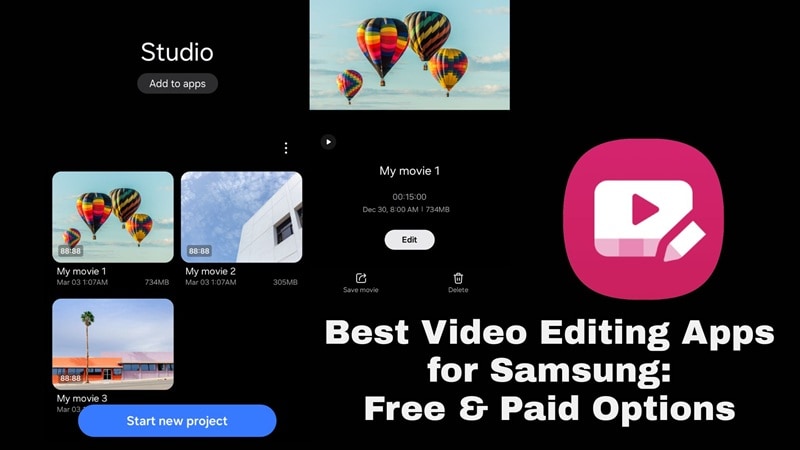
Samsung is still one of the biggest Android brands in the world. In Q3 2025, IDC listed Samsung as the No. 1 smartphone company worldwide by shipment volume, with 61.4 million units shipped and 18.8% market share. That explains why searches like Samsung Android video editor keep growing.
And the thing is, Samsung already gives users a built-in video editor through the Gallery app, but once you want something more advanced, the built-in Samsung video editor app can feel a little too basic.
So, we shortlisted the best Samsung video editing apps you can use in 2026 for different types of creators!
With hundreds of editing apps for Samsung on the Play Store and dozens claiming to be 'the best,' we had to set clear criteria for what actually matters on a Samsung phone. So, to make sure the recommendations hold up for more than one type of user, here are our criteria:
- Ease of Use: Can beginners start editing without a long learning curve?
- Editing Power: Does it support trimming, layers, transitions, speed, text, audio, and effects?
- AI Features: Does it include auto captions, smart cut, background removal, tracking, or AI templates?
- Export Quality: Can it handle HD, 4K, or higher-quality exports smoothly?
- Samsung Fit: Does it work well on Samsung Android phones and tablets?
- Reliability: Does it crash when you add more than three layers?
Our Top 3 Picks
If you don't have the time to read a full review of the best video editing apps for Samsung one by one, you can start with these three. These three tools lead the list for fundamentally different reasons, so you can pick based on what you actually need:


 Secure Download
Part 1. Samsung Studio – Built-in Samsung Video Editor App
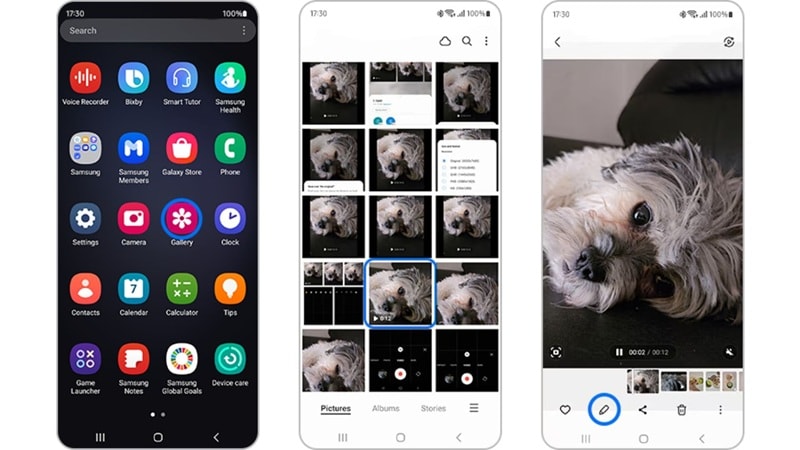
Samsung Studio is the official Samsung app for video editing built directly into the Gallery app on Galaxy S20 and newer devices. You access it by opening any video in the Gallery and tapping the pencil (Edit) icon. So, you do not need to search for a random Samsung video editor APK or install a sketchy file from a third-party site.
For quick, clean edits that stay on your device, it's the most frictionless option on this list. But the thing is, a lot of people either don't know it exists or underestimate what it handles. So, let's break down what your Samsung editing app already gives you.
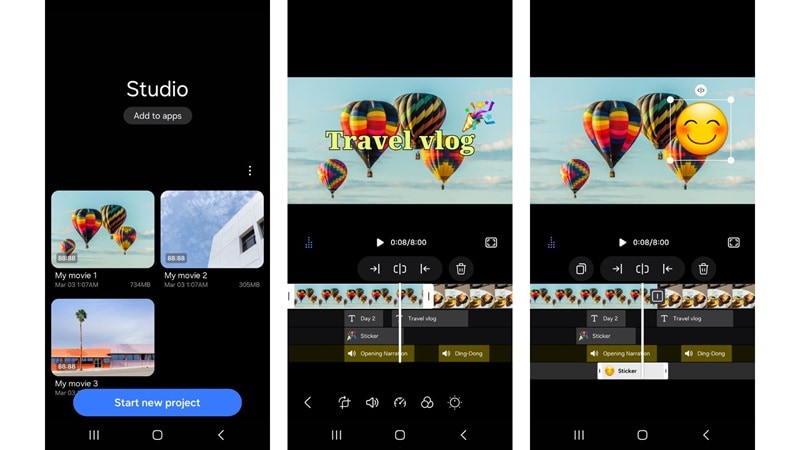
- Trim and Split Clips: Cut your video to the exact start and end points you want
- Speed Control: Slow motion and fast-forward adjustments
- Music and Audio: Add background music from your library or Samsung's built-in tracks
- Filters and Effects: Basic visual styles to change the mood of a clip
- Text Overlays: Add captions, titles, or labels directly on the video
- Stickers and Emojis: Basic decorative elements for casual social content
- For quick trims before posting a Story or a Reel, this is genuinely the fastest path.
- On Galaxy S20 and newer, Samsung Studio outputs up to 4K resolution.
- No strong auto-caption, AI background removal, or AI editing workflow.
- Effects, filters, and transitions are limited compared to any alternative app.
Samsung Studio is free to use on supported Samsung devices. Accessible via the Gallery app.
Part 2. Best Video Editing Apps for Samsung (Third-party Options)
As you can see, Samsung’s built-in editor is fine for small edits, but it's not enough for serious social or brand videos. Thankfully, you can always turn to other Samsung video maker app alternatives. These apps add stronger timelines, AI tools, templates, transitions, keyframes, effects, and better control over export quality.
Here is how the best Samsung editing apps stack up in 2026:
Comparison Chart
| Free Tier | Editing Level | What It Does Best | AI Features | Best For | |
| Filmora | (With watermark) | Beginner to Advanced | AI tools + balanced timeline | AI video generations, AI templates, captions, cutout, Smart Clips, and more | All around users from social clips to professional project |
| LightCut | (full access) | Beginner to Intermediate | One-tap AI editing, DJI footage | AI One-Tap Editing and smart template matching | Travel, vlog, and DJI users |
| KineMaster | (With watermark) | Intermediate to Advanced | Layered multi-track timeline | Auto captions, AI voice, AI music match, background removal, upscaling | Creators needing layer-based editing on mobile |
| LumaFusion | Unavailable | Advanced | Multi-track desktop-class edit | AI audio tools | Professional mobile editors, long-form content |
| Alight Motion | (With watermark) | Intermediate to Advanced | Motion graphics & keyframes | Limited | Graphic designers, motion creators, visual FX |
|
Show More
Show Less
|
|||||
Secure Download1. Filmora Mobile
This is easily the best video editing app for Samsung users who want both speed and depth. Built by Wondershare (the same team behind the desktop version), Filmora Mobile brings genuinely useful AI tools to Samsung Galaxy devices without the learning curve that normally comes with serious editing software. It also covers everything from quick Reels to more structured YouTube content.
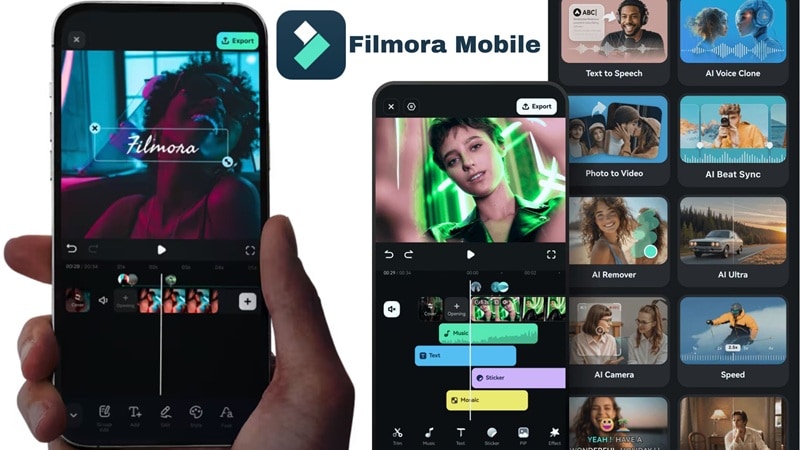
- AI Smart Short Clips: Scans your footage and automatically builds a highlight cut.
- AI Captions: Speech recognition that syncs subtitles automatically.
- AI Smart Cutout: Removes or replaces backgrounds without a green screen.
- AI Video Enhancer: Sharpens and upscales low-quality footage.
- Multi-track timeline: Layer video, audio, text, and effects independently.
- Vast template library with trending styles updated regularly.
- The most complete AI toolkit of any app in this list.
- It is intuitive for beginners but has enough depth that experienced editors won't outgrow it quickly.
- Ratios, templates, effects, and quick edits fit short-form videos well.
- Also available on desktop ( & ), so you can start on your Samsung and finish on a desktop.
- There is a watermark on free-tier exports.
Free version available, with affordable and flexible paid plans listed on the Filmora pricing page.
Secure Download2. LightCut
For casual users, travel creators, and drone owners, LightCut is one of the best free video editing apps for Samsung. LightCut is officially recommended by DJI and built around fast templates, one-tap editing, and smart footage selection. So, it is optimized to work with Galaxy devices to create Reels, TikToks, or YouTube Shorts.
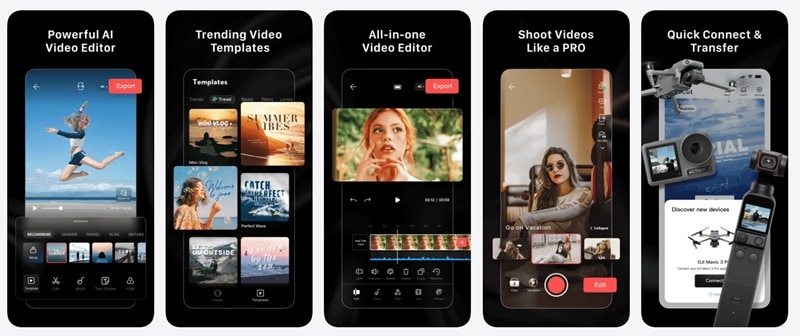
- AI One-Tap Editing: Auto-analyzes footage and assembles a highlight cut to a template.
- DJI Support: Wireless connection for DJI device users (DJI Avata 2, Mini 4 Pro, Air 3, and more).
- Video Templates: Fast edits for travel, sports, aerial, vlogs, food, and more.
- Real-Time Preview: Preview footage from compatible DJI devices.
- It is the best value free option in this comparison since it has no watermark and full feature access.
- The One-Tap AI editing system genuinely works great.
- Not designed for long-form content.
- Non-DJI users may not get the full benefit.
Completely free.
3. KineMaster
KineMaster has been one of the most downloaded Samsung video editor apps for years, and for good reasons. And it's kept that position by doing something most mobile editors don't: giving you actual multi-layer editing on a phone screen. KineMaster lets you layer videos, images, text, stickers, and audio independently, with each layer adjustable in opacity, blending mode, timing, and position.
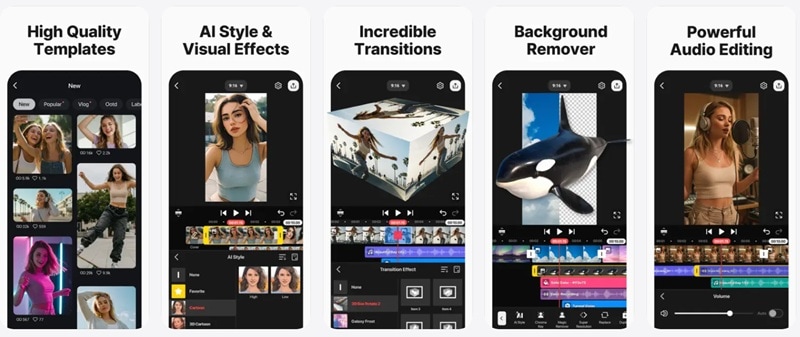
- Chroma Key: Remove and replace backgrounds with color-based keying.
- AI Background Changer: Swap backgrounds without a physical green screen.
- Blending Modes: Control how layers interact visually (multiply, screen, overlay, etc.).
- KineMaster Asset Store: Downloadable transitions, stickers, and effects.
- The most flexible layered timeline in this mobile comparison, useful for creators who need complex audio arrangements.
- Large active community and asset store for templates, transitions, and effects.
- Interface density can overwhelm new users.
- The free version has ads and watermark.
Free version is available. Paid plans start at $7.99 per month.
4. LumaFusion
If you want the best video editor app for Samsung for professional-style projects, LumaFusion deserves a serious look. This is for those who care about multi-track editing, audio control, color correction, LUTs, keyframes, and organized projects. You buy it once and own a professional-grade editor that can handle up to 6 tracks of 4K video at once!
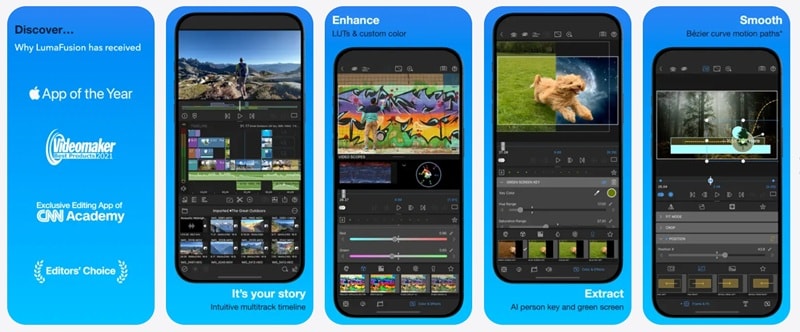
- Multi-track Timeline: 6 independent video/audio tracks.
- Color Grading: LUT import with cinematic color work on a phone screen.
- Audio Ducking and EQ: Improve dialogue, music, and sound balance.
- Dex Mode support: Export to ProRes, H.264, H.265, and social-optimized formats.
- Useful for interviews, tutorials, documentaries, and polished videos.
- ProRes and multi-camera editing capabilities are essentially unmatched on Android.
- There is no free version or trial to try at all.
- AI features are limited compared to other Samsung movie maker app alternatives on this list.
One-time purchase at $29.99 (permanent license, no subscription).
5. Alight Motion
Alight Motion is not just a regular video editor. It is more like a motion graphics studio for your Samsung phone. It is built for animated text, visual effects, compositing, keyframes, masks, vector graphics, and stylish edits. So, if your idea of the best editing app for Samsung includes animated typography, velocity edits, lyric videos, and effects-heavy posts, Alight Motion is the fun one.
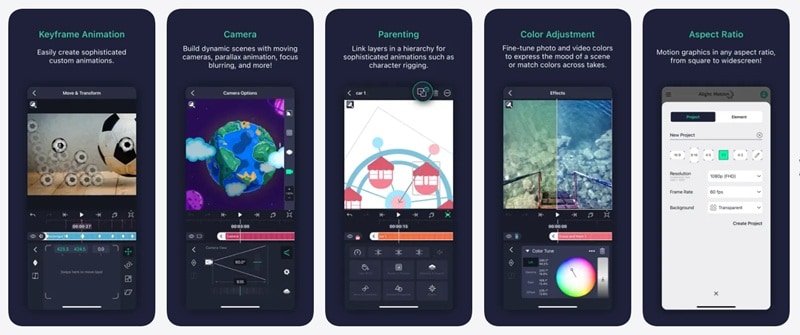
- Keyframe Animation: Control the position, scale, rotation, and opacity of any element over time.
- Vector Graphics Editing: Resolution-independent shapes and paths that scale cleanly.
- Multi-Layer Compositing: Stack and blend elements with blending modes and masking.
- Motion Blur: Realistic blur on animated elements for cinematic motion.
- A large community-driven preset library means you can import ready-made animation styles instantly.
- Export with transparency (alpha channel) lets you use Alight Motion as a compositing layer in a larger workflow.
- Steeper learning curve than any other app here for non-designers.
- Include watermarks on free exports and the most useful motion presets require a subscription.
Free version is available. Paid plans start from $4.99 per week.
Part 3. Choosing a Samsung Video Editing App Based on Use Cases
Here's the thing, the right Samsung Galaxy video editor app really depends on what you are actually making. A quick trim does not need LumaFusion. A professional vlog probably should not rely only on Samsung Studio. A motion graphics edit will feel much better in Alight Motion than in a basic editor.
So, rather than telling you which app is objectively the best video editing app Samsung, here's a use-case guide that maps your actual workflow to the right tool for it.
| Use Cases | Recommended App | Why It Fits | What to Watch Out For |
| Quick trims and simple edits | Samsung Studio | Already built into supported Samsung phones and easy to use from Gallery | Too limited for advanced edits |
| Fast social media videos (TikTok/Reels) | Filmora Mobile | Templates, effects, PIP, smart tracking, speed tools, and social ratios make editing easier | Some premium assets and watermark-free exports need Pro subscription |
| Layer-based mobile editing | KineMaster | Strong layers, AI captions, effects, asset store, and 4K exports | Free version has ads/watermark |
| One-tap travel and DJI videos | LightCut | AI One-Tap Editing and DJI support make it great for travel, drone, and vlog clips | Less manual timeline control |
| Professional-level projects | LumaFusion | Stable, advanced, and no subscriptions | Paid app and higher learning curve |
| Creative content with AI assistance | Filmora Mobile | Multi-track timeline plus reliable AI captions, smart cutout, and clip generation | Some AI tools require credits |
| Motion graphics and animations | Alight Motion | Best for keyframes, animated text, masks, effects, and visual design | High CPU usage |
|
Show More
Show Less
|
|||
Secure DownloadConclusion
Samsung Studio is a good starting point if you only need a simple Samsung app for video editing. But it is not the strongest option once you need AI tools, templates, advanced layers, motion graphics, or a more flexible timeline.
For most Samsung users, Filmora Mobile is easily the best Samsung video editor app to try. It brings AI Smart Clips, auto-captions, smart cutout, and a multi-track timeline to your Samsung Galaxy in one app, with a free tier you can actually test before committing. Start there, push its limits, and you'll know quickly whether you need to go deeper with one of the more specialized options on this list.
FAQs
-
What’s the best free video editing app for Samsung?
For basic editing, Samsung Studio or the built-in Samsung Video Editor is the best free option because it is already available on supported Galaxy phones. For more creative edits, LightCut is also a strong free option, especially for quick template-based videos and DJI footage. -
Can Samsung phones handle advanced video editing apps?
Yes, many Samsung phones can handle advanced video editing apps, especially newer Galaxy S, Z, and higher-end A series models. Apps like LumaFusion, KineMaster, Filmora, and Alight Motion can run on Android, but performance depends on your phone’s processor, RAM, storage, and video resolution. -
Is Samsung Studio good enough for video editing?
Samsung Studio is good enough for simple video editing. It works well for trimming, rotating, adding music, adding text, using filters, and making quick edits. But if you want multi-layer editing, AI captions, advanced effects, better audio tools, or professional-style projects, it's better to download a Samsung video maker app like Filmora.
