

 TL;DR:
Filmora Mobile stands out as the best overall vlog editing app for its AI-powered features and seamless desktop upgrade path, while CapCut is the top choice for trending short-form social media templates and LumaFusion delivers professional desktop-level control for mobile power users.
● iMovie is the only fully free, watermark-free option but is strictly limited to iOS and macOS devices, while cross-platform creators using Adobe Premiere Rush face monthly export limits on the free tier and the app will soon be replaced by Premiere for iPhone.
● Both Filmora Mobile and CapCut place watermarks on their free versions, but CapCut specifically lacks detailed color grading, has privacy-related data collection concerns, and is less smooth for editing long-form YouTube vlogs.
● LumaFusion charges a $29.99 one-time fee rather than a subscription and omits AI automation tools entirely, targeting committed professionals who require up to six video/audio tracks, LUT support, and advanced audio ducking across iOS and Android.
Ask AI for a summary
 ChatGPT
 Perplexity
 Gemini
 Claude
 Grok
Grok
Vlogging is booming on YouTube, TikTok, and Instagram, making your video editor choice critical. To help you create engaging, high-quality content, we've tested and ranked the Top 5 Best Vlog Editing Apps of 2025, including excellent free vlog editing apps. This curated list provides good vlog editing apps covering powerful free and paid options for YouTube vlog editing, focusing on ease of use, essential AI tools, and seamless social media export, ensuring you find the perfect vlog video editing app for your phone to simplify your workflow and get professional results.
Part 1. Why Choose a Dedicated Mobile Vlog Video Editing App?
To help your vlog content stand out, you need a vlog editing app that not only has fun extra features but also makes the editing process easier and faster.

- Professional Look: To achieve a professional look, a vlog editing app should include high-quality transitions, color adjustments, and video stabilization that can transform ordinary videos into enhanced clips and cinematic vlogs that feel professional and keep viewers watching.
- Time-Saving: You need a vlog app that simplifies your workflow and saves you time. AI-powered tools, pre-made templates, and automation features to handle difficult tasks allow you to edit your vlogs without spending hours on manual edits.
- Mobile-Friendly: Need to edit your vlog right away? A mobile-friendly vlog app lets you edit your vlog anytime, anywhere, just with your phone. There's no need to carry a laptop or deal with complicated software.
- Direct Sharing: To make your vlog look great and fit perfectly on all platforms, such as YouTube, TikTok, and Instagram, a vlog app makes it easy by exporting videos in optimized formats, so you don't need to make additional adjustments.
Using a vlog editing app, you can speed up your work with better results, so you can spend more time creating and sharing videos that your audience will love.
Our Top 3 Recommended Mobile Vlog Editing Apps (For AI & Ease of Use)


Part 2. Best Vlog Editing Apps in 2025
If you are a new creator or casual vlogger, a free vlog editing app is the ideal choice to get you started in video editing. With these apps, you can experiment with editing, learn the basics, and publish your videos without spending any money at first.
Currently, many free apps include basic features, like cutting and transitions, to more advanced tools, such as the AI-powered features, so you can easily create high-quality vlogs from your phone. Here are the best options for vlog editing apps in 2025.
1. Filmora Mobile – Best Free Vlog Editing App for Beginners (Android/iPhone)
 Secure Download
Wondershare Filmora for mobile is a tool that makes vlog editing simple, yet gives you professional results. Filmora includes AI-powered features such as Smart Cutout and AI Audio Denoise, which speed up your vlog video editing.
Moreover, its AI Template feature can be used to enhance your videos and customize them to suit your video type using the pre-built styles provided.
- The intuitive interface makes it easy for users to learn without needing tutorials.
- Royalty-free music and sticker libraries to keep your content fresh.
- Export without watermarks with the premium plan, so you can scale as you grow.
- A consistent experience across both iOS and Android platforms.
- AI-powered tools and some premium presets require a subscription.
- Limited advanced color grading compared to professional desktop tools.
- AI-Powered Editing Suite: AI Smart Cutout removes backgrounds without green screens, AI Auto Reframe adjusts videos for multiple platforms, and AI Audio Denoise automatically cleans up background noise.
- AI Templates for Vlogs: Ready-made styles with music, text, and transitions let you create polished vlogs with a single tap.
- Precision Controls: Speed ramping for dramatic slow or fast motion, audio sync for perfect timing, and keyframe support for text animation or effects.
- Social Media Export: Optimized presets for YouTube, TikTok, Instagram Reels, and Shorts with the right aspect ratios.
Free version with watermark. Premium plan available monthly or annually.
2. CapCut – Vlog Editing App for Social Media with Trending Templates
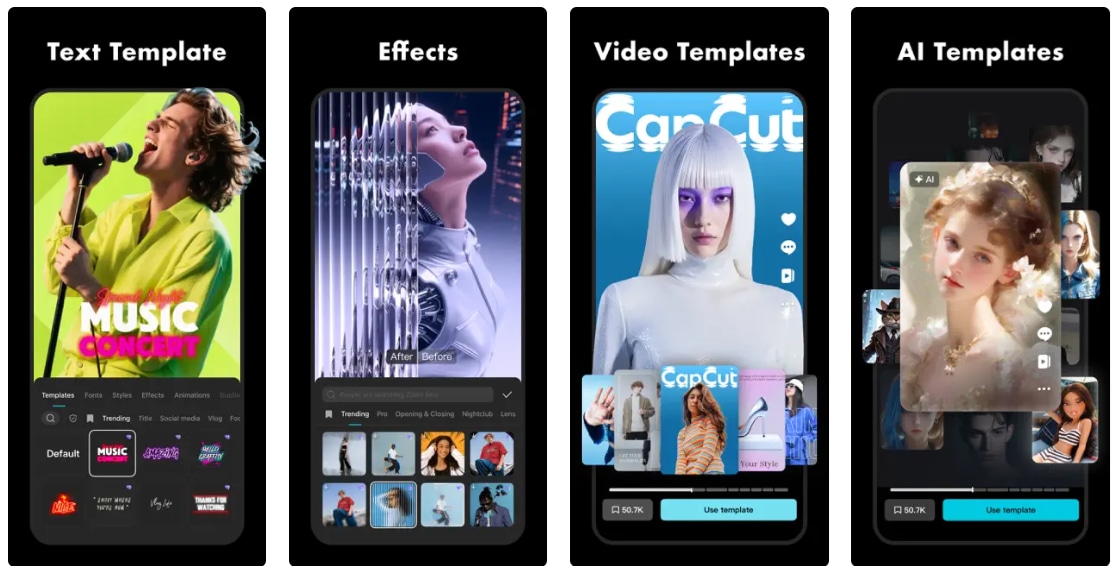
Popular for its simple interface and easy workflow, CapCut is a highly recommended vlog editing app. You'll find a wide range of useful tools, such as AI background remover, auto captions, and numerous social media templates. Many TikTok and content creators choose it because it has library of trending effects and music.
- Built-in TikTok integration for direct publishing.
- Huge library of trending sounds and effects that match social media trends.
- Lacks detailed control over color settings or audio mixing.
- Occasional ads and data collection concerns for privacy-focused users.
- Not as smooth for editing long-form content like YouTube vlogs.
- Watermark on the free versions.
- Many advanced features are for premium users only.
- AI Tools: Auto captions, background removal, and smart cropping for quick and automated workflows.
- Template Library: Thousands of trending TikTok-style templates updated regularly.
- Creative Control: Multi-layer editing, keyframes, and built-in effects for custom edits.
Available for free version. Monthly and annual subscription versions start from $7.99 - $19.99 per month and $74.99 per year.
3. Adobe Premiere Rush – Quick Editing Across Devices
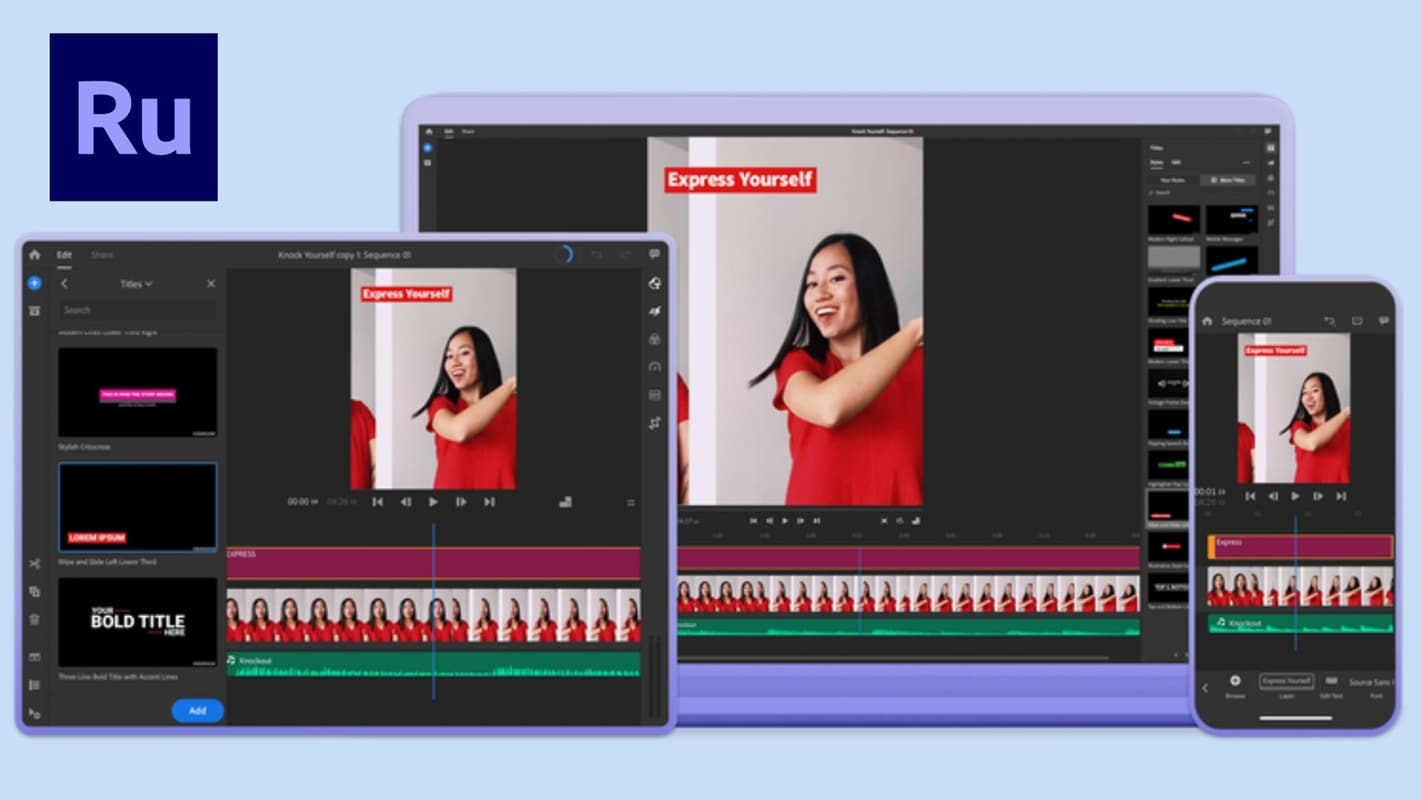
From its name, we already know that Adobe Premiere Rush is part of the Adobe ecosystem. With its credibility, many creators choose it to edit vlogs on multiple devices and keep projects in sync. It's available as a desktop and mobile app.
- Works seamlessly within the Adobe Creative Cloud ecosystem.
- Ideal for creators who frequently switch between mobile and desktop devices.
- Reliable performance and a clean interface for quick editing.
- The free version limits your monthly exports.
- Will be replaced soon with Premiere for iPhone.
- The subscription fee can be expensive if you only need light editing.
- Less flexible than Adobe Premiere Pro for complex projects.
- Cross-Device Sync: You can keep updating your project on all devices. Start on your phone and finish on your desktop.
- Motion Graphics Templates: Enhance the visuals of your vlogs using animated titles and transitions from Adobe Premiere Rush.
- Quick Sharing: Within one app, you can share your content directly to various platforms such as YouTube, Instagram, Facebook, or TikTok right after exporting it.
- Cloud Storage: With Adobe Creative Cloud integration, you can access your projects anywhere.
Free version (with limited exports per month). Paid plans start from $9.99 per month to unlock unlimited exports and larger cloud storage.
4. LumaFusion – Professional Editing on iOS
iPhone or iPad users may recognize LumaFusion as one of the most powerful professional vlog editing apps. Vloggers and filmmakers often choose it for its desktop editing quality on portable devices. For creators who want to use this tool across multiple platforms, LumaFusion is now also available for Android users.
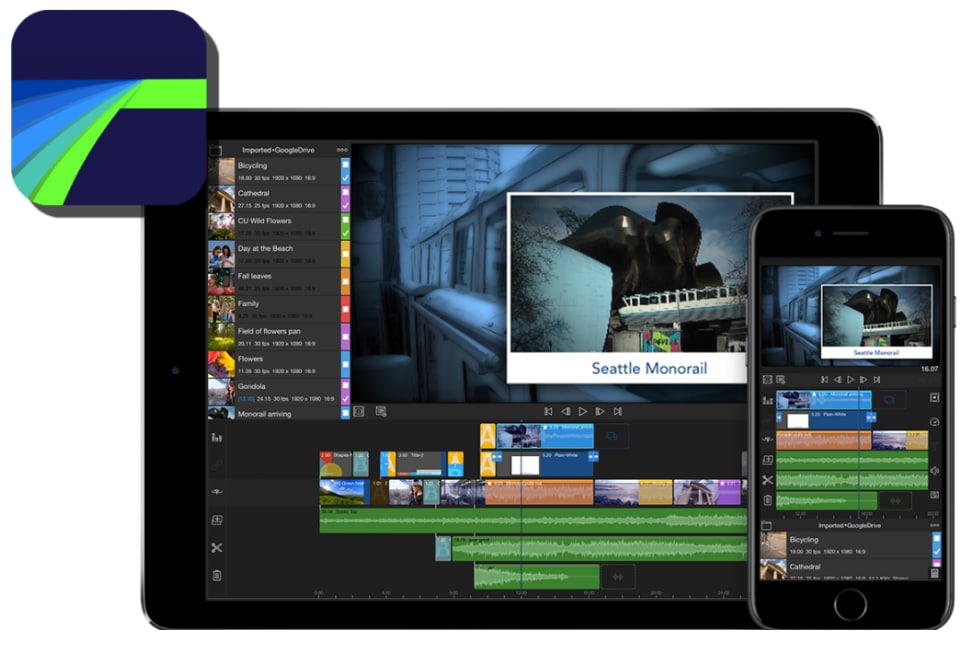
- The editing experience is almost desktop-level on mobile devices.
- A one-time purchase means no ongoing subscription fees.
- Smoothly edit 4K, slow-motion, and multi-camera videos.
- A steeper learning curve for casual vloggers.
- The best experience is still on the iPad, somewhat limited on smaller screens.
- No built-in templates or AI tools like Filmora or CapCut.
- Multi-Track Timeline: LumaFusion enables you to edit up to six video tracks and six audio tracks with precision.
- Advanced Trimming: Utilize frame-by-frame cutting for perfect cuts and transitions.
- Color Grading: Experiment with LUTs and adjust colors for a cinematic look.
- Audio Mixing: Popular for its professional tools, including keyframing, EQ, and ducking.
- Media Management: Quickly import media from external drives or cloud storage and edit large projects on the go.
One-time purchase at $29.99 (premium features like multicam editing may cost extra).
5. iMovie – The Best Free Vlog Editing App for iPhone and Mac Users
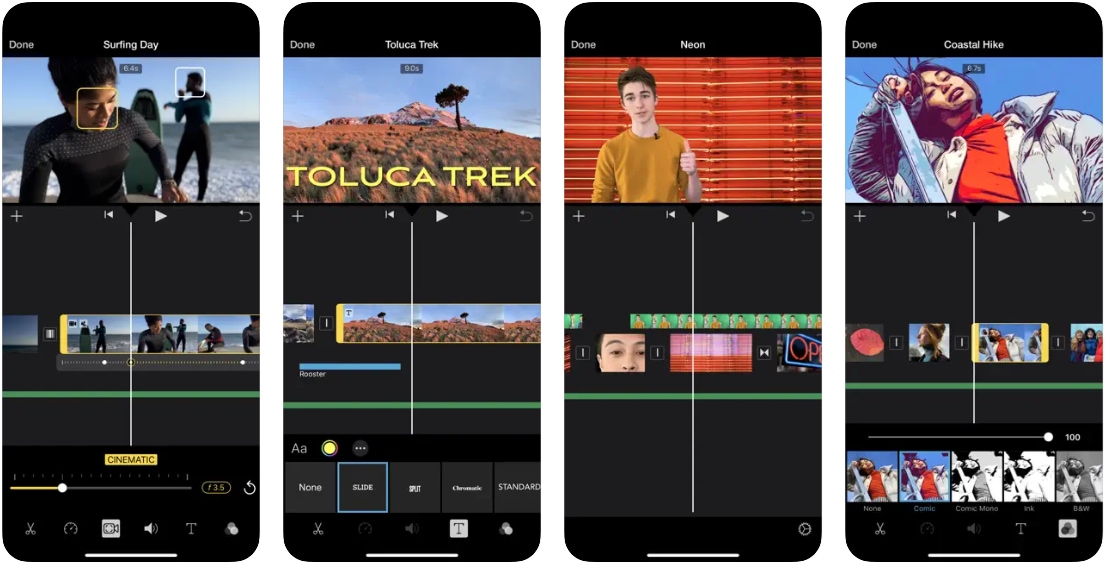
iMovie has been the first choice video editor for Apple users for a long time, and it remains one of the most reliable options for beginner vloggers in 2025. iMovie is the ideal option for creators seeking a seamless and free vlog editing app because it is pre-installed on most Apple devices and functions seamlessly on the iPhone, iPad, and Mac.
- Completely free and without watermarks on all Apple devices. Highly stable and well-optimized for iOS/macOS.
- Suitable for beginners who want simple yet polished results.
- Limited customization and advanced tools.
- Only available on Apple devices; does not support Android.
- Lacks AI-powered features that can speed up the editing process.
- Easy Drag-and-Drop: Easy timeline editing with built-in transitions.
- Built-In Themes and Soundtracks: Polished templates with matching music to create cinematic vlogs quickly.
- Seamless Apple Integration: With its iCloud sync you can start editing on iPhone and finish editing on iPad.
- 4K Video Support: High-quality export without any extra cost.
Free for all Apple users.
Part 3. Top 5 Vlog Editing App Comparison (2025)
Why Choose Filmora Mobile Over CapCut and iMovie? While CapCut excels with short-form templates and iMovie is fully free for Apple users, Filmora Mobile offers the best balance for growing vloggers. Filmora provides professional, desktop-level features like AI Smart Cutout and Precision Keyframing often locked behind expensive subscriptions in other apps. Its true strength lies in its cross-platform consistency with the Filmora desktop version, providing an unmatched upgrade path as your vlogging career expands. This makes it the superior choice for long-term content creation. Here is a comparison table of the top 5 vlog editing apps to help you decide which one is right for you:
| App | Platforms | Free Version | Key AI/Automation Features | Pricing Model | Best For |
| Filmora Mobile | iOS, Android | Free (watermark) | AI Smart Cutout, Auto Reframe, AI Templates | Subscription | Beginners, professionals |
| CapCut | iOS, Android | Free with limited features + watermark | AI Background Remover, Auto Captions | Subscription | TikTok or Instagram users |
| Adobe Premiere Rush | iOS, Android | Free with monthly exports | Auto audio sync, Motion Graphics templates | Subscription | Creators who want the Adobe ecosystem |
| LumaFusion | iOS, Android | No free version | LUT support, Multitrack editing | One-time purchase | Pro editors using iPad |
| iMovie | iOS, macOS only | 100% free | Built-in themes, Trailers | Free | Apple users & beginners |
Tips on Choosing the Best Video Editing App for Vlogs
- Consider Your Skill Level: Beginners will benefit from apps with simple controls and clear tutorials. More experienced creators should look for an app that offers advanced tools such as keyframing, multi-track timelines, and detailed color correction.
- Check Export Options: Ensure the app supports the resolution and file formats you need, especially if you plan to upload in 4K or to various social media platforms.
- AI Features: Apps with AI tools can save you a lot of time by automating tasks such as adding text, removing backgrounds, or adjusting vertical and horizontal formats.
- Pricing: Decide if a free version is enough for now or if upgrading to a paid plan is worth it for removing watermarks, unlocking access to additional assets, and exporting in higher quality.
- Community and Support: Useful tutorials, an active user community, and reliable customer service can make your editing experience much smoother.
Conclusion
With so many vlog editing apps available today, the top 5 apps curated in this article can help you choose the vlog app that best suits your needs and workflow. Each vlog editing app offers its own key features, pros, and cons.
Among the apps discussed, Filmora stands out for its simplicity while also offering advanced features like its AI tools, which can speed up your vlog editing process, especially if you have multiple projects to work on. Regardless of which app you choose, ensure that the free version is enough for your work, or if you need to upgrade to a premium plan to access more advanced editing features.

Frequently Asked Questions
-
Which free vlog editing app is best for beginners on Android or iPhone?
Filmora Mobile is a great choice for beginners due to its user-friendly interface, AI-powered templates, and social media-friendly export settings. CapCut is another excellent option for creators who want trending templates with built-in captions. -
Does a paid app always have to be used to create vlogs that look professional?
No, because free apps can produce high-quality results, but paid apps often unlock advanced features such as 4K export, keyframe settings, unlimited access to stock assets, and premium effects. If you intend to expand your channel or create content professionally, upgrading is something you should think about. -
Which app for editing vlogs is most effective for TikTok and Instagram Reels?
Both Filmora Mobile and CapCut are specifically designed for short-form content. You can edit in vertical format, use music libraries, and export with the right aspect ratio for social media. -
Is it possible to edit vlogs exclusively on my phone?
Yes. Many creators today edit entirely using mobile devices. Apps like Filmora Mobile, Adobe Premiere Rush, and LumaFusion give you professional tools without needing a laptop. -
Is Filmora suitable for beginners?
Without a doubt. Filmora is designed to be easy to use. It also comes with advanced features such as AI Smart Cutout, multi-track editing, and professional audio controls, for when you are prepared to advance your skills.
