

 TL;DR:
Soundful AI Music Generator is a highly specialized tool for producing royalty-free background tracks based on mood and genre templates, making it optimal for video creators who need quick background audio rather than full vocal songs.
● The free Standard plan permits unlimited track generation but strictly limits users to one monthly MP3 download for personal use, requiring an upgrade to the Pro plan (starting at $9.99/month) to unlock commercial rights and high-fidelity STEM downloads.
● In contrast to alternatives like Suno or Udio that utilize text prompts to generate complete songs with lyrics, Soundful operates on predefined styles and pairs effectively with Wondershare Filmora's AI Beat Detection to automate video cut synchronization.
● The platform lacks built-in features to edit individual instruments directly within the application, and users face a licensing restriction where canceling a paid subscription may necessitate the removal of previously published commercial tracks.
Ask AI for a summary
 ChatGPT
 Perplexity
 Gemini
 Claude
 Grok
Grok
Finding the perfect royalty-free background music is a constant challenge for creators. In this Soundful AI Music Generator review, we explore how this platform leverages AI to create studio-quality tracks in seconds. Whether you are a YouTuber or a pro editor, our hands-on 2026 guide covers everything from Soundful pricing to its seamless integration with Wondershare Filmora.

Part 1. What Is a Soundful AI Music Generator and How Does It Work?
Basically, Soundful is a tool that helps you create custom music using AI, without needing music production skills. Now, you might wonder how the Soundful Music Generator actually works. Here's the simple idea behind it:
- You choose a style, mood, or genre.
- The AI generates a music track based on your selection.
- The system uses original, non-copyright audio patterns to avoid copyright issues.
- You get a clean, studio-quality track ready to use.

As you can see, instead of generating completely random tracks, the Soundful AI Music Generator mixes AI speed with human input. This balance allows the tracks to maintain a human touch, so it doesn't sound rigid or artificial. As a result, Soundful AI Generator produces music that feels more alive.
Part 2. Key Features That Set Soundful Apart in 2026
With so many AI music generators available today, what makes the Soundful AI Generator special? Instead of just focusing on automation, Soundful AI Music offers several features that are especially useful for creators. Let's explore what sets it apart.
High-Fidelity STEM Downloads
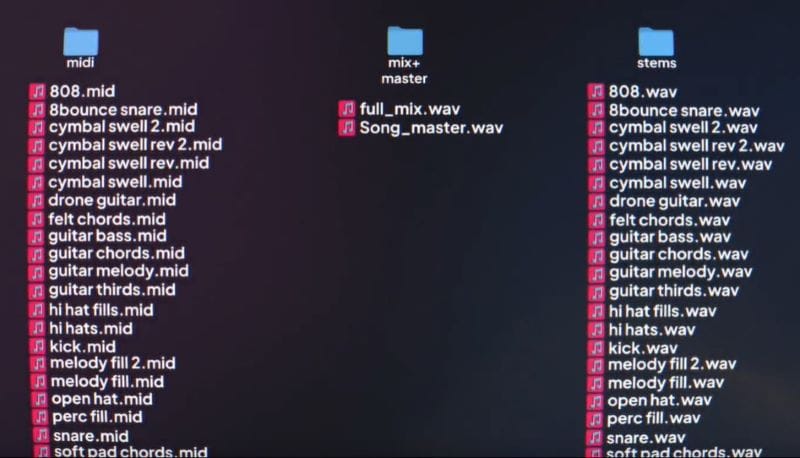
A standout feature in Soundful Music Generator is the high-fidelity STEM download. It means that you can download individual instruments, like drums, bass, or melody, separately. You can use the STEM files for mixing, editing transitions, or balancing instruments. It offers more control and flexibility during editing compared to a single merged audio file.
To get the most out of this feature, follow these steps:
- Log in to your Soundful account.
- Select from the various templates.
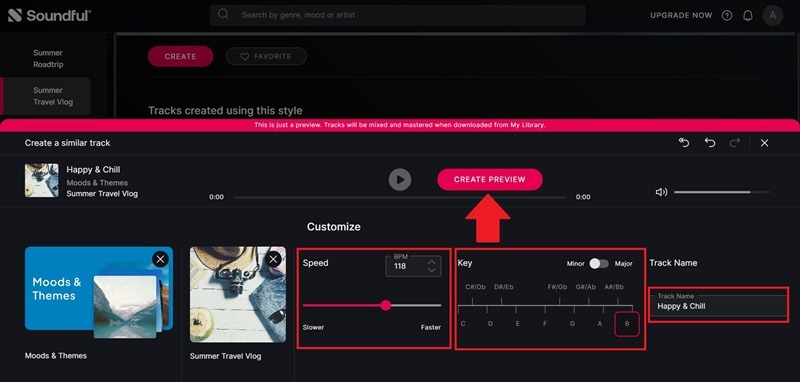
- Adjust the speed and key, then name your track. Click Create Preview.
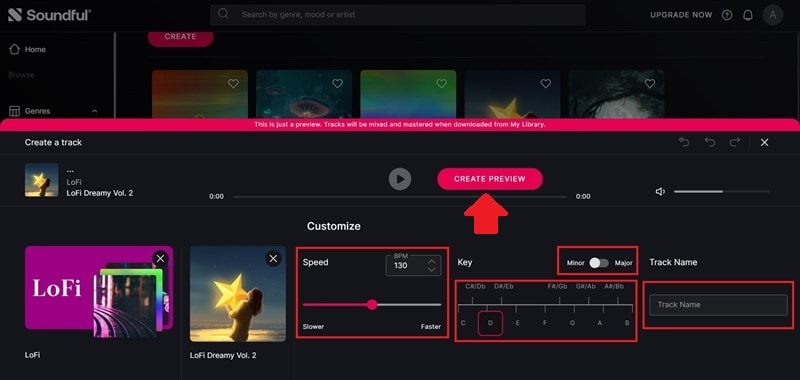
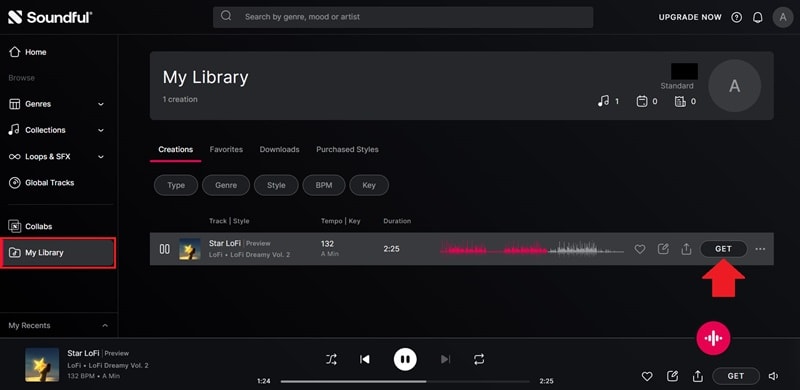
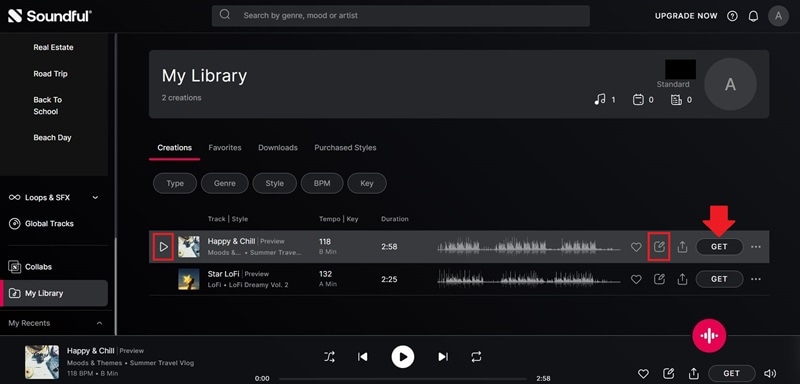
- Find the audio preview in My Library.
- Click Get to download and save it to your device.
- Select STEMs Download.
- STEM downloads are available only for Pro users.
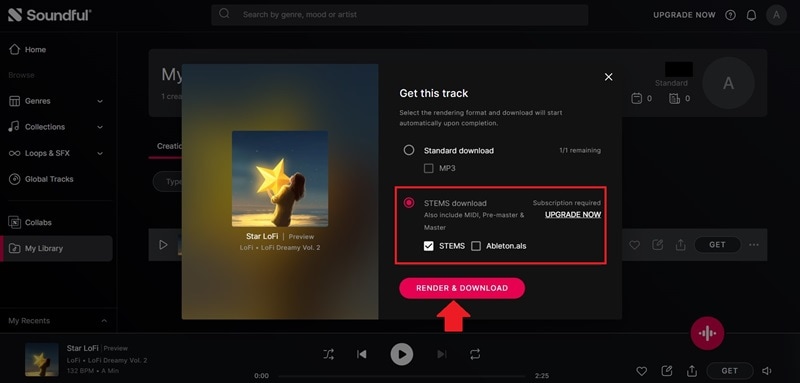
Once the STEM files are downloaded, you can make further adjustments in music editing software. The package also includes MIDI, pre-master, and master files that help you refine the composition and final sound. This makes it ideal for producers, editors, and creators who want more detailed control over their audio.
Genre-Specific Templates
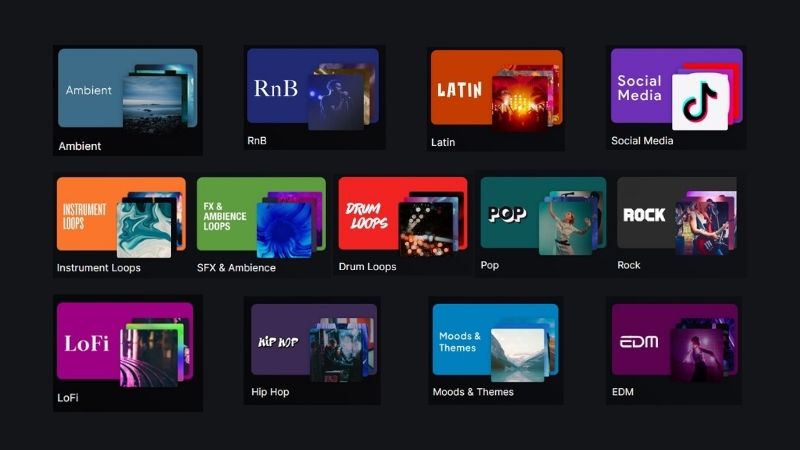
Soundful AI Music provides plenty of background tracks for different needs. It includes 14 genres and 50+ templates that let you build music based on a specific vibe or atmosphere. You can also adjust the tempo and key, and even use styles inspired by global producers and songwriters through Soundful's collaboration.
Global Tracks & Licensing

Music and creative works are always connected to copyright and licensing. Since AI generators help us create tracks, many people question who owns the final result. Soundful AI Music Generator provides three different license types.
- Personal License: For personal and non-commercial use only. Suitable if you just want to practice, experiment, or create music for yourself.
- Music Creator License: Allows you to use the music for commercial projects. Great for creators, producers, and small businesses.
- Business License: Designed for larger commercial use. It gives broader rights beyond social media platforms.
Check below to understand what counts as a commercial project and where the limits apply. Each license includes different rights and restrictions.

Part 3. Soundful AI Pricing 2026: Is the Pro Plan Worth It for Creators?
Now that we understand the licenses, let's look at how they relate to Soundful's pricing. While Soundful AI Generators offers six paid plans, three of them are designed mainly for businesses. Here, we'll focus on the plans most individuals use: Standard, Premium, and Pro. Check the table below for a quick comparison.
| Details | Standard | Premium | Pro |
| Price | Free | $5 / month | Starting at $9.99 / month |
| Track Generation Limit | Unlimited | Unlimited | Unlimited |
| Access to Styles | 25+ | 150+ | 150+ |
| Premium Content | No | Yes | Yes |
| In-App Purchases | No | Yes | Yes |
| Monthly Download Limit | 1 MP3/WAV and 0 STEM Packs | 100 MP3/WAV and 0 STEM Packs | 400 MP3/WAV and 20 STEM Packs |
| License Type | Personal License | Music Creator License | Music Creator License |
| Best For | Personal | Social media creators, freelancers, and businesses | Music enthusiasts, artists, and producers |
|
Show More
Show Less
|
|||
As you can see, Soundful AI Music pricing plans differ in download limits, style access, and premium features. The Standard plan is free but comes with restrictions. You can generate unlimited tracks, but only download one track per month, access limited styles, and use them for personal projects only.
So, is upgrading worth it? Well, if you plan to use Soundful AI Music for YouTube, social media, or client work, upgrading is worth it. But if you're just experimenting, the free plan is enough to get a feel for the tool.
Part 4. Soundful AI vs. Suno vs. Udio: Which AI Music Generator is Best?
By now, it's clear that Soundful AI Music Generator works best for background music, especially for videos. It's fast, easy to use, and creates royalty-free tracks based on mood, tempo, and genre, which makes it useful for everyday content creation.
That said, Soundful isn't the only option out there. There are some well-known alternatives to Soundful Music Generator that focus on different things, from full song creation to more experimental music. So, let's take a look at how they compare and where each tool makes more sense depending on what you need.
1. Suno
One popular AI music generator is Suno. While Soundful AI Music lets you select templates, Suno creates songs based on text prompts. If compared, Soundful works better for background music (BGM), while Suno is more suitable for making complete songs with lyrics.

- Fast generation process.
- Generous free plan with up to 10 songs per day using daily-renewed credits.
- Unable to edit specific parts of the song. You need to regenerate the whole track to change a lyric or adjust the instrument.
- The results may seem similar between tracks.
- Automatically generates a full song with lyrics by entering a description of the genre, vocal type, and mood.
- Offers two AI versions for music generation.
- Exports up to 12 WAV STEMs.
2. Udio
Another alternative to Soundful Music Generator is Udio. The tool helps you create music quickly using prompts. With Udio, you simply describe the genre, what the song is about, and the overall vibe. The AI will process your input and create the music. Also, you can choose to generate lyrics automatically or provide your own.
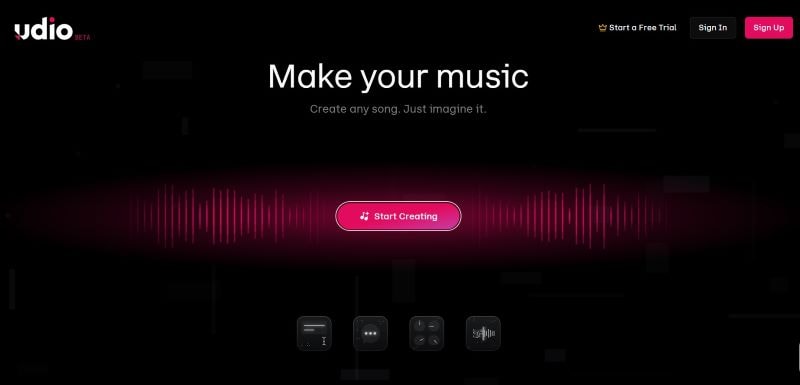
- The dashboard shows trending tracks and popular creations that can inspire your ideas.
- Editing tools allow you to fix certain parts instead of starting over from scratch.
- Audio generation takes time.
- New users may need time to explore and learn the available tools.
- Choose between generating music with a prompt or uploading a reference track to match a style.
- Includes extra features such as extending a track, using inpaint to edit specific parts, or remixing one audio with another.
- Supports batch generation, allowing you to create up to 4 tracks at the same time.
3. Beatoven
Lastly, don't forget that Beatoven is one of the Soundful AI Generator alternatives you can try. Powered by Maestro AI, it creates background music and sound effects quickly. You only need to describe the music you want, including the duration, mood, era, and occasion.
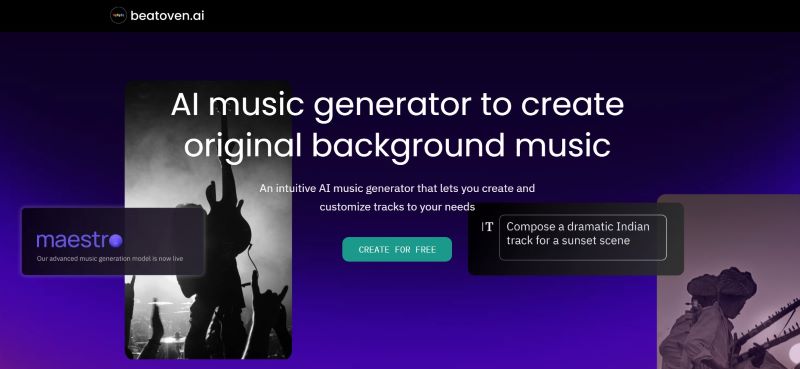
- Offers a wide range of genres and moods for background music and sound effects.
- Each generation provides four variations, making it easier to compare and select the best one.
- The interface can be a bit confusing for beginners and may require some time to learn.
- You can upload a video to match the audio, but it does not include built-in video editing tools.
- Provides Auto-Generated Prompts if you run out of ideas.
- After previewing the generated tracks, you can adjust the instruments by including or removing specific ones.
- Allows you to upload a video to match the generated audio.
Part 5. Step-by-Step: Using Soundful AI with Video Editors (like Filmora)
It's only fair that we test Soundful AI Music Generator in a real workflow. We'll create a full video of a couple going on a nature road trip. Soundful AI Generator will help us generate background music that fits the atmosphere. Next, we'll move to Wondershare Filmora to combine the audio with visuals and make the video more dynamic.
Section 1: Creating Music with Soundful Music Generator

- On the homepage, browse through the available genres and templates.
- Select a template that matches the mood or direction you want.
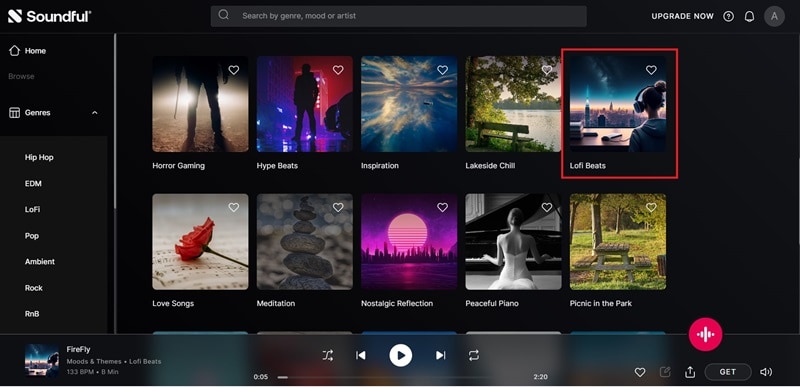
- Set the tempo and key as needed.
- Name your audio track, then click Create Preview.
- Your preview will be saved in My Library.
- Tap the Play button to listen to the full preview.
- Select the Edit icon if you want to change the settings and regenerate.
- Click Get to proceed with exporting.
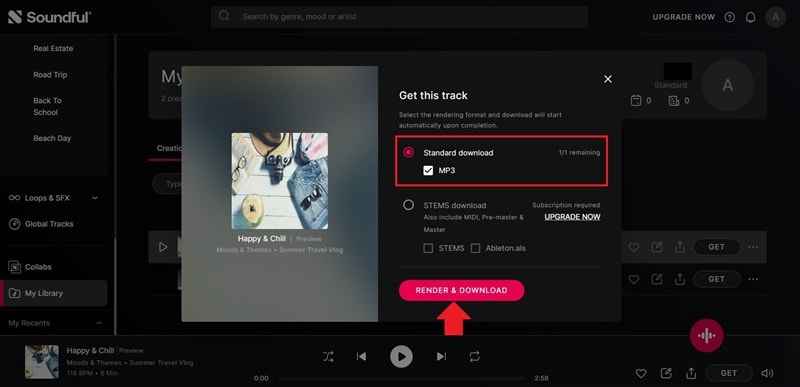
- Select the Standard download to export the MP3 file. You will also see the remaining download quota.
- Click Render & Download to save the track.
Once downloaded, the track can be edited further using music editors. You can tweak, refine, or mix the audio file. If you want to pair it with visuals, process the track in Wondershare Filmora.
Section 2: Bringing Your Music to Life in Wondershare Filmora
Having background music is just the first step in video production. To make your content stand out, you need a full and well-structured clip. That is why Wondershare Filmora becomes the next essential step.
As a powerful video editor, Filmora supports audio and video editing in one place. It helps you turn generated tracks from Soundful AI Music into a polished and engaging video. By combining Soundful AI's unique audio output with Filmora's AI Beat Detection, creators can reduce their editing time by up to 50% while maintaining a cinematic feel.
 Secure Download
Why Wondershare Filmora for Your Next Project?
1. Seamless Editing Workflow

Filmora keeps your editing process smooth and efficient. You can simply drag and drop audio and video into the timeline, trim clips, adjust layers, add transitions, and export in just a few clicks.
2. Advanced AI Tools
Filmora goes beyond basic editing without making things complicated. It offers advanced AI tools for both audio and video improvements. Powered by the latest AI models like Veo 3.1 and Sora 2, it helps you edit smarter and faster.
3. Extensive Media Library
You don't need to search for extra assets outside the platform. Filmora's built-in library includes various effects, filters, text styles, and stickers. You can simply drag them into your project and adjust as needed.
4. Works Across Devices
Filmora is compatible with Windows, macOS, iOS, and Android. Whether on desktop or smartphone, your editing workflow stays consistent. You can move between devices without losing progress.
How to Match Music to Video in Filmora
Using Soundful Music Generator, we created a calm and uplifting background track that fits the road trip theme. The music feels light and easy. Next, we'll pair the music with visuals in Filmora.
We'll use the Beat Detection feature, which analyzes the audio and marks the beat positions. These markers guide us when cutting and arranging clips. It helps create smoother transitions that follow the music naturally.
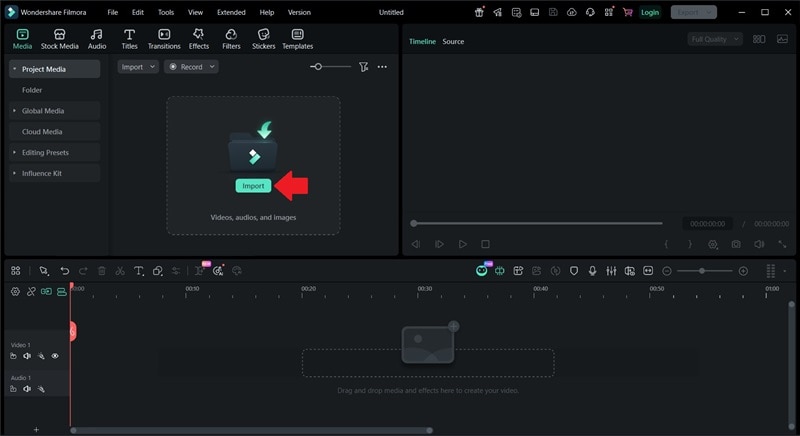
- Open Filmora and Create A New Project, you will be directed to the editing timeline.
- Click Import to upload the generated background music from Soundful AI Music.
 Secure Download
- Right-click on the audio you just uploaded.
- Select Beat Detection.
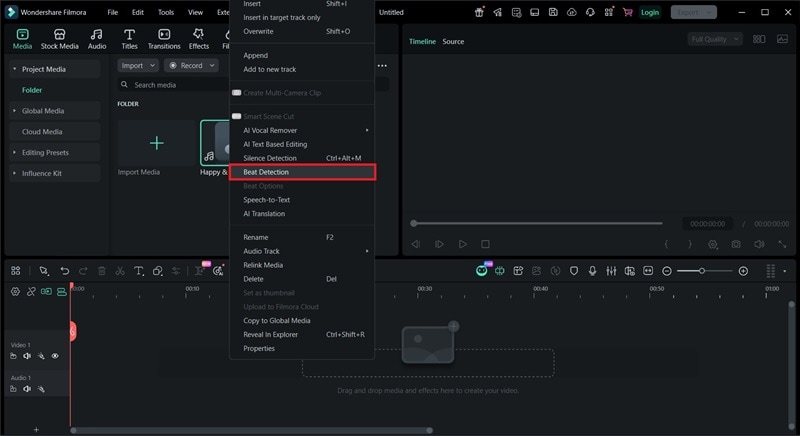
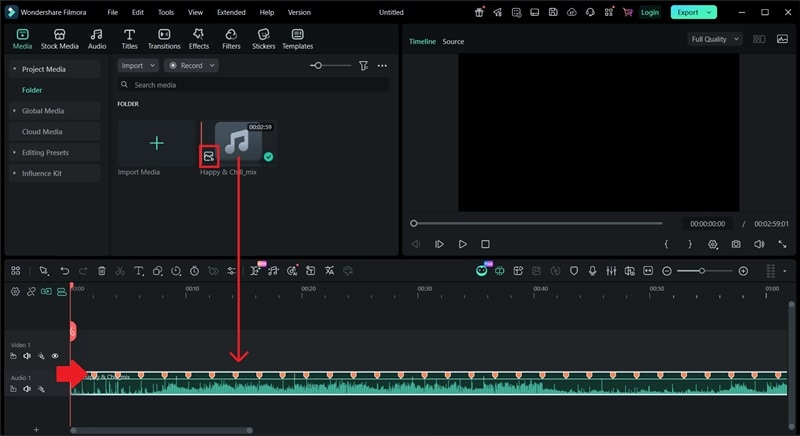
- Once Beat Detection is applied, you'll see a small mark on the bottom-left of the audio file.
- Drag the audio file to the timeline.
- The beats will be marked in red.
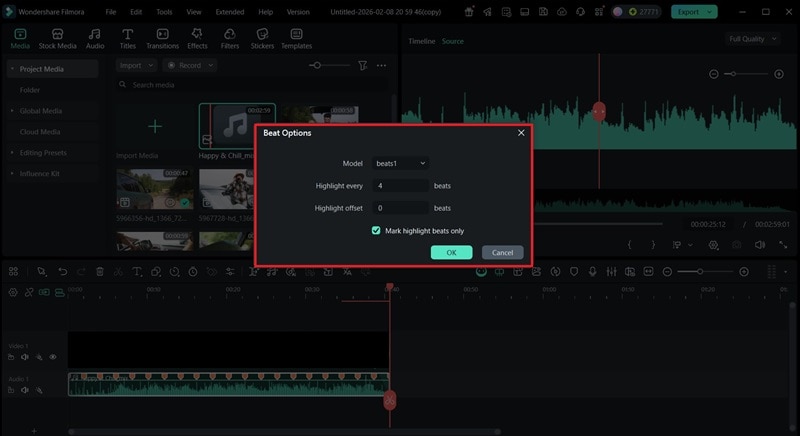
- Adjust Highlight every beat to control the interval between markers.
- Set the Offset to determine when the beat markers begin in the track.
- Uncheck Mark highlight beats only to mark both the highest and lowest beat points.
- Place your footage onto the editing timeline.
- Trim the clips to match the beat markers.
- Trim the audio to match the video duration.
- Click Export once everything is finalized.
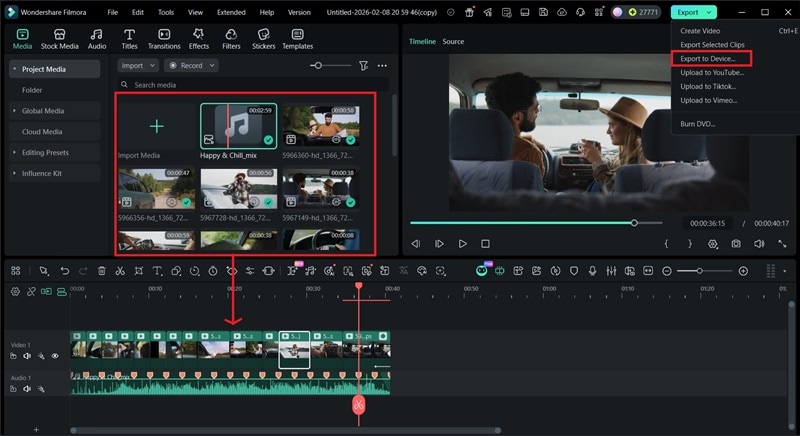
This is how the final video turns out. With Auto Beat Detection, the pacing comes together quickly without having to cut on every beat by hand. Paired with background music from Soundful AI Generator, the video ends up with a calm, relaxed feel that works well for this type of content.
Part 6. Pros and Cons: A Fair Assessment
After testing Soundful AI Music Generator in a practical working setup, we can better identify what works well and what doesn't. Although many features are solid, a few things could be improved.

Check the points below to see if Soundful AI Music matches what you're looking for.
- Simple and Intuitive: No prior experience needed to use Soundful Music Generator. The interface is straightforward, and the steps make sense without feeling overwhelming.
- Unlimited Track Generations: Although free users have limited downloads, they can generate unlimited tracks. You can experiment with various templates and genres freely. This is helpful for users who are learning and exploring music creation.
- Seamless Integration for Producers: You can export project files and continue editing them with professional music software. The files include song structure markers for easier editing.
- Good Quality Output: The tracks maintain stable and consistent sound quality. The generated tracks sound clean and well-balanced.
- Limited Sound Effects: The platform focuses more on music than sound effects, so the SFX options feel limited.
- Limited Customization: You can change the vibe, tempo, and key, but you can't tweak individual instruments or specific sections inside Soundful.
- License Terms to Consider: The licensing depends on your active subscriptions. If you cancel a paid subscription, you may need to remove the generated tracks that are published.
- Similar Structure Across Templates: If you generate many tracks within the same genre, some structures can start to feel familiar, even though the results aren't identical.
Conclusion
It's no surprise that many creators rely on Soundful AI Music Generator. In just a few clicks, you can create music that matches your mood and project needs. Based on our hands-on experience and feature breakdown, Soundful AI Music works best as background music for vlogs, podcasts, and ads.
To bring everything together into a finished clip, Wondershare Filmora is the perfect choice. You can quickly import the generated audio and match it with your video scenes. The AI tools and creative resources help you improve the overall look, making your video feel more polished and visually appealing.

