

 TL;DR:
Wondershare Filmora is the top recommended all-in-one tool for producing AI news videos with lifelike avatars, while Writesonic and Easy-Peasy AI are the primary choices for generating structured, SEO-ready written news articles.
● HeyGen specializes in converting text scripts into avatar-led videos with automatic translation but restricts free accounts to a single three-minute video per month, whereas the browser-based VEED limits free users to 10-minute exports at 720p quality with a watermark.
● Writesonic utilizes real-time data and its AI Article Writer 6.0 for premium search-optimized copy but lacks video capabilities, making Easy-Peasy AI a viable alternative for quick text briefs, though it requires an account and caps free usage at 1000 words per month.
● When using Filmora's Text-to-Video tool to generate news clips, users must specifically set the generation quality to Google Veo 3.1 within the description box to achieve the best visual results before finalizing the export.
Ask AI for a summary
 ChatGPT
 Perplexity
 Gemini
 Claude
 Grok
Grok
In 2026, news moves at the speed of a scroll. To keep up, creators are turning to the best AI news generators to produce high-quality updates in seconds. Whether you need an AI news article generator for blogs or an AI news generator video tool for social media, finding the right software is key to staying relevant. This guide reviews the top tools to help you find a reliable AI news generator from text or a free AI news story generator to streamline your workflow.

What is an AI News Generator and Why Do You Need It in 2026?
Basically, an AI news generator is a shortcut for turning ideas into news content without starting from a blank page every time. It looks at your input (prompt, a few facts, or notes), and figures out how a news story should be structured. It knows where the headline goes, how to open strong, and how to keep things clear and readable.
Some tools focus only on writing, while others go a step further and turn that same text into visuals or full videos. That's why you'll see different types of AI news generators depending on what you want to create. Take a look at the table below to see how they differ in a simple way:
| Type | What It Does Best | When It Makes Sense to Use |
| AI News Article Generator | Focuses on writing structured news articles from prompts or topics | When you need written news for blogs, websites, or newsletters |
| AI News Story Generator | Organizes facts into a clear story format | When working with multiple updates or topics |
| AI Video News Generator | Converts news scripts into visual news videos with scenes or presenters | When you want news content ready for social media or video platforms |
5 Best AI News Generators for High-Quality Text and Video (Reviewed)
As mentioned earlier, there are a few different types of AI news generator tools out there, and they are not all built for the same thing. That is why we picked five solid options that cover both text and video, so no matter if you need an AI news generator from text or something for video, you will find a good fit here. Let's break it down!
1. Wondershare Filmora: Best AI News Generator Video with Lifelike Avatars
We will start strong with what is easily one of the most complete AI news generator video tools out there, Filmora. It is an all-in-one video editor filled with AI features that help you create news videos in minutes instead of hours. You can start from a basic idea, plain text, or even an image and still end up with a clean and professional news video.

- AI Text to Video turns your prompts or scripts into a complete news video.
- AI Image to Video lets you create news visuals from still images.
- AI Idea to Video helps build a story using a simple storyboard flow.
- AI Copywriting can help draft news articles or short scripts.
- A large built-in media library gives you easy access to B-roll and transitions.
A free version is available, with affordable upgrade options listed on the official Filmora pricing page.
- Offers multiple ways to create news videos, which gives you more creative freedom.
- Lifelike AI avatars suitable for news delivery.
- The image-to-video feature includes news-style templates that feel engaging and current.
- Balances automation and creative control very well.
- Works especially well for short news clips and social media formats.
- Exported videos include a watermark on the free version.
2. Writesonic: Premium AI News Article Generator for SEO Ready Copy
If your main focus is writing, Writesonic often comes up as a top AI news article generator, and for good reason. Its AI Article Writer 6.0 is built to turn a topic or a short brief into a full news article in just a few minutes. You can adjust the tone to sound more formal or keep it relaxed, which helps when you are writing different types of news content.

- Uses real-time data to generate articles with current and accurate information.
- Supports more than 30 languages, including English, Japanese, French, Spanish, and Italian.
- A built-in SEO checker helps your article perform well in search results.
- Pulls research from across the web to support your content.
- Offers competitor analysis for word count, headings, topics, and keywords.
- Comes with a helpful demo that makes it easier for beginners to get started.
- Automates internal linking, which improves SEO and site navigation.
- Helps boost articles with more accurate and well-supported content.
- Pro subscription can feel expensive for some users.
- Does not include video generation features.
3. HeyGen: The Go-to AI News Generator From Text for Breaking News Updates
Another strong AI news generator from text worth looking at is HeyGen. This tool is built for speed and works well when you need to turn scripts, articles, or quick updates into clean news videos. You can even create lifelike avatars using photos you upload, which helps the videos feel more real and on brand.
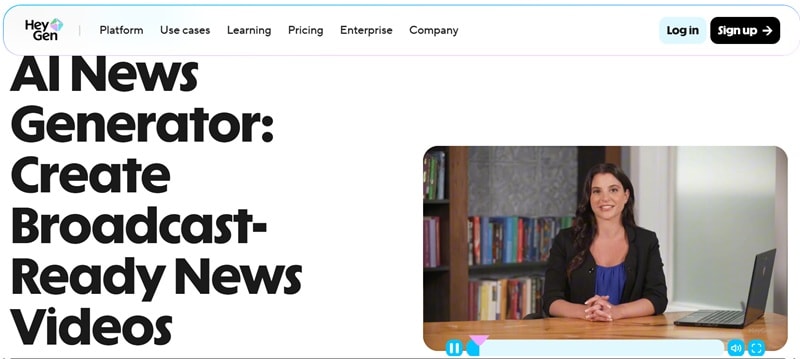
- Turns short bulletins, wire updates, or alerts into polished video segments.
- Offers expressive AI voices in many languages and accents, with options to clone a consistent brand voice.
- Comes with ready-made newsroom layouts, lower thirds, tickers, and headline overlays.
- Automatically translates scripts, recreates voiceovers, and generates accurate captions for each language.
- Converting text into video and translating it feels smooth and works well.
- Creating avatars from uploaded photos helps make news videos feel more authentic.
- You need to create a HeyGen account before using the tool.
- The free version limits you to one video per month with only a three minute duration.
4. Easy-Peasy AI: Free AI News Story Generator
Easy Peasy AI is a solid option if you are looking for a simple AI news story generator that gets straight to the point. It focuses on written content and works well when you want to turn a topic or short prompt into a complete news story. You can use it for quick news briefs or longer articles that go into more detail, depending on what you need at the time.
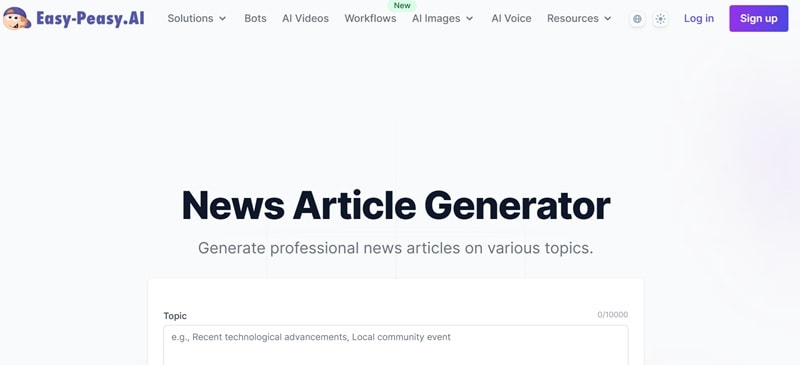
- Offers more than 200 article templates to help shape different types of news content.
- Lets you pick a writing style like formal, conversational, analytical, or persuasive.
- Supports a wide range of audiences, including general readers, professionals, and students.
- Works in more than 40 languages, including English, Chinese, and Arabic.
- You can edit any part of the article or ask the AI to rewrite specific sections for improvement.
- Allows you to set a preferred word count or length range.
- You need to create an account before using the tool.
- The free plan limits you to 1000 words per month.
5. VEED: Browser-Based AI News Generator Video
For our last recommendation, let's talk about VEED. It is an online platform that comes with an AI news generator video built right into the browser, so there is nothing to install. You just need to type in your text or prompt, and the AI turns it into a video you can use to explain updates, share announcements, or break news in a more visual way.

- Edit the AI-generated script so it matches your own voice.
- Pick the aspect ratio that fits your platform.
- Offers different accents to help news videos sound more natural for specific audiences.
- Add branded elements like logos, text overlays, and custom news intros.
- Lets you use an AI avatar as a news anchor instead of a simple voiceover.
- Works great for short news content on TikTok, Instagram, and YouTube.
- Exported videos include a watermark on the free version.
- Free exports are limited to 10 minutes at 720p quality.
How to Use an AI News Generator from Text: A Step-by-Step Guide with Filmora
All the tools we covered above do a solid job in their own way. Some are great at writing, others focus more on video, and a few try to do both. But when it comes to choosing the right AI news generator, simplicity matters a lot. If the tool feels confusing or forces you to jump between different apps, it slows everything down, especially when news needs to go out fast.
This is where Wondershare Filmora really stands out. Here's why:
 Secure Download
- Combines text, visuals, avatars, and editing in one place.
- No need to switch between writing and video tools.
- Made for creators, not just writers.
All of this makes Filmora a practical choice if you want to turn written news into something people can actually watch.
Create an AI News Video with Filmora
If you want to see how easy it is, take a look at the simple steps below to learn how to create an AI news video using Filmora. Make sure you've installed the latest version of Filmora on your device.
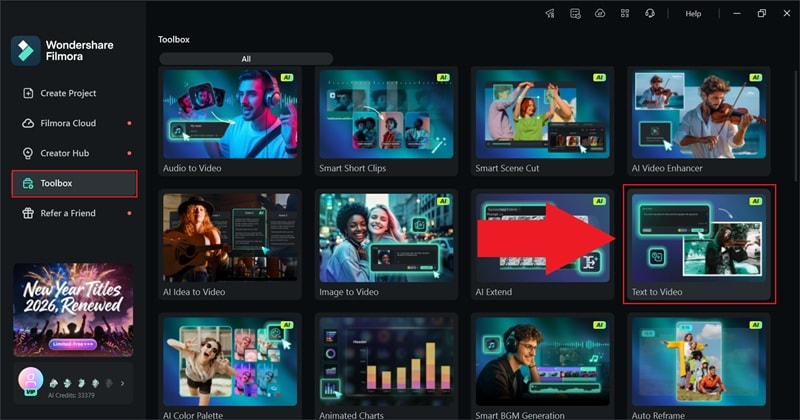
- Open the app and head to the "Toolbox" section.
- Select "Text-to-Video" from the available features.
 Secure Download
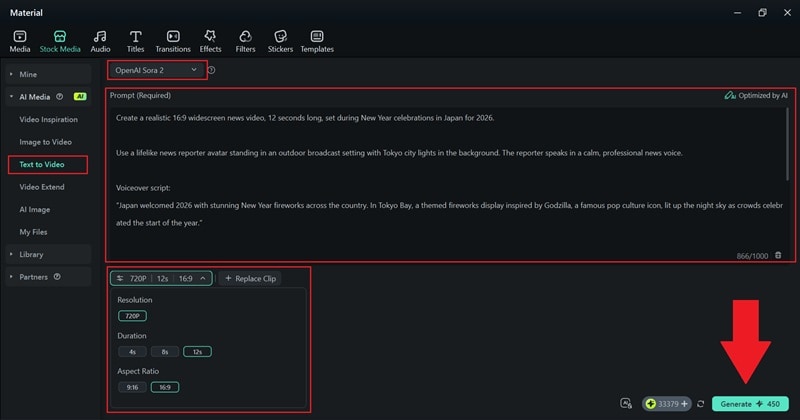
- Set the quality to "Google Veo 3.1" for the best results.
- Write your prompt in the description box as detailed as possible.
- Choose the resolution, duration, and aspect ratio, then click "Generate" to create the video.
- Find your video in the "My Files" section.
- Drag the clip onto the editing timeline below to preview how it looks.
- Enhance the video by adding filters, music, effects, transitions, and other finishing touches.
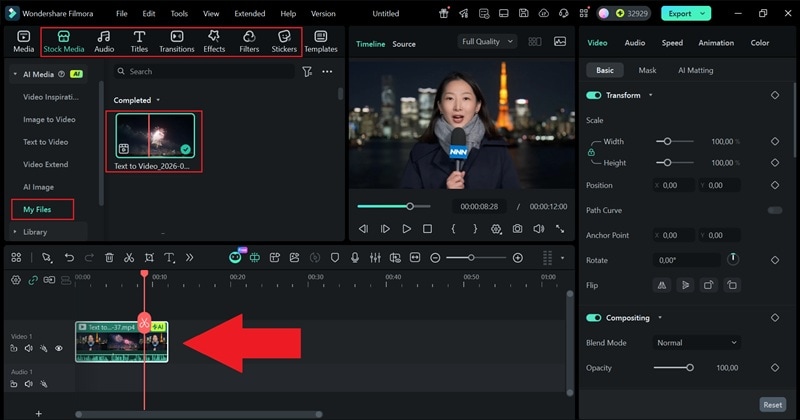
- Click "Export" and choose "Local" to save the video to your device.
- Set the file location, video name, format, and resolution, then click "Export" again.
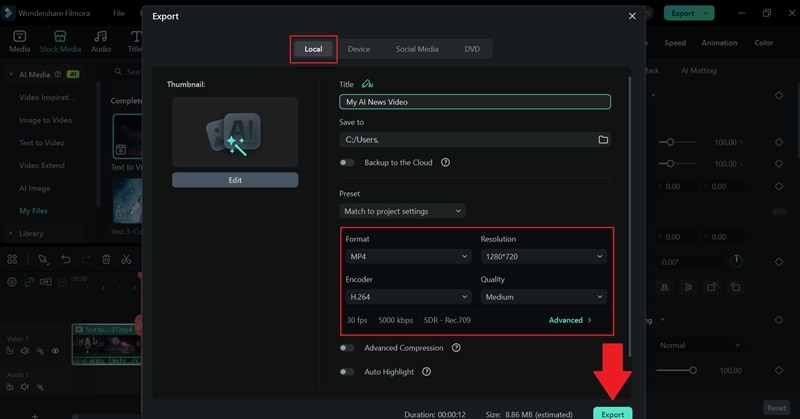
And that's pretty much all you need to create a news video! The steps are simple and easy to follow, even if you are a beginner. That is what makes Filmora one of the best AI news generators from text tools you can use right now. Now, take a look at the result below.
Can You Find a Reliable AI News Generator Free?
As you can see, Filmora works well for turning text into news videos, but it is not the only option out there. In fact, there are a few free tools that let you explore AI news creation before deciding to upgrade.

That said, free versions usually come with limits, including:
- You will often see watermarks on exported videos.
- There are usage caps, or a certain number of credits each month.
- Low video quality.

These limits are not deal breakers, but they are something to keep in mind if you plan to publish often. So, free AI news generators work best in these situations:
- Testing ideas: You can try different formats, tones, and visuals without worrying about cost.
- Drafting short news pieces: Free plans are usually enough for quick updates or short videos.
Basically, free tools are great for getting started and experimenting. When news creation becomes part of your regular workflow, that is usually the point where paid plans are worth it.
From Text to Screen: The Rise of AI News Generator Video
News is no longer something people sit down and read from start to finish. Most of the time, it shows up while scrolling, between messages, or right in the middle of a busy day. That shift is a big reason why AI news generator video tools have become so popular.

But to really dig into it, several reasons have been cited why video-based AI news keeps growing:
- Videos Fit Right Into Social Feeds: Social platforms are built for watching, not reading. Short news clips naturally get more attention, more shares, and more reactions than plain text that people scroll past.
- Visual News Matches How People Pay Attention: Most people skim content quickly, especially on their phones. An AI news generator video delivers key updates fast, making it easier to follow than long written news.
- AI Makes News Video Fast and Affordable: With an AI news generator video, there is no need for cameras, studios, or a full production setup. AI takes care of the hard parts, cutting both cost and time.
- One Script Turns Into Multiple Videos: AI makes it easy to scale news content. One script can become several videos for different platforms in just minutes.
Key Features to Look for in an AI News Article Generator
So, we have looked at a few AI news article generator tools already, and at first glance, many of them seem pretty similar. They all promise faster writing and cleaner news drafts, but once you actually use them, the differences start to show.
One important thing to note here is that what really separates an average option from the best AI news generator is how well it fits into your workflow and helps you get things done without slowing you down.

So, let's break down the features that truly matter when choosing an AI news article generator:
- Stays Updated: A good AI news article generator keeps up with recent information so your articles do not feel outdated. It supports fact-checking by surfacing relevant context, while still leaving the final call to you.
- Speaks To More Than One Audience: Multilingual support matters when your news reaches beyond one region. The right tool helps adapt stories for global readers without losing clarity or meaning.
- Helps Your Stories Get Found: Strong SEO support for AI news stories makes a real difference. The best tools guide headlines, structure, and keywords so your articles read well and still perform in search.
- Keeps The Writing Clear and On Tone: A reliable tool lets you control tone and structure so the story feels right for the topic. After all, news should sound balanced and easy to follow.
- Easy to Edit: News updates fast, and editing should be just as quick. Being able to revise sections or adjust details without rewriting everything saves time and keeps your workflow smooth.
Conclusion
AI news generator tools have made it much easier for creators to keep up with fast-moving news while still staying clear and accurate. We covered several strong options, including Writesonic, HeyGen, Easy Peasy, and VEED, each serving a different purpose, whether you need an AI news article generator or an AI news generator video.
All of them work well in their own way, but one tool clearly stands out. Filmora brings everything together by letting you create an AI news video from text, ideas, or images in a single place, which makes the whole process feel smooth and practical. On top of that, Filmora is easy to use, flexible, and built for creators who want speed without giving up creative control.

