
Ink Transition Examples & Guides
Explore top-tier ink splash transition templates and creative editing techniques.
Loading more ink transition examples...
 Category:
 Duration:
 Aspect Ratio:
Everything You Need for the Perfect Ink Transition
A well-executed ink transition can turn an ordinary cut into a mesmerizing piece of art. Filmora provides an extensive library of free ink transitions and video transitions that drop seamlessly into your timeline—no complex compositing required.
Whether you are crafting a music video, a wedding highlight, or a dynamic vlog, Filmora's tools empower you to achieve a flawless ink splash transition with just a few clicks.
Fluid Ink Splash Transitions for Cinematic Flow
Fluid Ink Splash Transitions for Cinematic Flow
Ditch the basic cross-dissolves and elevate your storytelling with a dynamic ink splash transition. Filmora offers a diverse range of fluid dynamics and ink bleed effects that mask your scenes beautifully. Enhance the mood further by integrating professional video filters to match the dramatic aesthetic of the spreading ink.
- Apply high-resolution ink bleed effects to bridge your clips seamlessly.
- Layer your footage effortlessly to create complex, artistic visual reveals.
- Enhance the overall atmosphere by matching the ink color to your scene's palette.
Precision Control Over Every Ink Transition Detail
Precision Control Over Every Ink Transition Detail
Achieving the perfect pacing is crucial when applying an ink transition. Once dropped onto your timeline, you can easily tweak the duration, adjust the opacity, and utilize color correction to blend the ink naturally with your footage. You can even combine these effects with advanced video effects to ensure your creative vision is fully realized.
- Fine-tune the speed and duration of the ink spread to match your audio cues perfectly.
- Adjust contrast and blending modes to make the ink transition look organic.
- Combine multiple ink layers to build a uniquely textured scene transition.
- Flip, rotate, and scale the ink splash to target specific focal points on the screen.
Supercharge Your Edits With AI-Powered Creative Assets

Supercharge Your Edits With AI-Powered Creative Assets
Beyond standard video editing, Filmora positions you at the forefront of creation with its integrated AI capabilities. Generate custom background elements using GPT Image 2 or Nano Banana, and tie them together with a free ink transition. Pair your striking visuals with tracks from the AI music generator to produce a fully immersive, multisensory experience that leaves a lasting impact.
- Generate distinct background textures using advanced AI image models right in the editor.
- Synchronize your fluid ink movements to beats generated by intelligent audio tools.
- Access an expansive library of creative assets to supplement your main video tracks.
- Export your visually stunning projects in high definition optimized for any platform.
Frequently Asked Questions About Ink Transitions
How to Add an Ink Transition in Filmora
Apply a breathtaking ink splash transition to your videos in just a few simple steps, utilizing the powerful Filmora video editor.
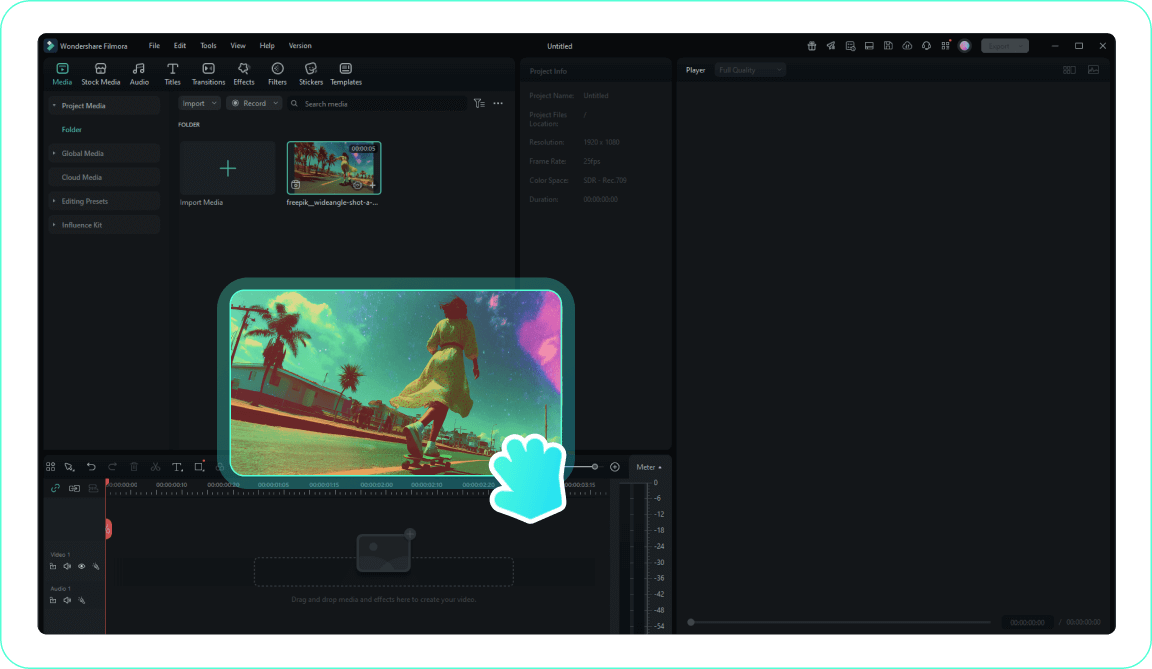
1. Import Your Footage
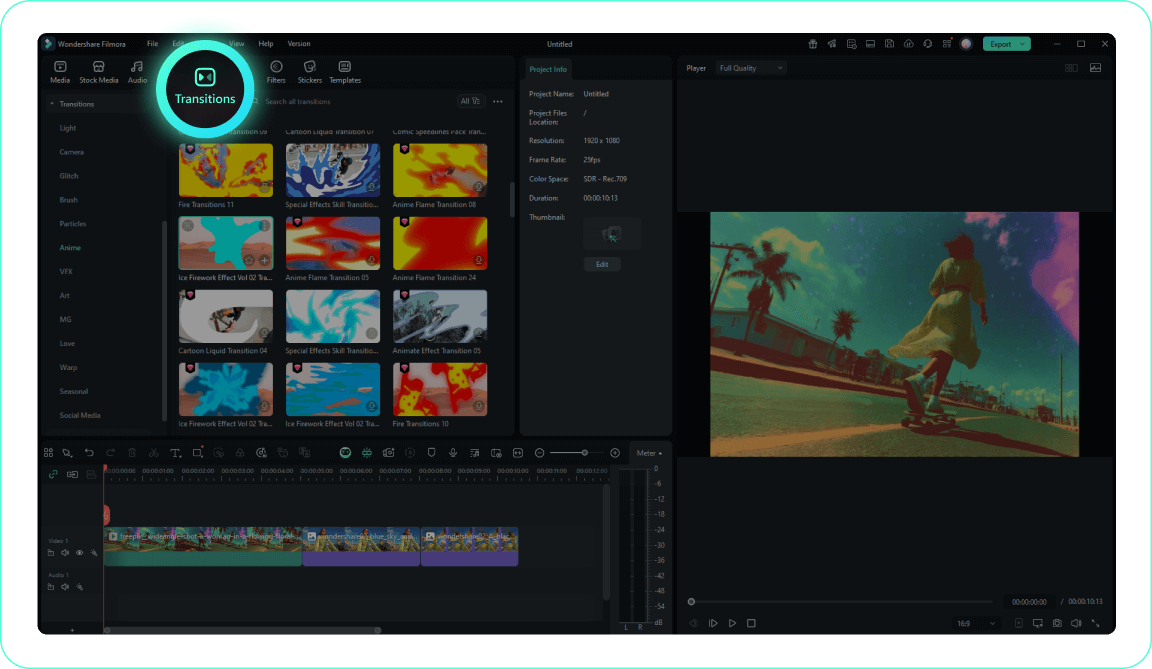
2. Access the Transitions Tab
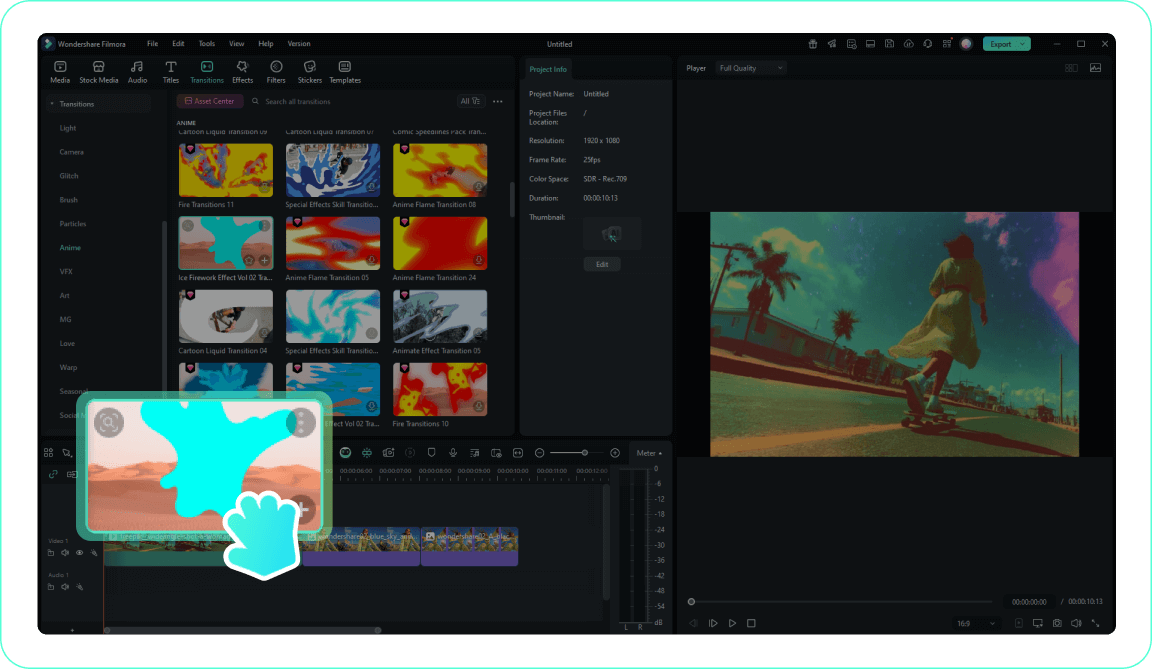
3. Apply the Ink Transition
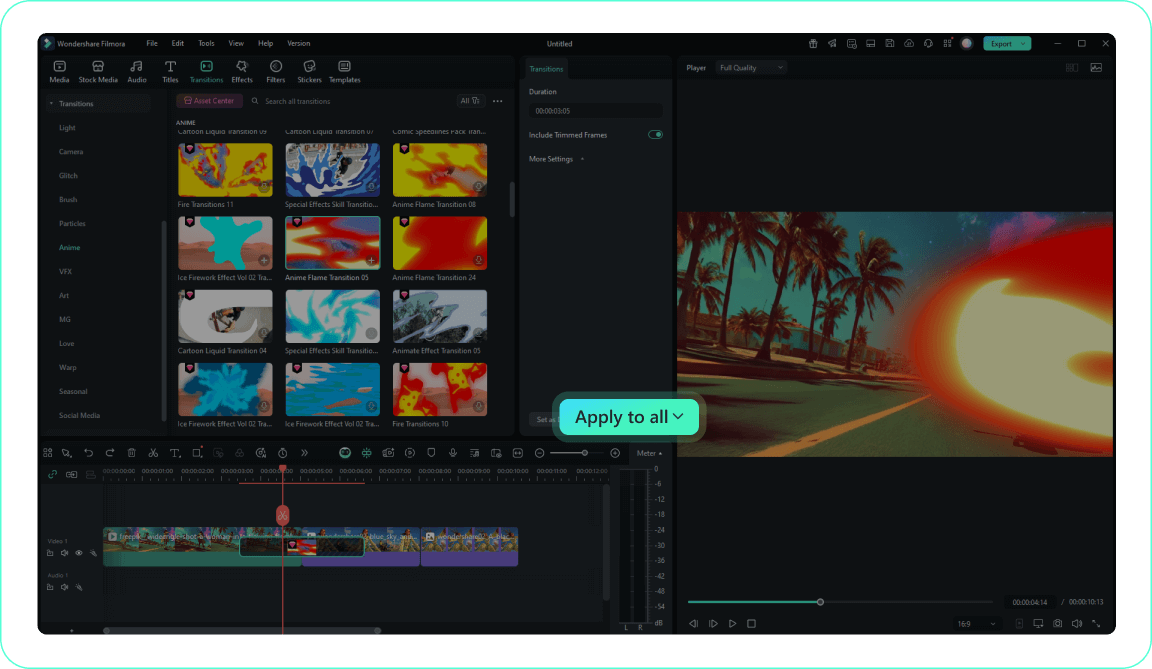
4. Customize and Preview
-
1. Import Your Footage
Import your video clips to the Media Library and drag them to the timeline where you want the ink transition to occur.Pro Tip: Organize your media into folders for easier access on larger projects. -
2. Access the Transitions Tab
Navigate to the Transitions tab to explore Filmora's comprehensive collection, and search for ink splash transition effects. -
3. Apply the Ink Transition
Drag your chosen free ink transition to the cut between two clips on your timeline for a fluid, artistic reveal. -
4. Customize and Preview
Double-click the ink transition to adjust its duration, blending mode, and color, then preview your smooth edit.Pro Tip: Right-click on a transition and select "Apply to All" to maintain a consistent artistic theme.
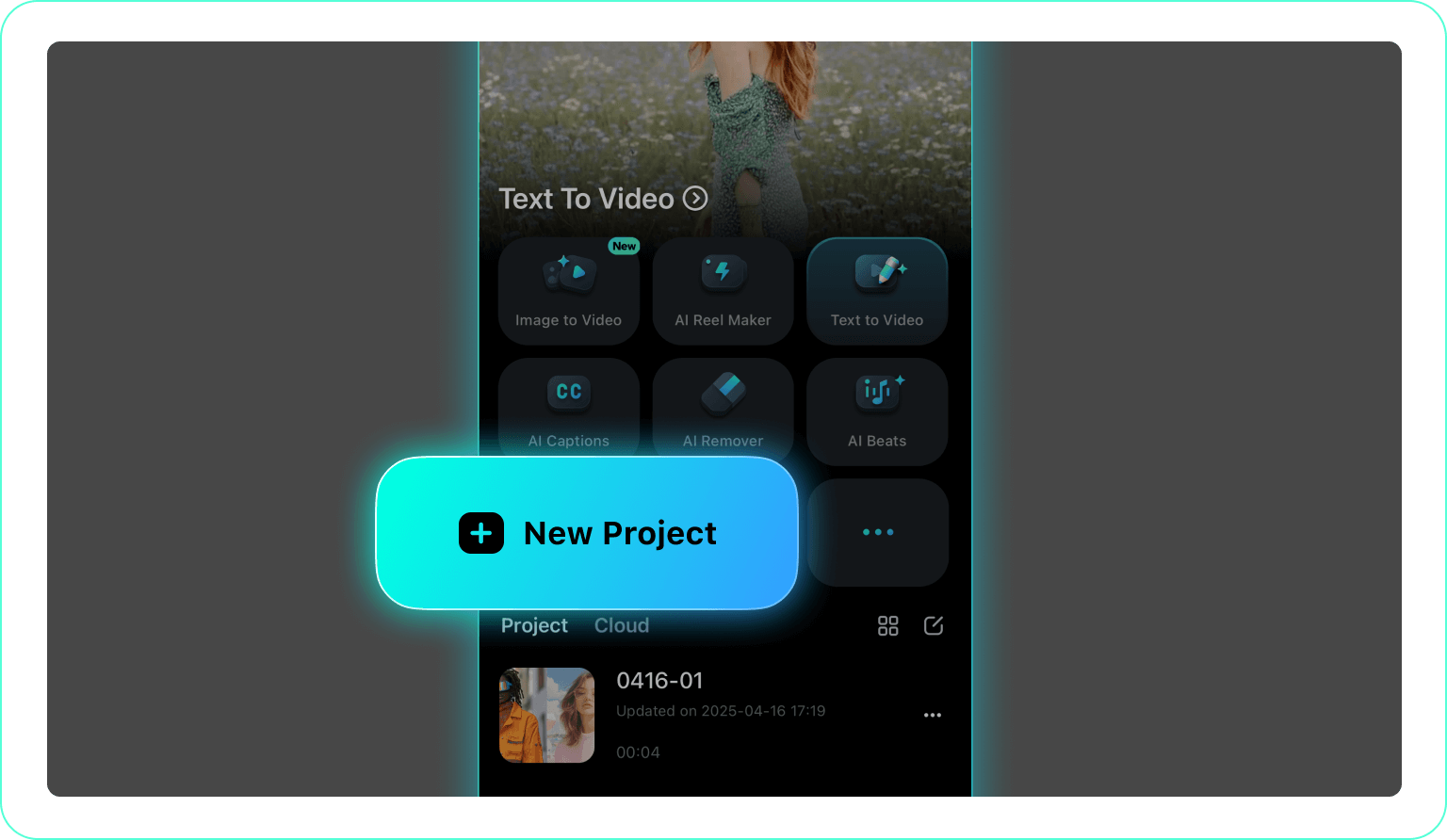
1. Open Your Project
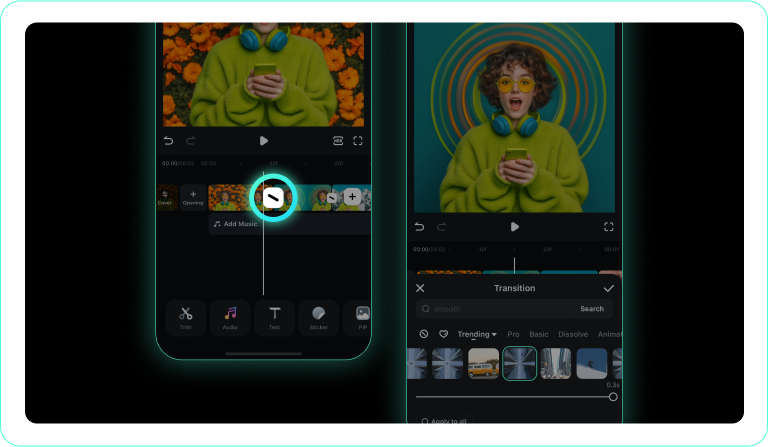
2. Tap the Transitions Icon
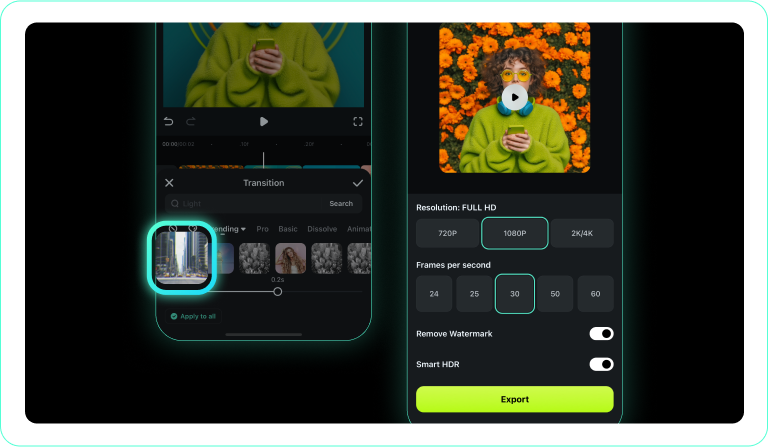
3. Apply an Ink Splash Transition
-
1. Open Your Project
Launch the Filmora app on your mobile device and import the clips you wish to merge. -
2. Tap the Transitions Icon
Tap the transition icon located exactly between your two clips to open the library. -
3. Apply an Ink Splash Transition
Select your favorite ink transition style, preview the fluid motion, and apply it instantly.
Elevate Your Visuals Beyond the Edit
Filmora offers much more than a simple ink transition. As a comprehensive creative suite, it empowers you to experiment with AI-generated visuals, dynamic typography, and rich atmospheric effects. Whether you are generating stunning concept art via the AI Image Generator (powered by industry-leading models like GPT Image 2 and Nano Banana) or utilizing an AI Image to Video workflow, the possibilities are endless. Combine a free ink transition with these advanced assets to craft truly mesmerizing visual narratives that stand out in any feed.








