


 TL;DR:
KineMaster Mod APKs carry severe malware and data theft risks that make them fundamentally unsafe, leaving the official KineMaster Pro subscription or transitioning to Wondershare Filmora as the only secure methods to edit and export videos without a watermark in 2026.
● Unofficial KineMaster Mod APKs bypass Play Protect security scans, exposing devices to malicious code injection, unrestricted data harvesting via broad app permissions, and inevitable crashes caused by signature conflicts or unsupported OS updates.
● KineMaster Pro is best suited for creators focused exclusively on quick mobile edits natively on Android, iOS, or iPadOS, requiring a $7.99 monthly or $51.99 yearly official subscription to legally remove the watermark and access premium assets.
● Wondershare Filmora is the recommended alternative for users requiring long-term scalability, offering cross-platform editing (Windows, macOS, Android, iOS), perpetual license options, and advanced AI workflows including Sora 2 and Veo 3.1 Text-to-Video generation.
Ask AI for a summary
 ChatGPT
 Perplexity
 Gemini
 Claude
 Grok
Grok
KineMaster is a popular app for editing videos on Android and iPhone. But if you are using the free version, there are certain limitations and restrictions that only get removed with a paid subscription.
Because of that, many users begin searching for Kinemaster without watermark apk to unlock premium assets and remove export limits without paying for Kinemaster Pro, without realizing the serious security, privacy, and legal risks these modified files can bring.
This article explains why the MOD version looks attractive, the dangers behind it, and the safest alternative options this year.
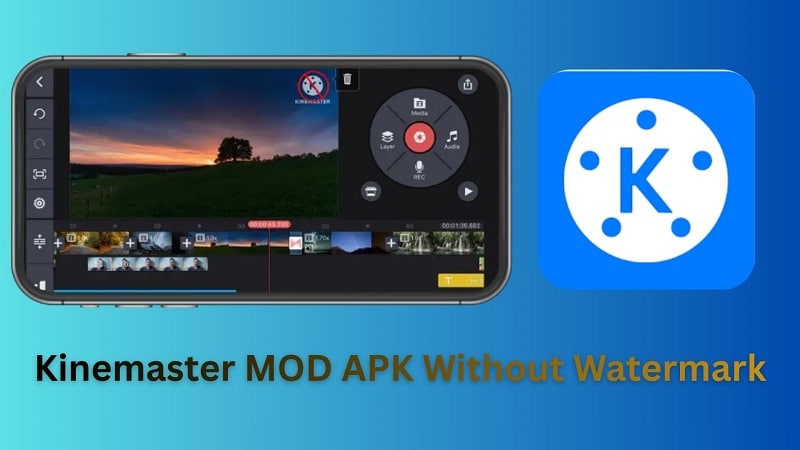
Part 1. What is KineMaster and Why Do Users Seek the "Mod" Version?
KineMaster is a mobile video editing app that has pro-level features in a user-friendly interface. For beginners, it can take a matter of minutes to trim and add music. For professional users, you can use it to layer multiple videos, keyframe animation and use of a chroma key for green screen effects.
The Kinemaster app is free to install, but the free version adds a watermark and restricts access to premium tools. This is where many users start searching for the modded version.
What is Mod APK?
A Mod APK is a modified version of an original Android application package file (APK). Developers or third parties alter the app’s code to change how it works. In most cases, these changes aim to bypass subscriptions or disable restrictions that exist in the official version.
Why Do People Look for Kinemaster Mod APK?
Many users want premium access without paying subscription fees. That’s why modified builds appear appealing, as they claim to unlock features that KineMaster Pro offers, including:
- Take the watermark off for a clean and professional look.
- Unlock premium tools and unlimited premium assets
- Edit without in-app ads interrupting the workflow
- Access up to 10GB of KineCloud storage
All of these benefits are presented as completely free, which makes the MOD version look like a shortcut to the full Pro experience without spending money.
How much is Kinemaster Pro?
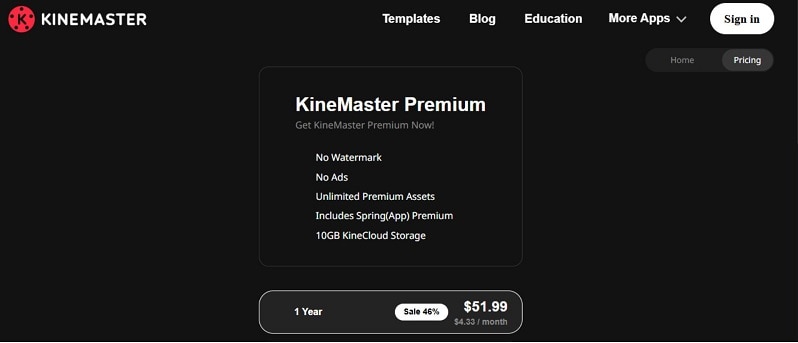
If you choose to upgrade to KineMaster Pro in an official way, the monthly plan costs $7.99, while the yearly plan costs $51.99.
Part 2. The Hidden Dangers of KineMaster Mod APKs
Modified apps promise free premium access. But as a trade-off, it can expose your device and data to serious risk.
1. Security Threats and Malware
- Malware Injection: Modded APK files may include hidden spyware, Trojans, or tracking added by other malicious parties.
- Data Theft: Wide-ranging permissions (camera, mic, storage, etc.) used to collect personal data.
- Device Malfunction: Unresponsive, sluggish and slow device performance or any other device related issues are indicative of infected apps.
- Lack of Security Updates: Mod versions will not be eligible for OTA updates. New vulnerabilities remain unpatched.
2. Compliance and Legal Risks
- ToS Violation: Modified builds breaches the official Terms of Service Violation, and can result in account suspension.
- Copyright Breach: Premium effects and asset libraries are paid content. Unlocking them without payment violates intellectual property rules.
- Professional Exposure: Commercial creators risk client disputes and compliance issues when using unauthorized software.
Part 3. How to Get KineMaster Without Watermark Legally?
The only safe path to removing KineMaster watermark without possibly harming your device, data or account is by going through its official means.
1. Official Subscription
Subscribing to the premium plan is the only guaranteed method to remove the watermark. Once the account is upgraded, exported videos no longer display the logo. Premium access also unlocks paid tools and assets. This method is secure and fully compliant with the app’s terms.
2. Free Trial
In some regions, a trial period is available. It allows temporary access to premium features. After the trial ends, the subscription renews unless canceled. If not upgraded, the watermark returns on exports.
Third-party cropping tools may attempt to hide the logo, but they reduce video quality and are not reliable solutions.
Difference Between Official APKs and Modified APKs
| Criteria | Mod APKs | Official APKs |
| Security | Uploaded on third-party APK sites. No Play Protect scan. File integrity cannot be verified. Code may be altered. | Distributed via Google Play or Apple App Store. Scanned by Google Play Protect and reviewed under Apple App Review |
| Privacy | No verified Data Safety disclosure. Permission use is not audited. | Must disclose data collection under Google Play “Data Safety” rules and Apple Privacy Labels |
| Updates | No automatic patch delivery. Users reinstall new builds manually. Security flaws remain open. | Automatic updates pushed through the store. Security patches included in new releases. |
| Stability | Modified code may break after OS updates. Higher crash risk. | Tested against platform compatibility requirements before approval. |
| Legal Use | Unlocks paid features without license. Violates developer Terms of Service. | Licensed use. Complies with copyright and usage terms. |
| Support | No developer supports access. | Official customer support available. |
When you compare them side by side, the risk becomes clear. If your goal is simply Kinemaster without a watermark download, you may solve one problem and create five more.
So instead of chasing Kinemaster Pro APK no watermark, it makes more sense to consider a secure alternative.
Part 4. The Best Secure Alternative That Offers Better Value: Filmora
If you are looking for a KineMaster mod APK because the subscription cost doesn’t feel worth it, you can actually try other video editors that offer strong features at a similar price or even free plans. One practical option is Wondershare Filmora.
Similar to Kinemaster, Filmora is a video editor that’s both intuitive enough for beginners to use. At the same time, it includes a complete set of editing tools that suit more advanced creators who want deeper control over their projects.
 Secure Download
Why We Recommend Filmora
Filmora is available on both desktop and mobile. It offers advanced AI capabilities and cross-platform flexibility that KineMaster does not, such as:
- Multi-Model AI Text-to-Video (Sora 2 & Veo 3.1 Supported): Filmora is compatible with Sora 2 and Veo 3.1 for better quality AI-generated videos. Scripts, keywords, or any stray thoughts can be turned directly into videos in the editor.
- AI Idea to Video & AI Script to Video: Automatically create whole videos from short prompts or full scripts.
- AI Copilot Editing Assistant: The built-in AI assistant suggests cuts, transitions, music, and effects based on your footage, helping you refine your project faster.
- AI Voice Modeling: You can replicate a user’s voice with tone and pitch accuracy, using approximately 20 seconds of audio.
The pricing structure of Filmora includes flexible subscription plans as well as a perpetual license option. You can also start with the free version to test the features and explore the interface.
 Secure Download
Part 5. Feature Comparison: Filmora vs. KineMaster
So, should you stay with the official KineMaster Pro, or try Filmora instead?
If you are still not sure, let’s compare Filmora and KineMaster to help you choose the right tool for you:
| Feature | KineMaster | Filmora |
| Supported Platforms | Android, iOS, iPadOS (mobile-focused) | Windows, macOS, Android, iOS |
| Free Version | Yes. Watermark on exports. | Yes. Watermark on exports. |
| Pricing | Subscription only (monthly or yearly Premium plan). | Subscription plans + perpetual desktop license option. |
| Built-in Effects & Templates | Built-in effects + Premium asset store access. | Built-in effects + large asset library + creative resource packs. |
| Audio Tools | Basic audio editing, multi-track mixing. | Advanced audio tools: AI Vocal Remover, Audio Denoise, Audio Ducking, Silence Detection. |
| AI Features | Limited AI tools depending on version. | Broad AI suite: AI Text-Based Editing, AI Music Generator, AI Smart Cutout, AI Speech-to-Text. |
| Export Quality | HD and up to 4K (Premium required for full quality, no watermark). | Up to 4K export; watermark removed on paid plans. |
| Security & Updates | Official store updates; mod versions unsafe. | Official updates; regular feature and security improvements. |
| Best For | Quick mobile edits and social media videos. | Cross-platform editing, longer projects, advanced AI workflows. |
Final verdict:
If you need to edit a video on your mobile, don't bother making it a two-step transaction; go ahead and shoot and edit all within the KineMaster app. Filmora provides wider-ranging tools, desktop support and stronger AI for users requiring a bit more flexibility and long-term scalability.
Secure DownloadConclusion:
The appeal of Kinemaster is clear. It gives strong mobile editing power in a simple app. The watermark is the only real barrier for many users. That is why searches for Kinemaster mod apk keep rising. Free access looks attractive. The risks are not.
Modified builds can expose personal data, break device security, and create legal trouble. A watermark can be removed safely through an official subscription. That is the secure path.
For creators who want more control, stronger AI tools, and cross-platform editing, Wondershare Filmora offers a stable and fully licensed environment. It protects your work while helping you grow beyond basic mobile limits.
Verification Note: This security guide was reviewed by our digital safety experts to ensure all information regarding APK vulnerabilities is accurate as of 2026.
FAQs
-
Is there a safe Kinemaster mod APK without watermark?
No. A mod APK is an altered, unofficial build. It does not pass official app store security review. Only the official version of kinemaster from Google Play or the Apple App Store is considered secure. -
Why is my KineMaster mod not working?
There are several common reasons why a KineMaster mod APK may fail to install or suddenly stop working:- - Signature conflict: Modded APKs often fail to install over the official version due to mismatched app signatures.
- - Play Protect block: Android may disable or warn against unofficial builds.
- - Update breakage: Modified apps do not follow the official update cycle and may stop working after system updates.
-
What is the best Kinemaster alternative for Android and iOS in 2026?
Wondershare Filmora is a strong alternative in 2026. It supports Android and iOS, and also works on Windows and macOS under the same ecosystem.
It has layer-based editing like Kinemaster and comes with advanced AI tools, more robust audio controls, as well as 4K export support. It is available on the official repo, so you have it updated and secure.
