

 TL;DR:
LALAL.AI is an accurate AI audio stem splitter utilizing the new Andromeda Engine to isolate up to 10 distinct audio layers, though downloading the fully separated tracks requires a paid plan starting at $7.5 per month.
● Extracted stems must be processed one at a time per audio file, and the updated Andromeda AI model is not yet integrated across all of the platform's features.
● Since LALAL.AI cannot mix tracks natively, isolated audio must be exported to external software like Wondershare Filmora to apply Auto Beat Sync or AI Speech-to-Text for video integration.
● For users seeking free alternatives, Ultimate Vocal Remover 5 provides desktop batch processing but cannot separate individual instruments like bass or drums, whereas Vocalremover.org works in-browser but lacks batch support and occasionally produces audio artifacts.
Ask AI for a summary
 ChatGPT
 Perplexity
 Gemini
 Claude
 Grok
Grok
High-quality audio is the backbone of great video content, but removing background noise or isolating vocals can be a challenge. LALAL.AI has emerged as a top-tier AI vocal remover and stem splitter for creators who need quick, professional results without the learning curve of complex DAWs. In this comprehensive LALAL.AI review 2026, we'll test its extraction quality, explore the new Andromeda Engine, and show you how to seamlessly integrate your tracks into Wondershare Filmora for a perfect audio-visual workflow.
Part 1. What Is LALAL.AI? A Powerful AI Vocal Remover and Stem Splitter
LALAL.AI helps you separate vocal and instrumental elements from an audio file. The tool uses AI technology to identify and split different sounds in a track. It works by analyzing frequency and sound patterns between audio elements.
Beyond basic vocal removal, LALAL.AI can also detect individual instruments. It separates drums, bass, piano, guitar, synthesizer, strings, and wind into different tracks. The process maintains good sound quality throughout the extraction.
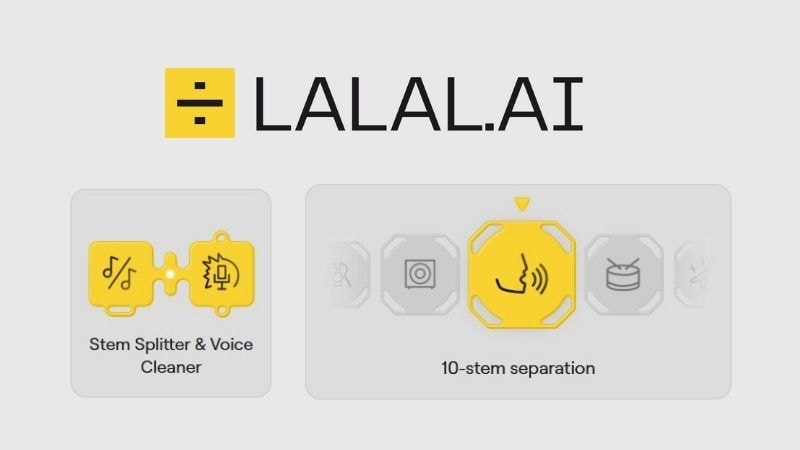
Many people only know LALAL.AI vocal remover, but the platform comes with several other powerful features worth exploring. Let's take a closer look:
- Lead / Back Splitter: Automatically identifies the main vocal and background vocals, then splits them into separate audio files.
- Voice Cleaner: You can easily eliminate unwanted noises from your recordings with LALAL.AI voice cleaner. Also, it can isolate dialogue from movies or shows, making it easier to transcribe or translate.
- Voice Changer: Modify your voice using various voice packs available on LALAL.AI, including characters, artists, and other featured personalities.
- Voice Cloner: Generate a custom voice based on multiple recordings you upload.
- Echo & Reverb Remover: Reduces unwanted echo and reverb from audio files. It uses advanced AI processing to improve clarity and make speech easier to understand.
Part 2. Key Features & 2026 Updates: The Andromeda Engine
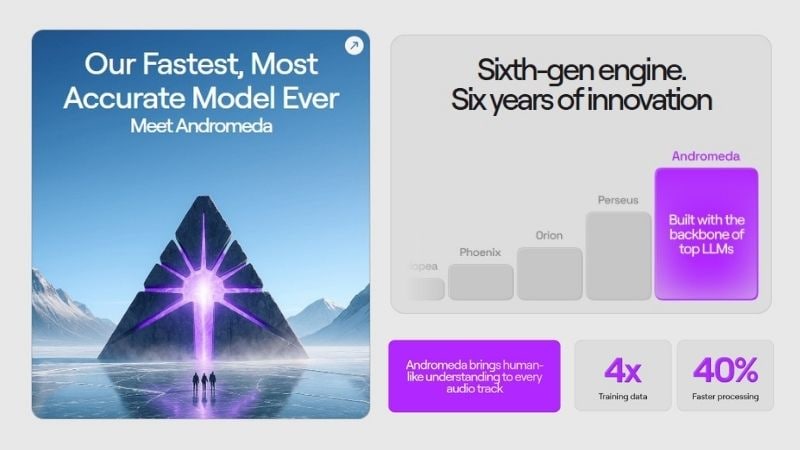
LALAL.AI introduces its latest update, a powerful AI model, the Andromeda Engine. It has been trained on much more data and designed to split sound more accurately than before. Andromeda studies audio layers deeply to reduce common separation problems like reverb, bleed, and mushy high notes.
The result is clearer vocal and instrumental tracks, even from complicated mixes. It also supports popular audio formats (MP3, WAV, FLAC, more) and video formats (MP4, AVI, MOV, more). So, you can upload the files directly without converting them first.
Part 3. LALAL.AI Pricing: Is the Free Version Worth It?
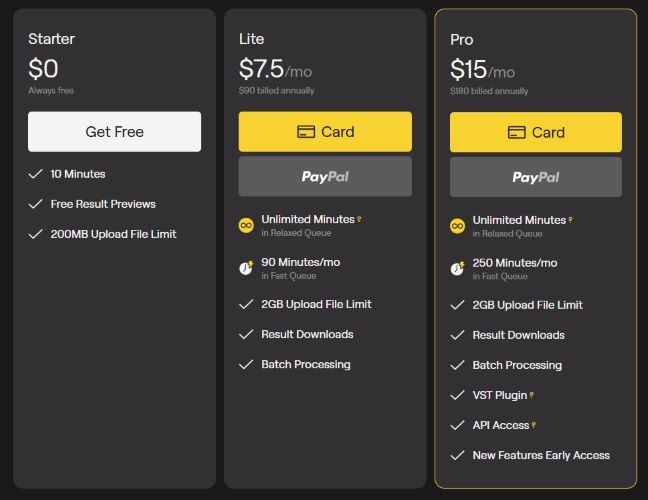
Now, you may wonder, is LALAL.AI free? Technically, it offers a free trial. Free users can upload multiple files with a 200MB file limit and preview up to 10 minutes of extracted audio. But if you want to download the final results, you'll need to upgrade.
Below, we've included the paid plan options for easier comparison. LALAL.AI offers Lite and Pro subscriptions, starting at $7.5 and $15 per month. The main differences are the total processing minutes you get, faster conversion speed, and access to plugins, API, and upcoming features.
There are also one-time payment plans: Master, Premium, and Enterprise. With a single payment, you get benefits similar to Pro users. The key differences between these plans are the number of processing minutes included. This option works well for users who don't want a recurring subscription.
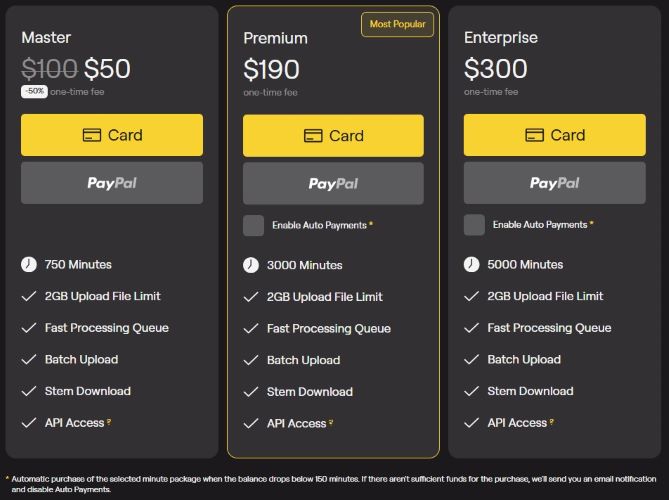
So, is LALAL.AI worth trying? The free version lets you test how LALAL.AI performs and check the extraction quality for vocals, instrumentals, and individual stems. Ideally, you can review the results first before deciding whether to upgrade.
Part 4. Step-by-Step: Using LALAL.AI with Wondershare Filmora
Now that we know how LALAI.AI works and what plans are available, it's time to put it into action. We'll use LALAL.AI vocal remover to split the vocals and instrumentals from Pluto Projector by Rex Orange County. Then, we'll bring the separated tracks into Wondershare Filmora and turn them into a complete video.
How To Use Stem Splitter in LALAL.AI
- Visit http://LALAL.AI.
- Log in using your Google account, Facebook, Apple ID, or email.
- You'll be directed to the homepage, where you can start the stem splitting process.
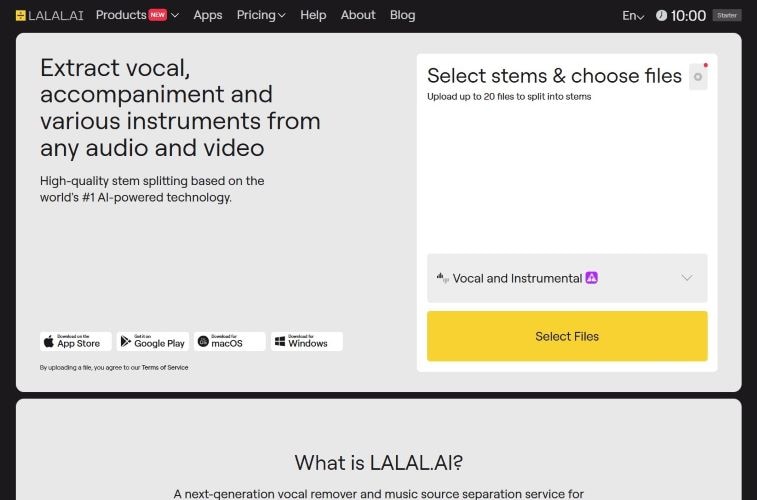
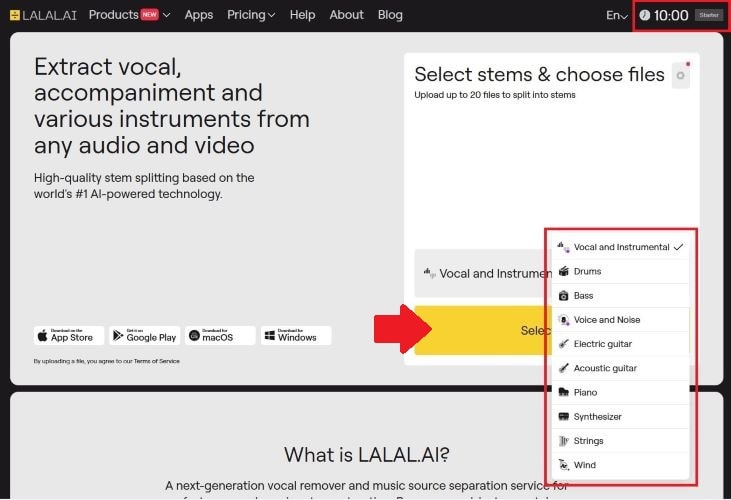
- In the top right corner, you can see your plan name and remaining processing duration.
- Select the stems you want to extract. The options marked with a purple dot use Andromeda technology.
- Click Select to upload one or multiple files.
- Once uploaded, the processing will start automatically.
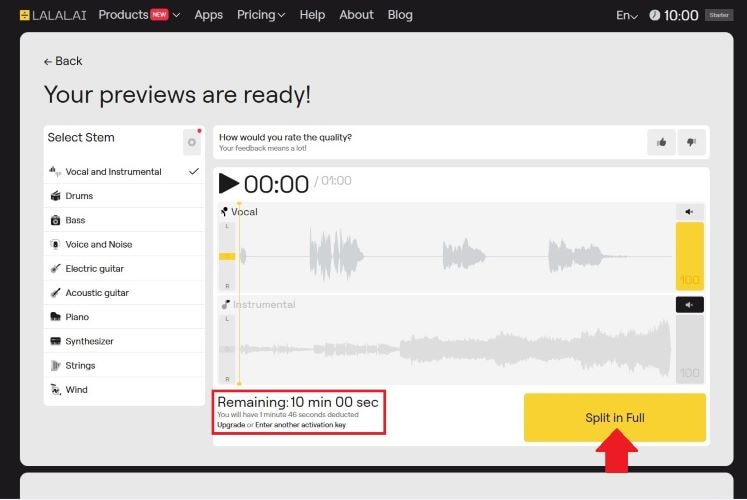
- You can listen to previews of separated audio tracks.
- The dashboard displays the processing time required and your remaining available minutes.
- Click Split in Full to process the complete tracks.
- In the top right corner, you can check the updated remaining processing duration after the full split.
- Click Get split Files to download the final tracks.
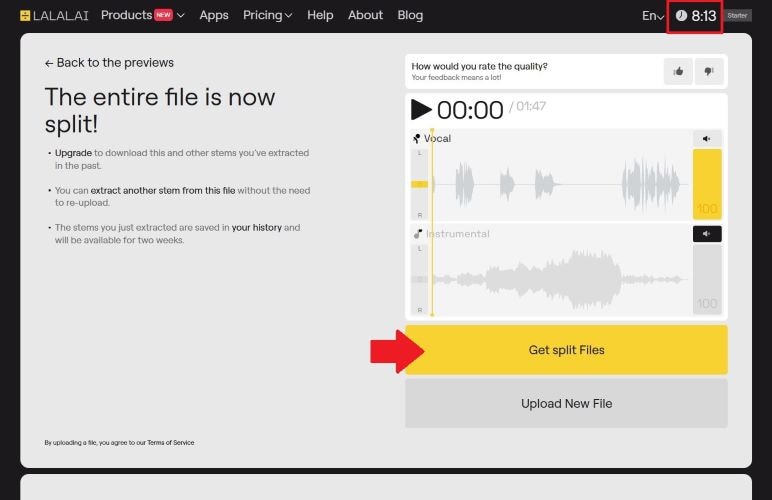
After separation, the files are ready for further editing. You can remix them, layer them with other sounds, adjust timing, or sync them with video footage. In the following step, we'll continue the process in Filmora.
The Next Step: Wondershare Filmora
Once you've used the LALAL.AI vocal remover to get your clean stems, you need a way to sync them with your visuals. Wondershare Filmora is the ideal companion for this. Unlike basic editors, Filmora's AI-driven tools (like Auto Beat Sync and AI Speech-to-Text) allow you to turn your isolated LALAL.AI tracks into professional-grade social media videos, music videos, or podcasts in minutes.
 Secure Download
What You Can Do With Filmora
AI Speech-To-Text
Creating subtitles manually can be tiring, but AI Speech-To-Text handles it for you. It covers 45 languages with 99% accuracy in transcription. With this feature, you can focus more on polishing your content instead of typing captions.
Audio Driven Text
Audio Driven Text works by detecting the rhythm of your audio and turning it into animated captions. The text responds to the beat, making the visuals feel more connected to the sound. It's a great option if you want to create energetic lyric videos or playful karaoke clips.
Automatic Subtitle Generator
No need to add subtitles manually anymore. The Automatic Subtitle Generator processes your audio and generates captions in just a few clicks. Also, it can detect multiple speakers, which makes it a practical solution for voiceover content or instructional videos.
Auto Beat Sync
Auto Beat Sync automatically matches the rhythm of your audio with your visuals. It helps create dynamic cuts without manual editing. The feature can also filter out clips that are too dark, overexposed, or jittery.

How to Combine Audio and Video in Filmora
After using LALAL.AI vocal remover to separate the vocals and instrumentals of Pluto Projector, we'll use only the instrumental tracks. Then, we'll combine it with visuals in Filmora using the Auto Beat Sync feature to create a full video clip.
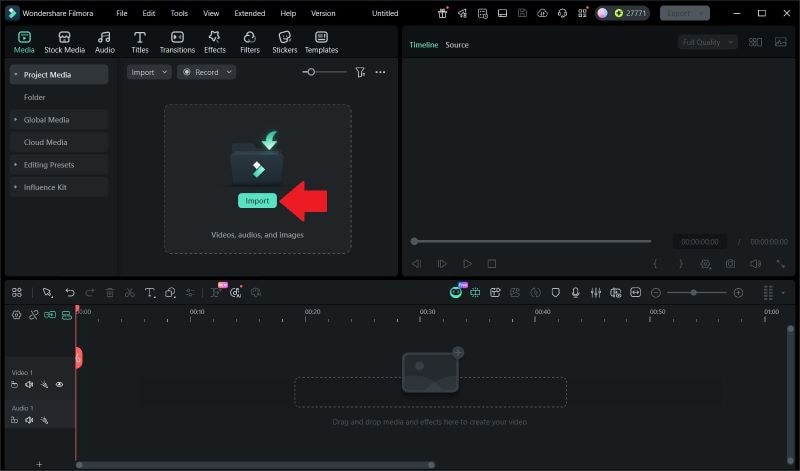 Secure Download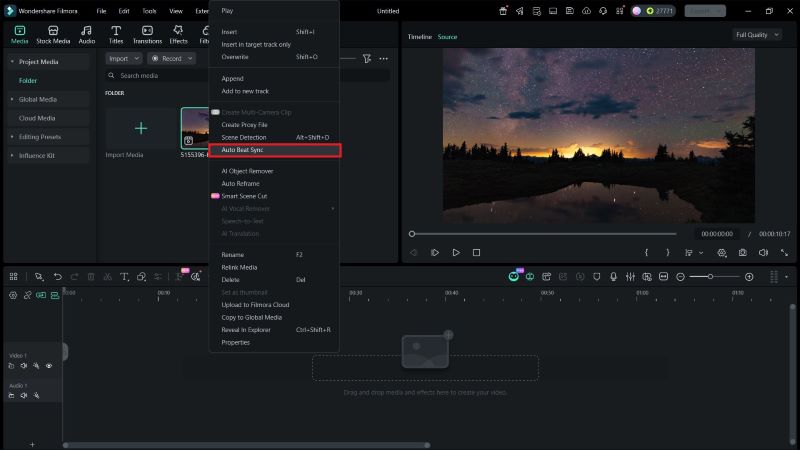
Then, click the Folder icon to insert the instrumental track. Set the BGM Start Time. Click Analyze to start the synchronization process.
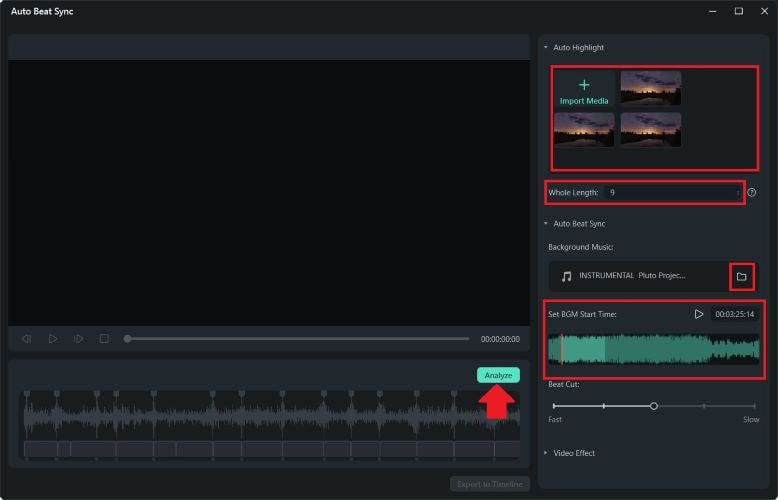
Click Export to Timeline once you're satisfied.
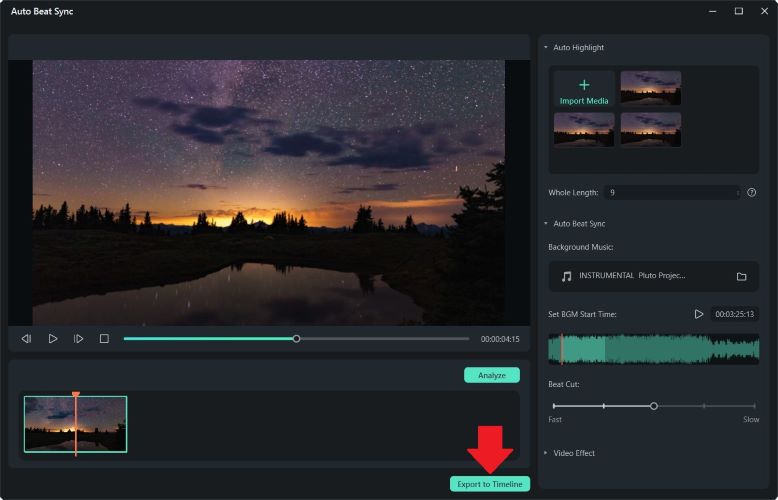
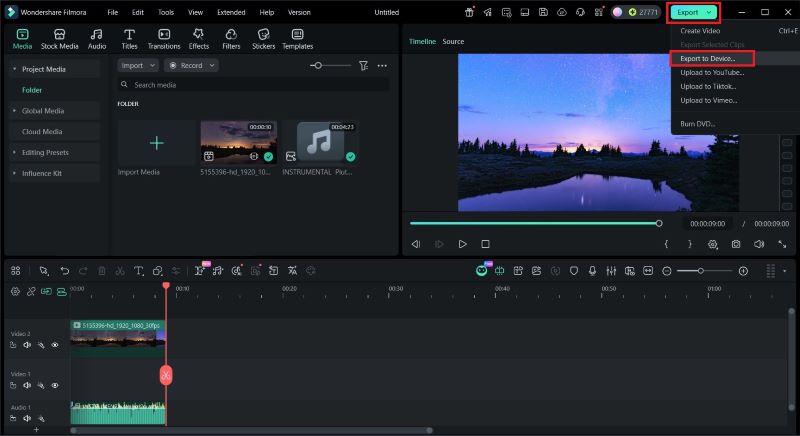
All that's left is to check out the final result! As you can see, Auto Beat Sync automatically matches the instrumental rhythm with the aurora visuals, making the motion feel in sync and dynamic.
Part 5. Top 2 Free LALAL.AI Alternatives to Try in 2026
Not everyone wants to jump straight into a paid subscription. If you're exploring LALAL.AI free alternatives, there are two solid tools you can try first. These tools are available on desktop and online, so you can choose what fits your workflow best. Let's take a closer look.
1. Ultimate Vocal Remover (UVR) 5
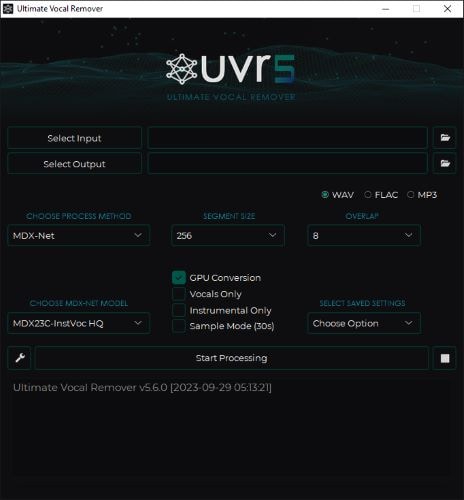
- Can process batch audio files and longer audio durations.
- Easy to download as it supports multiple platforms.
- The setup and model selection can be slightly complex for new users.
- Does not support splitting into individual stems like bass or drums.
- Allows you to choose different AI models for the stem splitting process.
- Provides up to 30 seconds of audio preview.
- Supports NVIDIA GPU acceleration for faster processing.
2. Vocalremover.org
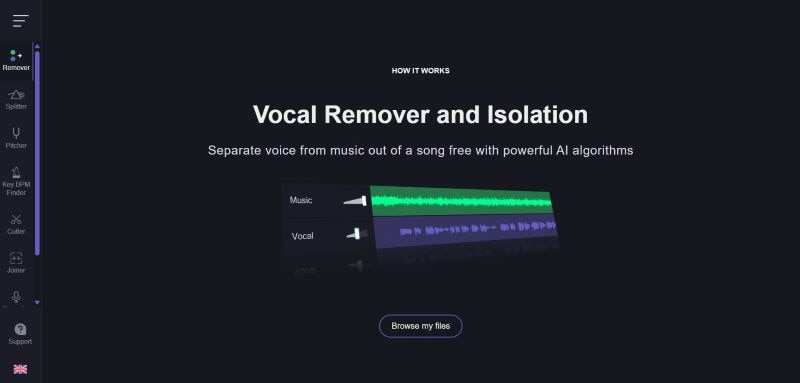
- The stem splitting process is relatively fast.
- The clean interface makes it easy to navigate and use.
- Does not support batch processing.
- Some separated tracks may still contain slight background noise.
- Can separate vocals, instrumentals, bass, and drums from an audio file.
- Provides up to 1 minute of audio preview.
- Includes additional tools such as Audio & Pitch Changer, Key & BPM Finder, Cutter & Joiner, Voice Recorder, and Karaoke Maker.
As you can see, both tools above clearly have their strong points and their limits. To make the comparison clearer, take a look at this quick overview of LALAL.AI alternatives.
| Tool | Sound Quality | Price | Batch Processing |
| LALAL.AI | High-quality separation with minimal artifacts | Free trial, paid plans start at $7.5/month | |
| Ultimate Vocal Remover 5 | Good separation quality, depends on model settings | Free | |
| Vocalremover.org | Decent quality, occasional audio artifacts or minor distortions | Free with paid plans starting at $12.5/month | |
|
Show More
Show Less
|
|||
Pros & Cons
After testing LALAL.AI vocal remover and comparing it with similar tools, it becomes easier to see where it performs well and where it still has room to improve. Some features feel polished and reliable, while others could be refined further.
To help you decide whether LALAL.AI fits your workflow, here's a breakdown of its strengths and limitations.
- Effortless Navigation: The interface makes it easy to find LALAL.AI vocal remover, LALAL.AI voice cleaner, and other tools. The steps are straightforward, and the whole process from upload to download is simple to follow.
- Wide Stem Selection: LALAL.AI vocal remover supports up to 10 stems, including vocals, drums, bass, guitar, piano, and more. This level of separation gives users more control when mixing or editing individual instruments.
- Flexible Payment Options: You can choose between subscriptions or one-time credits, depending on how often you plan to use it.
- Cross-Platform Access: LALAL.AI runs in the browser, has desktop apps, mobile support, and even offers a VST plugin for audio software.
- Andromeda Not Fully Integrated Yet: Not all LALAL.AI features currently use the latest AI model.
- Processing Time Depends on Server Load: Audio processing can take some time, especially during peak usage hours.
- One Stem Extraction at a Time: Even though one audio file can be separated into multiple stems, the extraction must be done individually. For example, if you want vocals, drums, and guitar, each stem needs to be processed separately.
- Limited Free Access: Free users can preview results, but downloading the full, separated tracks requires a paid plan.
Conclusion
LALAL.AI vocal remover has remained one of the crowd favorites, especially with the latest AI model update, Andromeda, which improves separation quality. After reviewing its features and performance, the tool proves to be suitable for many types of users. Whether you are a content creator, podcaster, music enthusiast, or working on professional audio projects, LALAL.AI is flexible enough to support different needs.
For users who want to continue the process and combine audio with visuals, Wondershare Filmora is a practical next step. It allows you to add animated text, create subtitles automatically, and match visuals to the beat of your audio. With Filmora, you can turn separated tracks into a complete and polished video.
FAQ
-
Can I edit the separate tracks directly inside LALAL.AI?
No, LALAL.AI can only separate vocals and instrumentals from a track. If you want to mix tracks, adjust timing, or sync the audio with video, you can continue the process in Wondershare Filmora.
-
Does LALAL.AI work better with studio recordings than live recordings?
Yes. In general, studio recordings usually have clearer sound, which helps LALAL.AI detect vocals and instruments more accurately. However, the Andromeda has improved noise handling, so live recordings can still be processed well, although the results may vary depending on the recording quality.
