


 TL;DR:
Zoomerang - AI Video Maker is a template-driven mobile and web application optimized for beginners to quickly recreate trending TikTok and Instagram Reels formats, though its reliance on a separate coin system makes complex AI edits expensive even with a paid subscription.
● The app offers a limited free version with watermarks, while paid plans (Pro + AI at $9.99/month and Advanced + AI at $39.99/month) still require purchasing extra coins for heavier AI processing or longer clips.
● Zoomerang is best for casual mobile creators wanting step-by-step shooting instructions and pre-timed cuts for viral short-form content, whereas Wondershare Filmora is best for users requiring full timeline control, cross-platform editing, and up to 4K exports for professional or long-form videos.
● Official software installation is restricted to iOS and Android platforms via official app stores to avoid APK security risks, meaning PC users lack a native desktop application and must rely on the web browser strictly for generative features like Video GPT.
Ask AI for a summary
 ChatGPT
 Perplexity
 Gemini
 Claude
 Grok
Grok
Short videos have become the main format driving today’s content. As a result, many creators are expected to produce content that looks polished and on trend, often in just a few minutes.
That pressure has led to the rise of tools that do more than basic editing. One example is Zoomerang - AI Video Maker, an app built specifically for short-form creators. Rather than starting from a blank canvas, you can follow guided templates, recreate viral formats step by step, and enhance clips with built-in AI effects. It’s designed for speed, which is exactly what most social media creators need right now.
This review breaks down how Zoomerang actually performs. We’ll cover its key features, pricing, strengths, and limitations, and help you decide if it’s the right tool for creating scroll-stopping videos.
Quick Overview of Zoomerang
Before diving deeper into its features, let’s take a quick look at what Zoomerang AI Video Maker actually offers and who it’s designed for.
| Feature | Details |
| Full Name | Zoomerang – AI Video Maker |
| Developer | Zoomerang Inc. |
| Capabilities | Template-based video editing, AI effects, short-form video creation, built-in tutorials |
| Platform | iOS, Android, web browser |
| Free Plan | Yes, with limited templates and features |
| Paid Plans | Subscription-based (monthly and yearly options) |
| Best for | Beginners, TikTok and Reels creators, fast content production |
Part 1. What Is Zoomerang?
If you’ve ever felt stuck staring at a blank timeline, Zoomerang offers a completely different approach. Instead of asking you to create a video from scratch, it gives you a ready-made framework to follow. Designed with speed and trends in mind, it helps create short videos that perform well on platforms like TikTok and Instagram Reels without advanced editing skills.
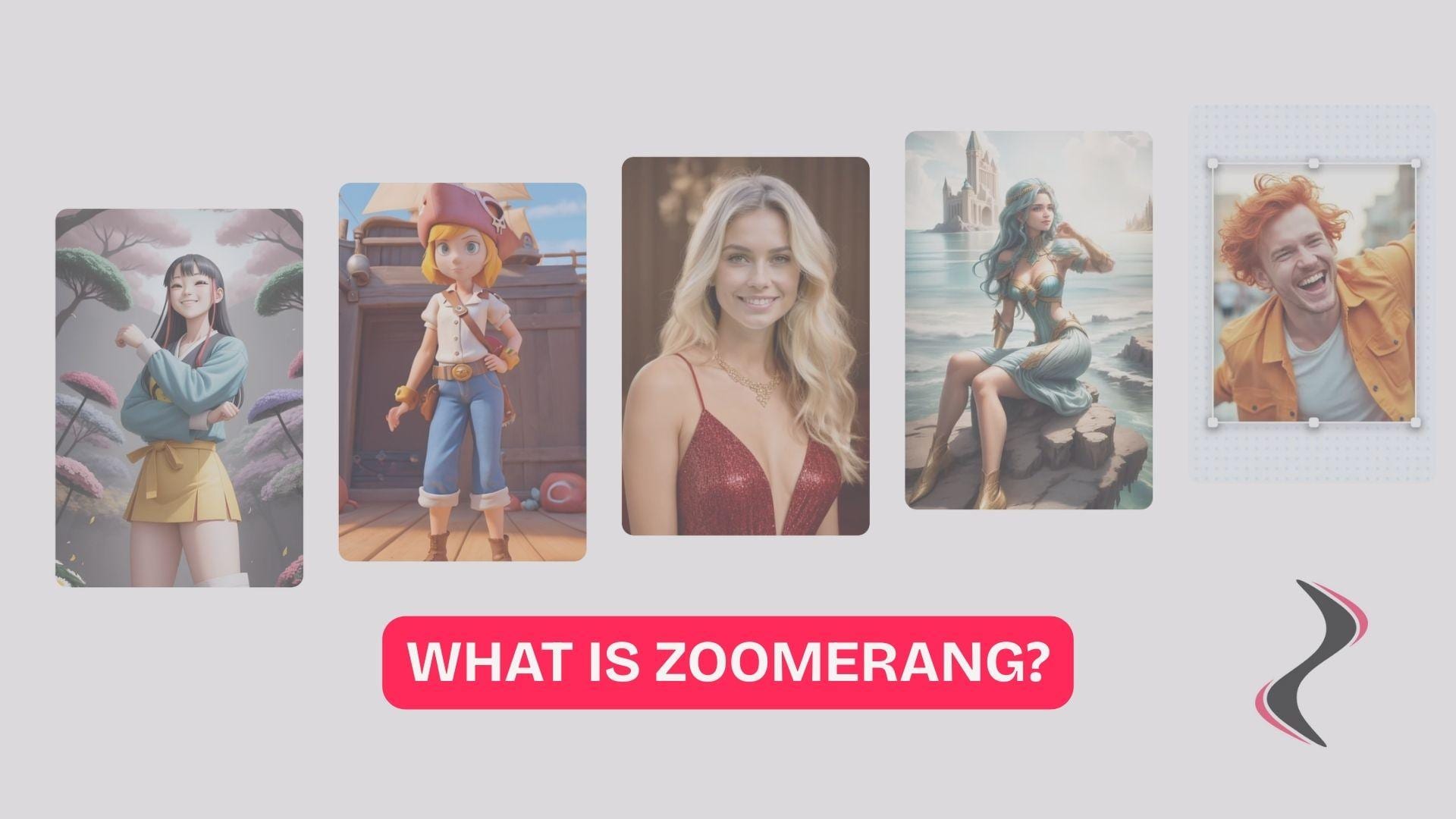
Here’s what defines Zoomerang as a tool:.
- Built specifically for short-form videos. Everything is optimized for fast-paced vertical content and compatible with TikTok, Reels, and Shorts.
- Template-driven workflow. Instead of starting from zero, you follow guided templates that show you how to shoot and edit each scene.
- Strong focus on trending content styles. Viral formats inspire many templates, so it's easy to create videos that feel current.
- Beginner-friendly editing experience. The step-by-step approach reduces the learning curve, even if you’ve never edited a video before.
- AI-enhanced creative tools. Includes effects and smart editing features that help upgrade visuals without manual tweaking.
Overall, Zoomerang is less about deep customization and more focused on creating polished short videos as quickly as possible.
Part 2. Zoomerang Features: Templates, AI Tools, Effects & More
Once you understand how Zoomerang AI Video Maker is designed, the real value lies in how its features work together seamlessly. It doesn't burden you with complicated settings; instead, the app focuses on tools that speed up the content creation process while keeping up with the latest content trends.
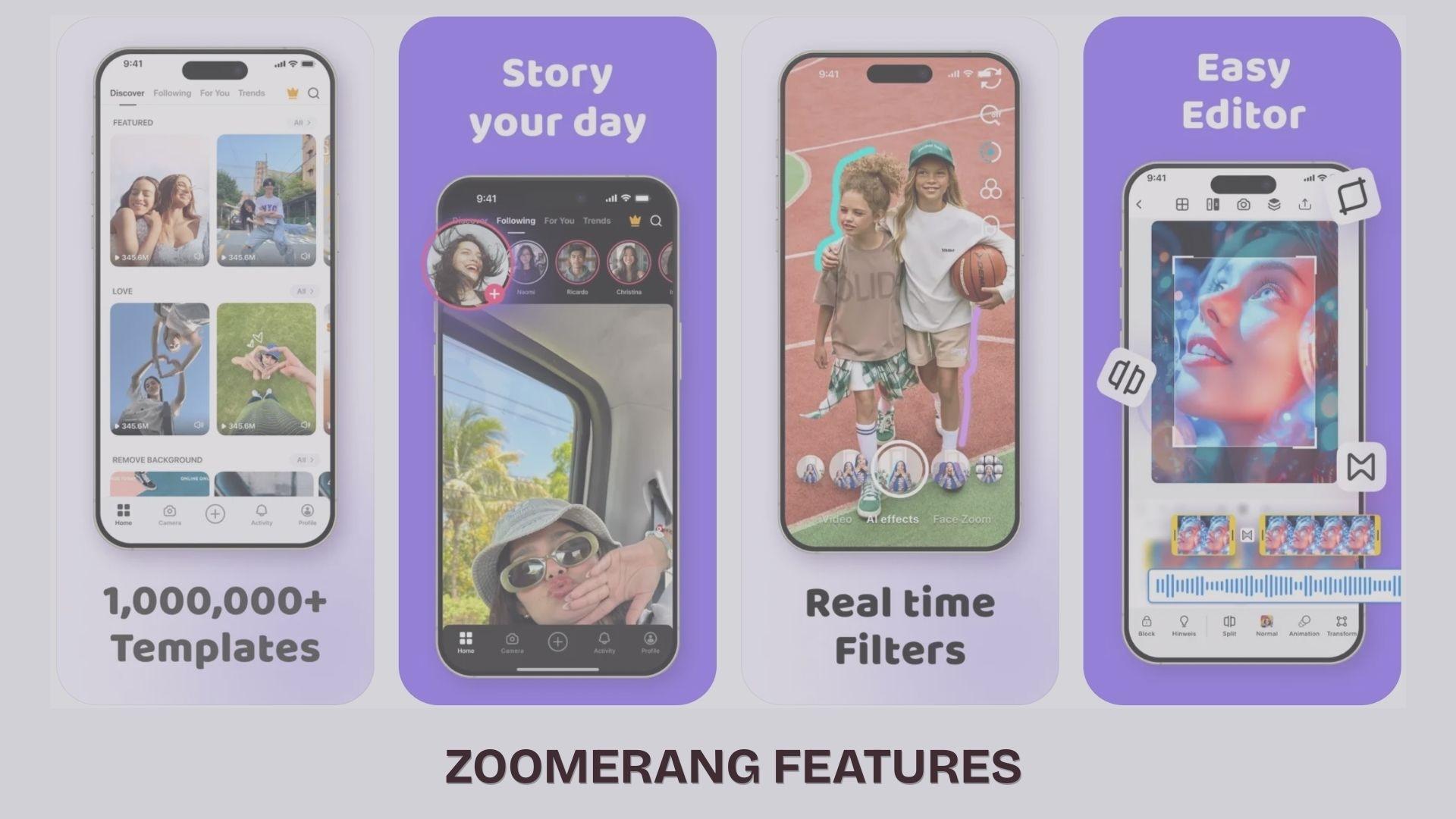
Viral Video Templates
Templates are key to the Zoomerang experience, but they’re more than just presets. Each one acts as a quick guide.
- Step-by-step shooting instructions help you match timing, angles, and transitions
- Trend-based concepts inspired by popular TikTok and Reels formats
- Pre-timed cuts and transitions so clips already sync with the flow
- Category browsing based on styles, challenges, or moods
This makes it easier to recreate viral-style videos without having to guess how they were made.
AI Editing Tools
Zoomerang has expanded well beyond basic effects into a full AI Studio with dedicated tools for both video and image creation.
Video AI Tools
- Video GPT: Generate a complete video just by typing a description
- Text to Video: Turn written prompts into short video clips
- Deform AI: Animate and transform a single still frame into a unique video
- Restyle AI: Reimagine your existing footage in a completely different visual style using text prompts
- Video Background Remover: Automatically remove video backgrounds in one tap
- AI Music Generator: Create original, trend-matching music tailored to your video
Image AI Tools
- AI Photoshoot: Train a personal AI model to generate unlimited social media content of yourself
- Photo AI: Transform photos into new visuals using text prompts
- Text to Image: Generate images from written descriptions
- Look AI: Virtually try on outfits and change your appearance in photos
- Generative Fill: Replace objects in an image by describing what you want instead
Built-In Video Editor
Beyond templates, there’s still a basic editing layer if you want to adjust things manually. Zoomerang video editor includes:
- Green Screen for custom background replacement
- Canvas tool (background colors, images, or blur)
- Slow motion and pause controls
- Face Beautification tool
- Video collage creator
- Music generator (pick genre/mood, not just import tracks)
Effects and Filters
- Over 300 aesthetic effects to choose from
- Filter categories including Aesthetic, Retro, Style, and B&M
- Effects and filters can be applied live during recording, not just in post-editing
Part 3. Zoomerang Pricing and Subscription
Before you start creating seriously with Zoomerang AI Video Maker, it’s worth understanding how its pricing actually works.
Zoomerang Pricing Plans (2026)
| Plans | Price | Features |
| Free | Free | Access to limited templates, basic editing tools, and a watermark on exports |
| Pro + AI | $9.99/month | More templates (1M), no ads and watermark, access to AI Studio, see profile visits, access to more editing features |
| Advanced + AI | $39.99/month | All Pro and AI features, high quality results |
*) Pricing may vary by region and promotions.
Free vs Paid Experience
The free version is usable, but it feels more like a trial:
- You can create videos using selected templates
- Basic editing tools are available
- Exports often include a watermark
- Many trending templates and AI tools are locked
After switching to Zoomerang Pro or Advanced plan, you’ll gain access to more templates and effects, as well as cleaner, watermark-free exports.
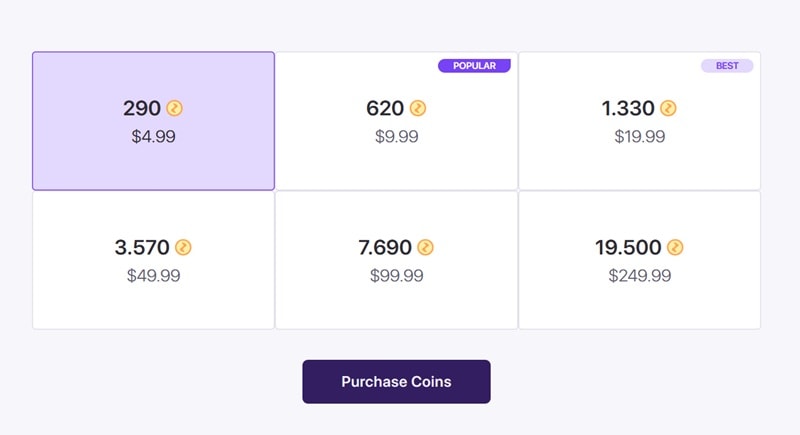
The Coin System
Even with a subscription, Zoomerang doesn’t always work as “unlimited.”
- The app uses a coin-based system for certain AI features
- Coins are purchased separately in packages
- More complex AI edits (longer clips, heavier processing) consume more coins
Meaning:
- You might still need to pay extra even after subscribing
- AI-heavy features like advanced effects or generative edits can require additional credits
In practice, the subscription unlocks access, but usage beyond certain limits can still cost more.
What This Means for Creators
Zoomerang’s pricing is flexible, but not always straightforward:
- Suitable for casual creators who rely on templates
- It can get expensive if you frequently use AI features
- Best value if you stay within basic editing and template workflow
Part 4. Zoomerang Review: Pros, Cons & What Users Say
After looking at how Zoomerang AI Video Maker works, the real question is how it performs in everyday use. Based on user reviews across app stores and third-party platforms, the experience is a mix of convenience and a few noticeable drawbacks.
- Easy to learn, even for beginners. Many users highlight how simple it is to start creating videos without prior editing experience.
- The template system is a real time-saver. The guided templates are often mentioned as the biggest advantage, especially for quick content creation.
- A fun and social media-friendly experience. Some describe it as a “TikTok-like” creative space with tutorials and a community feel.
- A wide variety of effects and creative tools. From filters to music and overlays, the app gives enough options to make Zoomerang videos feel dynamic.
- Paywall feels restrictive. A common complaint is that many key features require a subscription or extra payments.
- Extra costs through a coin system. Some users didn’t expect to pay more even after subscribing, especially for AI features.
- Performance issues on some devices. Reports include crashes, freezing, or problems saving videos properly.
- Limited video length in certain cases. This can be frustrating if you want more flexibility in editing.
- Mixed user satisfaction. While some call it “fun” and engaging, others feel it doesn’t fully deliver on premium expectations.
Overall User Impressions
Zoomerang tends to leave a strong first impression. It’s easy to use, fast, and genuinely helpful for creating short videos. But over time, the limitations become more noticeable, especially around pricing and performance.
In other words, it works best when you use it for what it’s designed for: quick, template-driven content rather than complex editing.
Who Should Use Zoomerang?
The Zoomerang app isn’t trying to be a professional editing tool. It’s built for a specific type of creator. It’s a good fit if you are:
- TikTok creators who want to follow trends quickly
- Instagram Reels creators focusing on aesthetic or viral formats
- Beginners learning video editing without a steep learning curve
- Content creators who prefer templates over manual editing
- Casual users making fun or social videos with friends
Part 5. How to Download and Use Zoomerang
Getting started with Zoomerang is straightforward, but it’s important to install it from the right source to avoid issues down the road.
Official Zoomerang App Download
The app is officially available on mobile platforms, and these are the safest ways to download it:
- Apple App Store: Available for iPhone and iPad with full feature support and regular updates
- Google Play Store: Available for Android devices with the latest versions and security checks
These official stores ensure the app has been verified, updated, and is free from modified files. Always download Zoomerang from the App Store or Google Play to avoid security risks, bugs, or missing features.
Or, you can also use Zoomerang on the Zoomerang website at https://zoomerang.app/, , where you can access AI tools like Video GPT, Text to Video, and AI Ads Generator directly in your browser. Avoid sites that offer Zoomerang APK download to protect your device.
Is there a Zoomerang app for PC?
If you prefer to edit on a larger screen, you can use Zoomerang online on the web, though it focuses more on AI-generated video ads and marketing content creation. There is no official desktop version available yet. If you want, you can also install the app on a PC using tools like emulators, then download it via Google Play.
Part 6. Zoomerang vs Other Video Editing Apps
At this point, it’s clear that Zoomerang AI Video Maker is built for speed and simplicity. But how does it compare to a more flexible editor like Wondershare Filmora?
Filmora is a professional yet beginner-friendly video editor available on both desktop and mobile. If Zoomerang locks you into templates and short-form formats, Filmora opens up the full spectrum of video creation. You get complete control over your timeline, layers, transitions, and effects, without needing to be a professional editor to figure it out.
The difference isn’t just about features. It’s about how much control you want over your videos.
| Zoomerang | Filmora | |
| Platform | Mobile (iOS, Android) and web browser | Desktop and mobile (Windows, Mac, iOS, Android) |
| Free trial | Yes (limited features, watermark) | Yes (free version with watermark) |
| Paid Plans | Subscription-based + coin system | Subscription or one-time license options + AI credits |
| AI tools | Basic AI effects and templates | Advanced AI tools like auto captions, AI enhancer, smart cutout |
| Video resolution | Optimized for social media (limited control) | Up to 4K export supported |
| Templates | Strong focus on viral templates | Templates available, but more customizable |
| Effects & filters | Trend-based, quick apply | Large professional library of effects and transitions |
| Stock assets | Limited in-app assets | Extensive library with music, effects, and media |
| Best for | Quick, short videos and trends | More control, YouTube videos, and polished content |
Where Zoomerang Works Better
Zoomerang is more efficient when:
- You want to jump on trends quickly without needing editing skills
- You prefer templates that guide the entire video process
- You’re creating short-form content only
- You need something fast and mobile-first
This app simplifies the process, which is why many beginners love it.
When to Upgrade to Filmora
On the other hand, Filmora offers much more flexibility if you want to grow beyond templates:
- Deeper editing control: You can freely adjust timing, layers, animations, and transitions instead of being locked into a template.
- More advanced AI tools: Features like AI video enhancement, auto-subtitles, and object removal go beyond simple effects.
- Higher output quality: Supports 4K resolution and more export controls, which are important for YouTube or professional content.
- Larger creative library: Includes thousands of effects, music tracks, and assets for more unique videos.
- Cross-platform workflow: You can start on mobile and continue editing on desktop, which is not possible with Zoomerang.
 Secure Download
Conclusion
Zoomerang AI Video Maker delivers exactly what many short-form creators need right now: speed, simplicity, and trend-focused templates that make content creation feel almost effortless. It’s a strong choice if you want quick, social-ready videos without spending hours editing. However, the experience can feel limiting over time, especially with locked features and extra costs for AI tools.
If you’re aiming for more control, higher quality, or long-form content, tools like Wondershare Filmora offer a more flexible path. Ultimately, it comes down to whether you prioritize speed or creative control.
FAQs
-
Is Zoomerang free?
Yes, Zoomerang offers a free version, but this version has limitations, such as a limited selection of templates and watermarked export results. You need to subscribe to a paid plan to access all features.
-
How do I download Zoomerang safely?
You should download Zoomerang only from official sources such as the Apple App Store or Google Play Store to ensure security and timely updates. Avoid downloading Zoomerang APK from third-party sources.
-
Is Zoomerang good for beginners?
Yes, Zoomerang is designed for beginners, thanks to its guided templates and simple editing process that make creating short videos quick and easy.
