

 TL;DR:
Choosing the right AI dialogue generator requires matching the tool's memory capabilities and customization depth to your project, whether drafting quick social media skits or plotting complex narrative games.
● NovelAI is optimized for long-form fiction and screenplays by utilizing dedicated world-building and context-retention features, whereas Perchance provides a login-free, browser-based environment ideal for rapid interactive character testing.
● Creators must manually edit generated lines for emotional depth and continuity, as general platforms like ChatGPT run the risk of producing generic phrasing, while browser tools like Perchance suffer from fragile session memory that resets upon cache clearing.
● To convert finalized dialogue scripts into visual content, users can navigate to the AI Text to Video tool within Wondershare Filmora's Stock Media panel and select the Google Veo 3.1 engine to generate editable video clips up to 8 seconds in duration.
Ask AI for a summary
 ChatGPT
 Perplexity
 Gemini
 Claude
 Grok
Grok
Many creators struggle to write dialogue that feels real. Lines sound flat. Characters lose emotion. Scenes lose power. This challenge has increased the demand for AI dialogue generators. These platforms help shape clear text dialogue for scripts, story scenes, and short drama moments. They also give writers a way to express tension, humour, or conflict with less effort.
A reliable dialogue generator AI supports beginners and experienced storytellers who want stronger character voices. It removes fear of the blank page and gives structure to ideas that feel unfinished.
This article aims to guide you through the best dialogue tools, explain their strengths, and show how these AI-generated lines can turn into full videos.
1. What Is an AI Dialogue Generator?
An AI dialogue generator is a system that turns an input prompt into output character dialogue. You provide a short description, and the model generates lines that match the scene, tone, and roles you set.
These tools support several output formats. They can produce plot dialogue for storytelling, two-person interview exchanges, and structured story dialogue used in scripts and short scenes.
What makes these tools sound real comes from how the models learn. They are trained on massive amounts of text, allowing them to pick up natural language patterns. For this reason, they are able to create dialogue that fits context, emotion, and pacing. The latter relationship situates an AI story dialogue generator, and hence also an AI dialogue video generator, and a set of related systems within this wider family of story-centred AI tools.
2. Top-Rated AI Dialogue Generators for Screenwriters & Storytellers (2025)
AI dialogue tools continue to improve, delivering better tone control and story direction. Below are the most reliable options for creators, whether you are writing short skits or full story scenes.
1. Toolsaday AI Dialogue Generator
Toolsaday provides a collection of AI tools that help users write faster and create clearer content. It supports many tasks, from simple rewrites to full story scenes, making it useful for creators who want quick results.
The platform has earned strong user trust through consistent output quality. Its broad toolset gives writers a smooth way to shape ideas without much effort. This makes it a solid option for those seeking an easy-to-use AI dialogue generator.
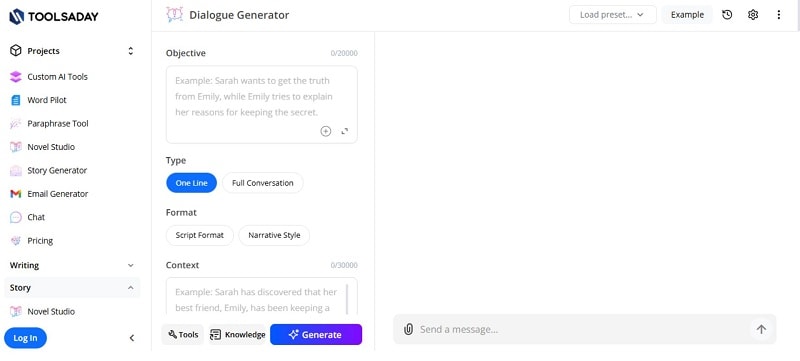
- Story generator for shaping creative scenes.
- Text-to-speech for turning lines into audio.
- Paraphrasing tool for cleaner rewrites.
- AI email builder for fast professional messages.
- Custom AI tool options for specific writing needs.
- Text tools for social media and marketing lines.
- Many writing tools in one place.
- Simple layout that suits quick tasks.
- Helpful for beginners and busy creators.
- Cost-friendly for content production.
- Some advanced tools need an account.
- Limited control over how the AI model works.
- Online use only; no offline mode.
2. Toolbaz Dialogue Generator
The Toolbaz platform offers many AI writing tools that help users create scenes, lines, and short scripts with little effort. It works well for quick drafting and gives clear, structured text. The system reads context and produces dialogue that fits the tone you set, making it a practical option for creators who want simple outputs without a long setup.
Many users rely on it to shape early drafts before editing. This makes Toolbaz a helpful dialogue generator AI for both short and long writing tasks.
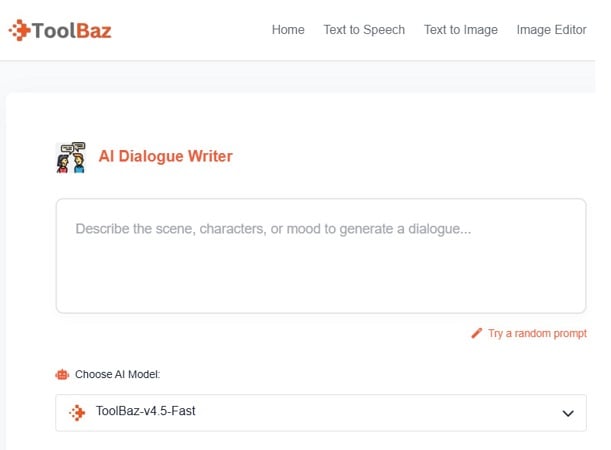
- Paragraph and scene builders for story-driven writing.
- Rewrite tools for cleaner lines and improved flow.
- Text generators for creative and structured outputs.
- Expansion tools for adding detail to short dialogue.
- Summaries that help reduce long drafts into simple points.
- Flexible settings for adjusting tone and style.
- Simple tools that support fast drafting.
- Good for overcoming writer's block.
- Easy for beginners to understand.
- Affordable for individuals and small teams.
- Some users need time to learn the tool layout.
- Limited depth for advanced customization.
- AI text may need light edits for clarity.
- Online-only use with no offline option.
3. Perchance Dialogue Generator
Perchance is a browser-based tool that lets you build and test character conversations without setup or accounts. It works well for quick ideas, rough scenes, and interactive character tests. Hobby writers and indie game creators often use it as an AI story dialogue generator for early drafts, not for final production work.
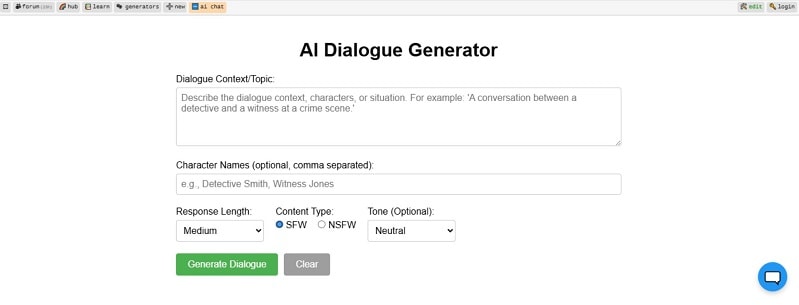
- Character profiles with names, traits, and speaking styles.
- Live, back-and-forth chats to test how characters respond.
- Ready to use in a browser, no login or personal data needed.
- Local session storage in the browser for basic privacy.
- Dialogue export so you can save and edit lines elsewhere.
- Template system that advanced users can extend with simple script logic.
- Instant access for fast testing and brainstorming.
- Helpful for rough drafts, prototypes, and NPC ideas.
- Strong flexibility for users who enjoy light coding.
- Local storage reduces server-side tracking of conversations.
- Output quality can vary and may need editing.
- Basic scripting skills are needed for deeper setup.
- Session memory is fragile and can reset if the browser cache clears.
- Site reliability may drop when traffic is high.
4. ChatGPT – Conversation Generator AI
ChatGPT is widely used for producing smooth, natural dialogue. It can follow context, adjust tone, and create clear exchanges for scenes, scripts, and short teaching moments. Its strength is fast, structured text generation that helps creators shape early drafts with ease. Many writers rely on it as a flexible conversation generator AI for both simple chats and detailed exchanges.
- Context tracking for multi-turn conversations.
- Natural language processing to shape human-like replies.
- Style control for tone, length, and format.
- Tools for rewriting or expanding dialogue.
- Multilingual responses for global scripts.
- Add-on support for tasks like browsing or data work.
- Fast replies that support quick drafting.
- Always available for repeated testing and edits.
- Helpful for brainstorming or breaking creative blocks.
- Works across many writing tasks with one interface.
- May generate text that needs fact-checking.
- Cannot express true emotion or lived experience.
- Risk of bias in certain outputs.
- Some lines may feel generic without editing.
- Not suitable for sensitive or private data.
5. NovelAI – AI Story Dialogue Generators for Novels/Screenplays
NovelAI is a fiction-focused platform built to help writers create stable, character-driven dialogue. It reacts to user input with strong context control, making it helpful for long stories, screenplays, and role-play scenes.
The system adapts to different writing voices and supports creators who want steady narrative flow. Many writers view it as an AI story dialogue generator suited for detailed scenes and character work.
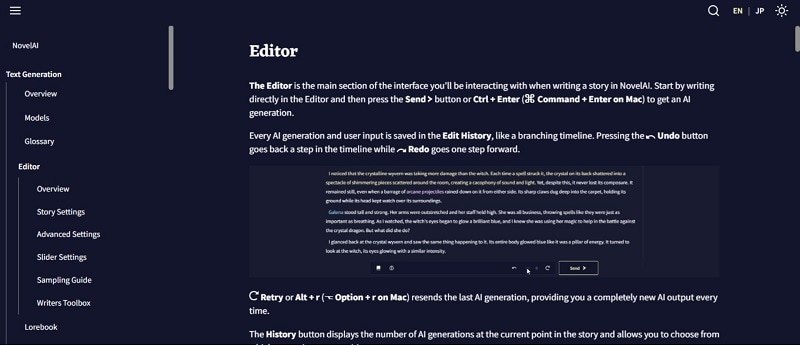
- A world-building tool that stores character traits, locations, and story rules to keep dialogue consistent.
- A context viewer that lets users control how much past story the AI considers.
- Interactive mode for role-play and scene testing.
- Style presets and model options for genre-specific dialogue.
- Real-time suggestions that help continue scenes and remove blocks.
- Optional text-to-speech for hearing lines aloud during review.
- Strong memory tools that help maintain tone and character behavior.
- Designed for fiction, giving richer dialogue than general models.
- User data stays private and is not reused for training.
- Good for complex story worlds that need steady character logic.
- Visual tools that help writers imagine characters or scenes.
- New users may need time to learn advanced settings.
- AI needs clear direction to avoid errors or weak story links.
- Full features require a paid plan.
- Online access only, with no offline use.
- Dialogue may still need user editing for final polish.
Part 3. Common Use Cases of AI Dialogue Generators
AI dialogue tools support many creative fields. Whether you're making short videos or writing stories, they help you move faster and stay consistent with your characters.

1. TikTok Dialogue Scripts
Short, fun dialogues perform well on TikTok. AI tools generate quick two-person exchanges for reactions, skits, or comedic twists.
These scripts work well with lip-sync content, animated avatars, or storytelling clips.
2. YouTube Dialogue Educational Content
Educators use AI dialogues to explain concepts through character conversations. This transforms complex topics into simple, engaging scenes.
Teachers, trainers, and tutorial creators use this method to keep viewers focused and entertained.
3. RPG/Visual Novel
Game creators rely on dialogue tools to craft branching choices, NPC interactions, and emotional scenes.
AI lets you test how characters react in different plot directions, speeding up script development.
4. AI Story Creation
Writers use AI story dialogue generator tools to build drafts, explore character arcs, and refine their narrative voice.
Many creators now use AI as a first-draft assistant before polishing the final work.
4. Filmora Text-to-Video: Convert AI Dialogue Scripts into Full Videos (Veo 3.1 Guide)
Your AI dialogue is only the starting point. Once the script is ready, Wondershare Filmora's AI Text-to-Video feature can turn those lines into moving scenes, using Google's Veo 3.1 model directly inside the editor.
 Secure Download
Filmora supports multi-model text-to-video, and Veo 3.1 brings higher motion realism and cinematic quality. It even generates exciting sound effects and lets you add scripts for character speech [01:07], turning your lines into a complete scene. This efficient workflow, offering up to 8-second AI clips per generation, acts like an all-in-one AI dialogue video generator built directly into your timeline.
You paste the dialogue, pick the model, and get a visual base you can edit like any other clip.
Step-by-Step: How to Turn Your AI Dialogue Script into Video using Filmora's Veo 3.1
Secure Download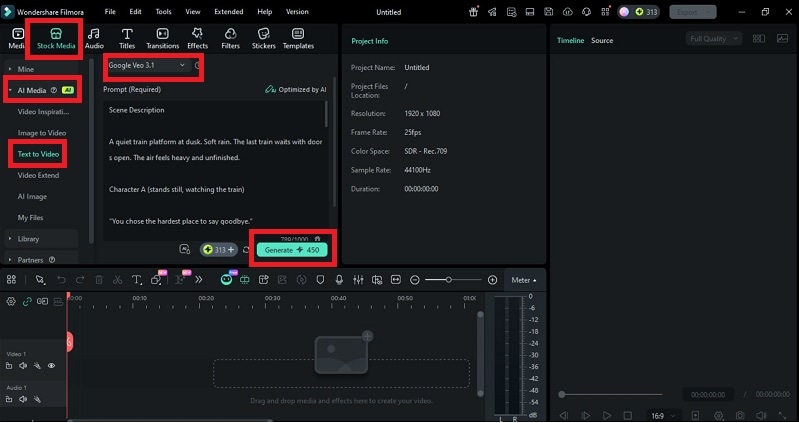
5. Best Prompt Templates for Your Next Dialogue Generation
Here are some ready-to-use templates for your AI dialogue generator tools:
- "Two detectives arguing about a clue that changes the entire case."
- "Teacher and student discussing a tough topic that shifts the class mood."
- "Two best friends debating a decision that could change their future."
- "A hero and a villain meeting for the first time in a tense standoff."
- "A mom and her daughter talking about a secret neither wants to reveal."
These templates help AI tools generate structured, emotional, and engaging scenes. You can adjust tone, personality, or pacing to suit your video or writing style.
Conclusion
AI dialogue generators offer creators a faster path to writing strong scenes and video scripts. Once your script is ready, Filmora's AI Text-to-Video workflow provides the perfect bridge to visual storytelling. This unique feature turns your dialogue into high-quality, editable scenes, effectively making Filmora an all-in-one AI dialogue video generator. With steady practice, your stories gain depth, rhythm, and confidence—even when they start with an AI dialogue generator.

