AI Christmas Makeup Photo Prompts:
Test Holiday Looks without Real Makeup
Explore this curated set of AI Christmas makeup prompts designed for Nano Banana Pro in Filmora. Each prompt is tuned to keep your facial structure consistent while applying festive eyeshadow, lipstick, glitter, and blush for realistic Christmas beauty portraits. Scroll through the examples below and pick the makeup prompt that best matches your selfie, mood, and holiday theme.
What You Can Create:
🎄 Natural to full-glam Christmas makeup photos
✨ Glitter eye looks, frosted highlighter, and bold red lip portraits
📸 Vertical and square beauty shots for Instagram, TikTok, and YouTube Shorts
🎁 Festive beauty concepts for Christmas parties, family photos, and holiday campaigns
Loading more templates...
 Category:
 Duration:
 Aspect Ratio:
Create Festive Looks in Seconds
AI Christmas Makeup Photo Generator
Want easy, camera-ready AI Christmas makeup photos without a full glam session? Filmora’s AI Image Generator, powered by Gemini Nano Banana Pro and other advanced models, turns your ideas and AI Christmas makeup prompts into realistic holiday beauty shots. Try soft, natural looks for family portraits, bold glitter eyes for parties, or editorial-style Christmas campaigns—all from a simple text prompt and a selfie.
Apply Christmas Makeup from Text Prompts and Selfies
Apply Christmas Makeup from Text Prompts and Selfies
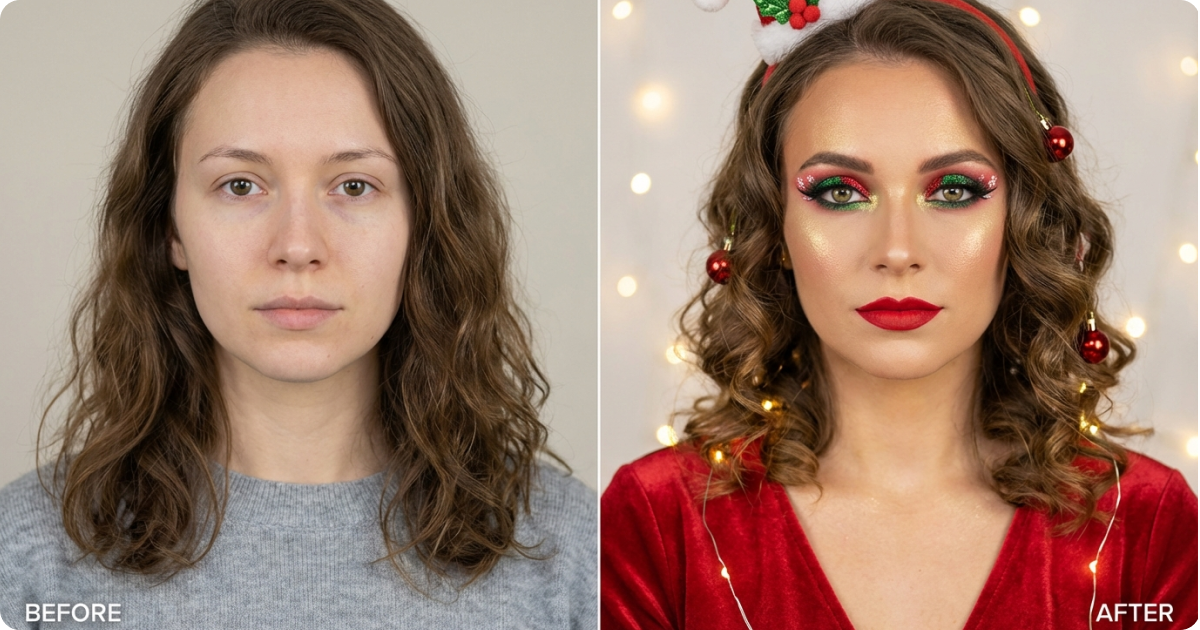
Paste any of our AI Christmas makeup prompts directly into Filmora’s AI Image Generator and choose Nano Banana as the model. Describe red-and-gold eye looks, frosty silver eyeliner, berry lips, or soft glam for Christmas Eve, then generate a polished portrait in a few seconds. You can experiment with multiple variations until you find a makeup style that feels right for your face.
- Reference selfie support: Upload a clear selfie with bare or light makeup. Filmora keeps your natural facial structure, then adds Christmas-themed makeup on top for realistic results.
- Copy-paste prompt friendly: Every Christmas makeup prompt on this page is ready to paste into Filmora—no long prompt writing needed.
- Multiple aspect ratios: Add ratio terms to your prompts to generate portraits for Stories, Reels, TikTok, YouTube Shorts, or square Instagram posts.
Turn Christmas Makeup Photos into Short Videos
Turn Christmas Makeup Photos into Short Videos
Convert your static AI Christmas beauty shots into engaging vertical videos with Filmora’s AI Image to Video feature. Build quick makeup transformations, Christmas “get ready with me” sequences, or festive intro clips for your channel in just a few clicks.
- 🎬 Before/after glow-up reveals: Combine a bare-face selfie and a Christmas makeup AI portrait to create a smooth transition video that reveals your holiday look.
- ✨ Animated beauty shots: Use motion prompts and simple camera moves to add gentle zooms, pans, or head turns to your AI makeup photos.
- 📱 Social-ready video formats: Generate clips in vertical 9:16 for TikTok and Reels or 1:1/16:9 for YouTube and other platforms.
Complete Editing Suite for Perfect Christmas Makeup Photos and Videos
Complete Editing Suite for Perfect Christmas Makeup Photos and Videos
AI handles the heavy work of drawing the makeup, but final touches still matter. Filmora’s photo and video tools help you refine each AI Christmas makeup photo so it matches your brand, feed, or campaign style—from skin tones and color grading to text overlays for beauty tutorials.
- 🎨 Color grading & beauty filters: Adjust contrast, warmth, and saturation to keep skin tones natural and enhance Christmas colors like red, gold, green, and silver.
- ✨ AI background removal & replacement: Cut out your portrait and place it in cozy Christmas scenes: fireplaces, snowy streets, decorated living rooms, or studio backdrops.
- 📝 Text & stickers for beauty content: Add product callouts, step-by-step captions, or festive stickers to make your AI Christmas makeup posts more engaging.
FAQs About AI Christmas Makeup Prompts
How to Use AI Christmas Makeup Prompts in Filmora?
Creating AI Christmas makeup looks is simple. You do not need pro editing skills or complex software—just a selfie and a clear idea of your holiday style. Follow this quick guide to turn your photo and AI Christmas makeup prompts into polished images in a few easy steps.
Step 1 Open Filmora and Access the AI Image Generator

Step 2 Generate Images from Text and a Reference Selfie

Step 3 Download, Edit, and Export Your Christmas Makeup Photos

-
Step 1: Open Filmora and Access the AI Image Generator
Download and launch Filmora, start a new project, click “Stock Media”, and choose “AI Image” in the AI Media panel. -
Step 2: Generate Images from Text and a Reference Selfie
Select the Nano Banana Pro model, then enter your AI Christmas makeup prompts—for example “red and gold Christmas glitter eye makeup, glossy red lips, soft studio lighting”. Optionally upload a selfie so the AI can match your face. Filmora analyses your features and applies the holiday makeup described in the prompt. -
Step 3: Download, Edit, and Export Your Christmas Makeup Photos
After generation, preview the AI image. Click the download icon or drag the portrait to the timeline to refine colours, crop, or add text. When you are happy with the look, export the final image or video and share it on social media or use it as a reference for real-life Christmas makeup.
More Than Just an AI Christmas Makeup Generator
Filmora does more than apply festive eyeliner and lipstick with AI Christmas makeup prompts. While it helps you create polished holiday beauty portraits in seconds, the same tools also support a wide variety of AI prompt styles—fashion looks, lifestyle portraits, family events, doodle art, travel scenes, and more. Any time you enter a creative prompt, Filmora turns it into high-quality AI images or videos and gives you a full editing toolkit to refine the result. With Nano Banana and Filmora working together, you have a flexible platform for Christmas campaigns, everyday content, and long-term creative projects.