
40+ Free Christmas Title Animations:
Download & Use Instantly
Get the most popular Christmas video titles for quick holiday video edits. Whether you want trendy TikTok Christmas intros, YouTube holiday openers, or festive Instagram story titles—these Christmas title templates make it easy.
Loading more templates...
 Category:
 Duration:
 Aspect Ratio:
Trending Christmas Title Templates
for Social Media Videos All in Filmora
Make your Christmas content stand out instantly with pre-made title templates that fit holiday videos, festive photos, Christmas captions, and trending Reels. Filmora's easy-to-use text and title assets help you add professional, eye-catching Christmas title animations to videos and images—pick a template and personalize.
Instant Festive Titles in One Click
Instant Festive Titles in One Click
Ready-made Christmas title templates with snow, lights, gifts, and trees give any video an instant holiday atmosphere by simple drag-and-drop. Built-in animations and layouts turn basic text into polished Christmas intros and greeting cards within seconds.
Flexible Christmas Titles for Any Brand
Flexible Christmas Titles for Any Brand
You can edit text, font, size, color, alignment, and spacing in every Christmas title template to match brand or personal style. Global controls allow quick adjustments to position, scale, rotation, and timing so titles stay consistent across different clips and scenes.
Works Seamlessly with Other Christmas Assets
Works Seamlessly with Other Christmas Assets
Christmas titles integrate smoothly with Filmora's Christmas video templates, stickers, effects, and transitions to create a unified festive visual package. Combined with Filmora's filters, LUTs, and holiday music, creators can complete the whole Christmas look and feel inside one editor.
FAQs for Christmas Title Templates
- Browse our collection of premium Christmas video title animations and templates.
- Select and download your preferred Christmas title animation style.
- Import the template into your video editing software (Filmora).
- Customize the animated Christmas title with your own text, colors, and timing.
- Apply the finished Christmas title animation to your holiday video and export for sharing across all platforms.
How to Use Christmas Title Templates in Filmora?
Wondering how to make trending holiday content? Christmas Title Templates are perfect for adding Christmas flair to any video or story. This step-by-step guide shows you how to copy and apply Christmas Title Templates in minutes—even if you’re brand-new to editing. Get viral-worthy Christmas text effects for your reels and shorts instantly.
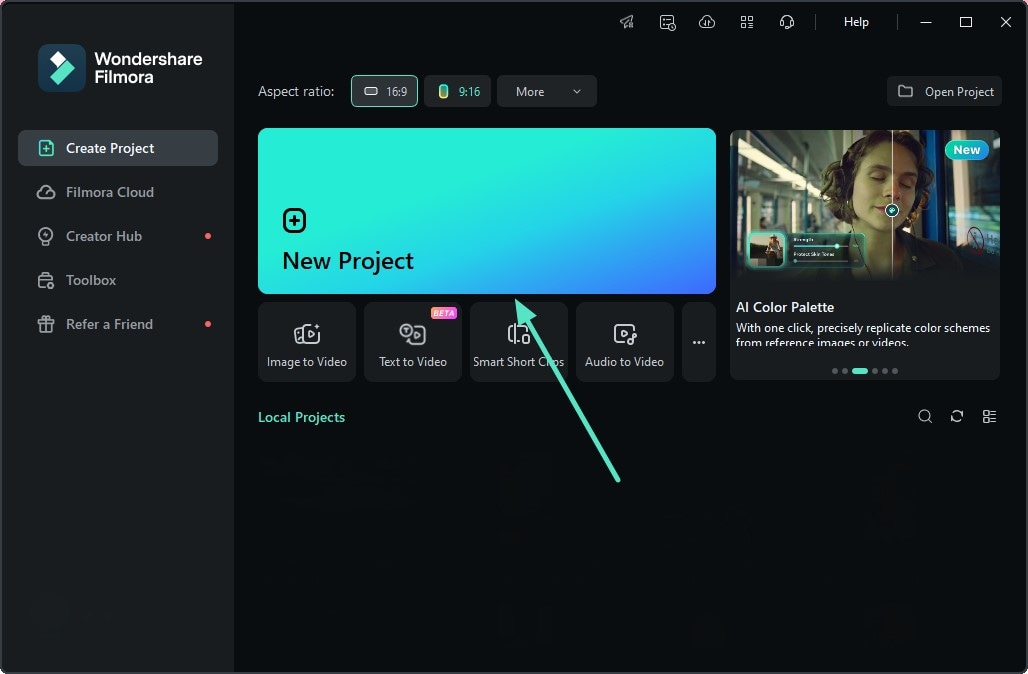
Step 1 Open Filmora and Start a New Project
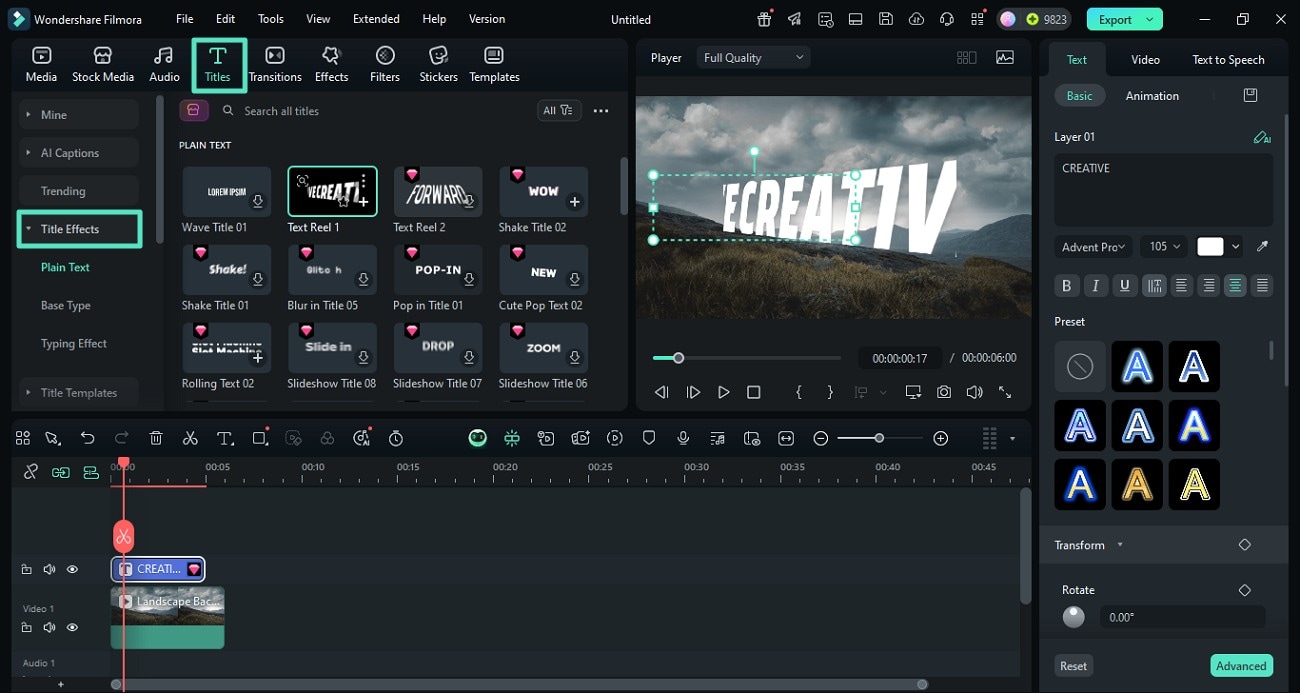
Step 2 Choose a Christmas Title Template
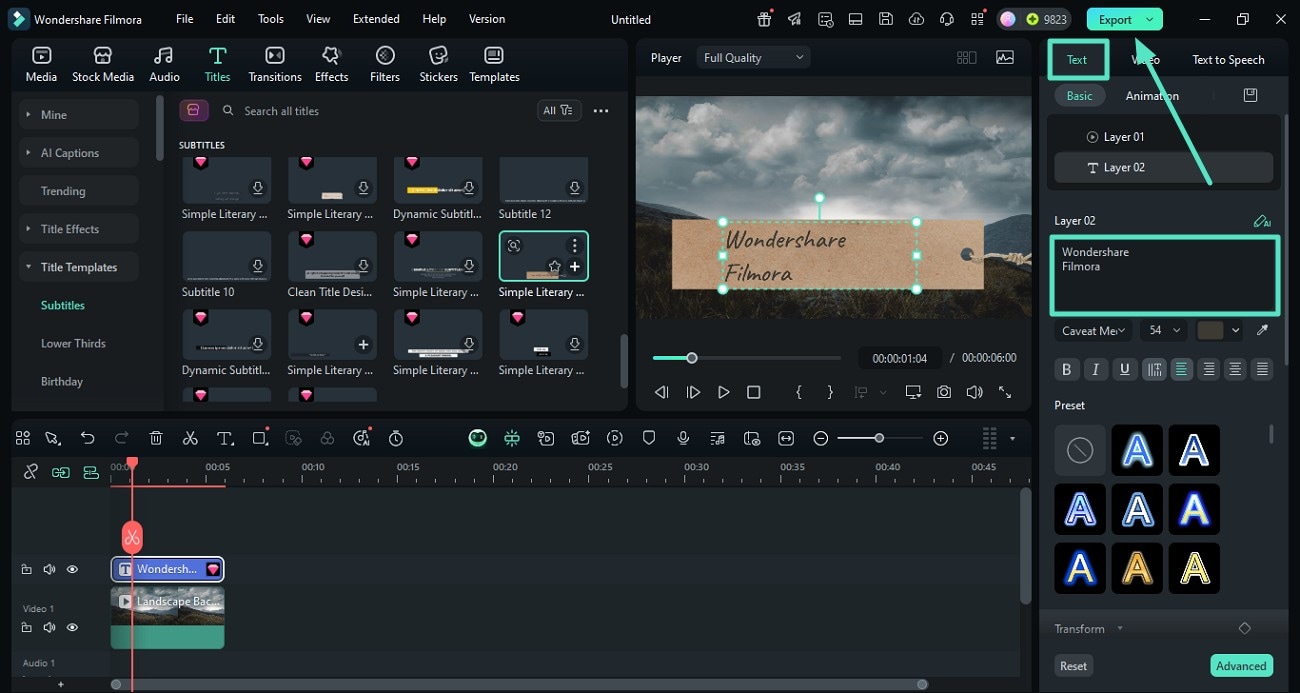
Step 3 Edit and Export Your Festive Content
-
Step 1:Open Filmora and Start a New Project
Launch Filmora, start a new project, click the Titles panel, and go to the Christmas/holiday category, then drag a Christmas title template onto your timeline above the video clip. -
Step 2:Choose a Christmas Title Template
Double-click the title on the timeline to edit the text, then adjust font, color, size, position, and animation to match your video style or brand. -
Step 3:Edit and Export Your Festive Content
Double-click the title on the timeline to edit the text, then adjust font, color, size, position, and animation to match your video style or brand. Play back the video to check timing and appearance of the Christmas title, make small adjustments if needed, and then export your finished holiday video.
More Than Just Christmas Title Templates
Filmora goes beyond just Christmas Title Templates. Use it to design all types of holiday graphics, add viral Christmas text to your videos, make AI-powered video content and edit with pro-level super-easy tools—all in one place.







