Gemini AI Grinch Photo Prompts:
Generate Hilarious Photos with Ease
Welcome to the ultimate resource for creating viral Christmas content with AI! Explore 36+ Gemini Grinch filter prompts designed to transform your ordinary photos into shareable holiday masterpieces.
Wholesome Family Shenanigans with the Grinch: capture authentic family moments with the perfect amount of holiday chaos.
Romantic Grinch Photoshoot Prompts: perfect for Instagram couples who don't take themselves too seriously.
Individual Grinch AI prompts: create magazine-worthy portraits with personality.
Party Chaos & Special Moments: capture life's most memorable (and memeable) Christmas moments.
Loading more templates...
 Category:
 Duration:
 Aspect Ratio:
Create Funny Christmas Memories
With Gemini AI Grinch Prompts
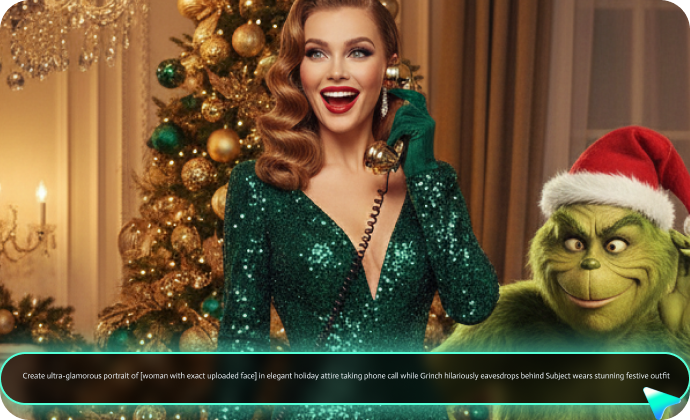
Can't get enough of those stunning, lifelike Grinch Christmas photos taking the internet by storm? Our handpicked Gemini Grinch prompt collection reveals the exact formulas behind these viral shots—packed with professional lighting techniques, Grinch-specific flair (fuzzy green fur, cheeky smirks, and cozy Whoville backdrops), and festive magic. Ready to bring your own Grinch-inspired visions to life? Dive into our Gemini Grinch prompts and create jaw-dropping art with Filmora's Nano Banana AI image generator!
Create Your Grinch Masterpiece with Filmora AI Image Generator
Create Your Grinch Masterpiece with Filmora AI Image Generator
Unleash the whimsical chaos of Grinch-themed Christmas magic with Filmora's Nano Banana model! Simply copy our tailor-made Gemini Grinch prompts, paste them into Filmora's AI Image Generator, and watch it conjure hyper-realistic Grinch Christmas scenes.
- Superior Face Preservation: Gemini Grinch's enhanced facial mapping ensures your features stay true-to-life while adding playful Grinch-style Christmas elements—solving the biggest issue users face with AI character prompts.
- Lightning-Fast Generation: Create high-quality Gemini Grinch portraits in just 20–30 seconds with real-time progress updates—no more long waits or guessing if the prompt is working.
- 1500-Word Prompt Support: Craft highly detailed Gemini Grinch prompts with up to 1500 words, giving you full creative control over every festive, mischievous detail.
Turn Static Grinch Photos Into Moving Magic
Turn Static Grinch Photos Into Moving Magic
TikTok and Instagram Reels favor video content nearly 3× more than static images, so turning your Gemini Grinch photos into short, dynamic videos can dramatically boost reach and engagement. With Filmora's AI Image to Video, you can instantly animate your Grinch-style portraits—whether you're hugging the Grinch, reacting to his mischievous expressions, or placing him in a fun Christmas scene. Add motion, music, and festive effects to make your Grinch content stand out on every platform.
Plus, the Filmora app comes pre-integrated with the Nano Banana Pro! Use AI templates to create festive Christmas videos effortlessly—upload a single portrait to design a unique animated Christmas playlist cover in seconds.
Full Grinch Photo and Video Editing Superpowers
Full Grinch Photo and Video Editing Superpowers
Beyond generating fun and mischievous AI portraits with Gemini Grinch photo prompts, Filmora also offers a powerful Christmas Photo and Video Enhancer along with comprehensive editing tools—allowing you to refine colors, boost clarity, and give your Grinch-themed visuals a polished, festive finish.
- AI Music Generator – Creates custom Christmas music matching your video vibe.
- Color Match: Match all Grinch photos to the same color palette for series consistency.
- Green Screen: Composite your Grinch photos into animated Christmas backgrounds.
How to Use Gemini AI Grinch Photo Prompts in Filmora?
Generate and edit professional Grinch photos with Gemini AI prompts in Filmora with ease.
Step 1 Activate AI Image Generator

Step 2 Generate Images From Text or Reference Pictures

Step 3 Download and Export Your AI-Generated Images

-
1:Activate AI Image Generator
Launch the latest version of Filmora, create a project, and click "Stock Media", choose "AI Image" from the Media panel. -
2:Generate Images From Text or Reference Pictures
Select the Nano Banana model, then type in your AI Gemini prompts for Grinch photos, then click on the "Generate" to start making Grinch photoshoots. You can also upload a reference picture for face consistency, and finally tap on Generate to edit the photo. -
3:Download and Export Your AI-Generated Images
After generating the photo, you can preview the image, tap on the download button, and drag it to the timeline, edit it if required, take a snapshot, or export to save the picture.
More Than Just a Grinch Photo Generator
Filmora goes beyond simple AI Grinch prompts to a photo generator. You can also generate other style photos from Gemini AI prompts, create AI videos from prompts or pictures, and edit them with the most powerful editing features in the same tool.