Viral Gemini AI Stranger Things Prompts
Your Complete Collection
Whether you're craving the supernatural terror of a Vecna curse levitation scene, the heroic intensity of an Eleven's glowing eyes moment, or the warm nostalgia of a Christmas lights wall message, our collection of free Gemini AI Stranger Things prompts delivers Hollywood-grade cinematic results in seconds.
Loading more templates...
 Category:
 Duration:
 Aspect Ratio:
Transform Into Hawkins Heroes
With Gemini AI Stranger Things Prompts
Remember the first time you saw Eleven flip that van with her mind? Or when the Party raced through storm-lit streets on their bikes, the Mind Flayer looming behind them? Those weren't just scenes—they were portals into an 80s sci-fi world we all wanted to inhabit. Now, with Gemini AI Stranger Things prompts, that portal is open. There is only one step away to transform into Hawkins Heroes, let's meet Filmora's AI image generator.
Generate Stranger Things Scenes from Prompts with AI Image Generator
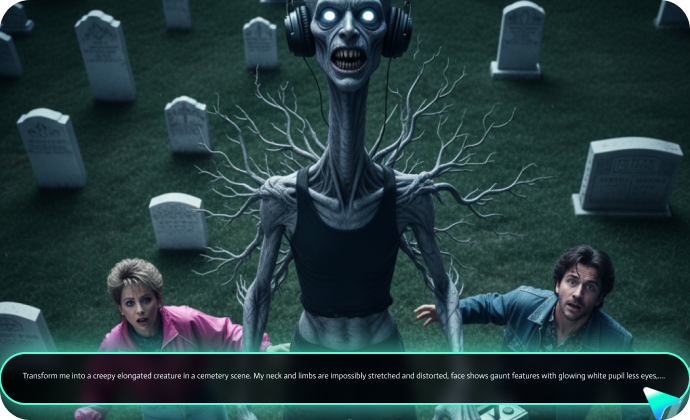
Generate Stranger Things Scenes from Prompts with AI Image Generator
Creating static upside-down photo effects is just the beginning. Filmora's Nano Banana AI Image Generator takes your Gemini AI Stranger Things prompts and transforms them into ultra-realistic 8K visuals with one click. No complicated settings, no manual editing—just pure creative power.
Copy any of our prompts, paste them into Filmora's AI Image Generator powered by Nano Banana, and watch as your photo morphs into a cinematic masterpiece.
- Deep Prompt Support: supports up to 1,500-word descriptions for maximum.
- Upload Reference Images for Perfect Accuracy: Upload your photo as a reference, add a Stranger Things aesthetic prompt, and Filmora's AI will seamlessly blend your image with the supernatural elements.
- Instant Generation with Real-Time Progress: No more waiting hours for renders. Filmora generates your Hawkins-inspired photos in seconds, with a live progress bar showing each processing stage. Generate multiple variations, compare results, and pick your favorite—all within minutes.
Animate Your Upside Down Adventure: AI Image to Video Magic
Animate Your Upside Down Adventure: AI Image to Video Magic
Static photos capture moments. Filmora's AI Image to Video brings them to life. This is where your Stranger Things Gemini AI creations transcend social media posts and become shareable cinematic experiences.
Picture this: Your photo standing in the red storm? Now the lightning actually flashes. The floating spores? They drift and swirl around you. The portal to the Upside Down? It crackles and pulses with supernatural energy. This isn't just animation—it's emotional storytelling through motion.
Beyond Photo Generation: Your Complete Stranger Things Content Studio
Beyond Photo Generation: Your Complete Stranger Things Content Studio
Filmora isn't just an image generator—it's an all-in-one creative powerhouse for every stage of your Stranger Things content creation journey. Once you've generated your AI photos and animated them, Filmora's comprehensive editing suite polishes your project to perfection.
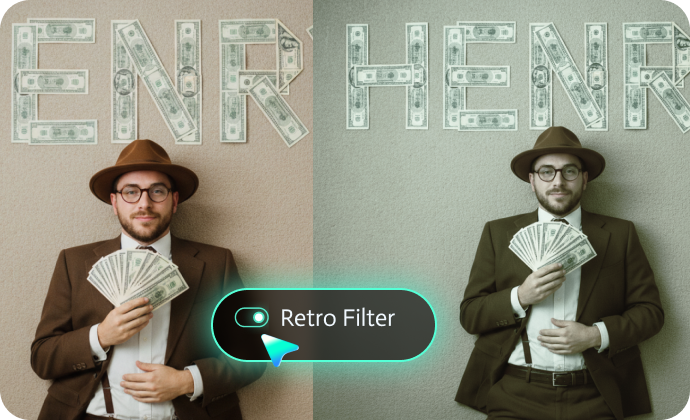
- Authentic 80s Film Effects: Recreate the show's signature look with built-in film grain overlays, VHS glitch effects, and vintage color grading presets. Apply the exact desaturated lower tones + vibrant red upper sky that defines the Upside Down aesthetic. Add scan lines, chromatic aberration, and light leaks for true 1980s authenticity.
- Creative Masks & Compositing: Isolate elements with AI-powered object removal. Want to erase a modern car from your Hawkins street scene? Done. Need to composite multiple generated images into one epic poster? Filmora's masking tools make it effortless.
- Custom Text & Logo Overlays: Add the iconic red Stranger Things logo to your creations, or design custom text with dripping blood effects, retro 80s fonts, and neon glow animations. Perfect for episode-themed posts, fan theories, or countdown videos for Season 5.
- Royalty-Free Music & Sound Design: Access Filmora's library of suspenseful synth tracks, eerie ambient soundscapes, and dramatic orchestral scores. Or upload your own audio—maybe that perfect Stranger Things soundtrack remix you've been saving.
FAQs About Gemini AI Stranger Things Prompts
How to Use Gemini AI Stranger Things Prompts in Filmora?
Generate and edit professional Stranger Things scenes with Gemini AI prompts in Filmora with ease.
Step 1 Activate AI Image Generator

Step 2 Generate Images From Text or Reference Pictures

Step 3 Download and Export Your AI-Generated Images

-
1:Activate AI Image Generator
Launch the latest version of Filmora, create a project, and click "Stock Media", choose "AI Image" from the Media panel. -
2:Generate Images From Text or Reference Pictures
Select the Nano Banana model, then type in your AI Gemini prompts for Stranger Things, then click on the "Generate" to start making Stranger things scenes photos. You can also upload a reference picture for face consistency, and finally tap on Generate to edit the photo. -
3:Download and Export Your AI-Generated Images
After generating the photo, you can preview the image, tap on the download button, and drag it to the timeline, edit it if required, take a snapshot, or export to save the picture.
More Than Just a Stranger Things Photo Generator
Filmora goes beyond simple AI Stranger Things prompts to a photo generator. You can also generate other style photos from Gemini AI prompts, create AI videos from prompts or pictures, and edit them with the most powerful editing features in the same tool.