ChatGPT Christmas Photo Prompt Ideas
for Every Holiday Moment
Transform ordinary snapshots into extraordinary holiday memories with our comprehensive ChatGPT Christmas photo prompt collection. Each prompt is engineered with professional photography techniques, ensuring photorealistic results that rival expensive studio sessions. Whether you're creating Xmas Candy Cane photoshoots, Christmas family portraits, pets, romantic couple photos, polaroids, or joining the viral AI ChatGPT Christmas photo trend, these ready-to-use prompts deliver consistent, high-quality results.
Loading more templates...
 Category:
 Duration:
 Aspect Ratio:
From Ideas to Festive:
ChatGPT Christmas Photos in One Click
Loved the look of those cozy, festive images created with a ChatGPTphoto prompt for Christmas? That's because well-written prompts can instantly capture holiday mood, lighting, and emotion — perfect for creating beautiful static Christmas photos.
Once you have a prompt or image style you love, you're not limited to ChatGPT alone. Tools like Filmora's Nano Banana Pro and Nano Banana models give you another powerful option for generating Christmas images, especially when you care about better face consistency, realistic details, and a more polished final look.
And Filmora goes beyond static images. You can easily turn your Christmas photos into short festive videos with AI image-to-video effects, add snowfall, light motion, or holiday music, and refine everything using Filmora's full video editing toolkit. From prompt to photo to animated holiday video, Filmora helps bring your Christmas ideas to life — all in one place.
Generate Christmas Photos with Filmora's AI Image Generator
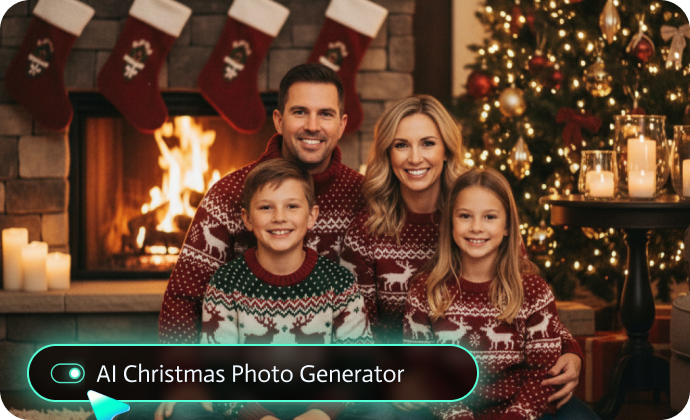
Generate Christmas Photos with Filmora's AI Image Generator
Filmora's built-in AI image generator powered by Nano Banana Pro and Nano Banana models solves the exact problems our ChatGPT Christmas photo prompts address - with enhanced capabilities:
- Superior Face Preservation: ChatGPT sometimes alters facial features beyond recognition, while Nano Banana's advanced facial recognition keeps features accurate while adding Christmas elements.
- Extended Prompt Support: The 1500-word prompt capacity lets you describe every Christmas detail. Perfect for our detailed ChatGPT Christmas family portrait prompts.
- Seamless Editing Integration: Generate AI Christmas photos and immediately enhance with Filmora's editing tools, you can add falling snow overlays, fairy light animations, and festive text.
Bring Christmas Photos to Life with AI Image to Video
Bring Christmas Photos to Life with AI Image to Video
Here's where the magic really happens: Why settle for static Christmas photos when you can create enchanting video memories? Filmora's AI Image to Video generator (powered by Google Veo3.1) transforms your ChatGPT AI Christmas photos into dynamic stories that capture the spirit of the season.
- AI Christmas Toasting: Glasses softly clink together as family and friends raise a festive holiday cheer.
- AI Christmas Dance: Natural body movement brings joyful holiday dancing to life, perfect for lively Christmas reels.
- AI Christmas Pet Animations: Add playful tail wags, head tilts, and blinking eyes to festive pet portraits.
- AI Santa Hug: Capture a heartwarming moment as Santa gently hugs loved ones, full of warmth and holiday magic.
- Christmas Playlist Covers: Create animated covers for holiday music playlists.
These subtle AI animations turn static Christmas photos into living holiday moments — perfect for sharing warmth, joy, and festive spirit on social media.
Enhance & Perfect Christmas Visuals with Filmora's Editing Suite
Enhance & Perfect Christmas Visuals with Filmora's Editing Suite
Once you've generated stunning AI Christmas photos and videos, Filmora's comprehensive editing tools help you create professional-quality holiday content that stands out.
- Rich Christmas Assets Library: Access hundreds of festive resources specifically designed for holiday content.
- AI-Powered Christmas Photo Enhancer: Transform AI-generated Christmas photos from 1K to 4K with One-click resolution upscaling.
- Festive Text & Typography Tools: Add trending Christmas captions, and messages with animated text presets, holiday font libraries, and customizable Christmas quotes.
- Christmas Video Templates: Explore fully customizable Christmas video templates for instant video making, such as family gathering highlight reels, Christmas morning gift opening montages, and more.
FAQs About ChatGPT Xmas Photo Prompts
How to Use ChatGPT AI Christmas Photo Prompts in Filmora?
Got a ChatGPT Christmas photo prompt ready? Bring it to life in Filmora. Paste your prompt into the AI Image tool, choose the advanced Nano Banana Pro or Nano Banana model, and create festive Christmas photos in seconds—no design skills required. Follow these steps to make AI Christmas photos with ease.
Step 1 Activate AI Image Generator

Step 2 Generate Images From Text or Reference Pictures

Step 3 Download and Export Your AI-Generated Images

-
1:Activate AI Image Generator
Launch the latest version of Filmora, create a project, and click "Stock Media", choose "AI Image" from the Media panel. -
2:Generate Images From Text or Reference Pictures
Select the Nano Banana pro or Nano Banana model, then type in your ChatGPT AI prompts for Christmas photos, then click on the "Generate" to start making Christmas photoshoots. You can also upload a reference picture, add a ChatGPT AI christmas photo editing prompt, and finally tap on Generate to edit the photo. -
3:Download and Export Your AI-Generated Images
After generating the photo, you can preview the image, tap on the download button, and drag it to the timeline, edit it if required, take a snapshot, or export to save the picture.
More Than Just a Christmas Photo Generator
Filmora goes far beyond basic ChatGPT AI Christmas prompts to photo generator. With one all-in-one tool, you can create multiple photo styles using AI prompts, turn text or images into AI-powered videos, and refine everything with professional-grade editing features. From generation to final polish, Filmora lets you seamlessly create, animate, and perfect Christmas pet photos and videos—without switching between tools.