Free Copy-Paste Gemini Sad Photo Prompts
Your Emotional Palette
In an era where viral trends like soul companion imagery are reshaping how we process grief, anxiety, and emotional pain on social media, these copy-paste-ready prompts work seamlessly with Gemini's Nano Banana AI model to generate cinema-quality emotional portraits in seconds. Whether you're a mental health advocate, a content creator exploring melancholic aesthetics, or someone seeking visual catharsis for unspoken feelings, these Gemini sad photo prompts transform invisible pain into visible, shareable, healing art.
Loading more templates...
 Category:
 Duration:
 Aspect Ratio:
Create Soul-Stirring Emotional AI Photos
With Gemini AI Sad Prompts
Can't get enough of those soul-stirring, lifelike visuals that capture quiet sadness paired with warm solace—perfect for the trending "soul-comfort companion" vibe? Our handpicked Gemini Sad prompt collection unlocks the secret to crafting these emotionally resonant images, packed with professional soft lighting, tender, wistful expressions, and cozy, intimate backdrops that feel like a gentle embrace.
Ready to bring your most tender, emotion-driven visions to life? Dive into our curated Gemini Sad prompts and create jaw-dropping, soul-soothing imagery with Filmora's Nano Banana AI image generator!
Turn Emotional Prompts Into Stunning Photos With Filmora's AI Image Generator
Turn Emotional Prompts Into Stunning Photos With Filmora's AI Image Generator
Copy-paste your prompts in Filmora's AI image generator, which transforms our emotional prompts into photorealistic imagery that captures what words cannot express.
- Deep Prompt Support: Paste any of our 20+ detailed sad photo prompts—supports up to 1,500-word descriptions for maximum emotional nuance
- Reference Photo Magic: Upload your own image and apply transformative sadness overlays using prompt instructions.
- Unlimited Iterations: Not satisfied? Modify specific details (add tears, darken shadows, intensify rain) and regenerate instantly.
- Instant Generation: Watch your emotional vision materialize in 10-30 seconds with real-time progress tracking.
From Still Sadness to Moving Stories
From Still Sadness to Moving Stories
Static sad photos capture a moment of pain. Animated emotional videos capture the experience of enduring it—and that's why they dominate TikTok and Instagram.
Filmora's AI Image to Video transforms your emotional AI photos into moving stories that have sparked millions of tears, shares, and healing conversations.
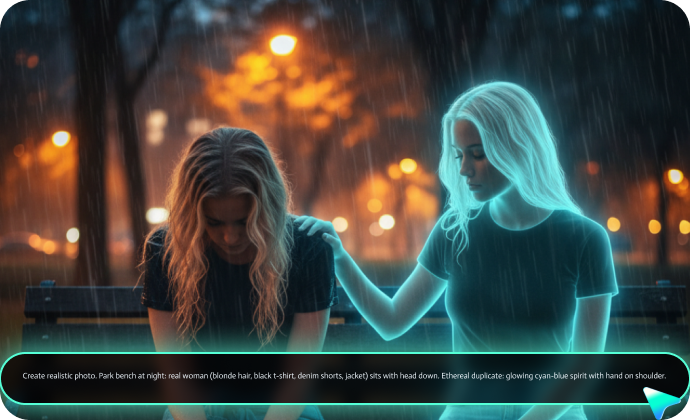
For example, you can animate the glowing ghost's hand gently moving to your shoulder → Cyan energy ripples flow → Symbolizes self-compassion awakening.
Complete Your Emotional Narrative With Professional Editing Tools
Complete Your Emotional Narrative With Professional Editing Tools
Raw emotion is powerful. Refined emotion changes lives. After generating and animating your sad AI photos, Filmora's comprehensive editing suite helps you craft complete emotional narratives that educate, advocate, and heal.
- Mood-Matched Audio – Generate royalty-free music according to the prompts with AI Music Generator or access to the huge music library filtered by emotion: "Melancholic Piano," "Ambient Rain," "Hopeful Strings".
- Emotional Color Grading: Enhance psychological temperature—cool blues for isolation, warm ambers for nostalgia, desaturated grey for numbness.
- Typography That Speaks: Overlay powerful quotes, poetry, or mental health statistics with 200+ customizable text templates.
- Voiceover Integration: Record personal testimonies of struggle and survival over your AI visuals—vulnerability creates connection.
FAQs About Gemini Sad Photo Prompts
How to Use Gemini AI Sad Photo Prompts in Filmora?
Generate and edit professional sad photos with Gemini AI prompts in Filmora with ease.
Step 1 Activate AI Image Generator

Step 2 Generate Images From Text or Reference Pictures

Step 3 Download and Export Your AI-Generated Images

-
1:Activate AI Image Generator
Launch the latest version of Filmora, create a project, and click "Stock Media", choose "AI Image" from the Media panel. -
2:Generate Images From Text or Reference Pictures
Select the Nano Banana model, then type in your AI Gemini prompts for sad photos, then click on the "Generate" to start making sad pictures. You can also upload a reference picture for face consistency, and finally tap on Generate to edit the photo. -
3:Download and Export Your AI-Generated Images
After generating the photo, you can preview the image, tap on the download button, and drag it to the timeline, edit it if required, take a snapshot, or export to save the picture.
More Than Just a Sad Photo Generator
Filmora goes beyond simple AI sad prompts to a photo generator. You can also generate other style photos from Gemini AI prompts, create AI videos from prompts or pictures, and edit them with the most powerful editing features in the same tool.