20+ Nano Banana Pro Infographic Prompts:
From Idea to Infographic in One Prompt
Stop spending hours tweaking prompts. With these Nano Banana Pro AI infographic prompts, you can go from idea to infographic in seconds — optimized for clarity, visual balance, and real-world publishing.
Our comprehensive collection also covers every major use case for Gemini AI infographics. From business analytics to health & wellness, each category features prompts specifically engineered for Nano Banana Pro's superior text rendering and spatial reasoning capabilities.
Simply browser all Gemini AI infographics prompts, tap on the image, copy-and-paste to Nano Banana Pro, and you will get quality results soon.
Loading more templates...
 Category:
 Duration:
 Aspect Ratio:
Create Clear Visuals with Gemini AI Infographic Maker:
Generate, Animate & Edit in Filmora
You've got powerful Gemini Nano Banana Pro infographic prompts — Now it's time to actually turn them into real visuals and videos. With Filmora, you can generate AI infographics, transform static images into dynamic videos, and polish everything with professional editing tools — all in one place. No switching apps. No complicated workflows.
Create AI Infographics from Gemini Nano Banana Pro Prompts

Create AI Infographics from Gemini Nano Banana Pro Prompts
Filmora's AI image generator feature, powered by Nano Banana Pro, lets you turn your Gemini Nano Banana Pro infographic prompts into clean, structured visuals instantly. Simply paste your prompt, choose a style, and let the AI handle layout, icons, typography, and color balance — perfect for data charts, timelines, comparisons, and process diagrams.
- Dual Model Support: Switch between Nano Banana Pro and Nano Banana to compare quality with the same prompt.
- Direct Project Integration: Generated infographics automatically appear in your media library — drag and drop for further editing.
- Prompt History: View the prompt history for the past 30 days.
- Batch Generation: Create multiple infographic variations simultaneously for A/B testing according to your prompts.
Turn Static Infographics into Engaging Videos with AI Image to Video

Turn Static Infographics into Engaging Videos with AI Image to Video
With Filmora's AI Image to Video feature, you can effortlessly bring static AI infographics to life by adding smooth, data-driven animations. For example, highlight rising trends in charts, emphasize key numbers, or guide viewers through step-by-step information with natural motion.
In addition, the Filmora mobile app also supports Gemini Nano Banana Pro–powered infographic creation, making it easy to turn ideas and data into clear, animated visuals anytime, anywhere.
- Pre-Built Infographic Templates – Choose from professionally designed layouts optimized for Gemini Nano Banana Pro prompts, including fashion blogs, comics, gaming character configurations, collages, and more.
- Zero Prompt Writing – Paste a ready-made Gemini infographic prompt or select a template → generate clean visuals instantly.
- Prompt Customization Supported – Advanced users can refine layouts, styles, and data structure with custom Gemini Nano Banana Pro prompts.
- Image-to-Video Infographic Animation – Instantly convert static AI infographics into dynamic videos with smooth motion and data-driven transitions.
- Built-In Icons, Text & Motion Effects – Enhance clarity with animated titles, data highlights, icons, and subtle sound cues for better engagement.
Polish & Visualize Data with Filmora's Animated Charts
Polish & Visualize Data with Filmora's Animated Charts
Beyond AI-generated infographics, Filmora offers another powerful way to visualize data clearly and professionally — Animated Charts. If you already have numbers, statistics, or structured data, you can turn them into dynamic visuals without relying solely on AI prompts. Filmora's Animated Charts let you create clean, easy-to-read data visuals such as bar chart races, line graphs, pie charts, and more — perfect for explaining trends, growth, or key metrics. Ideal for marketing reports, educational videos, and social content, smooth animations that guide viewer attention to key data points, and great alternative or complement to AI infographic images.
FAQs for Nano Banana Pro Infographic Prompts
How to Use Gemini Nano Banana Pro
AI Infographic Prompts in Filmora?
Filmora now fully supports Nano Banana Pro for AI infographic creation, making it easy to generate clear, professional data visuals directly inside the editor. Let's see the steps.
Step 1 Activate AI Image Generator

Step 2 Generate Images From Text

Step 3 Download and Export Your AI-Generated Images

-
1:Activate AI Image Generator
Launch the latest version of Filmora, create a project, and click "Stock Media", choose "AI Image" from the Media panel. -
2:Generate Images From Text
Select the Nano Banana Pro model, then type in your Nano Banana Pro AI infographic prompts , then click on the "Generate" to start making AI infographics. -
3:Download and Export Your AI-Generated Images
After generating the photo, you can preview the image, tap on the download button, and drag it to the timeline, edit it if required, take a snapshot, or export to save the picture.
Step 1 Open the Filmora App on iOS or Android
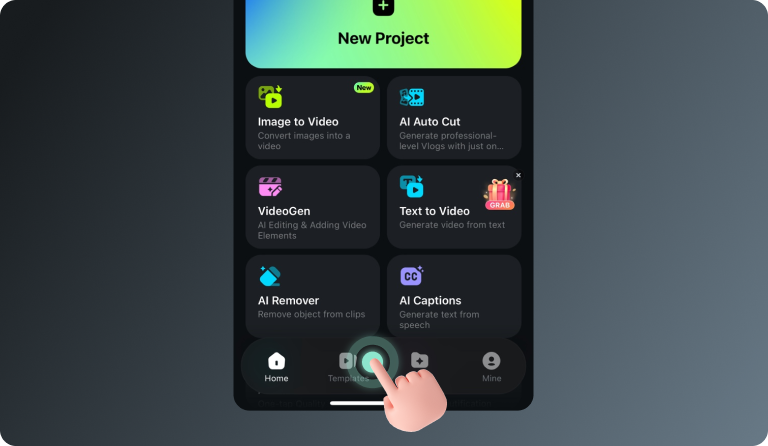
Step 2 Tap Templates and Find the Nano Banana Pro Collection
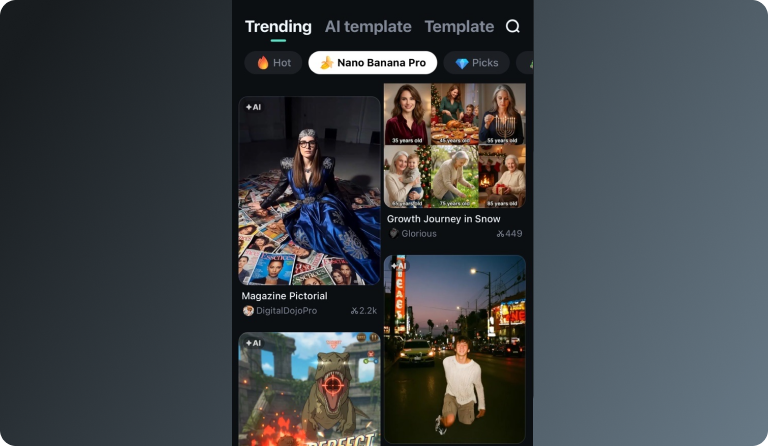
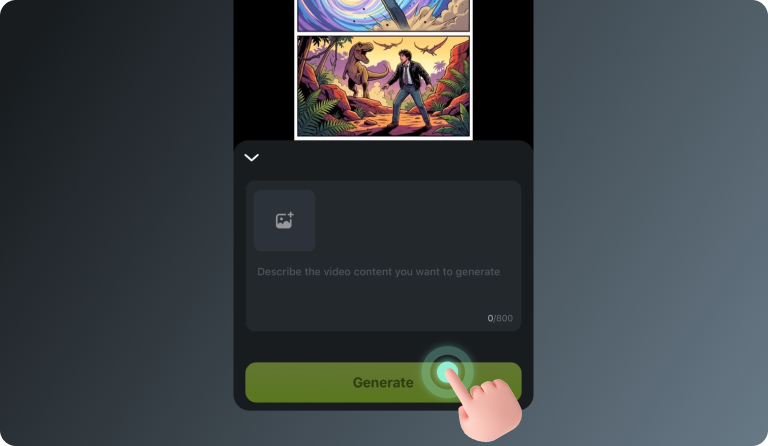
Step 3 Choose a Template and Create Your Video
-
Step 1: Open the Filmora App on iOS or Android
Launch Filmora on your mobile device. Make sure you're using the latest version to access the newest templates and AI features. -
Step 2: Tap Templates and Find the Nano Banana Pro Collection
Go to the Templates tab and scroll to the Nano Banana Pro category. Here you'll find a variety of trending styles designed specifically for the Nano Banana Pro videos. -
Step 3: Choose a Template and Create Your Video
Select a template you like and tap Use. Enter your prompt or upload a reference image, then let Filmora generate your Nano Banana Pro–style video automatically.
More Than Just an AI Infographic Maker
Filmora is not just an infographic maker from Nano Banana Pro AI prompts. You can also generate other style photos, create AI videos from prompts or pictures, and edit them with the most powerful editing features in the same tool.