30+ Powerful Camera Angle Changed Image Examples
Rotate or tilt your image and generate new viewing angles, all while preserving fine details.
Loading more templates...
 Category:
 Duration:
 Aspect Ratio:
Transform Your Photos With Perfect
Camera Angle Adjustments Using AI
In today's visual-driven world, the perfect camera angle makes all the difference—instantly transforming ordinary photos into compelling visual stories by adjusting perspective, highlighting compositional elements, and creating dynamic visual narratives. When you leverage AI to change image perspectives, you don't just edit photos—you reimagine possibilities and breathe new life into existing images.
Ready to master camera angle adjustments with AI technology? Meet Filmora. Its powerful AI image generator (powered by the innovative Nano Banana Pro model) can instantly change any photo's perspective and camera angle through simple text prompts—no complex photoshop skills or expensive equipment required.
From Flat Photos to Dynamic Perspectives: Transform Image Angles With Simple AI Prompts

From Flat Photos to Dynamic Perspectives: Transform Image Angles With Simple AI Prompts
Experience the revolutionary power of Nano Banana Pro integrated seamlessly within Filmora's intuitive interface! Simply describe your desired camera angle change with natural language prompts, paste them into Filmora's AI Image Generator, and watch as your photo transforms—shifting perspectives, adjusting viewing angles, and creating entirely new compositions from your original image.
- Professional Perspective Correction - Transform distorted angles, fix converging lines, and adjust image planes with photorealistic precision.
- 360° Viewpoint Freedom - The AI understands spatial relationships, allowing you to rotate around subjects, view from above, below, or any angle in between.
- Depth Enhancement - Add dramatic perspective changes that create immersive depth and dimension where flat images once existed.
- Subject Preservation - Maintain perfect detail integrity of your main subjects while completely transforming the viewing angle and perspective around them.
Beyond Basic Angle Changes: Filmora's Complete Perspective Transformation Suite

Beyond Basic Angle Changes: Filmora's Complete Perspective Transformation Suite
Your image perspective journey doesn't end with basic angle adjustments—it's just the beginning. Filmora offers comprehensive tools specifically designed for professional camera angle manipulation:
- AI Perspective Harmonization: Automatically balances lighting across newly adjusted angles, eliminates perspective distortion, and ensures natural proportions while maintaining visual integrity using Filmora's AI color palette.
- Professional Angle Enhancement Controls: Fine-tune your perspective changes with precision sliders for horizontal/vertical angle adjustments, adjust vanishing points, implement correct lens distortion compensation, and add subtle depth vignetting for enhanced dimensional realism.
Dynamic Perspective Shifts: Add Cinematic Camera Movement to Static Images
Dynamic Perspective Shifts: Add Cinematic Camera Movement to Static Images
The most compelling images tell stories through thoughtful composition and perspective—but what if your photos could actually move through different camera angles? What if your static image could simulate a cinematic dolly, pan, or crane shot? Filmora's AI Image to Video technology transforms perspective-corrected photos into dynamic camera movements that create professional cinematography from a single still image.
- 🎬 Cinematic Camera Techniques - Transform static shots into smooth perspective shifts that receive 4.2x higher engagement on social platforms by simulating professional camera movements.
- 🔍 Dimensional Storytelling - Create revealing angle transitions that gradually disclose new elements and details within your composition for more impactful visual narratives.
- ⚡ Multi-Angle Content Creation - Generate an entire sequence of different viewing perspectives from a single photo, eliminating the need for multiple camera setups or reshoot sessions.
- 🏆 Professional Photography Enhancement - Add subtle camera movements that bring architectural, product, and landscape photography to life with dynamic perspective changes and focal shifts.
FAQs on AI Camera Angle & Perspective Changer
How to Use AI to Change Camera Angle in Filmora?
Transform your photos with advanced AI camera angle technology in Filmora - easily adjust perspective and create professional-looking images with a few clicks.
Step 1 Access Filmora

Step 2 Change Image Perspective Using AI Image

Step 3 Save and Edit Your Perspective-Changed Images

-
Step 1: Activate AI Image Generator
Open the latest version of Filmora, start your project, and click "Stock Media", then select "AI Image" from the Stock Media panel. -
Step 2: Change Image Perspective Using AI Image
Choose the Nano Banana model and enter your camera angle adjustment prompts, then click "Generate" to transform your image perspective. You can upload a reference image to maintain subject integrity, and click Generate to create your custom perspective modification. -
Step 3: Save and Edit Your Perspective-Changed Images
After generating your new perspective image, preview the result, download it, and add it to your timeline. Further refine your perspective-altered photo with Filmora's professional editing tools before exporting to share your transformed images.
Step 1 Open the Filmora App on iOS or Android
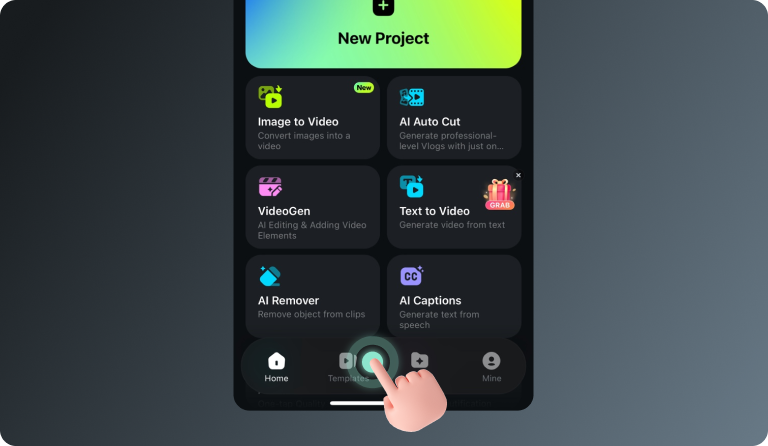
Step 2 Tap Templates and Find the Nano Banana Pro Collection
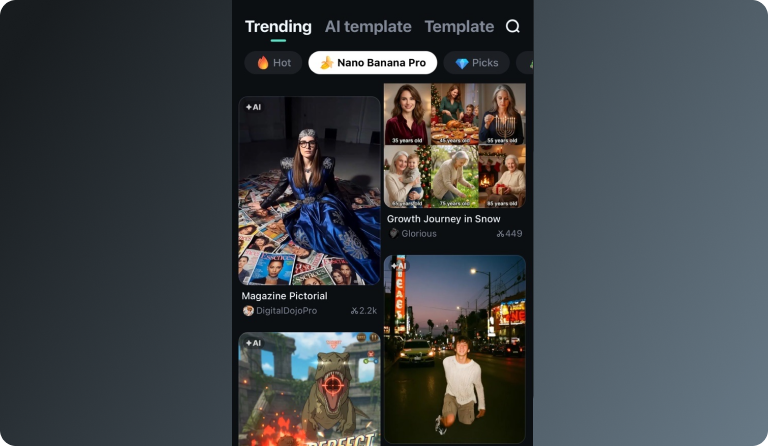
Step 3 Choose a Template and Create Your Video
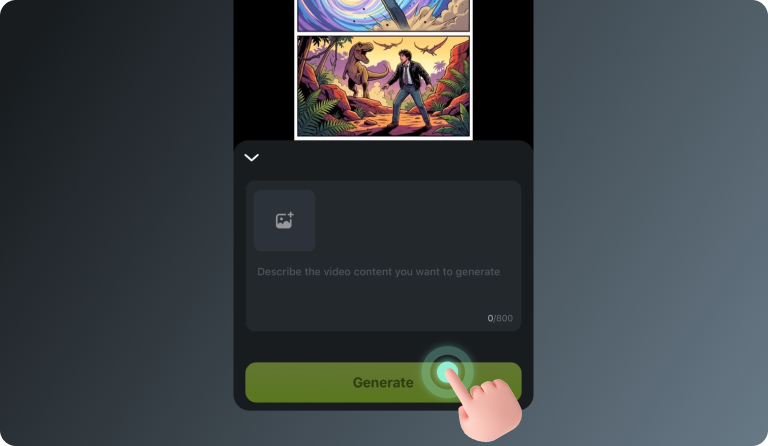
-
Step 1: Open the Filmora App on iOS or Android
Launch Filmora on your mobile device. Make sure you’re using the latest version to access the newest templates and AI features. -
Step 2: Tap Templates and Find the Nano Banana Pro Collection
Go to the Templates tab and scroll to the Nano Banana Pro category. Here you’ll find a variety of trending styles designed specifically for the Nano Banana Pro gameplay videos. -
Step 3: Choose a Template and Create Your Video
Select a template you like and tap Use. Enter your prompt or upload a reference image, then let Filmora generate your Nano Banana Pro–style video automatically.
Discover More Than Just
Basic Perspective Changes
Our AI camera angle technology goes beyond simple perspective adjustments. Create stunning visual transformations with realistic depth and dimension, turning flat photos into dynamic compositions. Convert ordinary images into AI-enhanced perspective masterpieces with professional photo editor capabilities for maximum visual impact.