30+ Advanced Game UI AI Examples
Discover our premium collection of AI-powered game interface designs created with cutting-edge Game UI AI technology. From intuitive HUD layouts to dynamic menu systems, explore how our Game UI AI Templates can transform ordinary gaming interfaces into visually stunning, user-friendly experiences that enhance player engagement and elevate your game development projects to professional standards.
Loading more templates...
 Category:
 Duration:
 Aspect Ratio:
Design Professional Game UI
With AI-Powered Game Interface Tools
In the competitive world of game development, stunning UI design separates mainstream titles from indie gems—capturing player attention, enhancing gameplay experience, and creating intuitive interfaces that keep gamers immersed. When you leverage AI for game UI design, you don't just build interfaces—you craft immersive visual experiences that elevate your entire game.
Ready to generate professional game UI designs with advanced AI technology? Meet Filmora. Its AI image generator (now powered by the revolutionary Nano Banana Pro model) transforms your game interface concepts into AAA-quality UI elements that look professionally designed—all without expensive design teams or complex software skills.
From AI Game UI Prompt to Professional Interface: Create Market-Ready Game Assets in Minutes

From AI Game UI Prompt to Professional Interface: Create Market-Ready Game Assets in Minutes
Experience the revolution of AI game design combined with Filmora's intuitive interface! Simply input your game UI requirements, paste them into Filmora's AI Image Generator powered by Nano Banana Pro, and watch as your perfect game interface materializes in minutes—complete with balanced visual hierarchy, intuitive navigation elements, and genre-appropriate aesthetic appeal.
- Hyper-Realistic Game Elements - From button textures to health bars, every UI component appears professionally designed with perfect integration into your game world.
- Perfect Style Matching - The AI understands fantasy RPG aesthetics, sci-fi minimalism, retro pixel art, and modern flat design patterns for consistent game interfaces.
- Genre-Specific Accuracy - Generate immersive MMO interfaces, competitive FPS HUDs, intuitive mobile game menus, or artistic indie game UIs that match your game's unique style.
- Brand Consistency - Upload your game assets and maintain complete visual identity while enhancing your UI components and overall quality.
Beyond Generation: Filmora's Complete Game UI Enhancement Suite

Beyond Generation: Filmora's Complete Game UI Enhancement Suite
Your game UI design journey doesn't end with AI generation—it's just the beginning. Filmora offers powerful tools specifically designed to elevate your gaming interfaces:
- AI Game UI Enhancement: Automatically optimizes visual hierarchy, improves readability, and enhances interactive elements while preserving your game's aesthetic with Filmora's AI color palette, powered by Nano Banana Pro technology.
- Premium Game Interface Styling with Professional Control: Transform existing UI elements with industry-standard effects, adjust color schemes, apply trending game aesthetics, control opacity/transparency balance, and add atmospheric effects for that professional gaming experience.
From Static to Dynamic: Transform Your Game UI into Interactive Experiences
From Static to Dynamic: Transform Your Game UI into Interactive Experiences
The most engaging game interfaces provide seamless player interaction and visual feedback—but what if your UI elements could come alive with subtle animations and transitions? What if menu screens could show atmospheric particle effects or character portraits could exhibit lifelike movements? Filmora's AI Image to Video, enhanced with Nano Banana Pro, transforms your static game UI designs into dynamic interactive elements that elevate the entire player experience.
- 🎮 Player Engagement Maximization - Animated game interfaces increase player session length by up to 27% compared to static UIs, helping your game maintain player attention and reduce bounce rates.
- 🏆 Professional Polish - Animated UI transitions add AAA-quality polish to indie games, mobile applications, or early access titles, helping smaller studios compete with larger productions.
- ⚡ UI Development Acceleration - Transform a single UI mockup into a fully animated interface with natural transitions and feedback animations—perfect for rapid prototyping or iterative design.
- 🎨 Creative UI Expression - Create game interface animations that flow seamlessly between menus, inventory screens, or combat HUDs with smooth transitions and professional motion effects.
FAQs on Game UI AI Generator
How to Implement Advanced
Game UI AI Elements in Your Design?
Create responsive gaming interfaces with AI-driven UI components - optimize your game's user experience with intelligent design systems.
Step 1 Activate AI Image Generator

Step 2 Generate Impressive Game Interface Elements

Step 3 Export and Implement Your AI-Generated Game UI

-
Step 1: Activate AI Image Generator
Launch the latest version of the design platform, create a new project, and click "UI Elements", then select "Game UI AI" from the Components panel. -
Step 2: Generate Dynamic Game Interface
Select the preferred game genre template, then input your custom game UI AI parameters, then click on the "Generate" to create responsive gaming interfaces. You can also upload reference designs for stylistic consistency, and finally click Generate to create your personalized adaptive game UI elements. -
Step 3: Export and Implement Your AI-Generated Game UI
After generating your game interface components, preview the elements, tap on the download button, and incorporate them into your design timeline. You can further enhance your game UI with advanced customization tools, test user interactions, or export to implement directly in your game development platform.
Step 1 Open the Filmora App on iOS or Android
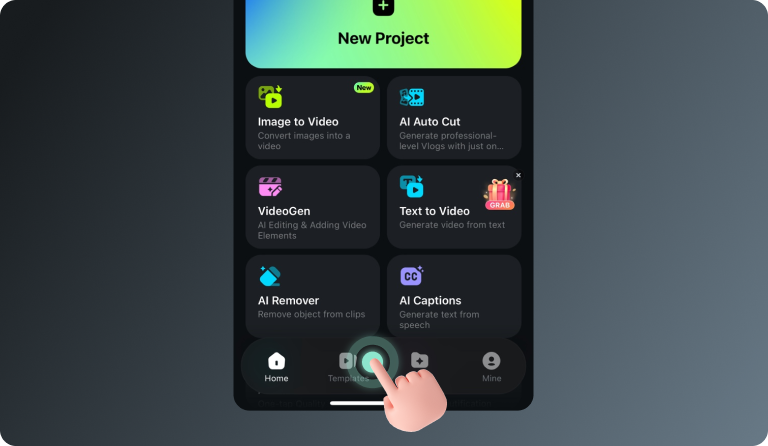
Step 2 Tap Templates and Find the Nano Banana Pro Collection
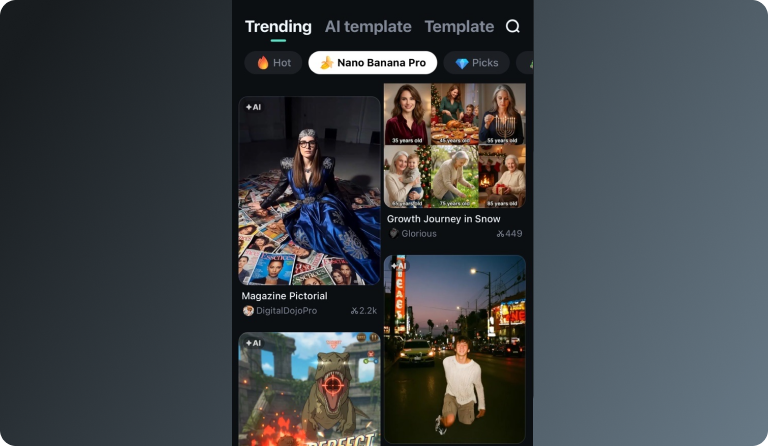
Step 3 Choose a Template and Create Your Video
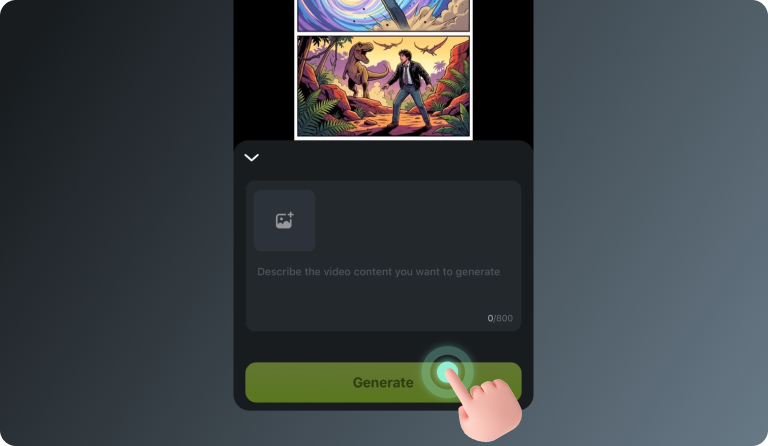
-
Step 1: Open the Filmora App on iOS or Android
Launch Filmora on your mobile device. Make sure you’re using the latest version to access the newest templates and AI features. -
Step 2: Tap Templates and Find the Nano Banana Pro Collection
Go to the Templates tab and scroll to the Nano Banana Pro category. Here you’ll find a variety of trending styles designed specifically for the Nano Banana Pro gameplay videos. -
Step 3: Choose a Template and Create Your Video
Select a template you like and tap Use. Enter your prompt or upload a reference image, then let Filmora generate your Nano Banana Pro–style video automatically.
Discover More Than Just Game UI Images
Our AI Game UI technology goes beyond generating basic interface elements. Create immersive gaming experiences with intelligent HUD designs, adaptive menus, and responsive control systems, transforming ordinary games into engaging interactive masterpieces. Turn conventional interfaces into AI-powered game UI solutions optimized for player engagement and retention.